10 min read
HIPAA 2-Way Texting for Dolphin Ortho — Skip the Weave Bundle
Mira Gwehn Revilla
:
April 17, 2026
- Works with Dolphin Desktop, Cloud, and Blue
- Over 75% average confirmation rate, based on our internal data
- No app download needed for patients
- Setup takes days, not weeks
- Staff training in under 10 minutes
Your Dolphin system runs your imaging, treatment cards, and billing just fine. But when a parent needs to confirm a Tuesday adjustment, your team picks up the phone — and often gets voicemail.
Dolphin Management and Blue Enterprise do offer basic one-way SMS. The problem? Patients can't text you back. That one-way gap means your front desk plays phone tag all day. So your Patterson rep points you to Weave.
Weave bundles two-way texting inside a full platform. It replaces your phone system, adds payment tools, runs analytics, and charges $300–$500+ per month. For many ortho offices, most of that platform goes unused.
Curogram takes a different path. It gives Dolphin practices two-way texting that is HIPAA compliant — without the bundle, without the phone swap, and without the bloated price tag. Patients text your office number. Staff reply from one clean dashboard. Messages are logged, encrypted, and audit-ready.
Based on our internal data, Curogram clients average over 75% in appointment confirmation rates. Compare that to the 40–50% you get with one-way reminders alone. That gap can mean 12–15 more confirmed visits per day for a busy ortho office.
This article breaks down why bundled tools often miss the mark for lean ortho practices. It shows how a focused text channel works alongside Dolphin. And it walks you through the real numbers behind two-way texting for orthodontic patient communication.
If your practice runs Dolphin and you've been told Weave is the only path to two-way texting, keep reading. There's a simpler, cheaper, and faster option — and it doesn't ask you to change a thing about the way your office already works.
The Villain: The Bundle You Didn't Ask For
Dolphin is the gold standard in orthodontic practice management. Over 10,000 practices use it. About 97% of U.S. ortho residency programs train on it. When your Patterson Dental rep suggests an engagement add-on, the pitch almost always leads to Weave.
Weave earned its spot as Patterson's endorsed partner. The platform launched its Dolphin tie-in in early 2023 and deepened the link in mid-2024. It offers VoIP phones, two-way texting, online scheduling, digital forms, payment tools, review requests, analytics, and team chat. On paper, it sounds like the total package.
But here's the catch: your practice may not need most of what Weave sells.
What You're Actually Paying For
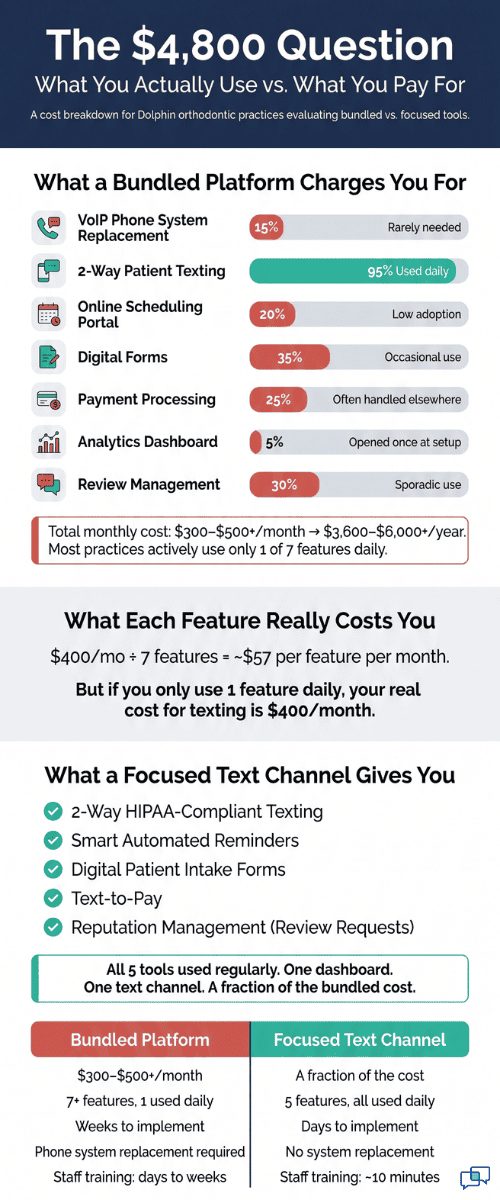
Weave's $300–$500+ per month pricing reflects a tool that does a lot. It replaces your phone system. It manages your online booking. It processes payments with ledger write-backs. It runs dashboards with charts and data views.
For a solo orthodontist with 3–8 staff who just needs patients to confirm adjustments via text, about 80% of that platform sits idle. The analytics dashboard? Your treatment coordinator opens it once during onboarding. Then it collects dust.
Let's put this in dollar terms. Say you pay $400 per month for Weave. That's $4,800 per year. If your team mainly uses the texting feature and the rest goes untouched, you're spending thousands on tools that add no value to your daily workflow.
The Hidden Cost of Complexity
Replacing a phone system is not a quick task. It means porting your numbers to VoIP. It means training every staff member on new hardware. It means setting up call routing, hold music, and after-hours rules.
For an ortho office that fields 80+ calls a day, the switch creates weeks of disruption. Every hour your staff spends learning a new phone system is an hour not spent talking to patients. That's the real cost — and it doesn't show up on the invoice.
Weave's setup timeline is often measured in weeks, not days. During that time, your front desk juggles two systems. Calls drop. Staff get frustrated. Patients notice.
How Practices Feel After the Switch
Here's a story that plays out often. A practice signs up for Weave because Patterson endorsed it. Six months later, the team pays $400 per month. Staff barely touches the analytics. The phone migration still isn't done. And the office manager says the same thing:
"We just wanted patients to text us back when we send a reminder."
That's the core issue. Most Dolphin practices don't need a full engagement suite. They need orthodontic two-way texting for patient communication that is HIPAA compliant — without Weave and without a bundle. They need direct SMS that works with their current setup.

What This Means for Your Budget
Here's a quick look at the cost picture:
|
Feature |
Weave |
What Most Ortho Offices Actually Use |
|
VoIP Phone System |
Included |
Not needed — current phones work fine |
|
2-Way Texting |
Included |
This is the must-have |
|
Analytics Dashboard |
Included |
Rarely opened after onboarding |
|
Payment Processing |
Included |
Often handled by Dolphin or existing tools |
|
Monthly Cost |
$300–$500+ |
Paying for 4 tools to use 1 |
The takeaway is simple. If your practice only needs the text channel, paying for the full bundle is like buying a car when you only need a bike. You don't need to replace your phone system to let patients text you back.
The Guide: The Unbundled Text Channel
Curogram solves the bundling problem with a focused approach. It delivers two-way texting for Dolphin orthodontic patients that is HIPAA compliant — no bundle, no phone swap, and no features you'll never open.
The concept is simple: patients text your office number, staff reply from one dashboard, and every message is logged and secure.
Direct Practice SMS: One Channel, One Dashboard
Curogram gives every Dolphin practice a dedicated text channel. Patients send messages to the practice phone number using their regular texting app. Staff respond in real time from one clean screen.
There's no app for patients to download. No portal to create an account for. No extra login to remember.
For ortho practices where parents manage their child's care, this matters a lot. A working parent can reply to a text between meetings. They can't always stop what they're doing to log into a patient portal.
Every conversation sits in one place. Your treatment coordinator can see all threads — scheduling questions, insurance inquiries, adjustment reminders, and retainer follow-ups. Nothing gets lost in a pile of voicemails or missed calls.
Works With Every Version of Dolphin
One worry practices have is whether a new tool will work with their setup. Curogram works with Dolphin Desktop, Cloud, and Blue. Whether your office runs on-site servers or cloud-based systems, the text channel runs on its own. It doesn't depend on your practice management software's structure.
That means setup takes days, not weeks. There's no hardware to install. No servers to configure. Your Dolphin system keeps doing what it does — imaging, treatment cards, financials. Curogram handles the conversation layer.
Built for the Orthodontic Treatment Arc
Orthodontic care isn't like a single doctor visit. A patient's journey spans 18–30 months and includes 15–25 touchpoints. Parents text about braces adjustments. Treatment coordinators confirm new patient starts. Financial coordinators answer payment questions.
All of these conversations happen in one text channel. That's the power of Dolphin HIPAA two-way texting for orthodontic patients with no bundle and direct SMS through a platform like Curogram.
|
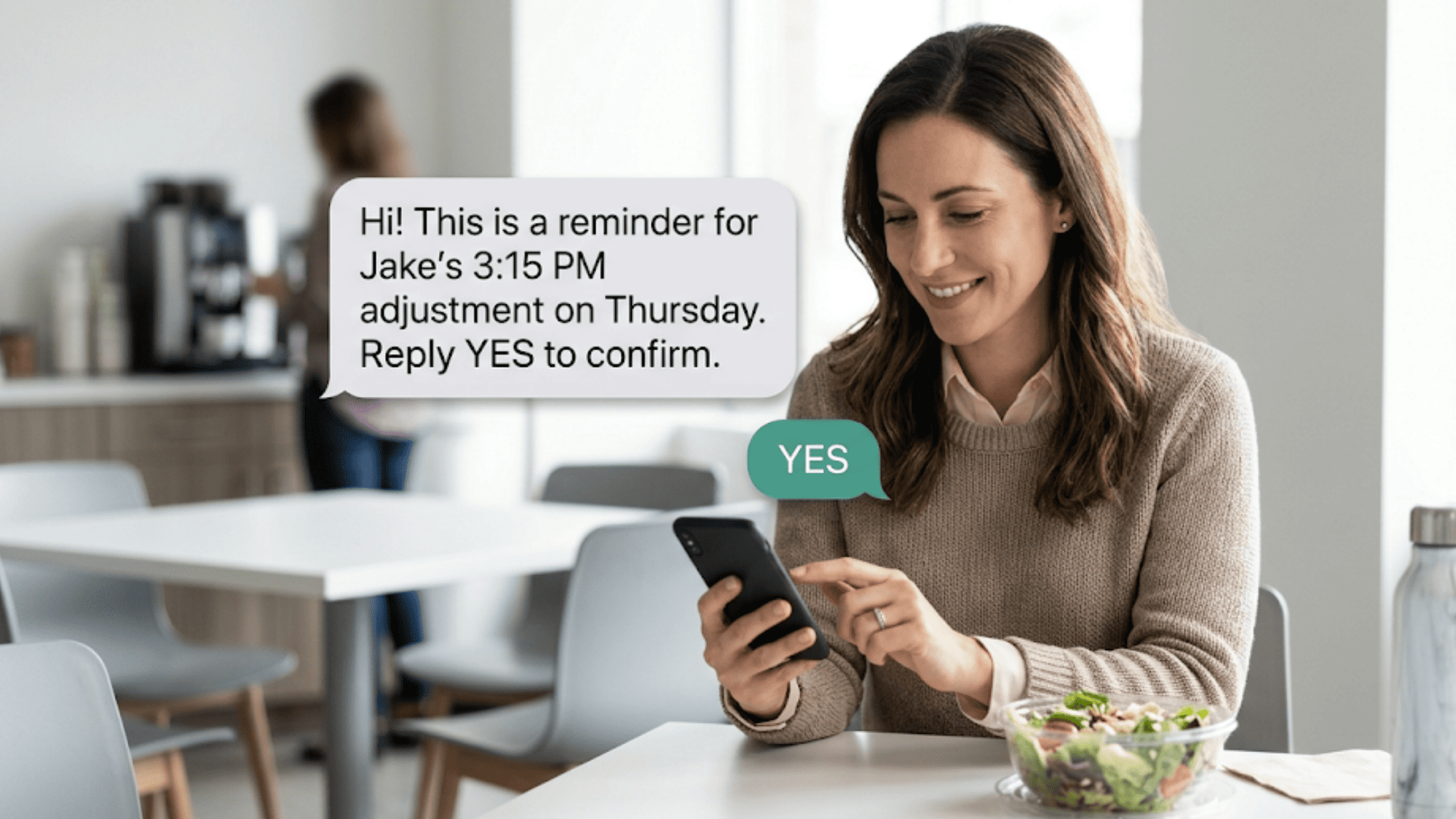
Consider this example: A 14-year-old patient has a wire adjustment scheduled for Thursday at 3 PM. On Tuesday, the office sends an automated reminder via text. The patient's mom replies "Yes" right from her phone. Done. |
Now picture that same flow for 50 patients a day. At 75%+ confirmation rates (based on our internal research), that's roughly 38 confirmed visits before your staff even picks up the phone. Compare that to the 40–50% rate you'd see with one-way reminders. The gap is clear.
What You Keep and What You Skip
Here's what doesn't change when you add Curogram:
- Your phone system stays the same
- Your Dolphin software stays the same
- Your call routing stays the same
- Your team's daily workflow stays the same
Here's what does change:
- Patients can text you back
- Staff see every conversation in one place
- Confirmations happen faster
- Your front desk spends less time on the phone
Based on our internal data, practices using Curogram reduce phone call volume by up to 50%. That frees your front desk to focus on the patients who are standing right in front of them.
Staff training takes about 10 minutes. The interface is built to feel like the texting apps your team already uses every day. There's no steep learning curve and no weeks-long rollout.
The Success: Real Conversations, Not Bundled Features
The shift from bundled platforms to focused texting isn't just about saving money. It's about getting better results from the one tool that matters most: two-way patient texting through Dolphin that is HIPAA compliant, with no Weave, delivered via SMS for practice-level communication.
The Numbers That Matter
Based on our internal data, Curogram clients average over 75% in appointment confirmation rates using two-way text. Practices that rely on one-way reminders alone typically see 40–50%. That 25–35 point gap shows up in your schedule every single day.
Let's break that down for an ortho practice. Say you schedule 50 adjustments per day. With one-way reminders at a 45% confirmation rate, about 23 patients confirm. With Curogram's two-way texting at 75%, that number jumps to 38. That's 15 more confirmed visits every day.
Now look at what each visit is worth. An orthodontic adjustment runs between $150 and $400, depending on the procedure and location.
At the low end, 15 extra confirmed visits per day at $150 each equals $2,250 in daily revenue that would have been at risk. Over a 20-day work month, that's $45,000 in protected revenue.
From "Bundle and Hope" to "Text and Confirm"
The old model looks like this: sign up for a bundled platform, hope your staff adopts every feature, and pay for the full suite whether you use it or not.
The problem is that adoption rates for bundled tools drop fast after the first month. Features like analytics dashboards and payment tools often go untouched.
Curogram flips that model. Instead of a wide platform with low usage, it delivers a narrow set of tools with high impact. The focus is on the five functions that drive real results for ortho practices:
- Two-way texting for appointment confirmations
- Smart automated reminders
- Digital patient intake forms
- Text-to-pay for balances
- Reputation management via review requests
Each of these runs through the same text channel. Patients interact with one number. Staff manage everything from one dashboard. There's no context switching between apps and no extra tabs to keep open.
How It Works in a Real Ortho Office
Let's walk through a typical day at a Dolphin practice using Curogram.
-
8:00 AM — The system sends automated text reminders to all patients booked for the day. These go out through the practice's existing phone number.
-
8:15 AM — Replies start coming in. "Yes, I'll be there at 10." "Can we move to 2 PM instead?" "My son is sick — need to reschedule." Staff see each reply in real time on the Curogram dashboard.
-
9:00 AM — A parent texts a question: "Do we need to bring the retainer to today's visit?" The treatment coordinator replies in seconds. No phone call needed. No hold time.
-
10:30 AM — A new patient start is confirmed via text. The coordinator sends a digital intake form through the same channel. The parent fills it out on their phone before they arrive.
-
1:00 PM — After a morning of adjustments, the financial coordinator sends a text-to-pay link for a patient's remaining balance. The parent pays from their phone during lunch.
-
3:00 PM — A review request goes out via text to patients seen that morning. Two five-star Google reviews come in by end of day.
This is what a focused SMS communication channel looks like for orthodontic practices. Every interaction happens through direct SMS on the patient's own phone. No apps to download. No portals to visit. No bundles to manage.
The Orthodontic Treatment Arc: Why Texting Matters More Here
Orthodontic care is different from most medical visits. Patients don't come once and leave. They come back every 4–8 weeks for 18–30 months. That's a long relationship — and a lot of touchpoints.
Each touchpoint is a chance for a missed call, a voicemail, or a no-show. Over a full treatment arc, a single patient might have 20+ scheduled visits. If even 3–4 of those turn into no-shows, the practice loses $450–$1,600 in revenue from just one patient.
Two-way texting plugs that gap. It gives parents a fast, easy way to confirm, reschedule, or ask questions without picking up the phone. Based on our internal data, practices using Curogram see no-show rates that are 53% lower than the industry average. That protection compounds over every month of every patient's treatment.

How Curogram Turns One Text Channel Into a Full Patient Communication System
Most ortho practices think two-way texting is just for appointment confirmations. Curogram shows that one text channel can do far more — without turning into a bloated platform.
Start with confirmations. A patient gets a reminder and replies "Yes." That's the baseline. But the same channel also handles treatment questions. A parent texts, "Does my son need to wear his rubber bands before Thursday's visit?" The coordinator replies in seconds. No phone tag. No voicemail.
Next comes intake. When a new patient start is confirmed, Curogram sends a digital form link through the same text thread. The parent fills it out on their phone before they walk in. No clipboard. No paper forms. No waiting room delays.
Then there's payments. After an adjustment, the financial coordinator sends a text-to-pay link. The parent taps, pays, and moves on. Based on our internal data, practices using text-to-pay see faster collections and fewer outstanding balances.
Finally, reviews. After each visit, Curogram sends a review request via text. Patients who just had a good experience are the most likely to leave a five-star Google review. This is how you build your online reputation without asking your front desk to make extra calls.
All of this runs through one number and one dashboard. Your staff doesn't switch between tabs or apps. Patients don't download anything new. Every interaction — from the first reminder to the final review — happens in the same text thread.
That's the difference between a bundled platform and a focused text channel. One gives you dozens of features you might use someday. The other gives you five tools you'll use every single day. For Dolphin practices, that focus is what makes patient communication simple, fast, and effective.
Conclusion: Keep Dolphin, Skip the Bundle, Just Text
Dolphin handles your clinical workflow — imaging, treatment cards, cephalometric tracings, and financials. It's the system you've trusted since residency. You don't need to bolt on a $400+ per month platform just to let patients text you.
Curogram is for your patients' convenience. It's the direct text channel where confirmations, questions, and conversations happen in real time. It sits alongside Dolphin without touching your phone system, your call routing, or your daily workflow.
The math is simple. Based on our internal data, two-way texting lifts confirmation rates above 75%. One-way reminders hover around 40–50%. For a practice booking 50 adjustments a day, that gap translates to thousands in protected revenue each month.
And the setup? It takes days, not weeks. Staff train in about 10 minutes. Patients don't need to download an app or make an account. They just text your office number from the app they already use every day.
If you're a solo orthodontist or run a multi-location group on Dolphin, you don't need a bundled engagement platform to talk to your patients. You need a focused, HIPAA-compliant text channel that does exactly what it should and nothing more.
Watch a Curogram specialist walk through a full day of two-way texting in a Dolphin ortho practice. Schedule a demo and see every feature you'd use — without the features you wouldn't.
Frequently Asked Questions
One-way messages can't capture a reply. Two-way texting lets patients confirm, reschedule, or ask questions right from the text thread, which closes the loop instantly.
Setup typically takes a few days. There's no hardware to install and no phone system to migrate. Staff training takes about 10 minutes, and most teams send their first text the same day.
Curogram is SOC 2 Type II certified and fully HIPAA compliant. All texts are encrypted, logged, and audit-ready. Every practice receives a signed Business Associate Agreement.