10 min read
Dolphin Text Routing: Departmental Inbox for Orthodontic Teams
Mira Gwehn Revilla
:
April 17, 2026
- Routes texts to scheduling, billing, clinical, or insurance queues
- Each coordinator works from their own departmental inbox
- Works with Dolphin Desktop, Cloud, and Blue
- No phone system swap needed — starts at a fraction of Weave's cost
- Includes a multi-queue dashboard with full conversation history
Dolphin text routing for orthodontic treatment coordinators through Curogram assigns every patient message to the right department. Whether the text is about scheduling, billing, clinical care, or insurance, it goes to the right person — not a shared inbox where it sits unclaimed.
Dolphin Management does send reminders. But it does not sort inbound patient texts by team or function. Weave adds 2-way texting, but it bundles that inside a full phone system swap at $300–$500+/month.
Curogram takes a different path. It acts as a departmental text router that removes the need for message triage. Scheduling questions reach the scheduling coordinator. Insurance inquiries reach the financial coordinator. Treatment questions reach the treatment coordinator. Each person works from their own queue with full conversation history.
For Dolphin practices handling 80+ patient interactions daily with a lean team of 3–8 staff, this kind of orthodontic text routing changes the game. It's the difference between fast, clear responses and a flood of buried texts.
Think of it this way: your Dolphin system runs the clinical record. Curogram runs the conversation — and sends every message to the right team, every time.
In this article, we break down why the shared ortho inbox fails lean teams, how Curogram's multi-queue dashboard solves the routing problem, and what practices can expect once every message hits the right desk on the first try.
The Villain: The Shared Ortho Inbox
Most Dolphin practices run lean. A solo orthodontist's team — usually 3–8 people — handles scheduling, treatment coordination, insurance checks, billing, and clinical care. That's a lot of roles for a small crew.
Now picture this: every patient text lands in one shared inbox. A parent's question about insurance sits behind three appointment confirms. A treatment coordinator's urgent case note gets buried under a billing thread. Messages stack up fast, and nobody knows what's theirs.
When all texts compete for attention in a single departmental inbox, the staff with the answer often never sees the question. That's the core problem. And it only gets worse as patient volume grows.
The Workflow Breakdown
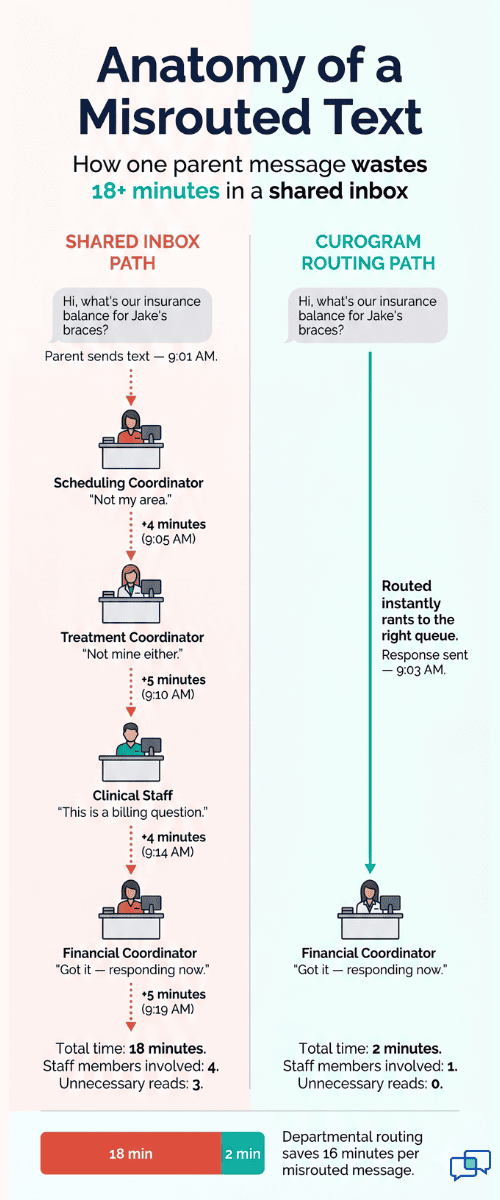
Here's what happens day after day. The scheduling coordinator opens the inbox and scrolls past billing questions. The financial coordinator reads clinical threads. The treatment coordinator skims appointment requests that aren't their job.
Everyone reads everything. Nobody owns anything.
This means duplicated effort on every shift. Two staff members might both reply to the same parent — or worse, neither one does. Messages get skipped. Response times climb. Parents text back: "Did you get my message?"
Without proper message assignment, no one has a clear view of their own tasks. The Dolphin ortho text routing system your team needs simply does not exist inside a single shared thread. It's like asking five people to cook different courses using one stove burner at the same time.
The Volume Problem
Let's do the math. Say your practice handles 80 patient interactions each day. If each misrouted message costs your staff just 5 minutes of search time, that adds up to hours of lost work each week.
Now stretch that across a full treatment arc. Orthodontic patients go through 15–25 visits over months — sometimes years. One delayed response per patient per visit creates dozens of wasted hours per year. That's time your treatment coordinator should spend on case talks and new starts — not sorting texts.
|
Problem |
Daily Impact |
Weekly Impact |
Yearly Impact |
|
Misrouted messages (5 min each) |
40–60 min lost |
3.5–5 hours lost |
180–260 hours lost |
|
Double-read messages |
20–30 min lost |
1.5–2.5 hours lost |
78–130 hours lost |
|
Missed follow-ups |
2–4 per day |
10–20 per week |
520–1,040 per year |
Based on our internal data, practices that rely on one shared thread see message response times balloon — which directly hurts patient satisfaction and rebooking rates.
The Feeling
You know this pain if you've lived it. It sounds like this:
"We got Weave so patients could text us. Now everyone's drowning in messages that aren't for them. The treatment coordinator reads billing questions. The scheduler reads clinical notes. We went from phone tag to text chaos."
That frustration is real — and it's common among orthodontic practices using Dolphin. The software handles charts, imaging, and financials well. But when it comes to organizing inbound patient texts, there's a gap. And filling that gap with a shared inbox just swaps one mess for another.
The truth is, your practice doesn't have a texting problem. It has a routing problem. And until you fix it, your team will keep reading, sorting, and losing messages that should have landed in the right queue from the start.

The Guide: The Departmental Text Router
Curogram solves the shared inbox problem with departmental text routing. Every inbound patient message gets sent to the right staff queue — scheduling, billing, clinical, or insurance — based on the conversation context and staff roles. No triage needed. No guesswork. Every text lands where it belongs.
Think of Curogram as the traffic cop for your patient messages. Instead of dumping every text into one pile, it reads the context and pushes the message to the coordinator who can actually help. That means no more scrolling, no more forwarding, and no more "did you see that text?" across the office.
The Feature: Multi-Queue Dashboard
The multi-queue dashboard is the backbone of this system. It gives each department its own text queue, complete with full conversation history, patient context, and message assignment tracking.
Here's what each role sees:
|
Staff Role |
Queue Content |
What They Don't See |
|
Scheduling Coordinator |
Appointment requests, confirms, reschedules |
Billing, clinical, or insurance threads |
|
Treatment Coordinator |
New starts, case updates, progress questions |
Scheduling or billing threads |
|
Financial Coordinator |
Payment plans, insurance checks, balance questions |
Clinical or scheduling threads |
|
Clinical Staff |
Wire/bracket concerns, emergency texts, provider notes |
Billing or insurance threads |
Each staff member works from their own dedicated view. The treatment coordinator opens their queue and sees only treatment-related messages. The scheduler sees only appointment threads. This kind of Dolphin text routing for orthodontic teams means every coordinator handles their own workload — not someone else's.
No one wades through messages that have nothing to do with their role. That alone cuts down wasted time and keeps the departmental message flow clean.
The Integration
Curogram works alongside every version of Dolphin — Desktop, Cloud, and Blue. It doesn't matter which setup your practice runs. The routing works through Curogram's own interface, so your Dolphin version never limits your text routing features.
Staff access their departmental queue from any device with a browser. Phones, tablets, desktops — it all works. And conversation history stays intact across every patient interaction, from the first visit through the end of the treatment arc.
There's no need to swap your phone system. No complex migration. Curogram plugs in as a focused add-on that handles what Dolphin wasn't built to do: organize and route the conversation.
The Orthodontic Fit
Orthodontic workflows are unique. A single patient's care involves many departments over months or years. Scheduling handles adjustment visits. Treatment coordination manages new starts and case presentations. Billing deals with payment plan questions. Clinical staff fields emergency wire and bracket texts.
That's a lot of moving parts for a Dolphin orthodontic text routing system to handle. And that's exactly why departmental routing matters here more than in most specialties.
Picture a parent who texts between meetings asking about their child's next adjustment. With Curogram, that message reaches the scheduling coordinator in seconds — not after three staff members read it first.
Now picture another parent texting about an insurance hold on a treatment plan. That text reaches the financial coordinator right away, without cluttering up the clinical queue.
When every message lands on the right desk from the start, response times drop and patient trust grows. Parents don't have to follow up. Staff don't have to forward. The text routing for Dolphin orthodontic practices handles the handoff — so your team handles the patient.

The Success: Every Message, Right Team, First Time
Based on our internal research, Curogram's departmental routing removes message triage from the daily staff workflow. Practices that use it report saving 45–60 minutes of staff time each day.
For a lean ortho team of 3–8 staff, that adds up fast. Over a five-day work week, that's roughly 4–5 hours saved. Over a month, it's 16–20 hours. Over a year, you're looking at close to 200+ hours returned to your team — hours they can use on patient care, case talks, or new starts.
Here's how the savings break down by role:
|
Role |
Time Wasted per Day (Before Routing) |
Time Saved per Day (After Routing) |
|
Scheduling Coordinator |
15–20 min reading non-scheduling texts |
15–20 min saved |
|
Treatment Coordinator |
15–20 min reading billing/scheduling texts |
15–20 min saved |
|
Financial Coordinator |
10–15 min reading clinical/scheduling texts |
10–15 min saved |
|
Clinical Staff |
5–10 min reading billing/insurance texts |
5–10 min saved |
|
Total |
45–65 min wasted |
45–65 min saved |
That's not just a nice perk. For a practice with 80+ patient interactions per day, every minute counts. When your treatment coordinator spends 20 fewer minutes on the wrong messages, that's 20 more minutes spent on case work. When your scheduler stops reading billing threads, they book more appointments.
A Day in the Life: Before vs. After
Let's walk through a real-world morning at a Dolphin orthodontic practice.
Before Curogram
8:00 AM — The scheduler opens the shared inbox. There are 12 new texts. Four are about appointments. Three are billing questions. Two are about a broken bracket. Three are insurance inquiries.
The scheduler reads all 12. She handles her four. She tries to forward the rest, but there's no clean way to hand them off.
She sends a Slack message to the billing coordinator: "Check the inbox — there's a payment question." The billing coordinator checks 20 minutes later. The parent has already texted again: "Hello?"
Meanwhile, the treatment coordinator didn't see the broken bracket text until 10:30 AM because it was buried under older messages. The parent is upset.
By lunch, the team has spent over an hour just sorting and re-reading texts that weren't for them.
After Curogram
8:00 AM — The scheduler opens her queue. She sees four texts — all appointment-related. She responds to each one in under 10 minutes. Done.
The billing coordinator opens their queue at the same time. Three billing texts. They respond directly — no Slack chase needed.
The clinical staff sees the bracket text instantly. They respond within minutes and schedule the patient for a same-day fix.
The treatment coordinator opens a clean queue with two insurance-related threads and one new start inquiry. They handle all three before 9 AM.
By lunch, every message has been answered. No forwards. No double-reads. No angry follow-ups from parents.
The Outcome: What Your Practice Looks Like After Routing
When Dolphin text routing through Curogram is in place, the practice runs differently. Here's what changes:
-
For parents: They text the practice number and their message reaches the right desk within seconds. They get a fast, direct reply from the person who can help. No more waiting. No more "let me transfer you to someone else."
-
For the treatment coordinator: Their queue shows only treatment messages. New starts. Case updates. Progress questions. Nothing else. This keeps them focused on the work that drives production — not on sorting inbox clutter.
-
For the scheduler: Only scheduling threads appear in their queue. Appointment requests, confirms, and reschedules. They process them quickly without wading through billing or clinical messages.
-
For the financial coordinator: Only billing and insurance threads. Payment plan questions, insurance holds, and balance checks. Clean, direct, and fast.
-
For the practice owner: Fewer complaints from parents about slow responses. Fewer complaints from staff about inbox overload. Better team morale. And a clearer picture of how each department performs — because each queue tracks its own message volume and response times.
Based on our internal data, practices using Curogram see a 75%+ appointment confirmation rate through automated systems alone.
When you add departmental routing to that mix, the full communication loop tightens — confirms land in the scheduling queue, follow-ups land in the treatment queue, and nothing falls between the cracks.
How Curogram's Multi-Queue Dashboard Keeps Orthodontic Teams in Sync
The multi-queue dashboard is built for the way ortho practices actually work. Each department gets its own queue. Each queue shows only the threads that belong to that role. And every text carries full conversation history — so staff never lose context, even when a patient's care spans years.
Here's why this matters for orthodontic text routing specifically. Ortho patients don't visit once and leave. They come back every 4–8 weeks for 1–3 years. Over that time, they text about appointments, billing, insurance, and clinical issues. That's four different departments touched by one patient across dozens of visits.
Without Curogram, those texts pile into one thread. Staff scroll through months of mixed messages just to find the latest billing question. With the multi-queue dashboard, each department picks up right where it left off — no scrolling, no guessing, no forwarding.
The dashboard also tracks message volume and response times by department. Practice owners can see which queues are backed up and which teams are responding fast. This gives you clear data to make staffing choices, shift task loads, or spot training gaps.
Based on our internal data, practices using Curogram confirm over 1,100 appointments per month through automated text — and departmental routing ensures those confirms land in the scheduling queue, not the billing team's view.
It works with Dolphin Desktop, Cloud, and Blue. Staff access their queue from any device. And because Curogram runs alongside Dolphin rather than replacing it, there's no migration headache. You keep your EMR workflow and add a focused communication layer on top.
In short, the dashboard gives every coordinator their own clean workspace — and keeps the right messages in front of the right team at all times.
Conclusion: Route the Message, Not the Patient
Your Dolphin practice doesn't have a texting problem. It has a routing problem. When every patient text drops into one inbox, you force your lean team to sort, forward, and re-read messages all day. That's not a system — it's a time drain.
Curogram's departmental text routing fixes this at the root. It sends every inbound message to the right coordinator based on role and context. No shared inbox. No triage. No guesswork.
Dolphin is built for treatment cards, imaging, and financials. It's strong software for what it does. But patient conversations need their own lane — and Dolphin doesn't provide that.
Curogram fills the gap. It handles the texts, routes them to the right person, and keeps full history in each departmental queue. Your treatment coordinator stays focused on new starts. Your scheduler stays focused on appointments. Your billing team stays focused on payments. Nobody reads messages that don't belong to them.
This is the split that makes ortho practices run smoothly: Dolphin for the record, Curogram for the conversation.
See how departmental routing removes the shared inbox — and gives your team hours back each week. When message assignment is handled right, your practice responds faster, your staff works smarter, and your parents feel heard.
Cut hours of triage this week — not next quarter. Book a demo and see how your treatment coordinator, scheduler, and billing team can each work from their own queue.
Frequently Asked Questions
Curogram includes routing in its standard plan with no add-on fees. Weave bundles texting with phone system replacement at $300–$500+/month. Curogram delivers focused communication at a fraction of that cost — no phone migration needed.
The dashboard shows message volume and response times for each departmental queue. Practice owners can spot backed-up queues, track which teams reply fastest, and make staffing or training decisions based on real data.
Most practices set up their departmental queues and start routing texts within days — not weeks. Staff training takes minutes since the interface works like standard texting, and there's no phone system swap or complex integration to manage.