
Streamlining Radiology Intake with Online Forms in Ramsoft
Learn how radiology networks using Ramsoft standardize intake and reduce paperwork errors with Curogram’s HIPAA-compliant online forms.
10 min read

Replace paper forms with digital patient intake Allscripts PM can use.
Cut repeat questions and duplicated data entry.
Help patients complete forms at home or on their phones.
Send intake links and reminders with clear instructions.
Reduce check in lines and waiting room crowding.
Give staff cleaner, more complete information at the start of the visit.
With Curogram, online forms help capture accurate information before the visit. Reduce handwriting errors, missing fields, and last minute scanning at your front desk.
You probably feel the pressure the moment your doors open. Patients line up at the front desk. Clipboards and pens move from hand to hand. Staff try to scan insurance cards and collect consent forms in a very small window of time. It is a familiar scene, but it also feels fragile when anything unexpected happens.
Paper based intake makes every small delay bigger. A missing signature can hold up the line. Hard to read handwriting can slow down charting and billing. New staff often struggle to remember which forms go with which visit types. When your Allscripts intake workflows depend on paper, you end up with chaos.
Digital patient intake in Allscripts PM gives you another option. Patients complete forms online or on their phones before they arrive. Online forms can send data directly into your workflow, so staff do less retyping. In this article, we'll walk through the problems with manual intake. Let's learn how digital workflows connect with Allscripts PM for an efficient workflow. Want to learn how to start improving your own intake process? Keep reading.
In our definitive guide, we saw how online forms in AllScripts PM can make a difference. Because when intake lives on paper, every visit starts with a balancing act. You try to keep patients moving while your staff gathers the information your providers and billers need. It can work on a quiet day, but most days are not quiet. Small issues at check in can ripple through your entire schedule.
Paper packets take time to complete. Patients often pause at each question and ask your front desk what to write. Some patients arrive late and then face ten or more minutes of paperwork. While they fill out forms, other patients queue behind them. This slows down your whole intake workflow.
Inside Allscripts PM, your schedule shows a simple list of names and times. In reality, some of those patients are still in the waiting room trying to finish forms. Providers may already be ready for the next visit, but the chart is not ready. This mismatch can create stress for both staff and clinicians.
When you rely on paper, someone has to read and retype the information. Handwriting can be hard to read, especially under time pressure. A simple mistake in a date of birth or insurance ID can cause claim denials later. Your staff does their best, but the process itself invites errors.
Every extra step increases the chance that something will be missed. A name might be spelled differently than it appears on a card. A phone number might be entered with a wrong digit. These small mistakes can create bigger problems for follow up, billing, and Allscripts PM patient intake workflow reporting.
Patients sometimes skip questions they do not understand or do not have time to answer. Staff may not catch every blank field while the patient is standing at the desk. Providers then walk into the exam room without key details. They may spend the first part of the visit fixing intake gaps instead of focusing on the reason for the visit.
Over time, this pattern can affect quality of care. It can also affect how patients feel about your clinic. They may wonder why they are being asked the same questions again and again. This experience can weaken trust in your process.
Digital intake changes where and how you collect information. Instead of handing out clipboards in the waiting room, you invite patients to complete forms before they arrive. Those forms can be connected to your Allscripts PM system so that information flows into your intake process in an organized way. This makes your Allscripts intake workflows more predictable and less dependent on paper.
With digital patient intake Allscripts PM can use, you send links by text or email. Patients can complete forms from home, work, or while sitting in their car. They have time to look up medication lists and insurance details. They do not feel rushed by a line behind them.
You can tailor forms based on appointment type. A new patient visit can have a full demographic and health history form. A follow up visit can have a shorter update form. This helps you gather the right amount of information for each visit without overwhelming patients.
Digital forms give you a chance to standardize questions. Instead of many versions of the same form in a drawer, you use one clean version in your system. Allscripts online forms or connected intake tools can match your existing paper forms in content. They can also improve clarity with simple language and clear instructions.
Standardization helps your team know what to expect. Staff can quickly scan for key fields. Providers can trust that certain questions are always asked in the same way. This supports both clinical and administrative work.
Digital intake tools can share information with Allscripts PM or with your team’s intake queues. Staff can review submitted forms before the visit starts. They can confirm key details and flag any missing pieces. This keeps your Allscripts PM patient intake workflow organized.
When information arrives before the patient, your team can prepare. They can verify insurance, review problem lists, and plan for any extra time needed. Instead of reacting in the moment at the front desk, they work from a clearer picture of what each visit will involve
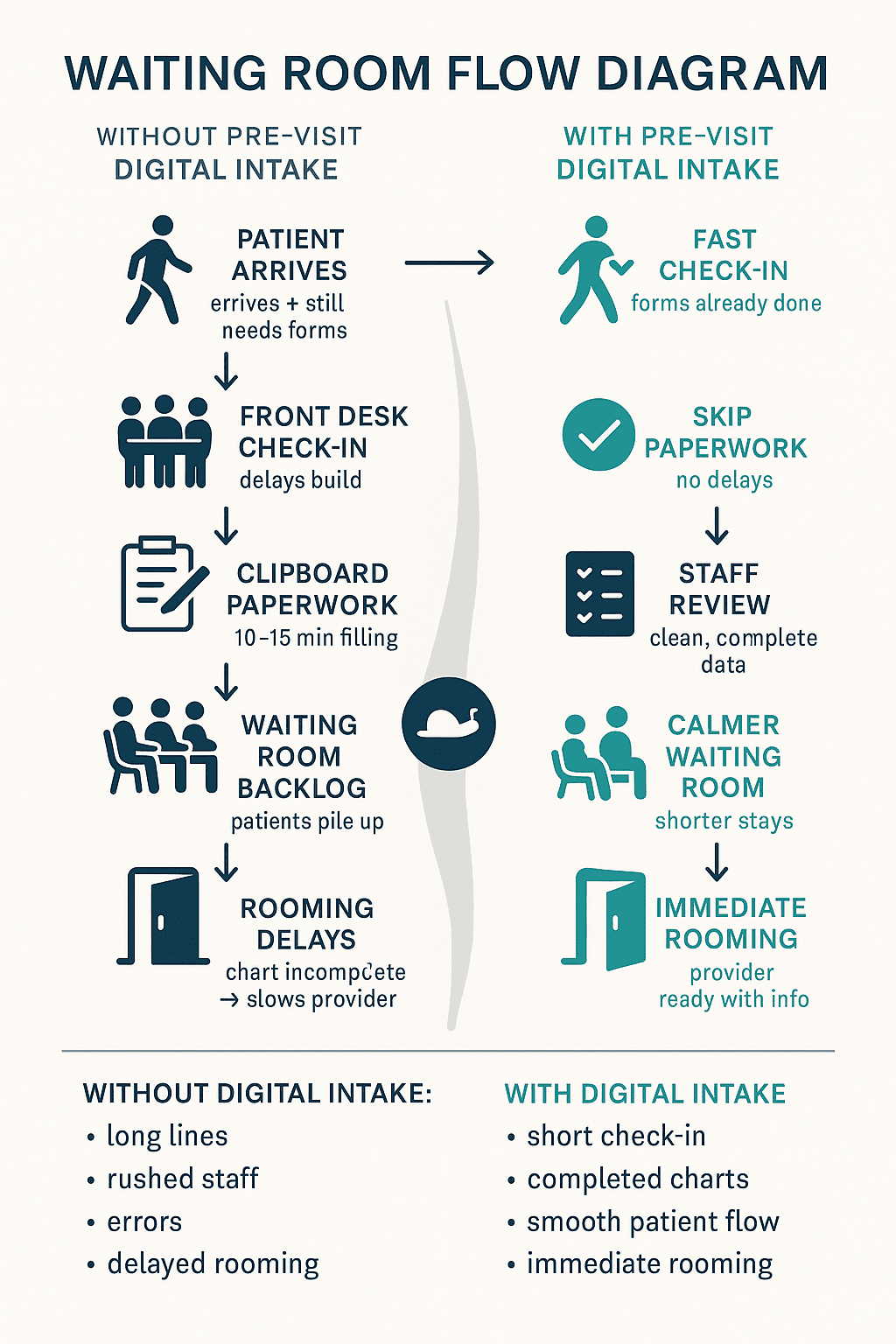
When you move from paper to digital Allscripts intake workflows, the change affects more than just forms. It touches the pace of your day, the experience of your patients, and the quality of your data. Over time, the benefits stack together and make your intake process feel less hectic and more intentional.
Patients who complete forms in advance arrive ready. They only need to confirm a few details at the front desk. This shortens the check in step and keeps your line moving. It also reduces waiting room congestion during busy hours.
Digital intake removes some of the most stressful tasks for your front desk. Staff do not have to manage stacks of clipboards or constantly refill paper trays. They spend less time explaining the same questions over and over. This gives them more mental space to greet patients and solve real problems.
Typed responses are easier to read than handwriting. Required fields can prevent missing key information. Patients can double check spelling and numbers. All of this leads to cleaner data for your Allscripts PM patient intake workflow and for downstream billing.
When intake forms are complete and available to providers, they do not have to redo the work. They can quickly review answers before walking into the room. This saves time and avoids frustrating patients with repeated questions. The visit feels more focused on care instead of paperwork.
Some visits require more information, such as detailed history or multiple complaints. Digital patient intake Allscripts PM can use gives you more room for these questions without crowding a paper page. You can design forms that guide patients step by step. This supports more thoughtful clinical planning.
Digital intake makes it easier to track consents, acknowledgments, and required notices. Forms are stored in a structured way instead of in boxes or binders. Staff can see at a glance whether a form is complete. This supports compliance and reduces the chance of missing required documentation.
Paper forms are hard to update. You have to reprint stacks and remember to recycle old versions. With digital forms linked to Allscripts online forms or intake tools, you update a template once. The new version goes live for all future patients. This saves time and reduces confusion.
Digital intake gives you options for patients with different comfort levels. Some patients prefer to complete forms at home. Others may need help on a tablet in your waiting room. You can support both. This flexibility supports access and comfort.
When intake information is available ahead of time, providers can prepare. They can see why the patient is coming in and what concerns they have. They can plan questions and consider options before entering the room. This preparation can make visits feel more thoughtful and less rushed.
Digital Allscripts intake workflows make your day easier to predict. You have a clearer sense of which patients have completed forms and which still need help. Staff can adjust their time based on this view. This predictability lightens the emotional load on your team.
Paper forms can be misplaced or damaged. Coffee spills, crowded desks, and shared workspaces all increase this risk. Digital forms sit in a structured system instead of on a pile. This protects patient information and reduces rework.
Digital intake gives you a chance to explain why you ask certain questions. You can include short prompts and examples. Patients can read at their own pace. This improves understanding and can increase honesty in their answers.
If you run more than one site, digital intake helps you align your process. You can use the same forms and rules across all locations. This makes training easier and keeps experiences similar for patients. It also supports consistent reporting at the organization level.
With digital patient intake Allscripts PM can use, you can track completion rates and timing. You can see how many patients finish forms before arrival. You can see where they tend to stop or ask for help. These measurements help you improve your forms and your process.
At the heart of all these benefits is a simple idea. Intake does not have to feel chaotic. When you design Allscripts intake workflows that match how patients really live and how staff really work, the day feels calmer. Patients start their visit with less confusion. Staff feel more in control. Providers walk into the room with clearer information and more time for real conversation.
Imagine a busy family medicine clinic that used paper packets for every visit. New patients filled out thick stacks of forms in the waiting room. Existing patients updated their information on short paper slips. Front desk staff scanned and retyped details into Allscripts PM whenever they had a spare moment. Most days, there were very few spare moments.
Patients often arrived late and still had to complete forms. Check in lines stretched across the lobby during flu season. Providers sometimes opened charts and found missing histories or unclear medication lists. Staff felt like they were constantly catching up. The clinic leadership wanted to improve intake, but they were not sure where to start.
They began by focusing on digital patient intake Allscripts PM could support for new patients. The clinic set up online forms that matched their most important paper packets. They sent links by text and email as soon as appointments were scheduled. Within a few weeks, many new patients arrived with forms already complete. Staff noticed shorter lines and fewer rushed conversations at the front desk.
Encouraged by this change, the clinic expanded digital intake to specific visit types, such as annual wellness visits and chronic care follow ups. Providers reported that the information they saw before visits felt more complete. They could spend more time discussing goals and less time catching up on basic history. The clinic used what it learned from this phase to refine forms, messages, and timing across the rest of its Allscripts intake workflows.
Map your current process. Watch what happens from the moment a patient schedules an appointment in Allscripts PM to the moment they are roomed. Notice where delays, repeated questions, and missing information tend to appear.
Next, choose one small area to pilot digital intake. This might be new patient visits, a single provider’s schedule, or one location. Create clear, simple online forms connected to AllScripts and decide when patients should receive them. Make sure staff understand the plan and know where to find submitted information.
As you run your pilot, listen closely to both staff and patients. Ask what feels easier and what still feels confusing. Adjust your Allscripts intake workflows based on that feedback. The exact setup should follow what you learn from your own environment instead of a one size fits all plan.
When you think about digital patient intake, you want tools that respect how you already work in Allscripts PM. Curogram is designed to sit alongside your existing systems and help organize patient communication. It supports texting, forms, and workflows that connect to your schedule. This can make it easier to send intake links, reminders, and follow up messages as part of one clear process.
With Curogram, you can build standardized forms that match your current Allscripts online forms and paper packets. Patients receive simple links by text and can complete forms on their phones. Staff can see who has submitted information before the visit. This supports your Allscripts PM patient intake workflow without forcing you to rebuild everything from scratch.
Curogram focuses on helping your team do less retyping and more real support. It gives front desk staff a clearer view of where each patient stands in the intake process. Providers gain more complete information before they enter the room. Over time, this can help your intake experience feel more stable, more patient friendly, and more aligned with the way you want your clinic to run.
Digital patient intake in Allscripts PM can use does not remove the human side of care. It supports it by letting staff focus on people instead of paper. Providers gain better context when they open the chart.
You do not have to reach a perfect system in one move. Starting with a small pilot and learning as you go is enough. Each improvement you make at intake carries forward into the visit. Over time, these changes help your clinic feel less chaotic. Your staff becomes more prepared for the patients who trust you with their care.
Want to see how easy it is to implement digital intake? Book a quick demo and learn how.

Learn how radiology networks using Ramsoft standardize intake and reduce paperwork errors with Curogram’s HIPAA-compliant online forms.

Curogram integrates with Allscripts PM to digitize patient intake, reduce paperwork, and improve efficiency with HIPAA-compliant online forms.

Learn how Curogram helps InSync EMR users streamline behavioral health intake with HIPAA-compliant online forms.