
10 min read

Text-to-Pay for CureMD | Collect Balances by Text

Patient on an exam table holds his phone after a visit while his doctor types at a workstation behind him
💡 CureMD text-to-pay patient billing works by texting the patient a secure SMS payment link they can pay in two taps, with no portal login. You get it by pairing CureMD with Curogram, a HIPAA-compliant texting platform that runs next to any EHR.
  • Bill pay in CureMD lives in its Patient Portal, and its AI Contact Center takes card payments by phone. Both wait for the patient to log in or call.
  • Curogram sends the link into the same text thread the patient used to confirm their appointment.
  • The patient taps the link, pays on a secure page, and gets a confirmation text back.
  • Billing staff post each payment to CureMD in a short daily routine.
CureMD stays the system of record for charges, claims, and RCM. Curogram adds the channel patients already read and answer.

A patient in a CureMD practice who owes $45 has two ways to pay it. She can dig up the portal invite, reset a password she made two years ago, find the balance, and check out.

Or she can call the front desk during office hours and read her card number to whoever picks up. Most patients pick a third option, which is later.

Later adds up fast. Patients now owe about 23% of allowable claim amounts across payer types, according to first-quarter 2026 data from Kodiak Solutions. In an October 2025 MGMA Stat poll, 29% of medical group leaders said patient balance collections had gotten worse over the past year.

Every small balance that waits a month gets harder to collect. It also costs another statement each time it’s re-sent.

We think the fix in a CureMD practice is the channel, since the billing side already works well. Put a secure payment link in the text thread where the patient confirmed their visit, and a $45 copay becomes a two-tap task they can finish in a parking lot.

That’s the case for CureMD text-to-pay patient billing through Curogram. CureMD keeps posting charges, filing claims, and running RCM. Curogram sends the request to the phone the patient is already holding, and your billing team logs the payment back into CureMD each day.

None of this asks your billing team to change how it works in CureMD. It changes one thing: who makes the first move on a balance. Today, that’s the patient. With a texted link, it’s your practice, on the same day the charge posts.

The Waiting Balance

CureMD’s billing side has a strong track record. In its 2016 ambulatory RCM services report, KLAS named CureMD the top performer for overall satisfaction among 1 to 10 physician practices, with a score of 7.7 out of 9.

On the patient side, CureMD offers two payment paths. Its Patient Portal includes online bill pay. Its AI Contact Center answers calls 24/7/365 in 14 languages and can take a card payment over the phone.

CureMD also documents a text-to-pay option through Global Payments, its payment processing partner, which practices request through a support ticket. If your practice already uses it, keep reading. The questions that matter are where the link lands and whether the patient can reply to it.

Every Payment Channel Waits for the Patient

Portal bill pay and phone payments share one trait: the patient has to make the first move. Nobody calls a practice to volunteer $45. Most CureMD patient portal bill pay friction shows up at the login screen, before the patient ever sees the balance.

A patient who hasn’t logged in since last year needs a username, then a password reset, then the reset email, then a new password that meets the rules. That’s four steps before the $45.

Think about who holds those balances. A 74-year-old on a geriatric panel may never have activated the portal at all. A working parent sees the portal email, flags it for later, and loses it under 40 newer emails by Friday.

Both would pay a clear request without a second thought. Patients say as much. In Salucro’s 2023 survey of 1,348 U.S. patients, 59% said they’d rather get a billing notice by text than by phone or email.

How a $45 Copay Ages Past 90 Days

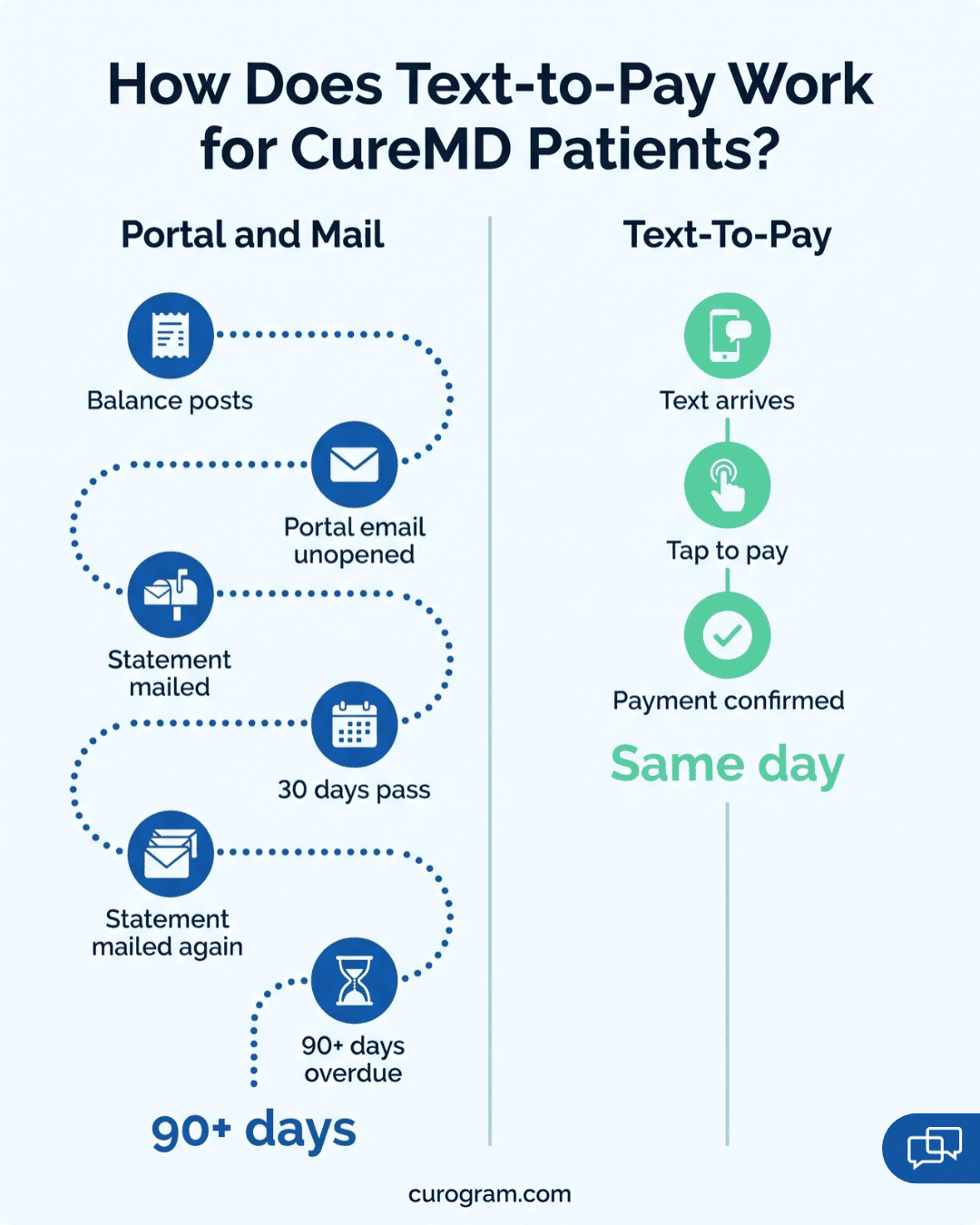
Walk one balance through a typical CureMD statement cycle:

  1. The visit closes and the $45 balance posts in CureMD.
  2. A portal notice goes out by email and sits unopened under a pharmacy coupon.
  3. Billing prints, folds, stuffs, and mails a paper statement.
  4. Thirty days pass. The patient means to pay but won’t set up a portal account for $45.
  5. A second statement goes out, with a second round of postage.
  6. The balance crosses 90 days, and the write-off talk begins.

By that point, the practice has paid for two mailings to chase a $45 balance.

What the Waiting Costs

Statement math varies by practice, so treat these as illustrative planning figures. Swap in your own spend and first-mailing rate from CureMD’s reports.

Statement cycle item

Illustrative figure

Monthly print and postage spend

$800 to $1,000

Share collected on the first mailing

About 20%

Balances that age past easy recovery (our working estimate)

40% to 60%


At $900 a month, a practice spends $10,800 a year on envelopes that mostly go unanswered. That spend sits on top of your CureMD subscription and any billing service fees. And each re-mailed statement adds cost to a balance that’s often under $100.

Why the Old Pressure Points are Weaker

Practices used to count on two levers to move old balances. One was the threat of credit reporting. The CFPB’s January 2025 rule to pull medical bills from credit reports was struck down by a federal court in July 2025, and MGMA notes there’s now no nationwide standard.

Collection agencies are the other lever, and they keep a cut of whatever they recover. So the cheapest dollar is still the one paid in the first few weeks. In that same October 2025 MGMA poll, groups that held steady on patient collections mostly relied on text or email reminders and online payment tools.

The Billing Manager Who Can See Everything

Your billing manager can pull every aged balance from CureMD in a few clicks. She knows the names, the amounts, and the dates of service. What she lacks is a way to reach those patients that they’ll actually respond to.

The portal waits for a login. Calls roll to voicemail, and the envelope sits on a kitchen counter under last week’s mail. So on the 30th, statement number two goes out, and the 60-day bucket in CureMD’s aging report gets a little bigger.

The Two-Tap Payment

Two taps is the whole patient effort: one on the link, one on Pay. That’s the core promise of text-to-pay for medical practices, and it works best when the link shows up somewhere the patient already trusts. In Curogram, that place is the thread that sent their appointment reminder and got their reply confirming the visit.

A typical request reads like this (example wording):

“Hi Maria, this is Valley Family Medicine. Your balance of $45 from your Oct. 14 visit is ready. Pay securely here: [link]. Reply with any questions.”

It names the practice, the amount, and the visit date. It leaves out diagnosis codes and anything clinical.

Patients are right to be wary of payment links from numbers they don’t know. An SMS payment link in healthcare only gets tapped if it looks like it came from the office. A link that arrives under last Tuesday’s confirmation, from the number the patient has already texted, carries that history with it.

How Curogram Text-to-Pay Works, Step by Step

  1. A staff member opens the patient’s thread in Curogram’s dashboard and sends a payment request for the balance shown in CureMD.
  2. The patient taps the link, which opens a secure payment page in the phone’s browser.
  3. The patient enters a card and taps to pay. Card details go into the payment page, never into the text thread.
  4. A confirmation text lands in the same thread right away.
  5. Each payment shows in Curogram’s dashboard with a receipt for reporting and records requests.

That covers patient payments without a portal account, an app download, or a phone call. If the patient has a question about a charge, they reply in the thread. Your billing staff answers there, and nobody plays phone tag over a $60 lab balance.

How Curogram Sits Next to CureMD

We’ll be direct about the plumbing. CureMD’s FHIR APIs use the SMART on FHIR framework with OAuth 2.0, and outside apps have to register with CureMD support to get credentials. We don’t claim a deep, two-way billing sync on top of that.

Text-to-pay runs at the communication layer instead. Payments are logged in Curogram, and your team posts them to CureMD billing in a short daily routine. CureMD stays the system of record for charges, claims, and RCM.

A daily posting routine usually looks like this. Near close, a biller filters Curogram’s dashboard for the day’s paid requests.

Each one gets posted in CureMD as a patient payment against its date of service, and the total is matched to the processor deposit. For a practice texting 20 to 30 balances a day, that’s a short task, and it replaces the time spent stuffing envelopes.

The return on this setup comes from patients seeing the request and acting on it, so it holds up regardless of API access. If you already use CureMD’s Global Payments text-to-pay option, compare where each link lands. Curogram’s sits inside a two-way thread the patient uses for reminders and questions.

Two-lane chart showing how text-to-pay lets CureMD patients pay a balance in three steps instead of six

Which Practices Feel the Difference First

A primary care group feels it every January. Deductibles reset, and a stack of $30 to $150 balances posts within a few weeks.

Multi-specialty practices see it in volume. Hundreds of small balances come through each month, and a mailed statement eats a real slice of what each one is worth.

For a geriatric-heavy panel, the portal itself is the barrier. Many older patients never set up an account, yet they read every text from their doctor’s office, often with a grown child helping on the same phone.

Your AI Contact Center and the Texts

CureMD’s AI Contact Center handles the patients who call about a bill, any hour, in their language. Curogram reaches the patients who never call by sending the payment request first.

Run both and each covers a different moment. Inbound payment calls still get answered, while outbound requests go out by text the day a balance posts. Practices that collect patient balances by text this way keep the phone line open for anyone who prefers it.

The Collected Balance

Based on our internal data, Curogram clients average a confirmation rate above 75% on appointment texts. Covina Arthritic Clinic confirms more than 1,100 appointments a month by text. Those patients have built a habit: a message from the office arrives, and they answer it.

A payment link sent into that thread reaches someone who is used to replying. Gartner has put SMS open rates as high as 98%, against about 20% for email. Salucro’s 2023 survey found 51% of patients said a text reminder would get them to pay a bill faster.

Our clients also see 10% to 20% revenue increases when text workflows recover appointments that would have been lost, based on our internal research.

A Worked Example: One Month of Texted Balances

The figures below are illustrative. They show the math to run with your own CureMD numbers, not a Curogram result.

  1. Pull the month. Say CureMD shows 400 new patient balances last month, averaging $85, for $34,000 in patient responsibility.
  2. Apply your mailed baseline. At a 20% first-mailing rate, $6,800 comes in during month one. The other $27,200 waits.
  3. Add the statement run. At $900 for printing and postage, plus re-mails for most of the $27,200, the cost keeps climbing while the balance ages.
  4. Price each point of lift. At this volume, every 10 points of first-cycle collection is worth $3,400 in month one.
  5. Change the timing. Send the link the day each balance posts, while the visit is fresh, and let the statement run shrink to patients with no mobile number.

First-cycle collection rate

Collected in month one

Still waiting

20% (illustrative mailed baseline)

$6,800

$27,200

30%

$10,200

$23,800

40%

$13,600

$20,400

50%

$17,000

$17,000


Your real rate after texting is the one number to test, and it’s why we ask for your own data in a demo.


Curogram Highlight: Text-to-Pay in the Thread Patients Already Use

Curogram Text-to-Pay lets your staff send a secure payment link to any patient with a mobile number, straight from Curogram’s dashboard. The link lands in the patient’s existing text thread with your practice, the same one that carries appointment reminders and two-way messages.

On the patient side, there’s nothing to download and no account to create. They tap the link, enter a card on a secure payment page, and tap to pay. A confirmation arrives in the thread a moment later, so they don’t call to ask whether it went through.

On your side, every payment is tracked in the dashboard with a receipt, which makes the daily posting into CureMD billing quick. Your team can see who paid and who still needs a nudge. A patient with a question about the charge just replies, and billing answers in the same thread.

Curogram is HIPAA-compliant and signs a Business Associate Agreement with your practice. Card details never pass through the text message itself.

Text-to-Pay works best alongside the rest of the thread. Appointment reminders build the reply habit, and 2-way texting handles the questions that would otherwise become phone calls. When the balance posts, the payment request comes from a number the patient has already answered.

CureMD keeps handling charges, claims, and RCM, and your team posts each texted payment back into it daily.

Conclusion: Stop Waiting on Balances Patients Would Happily Pay

Most patients with a small balance already plan to pay it. What they’re missing is a request that fits into 30 seconds, from a number they know, with a button at the end. CureMD bills the visit and files the claim. Curogram puts the payment request in the text thread the patient already answers.

Keep the CureMD portal for records and the AI Contact Center for patients who call. Both earn their place. Add the channel that reaches the patients who do neither, since that’s where small balances pile up month after month.

Before you look at any vendor, pull three numbers from CureMD: last month’s statement spend, your first-mailing collection rate, and the patient responsibility sitting past 60 days. Together they show the size of your collection gap. Compare that gap to a channel Gartner puts at up to a 98% open rate.

Book a 15-minute Curogram demo and bring that data with you. We’ll show a payment link going out in a live thread, the confirmation that comes back, and the daily posting routine your billing team would run in CureMD.


Frequently Asked Questions

How does Curogram keep text-to-pay secure for patient payments?

Curogram is HIPAA-compliant and works under a Business Associate Agreement with your practice. The text itself carries only a short request and a link. When the patient taps it, a secure payment page opens in the phone’s browser, and the card number is entered there. Card details are never typed into the text thread, and every transaction is logged in Curogram’s dashboard for audits and records requests.

How do payments collected by text get into CureMD’s billing records?

Your team posts them. Each payment shows in Curogram’s dashboard with a receipt, and billing logs the day’s payments into CureMD in a short daily routine. We don’t claim a deep billing sync, because CureMD’s FHIR APIs require app registration and SMART on FHIR credentials. A daily posting step keeps CureMD as the system of record while the texts do the collecting.

Why do patients pay a texted link faster than a portal bill?

The portal adds steps before payment: find the email, remember the login, reset the password, locate the balance. A texted link skips all of that and opens straight to a payment page. It also arrives in the thread where the patient already confirms appointments, so it looks familiar. In Salucro’s 2023 survey, 51% of patients said a text reminder would get them to pay faster.

How does text-to-pay fit alongside CureMD’s portal and AI Contact Center?

All three keep working, and patients pick whichever suits them. Portal bill pay stays open for patients who like logging in. The AI Contact Center still answers anyone who calls to pay by phone, around the clock. Curogram adds the outbound piece: a request that goes to the patient first.
Payments made by text get a confirmation in the same thread and land in the daily posting routine.

How should a CureMD practice measure whether text-to-pay is working?

Track four numbers from CureMD’s reports before and after you start. Watch your first-cycle collection rate on patient balances, your monthly statement spend, the average days from posting to payment, and the dollars sitting past 60 days. Give it at least two full billing cycles. If the 60-day bucket stops growing while statement spend drops, the texts are carrying balances your mail used to chase.

Collect CureMD Balances by Text With Secure SMS Payment Links

Collect CureMD Balances by Text With Secure SMS Payment Links

Learn how CureMD text-to-pay sends patients a secure SMS payment link they tap twice to pay, so small balances clear the same day instead of aging...
Read More
Tebra Text-to-Pay: SMS Payment Links That Collect Faster

Tebra Text-to-Pay: SMS Payment Links That Collect Faster

Tebra’s portal payments have low adoption, while Curogram texts patients a payment link. Cut $800+/month in statement costs and accelerate...

Read More
Pay Lytec Bills by Text | No Portal Login Needed

Pay Lytec Bills by Text | No Portal Login Needed

Patients ignore mailed bills and portal logins. With Curogram, Lytec practices send a secure text link so patients pay in two taps. No app, no...

Read More