
 Mira Gwehn Revilla
- No portal account, password reset, app download, or phone call is needed.
- The link arrives in the thread patients already use to confirm visits with your office.
- CureMD stays the billing record, and staff reconcile text payments into it daily.
- Portal bill pay and CureMD’s AI Contact Center, which takes card payments by phone in 14 languages, stay available.
- MGMA data shows practices collect only about 27% of patient balances billed after the visit.
Paying the $45 copay from that same visit asks for much more: find the portal invite, create an account, wait for a verification email, and invent a password with a symbol in it.
Most patients stop somewhere in that list. They still mean to pay. A statement goes on the fridge, a second one shows up a month later, and a small task starts to feel like a problem. By day 60, the patient is a little embarrassed, and your billing team is drafting a past-due letter to someone who liked their visit.
Small balances age because paying them is harder than the amount justifies. A text link removes the hard part. Your practice sends a secure link into the thread the patient already trusts, and the patient pays in two taps from the phone in their hand.
CureMD doesn’t need replacing for this to work. Its portal still handles bill pay, records, and refills for patients who like it. Its AI Contact Center still takes card payments by phone. Curogram adds a third lane, and for a $45 copay, it’s the lane most patients will actually use.
Older patients paying medical bills feel the login step hardest. Plenty of them text photos to their grandkids every week and have never held on to a portal password for long.
A link they can tap fits how they already use their phones, and it asks them to remember nothing.
The Waiting Balance
Every CureMD practice carries a pile of small balances nobody is arguing about. Patients agree they owe the money. Charges are correct. And the money still sits for weeks.
What CureMD Already Gives Patients
CureMD’s patient tools work well for the patients who use them. Its Patient Portal handles bill pay, records, and refill requests. Its AI Contact Center answers calls 24/7/365 in 14 languages, from Spanish to Korean, and can run a card payment over the phone.
A November 2024 release added one more path. Patients can pay on a web payment page using the statement number, or personal details if the statemment isn’t handy.
All three paths start the same way. Someone has to make the first move: log in, call, or find the paper statement and type in its number. For a $1,200 surgical balance, people make that effort. For a $45 copay, most of them put it off, and the balance waits.
A parent with two kids and a full-time job won’t spend ten minutes on a $45 task. It slides until the next envelope makes it feel urgent.
From the Envelope to the Fridge
Follow one copay from the patient’s side of the counter.
- Checkout gets skipped because the line is four people deep, so nobody collects the copay.
- Two or three weeks later, an envelope arrives, or a portal email lands in a promotions folder.
- “Pay online,” the statement says. In practice, that means making an account, waiting for a verification email, and picking a password with a capital letter, a number, and a symbol.
- When the verification email never shows up, the patient closes the tab and sticks the statement on the fridge, planning to deal with it this weekend.
- About 30 days later, a second statement arrives, stamped “second notice.” Now the patient feels behind on a bill they never meant to skip.
Each exit in that sequence happens at a login screen or a mailbox, while the patient still fully intends to pay.
Where the Money Stalls
MGMA put a number on this drop-off. Its 2025 DataDive Financials and Operations report found that practices collected about 72% of copays at the time of service. For patient-due balances, the collection rate was 26.83%.
That gap is the waiting balance. Once a patient walks out the door, nearly three-quarters of what’s billed afterward stays open. In MGMA’s October 2025 collections poll, the practices doing best were the ones collecting earlier and cutting the number of “touches” per balance.
Paper adds cost on top of the wait. Since July 12, 2026, a metered first-class letter costs 78 cents to mail. A $45 balance that takes two statements to collect costs $1.56 in postage alone, before paper, ink, and staff time.
Scale that up as illustrative math. A practice mailing 600 statements a month spends about $468 on postage, and by MGMA’s figures, most of those balances will still be open when the next batch goes out.
Who the Login Screen Loses
Start with a patient who liked her visit. Her doctor took extra time to walk through her knee X-ray, and she left grateful. Six weeks later, a past-due notice arrives for $45 she always planned to pay. That letter’s tone is what she now remembers about your practice.
An 82-year-old patient hits a different wall. He texts his grandkids photos of his tomatoes every week. What stops him is a portal password he set up at one visit last year, plus a reset email that goes to an address he rarely checks.
Then there’s the parent in the school pickup line with 12 idle minutes and a phone in hand. A link sent then would have been paid before the bell. Nobody sent one, so the balance waits for a free evening that keeps not showing up.
The Two-Tap Payment
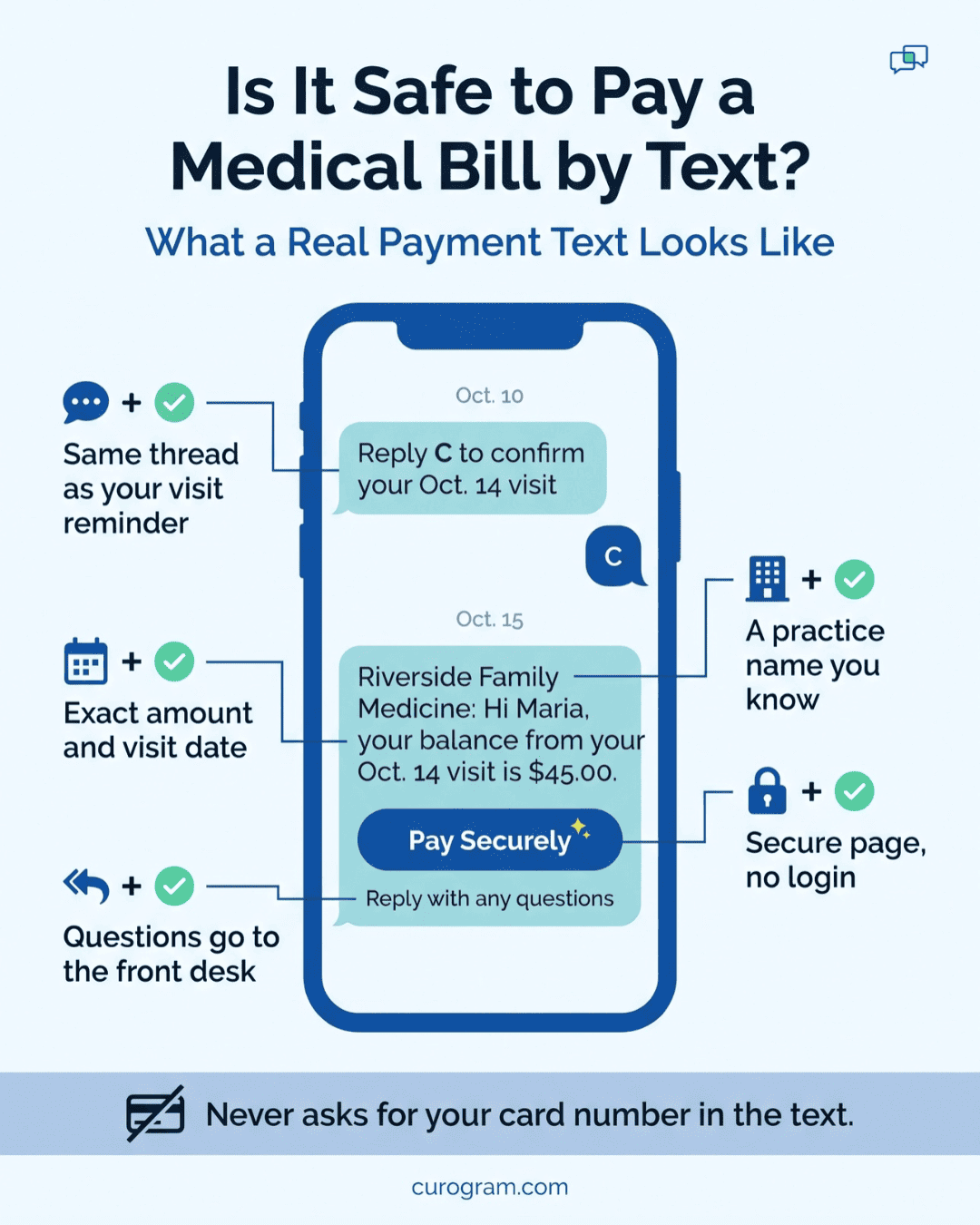
“Riverside Family Medicine: Hi Maria, your balance from your Oct. 14 visit is $45.00. Pay securely here: [link]. Reply here with any questions.”
That sample text is the whole front door.
What Arrives on the Patient’s Phone
A two-tap patient payment experience starts in a thread the patient already knows. Maria confirmed her October visit in that same conversation, from the same number, with the same practice name at the top.
Patients are right to be wary of payment texts. In MGMA’s October 2025 poll on patient collections, one practice leader said texting patients didn’t work because many feared the messages were scams.
A link from an unknown short code looks like every fake toll notice. A link that sits right under last week’s “Reply C to confirm” message looks like the office that just treated them. Your practice name, the visit date, and the exact amount all appear before the patient taps anything.
When patients pay a medical bill by text message, the whole exchange stays in one place they can scroll back through later. If Maria’s spouse asks in December whether the October bill got paid, she can find the receipt in five seconds.
Tap One, Tap Two
Tap one opens a secure payment page in the phone’s browser. It shows the practice name, the visit date, and the amount due. Nothing gets downloaded, and nothing asks for a username.
Tap two pays it once the card details are in. A confirmation lands in the same thread within seconds, and that text becomes the receipt.
If something looks off, the patient replies right there: “What’s this $45 for? I thought my insurance covered it.” Your front desk gets that question as a two-way text. Staff can answer between check-ins with the EOB detail, and the patient doesn’t spend 20 minutes on hold to ask it.
Most balance questions are simple: a copay mixed up with coinsurance, a deductible that reset in January, or a second visit the patient forgot. Staff can clear each one in a two-line reply, and the link is still sitting right above it when the patient is ready to pay.
Where CureMD Fits Behind the Scenes
CureMD stays your system of record. Visits, charges, and the patient ledger all live there, exactly as they do today. Curogram runs alongside it, and staff reconcile text payments into CureMD daily.
Patients never see any of that. What they see is a text, a payment page, and a receipt.
Anyone who prefers the portal keeps using it for bill pay, records, and refills. Patients who would rather call can still reach the AI Contact Center at 2 a.m. and pay in Portuguese if they want. Text-to-pay adds a lane for the big group who will do neither for $45.
Your billing team doesn’t rebuild anything in CureMD to add it. Statement settings, payment posting rules, and portal access stay where they are.
Patients Who Gain the Most
Pew Research Center’s 2026 mobile data shows 98% of U.S. adults own a cellphone, and 91% own a smartphone. Because the link opens a web page, it needs a smartphone. For the small share with a basic phone, the phone line and paper statement still work.
Some patient groups feel the login friction more than others:
- Older patients who text every day but don’t manage passwords get a link with nothing to remember.
- In a multilingual household, a grandchild can read a short text with a dollar amount out loud in seconds. That’s easier than walking a grandparent through a phone menu.
- Behavioral health patients often want to handle billing in private. A text can be paid at home, with no call from a work desk.
- Pediatric families pay copays between practices, games, and pickups, wherever the phone happens to be.
For each of these groups, the barrier is the login, the hold queue, or the timing, and a text link gets around all three.
A $45 Copay, Followed Two Ways
Take one routine follow-up visit. A patient owes a $45 copay, and the front desk misses it at checkout because three people are waiting. This table follows that balance down both paths. Timing is illustrative, but your billing team will recognize every step.
|
Day |
Statement and Portal Path |
Text-to-Pay Path |
|
0 |
Visit ends; copay missed |
Visit ends; copay missed |
|
1 |
Charge posts in CureMD |
Charge posts; staff send the pay link |
|
1 |
Nothing reaches the patient yet |
Patient taps the link at lunch and pays |
|
2 |
Still waiting |
Staff reconcile the payment into CureMD |
|
10 |
First statement mailed ($0.78) |
Closed |
|
40 |
Second statement mailed ($0.78) |
Closed |
|
70 |
Past-due notice; patient calls, upset |
Closed |
Walking the Text Path Step by Step
Day 1 and Day 2 run like this for your biller:
- Pull the day’s new patient balances from CureMD after charges post.
- Send each patient a pay link from Curogram, one at a time or as a batch.
- Watch payments land through the afternoon. Our sample patient pays at 12:20, on her lunch break, and gets her receipt text right away.
- Answer any replies, such as “Is this for the October visit?”, in the same thread.
- On Day 2, match each text payment to its open balance in CureMD during the daily reconciliation pass.
Some patients won’t pay on Day 1. For them, a second text a week later works like a second statement, minus the 78 cents and the days in the mail. It lands in the same thread, right under the first link, so the patient doesn’t have to search for anything.
For our sample patient, the account closes in under 48 hours, and no envelope ever gets printed. On the paper path, the same $45 costs $1.56 in postage, two print runs, and one tense phone call spread across ten weeks.
Curogram Highlight: Text-to-Pay for CureMD Practices
Curogram Text-to-Pay sends a secure SMS payment link for patients into the same thread that handles their appointment reminders and confirmations. Patients pay from their phone’s browser without downloading an app or creating a login.
Security is the first question practices ask about no portal account medical payments. Curogram is HIPAA-compliant and SOC 2 Type II certified, and we sign a Business Associate Agreement with every practice.
Each text holds only the link. Card details go on a protected, PCI-compliant payment page and never appear in the message.
For your staff, the workflow is short:
- Send a pay link to any patient with an open balance, one at a time or in a batch.
- Watch payments come in, with a receipt sent to the patient’s thread right away.
- Answer balance questions as two-way texts in the same conversation.
- Resend receipts anytime from Curogram’s records.
- Reconcile payments into CureMD daily, so CureMD stays your billing record.
Curogram runs alongside CureMD, so nothing about your charts, charges, or ledger changes. Your CureMD Patient Portal and AI Contact Center stay in place for the patients who prefer them. Text-to-Pay reaches the rest of your panel on the phone they already carry.
Conclusion: Make Paying as Easy as Confirming
Your patients already confirm appointments with one reply. Paying a CureMD balance should take about the same effort.
CureMD’s portal and AI Contact Center round out your practice’s tools, and they serve the patients who seek them out. Text-to-pay serves the patient standing in a parking lot with a $45 balance and 40 seconds to spare. Keep CureMD as your system of record. Add the lane patients will actually use.
Start with one question for your front desk this week. How many patients said “I never got the bill” or “I couldn’t log in” in the last month? Every one of those patients has a phone a pay link could have reached.
See the two-tap payment from your patient’s side of the screen. Schedule a Curogram demo and and we’ll walk through a live pay link next to your CureMD workflow.