Turn Lytec Visits Into 5 Stars With a Google Review Text Link
💡 A Lytec Google review text link patients tap after a visit makes leaving a review as easy as opening a text. Curogram sends each CGM Lytec...

8 min read
Mira Gwehn Revilla
:
July 12, 2026
Before a new patient sees your website, most of them see your Google page first.
About 90% of new patient leads check your Google Business Profile before anything else, based on our internal data. That page is your front door, and the reviews on it do a lot of the talking.
So here is the gap. Most of your happy patients would leave a five-star review if you asked. They mean well. Then they reach the parking lot, the day fills up, and the review never happens.
It is not that they are unhappy. Leaving a review just takes work. Find the practice on Google. Sign in. Scroll to the right button. Type something. Each step loses a few more people, and the happiest patients are often the ones you lose.
Your CureMD system already knows the visit happened. It has the phone number and the appointment status. That is everything needed to reach the patient while the good feeling is still fresh.
A CureMD post-visit Google review text for patients closes the gap. One text goes out after the visit.
The patient taps once and lands on your Google profile, ready to review. No app. No searching. No account.
The visit that felt good becomes proof the next patient can see.
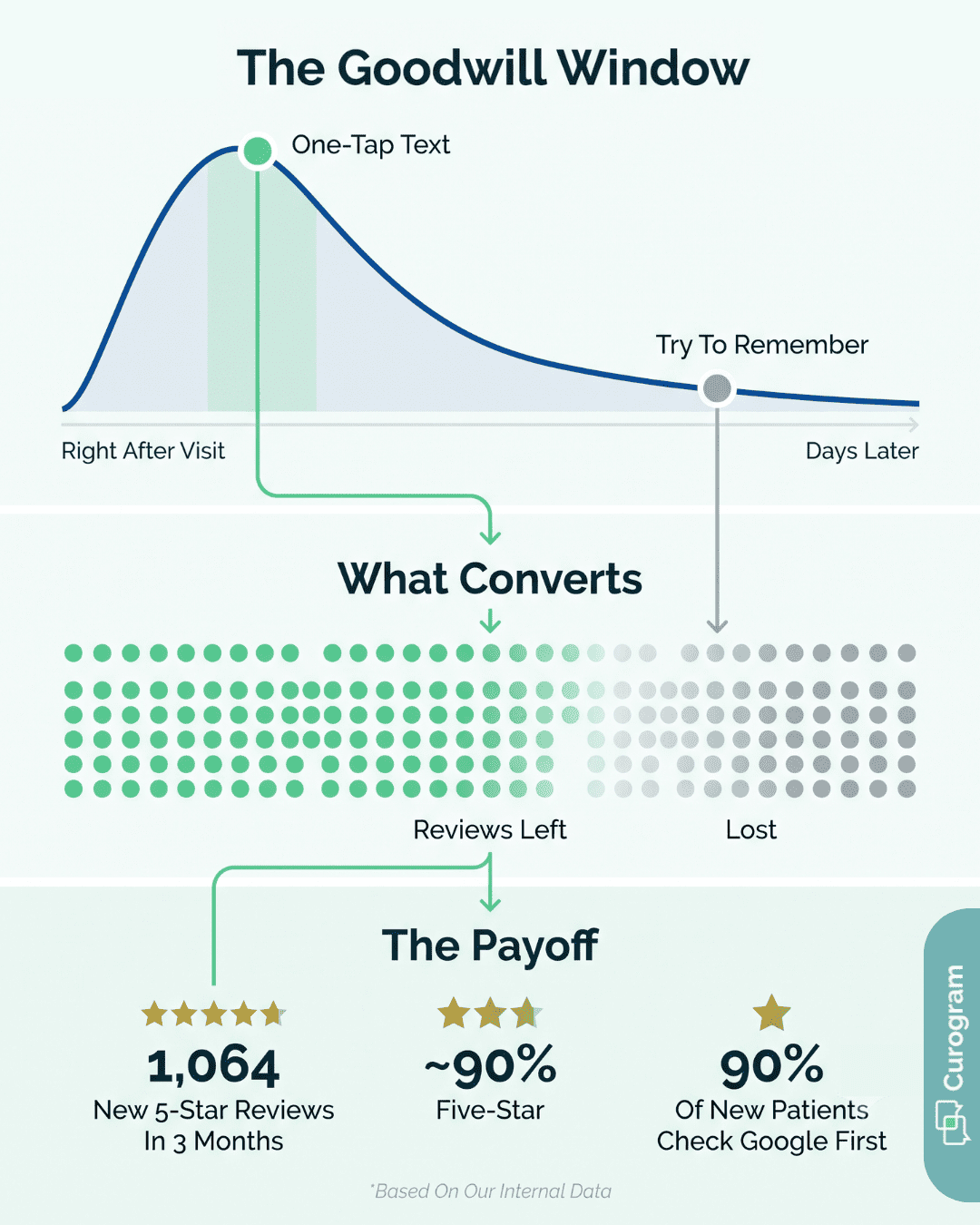
The best time to ask for a review is right after a good visit. The patient feels cared for. Hand them the chance and they would say something kind. That feeling is real, and it fades fast.
By the time they are home, the visit competes with dinner, work, and everything else. The goodwill is still there. The urge to act on it is gone. This is the quiet problem behind thin review counts. The ask comes too late, or it never comes at all.
Say a patient wants to leave a review on their own. Here is the path they face:
|
Step |
What it asks of the patient |
|
Find your page |
Open Google, type the practice name, pick the right listing |
|
Sign in |
Log into a Google account they may not remember |
|
Reach the button |
Scroll past photos and hours to the review section |
|
Write it |
Think of words, add stars, tap post |
Four steps. Each one loses people. A patient who would happily give five stars often quits at step two.
The friction does not fall evenly. Your calmest, happiest patients are the least likely to push through four steps for you. They are not upset. They just have no reason to work that hard.
An upset patient, though, will climb every step gladly. Anger is strong motivation. So the reviews that do get left can skew negative. Your Google page ends up quieter and harsher than the care you actually give.
Think about what is really happening. Dozens of patients leave your office glad they came. That good experience lives in their heads and nowhere else. It is a private scorecard, real but invisible to the person deciding where to book next.
A five-star visit that no one can see does nothing for your reputation. The care was excellent, yet the public record of it stays blank. Until that goodwill reaches a page new patients can find, it wins you no one.
That gap matters because of where new patients look. About 90% of new patient leads see your Google Business Profile before your website, based on our internal data. Google is the front door.
A front door with five reviews from 2021 tells a new patient nothing useful. Easy patient reviews for CureMD practices are not a vanity metric.
They are how the next patient decides whether to call. When your best patients stay silent, that choice gets made on stale, thin proof.

Now run the same happy patient through a different path, with the four steps removed. A text arrives a little after the visit. It is short and friendly, from a number they know is the practice. Inside is one link.
They tap it once and land right on your Google review screen, stars ready. No typing your practice name. No login. No hunting.
The whole thing takes about as long as reading the text. That is a CureMD one-tap review request, and it clears out every step that used to lose people.
Timing is half the battle, and this is where CureMD does the heavy lifting. Your CureMD schedule already tracks each appointment and when it wraps up. Once the visit is marked complete, that status can trigger the message.
So the review text after a CureMD appointment goes out while the patient still feels the care. No one at the front desk has to remember.
There is no end-of-day list to work through. The post-visit review link fires on its own, tied to CureMD, with no app for the patient to download.
The link is not a survey or a portal. It points directly to your Google Business Profile. One tap lets a patient leave a Google review by text, skipping the detour through search entirely.
That direct path is the whole point. Every extra screen is a place to give up. Send patients straight to the review box and the drop-off between "I would leave a review" and an actual review nearly vanishes.
Not every patient is 25 and fluent in apps. A one-tap link matters most for the people who would struggle with the four-step version.
A Google review prompt that reaches each CureMD patient this simply does not screen out your older or busiest patients. Those are the ones with the warmest things to say.
Easy does not mean pushy. Every request is consent-based and opt-out friendly. A patient who would rather skip review texts can say so, and the messages stop.
The text also carries only a link to your public Google page. It holds no health details and nothing tied to their chart. It is HIPAA-compliant by design, so a simple ask stays a simple ask.
One multi-location practice had the problem most clinics do. The care was strong. The Google page did not show it, and feedback stayed scattered and mostly private, based on our internal data.
They switched on automated post-visit review requests tied to their scheduling. The ask went from "sometime, if staff remembered" to "every completed visit, on its own."
Here is what one quarter produced:
|
Metric |
Result in 3 months |
|
New 5-star reviews |
1,064 |
|
Share of reviews at five stars |
~90% |
|
Staff time added per review |
None, fully automated |
Every one of those reviews came from a visit that was already on the schedule.
Here is how a single review happens, start to finish:
No one called them. No one chased them. The only new step for staff was the one they already do, closing out the visit.
Volume is the reason this adds up. A practice seeing 400 patients a month does not need a clever campaign. It needs the ask to reach all 400, every month, without fail.
When even a solid share of those patients tap through, the numbers stack quickly. The practice above hit four figures in a quarter because the request never skipped a visit. Reaching every completed visit is what filled the page.
The payoff shows up where it counts. A prospective patient searches, finds your Google profile, and sees dozens of recent five-star reviews instead of a handful of old ones.
About 90% of new patient leads look at that profile first, based on our internal data. So this is often their first real impression of you.

Most review tools ask staff to do the work. Someone must remember, pull a list, and send the ask. That step gets skipped on busy days, which is most days. Automated Review Requests remove the remembering entirely.
Here is how it runs. Once a CureMD visit is marked complete, Curogram sends the patient a short text a set time later.
The text holds one link to your Google Business Profile. The patient taps it, lands on the review screen, and posts. Staff do nothing beyond closing out the visit they already close.
The timing is the quiet advantage. The message reaches the patient while the visit is fresh, not days later when the goodwill has cooled.
That window is when people are most willing to say something kind, and this is the tool that catches it. You choose how long after the visit the text goes out, so it lands when a patient is most likely to tap.
It also fits the patients you actually treat. An older primary care patient or a parent rushing out of pediatrics can handle one tap. Neither would fight through Google search, a login, and a scroll. One link fixes that.
Control stays with the patient. Requests are consent-based and opt-out friendly, and each text carries only a public link with no health details attached. That keeps the whole thing HIPAA-compliant and low-pressure.
The effect compounds. A practice seeing hundreds of patients a month turns a slow trickle of reviews into a steady, recent stream.
One multi-location client saw 1,064 new five-star reviews in three months, with about 90% of them at five stars, based on our internal data.
You keep running CureMD exactly as you do now. Curogram simply carries each good visit to the page where your next patient is already looking.
Patients do not skip reviews because they are unhappy. They skip them because finding your Google page, signing in, and hunting for the right button is more work than a good day allows. The goodwill is there. The path is missing.
Your CureMD system already holds what matters: the visit happened, and here is the phone number. That is enough to reach the patient while the care still feels fresh. That one text does the rest.
CureMD records the visit. Curogram carries the patient's own voice to where new patients are looking. The result is a Google page that finally reflects the care you give, built from recent, honest, five-star reviews instead of a thin handful of old ones.
This is not a marketing stunt. It is your happiest patients, given a path they will actually use. One tap, no app, no search.
Most patients finish in under a minute, from the moment the text arrives to the posted review. The reviews that were always there in spirit become reviews the next caller can read.
And the payoff lands where new patients decide. About 90% of them check your Google Business Profile before your website, based on our internal data. A full, current page of five-star reviews turns a search into a booked appointment.
If your review count does not match the care your team delivers, the fix is not more effort from your busy front desk. It is a path your patients will take on their own, in one tap, right after the visit.
See how it works with your own CureMD workflow. Schedule a demo to watch the one-tap patient review experience, from the completed visit to the posted five-star review.
The text carries only a link to your public Google page. It holds no health details and nothing tied to a patient's chart. Requests are consent-based, which keeps every review ask compliant and low-pressure.
Calm, satisfied patients have no strong push to act. They mean to review later, then the day fills up and the moment passes. Upset patients, by contrast, stay motivated enough to climb every step.
It goes out shortly after the CureMD visit is marked complete, and you set the exact delay. That timing catches the patient while the care still feels fresh, when they are most willing to tap.
A verbal ask relies on the patient remembering later, at home, on their own device. One tap removes that gap. The link arrives on their phone and opens Google's review screen directly, so follow-through jumps.
Review requests are opt-out friendly. A patient can reply to stop the messages at any time, and they control their texting preferences going forward. The choice stays with them, not the practice.
💡 A Lytec Google review text link patients tap after a visit makes leaving a review as easy as opening a text. Curogram sends each CGM Lytec...

💡 A DrChrono patient Google review text link lets you turn happy patients into 5-star Google reviews in under 30 seconds. Curogram sends an...
1 min read
💡 CureMD automated Google review requests by post-visit text send a review link to each patient right after the appointment, turning private...