10 min read

Let CureMD Patients Pay a Medical Bill by Text, No Portal Login

Let CureMD Patients Pay a Medical Bill by Text, No Portal Login
πŸ’‘ CureMD patients can pay a medical bill by text with no portal login. Curogram texts a secure link that opens the payment page right in the phone's browser, so a patient taps, pays, and moves on.
  • No account to make, no app to download, and no password to reset before paying
  • The link opens a secure, card-safe page, and the texting itself stays HIPAA-compliant
  • Works the same for a $45 copay or a larger high-deductible balance
  • The practice keeps running CureMD for the charge while Curogram carries the pay link
  • Anyone who prefers the CureMD portal can keep paying that way
This ends the export-and-pray. Your team reaches dormant patients fast, and bookings flow back on their own.

A $45 copay is small enough that nobody wants to chase it. A patient means to pay. Then paying means digging up the CureMD portal, resetting a password they made once, and clicking through a few screens β€” so they close the tab and figure they'll get to it later. Later rarely comes.

Your front desk mails a statement, waits, then mails a second one. Eventually somebody has to stop what they're doing and make an uncomfortable call about a balance the patient never actually refused. That's ten minutes of staff time to collect $45 a link could have collected for free.

We've watched this from the billing side for years, and the pattern holds. Patients want to pay. What stops them is the path to paying.

That payment path is what needs fixing, and it can be. Give patients CureMD bill pay with no login, and the same balance that used to sit for months clears in the time it takes to read a text.

That's the whole idea here: closing the space between a patient who wants to pay and a bill they can settle from their phone in two taps. Most of it comes down to one change β€” how the payment link reaches them.

A portal makes the patient come to the bill. A text brings the bill to the patient, on the device already in their hand. What follows shows why balances age, how the two-tap link changes the math, and where it helps most.

The Villain: Why a Small Bill Sits for Months

Portals are built for people who want an account. Most patients paying a copay don't. They saw the doctor, they owe $45, and they'd hand over a card in a second if the reader were right in front of them.

Paying online, though, means finding the right site, remembering which email they used, and resetting a password β€” because almost nobody recalls a portal password set up at one visit a year ago.

Each step is a place to give up. By the time a patient has clicked "forgot password," the odds they finish paying have already dropped. What stops the payment is the login in front of the $45 β€” and it's the first thing a text link removes.

The Put-It-Off Moment

Watch what happens when the statement arrives. A patient opens the mail, sees a small balance, thinks I'll pay that this weekend, and sets the envelope on the counter. Then the weekend fills up. That envelope slides under a stack of school forms and a birthday card.

Two weeks later they honestly can't remember whether they paid it. Nobody decided to skip the bill. It lost a quiet contest against everything else in a busy week, with no easy way to settle it in the ten seconds of attention it briefly had.

A statement asks for a task later; a text asks for a tap now β€” and now is when the patient is actually looking. Paper routes the bill through their whole to-do list before it can be paid, and most small ones never survive that trip.

A Small Balance that Ages for Months

A payable $45 turns into a collections headache one mailing at a time. Providers send out more than three billing statements, on average, before an account gets handed to collections.

Each mailing costs postage and staff time, and each one asks the patient to go find a way to pay all over again. A balance that a two-tap text would have cleared on day one instead ages for 60, 90, or 120 days β€” and its odds of ever being paid fall the whole way down.

Every week it sits, the bill is worth less, because the visit fades and the patient's sense of owing fades with it.

What the Aging Balance Costs your Team

Postage is the small part. Bigger than postage is the queue. A billing person works down a list of people who never refused to pay, prints a third statement, then calls for a card number over a front desk that's already ringing.

Every one of those minutes is spent recovering money that a link could have collected for free on day zero. And a share never comes back at all β€” a balance sent to collections often returns pennies on the dollar after fees.

The work of chasing small balances rarely pays for itself; removing the reason to chase them does. There's a softer cost too. Every extra statement and every card-over-the-phone call is a small friction the patient remembers, and it shapes whether the office feels easy or annoying to deal with next time.

Patients Aren't Refusing to Pay

A stretched billing team can read an aging balance as someone ducking the bill. Usually that's not what's happening. Many patients who hadn't paid online in the past year said they'd likely do it if the option were offered.

That willingness is already there. What's missing is a path short enough to finish in the moment the patient is looking at the bill. Give them that path and most of the "aging balance" problem turns out never to have been about money.

Multiple patients stalled at a portal login screen in a waiting room, mailed medical bills left unopened

The Guide: The Two-Tap Checkout Patients Actually Use

Strip the process down and paying should look like this. A text lands: your balance from Riverside Family Practice is $45, tap here to pay. That's tap one β€” the patient opens the link. It loads a payment page in the phone's browser, card details quick to enter or already saved, and a single button to confirm. That's tap two.

A confirmation shows on screen and a receipt arrives by text. No site to search for, no account, no app store. The patient did the whole thing from the message thread, standing in a grocery line, in under a minute.

Patient payment in two taps is the goal: keep the number of decisions low enough that finishing feels easier than closing the phone. Every extra screen is a door someone walks back out of, so the design cuts the process to the two taps that actually move money.

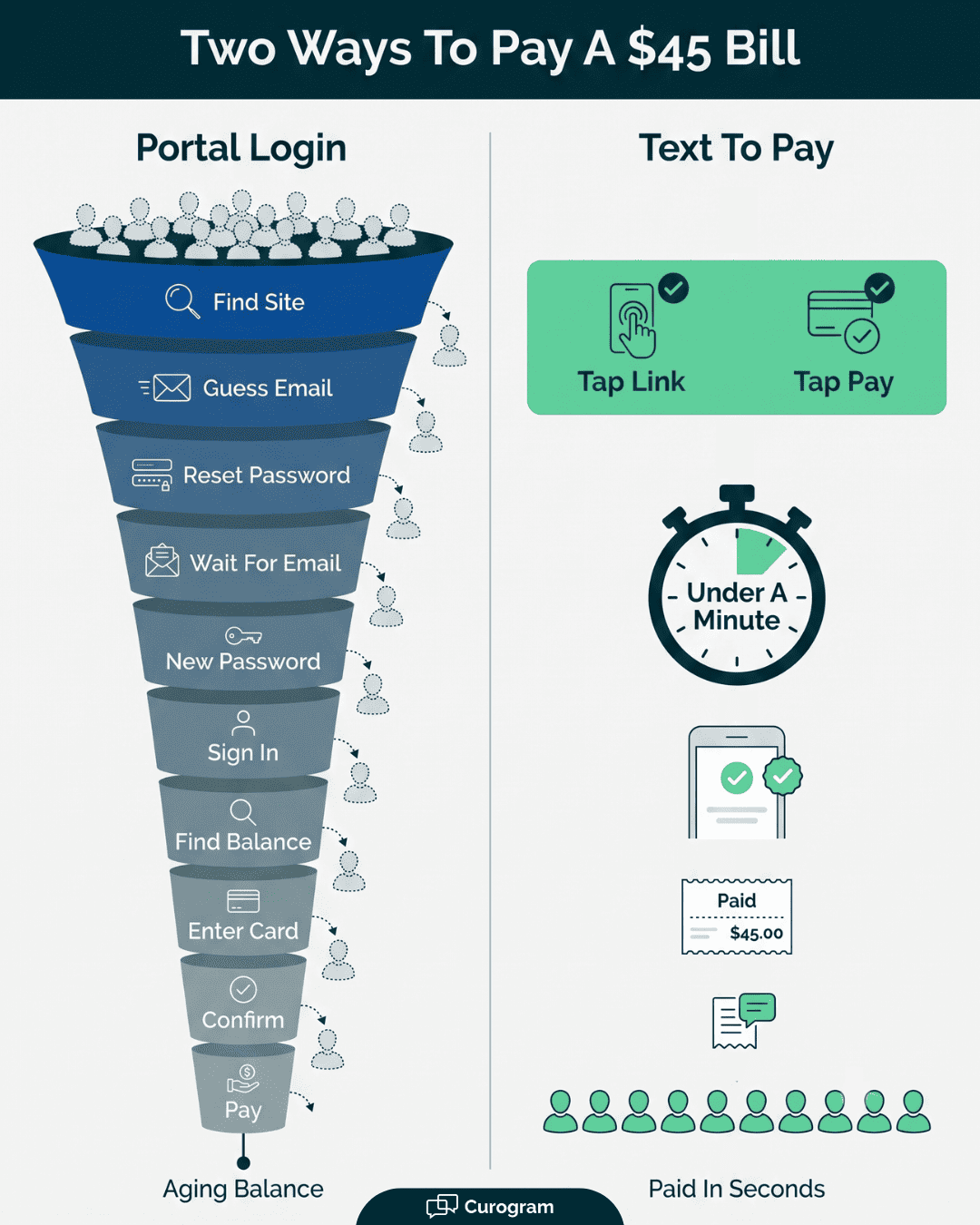
Compare that to the portal version: open a browser, search the practice name, land on a login, guess the email, request a reset, wait for the reset email, set a new password, sign in, find the balance, then pay. Ten steps against two. The count alone predicts who finishes.

The Text Link: What Sits Behind It

A pay-by-text link is plain on the outside and careful on the inside. The message is a normal SMS the patient reads on the lock screen. Tapping it opens a secure, card-safe payment page β€” the same kind of encrypted checkout people trust for other bills.

Card data is handled on that protected page, never typed into a text, and the messaging that carries the link stays HIPAA-compliant. So the patient gets the ease of replying to a friend with the safety a medical payment needs.

Ease and security aren't in tension here; the design does the hard part so the patient never has to think about it. That balance is the whole reason a text link works where a raw payment request in a message would rightly scare people off.

Where CureMD Ends and The Text Begins

Curogram and CureMD split the work cleanly. CureMD holds the visit and the charge β€” it stays the system of record for what the patient owes. Curogram adds one thing on top: the CureMD medical bill text link.

The practice sends the balance out as a text the patient can pay from, right alongside the CureMD workflow the billing team already knows. Staff don't step out of their routine to make it happen, and patients never touch CureMD at all. They get a text and they pay.

That portal still exists for anyone who wants it. A text gives everyone else a door that opens in one tap, so the practice isn't betting collections on whether a patient will rebuild a login they've forgotten.

Built for the Patients Who Stall

Two groups stall most: older primary-care patients and specialty patients on high-deductible plans. Both do better with a text. That old assumption β€” seniors won't pay by phone β€” is out of date.

In a 2025 TrustCommerce survey of 400 healthcare consumers, nearly 60% of adults over 60 said they were at least somewhat comfortable using digital payments for medical bills. Yet 80% of patients weren't sure their provider even accepted them.

A text answers that doubt directly: here's the bill, here's the button. Take a specialty patient owing $600 after a procedure. Paying a balance from their phone the day the charge posts beats a statement that lands three weeks later β€” long after they've filed the visit away and braced for a fight over the amount.

High-deductible balances are exactly the ones that stall, because they're large enough to feel worth "dealing with later" and small enough to forget. Catching that patient the day the charge posts, while the visit still makes sense to them, is when the money is easiest to collect.

Vertical funnel graphic showing portal bill pay drop-off beside a text-to-pay route paid in under a minute

The Success: A Bill That's Easy to Pay Gets Paid

The gap between "meant to pay" and "paid" is mostly timing, and a text closes it. Patients read a text almost the moment it arrives, while a statement waits for the next time they sort the mail.

In a 2023 Salucro survey of 1,348 patients, 51% said a text reminder would prompt them to pay their bill faster. Easy patient payments come from catching people in that short window when the bill has their attention and a card is a tap away.

A balance settled on day zero never becomes a day-90 problem for anyone. Speed here isn't a nice-to-have; the same dollar is far likelier to arrive when the ask reaches the patient while the visit is still fresh in their mind.

That's the quiet advantage of texting the link the same day the charge posts β€” you're asking while the patient still connects the bill to the care they just got.

What Easy Does Across a Full Schedule

One copay cleared by text is a small win. A month of them changes the shape of your receivables.

Take an illustrative example:

A practice sees 30 patients a day who owe a copay, and today most of those small balances drift into the 30-to-90-day column before they're paid.

Move even a third of them to same-day payment by text, and that's roughly 200 balances a month landing on day zero instead of aging on a report. Those dollars were always collectible.

Shifting when they arrive is what tightens cash flow and shrinks the pile the billing team has to work by hand. It compounds because it applies to every routine visit, not a special case.

From Aging Balance to Collected Balance

Follow the same $45 down two routes. Down the statement route it costs three mailings, weeks of waiting, and maybe a phone call, and it might still land in collections.

Down the text route the patient taps twice the afternoon of the visit and it's done. Same patient, same willingness, very different result β€” and the only thing that changed was how the bill reached them.

The $45 copay

Statement route

Two-tap text route

Reaches the patient in

5–10 days by mail

Seconds, by text

Steps to pay

Find portal, reset password, 3+ screens

Tap link, tap pay

Typical follow-up

3+ statements, then a call

A texted receipt

Where it often ends

Aging 60–120 days

Cleared day zero


That's the shift from an aging balance to a collected one, and it repeats across every small copay the practice would otherwise mail into the void.

Fewer Awkward Calls, An Easier Front Desk

The payoff for staff is the call that never has to happen. When balances clear themselves by text, the billing queue shrinks to real exceptions instead of a long list of people who never got around to it.

No chasing, no "can I read you my card number" over a busy front desk, no apologizing for a third statement. Your practice starts to feel like an easy place to do business with β€” you saw the doctor, you got a text, you paid, done.

Patients notice that ease, and it colors how they talk about the office. A billing experience that respects their time earns goodwill the same way a short wait or a friendly front desk does, and that reputation is worth nearly as much as the recovered dollars.

Staff hours freed up go back into the work only people can do: sorting out a denied claim, helping a patient who's confused about a bill, catching the mistake a form can't.


How Curogram Text-to-Pay Clears a Balance in Two Taps

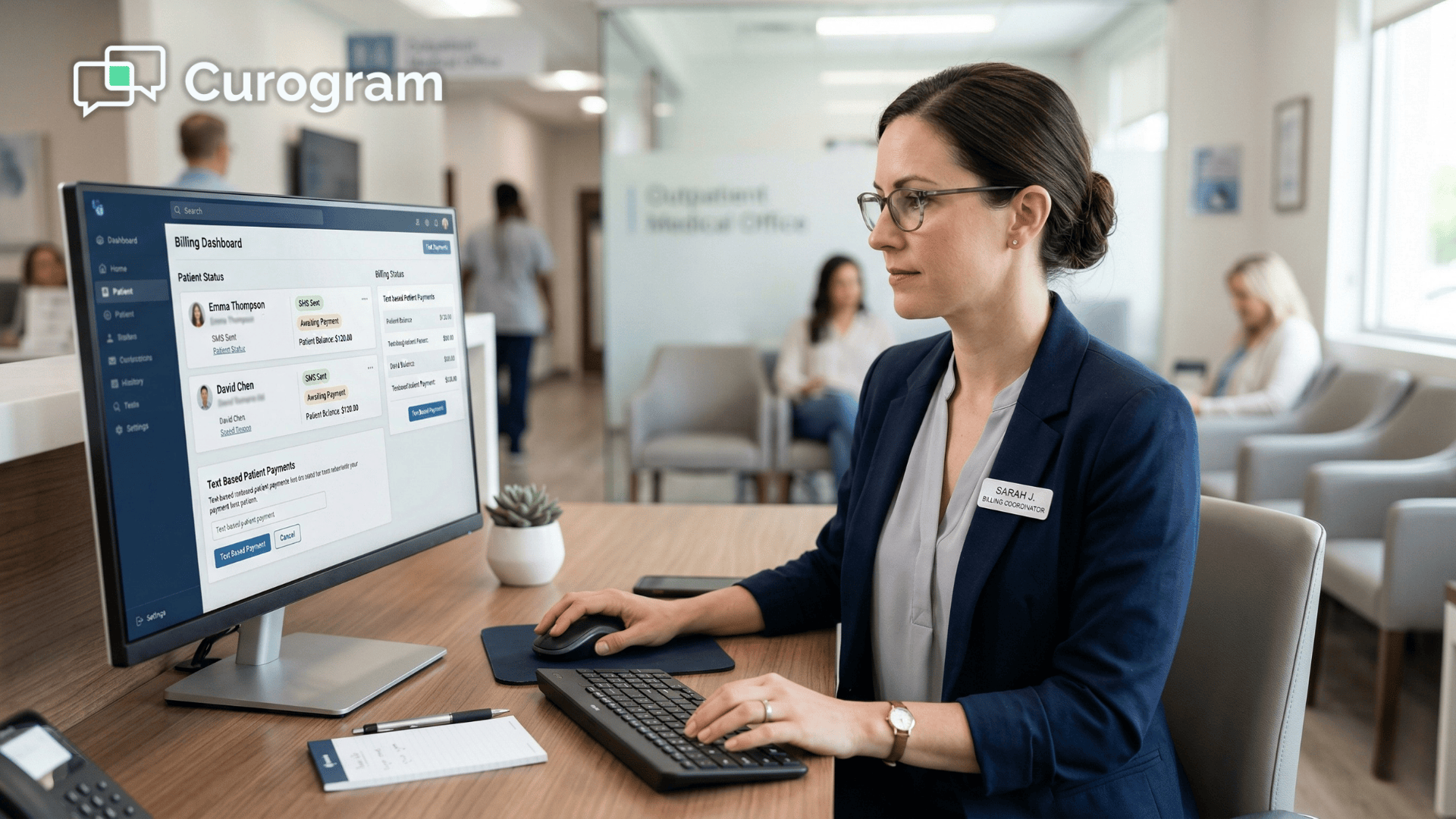
Curogram Text-to-Pay takes the balance sitting in your CureMD workflow and turns it into a text the patient can settle from the lock screen.

The practice sends the amount owed; the patient gets an SMS with a secure link; one tap opens a card-safe page and a second confirms the payment. No portal account, no app, no password reset β€” the three steps that most often kill an online payment are gone.

The link is built for a medical bill, not bolted on. Card details live on an encrypted checkout page, never in the text thread, and the messaging that delivers it stays HIPAA-compliant. Patients get the feel of answering a text with the safety a health payment demands.

We already see how readily patients act on a text they can answer from their phone. Across our clients, more than 75% of appointment reminders get a confirmation reply, based on our internal data.

A pay link rides that same channel patients are used to responding to β€” the difference is that the reply clears a balance instead of confirming a slot.

It fits how your team already works. CureMD stays the record of the charge; Curogram carries the pay link out and the payment back, so staff run their normal routine and patients never log into anything.

Setup doesn't ask your team to learn a second system; the balance you'd normally mail becomes a text instead. The result is a simpler way to pay copay by text: CureMD keeps the books, the patient keeps their phone, and the balance clears before it has a chance to age.

Conclusion: Make Paying as Easy as a Text

Patients pay when paying is easy. A portal login isn't easy, and a mailed statement is easy to set aside β€” which is how small balances end up aging for months behind a step nobody wanted to take.

The fix isn't pressure. It's a shorter path. CureMD records the charge; Curogram delivers the payment link patients actually use, right in the text thread where they already read and reply. Two taps, from the phone in their hand, the day the bill lands.

That's the difference between a balance that clears itself and one your team has to chase with a third statement and an uncomfortable call. Make paying as easy as a text, and most of that chasing stops on its own.

See the patient pay-by-text experience end to end, from the balance in CureMD to the receipt on the patient's phone. 

Book your CureMD integration demo and and we'll show you exactly how it fits the workflow your billing team runs today.


Frequently Asked Questions

How safe is it for patients to pay a medical bill by text?

The text opens a secure, card-safe payment page, so card details go on an encrypted checkout rather than into the message itself. That messaging stays HIPAA-compliant, keeping both the payment and the health data protected.

Why don't patients need a portal account or app to pay?

The link opens the payment page in the phone's own browser, so there's nothing to install and nothing to log into. Skipping the account and password steps removes exactly the points where most patients abandon an online payment.

How does pay-by-text work alongside CureMD portal bill pay?

It's an added option, not a replacement. CureMD stays the record of the charge, and patients who like the portal keep using it. Everyone else gets a text link, so no one is pushed down a payment path they dislike.

Why do small balances age when patients aren't refusing to pay?

Most aging balances come from friction, not unwillingness. A patient sets the statement aside, forgets the portal password, and the bill loses a quiet contest against a busy week. Shorten the path and that same patient pays right away.

How do older patients handle paying a bill by text?

Well, usually β€” the worry that seniors avoid digital payments is dated. A 2025 TrustCommerce survey found nearly 60% of adults over 60 are comfortable paying medical bills digitally. A plain link with one button removes the guesswork for them.


Pay Your NextGen Bill via Text | Two Taps, No Login, No Paper

Pay Your NextGen Bill via Text | Two Taps, No Login, No Paper

πŸ’‘ NextGen patient pay bill text message powered by Curogram's Two-Tap Payment lets patients settle their balance from a single text β€” no portal...

Read More
Fix Your Cerbo EHR Patient Payment Experience With Text-to-Pay

Fix Your Cerbo EHR Patient Payment Experience With Text-to-Pay

πŸ’‘ A great patient payment experience for Cerbo EHR means patients can pay fast. Text-to-pay makes billing frictionless by skipping the portal...

Read More
Pay a Medical Bill by Text β€” No Portal Login

Pay a Medical Bill by Text β€” No Portal Login

πŸ’‘With CollaborateMD, patients can pay a medical bill by text with no portal login. The secure link lands right on their phone. Two taps settle the...

Read More