

8 min read
Pay Your NextGen Bill via Text | Two Taps, No Login, No Paper
Aubreigh Lee Daculug
:
April 2, 2026
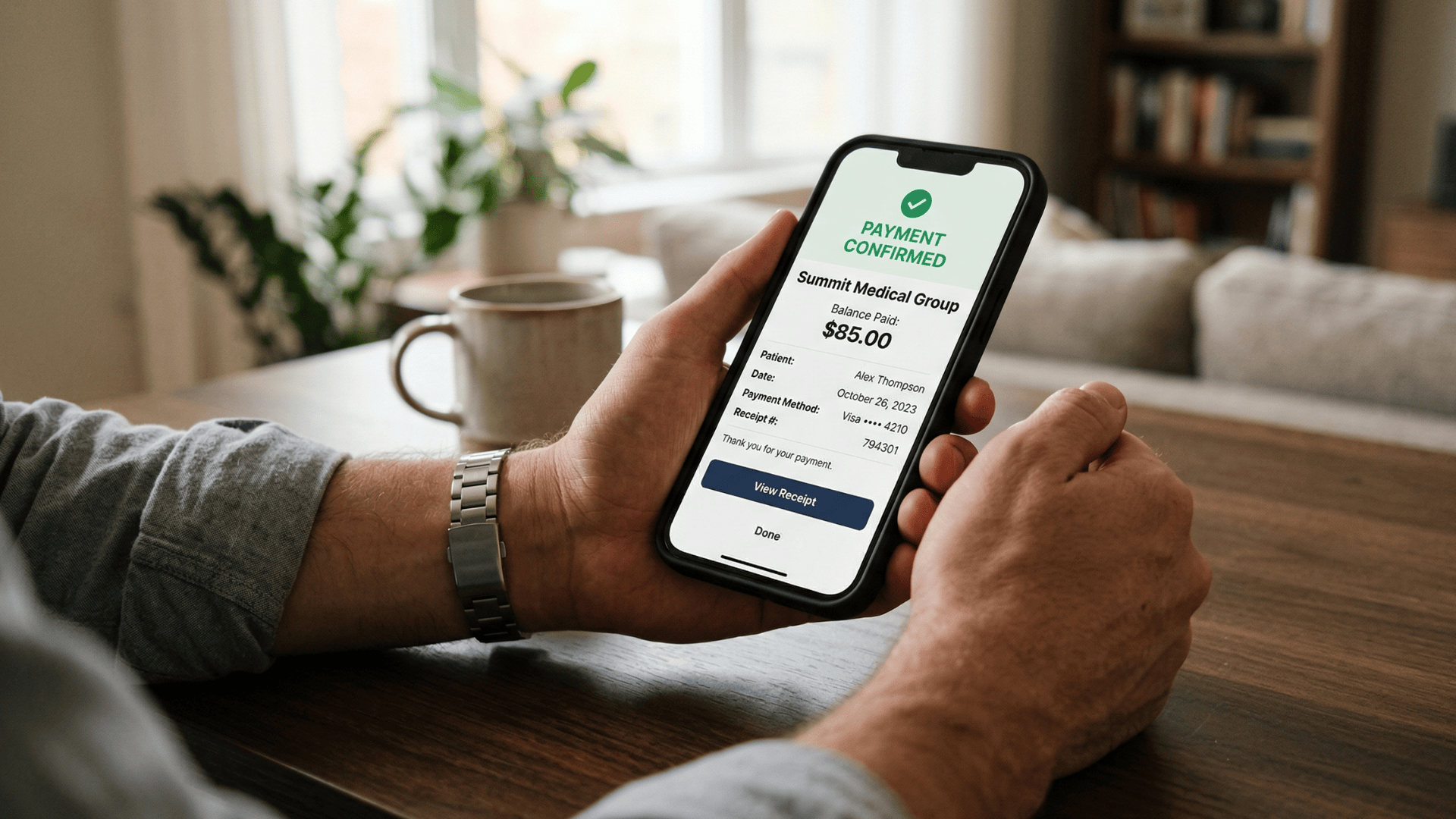
The patient receives a text from their practice's known number, taps a secure payment link, and confirms payment on a mobile-optimized page.
The entire transaction takes about 15 seconds.
For NextGen Enterprise practices, this means shorter collection cycles, less staff time on billing calls, and a patient experience that finally matches how people pay for everything else in their lives.
You've probably heard it before:
"Patients want to pay. They just don't."
That's not quite right. Patients do want to pay their medical bills. But the process of actually doing it is so loaded with friction — paper statements, forgotten portal passwords, 20-minute hold times — that "I'll deal with it later" becomes the path of least resistance.
And later turns into never.
For a NextGen Enterprise practice, this isn't a small inconvenience. It's a collections problem that compounds month over month, balance by balance, patient by patient.
The revenue is yours. It's already been earned. But it's sitting uncollected because the bill-to-payment experience is stuck in 2003.
Think about this. Your patients pay rent through an app.
They split dinner in three seconds. They order groceries from the parking lot of the grocery store. Then they receive your paper statement, dig through a junk drawer looking for stamps, and give up before the envelope is sealed.
That's the gap you're dealing with.
This article is for CFOs, billing managers, and patient experience directors at NextGen Enterprise practices who are tired of watching collectible revenue age into write-offs.
It's about a patient text payment NextGen Enterprise practices are using to close that gap — and what happens to your collections timeline when paying a medical bill takes two taps and 15 seconds.
The problem isn't your patients. It's the channel.
Let's start there.
The Bill They Can't Pay Easily — Even When They Want To
The paper statement doesn't fail because patients are unwilling. It fails because paying requires too many steps at a moment when no one is motivated to take them.
The statement arrives two to four weeks after the visit. By then, the appointment feels distant, the insurance EOB is confusing, and the bill lands in a stack of mail that gets sorted, ignored, and eventually shuffled into a drawer.
The patient knows it's there. They intend to handle it. They don't.
Three Channels. Three Dead Ends.
And it's not just the paper statement.
Every standard payment option your practice offers creates its own version of the same problem:
- Paper statement: Arrives 2–4 weeks post-visit. Requires a check, a stamp, and motivation the patient no longer has. Most end up in a drawer.
- Patient portal: NextGen's PxP or FollowMyHealth offers online payment — but only if the patient remembers credentials from a visit months ago. Most hit a password reset wall and abandon by step three.
- Billing phone line: Hold times at busy multi-location practices can stretch 10 to 20 minutes. The patient recites their date of birth, account number, and card info to a staff member who could be working a denial instead.
Each channel looks like a solution on paper. In practice, they all create the same result: a patient who intended to pay but didn't.
The Compounding Problem Nobody Talks About
Here's what makes this so costly:
Every failed payment attempt reduces the likelihood that the next one succeeds.
The patient who ignores the first statement is less likely to open the second.
The patient who gave up on the portal doesn't try again in 30 days.
Each deferral moves the balance further from your bank account and closer to a write-off.
Multiply that across hundreds of patients each month. The numbers get uncomfortable quickly.
A practice seeing 2,000 patients per month with an average patient balance of $85 and a paper statement collection rate of 20% collects about $34,000 in patient payments each cycle.
If text-to-pay improves that collection rate to 40% — a conservative estimate based on digital payment engagement — that's $68,000 collected.
The same balances. The same patients. Just a different channel.
The difference is friction. Remove it, and the money moves.
What Happens to Collections When the Friction Disappears
Paper statements have an 80% non-collection rate. That's not a typo. The channel that most practices still use as their primary billing tool fails to collect four out of every five balances it generates.
Text messages, by comparison, have a 98% open rate. Most are read within three minutes of receipt. That's not a marginal improvement — it's a different category of patient engagement.
Here's what that looks like in practice.
A billing manager at a 15-provider NextGen Enterprise group practice found their paper statement cycle averaged 47 days from statement generation to payment — when payment happened at all.
After implementing text-to-pay, patient balances under $200 were being resolved in an average of 31 hours. The collection rate on those balances increased from 22% to 39% in the first 90 days.
That compression of the collection cycle has a direct effect on cash flow. Balances paid in 31 hours don't age into 90-day AR. They don't require secondary statements or collections agency involvement.
The cost to collect drops alongside the time to collect.

What This Means for Your Billing Team
The pay NextGen bill via text no portal no login no paper statement workflow doesn't just improve collections — it changes how your billing staff spends their day.
Every patient who pays via text is a patient who doesn't call the billing line.
Consider what that shift actually frees up:
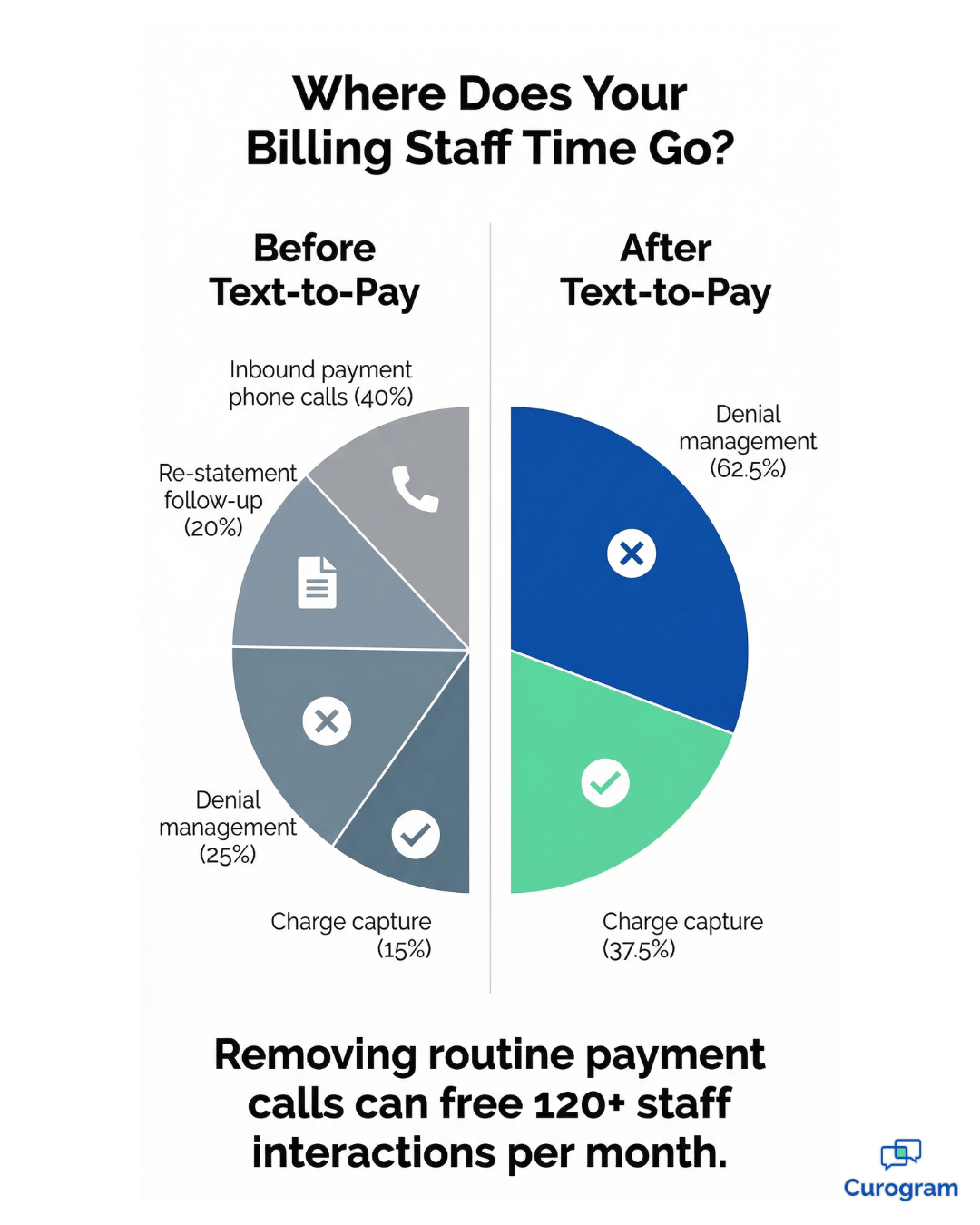
- Fewer inbound payment calls means less time spent verifying account numbers and reading card details over the phone
- Billing staff can redirect that capacity toward denial management, charge capture, and appeals — higher-value work that directly affects net revenue
- Reduced re-statement volume cuts print and postage costs that quietly compound over months
If your practice handles 300 billing calls per month and 40% are routine payment transactions, removing that volume frees 120 staff interactions monthly for work that actually requires human judgment.
A Real-World Collection Comparison
| Payment Channel | Avg. Collection Rate | Avg. Days to Payment | Cost per Statement |
|---|---|---|---|
| Paper statement | 20–25% | 30–60 days | $0.80–$1.50 |
| Portal payment | 15–20% | 7–30 days | $0.00 (no adoption) |
| Billing phone call | Variable | Same-day | High staff cost |
| Text-to-pay (Curogram) | 35–45%+ | 24–48 hours | Pennies per text |
The math makes the decision for you. The question isn't whether text-to-pay improves collections. It's how quickly you can make the switch.
What Actually Makes Two-Tap Payment Work
The solution isn't a better portal. It isn't a friendlier paper statement. It's meeting patients where they already are — their text inbox.
Curogram's pay NextGen bill via text message workflow is built around one principle:
The fewer steps between "I received a bill" and "I paid a bill," the higher the collection rate.
The patient receives a text from their practice's known number — the same number they've already seen on appointment confirmations and check-in reminders.
The message is clear:
"Your balance with [Practice Name] is $[amount]. Tap to pay securely."
That's it. No preamble. No login instructions. No portal directions.
The patient taps the link, lands on a mobile-optimized payment page branded with the practice's name, enters their card or uses their browser's saved payment method, and confirms. Two taps. 15 seconds. Done.
There's no app download, no account creation, no password to remember. The interaction is as simple as paying for a rideshare.

Smart Reminders That Don't Feel Like Harassment
Not every patient pays from the first text. Life happens. But unlike a paper re-statement — which costs another $0.80 to $1.50 and arrives weeks later — a text reminder costs pennies and arrives instantly.
Curogram's Smart Payment Reminders send configurable follow-up texts to patients who haven't completed payment.
The reminder links back to the same two-tap flow, so there's no additional friction. Patients who intended to pay but got distracted get a gentle nudge, not a collections call.
Patients can reply STOP at any time. The cadence is designed to be helpful — not aggressive.
The outcome is better collections with a better patient experience, which is not a trade-off you usually get to make in billing.
Why Patients Actually Trust It
Text messages from a known number feel safe in a way that email invoices from unknown senders don't.
When your patient receives a payment text from the same number they used to confirm their appointment, it carries the credibility of that relationship.
The payment link opens a PCI-compliant, branded page — not a generic third-party processor. The practice name is visible. The balance is clearly stated. Nothing is ambiguous.
For patients in diverse demographic groups, this matters enormously. Patient text payment NextGen Enterprise practices have implemented shows that trust in the sender directly correlates with payment completion rates.
Three things make the experience feel trustworthy rather than suspicious:
- The text comes from a number the patient already recognizes — their practice's line
- The payment page displays the practice's branding, not a generic processor
- No sensitive health information appears in the message itself — just the balance and a secure link
That combination removes the hesitation that kills email-based billing links. The patient isn't guessing whether it's legitimate. They already know.
Built for Every Patient — Not Just the Tech-Savvy Ones
This is worth saying plainly: text-to-pay works for everyone who has a phone that receives texts.
Older patients who avoid apps, patients in rural or lower-bandwidth areas, patients with no interest in patient portals — all of them can receive a text and tap a link.
For large ambulatory NextGen practices serving diverse populations across multiple specialties, that inclusivity is an operational advantage.
You're not designing a payment experience for your most tech-forward patients. You're designing one that works for every patient — and text achieves that in a way that portals and apps simply cannot.
Stop Making Your Patients Work for the Privilege of Paying You
The NextGen patient mobile payment text link model isn't a futuristic idea. It's the payment experience your patients are already expecting because they use it everywhere else.
Your patients don't write checks to renew subscriptions.
They don't call a phone line to pay for a meal. They tap, confirm, and move on.
Your medical bill is the only transaction in their lives that still requires finding a stamp or remembering a password from three years ago.
That gap between expectation and experience doesn't just cost you in collections. It costs you in patient satisfaction, loyalty, and the kind of goodwill that drives retention and referrals.
A patient who dreads your billing process is less likely to become a returning patient and less likely to recommend your practice.
A patient who pays in 15 seconds from a text? That's a different story.
Curogram's Two-Tap Payment meets patients where they are, removes every barrier between receiving a bill and paying it, and integrates directly with your NextGen Enterprise workflow.
The payment posts. The balance clears. The patient feels good about the interaction.
Schedule a demo with Curogram today to see how two taps can transform patient collections across your NextGen network. Your AR is waiting.
Frequently Asked Questions
Curogram's payment link opens a PCI DSS-compliant payment page. Card data is processed through certified payment infrastructure and is never stored on Curogram's servers. The payment page is encrypted with TLS and displays the practice's branding for patient trust. The text message itself contains no sensitive payment information — only the practice name, balance amount, and a secure link. Patients can verify the sender as their practice's known texting number.
Curogram's payment interface can be configured to support partial payments, allowing patients to pay a portion of their balance via text. For organizations that offer formal payment plans, the text-to-pay link can direct patients to the appropriate arrangement workflow. Patients can also reply to the payment text with questions about their balance, and the conversation routes to billing staff through the Curogram unified inbox for real-time assistance.
No. Curogram's Two-Tap Payment requires no app download, no account creation, and no login. The payment link opens in the patient's default mobile browser — Safari, Chrome, or any standard browser. The patient enters their card information, or uses a saved payment method through their browser's autofill, taps confirm, and the payment is complete. The entire interaction is designed to have zero barriers between receiving the text and completing the payment.
Curogram integrates with NextGen Enterprise to pull patient balance information and trigger payment texts automatically after insurance adjudication. Once a patient completes payment, the transaction is recorded and reconciled within the practice's billing workflow. There is no manual step required from billing staff to initiate or log the payment — the system handles the handoff. For practices already using NextGen as their primary practice management platform, the integration is designed to work alongside existing workflows rather than replace them.
Any reply from the patient routes directly into Curogram's unified inbox, where a billing staff member or front desk coordinator can respond. If the patient has a question about their balance, wants to dispute a charge, or needs to arrange a different payment amount, the conversation happens in the same thread — no phone call required. This two-way channel keeps billing communication organized, documented, and handled without pulling staff away from other tasks.