Automated Appointment Reminder Workflows for Meditab IMS Teams
💡 Automated appointment reminder workflows for Meditab IMS teams reduce missed visits and help clinics run more smoothly. These systems send text...
12 min read
Mira Gwehn Revilla
:
February 18, 2026
Picture this. It's 9 AM on a Monday. Your front-desk team has 47 patients on tomorrow's schedule. Instead of greeting the people walking through the door, they're hunched over the phone, dialing number after number, leaving voicemail after voicemail. Sound familiar
For most practices using CollaborateMD, the morning call list is a daily ritual that nobody enjoys. Your staff spend their best hours on a task that a text message could handle in seconds. And the worst part? Most of those calls go straight to voicemail anyway.
Automated appointment confirmations in CollaborateMD change this entire picture. When you connect Curogram to your CollaborateMD scheduler, every patient on tomorrow's list gets a 2-way SMS reminder.
They tap "Yes" to confirm. The status updates in your schedule. No call needed. No chart note. No wasted time.
This is what an exception-based workflow looks like. Instead of calling every single patient, your staff only step in when someone says "No" or asks a question. The rest takes care of itself.
The result? Practices that eliminate manual reminder calls save an average of 2 hours per day at the front desk. That's 2 hours your team can spend checking insurance, collecting past-due balances, or simply being present for the patients in your lobby.
Atlas Medical Center saw their medical practice staff productivity jump by 30% after making this switch. They didn't hire more people. They just stopped asking their people to do robot work.
In this article, we'll walk through what the old call-list grind really costs your team, how exception-based management works, and what a happier, more productive front desk looks like in practice.
Every medical practice knows the routine. Someone prints out tomorrow's schedule, grabs a highlighter, and starts working down the list. For the next two hours, your front-desk team dials number after number, trying to reach patients who may or may not pick up.
This is the call-list grind, and it's one of the biggest time drains in any practice running CollaborateMD:
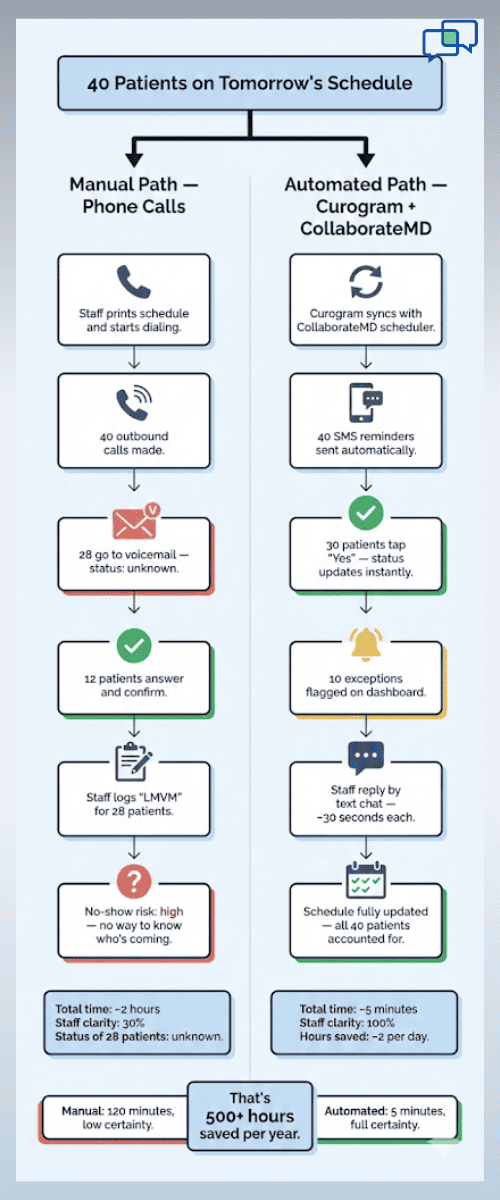
Let's break down what this looks like in real terms. Say, your practice sees 40 patients per day. Your staff needs to confirm each one. Even if each call only takes 3 minutes (including dialing, waiting, leaving a message, and logging the result), that's 120 minutes of pure phone work. Two full hours, gone before lunch.
And those calls don't happen during downtime. They happen between 9 AM and 11 AM, the busiest part of the morning. Patients are checking in. Insurance questions are piling up. The phone is ringing with new appointment requests.
But your front desk can't handle any of it because they're buried in outbound calls. This is prime staff time spent on the lowest-value task in the office.
Here's what makes it even worse: Most of those calls never connect. Studies on patient phone outreach show that the average answer rate for outbound calls from medical offices hovers around 30%. That means 7 out of 10 calls end up in voicemail.
So your staff member leaves a message. They type "LMVM" (left message on voicemail) into the chart note. And then they wait. They have no idea if the patient heard the message. They don't know if the patient plans to show up. The chart still says "unconfirmed."
Now, multiply that by 28 unanswered calls per day. That's 28 patients your team has zero clarity on. It's a guessing game dressed up as a workflow.
Some practices try to solve this by calling a second time. That doubles the call volume without doubling the results. Others try calling the day before and the morning of. Same problem, twice the effort.
The voicemail void doesn't just waste time. It kills your ability to plan. You can't fill a slot if you don't know it's open. You can't prep for tomorrow if you don't know who's coming.
This is the part that most practice managers miss. The problem isn't just that calls take time. It's what that time could have been used for instead.
Every minute your staff spend dialing a patient who would have shown up anyway is a minute not spent on work that moves the needle. Think about it:
That's time not spent running insurance checks for tomorrow's patients. It's time not spent calling on past-due balances. It's time not spent helping the patient standing at the window who needs to reschedule a follow-up.
In a typical practice, insurance verification issues cause more revenue loss than no-shows. A rejected claim can mean $150 to $300 lost per visit. But your staff can't catch those issues if they're trapped on the phone confirming patients who already plan to come.
When you look at the call list through this lens, the cost isn't just staff hours. It's lost revenue, lower patient satisfaction, and a front desk that feels like it's running in circles.
This is exactly why CollaborateMD scheduler automation matters. It removes the busywork so your team can focus on the work that actually grows your practice. The call-list grind isn't just outdated. It's actively holding your front desk back.
The goal isn't to make calls faster. It's to stop making most of them altogether. That's the core idea behind exception-based management, and it's the shift that changes everything for practices using automated appointment confirmations in CollaborateMD.
Here's the simple version: Curogram connects to your CollaborateMD scheduler and pulls tomorrow's appointment list. It then sends each patient a 2-way SMS reminder at the time you choose (most practices use 24 to 48 hours before the visit).
The patient gets a text that says something like: "Hi Sarah, you have an appointment with Dr. Patel tomorrow at 10:15 AM. Reply YES to confirm or NO to cancel."
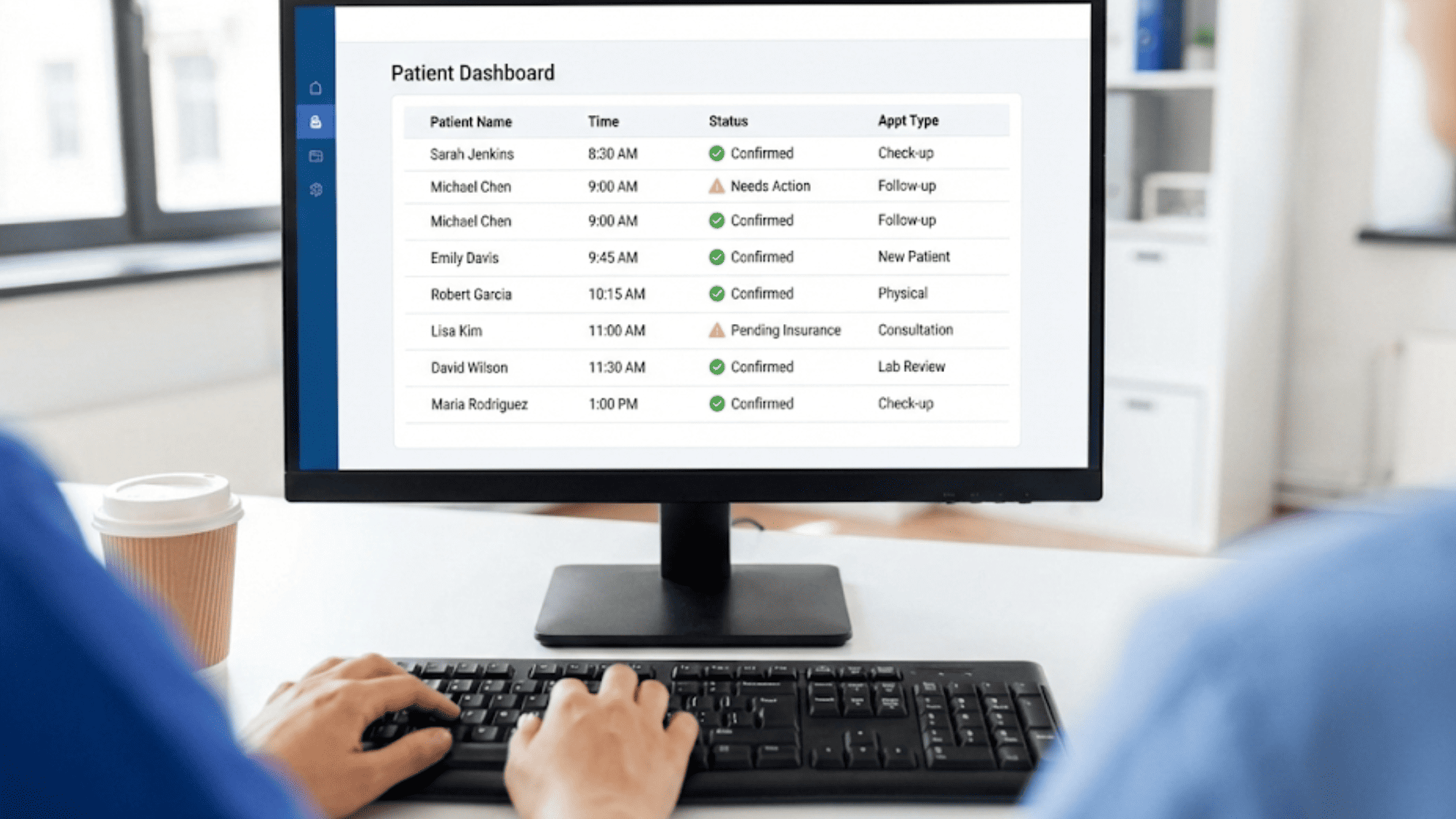
Sarah taps "YES." Done. Curogram writes the confirmed status back to CollaborateMD. A green checkmark appears on the schedule. No one on your staff had to lift a finger.
This is the "happy path," and it covers roughly 75% of your patients. Three out of four people on your schedule will simply confirm with a single tap. The entire process, from reminder sent to status updated, takes seconds with zero staff effort.
That's the power of CollaborateMD scheduler automation. The system handles the bulk of the work, and your team only deals with what the system can't resolve on its own.
So what about the other 25%? That's where the exception-based model really shines. Curogram's dashboard flags every patient who doesn't follow the happy path. If a patient replies "No," your team sees it right away.
If someone texts back "Can I move to Thursday?" that message shows up as an alert. If a patient asks a question like "Do I need to fast before my lab work?" it appears in the same place.
Your staff don't need to check every patient. They only look at the dashboard when there's something to act on. Think of it like a pilot's control panel. Everything is green until something needs attention. Then you deal with that one thing.
This is a total flip from the old model. Before, your team had to touch every single patient. Now, they only touch the ones who need help. It's the difference between making 40 calls and handling 10 alerts.
Here's another part that saves major time: Even when a patient does need a follow-up, your staff don't have to pick up the phone.
Let's say a patient replies "No, I need to reschedule." In the traditional workflow, a staff member would call that patient, wait for them to pick up (or leave another voicemail), discuss options, and book a new slot. That single interaction could take 5 to 7 minutes.
With Curogram, your staff simply reply by text. They open the chat, type "No problem! We have openings on Thursday at 2 PM or Friday at 9 AM. Which works for you?" The patient texts back their choice. Done in under a minute.
This is where you start to see how the time savings add up. Instead of 40 phone calls at 3 minutes each, you're looking at maybe 10 text exchanges at 30 seconds each. That's 5 minutes of texting versus 2 hours of calling.
And here's the bonus: patients prefer it. Most people would rather get a quick text than a phone call during their workday.
It's less disruptive, faster, and they can respond when it's convenient. This kind of shift can reduce front desk burnout and help your team feel less like a call center and more like a care team.

Switching from manual calls to automated appointment confirmations in CollaborateMD doesn't just save time. It changes how your front desk operates, how your staff feel about their jobs, and how well your practice runs day to day.
Let's look at what actually changes when you make this shift:
Ask any front-desk worker what their least favorite task is. Chances are, making confirmation calls will be near the top of the list. It's repetitive, thankless, and feels like something a machine should be doing. Because it is.
When your staff spend two hours every morning doing the same thing, saying the same script, and leaving the same voicemails, it wears them down. It doesn't matter how much they love working with patients. The call list makes the job feel robotic.
This kind of repetitive work is one of the top drivers of staff turnover in medical offices. When people feel like their skills aren't being used, they start looking for jobs where they matter more. Hiring and training a new front-desk employee can cost a practice thousands of dollars, not to mention the disruption during the transition.
Removing that daily grind has a real effect on morale. Staff who no longer dread the morning call list report feeling more engaged and more valued. They're free to use their people skills, their problem-solving ability, and their clinical knowledge for tasks that actually require a human touch.
Think about what your front desk was hired to do. They were hired to help patients navigate their care, answer complex insurance questions, and keep the office running smoothly. They weren't hired to dial phone numbers for two hours straight.
When you reduce front desk burnout by taking away the most tedious task, everything else gets better. Staff are more patient with the people at the window. They handle unexpected issues with more energy. They stay longer in their roles.
Manual processes always come with human error. It's not a knock on your staff. It's just how repetitive data entry works.
|
Here's a common scenario: Your staff member calls a patient. The patient says "Yes, I'll be there." The staff member hangs up and moves to the next call. In the rush, they forget to change the status in CollaborateMD from "unconfirmed" to "confirmed." Now the schedule shows a patient as unconfirmed even though they already said yes. |
This seems small, but it creates real problems. Another staff member sees the unconfirmed status and calls the patient again, wasting more time and annoying the patient.
Or the provider looks at tomorrow's schedule and sees five "unconfirmed" slots, so they tell the front desk to squeeze in extra patients. When the original patients all show up, the schedule is overbooked and everyone is stressed.
With Curogram's automated write-back to the CollaborateMD scheduler, this never happens. When a patient confirms by text, the status updates instantly. There's no step for a human to forget. The schedule always reflects reality.
This also helps with reporting. When your data is clean, you can actually trust your confirmation rates, your no-show rates, and your daily patient counts. You can spot trends and make better decisions about scheduling templates, staffing levels, and overbooking policies.
Clean data doesn't sound exciting. But if you've ever made a staffing decision based on bad numbers, you know how much it matters.
Let's talk about what all of this adds up to in practice:
Atlas Medical Center is a multi-provider practice that switched from manual confirmation calls to automated appointment confirmations with Curogram. The results were clear. Their staff capacity increased by 30%, and they didn't add a single new hire.
What does a 30% lift in medical practice staff productivity actually look like? Let's put some numbers to it:
If your front desk has three full-time staff members, each working 8 hours a day, that's 24 total staff hours per day. A 30% productivity gain means you're getting the output of about 31 staff hours from the same three people. That's like adding a part-time employee without the payroll cost.
In Atlas Medical Center's case, this extra capacity let them take on more patients as the practice grew. They didn't need to hire additional front-desk staff to handle a larger schedule. The same team absorbed the growth because they weren't spending hours on the phone every morning.
|
Here's another way to look at it: If your practice saves 2 hours per day on confirmation calls, that's 10 hours per week. Over a year, that's roughly 500 hours. At an average front-desk hourly rate of $18, that's $9,000 in recovered labor per year per staff member. For a three-person front desk, that's $27,000 in productivity gained annually, without spending a dime on new hires. |
But the real payoff isn't just the dollar amount. It's what those hours get used for. Practices that reclaim this time typically reinvest it in tasks that drive revenue and patient satisfaction: insurance verification, balance collection, patient check-in support, and same-day scheduling for cancelled slots.
The 30% lift isn't a theoretical number. It's what happens when you stop wasting skilled labor on a task that software handles better, faster, and more accurately.

When you combine better morale, fewer errors, and a 30% boost in capacity, you get a front desk that runs like it should. Staff are focused on the patients who need them. The schedule is accurate. The team has room to breathe.
This is the shift that practices feel most once they adopt CollaborateMD scheduler automation with Curogram. It's not just about the reminders. It's about giving your team back the time and energy to do their best work.
Your front-desk staff didn't go through training to become a phone bank. They were hired for their empathy, their attention to detail, and their ability to solve problems on the spot. Making 40 confirmation calls every morning wastes all of that.
When you set up automated appointment confirmations in CollaborateMD through Curogram, you're not replacing your team. You're freeing them. You're shifting them from a call list to a care list.
The math is simple. Most patients, around 75%, will confirm with a single text. The rest can be handled through quick chat exchanges that take seconds, not minutes. Your staff stop spending 2 hours a day on the phone and start spending that time on the patients right in front of them.
That's how you improve the in-office experience without adding headcount. That's how you reduce front desk burnout without lowering expectations. And that's how you boost medical practice staff productivity by 30% without burning anyone out.
The technology exists right now. It works with your current CollaborateMD setup. And it takes the busywork off your plate so your team can do the work that actually matters.
Why Curogram Is Built for CollaborateMD Practices
Curogram isn't a generic reminder tool bolted onto your system. It was built to work with practice management platforms like CollaborateMD from the ground up.
The integration is direct. Curogram syncs with the CollaborateMD scheduler in real time, pulling your appointment data and sending 2-way SMS reminders without any manual exports or imports.
When a patient confirms, the status writes back to your schedule automatically. Your team sees the green checkmark without clicking a thing.
This is what sets Curogram apart from tools that just send a one-way text and leave your staff to update the chart by hand. With Curogram, the loop is closed. The reminder goes out, the patient responds, and the schedule reflects the answer.
Curogram also gives your staff a single dashboard to manage the exceptions. Every "No," every "Can I reschedule?" and every patient question shows up in one place.
Your team can reply by text in seconds, right from the same screen. There's no switching between systems, no hunting through email, and no need to pick up the phone.
For practices that want to go further, Curogram also pairs automated reminders with secure intake forms, text-to-pay, and HIPAA-compliant messaging. That means you can send a confirmation reminder, a pre-visit form, and a copay notice all in one workflow.
The result is a front desk that spends less time chasing patients and more time supporting them. Practices using Curogram with CollaborateMD report saving 2 or more hours daily on confirmation calls alone, with a 30% increase in overall staff output.
The daily call list isn't just a nuisance. It's a drag on your team, your schedule accuracy, and your bottom line. Every hour your staff spend dialing patients who would have shown up anyway is an hour lost to work that matters more.
Automated appointment confirmations in CollaborateMD through Curogram fix this at the root. Instead of asking your team to reach every patient by phone, the system handles the 75% who just need a simple nudge. Your staff only step in when there's a real issue to solve.
This is the exception-based model. It's not about doing less. It's about doing the right things. Your team's time goes to insurance checks, patient questions, balance follow-ups, and better in-office care. The robotic tasks go to the software.
The results speak for themselves. Practices save 2 or more hours per day. Staff burnout drops. Data accuracy goes up. And with a 30% gain in medical practice staff productivity, your team can handle more volume without more headcount.
Your staff were hired for their skills, not their ability to leave voicemails. Give them the tools to do the work they're best at.
Ready to eliminate manual reminder calls for good? [Book a Demo] with Curogram and see how fast your front desk can change.
Ready to eliminate manual reminder calls for good? Schedule a demo with us to see how fast your front desk can change.
Your staff stop calling every patient and only handle the ones who need real help, like cancellations or rescheduling requests. This cuts out the repetitive grind that drives turnover and lets your team use their actual skills.
Most practices save around 2 hours per day on outbound calls. Over a year, that adds up to roughly 500 hours per staff member, time that can go toward revenue tasks and patient support instead.
Manual status updates depend on a staff member remembering to mark each patient as confirmed. Automation removes that step entirely, so your schedule always reflects real patient responses with no missed entries or duplicate calls.
💡 Automated appointment reminder workflows for Meditab IMS teams reduce missed visits and help clinics run more smoothly. These systems send text...
💡 Mental health practices see a strong Osmind appointment reminders ROI when they automate patient contact. Staff spend less time on phone calls...
💡 The cost of patient no-shows in CollaborateMD practices can top $150,000 per year for a 3-provider clinic. A single missed visit costs about...