
Patient Texting for Prime Clinical Practices | Curogram
 Aubreigh Lee Daculug : Aug 12, 2026, 6:00:00 PM
Prime Clinical's portal reaches 15–20% of patients. Texting reaches 98%. Two-way SMS with a 48-hour HL7 integration. Schedule a demo.
One orthodontic patient is not one appointment. Over an 18-month treatment plan, that same patient sits in your chair 20 or more times. Bonding, adjustments every four to eight weeks, aligner checks, a debond, then retention follow-ups.
Now multiply that number by every single active case on your treatment board.
That is the part general dental advice keeps missing. In most practices, a no-show costs you one open hour. In orthodontics, a missed visit breaks a link in a chain that already has a finish date attached to it.
The wire does not get changed. The tooth movement planned for those six weeks simply does not happen. The next visit turns into a catch-up visit, and the debond quietly slides.
Families feel that slide before you do. They are paying every month for a plan you told them would take a year and a half. When month 18 turns into month 22, the conversation at the front desk gets harder, and it is rarely about clinical care.
Meanwhile, your emergency slots fill with problems a kept appointment would have caught. A poking wire. A bracket that came loose two days after bonding. The schedule you built for real emergencies is now absorbing the fallout from missed ones.
Here is the twist that makes ortho different from every other specialty.
The person you are scheduling with is usually not the patient. It is a parent who is working around school pickup, a work shift, and two other kids. Reach that parent at the wrong hour and your message sits unread until dinner.
Miss the parent, and you miss the appointment.
Cloud 9 already runs the clinical side beautifully. What follows is how ortho practices close the stubborn gap between a scheduled adjustment and a family who actually turns up for it.
Most scheduling advice treats a missed visit as a single lost hour, which is reasonable enough in a general practice. Comprehensive cases usually run 18 to 24 months, and every visit inside that window is a scheduled step rather than a nice-to-have.
Run the same numbers across a full orthodontic panel and the picture changes considerably.
Say you have 400 active patients in treatment. If each one comes in every six weeks, that is roughly 3,470 visits a year, or about 290 a month. At a 10% no-show rate, 29 of those slots sit empty every month. That is 348 empty slots a year.
Here is what that means for your team.
Those 348 slots were not spare capacity.
They were scheduled steps in 400 treatment plans, and each one that slips pushes a finish date further out.
The second cost is quieter but more expensive. Patients who skip an adjustment tend to call several days later with something that hurts, and those calls land squarely in your emergency slots.
One missed visit therefore turns into two appointments:
The one that never happened, and the urgent one you had to squeeze into an already full day.
The third cost shows up in your reviews. A family that expected 18 months and got 24 rarely blames the wire. They blame the office.
None of this is a clinical problem. It is a communication problem wearing a clinical costume, and it responds to communication tools rather than chairside skill.
Cloud 9 practices are not starting from zero. Planet DDS bundles Legwork, its own patient engagement product, and it sends appointment reminders. Plenty of practices run it today, and it handles the outbound job.
The gap is not whether a message goes out. It is what happens in the ten seconds after it lands.
| What a parent is trying to do | Reminder-only setup | Two-way, ortho-cadence texting |
|---|---|---|
| Confirm the next visit | Covered | Covered |
| Confirm a series of visits across an 18-month plan | Usually one visit at a time | Tied to the recurring adjustment series |
| Ask to move a visit to after school | Often ends in a callback | Answered in the same thread |
| Ask whether a loose bracket can wait | Not built for triage | Routed to a staffed inbox |
| Keep the whole exchange in one record | Varies by tool | One logged thread per family |
| Keep the workflow if the practice changes systems | Tied to the vendor stack | Works alongside any practice system |
Read that table as a depth question, not a quality question.
A reminder tool that sends is doing its job.
A staffed conversation layer answers the reply that comes back, which is where ortho schedules are actually won or lost.
The portability line matters too. Because Curogram runs alongside Cloud 9 rather than living inside a single vendor stack, the reminder workflow your team learns this year still works if your software mix changes later.
That flexibility is worth something to any practice weighing a system change in the next few years.
One more note before you compare tools internally. Engagement products get updated constantly, so confirm the current feature scope of whatever reminder tool you already run before you decide what is missing.
If you are still mapping out how texting fits into your Cloud 9 setup overall, our guide to patient communication for Cloud 9 practices is the better starting point.
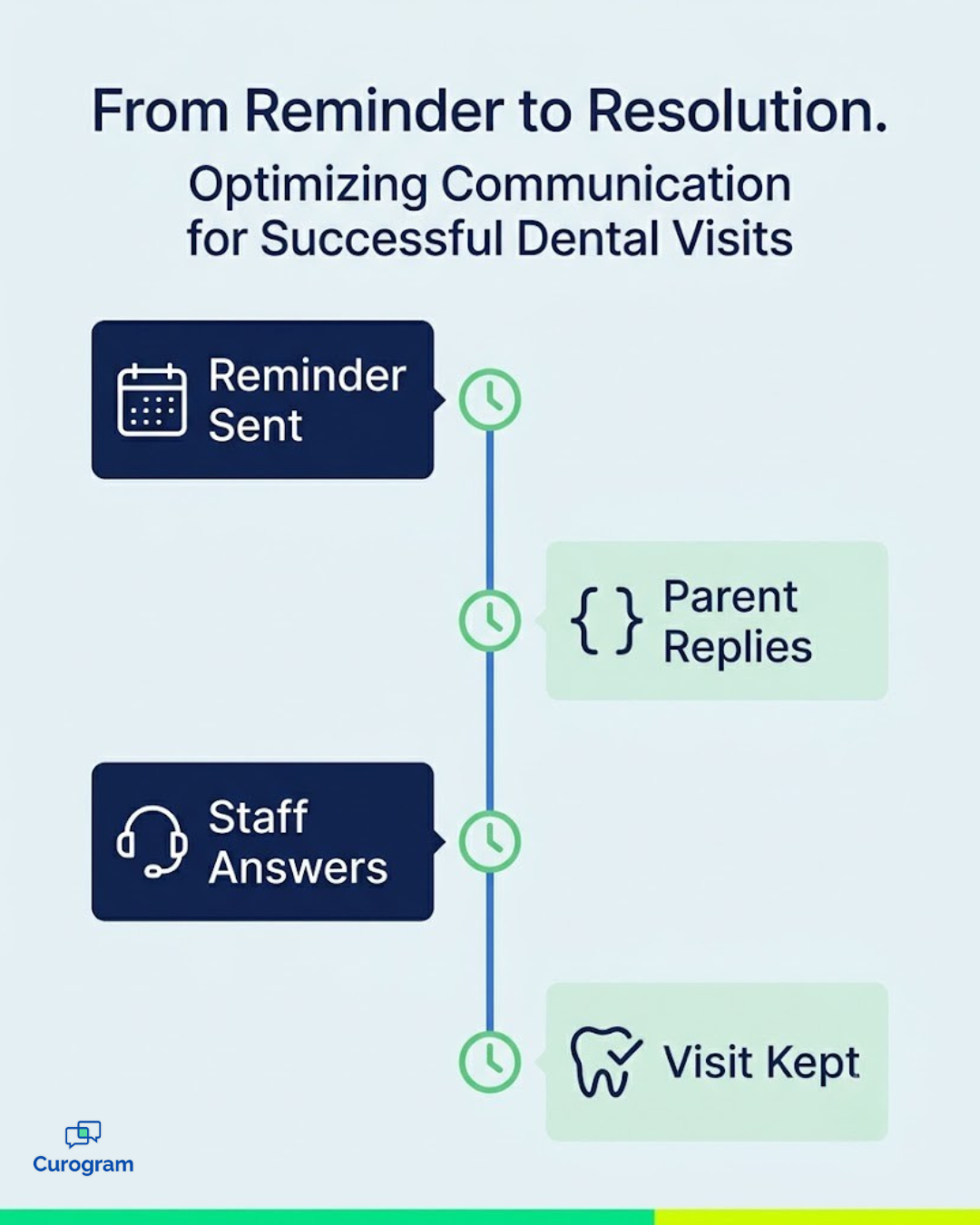
Setting up a Cloud 9 orthodontic appointment reminders texting workflow is less complicated than most practices expect, because nothing about your clinical system changes.
Here is the shape of it.
A generic reminder treats every visit as a one-off event.
Orthodontic patients do not really have one-off visits;
They have a series, and that series follows a predictable rhythm across the treatment plan.
So the cadence bends to the phase. New bonding gets a day-three check-in. Adjustments get a reminder tuned to the four-to-eight-week gap. Aligner checks and retention visits get their own timing, because a missed retention check has a different cost than a missed adjustment.
Send a reminder at 9 a.m. on a Tuesday and you are texting a parent in a meeting and a patient in third period. Neither replies.
The message is not wrong; the hour is.
Reminder timing can be configured to land when parents are actually able to answer, and reschedule offers can favor after-school blocks whenever your template allows it. Small change. Very different confirmation rate.
This is the piece that separates a reminder from a workflow.
When a parent texts back "his bracket came off last night, do we need to come in?", that message needs a human, not an auto-reply.
In a shared inbox, a coordinator sees it, answers it, and logs it against the family record. Most of the time the answer is reassurance and a note to mention it at the next adjustment. Occasionally it is a genuine emergency, and then you want the slot open.
That sorting is the quiet win. Your emergency capacity stops absorbing questions that a two-minute text exchange could have settled. We break that triage flow down further in our guide to treatment-plan follow-up texting between adjustments.
Curogram publishes its platform numbers, and they translate cleanly to an ortho board.
| Verified Curogram metric | What it means for your schedule |
|---|---|
| Above 75% average appointment confirmation rate | Roughly 3 in 4 visits are confirmed before the day arrives |
| No-show rates 53% lower than the industry average | Fewer chairs sit empty during adjustment blocks |
| Atlas Medical Center: 14.20% to 4.91% no-shows in three months | A drop of about 65%, achieved in a non-ortho clinic |
| 10% to 20% revenue increase from recovered appointments | Recovered slots go straight to the bottom line |
Apply that confirmation number to the example above. On roughly 290 monthly visits, moving from mostly unconfirmed to above 75% confirmed gives your team an accurate picture of the coming week before it actually starts.
You know which slots look shaky while there is still time to fill them from your waitlist.
There is a staff-hours side too. Confirming 290 visits by phone at three minutes each is about 14.5 hours a month, or nearly two full workdays. Text confirmations hand most of those hours back to your treatment coordinators.
The Atlas result is worth reading carefully. It comes from a medical clinic, not an orthodontic practice, so treat it as directional rather than a promise. What it shows is the size of the swing when reminders become two-way.

For your team, the shift is easier to describe than to measure precisely. Treatment plans finish closer to the date you quoted at the consultation. Debonds land on the calendar you promised the family.
And your emergency slots go back to holding actual emergencies.
That is what an on-schedule treatment plan looks like in practice. Not a dramatic overhaul of how you run adjustments, just a steady reduction in the small scheduling failures that stretch cases by weeks.
Ortho raises a question most specialties never have to answer. Almost every message goes to someone other than the patient, and the patient is usually a minor.
The rules here are workable. They just have to be set up on purpose rather than assumed.
Set up properly, none of this slows your front desk down. Consent gets captured alongside insurance details, opt-outs are automatic, and threads sit against the family record.
What you gain is a documented trail. When a family asks in month 20 why a visit was missed, you have the reminder, the timestamp, and the reply that came back.
Cloud 9 does the hard clinical work here. It holds the treatment plan, the imaging, the schedule, and the full sequence that moves a case from bonding through to debond. That is not the part that tends to break.
What breaks is the handoff to the family. A parent who does not see the reminder, or sees it and cannot reply, or replies and hears nothing back. That gap is where an 18-month plan quietly becomes a 22-month plan.
A two-way reminder layer closes it without touching your clinical workflow. Reminders go out on ortho cadence. Parents reply in the channel they already use for everything else.
A coordinator picks up anything that needs a person, and the whole exchange stays logged and HIPAA-compliant.
Nothing about your Cloud 9 setup changes. Curogram runs alongside it, complements it, and never replaces it.
The practices that get this right stop thinking about no-shows as a monthly number to complain about.
They start thinking about on-schedule treatment plans as something they manage on purpose. Those are very different mindsets, and they produce very different debond calendars.
Consider what this would be worth across your whole active panel. If a stronger confirmation rate recovers even a handful of adjustment slots each week, you gain back chair time you already paid for, staff hours you already scheduled, and finish dates you already promised to families.
Your families are not disengaged. They are busy, they are scheduling around a school day, and they answer texts.
Curogram gives Cloud 9 orthodontic practices a two-way texting workflow built for the way ortho actually runs: recurring visits, parent schedulers, and questions that need an answer today.
Book a demo and we will walk your team through a real adjustment reminder thread, start to finish, on your own ortho cadence.
 Aubreigh Lee Daculug : Aug 12, 2026, 6:00:00 PM
Prime Clinical's portal reaches 15–20% of patients. Texting reaches 98%. Two-way SMS with a 48-hour HL7 integration. Schedule a demo.
 Aubreigh Lee Daculug : Jun 26, 2026, 9:00:01 AM
CharmHealth reminders that close the loop: texts write confirmations back to the schedule with no 250-message cap. Clinics hit 1,100+/mo. Book a demo.
 Aubreigh Lee Daculug : Jul 3, 2026, 2:00:00 PM
Reduce missed appointments in your SUD program with automated, two-way reminders integrated with Opus EHR.