
CollaborateMD Sends Reminders, Curogram Gets Confirmations
 Jo Galvez : Jul 3, 2026, 8:00:00 AM
CollaborateMD reminders notify patients but never confirm them. See how Curogram’s two-way reminders hit 75%+ confirmations and cut no-shows.
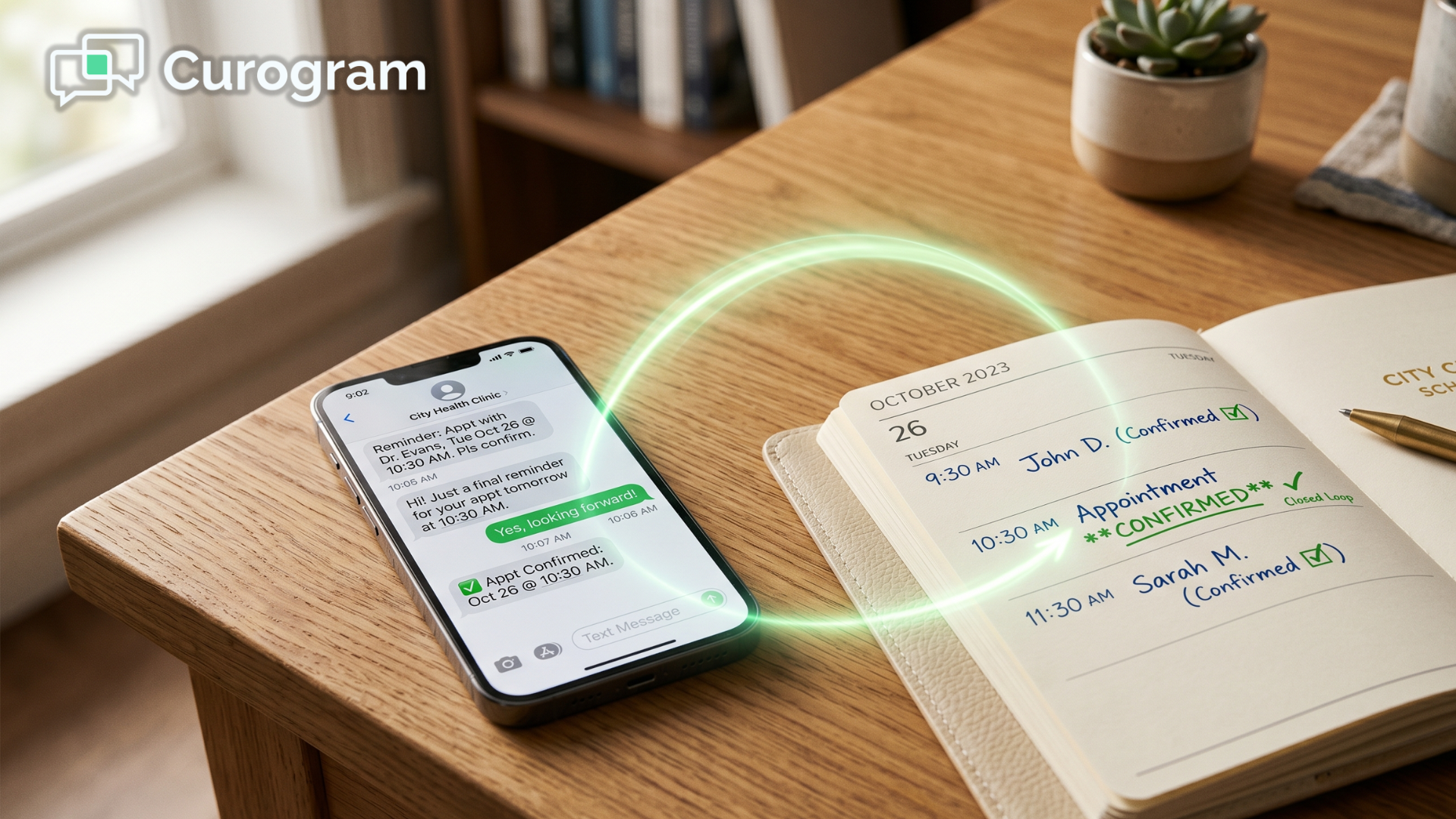
You send the reminder. Then you wait. And nothing reliable comes back.
That is the quiet problem hiding inside most CharmHealth schedules. The system can send an email or a text, which is genuinely useful. But a reminder is only half a conversation, and your calendar still shows a question mark.
A real CharmHealth integration should close that gap, not widen it. Yet most practices still pull a list every morning and dial patients one by one to confirm visits.
Here is the part that stings.
You are already paying for reminders, and you still cannot trust the schedule. The Text/Voice add-on caps out fast, email reminders slip into spam, and a patient's "yes" never makes it into the chart.
Think about what that costs over a year. A no-show rate of 10% to 30% can quietly drain $20,000 to $30,000 in monthly revenue, fill your phone lines, and turn every morning into a scramble.
It sounds like a small gap. It isn't.
And it grows every week you leave it open. Each unconfirmed visit is a small bet, and you are placing dozens of them before lunch.
The good news is that the fix does not mean leaving CharmHealth or learning a new system. It means closing the loop — sending reminders that write confirmations back to your calendar on their own.
That is exactly what this guide covers. You will see why the open loop costs so much, why your current CharmHealth appointment reminders fall short, and how automated appointment reminders for CharmHealth practices without add-on limits turn a shaky schedule into one that confirms itself.
By the end, you will know how comparable clinics now lock in more than 1,100 confirmed appointments a month — without adding a single staff member or making one extra phone call.
CharmHealth can send email and text reminders. That is a real feature, and it helps. But a reminder only does half the job, because nothing reliable comes back to confirm the visit.
This is the open loop. You send a message into the world and simply hope the patient shows up.
Three things quietly make it worse:
None of these are CharmHealth flaws, exactly. They are gaps where the loop never closes — and each one quietly costs you visits.
There is a reason patients respond to a text when they ignore an email, and it is worth understanding — see why patients confirm by text when they ignore email.
That CharmHealth reminder message cap is easy to overlook until you hit it.
Here is how the math shakes out:
| What you get | The fine print |
|---|---|
| 250 text messages per month | Included for $20/month |
| Each message after 250 | $0.08 per overage |
| Patient replies | Do not update the schedule |
| Confirmation status | Still added by hand |
Now scale that across a busy panel.
A no-show rate of 10% to 30% can translate into $20,000 to $30,000 in lost revenue every month, plus 80 or more inbound calls a day and a manual confirmation list before the first patient walks in.
The MGMA data on no-show rates and revenue impact backs up just how heavy that drag gets.
This means you are paying for reminders and still cannot trust your own calendar. For a practice that chose CharmHealth to stay lean, that is the worst of both worlds.
The fix is not a louder reminder. It is a reminder that listens for the reply and acts on it. Curogram works as a CharmHealth Text/Voice Notifications alternative that does exactly that — it sends the message, reads the response, and updates your schedule on its own.
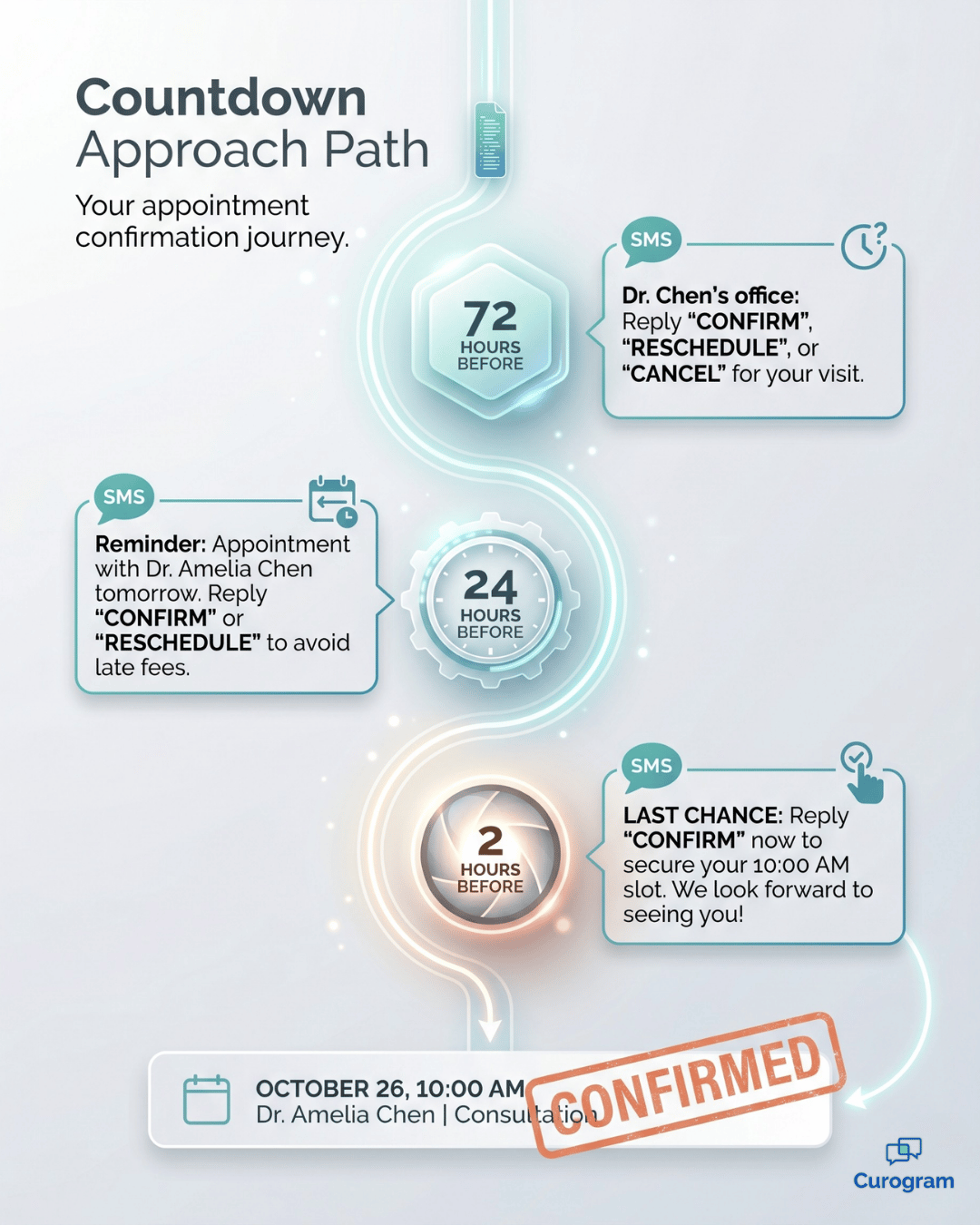
Most patients need more than one nudge. Curogram sends sequenced SMS reminders for medical practices on a custom timeline — typically 72 hours, 24 hours, and 2 hours before the visit.
There is no 250-message ceiling, so a busy week never silences your reminders. Each text invites a simple reply to confirm, cancel, or reschedule.

This is where the loop finally closes. When a patient confirms or reschedules by text, Curogram writes the new status straight to the CharmHealth calendar through its API, in real time.
No one re-keys anything, and the schedule reflects reality the moment a patient taps reply. For the deeper version, see how confirmations write themselves back to your CharmHealth schedule.
For rheumatology, integrative, and primary-care practices, continuity is the whole point. Automated appointment confirmations CharmHealth practices can rely on protect the visit cadence that protects outcomes.

The same engine pairs naturally with two-way HIPAA texting when a patient replies with a question instead of a yes.
When the loop closes, the numbers move fast. Here is what comparable practices see.
1,100+ confirmed appointments a month. That is roughly 3.5× the baseline at a comparable specialty clinic — with zero added staff. The reminders and confirmations simply run themselves.
14.26% → 4.91% no-show rate. A comparable practice cut its no-show rate by about two-thirds. To reduce no-shows CharmHealth practices usually lean on phone calls; here, the texts did the work instead.
A confirmed day before the first patient arrives. Staff walk in to a schedule that already confirmed itself overnight. Same-day gaps get spotted early and filled instead of sitting empty.
This is the self-confirming schedule. Reminders go out, replies come back, and your calendar updates without anyone touching it.
You can point the recovered hours toward patients instead of phone tag, and even connect confirmed visits to text-to-pay and patient billing so they collect faster, too.
Here is the simple truth under all of this. A reminder that goes out but never comes back is just noise, and noise is expensive.
Sequenced reminders with automatic write-back change that. They turn an open loop into a schedule your team can actually trust — and they do it without asking you to leave CharmHealth or rebuild a single workflow.
Think of it this way. CharmHealth holds your calendar. Curogram makes the patient's reply update that calendar for you, in real time, every single time.
That one small shift really adds up quickly. Fewer empty chairs, fewer morning phone marathons, and a front desk that starts the day knowing who is coming in. Every unconfirmed slot is a coin flip on revenue, and you do not have to keep flipping it.
The math tends to make the decision easy. Preventing just 2 to 3 no-shows a week, at $150 to $300 a visit, usually covers the platform several times over. Everything past that is recovered revenue that used to walk out the door.
So consider the alternative to the open loop.
A schedule that confirms itself overnight. Patients who reply by text because it is easy. A calendar that tells the truth the moment someone taps yes.
That is what closing the loop really means, and it is closer than you think.
The next step is short. Schedule a Demo, and we will calculate what no-shows cost your practice today, then show the revenue you could recover with automated appointment reminders for CharmHealth practices without add-on limits.
 Jo Galvez : Jul 3, 2026, 8:00:00 AM
CollaborateMD reminders notify patients but never confirm them. See how Curogram’s two-way reminders hit 75%+ confirmations and cut no-shows.

 Aubreigh Lee Daculug : Sep 8, 2026, 10:00:00 AM
Patients judge your whole group by one location’s reminder. Curogram makes every eCW site send the same clear, replyable texts, confirmed 75%+ of the...
 Jo Galvez : Jun 22, 2026, 4:00:00 PM
Your front desk still calls to confirm every appointment. See how Curogram automates Azalea Health confirmations — 1,100+ a month, zero added staff.