Azalea Health 2-Way Texting | Reach Rural Patients Easily
💡 Azalea Health 2-way HIPAA compliant texting for rural clinics bridges the gap between EHR-based care and patients who cannot reliably access a...
9 min read
Aubreigh Lee Daculug
:
April 8, 2026
With Curogram's Zero-Friction Parent Access, you can text your Cloud 9 orthodontist — no app, no portal, and no login required. Open your phone's regular text messages, type your question, send it to the practice's number, and get a response from the treatment coordinator directly.
That's it. Nothing else to download, create, or remember.
It's 12:30 PM on a Tuesday. Your son texts you from school:
"Mom, the wire is poking my cheek."
One message to the orthodontist's office. That's all you need. Quick question, quick answer, back to work.
But the practice uses a patient portal.
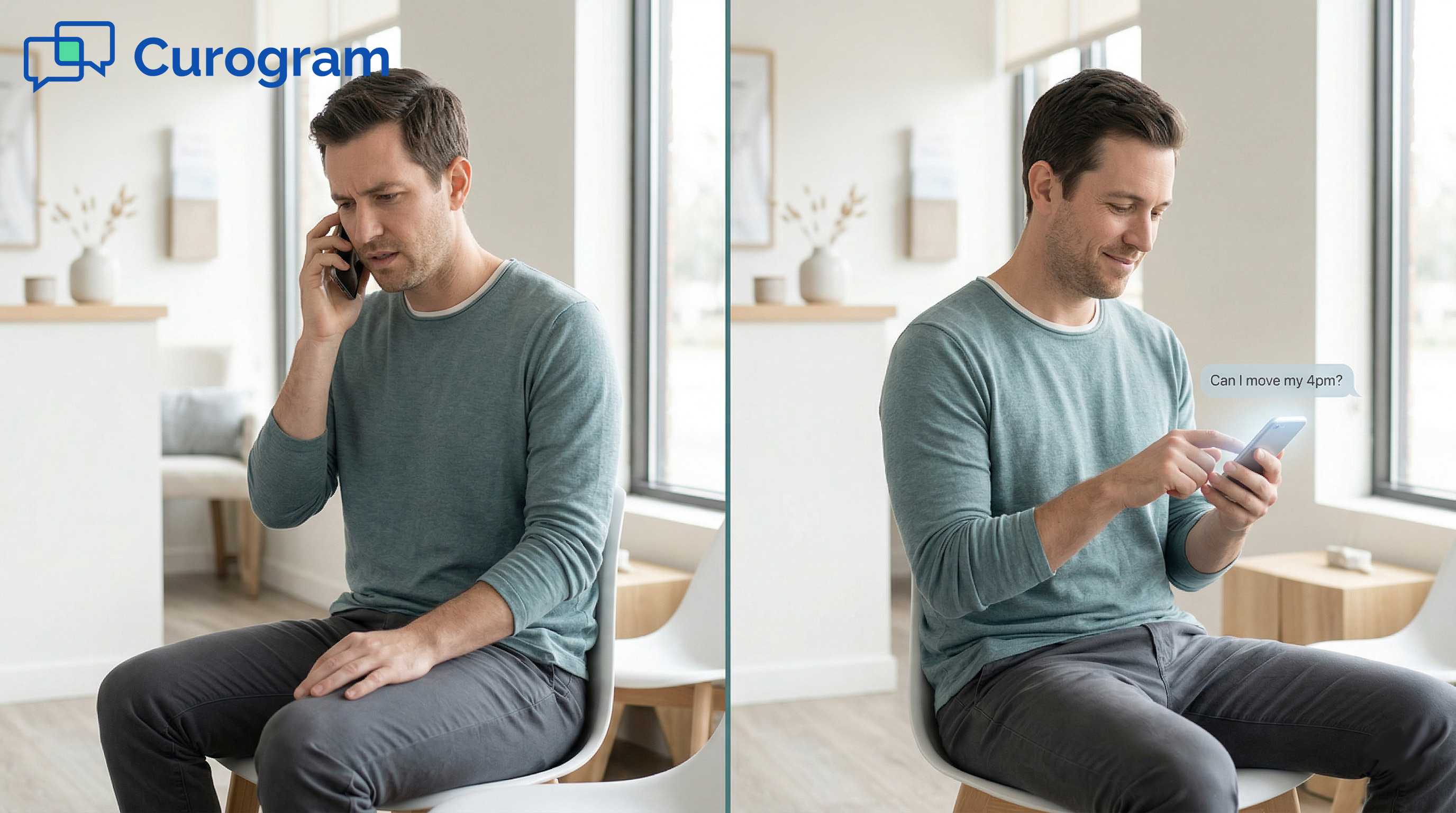
Now you're opening a browser, hunting for a URL you never bookmarked, entering a password you last used two months ago. You fail the login. You request a reset. Your inbox has seventeen unread emails. You give up and call. You're put on hold.
Meanwhile, your son is still sitting in class with a wire jabbing his cheek.
This plays out every day for parents of orthodontic patients across the country. Not because anyone planned it this way — but because the tools meant to improve communication made it more complicated instead.
Apps created a whole new friction point. Portals built a wall where there should be a door. And phone calls eat 5 minutes of a workday for a question that deserves a 10-second answer.
Curogram removes all of it. Parents text the orthodontic practice's actual phone number from the same native messaging app they use fifty times a day.
No new software. No learning curve. No tech barrier standing between a parent's worry and a practice's answer.
This is what zero-friction patient and parent communication looks like in 2026. And it's exactly what your Cloud 9 practice can offer — starting right now.
Orthodontic engagement platforms have been selling the "practice app" concept for years. The pitch is compelling: a branded mobile experience, in-app messaging, appointment management — all in one place. The reality is that the parents your practice relies on are not using it.
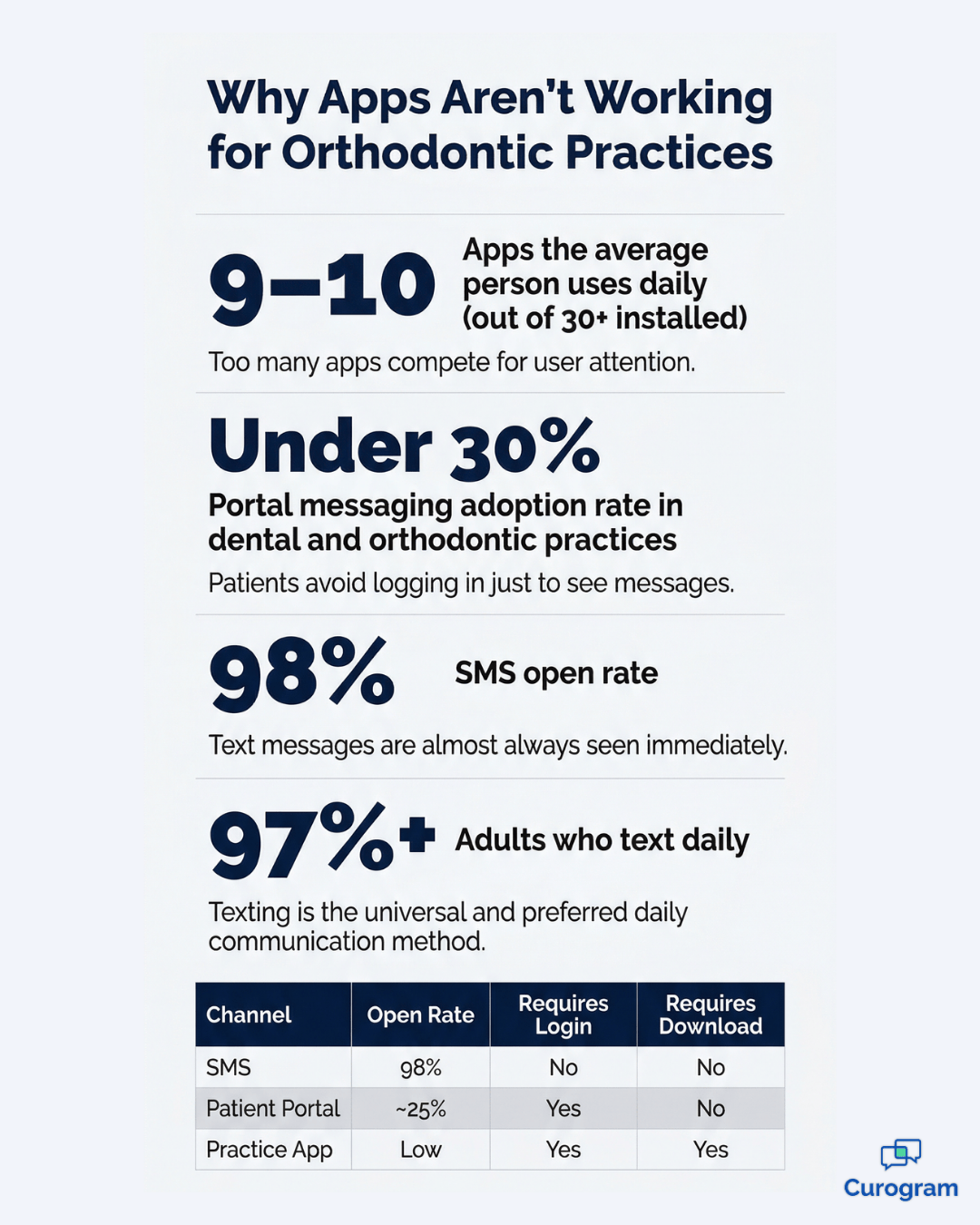
The average person uses 9–10 apps per day out of 30 or more installed on their phone.
A niche app for an orthodontic practice they visit every 6–8 weeks is not competing for that daily rotation. Parents download it once during their child's onboarding, maybe tap through it once to confirm the first appointment, and never open it again.
Six months later, when a bracket breaks and they actually need it, here's what the parent actually faces:
The app was designed to make things easier. For the parent, it made things harder.
Patient portals have a different version of the same problem. They're technically always available, but almost never used — because logging in requires more effort than simply picking up the phone and calling.
A working parent who needs to know whether Tuesday's appointment is at 3:00 or 3:30 is not going to navigate to a portal URL, enter credentials for a system they access twice a year, find the messaging section, and wait for a notification that may or may not show up.
They're going to call. And if calling means hold music, they'll hang up and try again later — or not at all.
Portal messaging adoption in dental and orthodontic practices typically sits under 30%.
That number is not a technology problem. It's a behavior problem. The tool is asking parents to change how they communicate. Parents don't change. The tool fails.
Parents of orthodontic patients are mostly working adults in their 30s to 50s. Their available window for non-urgent communication is narrow and unpredictable.
A phone call during business hours means stepping out of a meeting, finding a quiet space, waiting on hold, and spending 4–5 minutes on a question that could be answered in 10 seconds via text.
Texting fits between meetings. Calling doesn't.
That's not a preference — it's just how their days are structured.
The practice that respects that reality and removes the friction wins parent loyalty. The practice that asks a busy parent to download an app for a 6-week-rotation visit is pushing against the grain every single time.
The most widely used communication channel on the planet — SMS text messaging — requires no app, no portal, no account, and no learning curve. It's on every phone. It has a 98% open rate. Over 97% of smartphone owners use it daily.
Here's how the channels actually stack up:
| Channel | Open Rate | Requires Login | Requires Download | Daily Use |
|---|---|---|---|---|
| SMS / Native Text | 98% | No | No | Yes — 50+ times/day |
| Patient Portal | ~20–30% | Yes | No | Rarely |
| Practice App | Low (repeat use) | Yes | Yes | Almost never |
Healthcare technology platforms have spent years adding layers on top of SMS instead of simply using it.
The data makes the right answer obvious. The question is whether your practice is set up to take advantage of it.
Curogram's Zero-Friction Parent Access is built around a single principle: parents should never need to change their behavior to communicate with your practice.
When patients and parents can text a Cloud 9 orthodontic practice directly from their phone's native messaging app — no portal, no app, no account creation — communication stops being a friction point and starts being an advantage.
Here's the entire workflow:
Setup required from the parent: zero. Learning curve: zero.
That's what direct SMS texting with a Cloud 9 orthodontist looks like when there's no app, no portal, and no friction between a question and an answer.

Curogram texts from the practice's actual phone number — not a shortcode, not a branded notification, not a platform alert that parents have to recognize and decode.
When a parent saves the number as
"Dr. Chen Ortho," every future text arrives as a message from a known contact.
The practice number becomes as natural in the parent's phone as the pediatrician, the school nurse, or the babysitter.
There's no new interface to learn, no icon to locate, and no login prompt standing in the way.
It's just a text from a contact they trust.
Text communication is asynchronous, and that's a feature — not a limitation.
A parent who remembers at 9 PM that they need to reschedule Thursday's appointment can text the practice right then. The message sits in the queue. The team sees it first thing in the morning and responds before the parent even starts their workday.
No reminder needed. No callback forgotten.
This pattern eliminates a surprisingly common problem: the appointment change that never happens because the parent forgot to call back. The text gets sent when the parent thinks of it, and the practice handles it when they're open. Nothing falls through the cracks.
When a parent texts a photo of a broken bracket, it arrives directly in the Curogram dashboard, attached to the patient's conversation thread.
No portal upload required. No email attachment. No form submission through a patient app.
Parents use this more than most practices expect. Common examples include:
The orthodontist or clinical team reviews the photo and responds with clear guidance — whether that's "Bring him in today" or "That looks normal, we'll check it at his next adjustment."
The parent gets a real answer without navigating anything beyond their camera and text messages. For clinical triage, that speed matters.

Text response rates from parents significantly outperform portal messaging rates. That's not a surprise — texting requires no login, no app, and no behavior shift whatsoever.
When parents can text their Cloud 9 orthodontist with zero friction and no additional technology to learn, they actually respond.
Appointment confirmation rates improve. Insurance submissions arrive faster. Scheduling changes happen before they become no-shows.
The number that matters most here isn't message volume — it's resolution speed.
How quickly does a parent's question move from "asked" to "answered"? With direct SMS, that window shrinks to minutes rather than days.
Here's what that can mean at the practice level:
| Practice Size | No-Show Rate Before | No-Show Rate After | Monthly Appointments | Recovered Monthly Value |
|---|---|---|---|---|
| 400 active families | 10% | 8% | ~400 | $2,400–$4,000 |
| 600 active families | 10% | 8% | ~600 | $3,600–$6,000 |
Based on a 2% reduction in no-shows at $150–$250 per average orthodontic appointment. Presented as a sample calculation.
In practice, that math adds up fast — and it all traces back to one thing: making it easier for parents to respond.
The shift in how your practice describes communication says everything.
"Download our app to reach us" puts the burden on the parent before they've even asked a question. "Just text us" removes every step. The parent already knows how to do it. They've been doing it since 2007.
The practical difference plays out fast:
When Cloud 9 orthodontic practices move from app-dependent and portal-based messaging to direct SMS with no app and no portal, call volume drops. Not because parents communicate less, but because texting is faster for both sides.
Staff spend less time on the phone. Parents spend less time on hold. And the front desk gets breathing room to focus on what's actually in front of them.
Curogram's zero-friction approach doesn't just smooth out individual conversations. It shapes how families feel about your practice overall.
When reaching you is as easy as texting anyone else, the downstream effects are tangible:
That engagement translates directly into stronger retention and a reputation for being genuinely easy to work with. In a referral-driven specialty like orthodontics, being known as the practice that's always easy to reach is worth more than most marketing spend combined.
If you run a Cloud 9 orthodontic practice, you've likely already seen the pattern: the portal that nobody uses, the app that nobody opens, the front desk buried in calls for questions that could have been answered in a text.
The solution isn't a better app or a smarter portal. It's removing the technology barrier entirely.
Curogram makes it possible for patients and parents to text your Cloud 9 practice directly — no app download, no portal login, no account creation, and no friction between a parent's question and your team's answer.
Every message is HIPAA-compliant, fully secure, and handled through the Curogram dashboard while the parent's experience stays as simple as texting a friend.
You don't have to rebuild your workflow to make this happen. Curogram integrates with your existing systems and can be up and running in less time than it takes to onboard a new front desk hire.
Parents already text their child's school, the pediatrician, the dentist, and each other — dozens of times a day, without downloading a single extra app. Reaching your orthodontic practice should feel exactly the same way.
Less friction means more confirmations. More confirmations mean fewer no-shows. Fewer no-shows mean recovered revenue. And a practice that's genuinely easy to reach builds the kind of word-of-mouth that no ad budget can buy.
The change is simple. The impact isn't.
Schedule a demo today and see how Curogram's zero-friction texting transforms parent engagement at Cloud 9 orthodontic practices.
Yes. Curogram supports multiple contacts per patient. Both parents — or a parent and a guardian — can text the practice about the same child, and each person's conversation is linked to the patient's record in the dashboard. The treatment coordinator sees messages from both contacts in context, so nothing gets missed or miscommunicated. This works especially well for co-parenting situations or households where scheduling responsibilities are shared between adults.
Yes. Curogram is fully HIPAA-compliant and SOC 2 Type II certified. Patient messages are encrypted, logged, and accessible only to authorized practice staff. The practice operates under a Business Associate Agreement (BAA) with Curogram. The parent texts normally through their phone's native messaging app, while the practice side operates entirely within Curogram's secure, compliant dashboard. This architecture keeps the experience simple for parents and families without compromising compliance for your practice.
Text communication is built to be asynchronous — you send your message when it's convenient, and the practice responds during business hours. Most Cloud 9 practices using Curogram respond within minutes during office hours. If you text after hours, your message is queued and addressed the next morning. There's no need to set a reminder to call back — your message is already there waiting. For true emergencies, calling is always the right move. For everything else, a text sent at 9 PM gets answered by 9 AM.
No. There is nothing to set up, register, or install. A parent texts the practice's phone number from their regular messaging app — the same one they already use every day — and the message goes through immediately. No consent forms to fill out in advance, no username to create, and no app to locate on their phone. The first time a parent texts the practice, it works. Every time after that, it works the same way. The only thing a parent needs is the practice's phone number, which the front desk can share at the first appointment or include in any welcome communication.
The practice can absolutely initiate the conversation. Curogram allows the team to send outbound texts directly to patients and parents — appointment reminders, confirmation requests, follow-up messages after a visit, and payment links all go out through the same text thread. When a reminder arrives and a parent replies to reschedule, that reply lands right back in the Curogram dashboard for the coordinator to handle. The entire conversation — both outbound from the practice and inbound from the parent — lives in one thread, tied to the patient's record. Nothing gets lost between channels, and no one has to chase down a response in a separate app or portal.
💡 Azalea Health 2-way HIPAA compliant texting for rural clinics bridges the gap between EHR-based care and patients who cannot reliably access a...
💡 You can text your DrChrono doctor with Curogram — no app, no portal, no Updox needed. Open your phone's built-in text app and message the...
💡 AdvancedMD patient texting with no portal and no app is possible through Curogram’s direct text channel. Patients use their phone’s native...