
 Jo Galvez
Curogram sends the intake packet as a secure text link instead of a portal task. Patients finish forms on any smartphone with no account, app, or password, and progress saves.
Completed forms sync back through CharmHealth's FHIR API, and staff track every packet from one dashboard. The result is a full patient history in hand before the visit starts.
A CharmHealth intake packet can be well built and still show up blank at check-in. The weak point is the path to the forms. Every remote Pre-Screening Form sits behind a Patient Portal login. The CheckIn Kiosk, for its part, keeps the work inside your lobby.
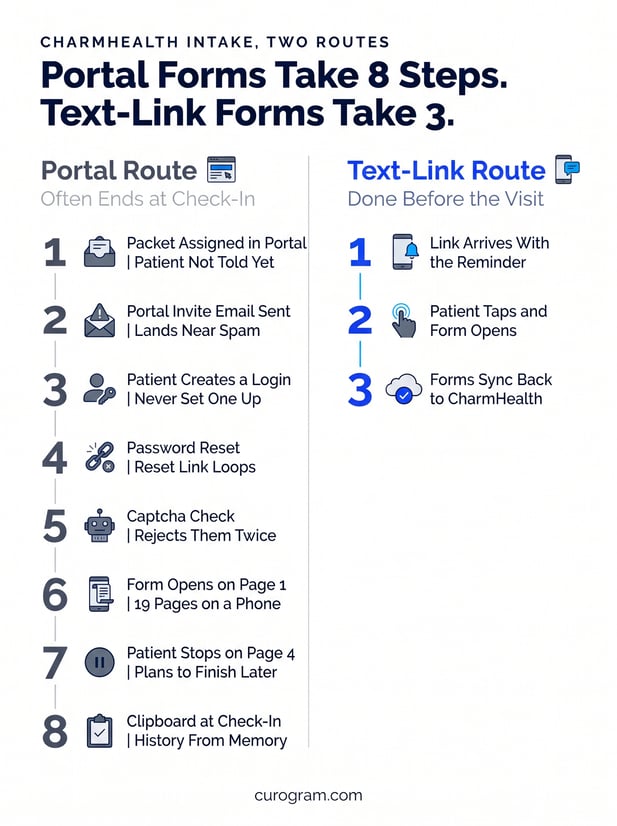
That path asks a lot of a new patient. They have to find the portal invite, set a password, and pass a CAPTCHA. Then they face what can be a 19-page history on a small screen. Many stop partway and plan to finish later.
Later usually means the waiting room. Your front desk hands over a clipboard, and the patient writes a medication list from memory. The first visit starts late, and the provider reads the history for the first time in the room. Afterward, staff scan or key in whatever the patient wrote.
The fix is to change how the packet travels. When intake arrives as a plain text link, patients open it like any other message. There is no account to make and nothing to install. Finished forms flow back to the practice, so staff never handle them twice.
SMS patient intake forms work because they reach patients on the phone they already carry. A long packet can then get done in short bursts, at home, with records in reach.
This guide covers why portal intake stalls and how text-link forms connect to CharmHealth. It then walks through one new patient's packet, from booking to check-in. It also lays out the setup steps for the integration. That way, you know what the switch takes before you commit.
Why CharmHealth Intake Packets Get Abandoned
A Real Toolkit Behind a Login
CharmHealth gives practices more than most EHRs at its price. It has Pre-Screening Forms, survey forms, and a CheckIn Kiosk, all in one cloud system.
The trouble is delivery. Every remote form runs through the Patient Portal. The kiosk only works once the patient is in your lobby.
Portals work well for patients who already use them. Yet ONC data shows only 65% of people accessed a patient portal even once in 2024. For a first-time patient, the portal is one more account to create before the real work starts.
Where the Packet Stalls
CharmHealth portal forms abandonment tends to follow the same five steps:
- The practice assigns the packet in CharmHealth.
- The patient gets a portal invite from a sender they don't know.
- The password reset or captcha fails once or twice.
- The patient quits on page 4 of a 19-page packet.
- The front desk hands over a clipboard at check-in.
Each step loses some patients. By the last one, staff are doing the work twice. They assigned the form once, and now they type in the paper copy.
How Text-Link Intake Forms Work With CharmHealth
The Same Packet on a Different Channel
Curogram keeps the intake your practice already uses and changes only the delivery. The packet goes out as a secure text link, and it opens in the phone's browser. Pew Research Center reports that 91% of U.S. adults own a smartphone, so the device is already in hand.
The link can ride your automated appointment reminders and confirmations with CharmHealth. It can also sit in the same thread you use for 2-way patient texting for CharmHealth practices. Either way, patients get one message, not a new system to learn.
What the CharmHealth Connection Involves
Curogram connects through CharmHealth's documented FHIR API. The program is gated. It takes a short questionnaire, a license agreement, and admin approval under Settings > Account > API Keys. Curogram's team handles that work, and your admin just clicks approve.
Plan on 1 to 2 weeks for full setup, since it is not a same-day switch. CharmHealth stays the system of record for charts, schedules, and billing. Nothing about your charting changes. The Curogram and CharmHealth integration page lists everything else the connection covers.
Curogram Highlight: Secure Online Forms
Curogram's Secure Online Forms turn a CharmHealth intake packet into a text link any patient can finish. Forms are HIPAA-compliant, mobile-first, and sent over an encrypted connection. The text holds no health details, only the secure link. Practices can build packets by specialty or department, so each patient gets the right forms.
Completed forms sync back to CharmHealth, and every submission is logged. Curogram is SOC 2 Type II certified and signs a Business Associate Agreement.
For a closer look, see the online patient forms page for CharmHealth users. Patients see the same flow described in our article on CharmHealth patient forms completed by text before the visit.
What a Completed Intake Looks Like on Visit Day
Step 1: The Booking Sends the Packet
The best way to judge integrative medicine digital intake is to follow one packet through. Take a new patient booked for a 60-minute consult. The intake asks about diet, sleep, supplements, and years of history.
When the visit is booked in CharmHealth, Curogram texts the packet link with the confirmation. The patient opens it that evening and gets through the first section.
They stop to check a pill bottle in the kitchen. Progress saves, which is what makes a mobile-friendly medical intake packet work.
Step 2: Nudges Do the Chasing
Two days pass, and the patient hasn't come back. An automatic nudge text goes out, and they finish the rest from the couch. The dashboard flips the packet from in progress to done. Nobody on staff made a call.
If a packet is still blank near the visit, staff spot it in the same view. One targeted call covers it, instead of a full call list. Our guide to the CharmHealth intake workflow for front desk staff covers that side in detail.
Step 3: Check-In Becomes a Greeting
The finished packet reaches the practice before visit day. No one downloads a portal PDF or re-uploads it to the chart. The provider reads the history the night before. At check-in, the front desk confirms insurance and says hello.
Pre-visit texts also protect the schedule. Atlas Medical Center cut no-shows from 14.20% to 4.91% in three months, per Curogram client data from clinical settings. Our post on reducing no-shows with CharmHealth automated SMS reminders shows how that reminder flow works.
Conclusion: Send the Packet Where Patients Already Are
CharmHealth is built to hold your clinical record, and it does that job well. Intake is a different job, because it depends on a patient doing work at home. Asking them to log in first is where that job breaks. Moving the packet to text keeps the forms you trust and removes the step patients skip.
The math is easy to test. Say complete intake and reminders prevent just 2 or 3 no-shows a month. At $200 a visit, that is $400 to $600 back each month.
Book a CharmHealth integration demo and bring your current packet. We'll show you exactly how it travels by text.
Frequently Asked Questions