
 Aubreigh Lee Daculug

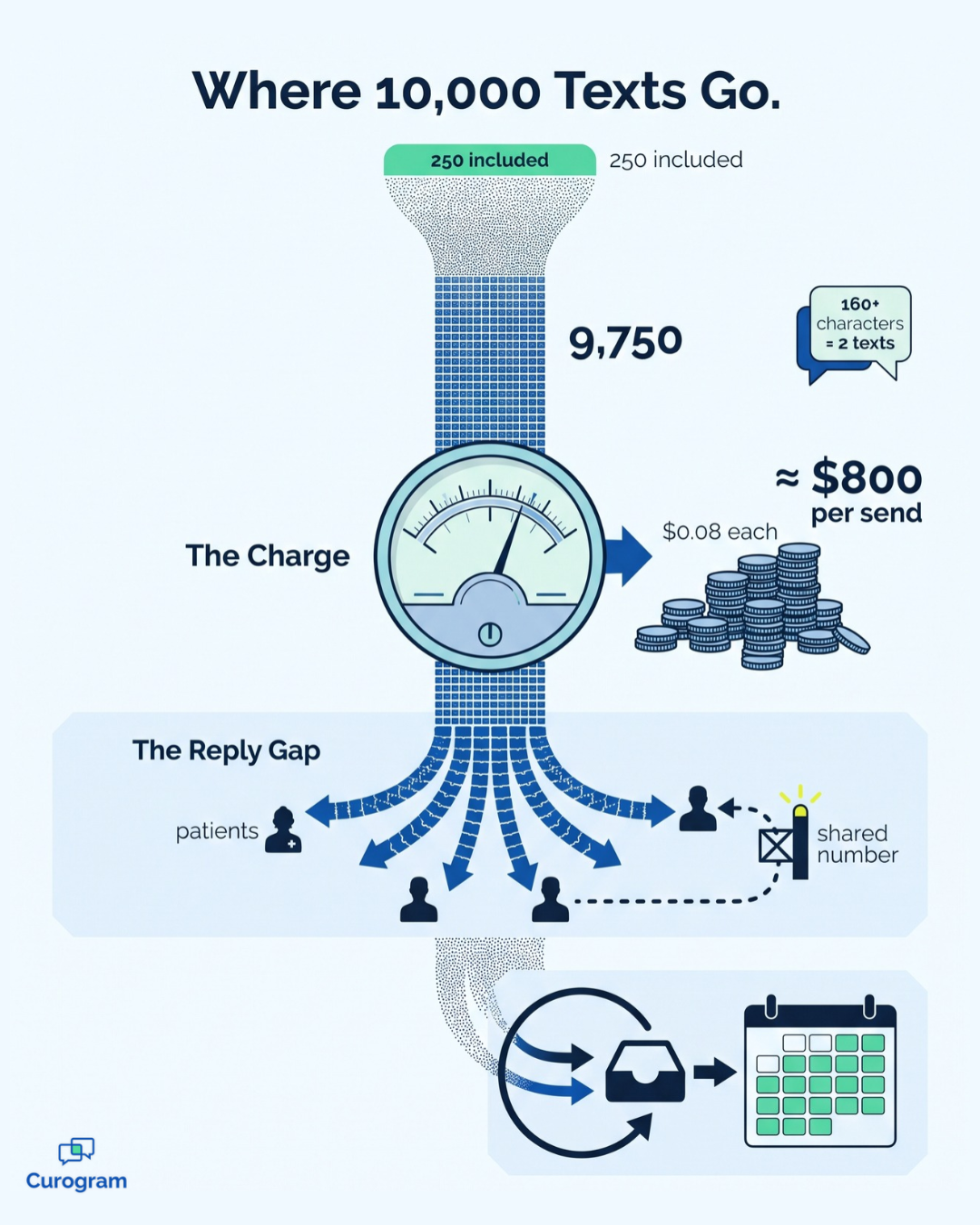
CharmHealth's Bulk SMS exists, but it runs through the Text/Voice Notifications add-on. Every message beyond the plan's allowance costs $0.08. Patients also cannot reply to Bulk SMS, so interested patients still have to call. We call this pattern "The Add-On Trap."
In Curogram client data from clinical settings, 35% of recalled patients at one multi-location practice scheduled within a month. In all, 1,240 patients were seen from recall messages alone.
The file usually carries a name like Overdue_Patients_FINAL_v3. Your practice manager has rebuilt it several times this year. Every row is a patient who hasn't come back in months. Each one is also a visit your schedule could still hold.
So why does that list never become an actual campaign?
It isn't a motivation problem. CharmHealth manages charting and scheduling effectively, and it even includes a Bulk SMS feature. But a recall initiative reaches thousands of patients simultaneously, and that's exactly where the process begins to unravel.
Three obstacles usually arrive together. The message meter charges for every text beyond your allowance, and patients can't respond to a Bulk SMS. Meanwhile, the phone keeps ringing, leaving nobody available to solve the first two problems.
That's the gap a CharmHealth recall campaign workflow for office staff has to close. Recall can't remain a project reserved for a quiet week, because quiet weeks rarely show up. It needs to become a short, repeatable routine that fits between patient calls.
The routine itself involves only four components. You identify the overdue group, select a message, schedule delivery, and answer replies from one shared inbox. When every step lives on a single screen, the entire process fits comfortably into an afternoon.
Most small offices never reach that point. They export the list, draft a message, and calculate the overage fees. Then they anticipate days of sorting replies between phone calls, and the campaign quietly slides to next quarter.
This guide walks through the complete process, from the first filter to the booked appointment. You'll see where current tools stall, how each step operates in Curogram, and what real recall results look like. You'll also find a simple formula for estimating the revenue inside your own list.
Let's begin with why the campaign keeps stalling.
Why Your Recall List Never Leaves the Spreadsheet
Credit where it's due:
CharmHealth handles scheduling and charting well, and its Bulk SMS feature genuinely works.
From the Messages section, staff can text every patient or a specific group, filtered by facility or patient category. They can also schedule delivery for a later date and time.
But Bulk SMS was designed for occasional announcements, like a holiday closure. Bringing back thousands of dormant patients is a very different job. It requires sorting patients by their last visit and turning their answers into bookings.
Here's how the stall typically unfolds:
- The manager exports the overdue-patient list from CharmHealth.
- They draft a friendly message inviting patients to return.
- They review the add-on terms. On the Encounter plan, the Text/Voice Notifications add-on costs $20 monthly for 250 messages, then $0.08 per text.
- They calculate the cost. One message to 10,000 patients means 9,750 additional texts, or roughly $800 for a single send.
- They notice another wrinkle: messages over 160 characters count as two.
- They discover the reply gap. CharmHealth's documentation says Bulk SMS comes from a shared number, so patients can't respond.
- The campaign gets postponed until next quarter.
Step six is the quiet killer. A recall text succeeds because patients can answer "yes" and get scheduled immediately. Without that option, every interested patient has to call, sending the workload back to an overloaded front desk.
Two-Way Text replies, a separate feature, land under Messages > Text Messages > All. Staff read them one thread at a time.
The usual fallback is calling. Suppose each recall call takes 5 to 6 minutes, including voicemails and follow-up notes. Contacting 1,000 dormant patients would then consume 83 to 100 staff hours. Meanwhile, every quarter of delay leaves visits you could win back, worth perhaps $150 to $300 each, sitting untouched.
That's the real cost of the campaign that never launches. The manager understands exactly how much revenue that spreadsheet represents. They've just never had a tool to act on it without asking the owner to approve an overage bill.
Four Steps, One Screen, and No Message Meter
Curogram's campaign dashboard turns recall into a routine your front desk can run on its own.
Think of it as a medical office bulk text workflow with four steps. None of them involves counting messages, because Curogram has no per-message overages at any volume.
Step 1: Build the Segment
Effective patient recall list segmentation is where results begin. Filter patients by last-visit date, provider, or appointment type. Patients overdue for an annual exam receive one message, while patients who paused treatment receive another.
Smaller, targeted lists let each message speak directly to the patient reading it.
Step 2: Pick a Saved Template
Write a message once, then reuse it again and again. Over time, you'll develop a library of recall message templates for medical practices like yours.
Keep separate versions for annual exams, wellness campaigns, weather closures, and schedule changes. Avoid clinical details, since standard text messages are meant for general notices and reminders.
Step 3: Schedule the Send
Choose a delivery time when patients actually read their messages, such as early evening. Schedule the campaign, then return to the phones. It goes out on time without anyone watching it.
Step 4: Work the Replies From One Inbox
Replies arrive as ordinary text messages inside the same shared inbox your team uses daily. Any available staff member can open a conversation and book the appointment.
That's what managing patient replies at scale should look like: one queue, multiple hands, no searching.
How Curogram Connects to CharmHealth
CharmHealth remains your system of record, while Curogram manages the outreach. Curogram's team handles the integration setup, including CharmHealth's API approval process. Your practice admin approves access in CharmHealth settings, and complete setup takes 1 to 2 weeks.
The patient experience differs, too. CharmHealth's Two-Way Text is an EHR-side tool, and its secured messages require several steps. Patients click a link, enter a one-time code that expires in two hours, and confirm their birth date.

For a simple invitation to rebook, Curogram sends a standard text message that patients answer in one word.
This approach suits offices with 1 to 20 providers. Staff training takes under 10 minutes. An afternoon that once produced 30 manual recall calls can now launch a campaign reaching 3,000 patients.
The Front Desk That Books Its Own Openings
Here's what recall by text looks like when it actually launches.
In Curogram client data from clinical settings, 35% of one multi-location practice's recalled patients booked within a month. Altogether, 1,240 patients were seen from recall messages alone.
That's the shift from spreadsheet to send button. The overdue list stops being a guilt document. Instead, it becomes a monthly 30-minute task with a booking count attached.
A quarterly recall might run like this:
- Tuesday morning: The manager filters patients not seen in 12 months and picks the annual-exam template.
- Tuesday afternoon: The scheduled campaign goes out, and staff return to incoming calls.
- That week: Replies land in the shared inbox next to everyday texts. Whoever is free books the visit.
- That month: Open appointments fill, and the team can count the bookings the campaign brought in.
Every recovered patient can then move directly into automated appointment reminders for CharmHealth. Campaign replies also become ordinary two-way texting conversations inside the same inbox.
This is how a small practice patient outreach process should run. It's steady, easy to measure, and never waits on a quiet week. Use the four steps above as your front desk recall campaign checklist every quarter.
Now for the money, using an illustrative example, not a promise. Say one campaign fills just 10 appointments at $200 per visit. That's $2,000 in visits that would have stayed empty. Repeat that quarterly, and the practice owner can see the growth math working.
For the bigger picture, see our guide to patient recall texting for CharmHealth.
Your Next Quarter of Visits Is Already in a Report
The recall campaign that kept stalling was never a staffing problem. It was a tools problem. On CharmHealth's add-on, every text beyond the allowance costs extra, and Bulk SMS can't receive replies. So a sensible plan kept losing to the daily call list.
Curogram converts that plan into a four-step afternoon task. You build the segment, select the template, and schedule delivery. Then you manage every reply from one inbox. At one multi-location practice, that approach brought 35% of recalled patients back onto the schedule within a month.
Here's a simple way to divide responsibilities.
CharmHealth manages your charts and your calendar. Curogram handles the patient's side of the conversation. That's the friendly invitation to return that patients can answer in one word.
Your team keeps the system it already knows. You simply stop paying by the message to communicate with your own patients. That's how your practice escapes "The Add-On Trap" permanently.
Nothing about this requires a new hire or an outside agency. It takes one afternoon, one filtered list, and a message your patients can answer from wherever they are.
So try one small, practical exercise today. Open your report of patients not seen in 12 months and count the rows. That number represents next quarter's open-appointment revenue, waiting on a send button rather than a calmer week.
Then bring that row count to a brief conversation with our team. Schedule a Demo for your CharmHealth integration, and we'll build your first segment, template, and campaign timeline together. We'll also review the add-on math for your specific practice. You'll see what outreach costs today and what changes once the meter disappears.