


7 min read

End Double Data Entry in CharmHealth Intake

End Double Data Entry in CharmHealth Intake
💡 A CharmHealth intake form workflow without double data entry removes the step where staff download a portal submission and re-upload it to the chart. 

Curogram sends intake by text link and writes finished answers back into CharmHealth as structured data.     

That ends the manual handling of up to 19 pages per patient, since portal forms often save as files instead of filling fields. The front desk never re-types or re-attaches a thing.   

Text messages reach patients at about 98% open rates, so the forms actually come back. Intake gets captured once and filed automatically.


Your team went digital to escape paperwork. So why does it still feel like the data entry never ended?

Here is the quiet problem hiding inside many practices. A patient fills out an online form, hits submit, and feels done. Then someone at the front desk opens that submission, saves it, and types it all over again into the chart.

That second round of typing has a name. It sounds small. It isn't.

Multiply it by every new patient, every updated history, every consent. With CharmHealth holding the chart, the friction isn't storage. It's getting the answers into the right fields without a human re-keying them.

Imagine one patient handing you up to 19 pages of intake. Now imagine your staff downloading, re-uploading, and tagging all of it by hand. Every patient. Every day.

This is the cost nobody budgets for, because it never shows up as a line item anyone can point to. It quietly eats hours, slows chart prep, and buries documents that are hard to find later. The practice automated the form but never actually automated the filing behind it.

A CharmHealth intake form workflow without double data entry fixes the part that actually hurts. Instead of forms arriving as files your team has to process, the finished answers land in the chart as structured data on their own.

The shift is simple. Patients get a text link, complete intake on their phone, and their responses write back into the chart automatically. No saving, no re-typing, no re-attaching.

In this guide, you'll see where the time leaks today, why portal-only setups quietly keep the manual work alive, and how text-link intake finally closes the gap.

We'll also put real numbers to it, so you can see what those reclaimed hours are worth to a busy front desk.

Why Going Digital Didn't Stop the Typing

CharmHealth stores the chart well. That was never the weak spot. The weak spot is how intake arrives before it gets there.

Portal forms tend to land as something to download, not as data that drops into the right fields. So your team becomes the bridge between the submission and the chart. That bridge is built out of clicks, keystrokes, and re-uploads.

The barrier you didn't sign up for

You bought software to capture information. Instead, the information arrives as a file you still have to process. The CharmHealth double data entry problem starts right there, at the gap between "submitted" and "filed."

What the workday actually feels like

Staff open the submission. They save the PDF. They re-upload or re-key it. Then they tag it for document management so someone can find it later.

Now repeat that for up to 19 pages, for every patient, all day. For an office already fielding 80 or more calls a day, this is pure overhead stacked on top of pure overhead.

A single front-desk worker handling 30 intakes a day at six minutes each spends three hours daily just moving forms around. That's roughly 60 hours a month lost to typing things patients already typed.

The bottleneck nobody sees on a report

Manual handling quietly caps how many charts the front desk can prep before the day even starts. And tag-by-hand filing makes records harder to retrieve when a provider needs them mid-visit.

It's data entry the practice thought it had automated away the day it went digital.

How Text-Link Intake Files Itself

Curogram acts like an intake concierge. A text link goes out, the patient completes the form, and the answers come back into the chart without a single re-type.

The key is structured intake data in CharmHealth, not a flat attachment. Curogram's online patient forms use structured fields that map to the chart, so responses populate the record instead of dumping a PDF your team has to babysit.

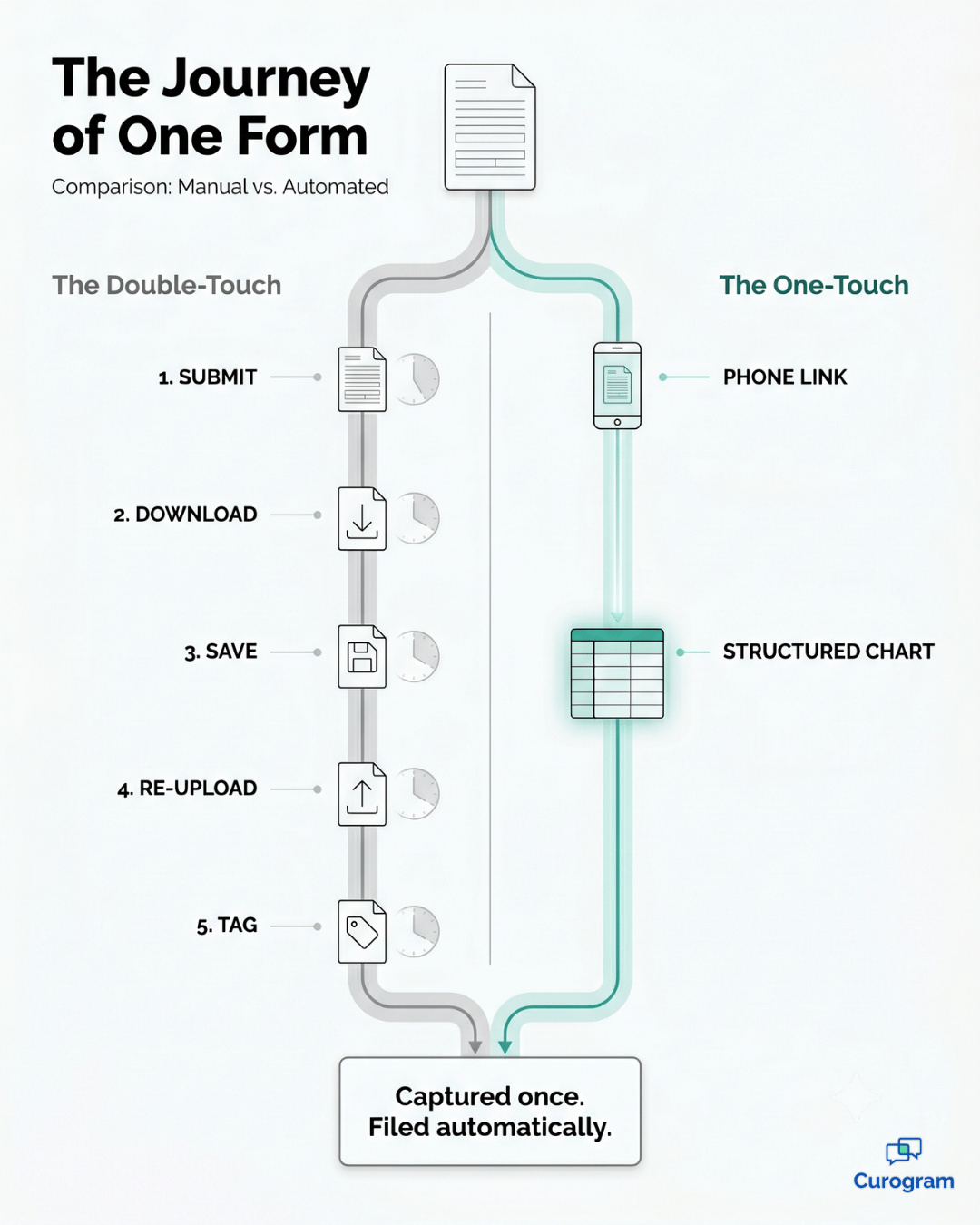
Infographic tracing one patient intake form from paper to structured CharmHealth data

Here's how the loop runs, start to finish:

  1. You send intake as a text link, usually attached to the visit reminder that's already going out. There's no portal account to set up and no packet to print, so the work on your end is a single message. 
  2. The patient taps the link and fills out intake right on their phone, with no portal login to remember and no password to reset. Because it opens in a browser like any other link, they can finish in the waiting room, in the parking lot, or on the couch the night before. 
  3. The moment the patient submits, CharmHealth form write-back posts those answers through the API in real time. The data moves straight into the chart as it's entered, so no stack of submissions sits waiting for someone to process. 
  4. The structured fields arrive in the chart already mapped to the right spots and fully searchable, with nothing left to re-attach. A provider opening the record sees clean, organized data instead of a PDF stapled to the file.

That's the whole point of EMR integration:

It negates double entry instead of hiding it behind a download button.

For a front desk serving anywhere from 1 to 20 providers, that change alone gives back the hours now spent saving, re-uploading, and tagging.

It also helps to know why patients finish this way. Most won't dig through a portal, but they will tap a text. See why patients finish intake on their phone, not the portal for the behavior behind the numbers.

The result is simple:

You eliminate manual intake in CharmHealth without changing how the system stores anything.

What One-Touch Intake Looks Like in Practice

Capture the form once, file it automatically, and the whole rhythm of the front desk changes. Charts get prepped before the patient walks in. Documents stay searchable instead of buried under hand-typed tags.

Here's the same form on both paths.

Under the double-touch, a submission lands as a file to download. Staff save it, re-upload or re-key it, and tag it by hand, so it's hard to find later. Count on roughly six minutes of manual work per patient.

Under the one-touch, that same submission lands as structured data. There's no staff action to take, the filing maps automatically, and the record stays searchable in the chart. Time per patient drops to near zero.

Same form, same patient, yet one path costs six minutes and a misfiled document, while the other costs nothing and quietly files itself.

Now translate that into money. Imagine a front desk handling 30 intakes a day, each one eating about six minutes of manual work.

Clinic team member warmly greeting a patient at check-in in a bright medical office

Here's how that quietly adds up:

  • 30 intakes × 6 minutes = 3 hours of typing every day
  • 3 hours × 20 workdays ≈ 60 hours a month
  • 60 hours × $20 an hour ≈ $1,200 a month, or about $14,400 a year

That last figure is the one to sit with. It's $14,400 a year spent re-typing forms patients already filled out. For your team, those are hours that could go to patients instead of paperwork.

The reach matters too. Because text messages see about 98% open rates, the forms actually come back before the visit, not after. A paperless front desk for CharmHealth only works if the paper-free part reaches people, and texting does.

Kill the clipboard! Streamline intake and decrease wait times with Curogram's mobile-friendly online forms.  

This is what a clean front desk intake workflow in CharmHealth feels like:

Captured once, filed once, found instantly.

If you want the full picture, this article sits inside a larger resource. See the complete guide to secure online intake forms for CharmHealth practices for how every intake scenario fits together.

The Payoff Reaches Past the Front Desk

The front desk feels the change first, but the effects don't stop there. When intake files itself, the benefit ripples into the exam room, the billing queue, and the patient's very first impression.

Cleaner charts in the exam room

Start with your providers. A chart that arrives prepped and structured means no scrambling to read a scanned form mid-visit. Clinicians open the record and the history is already sitting in the right fields.

When intake writes back as structured data, the provider spends the visit looking at the patient, not hunting through a PDF for an allergy or a dose.

Fewer errors at the source

Then there's accuracy. Every manual re-key is a chance to fumble a date of birth, a phone number, or a medication name. Skipping the re-typing step removes those mistakes at the root, because the patient's own answers go straight into the chart untouched.

Take 30 intakes a day at two mistyped fields each: that's 60 corrections daily that never happen when answers post straight to the chart.

A smoother arrival for patients

Patients notice it too. Filling out forms once, on their own phone, at their own pace beats arriving early to scribble on a clipboard. And because the data lands clean, billing and front-office staff aren't chasing missing fields after the visit is over.

For your team, that's the quiet compounding return. Saved minutes per patient, fewer corrections, faster retrieval, and a smoother arrival all stack on top of the hours you already win back.

Stop Paying to Type the Same Form Twice

Let's bring it back to the simplest version of the truth. CharmHealth holds the chart. Curogram fills it once, automatically.

The double-touch was never a storage problem. It was a handoff problem. Patients submitted their answers, and your team got stuck re-entering the very information they'd already entered. Structured write-back removes that handoff without changing how CharmHealth keeps records.

So the real question isn't whether your system can store intake. It clearly can. The question is whether you're still paying skilled people to re-type details patients already handed you.

That cost is real, and it repeats every single day. Sixty hours a month doesn't sound dramatic until you see it as $14,400 a year, or as the chart prep that keeps slipping behind schedule. Stop the typing, and that time flows back to the front desk and the patients waiting to be seen.

The fix is not a rip-and-replace. You keep CharmHealth exactly as it is. You keep its native forms and kiosk wherever they're useful. You simply add a text-link path that writes back, so nothing about your EHR has to change.

What changes is the work itself. Intake comes in once, lands as structured data, and stays searchable from then on. Your team stops being the manual bridge between a patient submission and the finished chart. No saving, no re-uploading, no tagging by hand.

That's the difference between automating a form and automating the entire workflow around it. One looks modern on the surface. The other actually gives your staff their hours back.

If you want to see it work on a real chart, the next step is short. Schedule a Demo and we'll show structured intake posting straight into CharmHealth with no re-upload. In most practices, the freed staff hours offset the platform on their own.


Frequently Asked Questions

Does intake post as structured data or just a PDF?

It posts as structured data. Curogram maps the form fields to CharmHealth through its API, so the answers populate the chart instead of arriving as a flat PDF your team has to re-upload and tag.

Will staff still have to file or tag documents by hand?

No re-keying is needed. Completed forms write back on their own, which also keeps records more consistent and far easier to retrieve than uploads tagged one by one.

How does this work with CharmHealth's existing pre-screening forms?

It complements them. You can keep CharmHealth's native forms and kiosk wherever they help, and Curogram simply adds a text-link path that writes back, so nothing about the EHR has to change.

Is this approach compliant and reliable for sensitive health data?

Yes. Write-back uses CharmHealth's own API, and structured data exchange like this follows the interoperability standards that health IT systems are built around. You can read more through ONC's resources on EHR interoperability.

How fast can a practice see the time savings?

Quickly, because the change is additive rather than disruptive. Once text-link intake is live, the very next patient's form can write back automatically, so the hours your staff used to spend re-typing start coming back almost immediately.


Secure Online Intake Forms for CharmHealth

Secure Online Intake Forms for CharmHealth

💡 Secure online intake forms for CharmHealth EHR practices let patients complete paperwork on their own phone before a visit — no portal login, no...
Read More
Notenetic Intake Forms by Text | Paperless Behavioral Health

Notenetic Intake Forms by Text | Paperless Behavioral Health

💡 Notenetic intake forms via text message for behavioral health let new clients finish their paperwork at home, on their phone, instead of on a...

Read More
Dolphin Orthodontic Intake Automation: Zero Data Entry Dashboard

Dolphin Orthodontic Intake Automation: Zero Data Entry Dashboard

💡 Dolphin orthodontic intake automation through Curogram's Intake Automation Dashboard ends manual data entry and delivers complete patient records...

Read More