
 Aubreigh Lee Daculug

On CharmHealth's per-encounter plan, the Text/Voice Notifications add-on costs $20 a month for 250 messages, then $0.08 per text. Patient replies don't update the schedule.
Curogram sends reminders 3 days, 1 day, and 2 hours before each visit, with no message cap. When a patient replies to confirm, the confirmation is written back to the CharmHealth schedule. That fixes what we call "The 250-Message Ceiling."
Atlas Medical Center cut no-shows from 14.20% to 4.91% in three months with Curogram.
Somewhere around the fifth workday of the month, a small counter inside your CharmHealth account quietly reaches 250. Nobody on your team notices. From then on, though, every reminder your practice sends adds a little more to the monthly bill.
Practice managers who search for "automated appointment reminders CharmHealth without add-on limits" usually aren't new to patient reminders. They already pay for them every month. What they actually want is a system that keeps running through the end of the month and tells the schedule exactly who said yes.
That second part is exactly where most reminder setups fall short. A patient receives a text, replies "yes," and then nothing changes on the calendar. So your front desk calls the patient anyway, just to be certain.
Here's the quiet trade-off that many small offices end up making.
To keep CharmHealth reminder overage charges under control, someone trims reminder touches during the last two weeks of the month. It feels like responsible budgeting, but it actually removes the very messages that keep patients from missing their visits.
To be fair, CharmHealth is a capable, budget-friendly EHR, and its reminder add-on performs exactly as designed. The real issue is the design itself. You get a monthly message allowance, a separate fee for every text beyond it, and patient replies that never flow back into your appointment book.
This guide covers three things. First, how quickly a three-touch reminder plan exhausts a 250-message allowance and what that really costs. Second, how Curogram works alongside CharmHealth to send reminders without a message cap and post each confirmation back to the schedule automatically.
Third, it shows what real practices experienced once that communication loop was finally closed. If you run primary care, multi-specialty, integrative medicine, or behavioral health on CharmHealth, this guide is for you.
Why 250 Messages Run Out Before Your Month Does
Let's give CharmHealth its due first. Its scheduling tools are affordable, and the Text/Voice Notifications add-on does send reminders at the intervals you configure. For a very small office with light volume, that may be perfectly adequate.
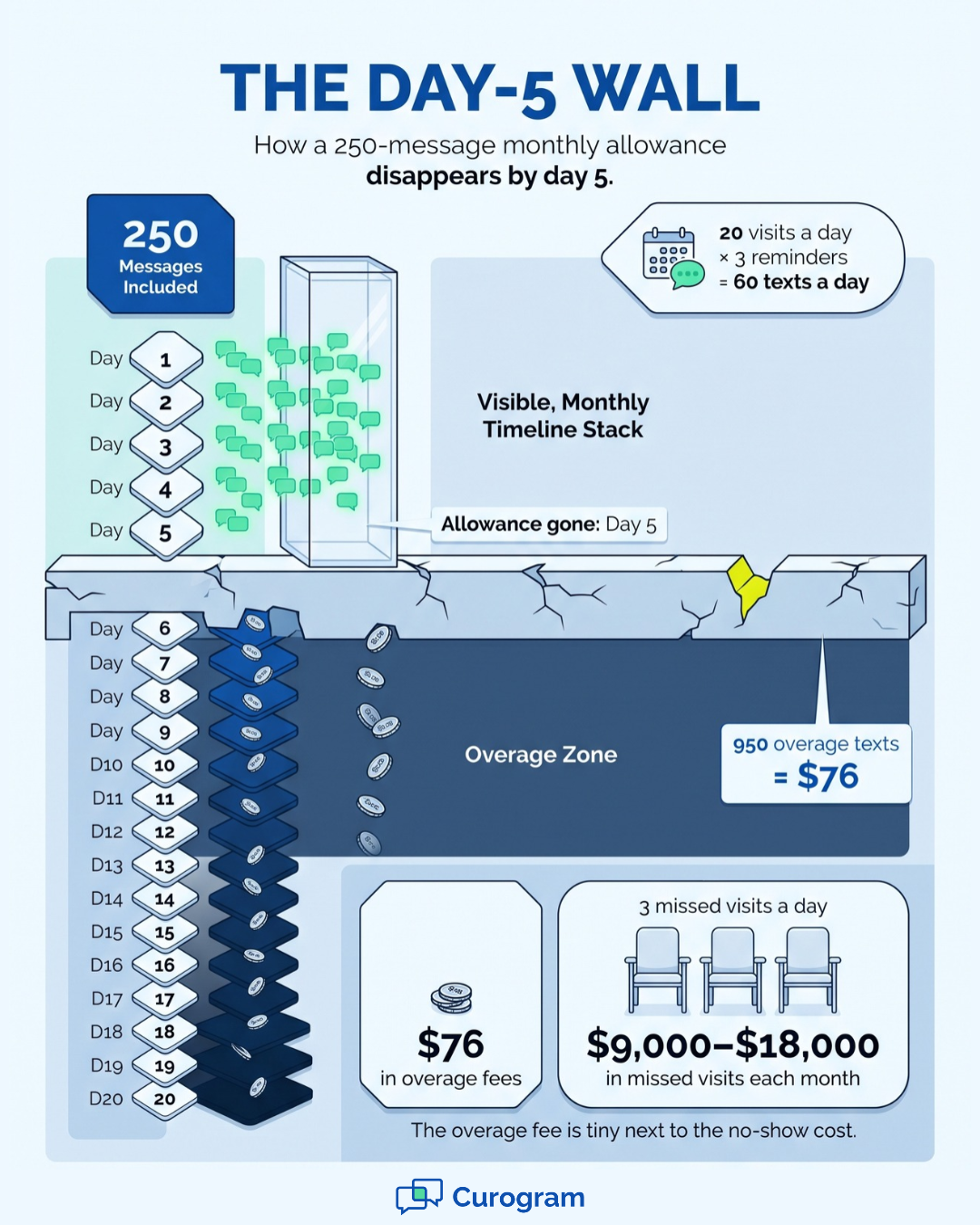
The trouble begins when you follow reminder best practices. Sequenced SMS appointment reminders for medical practices typically go out three times before each visit. That means three messages per appointment, so a 250-message allowance covers only about 83 visits.
That is the CharmHealth text reminder message cap on the per-encounter plan. CharmHealth's $200-a-month Provider plan includes 1,000 messages, but even that allowance falls short of a three-touch sequence at 20 visits a day.
Here's an illustrative example for a practice booking 20 visits a day across 20 clinic days on the per-encounter plan:
| Line item | Monthly figure |
|---|---|
| Visits booked | 400 |
| Reminder texts (3 per visit) | 1,200 |
| Messages included | 250 |
| When the allowance runs out | Day 5 |
| Overage texts | 950 |
| Overage cost at $0.08 each | $76 |
The $76 overage isn't the alarming number. The alarming part is everything that happens around it.
The reminder goes out, and the patient texts back "yes." Nothing on the schedule changes, because the reply never updates the appointment record. So the front desk picks up the phone and makes the confirmation call anyway.
Some practices skip the add-on entirely and depend on email reminders, which frequently land in spam folders. Others pay for texting but ration messages during the second half of the month to avoid overage fees. Both approaches eliminate the exact messages that prevent no-shows.
Now consider the real financial exposure. MGMA benchmarking data placed the median no-show rate for medical practices at 7% in 2019, and many smaller offices operate well above that. In this example, assume a 15% rate at $150 to $300 per visit, which produces 3 empty slots a day and $9,000 to $18,000 in lost revenue each month.
Compared with those losses, debating an 8-cent text message seems backward. The least expensive line item in the practice is protecting the most expensive one, and protecting it poorly.
Consider the practice manager who chose CharmHealth to keep the budget lean. She now monitors a message meter like a prepaid phone plan from 2009. Every morning begins with a highlighted call list, because the reminder system can send messages but can't listen to the answers.
How Curogram Turns Reminders Into a Confirmed Schedule
Curogram is the patient texting layer that works next to CharmHealth. Its job is to close the loop that the reminder add-on leaves open. Reminders go out without a usage meter, and confirmations come back in automatically.
We call that outcome "The Confirmed Schedule."
Three Touches, One Reply
Curogram sends automated SMS reminders 3 days, 1 day, and 2 hours before each visit. You can customize the timing and wording by provider, visit type, and location. Because there's no message cap, it suits practices looking for unlimited text reminders for small medical practices without a monthly count to monitor.
The patient reads an ordinary text message and replies once. That reply updates the appointment status, so staff don't need to read it, interpret it, and click through several screens to record it.
What About CharmHealth's Own Two-Way Tools?
They exist, and it's only fair to say so. CharmHealth's Two-Way Text feature and Automated Booking Assistant can process confirm, cancel, and reschedule replies.
However, both operate inside the EHR, where staff review replies under Messages > Text Messages > All.
Secured messages also require patients to click a link, enter a one-time code that expires after two hours, and confirm their date of birth. That's responsible security, but it adds friction to a simple "yes." Curogram sends direct text messages with no portal, no code, and no app, and every conversation appears in one dashboard.
How the Write-Back Connects
Appointment confirmation write-back to EHR schedule data needs a real integration, not a workaround. Curogram connects through CharmHealth's FHIR API program.
That program includes a request questionnaire, a license agreement, a sandbox account, and approval from your practice admin.
Curogram's team handles that heavy lifting with you. Plan on 1 to 2 weeks for full setup rather than same-day activation. Once it's live, CharmHealth remains your system of record, and Curogram runs the reminder conversation.
Why Automation Feels More Personal Here
Automation sounds cold, but in this case it works the other way. A patient can answer a text message in about five seconds.
That beats an email buried in a spam folder or a phone call that interrupts a work meeting. Nobody has to download the Charm mPHR app or reset a portal password just to say "I'll be there."
What a Full Morning Book Looks Like in Practice
Results matter more than promises, so start with what Curogram practices have actually reported.
- Atlas Medical Center reduced no-shows from 14.20% to 4.91% within three months.
- Covina Arthritic Clinic confirms more than 1,100 appointments every month, fully automated.
- Curogram practices average an appointment confirmation rate above 75%.
- No-show rates across Curogram practices run 53% below the industry average.
We call this transformation "The Full Morning Book." The schedule confirms itself overnight, and reschedule requests appear as flagged openings your team can refill. The message meter simply stops being part of the daily conversation.
Here's how that looks in practice.
Your practice manager opens CharmHealth at 7:55 a.m., and the day's appointments are already marked confirmed. The front desk devotes its first hour to patients in the lobby instead of working through a call list.
The owner can see the financial impact on a single page, too. In an illustrative scenario, preventing 2 to 3 no-shows a week at $150 to $300 per visit recovers roughly $1,200 to $3,600 a month.
For teams working to reduce no-shows in CharmHealth primary care practices, that's the metric worth tracking.
Stop Rationing the Texts That Keep Your Schedule Full
Here's the short version.
CharmHealth runs your practice, and Curogram confirms your schedule. You get sequenced reminders with no message cap, and every patient confirmation is written back automatically, with no overages to track and no morning call list.
The two platforms handle different jobs, and that's the whole point. CharmHealth manages your clinical records, scheduling, and billing infrastructure. Curogram handles the patient's side of the conversation: the five-second "yes" that fills your 9:15 slot without a single phone call.
Take a moment now to consider where your communication budget goes today. Most practices never add up their add-ons in one place. There's the texting add-on, the overage charges, and the staff hours spent on confirmation calls.
Then calculate one more figure. Multiply your monthly visits by your no-show rate, and then multiply that result by your average visit value. That's what empty appointment slots cost your practice every month.
For most small offices, that number is far larger than any texting fee. Yet the common reaction is to send fewer reminders, not more. It's a bit like disconnecting the smoke alarm to save money on batteries.
You don't have to choose between a full schedule and a lean budget. Sequenced reminders keep patients on track, and automatic confirmations keep your staff off the phone. A schedule that updates itself gives your whole team a calmer start to every day.
Ready to see how this works with your own numbers? Schedule a Demo of the Curogram and CharmHealth integration. Bring your current no-show rate and your add-on bill, and we'll show you which add-ons Curogram can replace and the net cost impact for your practice.