
 Aubreigh Lee Daculug
CharmHealth's built-in text notifications are one-way by default, and email reminders can land in spam. That's the patient side of what we call "The 250-Message Ceiling."
Curogram sends reminders 3 days, 1 day, and 2 hours before each appointment and records the patient's reply on the schedule.
Curogram clients confirm more than 75% of appointments on average. Atlas Medical Center reduced no-shows from 14.20% to 4.91% in three months.
Your patient already said yes. She read the appointment reminder during her lunch break, typed "Yes, I'll be there," and went back to work, confident her visit was confirmed.
But her reply never reached anyone at your practice. The message was a one-way notification, designed to deliver information but not to receive it. So the next morning, your front desk calls her at the office to ask the same question again.
This gap shows up in CharmHealth practices of every size. You genuinely try to remind patients, whether you pay for the text add-on or rely on email. Both approaches still leave patients holding a reminder they can't easily answer.
Email creates its own complications. If you've noticed CharmHealth email reminders going to spam, you know how often a well-timed message goes unseen. Secured messages add another barrier, because patients must open a link and enter a verification code before reading a few routine lines.
None of this is the patient's fault. Most people want to confirm. They simply want to respond the way they'd answer a friend, quickly and from the phone already in their hand, without remembering another login.
That's exactly where two-way text appointment confirmations for CharmHealth patients make a meaningful difference. The reminder arrives as an ordinary text, the patient replies with one word, and the confirmation appears on your schedule without anyone picking up the phone.
In this guide, you'll learn why CharmHealth's built-in reminders stall on the patient's side and what an effortless reply actually looks like. You'll also see what happens when patients can confirm in five seconds.
If you run a behavioral health, integrative medicine, or primary care practice, this article is written for you. Your patients chose your practice for its personal attention, and their reminders should reflect that same care.
When a Reminder Becomes a Dead End for Patients
You're Reminding Patients. They Just Can't Answer.
CharmHealth gives practices genuine reminder tools, and most offices use them consistently.
With the paid Text/Voice Notifications add-on, text reminders go out automatically on a schedule you configure. Practices that skip the add-on, or carefully ration it, usually depend more heavily on email.
The limitation hides in the details. CharmHealth's text notifications are one-way by default, which means patients can read them but can't reply. On the Encounter plan, the add-on costs $20 a month for 250 messages, then $0.08 for every additional text. That pricing structure encourages many offices to send fewer texts and more emails.
Three Ways a Patient's Yes Gets Lost
When you follow the reminder from the patient's perspective, the communication breakdowns become obvious.
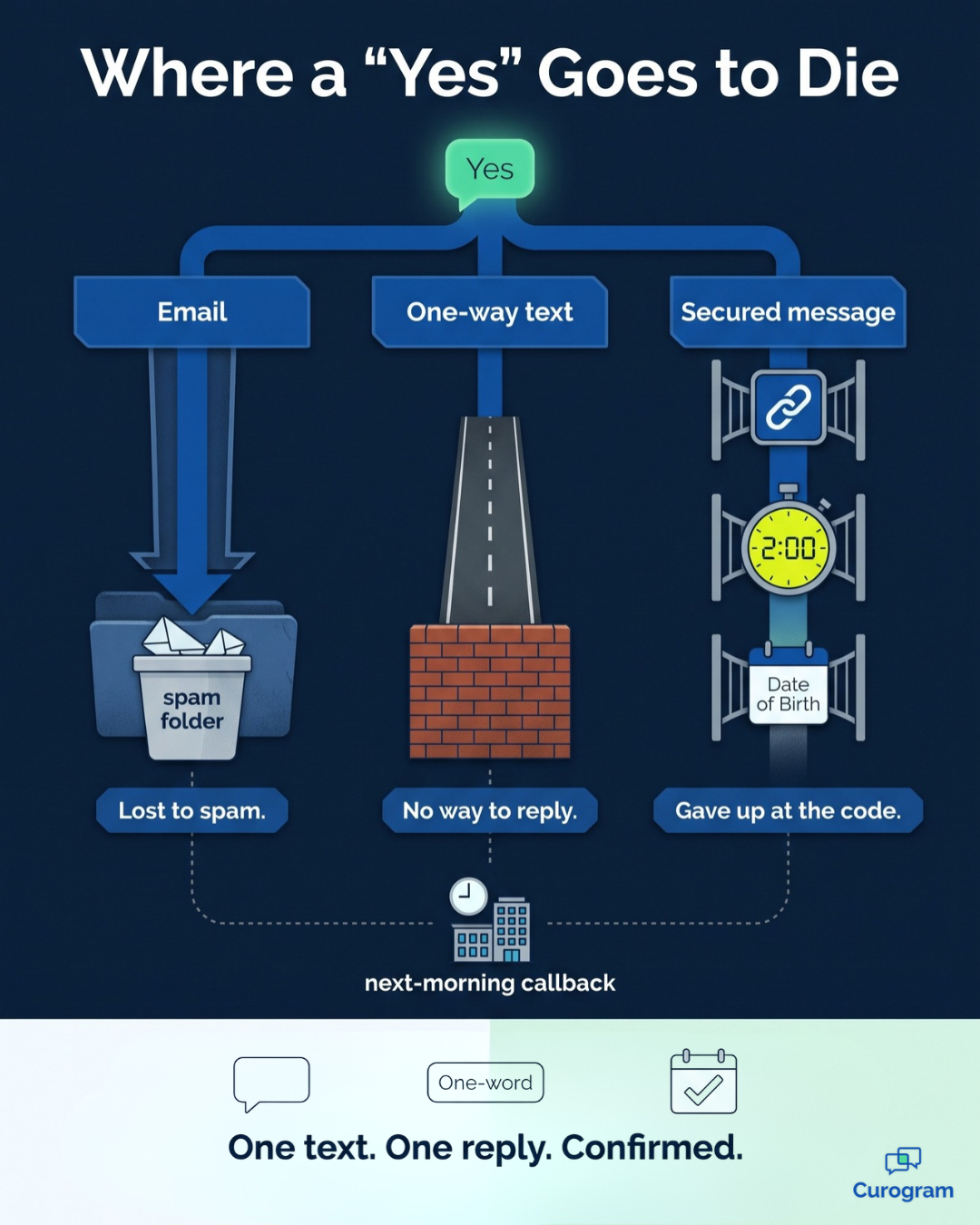
An email reminder lands in a spam folder and never gets opened.
A one-way text arrives, and the patient types "yes" into a conversation that can't hear it.
Secured messages create the most friction of all. The patient taps a link, enters a one-time code that expires in two hours, and verifies a date of birth just to read three short sentences. Understandably, many patients abandon the process halfway through.
So your staff calls the following morning, often while the patient is busy at work. Sometimes the appointment survives the phone tag. Other times, it quietly becomes another no-show.
What the Missed Replies Cost You
MGMA reports a median no-show rate of 7% for medical practices, based on 2019 data, and many smaller practices experience higher rates. Consider an illustrative example where you book 20 appointments daily and 15% of patients don't show. That's 3 empty appointment slots every single day.
At $150 to $300 per visit across 20 clinic days, those empty slots cost roughly $9,000 to $18,000 each month. These figures are a hypothetical example rather than a guarantee, but the underlying pattern is real. Behind many no-shows is a patient who would have confirmed or rescheduled if replying had been effortless.
The communication channel matters, too. Text messages see open rates near 98%, while email reminders compete with spam filters and overflowing inboxes. Pew Research Center found that 73% of adult cell phone owners were already texting back in 2011, and texting was nearly universal among young adults even then.
The Patients Behind the Numbers
Consider the working parent who can't answer a confirmation call during the morning school drop-off.
Think about the behavioral health patient who will privately respond to a text but will never answer a call from the clinic. Remember the longtime patient who missed an appointment because the reminder disappeared into an email folder she rarely opens.
None of these patients are careless or unreliable. The communication channel simply failed them.
What the Patient's Easy Yes Looks Like with Curogram
Curogram builds the confirmed schedule from the patient's side, an approach we call "The Patient's Easy Yes." Reminders arrive in the same text conversation patients already use every day. They also accept the simple reply patients were planning to send anyway.
Here's how the process works.
Automated SMS reminders go out 3 days, 1 day, and 2 hours before each appointment, and the patient replies with one word to confirm or request a new time.
That one-reply appointment confirmation by text is recorded on the CharmHealth schedule, so your staff can see who's coming without making a single call.
It's reasonable to ask how this differs from CharmHealth's own Two-Way Text feature.
That tool is legitimate and useful, but it's designed primarily for the EHR side of the conversation. Replies arrive in the Messages section for staff to manage individually, and secured messages still place a verification code and birth date check between the patient and the information.
| What the patient experiences | CharmHealth's built-in tools | Curogram |
|---|---|---|
| How the reminder arrives | One-way text by default, or an email that may hit spam | A regular text in the patient's own message thread |
| How the patient confirms | Only if Two-Way Text is on, and staff work each reply in Messages | One-word reply, recorded on the schedule |
| Reading a secured message | Link, two-hour code, and date of birth check | No code or login for routine reminders |
| What the patient installs | Portal or Charm mPHR app for many tasks | Nothing to confirm a visit |
Implementation stays manageable for your team and completely invisible to patients.
Curogram's team handles the CharmHealth API approval steps, and full integration typically takes 1 to 2 weeks. On the patient's side, there's nothing to configure at all. Patient text reminders with no app download work from day one, because every patient with a phone already has the only app they need.
This approach matters most in practices where the relationship is everything. An SMS appointment confirmation for behavioral health patients is discreet enough to answer from a workplace without drawing attention. Integrative medicine patients who chose a high-touch practice receive reminders that feel personal rather than robotic.
For patients who will never install the Charm mPHR app, a plain text message simply works. Patient-friendly appointment reminders without portal login don't make care feel less personal, and they demonstrate that you respect your patients' time.
Once an appointment is confirmed, that same conversation can support two-way patient texting and secure online intake forms.
From Five-Second Replies to a Full Morning Book
Easy replies change how patients behave, and the results show it.
Here's what Curogram practices report:
- More than 75%: the average appointment confirmation rate among current Curogram clients
- 14.20% to 4.91%: Atlas Medical Center's no-show rate before and after three months of automated reminders
- 53% lower: Curogram clients' no-show rates compared with the industry average
We call this shift "The Five-Second Yes." Confirming a visit stops being a chore the patient owes you. It becomes an automatic reflex. Reschedule requests arrive as texts your team can act on right away, not silent no-shows you find once the morning has begun.
The outcome is what we call "The Full Morning Book." Patients often tell your staff that the reminders are the easiest part of the whole visit. Your schedule holds steady, and open appointments appear early enough to refill. F
or the front desk side of this shift, see how practices can end the confirmation call list.
The financial math adds up quickly. In an illustrative example, preventing just 2 to 3 no-shows weekly at $150 to $300 per visit recovers about $1,200 to $3,600 every month. If you want to reduce patient no-shows in integrative medicine practices, or in any practice built on trust, making the reply effortless is the right place to start.
Make Every Reminder One Your Patients Can Answer
Your patients aren't ignoring your reminders. Most of them genuinely want to confirm their appointments. They just need a reminder that reaches them and gives them an easy way to respond.
That's the central idea behind this guide. When confirming requires only one reply to an ordinary text, CharmHealth patients confirm reliably. There's no portal login, no verification code, and no spam folder standing in the way.
It helps to view the partnership differently. CharmHealth is built for your records and your clinical workflow, while Curogram is built for your patients' convenience. One system keeps your documentation organized, and the other protects the appointments you and your patients planned together.
There's a financial angle as well. Many CharmHealth practices pay for texting, reminders, and patient communication as separate add-ons. A single Curogram subscription brings those tools together in one platform, which can simplify your daily workflow and monthly expenses.
Here's a simple test you can run this week.
Ask your front desk how many of yesterday's no-shows actually saw their reminder. Then ask how many could have replied to it if they'd wanted to. The answers usually reveal the real problem.
Two-way text appointment confirmations for CharmHealth patients close that gap for good. Reminders become difficult to miss and easy to answer. Your staff spends less time chasing confirmations, and your morning schedule stays full.
Ready to see the experience from your patient's perspective? Schedule a Demo, and we'll walk through the full patient journey. We'll also identify which CharmHealth add-ons Curogram can replace and what that could mean for your monthly costs.