14 min read

Athenahealth Negative Review Prevention: Start With Your Front Desk

Athenahealth Negative Review Prevention: Start With Your Front Desk
💡 Athenahealth practice negative review prevention starts with a simple idea: screen patient mood before sending the Google review link. Curogram's Feedback Firewall makes this possible.
  • Sends a quick post-visit text asking patients to rate their visit
  • Routes happy patients straight to your Google review page
  • Sends unhappy patients to a private feedback form instead
  • Alerts your office manager or admin so they can follow up fast
  • Turns would-be 1-star reviews into resolved cases that stay private
With sentiment screening and a staff complaint resolution workflow built into your internal feedback system, your team gets the chance to fix problems before they become public. The result: fewer bad Google reviews and stronger patient trust.

Picture this. A patient waits 40 minutes at your urgent care clinic. She's upset. Ten minutes after she leaves, your system sends her a text asking for a Google review.

What happens next is easy to guess. She writes a 1-star review about the long wait. It goes live for the world to see. And your office manager finds out about it two days later — from Google, not from the patient.

This is the reality for most practices that use Athenahealth without a feedback firewall practice layer. Every patient, happy or not, gets the same review link. There's no filter. No safety net. No chance for your team to step in and make things right.

The core issue isn't that patients are upset. People get upset. The real problem is that your staff never had a shot at fixing it first.

Athenahealth practice negative review prevention doesn't mean hiding bad feedback. It means giving your team a window to act on it before it hits Google.

That window is what we call the Feedback Firewall — a sentiment screening step that sorts patient mood and sends unhappy patients to a private form, not a public page.

In this article, we'll walk through how the Feedback Firewall works step by step. You'll see how one office manager turned a 1-star complaint into a 5-star review. And you'll learn the key metrics your team should track to measure success.

If you run a practice on Athenahealth and you're tired of seeing fixable problems turn into lasting public damage, this guide is for you. It's built for practice admins, office managers, and patient experience leads who want a smarter way to handle patient complaints.

The Unfiltered Review: When Every Complaint Goes Straight to Google

Most review request systems work the same way. A patient checks out. The system sends a text. The text includes a Google review link. Done.

But here's the problem: the system treats every patient the same. The person who had a quick, smooth visit gets the same prompt as the person who waited 45 minutes with no update. The patient who had a billing issue at check-in gets the same link as the patient who breezed through with a simple copay.

There's no step in between. No filter. No way to tell happy patients from unhappy ones. That's what makes this an unfiltered review pipeline — and it's a risk that most practices on Athenahealth don't think about until the damage is done.

The Real Cost of No Filter

When there's no sentiment screening Athenahealth practices can rely on, staff have zero insight into how a patient feels before that review goes live. The first time your office manager hears about a complaint is when she opens Google and sees a 1-star rating staring back at her.

By that point, the options are slim. She can post a polite public reply. Maybe she can call the patient. But the review is already out there. Every new patient who searches your practice name will see it.

And in local search, that one bad review can carry real weight. For practices in a busy market, the gap between spot three and spot four on the Google map pack can come down to a tenth of a star. One angry review can mean fewer eyes on your listing and fewer new patients walking through the door.

A Fixable Problem That Became Public

Let's say a patient named Mrs. Taylor came in for a sore throat:

The visit went fine, but the front desk had a mix-up with her insurance card. She had to wait while staff sorted it out. No one told her what was going on. She left feeling ignored.

Twenty minutes later, she got a review request text. She clicked the Google link and wrote: "Front desk was rude and didn't know how to process my insurance. I waited 20 minutes for something that should have taken two. Won't be back."


Now, was the front desk rude? Probably not. Was the wait a real issue? Yes. Could the office manager have called Mrs. Taylor, said sorry, and cleared things up? Absolutely. But there was no internal review routing to catch that unhappy patient before she went to Google.

That's the core issue. It's not that patients complain. It's that the practice had no chance to respond first.

Why This Keeps Happening

Most practices don't set up a review system with bad reviews in mind. They set it up to collect more reviews, period. And that makes sense — more reviews help your search ranking.

Based on our internal research, 90% of new patient leads see a practice's Google Business Profile before they even visit the website. More reviews mean more trust and more clicks.

But when the only goal is volume, quality control gets lost. Every patient hits the same pipeline. Happy ones leave 5 stars. Unhappy ones leave 1 star. And your team doesn't know about the 1-star reviews until it's too late to do anything about them.

This is what we call the unfiltered pipeline — and it's the villain behind most public reputation damage for Athenahealth-based practices. It's not a broken system. It's a system that was never built to prevent bad Google reviews in the first place.

The good news? There's a fix. And it only takes one extra step.

Photo of a clinic office manager listening to a patient concern over the phone at her desk

The Feedback Firewall: Sentiment Pre-Screen with Internal Complaint Routing

The Feedback Firewall is a simple layer added to your post-visit review flow. It works by asking one quick question before a patient gets the Google link. That question acts as a fork in the road — and it makes all the difference.

Here's how the process works, step by step.

Step 1: The Sentiment Check

Right after a visit ends, the patient gets a text. It asks something simple: "How was your visit today?" The patient can tap a thumbs up, thumbs down, or pick a score on a 1-to-5 scale. This takes about two seconds. No typing needed.

This one step is the heart of the sentiment screening and staff complaint resolution workflow. It gives you a read on how the patient feels before you send them anywhere.

Step 2a: The Positive Route

If the patient responds with a high score or thumbs up, they get the Google review link right away. The message says something like: "Thank you! Would you share your experience on Google? It helps other patients find great care."

This is key. You're reaching the happy patient at the peak of their good feeling. They just had a great visit. They're in the mood to help. That's when they're most likely to write a strong, positive review.

Step 2b: The Negative Route

If the patient gives a low score or thumbs down, they don't get the Google link. Instead, they see a private feedback form. The message says: "We're sorry to hear that. Would you tell us what happened so we can make it right?"

Their response goes straight to your office manager, practice admin, or whoever you assign. Not to Google. Not to the public. The patient feels heard, and your team gets a clear picture of the problem.

This is internal review routing in action. It keeps the complaint inside your walls, where you can act on it.

Step 3: Staff Alert and Follow-Up

When a negative response comes in, the system sends an alert to the right person on your team. That person can call the patient, send a text, or set up a callback — whatever makes sense.

And here's the part that surprises most practices: a lot of unhappy patients just want someone to listen. A quick phone call can turn the whole thing around. Many patients who get a timely follow-up not only stay with the practice — they come back and leave a positive review later.

Why This Works So Well

The Feedback Firewall doesn't block anyone from leaving a Google review. It doesn't hide feedback. Patients can still go to Google on their own if they want. The system just offers a faster, more personal path for those who are upset.

Think about it from the patient's point of view. You're frustrated after a visit. You get a text. Instead of being sent to Google with no context, you're asked what went wrong. Someone from the office calls you that same day to say sorry and fix the problem.

Which experience builds more trust?

This approach works because it respects the patient's feelings and gives staff a real chance to fix things. It's a simple internal feedback workflow that turns a one-way review pipeline into a two-way exchange.

And the data backs it up. According to our internal data, practices using Curogram's feedback tools have seen 90% of surveyed patients leave 5-star reviews. When happy patients are guided to Google and unhappy patients are handled in private, the results speak for themselves.

That's what Athena negative review prevention looks like in practice — not a review blocker, but a smart filter that helps your team do what it does best: take care of people.

The Narrative: How One Office Manager Turned a 1-Star Into a 5-Star

Stories make the concept real. So let's walk through how this plays out in a live practice setting.

The Practice

Meet Lisa. She's the office manager at an 8-provider urgent care group with two locations in the Charlotte metro. The practice runs on Athenahealth. Lisa wears a lot of hats — she handles daily ops, staffing, supply orders, and yes, Google reviews.

Before the Feedback Firewall, Lisa found out about negative reviews the hard way. She'd open Google one morning and see a new 1-star review posted two days ago.

By then, the patient had already vented in public. Lisa's only move was to post a polite public reply that most people would never read.

The Problem

The practice was getting 2 to 3 negative reviews per month. Most were about two things: long wait times during busy hours and mix-ups with insurance at check-in.

These weren't signs of a bad practice. They were signs of a busy one. But online, the context doesn't matter. All a new patient sees is a 1-star review that says "waited 40 minutes" or "front desk didn't know my coverage."

Each review pulled the overall rating down a little. In a market like Charlotte, where a dozen urgent care options pop up on the map, a 0.1-star dip can move you from position three to position four. That's fewer clicks. Fewer calls. Fewer new patients.

Lisa was spending hours each week doing damage control. She'd research each complaint, draft a careful public reply, and try to reach the patient after the fact. Most of the time, the patient never replied.

The Firewall in Action

Then the practice turned on the Feedback Firewall with Curogram's sentiment pre-screen. Here's what happened with one patient — let's call him Mr. Simmons:

Mr. Simmons came in on a busy Tuesday. He waited 35 minutes. No one at the front desk told him why. An urgent case had come in, and the whole schedule shifted. But Mr. Simmons didn't know that. He just knew he was sitting in a waiting room with no update.

After his visit, he got the standard post-visit text: "How was your visit today?" He tapped the low rating.

Because of the Feedback Firewall, he didn't get a Google link. Instead, he got the private form: "We're sorry to hear that. Would you tell us what happened so we can make it right?"

He typed: "Waited over 30 minutes. Nobody told me why. I almost left."

Lisa got the alert within minutes. That evening, she called Mr. Simmons. She said sorry for the wait. She told him about the urgent case that caused the delay. She offered to flag his chart so his next visit would be faster.

Mr. Simmons was caught off guard — in a good way. He told Lisa: "No doctor's office has ever called me back about a complaint."

The Outcome

Mr. Simmons came back the next week for a follow-up. This time, his visit was quick. He got the post-visit text, tapped a high score, and received the Google link.

He left a 5-star review. It read something like this: "Great urgent care. Had a long wait once but they called me to say sorry and made it right. That's how you know a practice cares."

Lisa's 10-minute phone call did what no public reply could. It turned a would-be 1-star review into a 5-star story about service recovery. And it kept a patient who was ready to leave for good.

The Bigger Picture

Mr. Simmons wasn't the only case. Across both locations, the Feedback Firewall caught the bulk of negative sentiment before it reached Google. In the first two months, the practice saw a clear drop in public negative reviews.

Here's why that matters in real terms. Let's say the practice had a 4.2-star rating before the Firewall. With 2 to 3 fewer 1-star reviews per month and more 5-star reviews coming in through the positive route, the rating climbed. After a few months, it crossed 4.5 stars.

In Google's local map pack, that kind of jump can move a practice from page two to the top three. Based on our internal research, Google search is the number one source of new patients for many clinics, and 90% of new patient leads check the Google Business Profile before the website. A higher star rating means more trust, more clicks, and more patients.

What Lisa's Story Teaches Us

Lisa's experience shows three things:

  • The complaint was fixable. A long wait caused by an urgent case isn't a failure. It's a normal part of running a busy practice. But without the Firewall, that normal event became a public problem.

  • Speed matters. Lisa called the same day. If she had waited a week, the impact would have been lost. The internal feedback workflow gave her the heads-up she needed to act fast.

  • People want to be heard. Mr. Simmons didn't want free care or a gift card. He wanted someone to know what happened and say sorry. That's it. A simple phone call did more than any online reply ever could.

This is what a staff complaint resolution workflow looks like in real life. It's not a script. It's not a template. It's a system that gives your team the time and tools to do what they already want to do — take care of their patients.

And when you combine that with sentiment screening Athenahealth practices can use through Curogram, you get a process that works without adding more to your team's plate. The system handles the routing. Your people handle the follow-up.

Operational Metrics for Complaint Resolution Teams

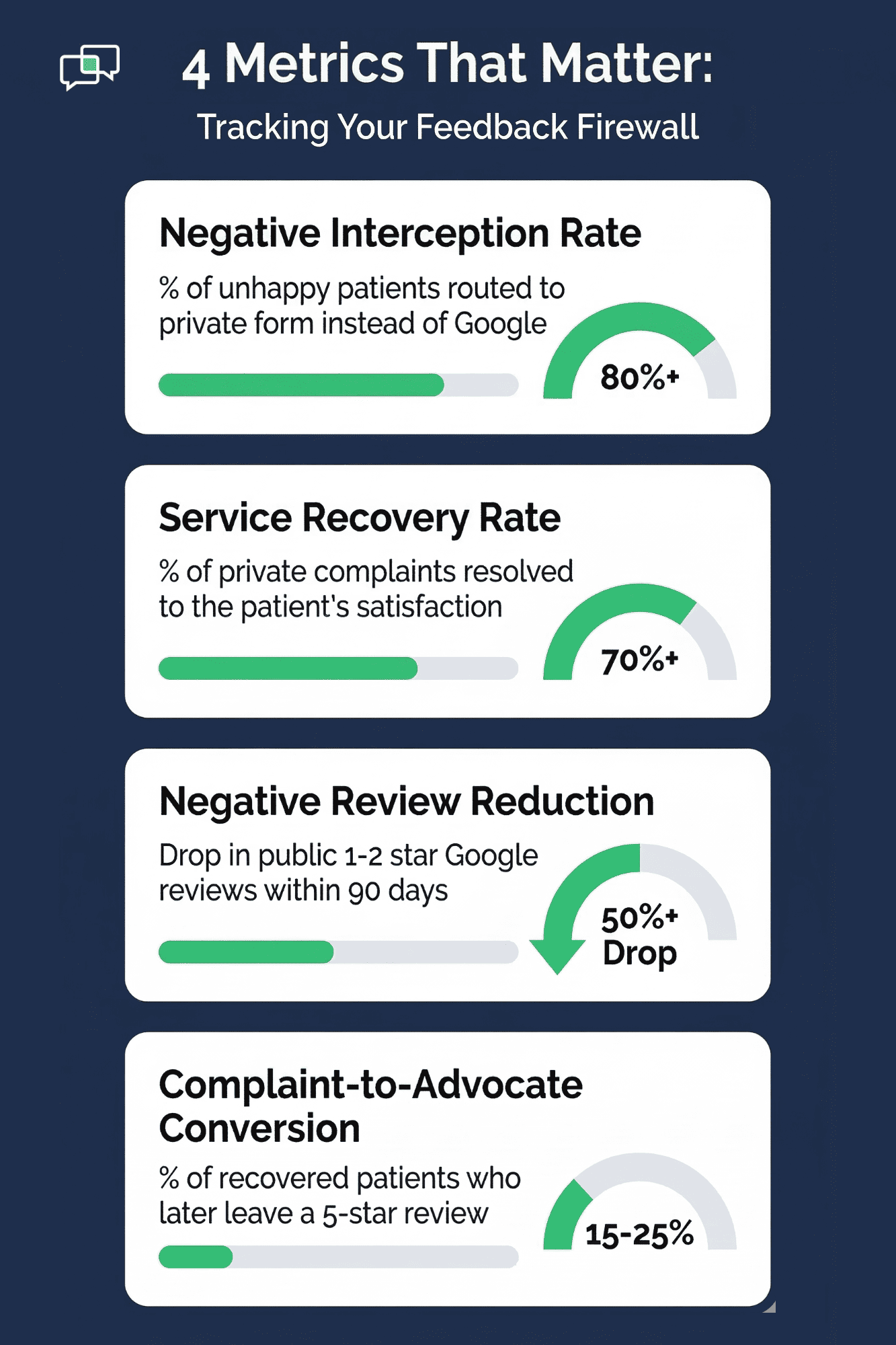
If you're going to use the Feedback Firewall, you need to track the right numbers. Here are four metrics that matter most for practice admins and office managers:

  • Negative Interception Rate - This tells you what share of unhappy patients were caught by the pre-screen and sent to the private form instead of Google. The goal is to capture the vast bulk of negative mood before it goes public. If your rate is low, check your text timing or the wording of your prompt.

  • Service Recovery Rate - Of the patients who were routed to the private form, how many were resolved to their liking? A high rate means your staff is doing strong follow-up. A low rate could mean slow response times or a lack of clear next steps for the team.

  • Negative Review Reduction - Compare the number of 1- and 2-star reviews on Google each month, before and after you turn on the Firewall. The target is a clear drop. Track this for at least 90 days to see a true trend.

  • Complaint-to-Advocate Conversion - This is the gold metric. It tracks how many patients who first gave a low score later came back and left a positive Google review. This shows the full power of the feedback firewall practice model — not just stopping bad reviews, but turning upset patients into loyal fans.

Infographic showing four key metrics for tracking negative review prevention at medical practices

Here's a simple way to view these metrics:

Metric

What It Measures

Target

Negative Interception Rate

% of unhappy patients routed to private form

80%+

Service Recovery Rate

% of private complaints resolved

70%+

Negative Review Reduction

Drop in public 1-2 star reviews

50%+ drop in 90 days

Complaint-to-Advocate Conversion

% of recovered patients who later leave 5 stars

15-25%


Track these monthly. Share them with your team. When staff see the direct link between their follow-up calls and fewer bad reviews, it builds a culture of care that goes beyond any system.

To see how these metrics translate into real review growth for your practice, try running your numbers through Curogram's ROI Calculator: Reputation Booster. It takes your monthly appointment volume and shows you how many of those visits could become 5-star Google reviews.

Integration Confidence: The Firewall Works Within Your Existing Workflow

One of the biggest worries with any new tool is: "Will this add more work to my team's day?" With the Feedback Firewall, the answer is no.

  • It runs on its own. The sentiment pre-screen fires after every visit. No one on your team needs to pick which patients get screened. The system handles the routing based on how the patient responds. It's hands-off from the start.

  • Alerts go where you want them. Negative feedback alerts can be sent to the practice admin, office manager, patient experience lead, or anyone else you choose. You can get them by email, text, or through the dashboard. Set it once and forget it.

  • It's ethical and compliant. The Feedback Firewall does not block patients from going to Google. If a patient wants to leave a public review, they still can. The system just gives them a faster, more direct way to be heard — and most upset patients prefer that. It offers a path to real help, not a dead end.

This means you can prevent bad Google reviews at your practice without crossing any lines. You're not hiding feedback. You're giving your team a chance to act on it first. And you're giving your patients a channel that feels personal instead of public.

The Firewall fits right into your existing athenahealth setup through Curogram. No double data entry. No new logins for your staff. Just a smarter layer on top of what you already do.


Why the Feedback Firewall Work When Generic Review Tools Don't


Most review tools focus on one thing: getting more reviews. They blast every patient with the same link and hope for the best. That works fine when things go well. But when a patient has a bad day, that same tool becomes a direct line to public damage.

The Feedback Firewall works because it does something those tools don't — it listens first. Before asking for a review, it asks how the patient feels. That one extra step creates two paths: one for happy patients and one for those who need help.

Curogram built this feature to fit the way real practices work. The pre-screen text goes out on its own after every visit. There's no manual step for your staff.

When a negative response comes in, the right person gets an alert right away. They can call, text, or set up a follow-up — whatever fits the moment.

And because Curogram works with any EMR, including Athenahealth, there's no need to change your core system. It plugs in as an add-on and runs alongside what you already use.

Based on our internal data, one multi-location practice earned over 1,064 new 5-star reviews in just three months after using Curogram's automated survey and review tools.

The Feedback Firewall isn't about hiding bad reviews. It's about giving your team a real shot at fixing problems before they go public. That's what makes it different from every other review tool on the market.

Your patients want to be heard. The Firewall makes sure you hear them first — before Google does.

Next Step: Give Your Team a Chance to Fix It Before Google Sees It

The math is simple. If a patient is upset and the only option you give them is Google, they'll use it. But if you give them a private channel where someone listens and acts fast, most will choose that instead.

That's the whole point of the Feedback Firewall. It adds one step to your post-visit flow — a quick mood check — and uses that answer to route patients down the right path. Happy patients go to Google. Unhappy patients go to your team.

This approach to Athenahealth practice negative review prevention isn't about gaming the system. It's about doing the right thing at the right time. It's about building a staff complaint resolution workflow that treats every complaint as a chance to get better, not a threat to manage.

You saw how it worked for Lisa and her urgent care group. A 10-minute phone call turned a frustrated patient into a 5-star advocate. The same thing can happen at your practice, every week, with the right system in place.

And the payoff goes beyond reviews. When your team knows they have the tools to catch and fix problems early, morale goes up. When patients feel heard, trust goes up. When your Google rating climbs, new patient volume goes up. It all connects.

Based on our internal research, 90% of new patient leads see your Google Business Profile before your website. What they see there shapes whether they call or scroll past. A strong rating built on real patient experiences is the best marketing you can have.

Do not let fixable complaints become permanent 1-star reviews. Request a quick demo and see how the Feedback Firewall routes unhappy patients to your team.


Frequently Asked Questions

How does the sentiment pre-screen know which patients are unhappy?
After each visit, the system sends a text asking patients to rate their experience. Patients who tap a low score or thumbs down are flagged and routed to a private feedback form instead of the Google review link.
Why is a private feedback form better than letting patients post directly to Google?
A private form gives your staff a window to respond, fix the issue, and rebuild trust before the complaint goes public. Most upset patients prefer a direct response over posting online when given the choice.
How quickly should staff follow up after receiving a negative alert?

Same-day follow-up gets the best results. The sooner your team reaches out, the more likely the patient is to feel heard and give your practice a second chance.

Why does routing negative feedback internally not count as blocking reviews?

The system never stops a patient from going to Google. It simply offers a faster, more personal path for unhappy patients. They can still leave a public review if they choose to.

How can an office manager track whether the Feedback Firewall is working?

Track four key metrics each month: negative interception rate, service recovery rate, negative review reduction, and complaint-to-advocate conversion. Comparing these over 90 days shows clear trends.


Athenahealth Reputation Management: The Review Engine Guide

Athenahealth Reputation Management: The Review Engine Guide

💡 Athenahealth reputation management powered by Curogram's Review Engine turns every patient visit into a Google review — with zero staff effort.

Read More
How Automated Review Requests Work With StreamlineMD

How Automated Review Requests Work With StreamlineMD

💡 StreamlineMD practices use automated review requests to boost patient reviews and build a stronger online presence. Sends review requests right...

Read More
One-Tap Google Reviews for Athenahealth: No Portal Needed

One-Tap Google Reviews for Athenahealth: No Portal Needed

💡 Athenahealth patient Google review text link tools like Curogram's One-Tap Review make it easy for patients to rate your practice right from...

Read More