7 min read
Centralize Patient Texting Across athenahealth Sites
Aubreigh Lee Daculug
:
September 14, 2026
Curogram adds the two-way layer. Each location keeps its own local, textable number.
Patients text back in plain SMS, with no app and no portal login. Staff route each thread to scheduling, billing, or clinical from one dashboard. athenaOne stays the system of record.
Curogram clients average a confirmation rate above 75%. Call volume falls by as much as 50%.
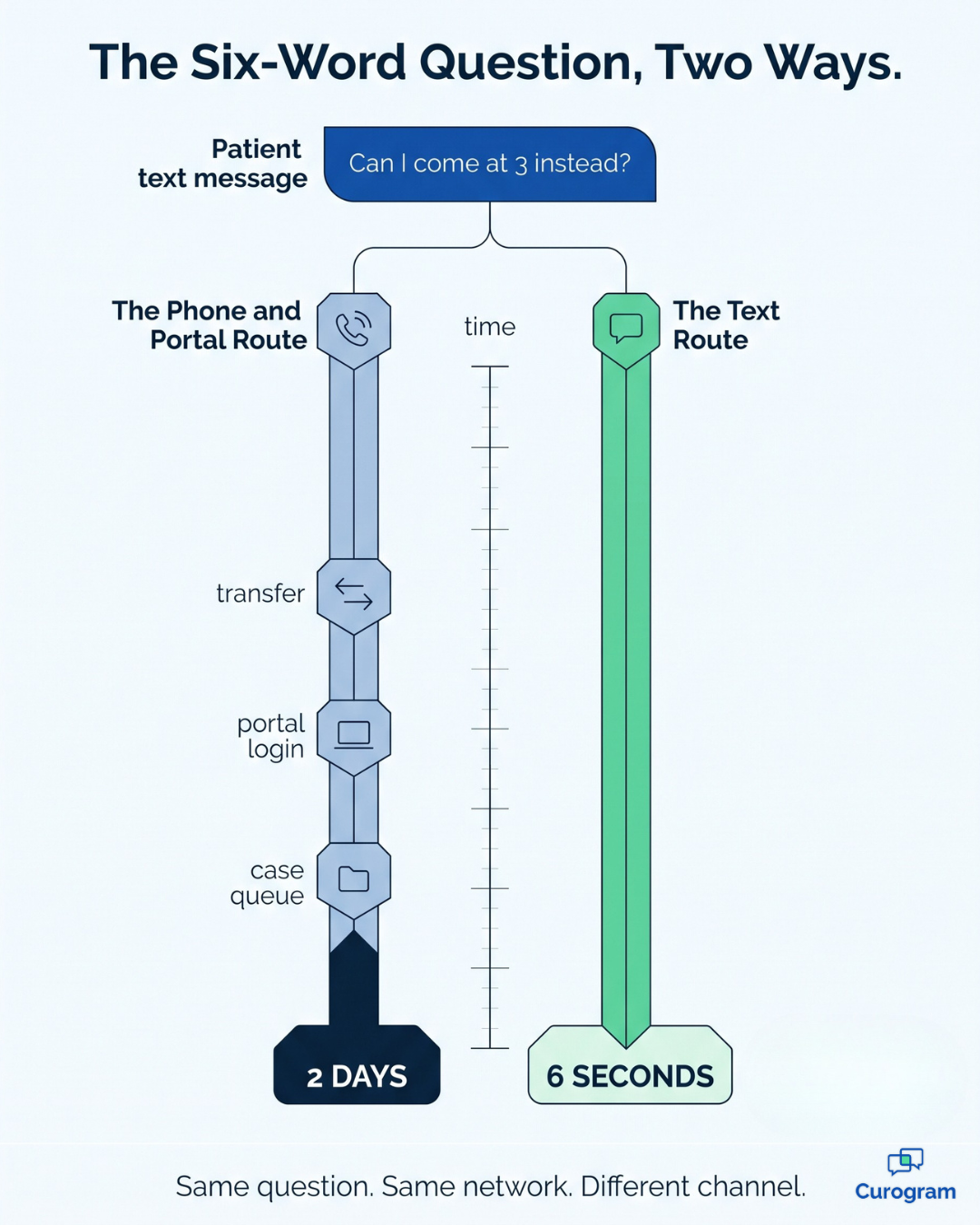
A patient gets a reminder text from your network. She types back: "Can I come at 3 instead?" Six words. Simple request.
Then nothing happens.
Her reply lands in a system that was never built to answer it.
So she calls the location and waits on hold. Or she opens the portal and sends a message that sits behind forty others in a case queue. A question that needed ten seconds now takes two days.
Multiply that by every site in your network.
This is the strange gap inside most athenahealth groups. athenaOne runs the clinical and financial side across your whole enterprise. athenaCommunicator sends reminders, portal alerts, and outreach to every patient on the schedule.
The outbound half of your engagement stack is enterprise grade.
The inbound half is not.
Replies scatter across the network. Every site has its own phone line, its own voicemail, and its own front desk trying to keep up. Central operations can benchmark claim denial rates across twenty locations, yet cannot see one patient conversation.
That gap is expensive, and it hides well. It shows up as hold times, no-shows, staff burnout, and one-star reviews written by people who only wanted to move an appointment.
Centralized patient texting across athenahealth locations closes it. Not by replacing anything you run, but by adding the layer that was never there. A genuine two-way channel that every location shares and central operations can actually monitor.
This article explains why the inbound side fragments and what it costs in calls and hours. You will see how a shared texting layer works next to athenaOne rather than against it. You will also see how routing works, what compliance looks like, and what changes once replies stop disappearing.
Your network already talks to patients. It is time it listened back.
Why Every Location Ends Up Talking to Patients Alone
Your network was built to broadcast. It was never built to listen.
The Outbound Side Is Already Solved
athenaOne scales the clinical and financial work across your whole enterprise. athenaCommunicator scales the outreach that goes with it. Reminders leave on schedule, at every location, without anyone lifting a finger.
That part works. The trouble begins the moment a patient wants a conversation instead of a notification.
The Reply Has Nowhere to Go
When a patient has a question, your network offers exactly two doors.
Door one is a location phone line.
Door two is a portal message that becomes a case in a queue.
Both doors fragment by site, and neither one is fast.
So the patient with a six-word question waits on hold behind someone disputing a bill, or she waits two days for a portal response. This is the precise point where athenahealth multi-location patient communication quietly falls apart.
The Volume Nobody Is Measuring
Front desks absorb this traffic all day. Confirmations, reschedules, refill checks, directions, insurance questions. Most of it is short, routine, and far better suited to text than to a phone call.
Here is the part that stings. Your central team can pull a benchmark on nearly any claim in the network, but it cannot produce a single number describing how long patients wait for an answer.
Regional Leaders Find Out Last
So how does a regional administrator discover that a location is drowning? Complaints. Reviews. A provider mentioning that patients keep arriving on the wrong day.
Those are the only channels that escalate reliably. By the time they do, the patient experience has already happened and the review is already public.
One Switchboard for Every Location's Conversations
The fix is not another portal. It is a switchboard.
Curogram sits on top of your athenahealth setup. Every location's texts, calls, and messages land in one shared workspace. Staff see only the conversations their permissions allow.
Nothing leaves athenaOne, which stays your system of record.
Think of it as an athenaCommunicator conversational texting complement. Your automation keeps sending, and Curogram answers whatever comes back.
| Layer | What it handles | Who can see it |
|---|---|---|
| athenaCommunicator | Outbound reminders, portal alerts, campaigns | Network-wide, automated |
| Location phone lines | Inbound calls, holds, voicemail | One location at a time |
| Portal case queues | Inbound secure messages | One location, one queue |
| Curogram | Two-way SMS, routing, media, telehealth links | Every location, one dashboard |
The table exposes the hole in the middle. Two of those rows are visible one location at a time. That is exactly where patient questions go to sit.
Local Numbers, Central Visibility
Each location keeps its own local, textable number. Patients see a caller ID they know, not a strange 800 number. They reply in plain SMS with no app to download and no athenaPatient login to remember.
Behind that familiar number, every thread flows into a single queue. That gives you a unified patient inbox athenahealth network leaders can staff, measure, and audit.
Security scales with it. That is the real question in any HIPAA texting multiple locations enterprise rollout. Curogram works under a signed BAA. Role-based permissions decide which staff can open which location's threads.
Routing That Matches How You Already Work
A billing question should never sit in a scheduler's pile. athenahealth department message routing sends each thread to the right team the first time. That means scheduling, billing, or clinical staff, based on what the patient asked.
Threads tie back to the patient record, so context stays whole when a message moves between teams. Nobody has to ask the patient to repeat herself.
For groups running a central scheduling team or a call center, this becomes one ambulatory network communication hub. Your team works a single queue across every location instead of twelve separate phone lines.
When one site spikes on a Monday, you rebalance coverage in minutes. Per-location phone lines never gave you that option.

What Changes When Every Reply Gets an Answer
The results show up in three places. Confirmations, calls, and staff hours.
Curogram clients average an appointment confirmation rate above 75%.
Curogram client data from clinical settings shows phone call volume falling by as much as 50%.
Staff productivity climbs more than 30% once two-way texting is running.
Here is what a 50% call cut looks like in practice. The math below is an illustration, not a study result. Run it against your own volumes.
| Measure | Before | After a 50% reduction |
|---|---|---|
| Patient calls per location each week | 400 | 200 |
| Staff minutes at 3 minutes per call | 1,200 | 600 |
| Hours per location each week | 20 | 10 |
| Hours across 12 locations each week | 240 | 120 |
That is 120 staff hours a week handed back to a twelve-location group. Across a year, it comes close to 6,000 hours. Call it three full-time roles you never have to hire.
The confirmation number carries the same weight. Covina Arthritic Clinic now confirms more than 1,100 appointments a month after automating the process. Atlas Medical Center cut no-shows from 14.20% to 4.91% in three months.
Recalls follow the same pattern. At one multi-location practice, 35% of patients who got an SMS recall booked within a month. In all, 1,240 patients came back from recall messages alone.
For your team, the shift is simple. You move from broadcasting without a listener to answering every reply. The six-word question gets a six-second answer from whichever team is free. The whole thread stays on the record.
How a Network Actually Turns This On
None of this requires a rip-and-replace project. Your athenahealth environment stays exactly where it is, and your reminders never pause.
Most networks follow the same five-step sequence.
- Pick two pilot locations. Choose your highest call volume site alongside one that already runs smoothly. The contrast shows exactly what the platform fixes and what it does not.
- Provision the numbers. Each pilot site keeps its existing local number and simply gains texting capability on it. Patients notice nothing except that their replies suddenly work.
- Write the routing rules. Decide which messages belong to scheduling, billing, or clinical staff. Begin with three lanes and expand once you observe actual traffic.
- Load your templates. Confirmations, reschedules, intake forms, and balance reminders make up most of the volume. Roughly ten templates cover almost everything a front desk sends in a typical week.
- Train the team and watch the queue. Front desk staff learn the screen in about five minutes. Regional leaders then track response times daily for the first two weeks.
Then you measure. Response time per location, call volume, and confirmation rate give you enough evidence to decide whether to expand.
Most groups roll out to the remaining locations once the pilot sites sustain a confirmation rate above 75% for a full month. That is a defensible internal benchmark, and it is also a number your central team can produce on demand for the first time.
The one element worth planning carefully is permissions. Decide early which staff can see which location's conversations. Retrofitting access rules across thirty sites is considerably harder than setting them once.
Your Network Already Sends at Scale. Now It Can Answer at Scale.
Try one quick exercise this week. Pull every portal case across your locations that took more than a day to close, count them, then read a handful.
Most of them will not be clinical. They will be scheduling questions, insurance questions, and directions. Each one was a conversation searching for a faster channel, and each one consumed staff time that a two-second text would have saved.
That is the entire case for centralized patient texting across athenahealth locations. Your network already reaches every patient on the schedule. What it lacks is a practical way for those patients to reach back without dialing a number and waiting on hold.
athenaOne is built for your clinical and financial enterprise, and it handles that responsibility well. It was never designed to serve as a conversation platform.
Curogram is built for the patient's side of the exchange, which is why it functions as a complement rather than a replacement. Nothing gets ripped out, and your reminders keep running exactly as they run today.
What changes is everything after the reminder. Replies land somewhere visible. Someone owns them. Central operations can finally measure how fast the network answers, location by location, and fix the sites that lag.
Practices that make this shift report confirmation rates above 75%, call volume down by as much as half, and front desk teams that leave at five instead of six. Those are meaningful gains once you multiply them across a dozen locations.
You have already done the difficult part by building a network that talks to patients at scale. The remaining piece is simply letting it listen at that same scale.
Book a demo with Curogram. Bring the call and case volumes from your two busiest locations, and we will map exactly what moves to text in week one.
Frequently Asked Questions
Yes. Curogram is HIPAA compliant and SOC 2 certified, and it works under a signed BAA. Role-based permissions control which staff can see which location's conversations, and every access is logged. That audit trail is what makes a shared inbox safe to run across an enterprise.
As a complement, not a replacement. athenaCommunicator keeps automating your outbound engagement, and Curogram handles the two-way conversations that come back. Threads tie to the patient record, so context stays unified.
Yes. Each location keeps its own local, textable number, so patients always see a familiar caller ID. Central routing happens behind the scenes. Patients simply notice faster answers.
No. Patients reply in plain SMS from whatever phone they already carry. There is no app to download and no athenaPatient login to remember. That is why reply rates run far higher than portal messaging.
Most groups start with two locations and expand from there. Front desk staff learn the platform in about five minutes. The screen works like the messaging apps they already use, and reminders keep running throughout, so nothing goes dark during the switch.