
Text Your Tebra Location’s Same Familiar Number
 Aubreigh Lee Daculug : Oct 19, 2026, 2:00:00 PM
Growth shouldn’t make your practice feel like a bureaucracy. Curogram keeps every Tebra location’s familiar number — now textable, answered in...

Your marketing did its job this month. New patients found your group online, compared their options, and picked up the phone to book a visit. Then a surprising number of them hung up without ever reaching a real person.
That's the quiet problem inside many growing medical groups. Tebra helps you attract patients at every location, but once those patients call, each site handles them on its own, with separate lines, separate voicemail boxes, and separate promises to "call you right back."
It sounds like a small gap. It isn't.
A new patient doesn't care which of your offices answers; she just wants a quick, helpful response. If the first location sends her to voicemail and the second can't see her message, she moves on to the next practice in her search results. You paid to bring her in, and now you've paid again to lose her.
This is what we call "The Location Silo." Your group expanded from one practice into several, but your phone systems still operate like independent businesses.
Each front desk manages its own queue, keeps its own notes, and misses its own calls, while the owner never sees the complete picture.
Centralized patient texting across Tebra locations changes that. Instead of five disconnected funnels, you get one coordinated pipeline.
Every location keeps its local number, every conversation lands in one shared view, and administrators can see exactly what's been answered and what's slipping.
In this guide, you'll learn where the leak actually lives and why adding front desk staff won't solve it.
You'll see how Curogram works as a switchboard for your entire network while Tebra continues running growth and billing. You'll also see what changes when a multi-location group finally operates from one inbox.
Let's start with the problem most growing groups can't see.
Growth worked, and that's the irony. Your group invested in marketing, online reviews, and digital booking, and demand increased at every site. What nobody planned for was the communication infrastructure that growth would eventually require.
So the new demand lands on a setup built for one office. Each location still has its own phone line, its own voicemail box, and its own way of tracking callbacks.
Most multi-site independent group communication still works this way, even in groups with a strong brand.
Here's how a single lost patient plays out:
No one did anything wrong, and each desk followed its own process. The system itself leaked.
A busy location can easily field 80 or more calls a day.
Most are routine:
Appointment confirmations, directions, prescription refill questions, and "what time is my appointment?"
Every one of those calls ties up a line that a new patient might be trying to reach.
Meanwhile, your marketing keeps working to send even more calls into that same crowded funnel.
Now consider what the owner sees. The marketing dashboard shows demand climbing, while the appointment schedule stays flat. Somewhere between those two numbers, patients are disappearing.
The leak is difficult to spot because it's distributed across five separate voicemail boxes.
No single report tracks the new patient calls missed, voicemail by voicemail. Without that view, it's easy to blame the ads instead of the phones.
Hiring additional front desk staff won't fix the silo, and neither will a new phone tree. Those solutions add capacity at each site, but the locations still can't see or support each other.
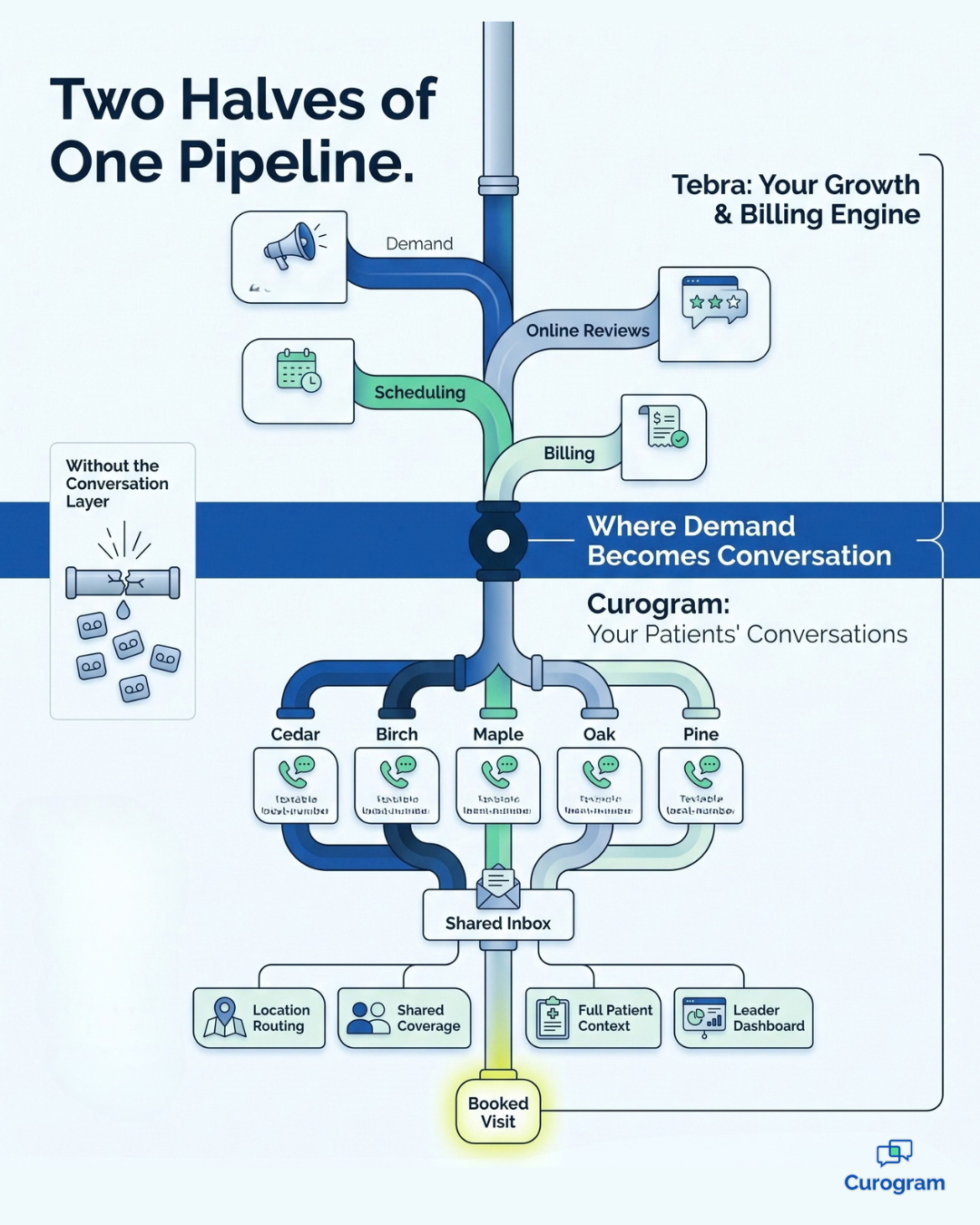
What your group needs is a switchboard. That's the role Curogram plays. It gives you one command center where every location's texts, calls, and messages live in a shared workspace. Permissions decide who sees what, so each team stays focused on its own patients while leaders keep the full view.
Here's how it comes together:
That last point matters more than it seems. Most leaders never see the conversations happening at the front desk. With a unified patient inbox Tebra group leaders can open at any time, those conversations stop being a black box.
Just as important, Curogram doesn't replace Tebra. Tebra stays the backbone for scheduling, billing, and practice growth. Curogram adds the conversation layer on top, handling the back-and-forth between a patient's first click and first visit.
That split keeps things simple for your team, since they keep working in the tools they know. The difference is that demand created anywhere in your network now gets answered somewhere in your network.
It also makes compliance easier. HIPAA texting across multiple locations gets messy when every site picks its own tools.
For a growing practice, one secure platform with role-based access and access logs is far easier to manage than five separate setups.
When a group moves to one shared inbox, the change appears quickly. Routine questions shift to text, and phones free up for the calls that genuinely need a person.
And new patients stop falling through the gaps between locations.
Curogram's results give a sense of the scale. Groups using unified texting sustain an appointment confirmation rate above 75%. Practices have cut call volume by 50% and raised front desk productivity by more than 30%.
With a 98% open rate, texts actually get read, which is more than most voicemail messages can claim.
| The Location Silo | The Network Switchboard | |
|---|---|---|
| How patients reach you | A separate line and voicemail at each site | Local numbers feeding one shared inbox |
| Missed calls | Stuck in one location's voicemail | Answered by text and claimed by any free desk |
| Routine questions | Tie up phone lines all day | Handled by text between other tasks |
| Leader visibility | Scattered across sites | One dashboard for every thread |
| Confirmations | Rounds of phone tag | 75%+ confirmed by text |
In short, this is what good Tebra multi-location patient communication looks like. Every conversation gets answered, and every inquiry gets captured, no matter which location it lands at.
Now let's translate the leak into dollars.

Here's an illustrative example, not client data. Say each of your 4 locations misses 5 new-patient calls a week. That's 20 calls a week, or about 1,040 a year.
If a third of those callers book somewhere else, and each new patient is worth $500 a year to your group, you're losing about $173,000 a year.
You don't need to win back every one of them to see a return. Winning back half would add more than $85,000 a year, all from demand you already paid to create.
The biggest shift, though, is visibility. Your marketing dashboard and your appointment schedule finally start moving together. When demand goes up, bookings follow, because patients stopped leaking out between the two.
Understanding the leak is one thing. Closing it across several busy locations is another. The good news is that the switch doesn't require a big overhaul, and your team doesn't need to learn a new scheduling or billing system.
Most groups move through the same five steps:
The order matters. Starting with measurement creates a clear before-and-after comparison, which makes it easier to show the value to partners and managers.
It also helps to name one person as the project owner. That person doesn't need technical expertise. They simply need to keep each location accountable and share what's working across the organization.
A group that invests in growth deserves a front desk operation that can actually hold that growth. Right now, many multi-location groups have one without the other. The marketing is working, but the phones are where patients quietly slip away.
The solution isn't hiring additional staff or adding longer hours. It's giving every location one shared place to communicate with patients, so no inquiry gets stranded in a single voicemail box.
When any available desk can answer any message, your entire network starts functioning like one practice again.
Think of it as two halves of the same pipeline.
Tebra is designed for your growth and billing engine, while Curogram is designed for your patients' conversations. Together, they make sure the demand you generate turns into appointments on the schedule.
Here's a simple way to measure where you stand.
For one week, count the missed calls across all your locations, then multiply that number by the average value of a new patient to your group. That figure is your leak, written out like an invoice.
Most owners are surprised by the total. That's not because their teams are doing a poor job; it's because the silo concealed the problem so effectively. Once you see the number, it's difficult to ignore.
The good news is that closing the leak doesn't require replacing your systems. Your locations keep their numbers, and your team keeps Tebra. Patients simply get faster answers, and you get complete visibility into every conversation.
Ready to discover how much of that volume could move to text? Schedule a Demo with Curogram and bring the call log from your busiest location. We'll review it together and map which calls can shift to text during your first week.
 Aubreigh Lee Daculug : Oct 19, 2026, 2:00:00 PM
Growth shouldn’t make your practice feel like a bureaucracy. Curogram keeps every Tebra location’s familiar number — now textable, answered in...
 Aubreigh Lee Daculug : Sep 14, 2026, 2:00:00 PM
athenaCommunicator sends network-wide — but replies die in per-location phones and case buckets. Curogram unifies the conversations. 75%+...
.jpg?width=30&name=square-formal-photo%20(1).jpg) Mira Gwehn Revilla : Sep 2, 2026, 1:00:00 PM
Mira Gwehn Revilla : Sep 2, 2026, 1:00:00 PM
See how centralized patient texting across Practice Fusion locations helps growing groups confirm over 75% of visits from a single, secure staff...