
 Aubreigh Lee Daculug

That number becomes textable. Patients send a plain text, and whoever is free across the group replies in minutes from a secure, HIPAA-compliant inbox.
It replaces "The Growing-Pains Front Door" of phone trees, holds, and transfers. Practices using Curogram see no-show rates 53% below the industry average.
Three small words usually signal that a loyal patient is getting ready to leave: "They got big."
Patients rarely say it to your front desk. They say it at home, after a quick call turned into ten minutes. They dialed the number they had used for a decade, and an automated menu answered instead of a familiar voice. Then came a hold, a transfer, and a stranger asking for their information twice.
That is the hidden cost of expansion. Your organization adds locations, acquires a practice across town, and builds a stronger business. From the patient's side of the counter, though, those changes can look like decline.
It sounds unfair. It is.
Most growing groups monitor new patient volume, payer mix, and provider capacity. Very few measure how the front door feels to the people who have walked through it for years. Yet communication often breaks first during growth.
A centralized phone tree may look efficient on a spreadsheet, but it adds steps, delays, and confusion for every caller.
The risk is measurable. In an Artera survey of more than 2,000 patients, nearly 60% said they would consider switching doctors after a frustrating communication experience. Patients from a recently acquired practice watch the transition even more closely.
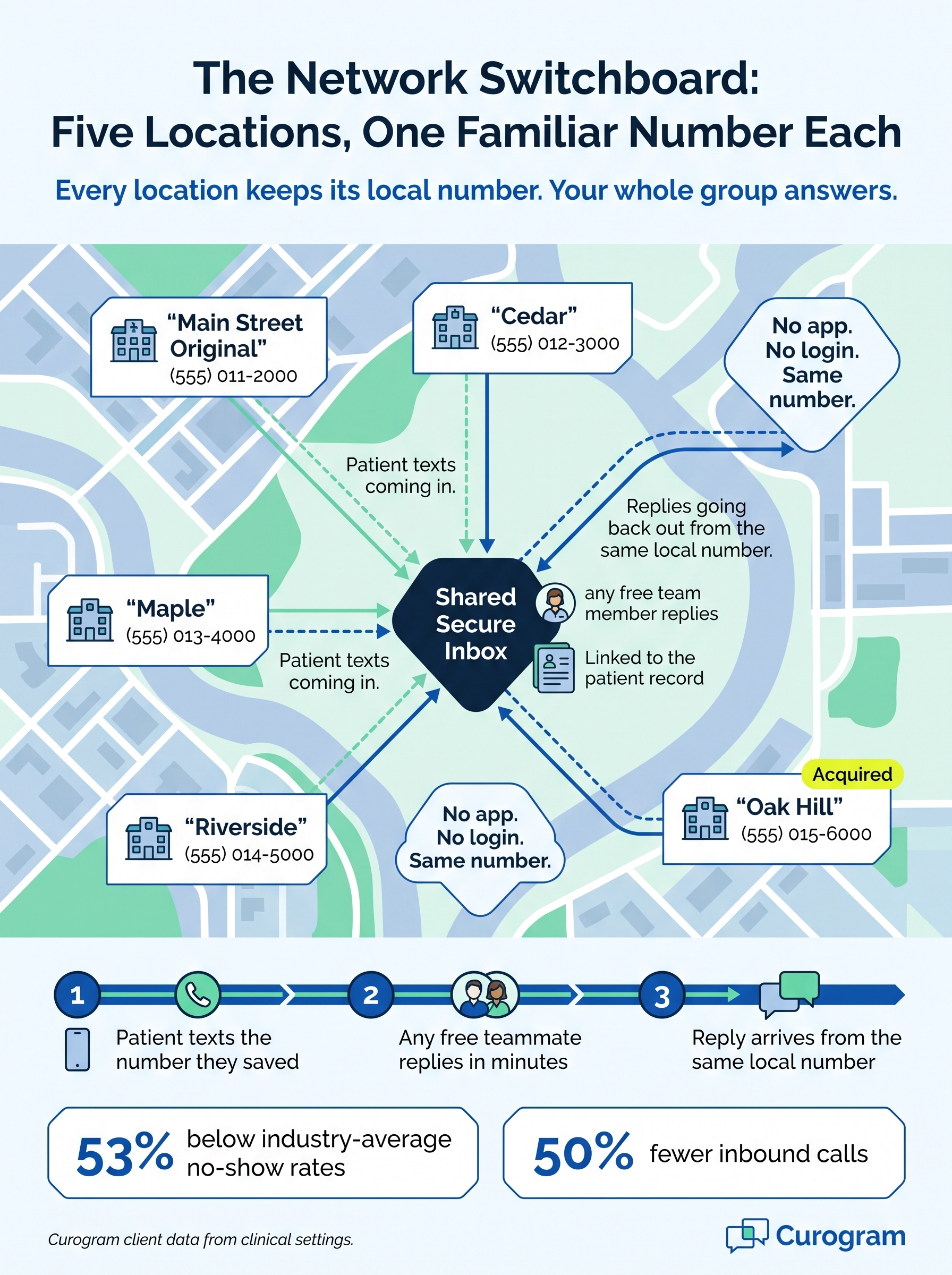
There is a better approach. Instead of routing every caller through one central line, you can offer one familiar texting number for every Tebra location. Each office keeps its local number. Patients can text it and get a reply within minutes from any available team member.
In this guide, you will learn why growth so often feels like loss to patients. You will also see how Curogram preserves each location's number while adding group-wide coverage behind it.
Finally, you will see what happens when a growing group feels like a small practice again.
How the Growing-Pains Front Door Pushes Loyal Patients Away
Growth rarely damages the quality of your care.
It damages something patients value almost as much: how easily they can reach you.
Access Is Part of the Care
Patients connect with a practice in two ways. They trust their provider's clinical judgment, and they trust that someone familiar will answer when they call. That second relationship is built over years of quick conversations, recognized voices, and a number saved in their phone as "Dr. Patel's Office."
When a single practice expands into a five-location group, the phone system is usually the first thing to change. A new automated menu appears, and calls are redirected to a centralized team.
On paper, the arrangement looks efficient and organized.
One Phone Call, Three Warning Signs
Consider a woman who has visited the same practice for ten years. She calls the number she always calls, but this time a recording asks her to "press 2 for the Cedar location."
She waits on hold, gets transferred, and repeats her date of birth to a stranger.
That evening, she tells her husband the practice "got too big." That phrase is the quiet warning that comes before most patient departures.
Friction, Not Care, Drives Patients Away
Patients rarely leave because the medicine got worse. They leave because reaching that medicine became frustrating and unpredictable. Familiar caller ID, patient trust, and a fast response depend on one another, and a complicated phone tree weakens all three at once.
Patients of an acquired practice feel this most intensely. Their clinic just changed ownership, so every new obstacle looks like evidence that the experience they valued is disappearing.
Running to Stand Still
This is where the financial damage appears. Your group invests in marketing and referral programs to attract new patients. Meanwhile, loyal patients quietly leave through the back door because of growing pains.
The result is an organization working harder every quarter simply to remain in the same place.
Meet the Network Switchboard: Your Local Numbers, Now Textable
The solution is not a larger call center. It is protecting what patients already trust and making it work better for everyone.
Curogram serves as "The Network Switchboard" for your organization. It responds from each location's own familiar number, so your expansion stays invisible while your service becomes more visible.
Here is how the approach works in practice:
- Every location keeps its existing number. Patients text the same local number they have saved for years, with no new line to memorize and no application to download.
- Patients use ordinary text messaging. On their side, it looks like any other text conversation: no login, quick question, clinic reply.
- Your team shares one secure inbox. Messages arrive in a HIPAA-compliant inbox that staff across the group can cover, so a busy location never leaves patients waiting.
- Every conversation connects to the patient record. Threads link to the patient's information, so whoever responds knows that a ten-year patient is a ten-year patient.
This feature is called No-App 2-Way Texting on Existing Numbers. It turns your current landlines into textable lines without changing a single digit.
That detail matters more than it might seem. Patients text local practice numbers they recognize far more comfortably than an unfamiliar short code or a central toll-free line.
A recognized name on their screen tells them the message is legitimate and that the clinic still feels like theirs.
Your staff benefits just as much. Instead of each front desk struggling alone, the group shares the workload across locations. Routine questions about parking, paperwork, or prescription refills get answered quickly, regardless of which office is busiest that day.
Built for the Practices You Acquire
Acquired practice number continuity is one of the most overlooked parts of a successful acquisition. When you purchase a practice, its patients are already uncertain about what comes next. Keeping their number is a promise they can verify with their own thumbs.
They text the number they have always used and receive a fast, friendly reply. Nothing they valued feels lost, yet they now have the responsiveness of a full group behind them.
For a deeper look at group-wide setup, explore our guide to centralized patient texting across Tebra locations.
Bigger Group, Smaller Feel: What Patients Notice First
When patients feel connected, they keep their appointments. Practices using Curogram see no-show rates 53% below the industry average, based on Curogram client data from clinical settings.
That figure points to a bigger change in how patients talk about your group.
The conversation shifts from "they got too big" to "they text back in five minutes now." Growth begins to feel like a service upgrade instead of a loss.
Here is how the patient experience multi-location groups deliver can change:
| Patient moment | Growing-pains front door | Network Switchboard |
|---|---|---|
| Reaching the office | Phone tree, hold, transfer | Text the saved local number |
| Asking a quick question | Wait on hold for one answer | Reply within minutes |
| Acquired-practice patients | New number, new process | Same number, faster replies |
| Who answers | Whoever picks up the central line | Any available staff, with context |
| What they tell friends | "They got too big." | "They text back fast now." |
The front desk notices the difference as well. Curogram client data shows a 50% reduction in call volume and a 30%+ improvement in front desk productivity.
Imagine your five-location group handles 250 calls a day, and each call takes about three minutes.
A 50% drop removes 125 calls. That frees roughly six staff hours a day, or about 130 hours in a 21-day month. (These are illustrative sample figures, not results from a specific group.)
Messages also get noticed. Curogram client data shows a 98% open rate for text messages, so reminders and replies rarely go unread.

The benefits build on each other over time. Loyal patients stay through the expansion, and patients from acquired practices settle comfortably into the transition. Online reviews begin to mention how responsive and approachable your team has become.
That kind of public praise strengthens each site's location-level reputation management efforts.
A Practical Rollout Plan for Familiar-Number Texting
Knowing why familiar numbers matter is the easy part. The harder part is turning them on across several locations without confusing patients or overwhelming staff.
A phased rollout keeps the change smooth.
Here is a simple sequence most growing groups can follow:
- Map every number you own. List each location's main line, including numbers that came with acquired practices. Note where each one appears, such as reminder cards, your website, and online listings.
- Text-enable one location first. Start with a single site, watch how patients respond, and refine your reply habits before expanding.
- Set shared coverage rules. Decide who covers the inbox during lunch, busy mornings, and staff absences. Clear rules keep messages from sitting unanswered.
- Agree on reply standards. Create a few saved replies for common questions about parking, forms, and refills. Consistent answers make every location sound like the same trusted team.
- Tell patients the good news. Post a short notice at the front desk, on your website, and in appointment reminders: "Same number, now textable."
- Review and expand. After a few weeks, check reply times and patient feedback, then bring the next location online.
This approach protects what patients already value while your team builds confidence. Each new location joins a system that has already been tested, so the experience feels steady from the very first message.
It also keeps growth honest. Instead of announcing a brand-new phone system, you are simply making the old number work better. For patients, that is the most reassuring kind of change there is.
Let Your Group Grow While Patients Keep Their Clinic
Patients will forgive a great deal when a practice grows. New providers, updated paperwork, and a different logo on the door rarely drive anyone away.
What they will not forgive is losing the ability to reach you.
That is the real lesson behind "they got too big." The complaint is never really about size. It is about the moment a familiar number stopped feeling familiar.
It helps to think of your technology as having two separate jobs. Tebra powers your growth engine, handling scheduling, documentation, and billing across every location. Curogram protects your patients' feeling that nothing they loved was lost along the way.
You need both working together. One builds the organization, while the other keeps it feeling like the clinic patients originally chose. Your most loyal patients deserve to feel that growth was built for them, too.
With one familiar texting number for every Tebra location, your expansion stays behind the scenes. Patients keep the number they trust, and your team shares the workload across sites. Replies arrive within minutes instead of after a long hold and two transfers.
Before making any changes, try a simple exercise. Ask five long-time patients what changed when you added locations, and listen carefully to their answers.
If you hear "it's harder to get through," you have your churn forecast. If you hear "nothing really changed," you are ahead of most growing groups. Either way, you will know exactly where to begin.
Then start where loyalty runs deepest. Text-enable your original location's number first, because those patients have known you longest and will notice the improvement within a week.
Ready to keep every location feeling like home as your group grows? Schedule a Demo to see how Curogram turns your existing Tebra location numbers into fast, textable lines your patients already trust.