
 Aubreigh Lee Daculug

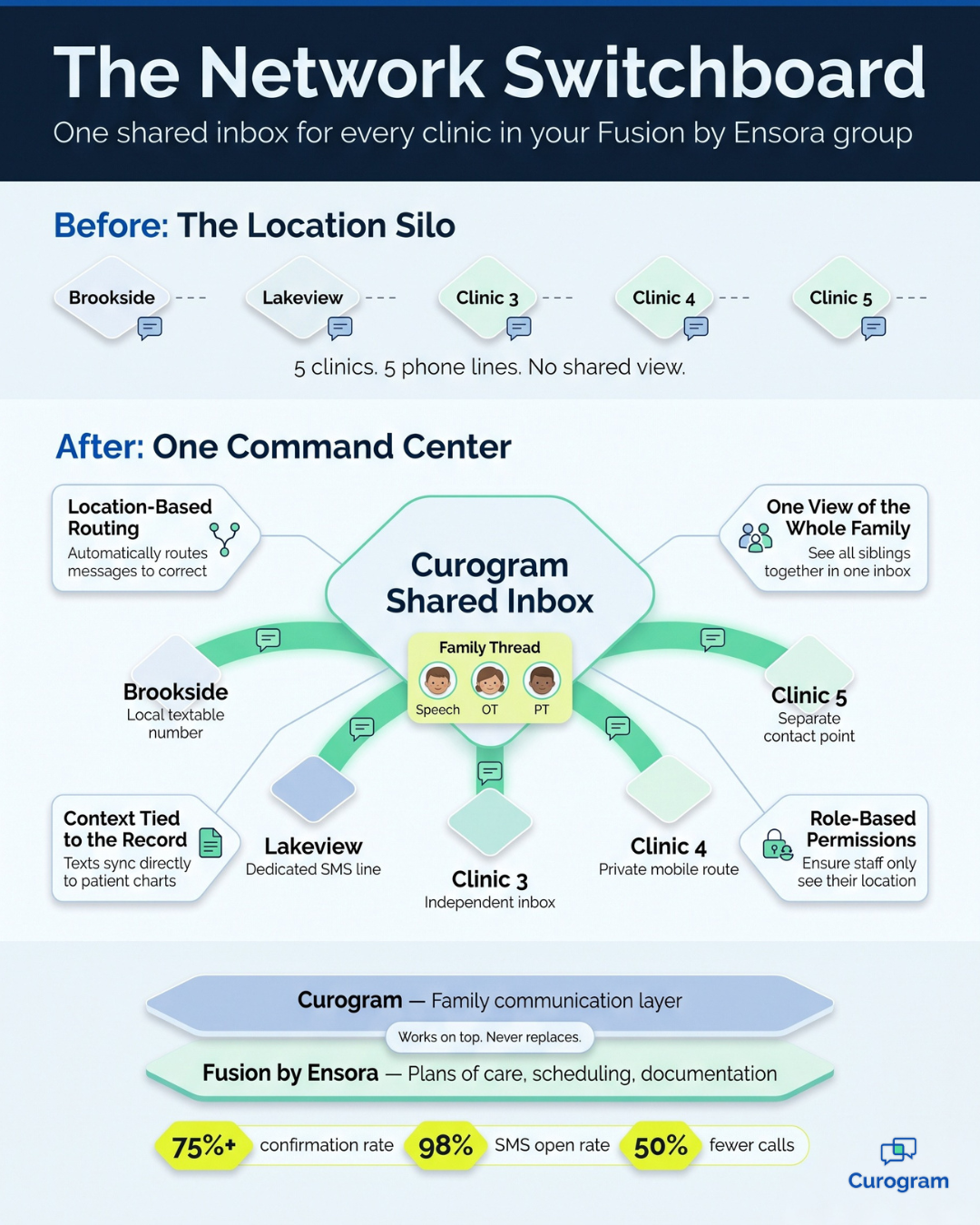
Curogram works on top of Fusion by Ensora Health without replacing it. Each clinic keeps its own local number, now textable.
Owners and admins can see, route, and audit every thread across locations. That matters in therapy, where parents juggle sessions for more than one child and one cancellation can ripple across a full calendar. The "Location Silo" forces each clinic to handle that alone.
Each thread ties to the patient record. Groups using Curogram confirm more than 75% of appointments and refill freed slots faster.
Five clinics, five phone lines, and five front desks that can't see each other's notes. It looks normal on paper.
Consider a family with three children in therapy. One child sees a speech therapist at Brookside, another has occupational therapy at Lakeview, and the youngest does physical therapy across town. When their mom needs to move a single session, she doesn't make one call. She makes three.
That routine is common for multi-location groups on Fusion by Ensora, and it wears everyone down.
Fusion handles the clinical side well. Plans of care, scheduling, and documentation all live where they should. But family communication still runs through each clinic's separate phone line. As a result, your five-clinic group operates like five solo practices that happen to share a logo.
It sounds like a small gap. It isn't.
Therapy generates more schedule changes per patient than almost any other specialty. Children get sick, school events appear, and parents switch shifts. Every change becomes a phone call, and every call lands on a front desk already busy with check-ins and insurance questions.
The real cost hides in plain sight. A cancellation voicemail left at 7:40 am doesn't get heard until 9:05, and by then the open slot is useless. The therapist sits idle, a waitlisted child misses care, and the owner discovers the problem weeks later in a utilization report.
This is where centralized patient texting across Ensora Fusion therapy clinics changes the picture. Instead of each location fighting alone, every clinic works from one shared view of family conversations.
In this guide, you'll learn why the clinic-by-clinic model breaks down as your group grows. You'll see how Curogram connects your entire network while Fusion remains your system of record. Finally, you'll see what happens when a group answers families as one team.
Why Each Clinic Ends Up on Its Own
Fusion Runs the Care, but the Phones Run Everything Else
Fusion by Ensora is built for therapy practices. It manages plan-of-care scheduling, authorization limits, and clinical documentation with real depth. Most groups chose it for good reason, and few want to replace it.
However, family communication never moved into that system. It still lives on each clinic's front desk phone line. When you open a second, third, or fifth location, you don't get one larger practice. Instead, you get several small ones with no shared memory.
One Family, Three Front Desks
Here's how the problem plays out in a typical week.
A mother calls the Brookside clinic to reschedule her son's speech session. But his occupational therapist works at Lakeview, and his sisters attend physical therapy at a third location.
Brookside can change the speech appointment, but it can't see the OT schedule or the PT bookings.
So the mother calls again, and then again. Now three front desks each hold a slightly different version of one family's schedule, and nobody has the complete picture.
For the parent, it feels like dealing with three unrelated companies. For your staff, it means repeat calls, conflicting information, and duplicated effort.
The Phone Becomes the Bottleneck
This is what therapy practice phone overload looks like on an ordinary day. A busy therapy front desk can field 80 or more calls daily, and most of them involve scheduling logistics. Parents call to move an appointment, confirm a visit, or ask whether an earlier opening is available.
Every one of those calls pulls your staff away from the family standing at the desk. Meanwhile, calls that arrive early in the morning or after hours go straight to voicemail, where they wait.
Think about that 7:40 am cancellation again.
Nobody checks voicemail until 9:05, so the 9:00 opening is already lost. A child on the waitlist could have taken that appointment, but the message simply moved too slowly.
The Damage Shows Up Late
The most frustrating part is how quietly this happens. Therapist calendars develop gaps that nobody can fill in time. Waitlisted families keep waiting, and staff feel permanently behind.
The owner usually spots the pattern weeks later, buried in a utilization report. By then, the missed visits and the lost revenue are long gone.
Meet the Network Switchboard That Connects Every Clinic
The solution isn't hiring more staff or adding more phone lines. It's giving every clinic access to the same family conversations.
Curogram acts as "The Network Switchboard" for your entire group. It's one command center where texts, calls, and messages from every clinic live in one shared space with set permissions. You decide who sees what, so security stays tight while coordination gets much easier.
Here's how the pieces fit together:
- Location-based routing: Each clinic keeps its own local phone number, now able to send and receive texts. Messages arrive at the right clinic, but a family's thread stays visible across the group to authorized staff.
- One view of the whole family: A front desk at any location can see all three children's schedules and conversations at once. Nobody has to say, "Let me call the other office."
- Context connected to the record: Threads tie to the patient record alongside the Fusion schedule. Staff can review the history before they reply.
- Role-based permissions: Admins control who can view which clinics. That matters even more when messages concern minors.
This is what PT, OT, and SLP group message routing should feel like. The right message reaches the right person, no matter which clinic it came through.
It's important to be clear about one thing. Curogram doesn't replace Fusion, and plans of care, scheduling rules, and documentation stay exactly where they are. Curogram simply adds the family side that Fusion was never built to carry.
For groups that started on Fusion Web Clinic, this works as a Fusion Web Clinic communication upgrade without moving any data. Your team keeps its clinical workflow, and families just get faster answers.
The biggest payoff shows up with cancellations. When parents can text, they usually cancel the moment they know, rather than hours later. That message appears instantly for whoever can refill the opening, at any location.
Because Curogram delivers HIPAA texting for pediatric therapy clinics, you never have to trade compliance for speed. Every message is protected, and every access is logged.
What Changes When Your Clinics Share One Inbox
When every location works from a unified family message inbox, your therapy group stops behaving like five separate businesses. Any authorized staff member can claim any family's thread. As a result, nothing disappears into a voicemail box.
The numbers support this shift. Groups that run unified texting with Curogram maintain appointment confirmation rates above 75%. Text messages also get read, with a 98% open rate, so reminders and schedule updates actually reach parents.
That reach takes real pressure off your phones. Practices using Curogram have reduced call volume by 50%. For example, a clinic handling 80 calls a day could see roughly 40 fewer calls daily, which is time your staff can give back to families in the lobby.
Now let's return to that early cancellation. Here's the same morning, before and after:
| Time | Clinic-by-Clinic Phones | One Shared Inbox |
|---|---|---|
| 7:40 am | Parent leaves a voicemail to cancel | Parent texts the clinic's number to cancel |
| 7:42 am | Voicemail sits unheard | Staff at any clinic sees it and texts a waitlisted family |
| 8:15 am | Front desk is still opening up | Waitlisted parent confirms the 9:00 appointment |
| 9:00 am | Therapist faces an empty hour | Therapist starts a full session |
| 9:05 am | Staff finally hears the voicemail, but the slot is lost | Nothing to catch up on |
That's the difference in plain terms. It's the same cancellation and the same therapist, with a completely different outcome.
Here's an illustrative example to show the scale.
Imagine your five clinics each lose three cancellation slots a week that never get refilled.
That adds up to 15 missed visits weekly, or about 780 visits a year. At a sample rate of $100 per visit, that's roughly $78,000 in care that never happens.

You won't recover every opening. But catching even half of them early improves your utilization and shortens your waitlist. It also changes how parents experience your group, because they text once and someone answers.
How to Bring Every Clinic Onto One Shared Inbox
Switching to shared texting doesn't have to disrupt your daily operations. Most therapy groups introduce it gradually, beginning with the location under the most pressure.
- Start with your busiest clinic. Review its call log and sort the calls by type. Schedule changes and confirmations are usually the easiest to move to text.
- Turn on texting for each local number. Families keep the caller ID they already know, so nothing changes on their end.
- Set permissions by role. Decide which staff can see each clinic's threads, especially messages about minors.
- Build a waitlist routine. Agree on who contacts waitlisted families when a cancellation arrives, and how quickly they should respond.
- Add the next clinic. Once the first location runs smoothly, bring the other clinics on one at a time.
Within a few weeks, your front desks stop operating as separate islands. Every clinic sees the same family conversations, and your waitlist finally moves as quickly as your cancellations.
Turn Your Clinics Into One Team That Answers
In therapy, communication speed directly shapes schedule utilization. How quickly a message moves often decides whether an opening gets filled or goes to waste.
The Location Silo puts a speed limit on every clinic you operate. Each front desk sees only its own calls, and each voicemail waits its turn. Families often have to repeat themselves just to move a single session.
It doesn't have to work that way anymore.
Fusion is built for your side of care, holding your plans of care, schedules, and documentation. Curogram is built for the families' side. It handles the daily back-and-forth of rescheduling sessions, confirming visits, and filling gaps. Together, they operate like one connected system.
That's what effective Fusion Ensora multi-clinic patient communication looks like. Every clinic keeps its local number, and every thread stays visible to the right people. Each cancellation becomes an opportunity to help a child on your waitlist.
Here's a simple way to measure where you stand today.
Pull last month's schedule from Fusion and count the cancellation slots that went unfilled across all your clinics. Every one of those openings started as a message that moved too slowly.
Now imagine those same messages arriving as texts, seen within seconds by whoever could act on them. That's the exact gap Curogram closes for growing therapy groups.
You don't need to change your EHR or retrain your therapists. You simply need a better way for your clinics to communicate with families, and with each other.
Ready to see how this would work for your group? Schedule a Demo with Curogram. Bring your busiest clinic's call log, and we'll map out exactly which calls can move to text during your first week. You'll leave with a clear picture of what one shared inbox could do for every location you run.