8 min read

Centralize Patient Texting Across AdvancedMD Sites

Centralize Patient Texting Across AdvancedMD Sites
💡 Centralized patient texting across AdvancedMD locations puts every office's patient messages in one secure dashboard. It is HIPAA compliant. AdvancedMD still runs the schedule, the chart, and the claim.
  • Each office keeps its own local number, and that number can now send and receive texts
  • Staff work one shared queue, so the Lakewood desk can read what Summit already told the patient
  • Messages route by team: scheduling, billing, or clinical, with role-based permissions and access logs
  • Patients reply from their phone, with no portal login and no password reset before a simple reschedule
  • Threads sit beside the patient record, so context survives a handoff between sites
Curogram clients confirm more than 75% of appointments, based on our internal data. Groups use the same dashboard to take routine questions off the phones.

One calendar covers every site in an AdvancedMD group. Five phone lines cover those same sites, and nothing joins them.

A patient calls your Summit office about a Thursday visit at Lakewood. Summit opens her chart, reads the appointment time, and cannot see the two texts Lakewood sent her on Monday. So the front desk takes a message and promises a callback.

She calls Lakewood an hour later anyway. Friday she calls both offices again.

Growing group phone overload has a shape that shows up early and never corrects itself. The schedule scales across sites. The conversation layer stays stuck at one office per phone line, and no settings screen changes that.

Centralized patient texting across AdvancedMD locations is how a group closes the second gap without touching the first.

Your administrator spent two years tuning visit types, fee schedules, and claim rules. None of that moves. What changes is where patient messages land.

This article is for groups past their third location, where the relay between front desks has quietly become its own job.

We will walk through what the silo costs in staff hours, how a shared queue routes messages without flattening five sites into one anonymous call center, and what the first two weeks look like on the schedule.

We will also name the limit, because it matters. Texting does not fix a desk that is short two people. It removes the reason most of those calls happen at all, which is a different and cheaper kind of help.

The Location Silo

Front desks at multi-site groups run a protocol nobody wrote down. Take the message. Write the callback number on a slip. Email or ping the other office. Wait.

Your Summit receptionist can read the Lakewood appointment. What she cannot read is the exchange Lakewood already had with that patient, because it happened on a phone line she does not share.

So the patient repeats herself. Two staff members touch one question that a single line of text would have closed. Neither knows the other was involved.

By Friday she has called twice more. Nobody owns the thread, so nobody notices it is the fourth contact about the same Thursday visit.

The Silo Grows Faster Than the Group Does

Two offices have one relay path between them. Three offices have three. Five offices have ten, and every one of those paths runs on somebody remembering to follow up.

That is why the pain rarely registers at site two and becomes constant at site four. Nothing broke. The number of handoffs simply outgrew the habit of tracking them.

New locations feel it worst. A site open six months has patients who still call the office they were referred from, and staff who do not yet know which colleague handles what at the other end.

Where the Audit Trail Stops

An AdvancedMD administrator can follow a claim from referral through billing to the deposit. Ask that same person what a patient was told on the phone last Tuesday, and the answer lives in somebody's memory.

Phone calls leave nothing to search. Voicemail sits on a desk phone at each site, heard by whoever gets in first.

This bites hardest in behavioral health and physical therapy groups. Visit caps, authorization limits, and cancellation policies get explained out loud dozens of times a week, and each explanation vanishes when the call ends.

AdvancedMD office message routing, day to day, is a person deciding who to forward a slip of paper to. That is not a knock on the software. It is a description of what a phone line can do.

The Phone Math Nobody Budgets For

MGMA's 2026 Stat poll asked practice leaders which phone tasks eat the most staff time.

Scheduling ranked second at 31%, behind eligibility and prior authorization at 45%, across 294 responses. Scheduling questions do not need a live voice. They get one anyway.

The table below is illustrative example math, not sourced data. It uses round numbers for a five-site group so you can swap in your own.

Item

Per office

Group total

Routine inbound calls per day

80

400

Share that are scheduling or confirmation

40%

160

Average handle time

3 min

480 min

Staff hours spent daily

1.6

8


Why the Portal Absorbs Only Part of It

The AdvancedMD patient portal handles secure messaging, refill requests, lab results, and bill pay for patients who enroll and log in.

Enrollment is the whole constraint. A patient moving Thursday's 2:15 will dial before she resets a portal password.

Portal messages also arrive per patient rather than per queue. A group with five front desks still has five people checking five places, plus the phones ringing behind them.

HIPAA texting across multiple offices in a specialty group is the layer with no home in that setup. Each site secures its own line, keeps its own log, and answers its own patients. The group never sees the whole picture.

The Network Switchboard

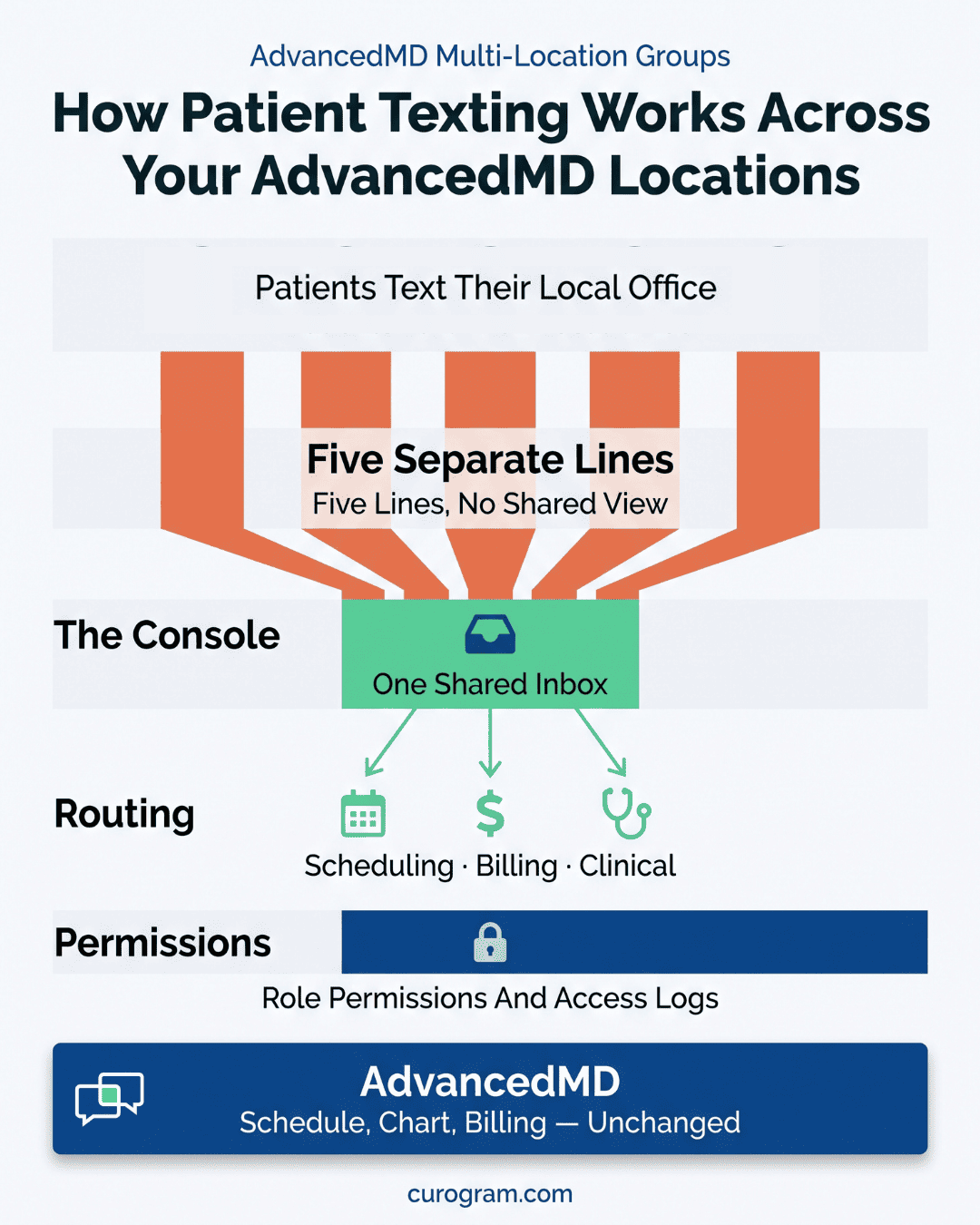
Curogram sits over your AdvancedMD setup as a shared workspace. Every office keeps the number already printed on its cards, and that number becomes textable. Caller ID does not change for patients.

Staff log into one dashboard. A scheduler covering Summit and Lakewood on the same afternoon sees both queues without switching apps or picking up a second handset.

Each thread carries its site tag, so a message to Lakewood stays visibly a Lakewood message even when a float staffer answers it from Summit. That tag is what makes a multi-site practice communication hub usable instead of noisy.

Patients change nothing. They text the number saved in their phone, and a reply takes them four seconds at a red light.

Why a Shared Queue Does Not Flatten Your Sites

Groups hear "one inbox" and picture a central call center swallowing five local identities. That is the wrong picture, and it is worth taking apart.

Local numbers stay local. Templates merge the correct office name, address, parking note, and provider, so a Summit patient never gets Lakewood's directions. Staff assignments stay site-scoped unless you widen them on purpose.

What consolidates is visibility, not ownership. The Lakewood lead still runs Lakewood. The difference is that when a Lakewood thread goes cold at 4:40 on a Friday, somebody else can see it and answer.

Infographic on centralized patient texting across AdvancedMD locations, with AdvancedMD as the unchanged base layer

What Stays in AdvancedMD

Curogram connects with AdvancedMD and complements it. The suite keeps the schedule, the chart, the ledger, and every rule your team built around them.

Threads tie to the patient record and sit beside the AdvancedMD appointment. A staffer answering at 4:50 on a Friday has the visit type, the provider, and the last three messages in one view.

Your visit types stay yours. Your claim scrubbing stays yours. AdvancedMD multi-location patient communication gains a console, and the practice engine underneath keeps running as configured.

Control Your Administrator Already Expects

Groups choose AdvancedMD for configuration depth. A communication layer that cannot be configured gets abandoned by month three.

Routing rules, templates, business hours, auto-replies, and permissions are all administrator-controlled.

Run different after-hours messages per site. Restrict which staff can text patients at all. Set one escalation window for clinical threads and a longer one for billing.

Reporting rolls up by office and by team. That gives you a comparison five voicemail boxes never could: median response time at Summit against Lakewood, on one screen, by week.

One Group, One Inbox

Follow one ordinary request through both setups. A patient needs to move a Thursday 2:15 physical therapy visit at Lakewood, and she calls Summit because Summit is the number in her phone.

Before, it goes like this. Summit answers, opens the chart, sees the visit, and explains that Lakewood has to confirm.

She writes a slip and emails Lakewood. Lakewood calls back at 4:40 and gets voicemail. The patient calls again Wednesday. Thursday's slot goes unfilled because nobody could confirm the swap in time.

After, she texts the Summit number she already has. Routing tags the thread to Lakewood and drops it in the scheduling queue.

Whoever covers that queue opens the AdvancedMD schedule in the same view, offers Tuesday at 3:00, and has an answer in ninety seconds. Thursday's slot goes back on the board by lunch.

Step

Phone relay

Shared queue

Patient contacts group

Calls Summit

Texts Summit

Reaches right office

Slip plus email

Routed on arrival

Confirmation

Two days, three calls

90 seconds

Thursday slot

Left empty

Refilled same morning


What the Numbers Look Like Once it Settles

Curogram clients confirm more than 75% of appointments on average, and no-show rates across our client base run 53% below the industry average, based on our internal data.

Atlas Medical Center cut no-shows from 14.20% to 4.91% inside three months. Covina Arthritic Clinic confirms more than 1,100 appointments a month, with patient replies processed as they arrive, based on our internal data.

Recall behaves the same way once the queue is unified. One multi-location practice running SMS recalls saw 35% of contacted patients book within a month, and 1,240 patients came back from those messages alone.


Location-Based Routing

Location-Based Routing keeps a shared inbox from turning into a pile. Every incoming message carries two labels: which office it belongs to, and which team should handle it.

Your administrator sets those rules the same way they set anything else in the suite. Billing questions route to the billing queue. Scheduling requests land with schedulers. Clinical messages go to the nurse line at the right site.

A single message can appear in more than one view. The Summit lead sees everything at Summit. The billing manager sees billing across all five offices. Neither has to scroll past the other's work to find their own.

Coverage rules handle the rest. If a Lakewood thread sits unanswered past a window you set, it escalates to the group queue instead of aging on one desk. That one rule removes most of what the location silo used to cost.

Every action stays logged. Role-based permissions decide which staff see which offices, and access records show who opened what and when. For a growing group, that audit view is often the reason the shared queue clears compliance review on the first pass.

Conclusion: Give the Last Workflow a Console

Your group configured everything the suite would let it configure. Visit types, claim rules, provider templates, location-level fee schedules. The workflow left outside all that work is the one patients touch most.

Count yesterday's voicemails across your offices that sat more than an hour. Every one of them happened outside every system you have tuned.

That count is the honest measure of the silo. It is also the number that moves first, usually inside two weeks, because confirmations and reschedules leave the phone before anything else does.

Texting will not fix a desk that is short two people. It will stop that desk from spending its morning on questions a one-line reply closes.

Book an integration demo and bring your busiest office's call log from last week. We will map which volume moves to text in week one, and which calls should stay on the phone.


Frequently Asked Questions

How does a shared inbox across offices stay HIPAA compliant?

Curogram works under a signed BAA and encrypts patient messages in transit and at rest. Role-based permissions set which staff can see which offices' threads. A Summit scheduler is not reading Lakewood's clinical messages. Every open, reply, and assignment is logged, which gives your compliance lead an access record that five voicemail boxes could never produce.

Why does texting reach patients the portal misses?

The portal needs an account, a password, and a login at the exact moment a patient wants something small. Texting needs none of that. A patient moving Thursday's visit replies from her lock screen. Groups tend to see the biggest lift with older patients and Medicaid populations, where portal sign-up lags well behind phone use.

What happens to our existing office phone numbers?

Each office keeps its own local number, and that number gains texting. Patients see the caller ID they already saved, so your cards, signage, and Google listings stay as they are. Calls still ring the way they always did. Routine questions simply arrive as text and get answered from a queue instead of a hold line.

How does routing decide which office a message belongs to?

Every inbound message inherits the office tag of the number it came in on. It then picks up a team tag from rules your administrator sets: billing to billing, scheduling to schedulers, clinical to the nurse line. Coverage rules push anything unanswered past a set window to the group queue, so no thread ages quietly on one desk.

Why do multi-site groups see faster results than single offices?

The relay between offices is pure waste, and bigger groups carry more of it. A five-site group drops five voicemail backlogs and the callback loops between them at once. Confirmations and reschedules move first because they are the highest-volume, lowest-judgment calls. That is why the schedule usually tightens a week or two before call volume falls.