
Curogram for Telemedicine: Features and Virtual Care Use Cases
 Jo Galvez : 4/12/26, 9:00 AM
Discover how Curogram enhances telemedicine with HIPAA-compliant communication, appointment reminders, and integrated patient engagement features.

Imagine this: a patient handles a follow-up visit without leaving home. No long drive. No waiting room. Just a quick video call with their doctor. That is the reality of modern healthcare, and patients are choosing it in larger numbers every year.
But here is what most guides do not tell you: the setup matters more than the tech. Practices that rush into virtual care without a plan often run into trouble fast. Staff are unsure what to do. Patients cannot connect. Billing gets messy. None of this is inevitable. It all comes down to preparation.
A well-designed plan makes virtual care implementation feel manageable, not overwhelming. It gives your team clear steps to follow. It sets patient expectations early. And it helps you catch problems before they grow costly. Based on our internal data, practices using structured digital workflows for virtual visits achieve appointment confirmation rates above 75%.
This guide walks you through a 12-week path to launch telemedicine in your practice from the ground up. You do not need a large IT team. You do not need a big budget. What you need is a step-by-step approach your whole team can get behind.
Week by week, you will work through platform selection, legal review, tech setup, staff training, and patient outreach. Each phase builds on the one before it. By week 12, your practice will have a working virtual care service ready for real patients.
Whether your goal is to start telehealth services at a small practice or scale a more formal virtual care program at a larger clinic, the steps in this guide apply to you. Take each week as it comes. Trust the process. Your launch is closer than you think.
Before you dive into platforms and paperwork, take a step back. The work you do before week one often determines whether your launch goes smoothly or hits early walls. This section helps you take stock of where your practice stands today.
Your first step is figuring out how much demand there is for virtual visits. Look at your patient base. Are there patients who travel far for routine follow-ups? Do you get calls from patients who just need a quick check-in? These are signs that telemedicine could fill a real gap.
Pay close attention to which patient groups are already asking for remote options. Older patients managing ongoing conditions, working adults who struggle to take time off, and caregivers managing a family member's health are all strong candidates for virtual visits.
Not every visit works well through a screen. Medication reviews, mental health check-ins, follow-ups after procedures, and chronic disease management tend to fit virtual care well. Visits that need a physical exam or on-site lab work are better kept in person.
Your plan will stall if providers are not on board. Some may worry about workflow changes. Others may feel unsure about using new tech during a patient visit. These concerns are valid and worth addressing early.
Talk to each provider one on one. Explain the benefits and be honest about the learning curve. When providers feel heard, they are far more likely to support the launch.
Take stock of what you already have. Do your exam rooms have webcams? Is your internet fast enough for video calls? Does your current EMR support virtual visit documentation?
A basic bandwidth check is a good place to start. Video calls need at least 10 Mbps per user for smooth performance. If your setup falls short, factor upgrades into your timeline and budget.
Telemedicine does not have to be expensive, but it does require some investment. Platform licensing, equipment, staff time for training, and any IT support all add up.
Build a rough budget before you commit to a platform. A simple spreadsheet listing expected costs against available funds will help you plan and avoid surprises later.
Before you launch a telehealth program, you need to know where you stand on the basics. HIPAA rules still apply to virtual visits. Your state may also have specific rules about where patients must be located during a visit.
Do a quick audit of your current compliance setup. If you already use secure patient communication tools, you are ahead. If not, this is the time to get up to speed.
Use this table to see where your practice stands before moving into the 12-week plan.
|
Readiness Area |
Questions to Ask |
Status |
|
Patient Demand |
Do patients ask for virtual options? |
Yes / No / Partial |
|
Provider Support |
Are providers willing to try virtual visits? |
Yes / No / Partial |
|
Tech Infrastructure |
Is internet and hardware ready? |
Yes / No / Partial |
|
Budget |
Is there funding available? |
Yes / No / Partial |
|
Compliance |
Are HIPAA basics in place? |
Yes / No / Partial |
If most answers are "Yes" or "Partial," you are ready to move forward. A few "No" answers are not deal-breakers. They just tell you where to focus first.
The first two weeks of your telemedicine rollout plan are about building a solid legal and technical base. Rushing through this stage creates problems down the road. Take the time to do it right.
There are many platforms designed to help practices launch telehealth programs. The right one depends on your specialty, patient volume, and existing tech stack. Look for platforms that are easy to use, integrate with your EMR, and offer strong HIPAA compliance features.
Start with a list of must-haves. Do you need multi-provider scheduling? Automated reminders? Integrated billing? Narrow your list to three or four options, then request demos before making any commitments.
When reviewing platforms, look beyond the basic video call function. Reliable platforms offer waiting room features, session controls, screen sharing, and patient consent capture. Consider also whether the platform supports automated text or email reminders for virtual visits, which can reduce no-shows significantly.
A platform that does not connect to your EMR will create extra work for your staff. Check whether your top choices offer direct EMR integration or use a trusted third-party connector. Smooth data flow between your scheduling system and your virtual visit platform is a must for efficient virtual care implementation.
Every platform you consider must sign a Business Associate Agreement (BAA) with your practice. This is a legal requirement under HIPAA. Do not use any platform that refuses or delays this step.
Review what data the platform collects and how it stores it. Look for end-to-end encryption on all video sessions. Ask the vendor directly how they handle security incidents.
Telemedicine rules vary widely by state. In most cases, you must be licensed in the state where the patient is physically located during the visit. Review your current license coverage before your launch.
If you plan to see patients across state lines, check whether those states have joined the Interstate Medical Licensure Compact. This compact can speed up the licensing process in many states.
Contact your malpractice carrier early in the process. Confirm that your current policy covers telemedicine visits. Some policies require an update or a rider to include virtual care.
Get written confirmation from your insurer. Keep this document on file as part of your compliance records before you ever go live with a patient.
Prescribing via telemedicine comes with its own set of rules. Controlled substances, for example, may require an in-person visit first in many states. Know the rules for your specialty before scheduling virtual visits.
Federal rules also play a role, especially for practices that bill Medicare or Medicaid for telemedicine services. Review current CMS guidelines and note any recent policy updates that apply to your practice.
By the end of week two, aim to have a platform selected and under contract. If the decision is still open, set a firm deadline to avoid delays. Your technology setup in weeks three and four depends on this choice being finalized.
With your platform chosen, it is time to get technical. These two weeks are about building the infrastructure that will support every virtual visit your practice delivers. Done well, this phase saves you major headaches at launch.
Log into your new platform and work through the full setup process. Create provider accounts. Set up the virtual waiting room. Configure session defaults like audio quality, video resolution, and screen-sharing options.
Do not skip the notification settings. Most platforms let you send automated reminders before a scheduled virtual visit. Getting these right during setup means less manual work for your front desk team.
The virtual waiting room is often the first thing patients see when they join. Add your practice name, logo, and any pre-visit instructions you want patients to read. A clear, professional waiting room sets the right tone and eases patient anxiety before the visit starts.
Before any real patient joins a call, test everything. Check video resolution, microphone clarity, and speaker volume on all devices your providers will use. Run tests on both wired and wireless connections to see how the platform performs under different conditions.
Start the integration process with your EMR as early as possible. This step often takes longer than expected. Vendors may need time to connect accounts, configure data mapping, and run test cases.
Work with both your EMR vendor and your telemedicine platform's support team to keep things moving. Set a target date for full integration and follow up weekly so nothing slips.
Identify which devices need upgrades. Webcams, headsets, and ring lights can all improve the quality of a virtual visit. For providers who work from multiple locations, consider portable setups they can use anywhere.
Place orders early. Supply delays are common, and waiting until the last minute can push your launch date back significantly.
Run a speed test on your office internet connection. If you plan to offer telemedicine from multiple rooms at the same time, test bandwidth under load. You want to confirm that real-time video will not lag or drop during peak hours.
Most practices need at least 25 Mbps of dedicated bandwidth to support multiple virtual visits at once without quality issues. If your current connection falls short, contact your provider about an upgrade.
Schedule at least two or three internal test calls before your soft launch. Have providers and front desk staff take turns as the patient. Walk through the full visit flow: joining the waiting room, entering the call, sharing documents, and closing the session properly.
These dry runs reveal small issues before they affect real patients. Document any problems you find and resolve them before moving to the next phase of your plan.
Keep a running list of any technical issues that come up during testing. Group them by type: connection issues, login problems, audio and video quality, and platform navigation. Assign a team member to each category and set a deadline for fixes.
Most telemedicine platforms have a support line or live chat. Use it. Getting fast answers during setup can keep your whole timeline on track.
Good technology is only part of the equation. Without clear workflows and written protocols, your team will figure it out as they go. These two weeks are about building the backbone of your virtual care service.
Map out what a typical virtual visit looks like from start to finish. Who schedules it? How does the patient receive the visit link? What happens if the patient cannot connect? Who handles follow-up after the visit ends?
Draw a simple flowchart that covers each step. This document will become a key reference for your staff during training and in the first weeks after launch.
Before any patient joins a virtual call, your front desk team should send a confirmation message with the visit link, confirm that the patient has the right device and a working connection, and verify that any pre-visit forms are complete. Building these steps into a standard checklist keeps every visit consistent.
Providers need their own checklist too. This should include opening the patient record before the visit starts, documenting clinical notes in real time, and knowing what to do if the technology fails mid-call. A post-visit message sent through a HIPAA-compliant system ties the experience together for the patient.
Decide how patients will book virtual visits. Will they call in, use an online portal, or both? Make sure your scheduling team knows how to flag a virtual appointment differently from an in-person one in your system.
Block time on provider calendars specifically for virtual visits. Decide whether you will dedicate certain hours to telehealth or mix virtual and in-person slots throughout the day.
Create documentation templates designed specifically for virtual visits. These should capture the same core clinical data as your in-person templates, but also note the visit type, patient location, and the platform used.
Keep these templates lean and easy to fill out during a live call. Long, complex forms slow the visit down and frustrate providers who are already adjusting to a new workflow.
Patients must give consent before their first virtual visit. This consent should explain the nature of telehealth, its limits, privacy practices, and what happens in an emergency.
Most platforms allow you to send a consent form digitally before the visit. Collect and store signed consents in each patient's chart. This step is required for both legal and billing purposes.
Telemedicine billing has its own set of codes and rules. Familiarize your billing team with the most common telehealth CPT codes for your specialty. Also review payer-specific rules, since Medicare, Medicaid, and private insurers each have their own requirements.
Document your billing workflows before launch. A billing reference sheet with the most common codes and payer rules can save your team significant time during the first weeks of operation.
Patients need clear, simple guidance on how to join a virtual visit. Create a one-page instruction sheet that explains how to access the visit link, what device to use, and what to do if they have trouble connecting.
Offer this guide in both print and digital formats. Send it automatically with every appointment confirmation. The easier you make it for patients, the smoother your launch will be.
Well-trained staff are the backbone of any successful virtual care program. These two weeks are your chance to make sure every person on your team feels ready to deliver great virtual visits from day one.
Providers need training on more than just how to use the technology. They also need guidance on how to build a strong connection with patients through a screen. This includes eye contact with the camera, lighting and background setup, and how to manage tech issues mid-visit without losing the patient's trust.
Schedule one-on-one practice sessions for each provider. Walk through a full visit from opening the patient record to ending the call. Allow time for questions and address any concerns about workflow changes.
Some clinical techniques need adjustment for virtual visits. Providers should practice guiding patients through self-exams, asking detailed questions to make up for limited physical assessment, and using clear and simple language so patients understand their next steps.
Every provider should know what to do if a video call drops. Have a backup plan ready: a phone number to call, a way to reschedule quickly, and a short script for handling the situation calmly. Practicing this scenario removes anxiety and builds real confidence.
Your front desk staff will field the most patient questions about virtual visits. They need to know how to schedule telehealth appointments, send visit links, and explain the process to patients who are new to virtual care.
Role-play common scenarios with your scheduling team. Practice how to handle a patient who cannot connect, a visit that needs to be rescheduled, and a caller who is unsure whether their concern is right for a virtual visit.
Even if your practice relies on outside IT support, someone on your internal team needs to know the basics. They should know how to restart the platform, reset a provider's login, and run a quick bandwidth test when needed.
Create a simple IT guide and keep it accessible at every workstation. Fast internal support during the first weeks of your launch telehealth program can prevent small issues from becoming bigger ones.
Walk your billing team through the new codes and documentation requirements for virtual visits. They need to know which payers cover telehealth for your practice and what modifiers to use on each claim.
Hold a focused session just for billing staff. Use real claim examples from your specialty and make sure everyone knows where to find the billing reference sheet you created in weeks five and six.
Before your soft launch, run at least two full simulation sessions with your whole team. Have providers, front desk staff, and billing work through a complete virtual visit from scheduling to billing. Treat it like the real thing.
These sessions surface gaps you might have missed. They also build team confidence and create a shared understanding of how the entire process should flow.
Compile all training documents into one shared folder or drive. Include the virtual visit workflow, the patient instruction guide, the billing reference sheet, and the IT guide. Make sure every team member knows exactly where to find these resources at any time.
You have done the prep work. Now it is time to let patients know and start small. A soft launch gives you the chance to work out real-world issues before opening your virtual doors to everyone at once.
Start by notifying your current patient base. Send a simple, clear message via text or email that explains what telemedicine is, which visit types are available virtually, and how to book a virtual visit.
Keep the message short. Patients do not need a full explanation of how the technology works. They need to know two things: that the option exists and how to use it.
Update your practice website to reflect your new virtual care services. Add a section that explains what to expect, how to schedule, and what tech patients need. Include a direct link to your online scheduling tool.
Update your Google Business Profile and any other online directories where your practice is listed. Patients who search for virtual care options in your area should be able to find you quickly and easily.
Not all patients are comfortable with technology. Prepare a short guide in plain language that walks them through the process step by step. Include screenshots if possible. Offer to walk first-time virtual visitors through the setup over the phone.
Based on our internal research, practices that provide clear onboarding for virtual visits report higher patient satisfaction and fewer missed connections. Taking a few minutes to prepare patients pays off in smoother visits overall.
Choose a small group of patients for your first virtual visits. Ideal picks are comfortable with technology, familiar with your practice, and scheduled for simple visits like follow-ups or medication reviews. Aim for 10 to 20 patients in your first week.
Contact each patient personally before their visit to confirm they have the visit link, know how to access it, and have a backup phone number in case something goes wrong. This personal touch shows patients you care about making the experience work.
After each soft launch visit, send a brief feedback form to the patient. Ask about their experience connecting to the visit, the quality of the call, and whether they would use virtual care again.
Collect feedback from providers too. Ask what went well, what felt awkward, and what they would change. Use a simple form or a quick debrief after each session. This data will guide your improvements before the full launch.
Use everything you learn in the soft launch to fine-tune your workflows. Maybe the patient consent form is confusing. Maybe the visit link is hard to find in the confirmation email. These are easy fixes when you catch them early.
Document every change you make and update your training materials to match. Going into your full launch with a refined, tested process gives your whole team more confidence.
Weeks 11 and 12 mark a major turning point. You have tested, trained, and refined. Now it is time to open virtual care to your full patient base and start learning at scale.
Make your full launch a moment your whole team can feel good about. Send an announcement to your entire patient list via text and email. Post on your social channels. Add a banner to your website. Let your community know that virtual care is now available to all.
Keep the message clear and upbeat. The goal is to reach patients who have not yet heard about your new service and give them an easy way to book their first virtual visit.
Your first 50 virtual visits are a learning lab. Assign someone on your team to track each visit in real time. Note any technical issues, patient concerns, and workflow gaps that come up during this early period.
Create a simple tracking log with columns for date, provider, visit type, technical issues, and patient feedback. Review this log daily during the first two weeks. Patterns will emerge quickly, and fast action keeps small problems from becoming habits.
Make it easy for both patients and providers to share feedback during the first two weeks. A short post-visit survey sent by text or email takes less than two minutes to complete but gives you rich, real-time data.
Hold a brief weekly check-in with your providers during this period. Ask what is working, what is not, and what they need to feel more comfortable. Small adjustments made early can have a big impact on long-term satisfaction for everyone involved.
Keep a live log of technical issues that come up. Assign each one to a team member and set a deadline for resolution. Common issues at this stage include login problems, audio lag, and integration errors between the platform and your EMR.
Stay in close contact with your platform's support team. Most reputable platforms offer onboarding support for new practices. Use that resource fully during your first weeks of operation.
You will spot gaps in your process once real patient volume picks up. Maybe your pre-visit reminder needs to go out earlier. Maybe your documentation template has fields that slow providers down. Maybe front desk staff need a better script for handling missed connections.
Write down every refinement you make and share it with your team right away. Fast, clear communication about process changes keeps everyone on the same page and reduces errors during the critical early weeks.
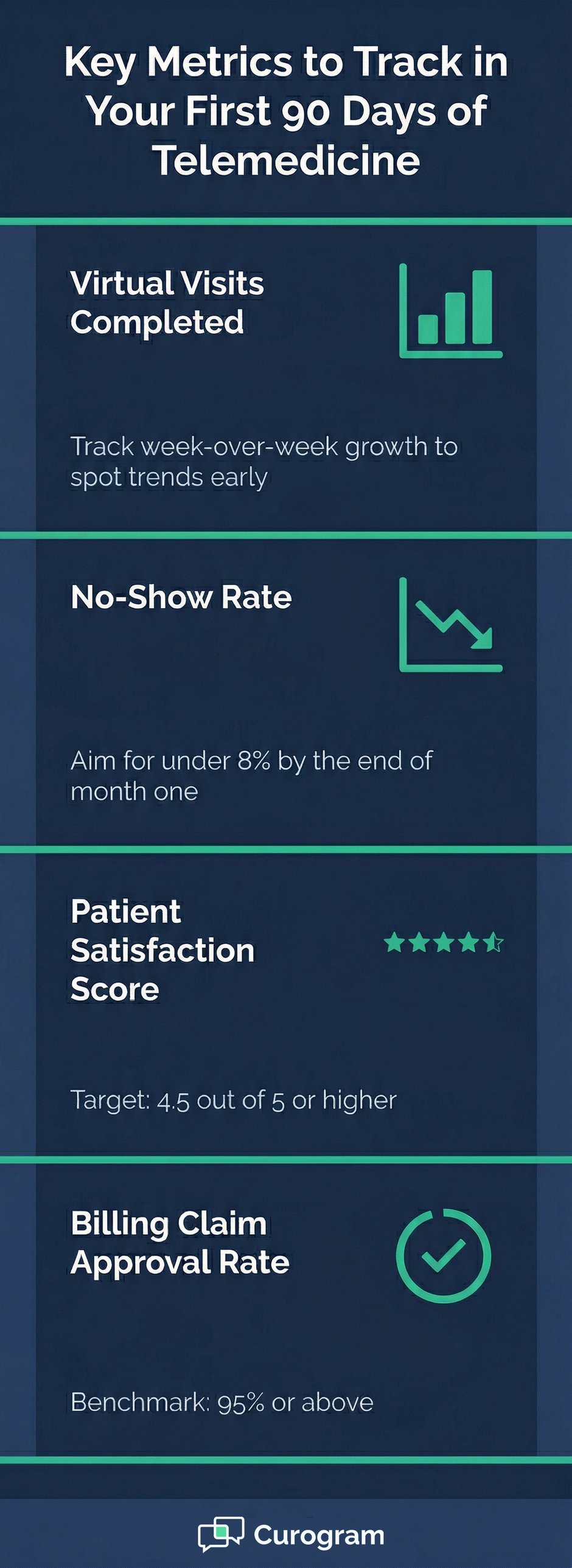
By the end of week 12, pull your first round of data. Look at total virtual visits completed, no-show rates, patient satisfaction scores, and any billing claim issues. Compare these numbers to your original goals and note where you fell short.
This first snapshot becomes your baseline. It shows where you started and gives you a benchmark to measure future progress against. Use it to set your priorities for the first 90 days post-launch.

Some practices succeed with virtual care on the first try. Others struggle. The difference often comes down to a few key factors that either support or undermine the launch. Understanding these in advance puts you in a much stronger position.
Every successful virtual care implementation has a champion at the top. This could be a lead physician, a practice manager, or a clinical director. Their job is to signal that virtual care matters and to model the behavior they want from the rest of the team.
When leadership is visibly committed, staff follow. When leadership is indifferent, the launch often stalls before it finds its footing.
Decisions about technology, budget, and scheduling all flow from the top. A sponsor with authority can clear roadblocks that would otherwise slow your timeline. They can also reinforce training and hold the team accountable to launch milestones in a constructive way.
Sponsorship at the top is not enough on its own. You also need buy-in from providers, front desk staff, and billing. The best way to get it is to involve people early. Ask for input on workflows. Share feedback from the soft launch. Show each staff member how their role fits into the bigger picture.
Rushed training is one of the top reasons virtual care programs fall short. Staff who feel unsure about the technology or the process will avoid it. Invest the time in thorough, role-specific training and provide ongoing support after launch.
Keep training materials updated as your workflows evolve. And make it easy for staff to ask questions. A culture of open communication around telemedicine helps everyone improve faster.
Patients need to know what to expect before, during, and after a virtual visit. If they are confused about how to join, they may simply not show up. If they are unsure which visit types are right for virtual care, they may book the wrong type of appointment.
Clear, proactive communication reduces both no-shows and mismatched appointments. Use multiple channels: text, email, your website, and phone scripts for your front desk team.
No launch strategy can overcome technology that fails mid-visit. Before you go live, confirm that your platform is stable, your internet connection is reliable, and your devices are properly set up. Test everything under realistic conditions, not just in an empty office.
When technology works smoothly, patients trust the process. When it does not, they lose confidence quickly and may not try virtual care again.
Twelve weeks is a solid foundation, but it is not a guarantee. Things will take longer than planned. Vendors will be slow. Staff will need extra training sessions. Patients will ask questions you did not expect.
Build buffer time into your plan where you can. And frame the launch to your team as a starting point, not a finish line. The goal is a functional, improving program, not perfection from day one.
The practices that do best with virtual care treat it as an ongoing project, not a one-time setup. They review metrics regularly, gather feedback continuously, and make adjustments without hesitation.
Commit to a monthly review of your telemedicine metrics from the start. Make it a standing item in your team meetings. Small, consistent improvements add up to a much stronger program over time.
Even well-prepared practices run into trouble during a telemedicine launch. Knowing the most common pitfalls in advance gives you a real advantage. Here is what to watch for and how to stay ahead of each one.
One of the most common mistakes is skipping thorough testing before going live. Practices that test only once or under ideal conditions are often caught off guard when real patients join from different devices, browsers, or network setups.
Prevention: Run multiple test calls across different devices, browsers, and locations. Test on a smartphone, a tablet, and a laptop. Include a test from outside your office to simulate a patient connecting from home.
Staff who receive only a brief overview of the platform are not ready to support patients or fix issues. Training that is rushed or incomplete leads to confusion, errors, and frustrated patients right out of the gate.
Prevention: Build training into your formal schedule, not just a casual walkthrough. Hold role-specific sessions, run simulations, and plan for at least one refresher session after your soft launch.
When patients do not know how to join a virtual visit or what to expect, they either do not show up or arrive without the right setup. This wastes time for everyone and creates a poor first impression of virtual care at your practice.
Prevention: Send a simple, step-by-step guide with every virtual visit confirmation. Make it available on your website and have a printed version on hand. Offer a brief phone check-in for patients new to telehealth.
Skipping or delaying the legal review is a serious risk. HIPAA violations, missing Business Associate Agreements, and licensing gaps can result in fines, claim denials, and loss of patient trust.
Prevention: Complete your legal review in weeks one and two, before any patient visits take place. Work with a healthcare attorney if needed. Keep all compliance documents organized and easy to access at any time.
Technology fails. A call drops. A patient cannot connect. The platform goes down at the worst possible moment. Practices without a backup plan scramble and sometimes lose the visit entirely.
Prevention: Create a written backup protocol before your launch. Include a direct phone number providers can give patients if the video call fails. Train staff on how to handle a technical failure calmly and efficiently.
Some practices expect to fill their virtual schedule right away. When visit volume grows slowly in the first few weeks, they become discouraged and lose momentum at the worst possible time.
Prevention: Set modest, realistic targets for the first month. Plan for 10 to 20 virtual visits in week one, not 100. Growth takes time. Focus on quality early on, and volume will follow as patients gain confidence in the service.

The launch is done. But the real work of building a strong virtual care program starts now. The first 90 days are your window to learn fast, improve quickly, and set your program up for long-term success.
Set aside time each week to review your core numbers. Track virtual visits completed, no-show rates, technical issue frequency, and billing claim approval rates. Put these numbers in a simple spreadsheet and watch for trends week to week.
If no-show rates are high, look at your reminder process first. Based on our internal data, practices using automated text reminders see no-show rates drop significantly, with some reducing from over 14% to under 5% within just three months.
Send a short satisfaction survey after every virtual visit. Keep it to three or four questions. Ask how easy it was to join the visit, how the provider communicated, and whether the patient would use virtual care again.
Use the results to find specific weak spots in the patient experience. If several patients mention audio issues, that is a signal to upgrade hardware or check your bandwidth setup. If patients love the convenience, use that feedback in your outreach.
Schedule a brief feedback session with your providers every two weeks during the first 90 days. Ask what is slowing them down, what is working well, and what they need to feel more effective in virtual visits.
Provider satisfaction matters just as much as patient satisfaction. Providers who enjoy virtual visits and feel supported will recommend it to patients and champion it within your practice over time.
Use the data and feedback you gather to make targeted improvements. Update your documentation templates if providers are struggling to fill them out mid-visit. Adjust your scheduling blocks if certain visit types are consistently running over time.
Keep a log of every change you make. This creates a record of your improvement process and helps new staff understand how the program has evolved since launch.
Many patients still do not know their practice offers virtual visits. Use the first 90 days to build awareness actively. Mention virtual care options on social media. Train your front desk team to bring it up when patients call for appointments.
You can also use targeted messaging to reach patients who have not visited in a while. Based on our internal research, SMS-based recall campaigns can convert 35% of overdue patients into scheduled appointments within a single month.
As your team gets more comfortable and your processes tighten up, begin scheduling more virtual visits per day. Add virtual appointment slots during high-demand hours. Consider making certain visit types, like mental health check-ins or chronic disease follow-ups, default virtual visits when appropriate.
Growth in virtual visit volume should be gradual and intentional. Do not scale faster than your team can support without letting quality slip.
By the end of your first 90 days, you should have a clear picture of what is working and what needs more attention. Use this data to set goals for the next six months, whether that means adding more providers, expanding to new visit types, or adding tools to support patient communication.
Telemedicine is not a feature you add and forget. It is a living part of your practice that grows and improves over time. The practices that commit to this process are the ones that build lasting, successful virtual care programs.
Launching telemedicine in your practice is one of the most valuable investments you can make in modern healthcare delivery. It expands your reach, improves patient access, and creates new efficiencies for your team. But it only works when it is done with intention.
This 12-week plan gives you a clear, step-by-step path to make it happen. The first phase focuses on honest self-assessment, because knowing where you stand before you start saves time and prevents costly surprises. Legal and platform decisions in weeks one and two set a secure foundation.
Technology setup and testing in weeks three and four ensure that when patients join their first virtual visit, things just work. Workflow design and staff training turn good intentions into reliable processes. And a structured soft launch lets you catch real-world issues before they reach your full patient base.
The goal has never been to rush to launch day. It has been to build something that lasts. A well-run virtual care program does not just survive the first 90 days. It gets stronger because the team behind it is always learning and always improving.
If there is one key thing to take away from this guide, it is this: preparation is the point. Every hour you spend mapping a workflow, running a test visit, or training a staff member is an hour that pays back many times over. You get smoother visits. You get happier patients. You get a team that feels ready for the challenge.
Patient expectations are shifting fast. More people want the option to see their doctor without traveling. More providers are finding that virtual visits can be just as meaningful as in-person ones when done well. And more practices are realizing that virtual care is not just a nice-to-have. It is a core part of how modern healthcare works.
Whether you are just starting to explore how to start telehealth services or you have been thinking about it for months, now is a good time to act. The tools are better than ever. The rules are clearer. And the demand from patients is real and growing.
Take the first step today. Review your readiness. Pick a platform. Set a launch date. Then follow the plan week by week, trust your team, and stay committed to improving as you go.
Your patients are ready for virtual care. The only question now is whether your practice is ready to deliver it.
Request a free demo to explore how Curogram can support your virtual care operations.
Frequently Asked Questions
 Jo Galvez : 4/12/26, 9:00 AM
Discover how Curogram enhances telemedicine with HIPAA-compliant communication, appointment reminders, and integrated patient engagement features.
 Jo Galvez : 3/22/26, 11:00 AM
Master telemedicine with comprehensive best practices guide. Clinical, technical, legal, and operational guidelines for successful virtual care...
Jo Galvez : 3/15/26, 9:00 AM
Master telemedicine with comprehensive best practices guide. Clinical, technical, legal, and operational guidelines for successful virtual care...