11 min read
HIPAA Compliant Messaging: What Every Medical Office Needs to Know
Mira Gwehn Revilla
:
April 19, 2026
Medical offices should use a purpose-built healthcare messaging platform that supports secure staff and patient messaging, keeps message records, and allows proper handling of protected health information (PHI). Moving to a compliant system starts with auditing your current tools, choosing a platform with a BAA, training your team, and updating patient consent forms.
Your front desk phone rings nonstop. Patients sit on hold. Staff scrambles to confirm tomorrow's appointments by hand. Sound familiar?
Your medical office sends dozens of messages each day. Staff text each other about patients. Front desks send visit reminders. Nurses share test results through apps on their phones.
But here's the issue: most of those messages break federal law.
HIPAA compliant messaging isn't just a nice-to-have for healthcare practices. It's a legal must. Every message that touches patient data — from a quick note between nurses to a billing alert sent to a patient — falls under strict federal rules. And the fines for getting it wrong can reach millions.
Yet many offices still rely on regular email, basic texting, or chat apps that were never built for healthcare messaging. They assume that because the message is short or internal, it's safe. That's a costly mistake.
This guide breaks down what HIPAA compliant messaging really means in plain terms. You'll learn which types of messages need to be secured, what features a medical messaging app must have, and the exact steps to move your practice to a compliant system. We'll also cover the most common errors that put offices at risk — and how to avoid them.
Whether you run a small clinic or a multi-site practice, this article gives you what you need to protect your patients, your team, and your bottom line.
What Is HIPAA Compliant Messaging?
HIPAA compliant messaging is any digital message system that meets the rules set by the Health Insurance Portability and Accountability Act. In simple terms, it means your practice can send, receive, and store messages that contain patient data — without breaking the law.
So what makes a system compliant? It comes down to a few core parts.
First, the platform must use end-to-end encryption. This means that the message is scrambled from the moment it leaves the sender until it reaches the reader. No one in between — not hackers, not the app provider — can read it.
Second, your practice needs a signed Business Associate Agreement, or BAA, with the platform vendor. A BAA is a legal contract. It holds the vendor to the same data rules your office must follow. Without a BAA, even an encrypted platform does not meet HIPAA rules.
Third, the system must have access controls. Not every staff member should see every message. A front desk clerk doesn't need to read a doctor's notes on a patient's mental health visit. Role-based access keeps data on a need-to-know basis.
Fourth, the platform must keep detailed message logs. These logs act as an audit trail. If a breach happens or an audit occurs, your office needs to show who sent what, when, and to whom.
Finally, there are rules about how protected health information (PHI) is used in messages. You can't include a patient's full name, diagnosis, and Social Security number in a casual text. Even within a compliant system, staff need to follow best practices about what to include and what to leave out.
Healthcare messaging that checks all of these boxes gives your office a safe way to share patient data. It protects your practice from fines. And it keeps your patients' trust.
Which Types of Messages Fall Under HIPAA?
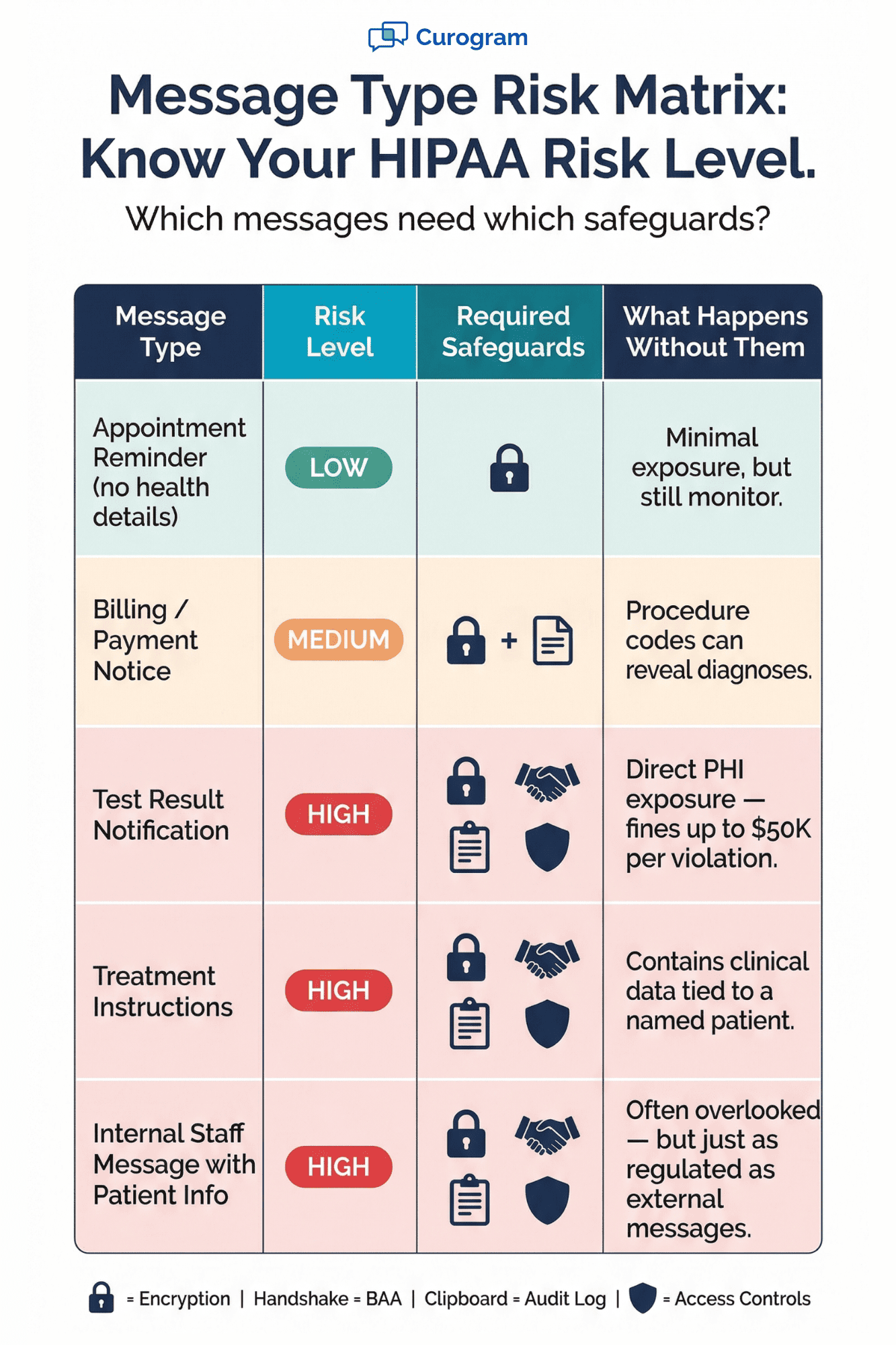
Not every message your office sends needs the same level of care. But any message that includes or refers to PHI must follow HIPAA rules.
The key rule is simple: if a message could identify a patient and reveal something about their health, it's PHI. That includes names, dates of birth, medical record numbers, and even appointment types (e.g., "oncology follow-up").
A common gray area is appointment reminders. A reminder that says "You have a visit on Tuesday at 10 AM" is usually fine. But a message that says "Your cardiology follow-up is on Tuesday" reveals health details — and that pushes it into HIPAA territory.
Another risk area is internal chat. Many staff members use group texts or apps like WhatsApp to coordinate care. If any patient detail shows up in those threads, the office is out of compliance. Even one message can trigger a violation.
The safest approach? Use a single, compliant platform for all patient messaging and internal messages that touch PHI. That way, your team doesn't have to guess which tool is safe for which message.

The Risks of Using Non-Compliant Messaging Tools
Using the wrong tools for medical messaging can cost your practice far more than you think. HIPAA fines are steep, and they scale based on how careless the violation is.
Here's a look at the fine structure set by the U.S. Department of Health and Human Services (HHS):
|
Violation Tier |
Description |
Fine Per Violation |
Annual Cap |
|
Tier 1 |
Did not know (and could not have known) |
$100 – $50,000 |
$25,000 |
|
Tier 2 |
Reasonable cause, not willful neglect |
$1,000 – $50,000 |
$100,000 |
|
Tier 3 |
Willful neglect, corrected within 30 days |
$10,000 – $50,000 |
$250,000 |
|
Tier 4 |
Willful neglect, not corrected |
$50,000 |
$1.5 million |
These numbers add up fast. If a single data breach exposes records for 500 patients, the total penalty could reach millions — even at the lowest tier.
But fines aren't the only cost. There are also audit costs, legal fees, and the expense of breach notices you must send to every affected patient. Smaller practices often can't absorb these hits.
Then there's the damage to your reputation. Patients trust you with their most private data. A breach caused by a staff member using a personal phone to share lab results can make headlines. Once that trust is gone, it's hard to win back.
Healthcare messaging apps that lack encryption, BAAs, and audit trails are the biggest sources of risk. Platforms like standard email, iMessage, or social media messengers were not built to handle PHI. They don't log messages the way HIPAA demands. And they don't offer a BAA.
Some offices assume that because "everyone uses" a certain app, it must be fine. That assumption has led to real enforcement actions. The HHS Office for Civil Rights investigates complaints and conducts random audits. Not knowing the rules is not a valid defense.
The bottom line: the cost of a compliant platform is a fraction of the cost of a single violation. Switching to a proper system is one of the smartest ways to protect your practice.
What Healthcare Messaging Platforms Must Have to Be HIPAA Compliant
Choosing a healthcare messaging app for your practice isn't just about features. It's about making sure the platform meets every HIPAA rule. Here are the must-haves.
1. End-to-End Encryption
Every message — whether it's between staff or from your office to a patient — must be encrypted in transit and at rest. This means the data is protected while it travels and while it sits on a server. Without this, any intercepted message is a breach.
2. Business Associate Agreement (BAA)
The vendor must sign a BAA with your practice before you send a single message. This is non-negotiable. The BAA makes the vendor legally responsible for protecting PHI on their end. If a platform won't offer a BAA, walk away.
3. User Access Controls
The system should let you set roles and limits. A front desk worker, a nurse, and a doctor all need different levels of access. Look for tools that allow role-based access so each user only sees what they need to do their job.
4. Audit Trail and Message Logs
HIPAA requires you to track who accessed what data and when. Your patient messaging software should log every message, including the sender, recipient, time stamp, and content. These logs must be stored securely and be available on request during an audit.
5. Data Breach Alerts
If a breach occurs, the platform should detect it and notify your team right away. HIPAA requires affected patients and HHS to be told within 60 days of a breach. A good system helps you act fast.
6. Auto-Logoff and Session Timeouts
If a staff member steps away from their screen, the system should lock itself. This stops someone from walking up and reading open patient messages.
7. Secure File Sharing
If your team shares images, PDFs, or forms, those files must be encrypted too. A compliant platform handles this within the same secure space as messaging.

HIPAA Compliant Messaging vs. Regular Messaging Apps
Many offices still wonder: "Why can't we just use WhatsApp or regular email?" The answer comes down to what those tools were built for — and what they lack.
Here's a side-by-side look:
|
Feature |
HIPAA Compliant Platform |
Standard App (iMessage, WhatsApp, Email) |
|
End-to-end encryption |
Yes (in transit and at rest) |
Partial (varies by app; often not at rest) |
|
BAA available |
Yes |
No |
|
PHI permitted |
Yes, within policy |
No — violates HIPAA |
|
Audit log |
Full message history with timestamps |
No formal logging |
|
Staff access controls |
Role-based permissions |
None — anyone with the app can see threads |
|
Breach notification system |
Built-in alerts |
None |
|
HIPAA penalty exposure |
Low (when used properly) |
High |
The gaps are clear. Standard apps may encrypt messages in transit, but they don't encrypt stored data the same way. They don't offer a BAA. And they give your office zero control over who sees what.
|
Consider a real-world example: A nurse at a small clinic texts a doctor through iMessage: "Mrs. Johnson's blood work is back — her A1C is 9.2." That single message contains a patient's name and a test result. It now lives on two personal phones, backed up to two personal cloud accounts, with no audit trail and no encryption at rest. That's a HIPAA violation. |
With a compliant platform, that same message would be encrypted, logged, and only visible to users with the right role. If either device is lost or stolen, the data can be wiped remotely.
Regular apps also create a "shadow record" problem. Patient data ends up scattered across personal devices and cloud backups that your practice doesn't control. In an audit, you can't produce those records — and that's another violation.
The switch to a purpose-built system removes these risks. It also makes your team's work simpler by putting all patient messaging in one secure place.
How to Move Your Practice to a Compliant Patient Messaging System
Switching to a new system can feel like a big task. But it doesn't have to be. Here's a step-by-step path to get your office on a compliant medical messaging app.
Step 1: Audit Your Current Tools
Start by listing every channel your staff uses to talk about patients. This includes email, text, phone apps, internal chat tools, and even fax.
Ask every team member — you may be surprised at how many tools are in use. Based on our internal research, many practices discover three or more unapproved channels during this step.
Step 2: Choose a Compliant Platform
Look for a platform that meets all the must-haves listed above: encryption, BAA, access controls, audit logs, and breach alerts. It should also be easy to use — if it feels like a basic texting app, your staff will adopt it faster.
A platform that works with your existing EMR is a big plus. For example, Curogram syncs with any EMR, so there's no double data entry.
Step 3: Sign the BAA
Before you go live, make sure you have a signed BAA with the vendor. Keep a copy on file. This is one of the first things an auditor will ask for.
Step 4: Train Your Staff
Every person who sends or reads patient messages needs training. Cover what PHI is, what can and can't be shared, and how to use the new tool. Based on our internal data, practices that invest in thorough onboarding see faster adoption and fewer compliance gaps.
Step 5: Update Patient Consent Forms
Your intake forms should tell patients how you'll contact them and through which channel. Add a consent line for messaging. This protects your practice and sets clear expectations.
Step 6: Set Clear Policies
Write a short policy that spells out which tools are approved, what data can be shared, and what happens if rules are broken. Make it part of your staff handbook.
Following these steps doesn't just make you compliant. It also improves how your office runs day-to-day. Based on our internal data, practices using automated, compliant messaging confirm over 1,100 appointments per month — freeing staff to focus on in-person care.
Common Mistakes Medical Offices Make with Healthcare Messaging
Even well-meaning offices slip up when it comes to patient messaging. Here are the most common errors — and how to fix them.
Using Personal Phones for Patient Chats
This is the number one mistake. A doctor texts a patient from their personal cell phone. The message isn't encrypted.
There's no audit trail. And if that phone is lost, the data goes with it. The fix: use a compliant app that works on any device but keeps data separate and secure.
Assuming EMR Messaging Is Automatically Compliant
Many offices believe that because their EMR has a built-in message feature, they're covered. But not all EMR messaging tools meet HIPAA standards on their own.
Some lack proper encryption or don't keep full audit logs. Always verify with your EMR vendor — and get it in writing.
Not Training All Staff
It's not enough to train just the doctors. Receptionists, medical assistants, billing staff, and even temp workers handle PHI. Every person who touches patient data needs to know the rules. A single untrained employee can create a breach.
Operating Without a BAA
Some offices use third-party apps for years without ever signing a BAA. This is one of the easiest violations to spot during an audit — and one of the easiest to prevent. Before you use any outside tool for messaging, confirm the vendor will sign a BAA.
No Written Messaging Policy
Without a policy, staff make their own choices. One nurse uses WhatsApp. Another uses email. A third sends photos through a personal cloud account. A clear, written policy removes the guesswork. It should list approved tools, banned tools, and the steps to follow if a mistake is made.
Ignoring Internal Messages
Offices often focus on outbound patient messages but forget about internal chats. A quick Slack message to a coworker about a patient's condition is still PHI. Internal messages need the same level of care as external ones.
These mistakes aren't about blame. They're about awareness. Once your team knows the rules and has the right tools, staying compliant becomes second nature.
Conclusion
HIPAA compliant messaging isn't just a tech upgrade. It's a core part of running a safe, modern medical office.
Every message your practice sends — whether it's a test result, a billing note, or a quick internal chat — has the potential to expose patient data. And when that data isn't protected, the costs hit hard: fines, legal fees, lost trust, and disrupted care.
The good news is that fixing this isn't complex. It starts with understanding what makes a system compliant. Encryption, a BAA, access controls, and audit logs are the basics. From there, it's about choosing the right healthcare messaging app, training your team, and putting clear rules in place.
Too many offices put this off because they think their current setup is "good enough." But good enough is how breaches happen. A single text on a personal phone can trigger a federal investigation.
The practices that get this right don't just avoid fines. They also run more smoothly. Staff spend less time on phone calls when patients can message securely. Appointment reminders go out on time. And everyone — from the front desk to the provider — works from the same compliant system.
Based on our internal research, practices that move to a compliant platform see real results. Atlas Medical Center cut their no-show rates from 14.20% to 4.91% in just three months — three times better than the industry average. That kind of impact goes far beyond compliance.
Your patients deserve to know their data is safe. Your staff deserve tools that make their jobs easier, not riskier. And your practice deserves the peace of mind that comes from doing it right.
Find out if your current messaging tools meet HIPAA standards. Book a demo to see what compliant messaging looks like in action and how you can protect your practice before your next audit.
Frequently Asked Questions
Address it right away with retraining, document the incident, and assess whether a breach report is needed. Then enforce your written policy and provide a compliant tool for all future messages.
At least once a year or whenever you adopt a new tool. Regulations, vendor features, and staff habits change — regular reviews catch gaps before they become violations.
Encryption protects data in transit and at rest, but a BAA creates a legal duty for the vendor to safeguard PHI, report breaches, and follow HIPAA rules — encryption alone doesn't cover those obligations.