

9 min read
HIPAA Compliant Texting for Medical Practices: The Complete Guide
Jo Galvez
:
April 12, 2026
A compliant platform must encrypt messages in transit and at rest, support two-way messaging, and maintain access controls. Medical practices that text patients without these safeguards face data breaches and steep fines. The right HIPAA-compliant texting solution should integrate with your EMR, be easy for staff to use, and come with strong vendor support. This guide covers what HIPAA-compliant texting is, what rules apply, what to look for in a platform, and how to get started safely and quickly.
Most patients would rather get a text than answer a phone call. Texts have a 98% open rate, compared to just 20% for email.
For a busy medical office, that gap matters. More patients see your reminders, respond to your messages, and show up on time.
But texting patients is not as simple as pulling out your phone. When a message includes protected health information (PHI), federal law applies.
Sending that kind of data through a standard SMS app puts your practice at risk. Fines for a HIPAA violation can range from $100 to over $50,000 per incident.
HIPAA-compliant texting is the answer. It lets your team send messages to patients while keeping their data safe.
The right platform gives you encryption, audit logs, and a signed Business Associate Agreement (BAA) with your vendor. It also makes daily tasks easier for your front desk staff.
This guide covers everything your practice needs to know. You will learn what makes a platform compliant, which rules you must follow, and how to choose the right tool. Whether you are exploring options for the first time or ready to switch, this guide gives you a clear path forward.
What Is HIPAA Compliant Texting?
HIPAA-compliant texting means using a platform designed to meet HIPAA's Privacy and Security Rules when sending patient data by text. It is not just about what you say. It is about how the system protects that data.
Under HIPAA, any entity that handles patient health data is called a covered entity. This includes medical practices, clinics, hospitals, and their business partners, which HIPAA calls Business Associates (BAs). When your team sends a patient's name, appointment details, diagnosis, or any health-related data by text, that message contains PHI.
A standard SMS app does not protect PHI. It does not encrypt messages, log access, or let you sign a BAA with the provider.
All three of those things are required under HIPAA. A BAA is a written contract between your practice and a vendor that confirms the vendor will protect your patient data. Without one, using that vendor's app to send PHI is a violation.
In short, HIPAA-compliant texting is not about the act of texting itself. It is about using the right kind of system to do it safely and legally.
Why Regular SMS Puts Your Practice at Risk
Standard consumer apps like iMessage, WhatsApp, and Android SMS were not built for healthcare. They lack the key security features HIPAA requires. Using them to send PHI creates real legal risk for your practice.
The biggest problem is encryption. Most consumer apps do not encrypt messages once they are stored. If a device is lost or hacked, patient data can be read. HIPAA requires PHI to be protected both when it is sent (in transit) and when it is saved (at rest).
Another gap is the lack of audit trails. HIPAA requires that covered entities track who accessed what data and when. Consumer apps do not keep those records. If you face an audit, you would have no way to prove your messages were handled properly.
Then there is the fine risk. HIPAA penalties are tiered by level of fault. Violations from willful neglect can cost between $10,000 and $50,000 per incident. A single data breach can trigger multiple violations. The costs can grow fast, and so can the damage to your reputation.
What Makes a Texting Platform HIPAA Compliant?
Not every secure messaging app meets HIPAA's standards. To be truly compliant, a platform needs to check several key boxes. The requirements fall into two main areas: technical safeguards and admin safeguards.
Technical Safeguards
These are the built-in security features that protect data as it moves and as it sits in storage. Without them, no texting tool qualifies as compliant.
Encryption in Transit and at Rest
All messages must be encrypted when sent and when stored. This keeps patient data safe whether it is moving through a network or sitting on a server. A platform that only encrypts in transit is not fully compliant.
Access Controls and Audit Logs
The platform must let you set staff permissions so each person only sees the data they need. It must also keep a log of every message sent, received, and accessed. These logs are what you rely on during an audit.
Administrative Safeguards
These are the policies and agreements that back up the technical tools. They are just as important as the software itself.
Your vendor must be willing to sign a BAA. This is not optional. It means the vendor shares legal responsibility for protecting PHI. The vendor must also store patient data on servers that meet HIPAA's physical and technical standards. Ask your vendor where data is hosted and how it is protected.
HIPAA Compliant Texting vs. Standard SMS: Key Differences
Here is a clear look at how HIPAA-compliant SMS messaging compares to a standard SMS app. The differences affect your legal exposure, your staff workflow, and your patients' trust.
|
Feature |
Standard SMS |
HIPAA Compliant Texting |
|
Encryption (in transit) |
Partial or none |
Yes, required |
|
Encryption (at rest) |
No |
Yes, required |
|
BAA Available |
No |
Yes |
|
PHI Permitted |
No |
Yes, with safeguards |
|
Audit Log |
No |
Yes |
|
Two-Way Messaging |
Limited |
Yes |
|
Staff Access Controls |
No |
Yes |
The gap between these two options is wide. Standard SMS may feel fast and easy, but it does not protect your practice or your patients. The table above makes the stakes clear at a glance.
HIPAA Texting Rules Your Practice Needs to Follow
Choosing a compliant platform is just the first step. Your team also needs to follow the right steps when sending messages to patients. Here are the key HIPAA texting rules every medical office should know.
Get Patient Consent First
Before you send any PHI by text, you must get written consent from the patient. This consent should clearly explain what kinds of messages they will receive and how their data will be used. Keep a record of that consent in the patient's file.
Limit What You Send
HIPAA messaging rules say to keep messages brief and free of sensitive details when possible. Appointment reminders and basic follow-up notes are generally fine.
Full diagnoses, lab results, or treatment plans should not be sent by text unless your platform supports high-level security and the patient gave specific consent.
Know What PHI Looks Like
PHI includes any data that can identify a patient and link them to their health. This includes names, dates of birth, addresses, insurance IDs, and medical record numbers. Even a first name paired with a condition counts as PHI under the law.
Train Your Staff
HIPAA rules only work when your team follows them. Staff should know what to send, what to avoid, and what to do if a message is sent by mistake. Regular training sessions keep everyone aligned and reduce the chance of a slip.
How to Choose the Right HIPAA Compliant Texting Service
Finding the right platform starts with knowing what your practice needs day to day. If you are evaluating vendors, here is what to look for in a hipaa compliant texting service.
EMR Integration
Secure texting for physicians works best when it connects with your existing EMR. Look for a platform that syncs patient data without requiring double entry. The best tools act as a plug-in to your current system, not a full replacement.
Ease of Use for Your Front Desk
Your front desk staff will use this tool every day. A complex interface slows them down and increases mistakes. Choose a platform that feels as easy as sending a regular text. If it takes an hour to train new staff, it is probably too hard.
Two-Way Messaging
One-way message blasts are useful, but real patient engagement happens when patients can reply. Two-way messaging lets them confirm, cancel, or reschedule without calling in. Based on our internal data, practices using two-way text messaging confirm over 1,100 appointments per month on average.
Vendor Support and Pricing
Make sure your vendor offers clear onboarding, fast support, and pricing that fits your budget. Ask about training tools for staff. Before you sign any contract, confirm a BAA is included. Also, ask whether the platform was designed with HIPAA-compliant texting for physicians in mind, since doctors need confidence that messages are private, documented, and protected.
Common Questions About HIPAA Texting in Medical Offices
Many practices have questions before they switch to a new messaging tool. Here are honest, direct answers to the ones we hear most often.
Can I use WhatsApp to text patients?
No. WhatsApp does not sign BAAs with healthcare providers. It also does not meet HIPAA's technical standards for storing PHI. Using WhatsApp for patient communication puts your practice at risk of a violation.
Does texting patients automatically violate HIPAA?
Not if you use the right platform. Texting is allowed under HIPAA when done through a compliant system, with patient consent, and with proper safeguards in place. The method is not the issue. The platform and process are.
Does my EMR's built-in messaging count as HIPAA compliant?
It depends. Some EMR systems have secure internal messaging that meets HIPAA rules. But many EMR portals do not support direct two-way SMS with patients. Check with your vendor to confirm whether their system includes a BAA and a full audit log.

How to Get Started with Secure Texting for Your Practice
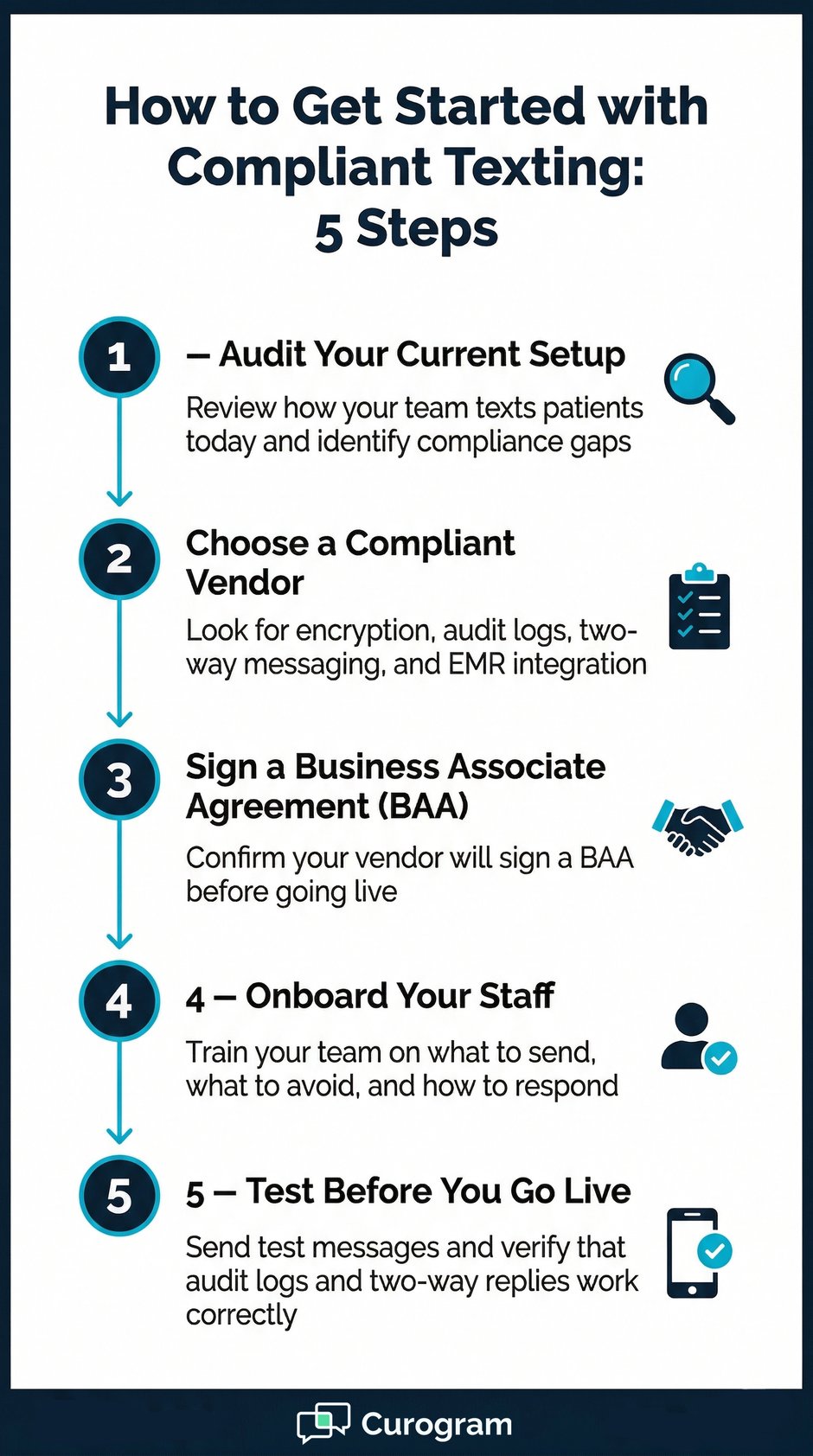
Getting started does not have to be a big lift. These five steps will take your practice from where you are now to a fully compliant setup.
Step 1: Audit Your Current Setup
Look at how your team talks to patients today. Are staff using personal phones or consumer apps? Write down the gaps you find before picking a new tool.
Step 2: Choose a Compliant Vendor
Look for a platform that meets all the safeguards covered in this guide. If you want a tool that integrates with your EMR, supports two-way messaging, and is easy to use, Curogram is worth a look.
Step 3: Sign a BAA
Before you go live, make sure a signed BAA is in place. This is a legal must. It protects both your practice and the vendor if a data issue arises.
Step 4: Onboard Your Staff
Walk your team through the platform before launch. Show them what to send, what to avoid, and how to handle replies. Good training is the backbone of solid compliance.
Step 5: Test Before You Go Live
Send a few test messages before using the system with real patients. Check that messages arrive, replies work, and audit logs record each event correctly.
Based on our internal data, practices that move to structured text-based communication see results fast. Atlas Medical Center reduced its no-show rate from 14.20% to 4.91% in just three months. That result was three times better than the industry average.
Conclusion
Texting is no longer a nice-to-have for medical practices. Patients expect fast, clear communication. They want to confirm their visits, ask quick questions, and get follow-up notes without picking up the phone.
But there is a right way to do it. Using a consumer app to send PHI puts your practice at legal risk. The fines are real. So is the damage to patient trust. The good news is that switching to a compliant system does not require a full overhaul.
HIPAA-compliant texting works because it combines the ease patients already love with the security the law requires. The right platform handles encryption, audit trails, and access controls in the background. Your staff just focus on their work.
When choosing a platform, look for tools that are simple, well-supported, and built to work with your EMR. Two-way messaging is a must. Ease of use for your front desk is critical. And never skip the BAA. That single agreement is what keeps your practice legally covered.
Think about what your practice stands to gain. Based on our internal research, practices using structured text-based communication see measurable results. Atlas Medical Center cut its no-show rate by nearly two-thirds in just three months. And practices using SMS recall messages saw 35% of patients schedule a follow-up appointment within one month.
These results did not come from luck. They came from having the right tools, the right process, and a team that knew how to use both.
Curogram was built for exactly this kind of work. It supports hipaa compliant text messaging with two-way conversations, EMR integration, and automated appointment reminders, all in one place. It is designed to be simple for front desk staff and powerful enough to meet the needs of multi-location practices.
If your practice is still using consumer apps or is unsure whether your current setup meets HIPAA standards, now is the time to take action. Start by reviewing your tools. Talk to vendors. Ask the right questions about encryption, audit logs, and BAAs.
Your patients deserve safe, easy communication. Your practice deserves a tool that makes staying compliant simple, not stressful.
See How Curogram Keeps Your Practice HIPAA Compliant — Book a Demo.
Frequently Asked Questions
A BAA is required because your texting vendor handles PHI on your behalf. HIPAA treats them as a Business Associate, which means they share legal duty for keeping that data safe. The agreement spells out how the vendor will store and protect patient data. Without a signed BAA, using that vendor for patient messages is a HIPAA violation.
If your staff sends patient data through apps like iMessage, WhatsApp, or standard SMS, your setup is likely not compliant. Ask two key questions: Does the platform encrypt messages at rest and in transit? Does the vendor offer a signed BAA? If the answer to either is no, you have a compliance gap that needs to be closed.
Patient consent is required because people have a legal right to control how their health data is used. HIPAA's Privacy Rule gives patients the power to decide what types of messages they receive. Consent also protects your practice if a patient disputes how their data was handled. Getting written consent up front makes your compliance easier to document.
Compliant texting platforms support automated appointment reminders with two-way replies. Patients can confirm or cancel with a quick text, which saves staff time and fills open slots fast. Based on our internal data, practices using automated text reminders have cut no-show rates by a large margin. When patients get timely, easy reminders, they are far more likely to show up.
First, document the incident as soon as it is found. Your practice must assess whether the message counts as a HIPAA breach based on what PHI was included. If it does qualify as a breach, you are required to notify the affected patient and, in some cases, the Department of Health and Human Services. Having a clear response plan in place before any mistakes happen makes the whole process faster and less stressful.