

Skip to the main content.

8 min read

HIPAA Compliant Texting Platforms: What to Look for Before You Buy

HIPAA Compliant Texting Platforms: What to Look for Before You Buy
💡 Not every texting tool is built for healthcare. HIPAA-compliant texting platforms give medical practices a secure way to send and receive messages with patients and staff. The best platforms offer end-to-end encryption, a signed Business Associate Agreement (BAA), two-way messaging, and access controls. They also keep audit logs and allow remote message wipe in case a device is lost or stolen.

When choosing a HIPAA-compliant texting platform, practices should ask vendors about data storage, breach response, and staff training. Avoid tools that lack a BAA, have unclear data policies, or charge confusing per-message fees. The right platform protects patient data and helps your team work better.


You already know that regular texting apps are off-limits in a medical practice. But knowing what to look for in a HIPAA-compliant texting platform is a different challenge. There are dozens of options out there, and not all of them are built for healthcare.

This guide breaks down what matters most. You will learn what features to require, what questions to ask vendors, and what warning signs to avoid. By the end, you will have a clear picture of how to pick the right tool for your practice.

Why Not All Texting Tools Are Built for Healthcare

Most texting apps were built for consumers or general business use. They were not designed with healthcare data in mind. That creates a serious gap when it comes to protecting patient information.

The Problem with Consumer and Business SMS Tools

Popular apps like WhatsApp, iMessage, or even standard SMS do not offer the level of security that HIPAA requires. They may lack encryption at rest, have no access controls, and store data on servers outside your control. Using them to share patient information puts your practice at risk of a costly HIPAA violation.

What HIPAA Actually Requires

HIPAA sets strict rules for how protected health information (PHI) is handled. Any tool used to transmit PHI must safeguard that data through technical controls. That means encryption, user authentication, and the ability to track who accessed what and when.

Why Generic Platforms Fall Short

General business tools, even ones marketed as "secure," were not built for healthcare workflows. They often lack audit trails, do not support two-way clinical messaging, and cannot connect to your electronic medical records (EMR). These gaps make them unsuitable for a medical practice, no matter how convenient they seem.

The Role of a Business Associate Agreement

A Business Associate Agreement, or BAA, is a contract between your practice and any vendor that handles PHI on your behalf. It spells out how they will protect that data and what happens if something goes wrong. Without a signed BAA, you are exposed to liability, even if the vendor claims their product is secure.

Most consumer texting apps will not sign a BAA because they are not set up to assume that responsibility. This alone disqualifies them from being used in a healthcare setting. Any vendor you consider must be willing to put their commitment to HIPAA compliance in writing.


What a HIPAA Compliant Texting Platform Must Have

Before you evaluate any product, build a non-negotiable checklist. Some features are not optional. They are the baseline for keeping your practice protected and your patients' data safe.

Core Features Checklist

The table below outlines the must-have features of any HIPAA-compliant texting platform and why each one matters.

Feature

Why It Matters

End-to-End Encryption

Protects messages in transit and at rest so unauthorized parties cannot read them.

Signed BAA

Confirms the vendor is legally responsible for protecting PHI under HIPAA.

Access Controls and User Permissions

Limits who can view or send messages, reducing the risk of internal data leaks.

Message Audit Logs

Tracks who sent what and when, which is critical for compliance audits.

Remote Wipe Capability

Lets you erase messages from a lost or stolen device to protect patient data.

Two-Way Messaging

Allows patients to respond, making communication more useful and complete.

EMR Integration

Connects messaging to your patient records, reducing manual data entry and errors.


A platform that is missing even one of these features may leave gaps in your compliance program. Do not let a flashy interface or low price point distract you from this list. 

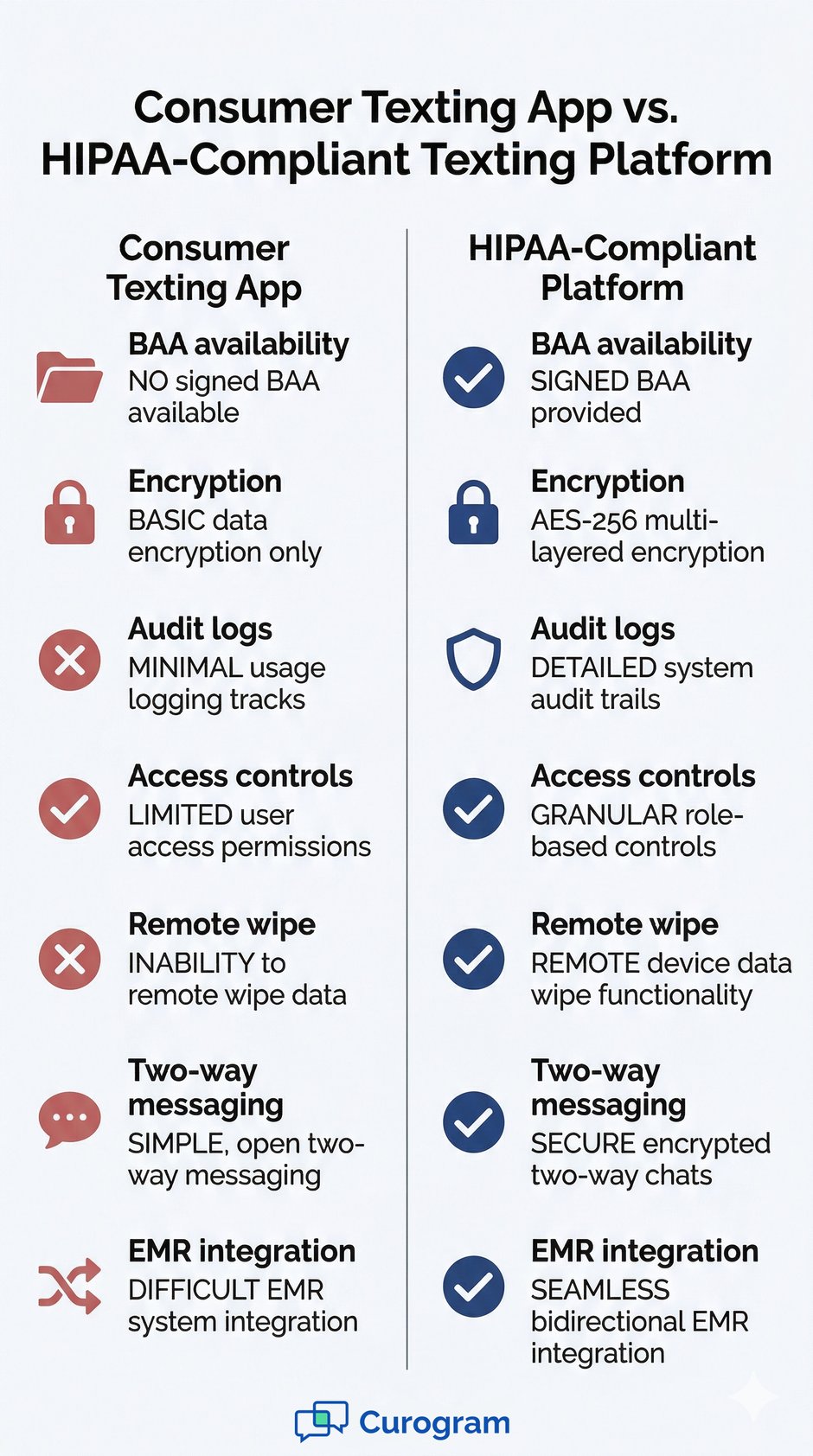
Comparison infographic: Consumer Texting App vs. HIPAA-Compliant Texting Platform features


Questions to Ask Every Vendor Before You Sign

Vendor websites often make everything look great. The real test happens when you ask direct questions. Here are 12 questions every practice manager should ask before committing to a HIPAA-compliant texting service.

Compliance and Legal Questions

1. Do you sign a Business Associate Agreement?

This should be question number one. If the answer is no or "we will get back to you on that," move on. A BAA is not optional.

2. Where is patient data stored, and is it encrypted?

Data should be stored in a HIPAA-eligible environment with encryption at rest. Ask what cloud provider they use and whether the servers are based in the US.

Security and Breach Response Questions

Beyond the BAA, you need to know how the vendor handles problems when they arise. These questions get at the heart of their security posture.

3. What happens if there is a data breach?

Your vendor should have a clear breach response plan. They should notify you quickly, provide a written report, and have steps in place to contain the damage.

4. How do you handle staff turnover on our end?

When an employee leaves your practice, their access should be revoked quickly and completely. Ask how the platform handles deprovisioning and whether you can do it yourself in real time.

Operational and Support Questions

The following questions cover day-to-day use, pricing, and ongoing support.

  1. Is training included, and is it ongoing or one-time?
  2. Can the platform integrate with our current EMR system?
  3. Is pricing per message, per user, or a flat monthly rate?
  4. Does the platform support automated reminders and two-way texting?
  5. What does your uptime and reliability record look like?
  6. Is there a dedicated support team for healthcare clients?
  7. Can we run a pilot before committing to a full contract?
  8. What does the onboarding process look like?


How to Compare HIPAA Compliant Texting Platforms

Once you have narrowed down your options, a side-by-side comparison makes the decision much clearer. Not all platforms offer the same feature set, and some that look affordable upfront can cost more in the long run.

The table below compares Curogram against a generic texting tool and an EMR's built-in messaging system across key features.

Feature

Curogram

Generic Texting Tool

EMR Built-In Messaging

BAA Available

Yes

Rarely

Varies

Two-Way Texting

Yes

Limited

No

EMR Integration

Yes

No

Yes (own EMR only)

Patient Intake

Yes

No

Limited

Appointment Reminders

Yes (automated)

Manual only

Basic

Pricing Model

Flat monthly rate

Per-message fees

Bundled (often inflexible)


Red Flags to Watch Out for When Evaluating Vendors

Not every vendor that claims to be HIPAA-compliant actually is. Some use vague language or hide key limitations in the fine print. Here is what to watch for.

Warning Signs That Should Give You Pause

No BAA Available or Offered Late in the Process

If a vendor drags their feet on providing a BAA, that is a serious warning sign. A truly compliant platform will offer the BAA upfront, not as an afterthought after you have already signed a contract.

Unclear Data Storage Policies

If you cannot get a straight answer about where your data is stored or who has access to it, walk away. PHI must be stored in a secure, HIPAA-eligible environment. Vague answers suggest the vendor has not thought this through or does not want you to know.

Other Red Flags to Watch

Keep an eye out for these additional warning signs during your evaluation process.

  • No audit trail: If the platform cannot show you a log of message activity, you have no way to prove compliance if you are ever audited.
  • No dedicated healthcare support: General customer service teams often do not understand healthcare workflows. You need a team that speaks your language.
  • Per-message pricing with no cap: This model can lead to unpredictable bills, especially for high-volume practices. A flat monthly rate is almost always better for budgeting.

No remote wipe: If a staff member loses their phone, you need to be able to erase PHI from it immediately. Platforms that lack this feature create real risk. 


HIPAA Compliant Texting for Physicians: Special Considerations

Physicians have different messaging needs than front office staff. When it comes to HIPAA-compliant texting for physicians, the stakes are higher, and the use cases are more complex.

Secure Messaging Between Providers

Doctors often need to share clinical information with other providers, whether that is a referral, a test result, or a care update. This kind of provider-to-provider messaging must be just as secure as patient-facing communication. The platform you choose should support secure messaging between providers, not just outbound texts to patients.

Prescription Follow-Ups

Following up on prescriptions via text can save time and reduce phone tag. But it only works safely on a platform designed for healthcare. Sending a follow-up through a non-compliant tool could expose sensitive medication information and put your practice at risk.

Lab Results and Clinical Updates

Lab results contain some of the most sensitive information in a patient's record. Sharing them through a HIPAA-compliant text messaging system means patients get their results faster, and your team does not have to chase them down with phone calls. This also creates a documented record of when and how the information was shared.

Why Physicians Need Purpose-Built Tools

Off-the-shelf tools are not designed for the pace or precision of clinical care. A HIPAA-compliant texting platform built for healthcare workflows helps physicians stay informed without cutting corners on security. It also reduces the temptation to use personal phones for clinical updates, which remains one of the most common HIPAA compliance gaps in medical practices. 


How to Transition Your Practice to a New Texting Platform

Switching platforms does not have to be disruptive. With the right approach, you can move your practice to a new system with minimal downtime and staff confusion.

Step 1: Audit Your Current Tools

Start by taking stock of how your team currently communicates with patients. What tools are they using? Are any of them non-compliant? Understanding the current state helps you identify the gaps a new platform will need to fill.

Check for Shadow IT

It is common for staff to use personal phones or free apps to send quick updates to patients. These informal habits are hard to track and easy to overlook. Your audit should include conversations with staff, not just a review of official tools.

Document Your Messaging Workflows

Before you switch anything, map out your current messaging workflows. Which messages go out? When? Who sends them? This documentation will make it much easier to recreate those workflows in your new system.

Step 2: Shortlist and Pilot

Once you know what you need, narrow your list to two or three vendors. Then run a pilot with one provider or one location before rolling out to the whole practice. A pilot lets you catch problems early, before they affect every patient interaction.

During the pilot, pay attention to how the team adapts. Are there features they find confusing? Are there workflows that do not translate well? Gather feedback and use it to refine your setup before the full launch.

Step 3: Migrate and Train

Once you are ready to move forward, transfer your message templates, contact lists, and any saved content to the new system. Make sure all staff are trained before go-live, not after.

Training is not a one-time event. Plan for follow-up sessions and a clear point of contact for questions. Most platforms offer onboarding support, so take full advantage of it. The smoother the rollout, the faster your team will see the benefits.  


Doctor and medical admin looking at a smartphone

Conclusion

Picking the right HIPAA-compliant texting platform takes more than a quick Google search. It requires knowing which features are non-negotiable, which questions to ask, and which warning signs to walk away from.

The good news is that you do not have to figure it all out alone. Tools like Curogram are built specifically for medical practices. They combine secure, two-way messaging with EMR integration, appointment reminders, and patient intake, all under one roof.

Based on our internal research, practices that use automated messaging tools see no-show rates drop by over 50%. That kind of impact goes well beyond compliance. It means more patients showing up, more revenue staying in the practice, and less time spent on manual follow-ups.

If you are ready to take the next step, start by reviewing your current tools and identifying the gaps. Then use the checklist and questions in this guide to evaluate your options with confidence.

The right platform will not just keep you compliant. It will make your practice run better for everyone on your team and every patient you serve.

Ready to Find the Right HIPAA Texting Platform? Talk to a Curogram Specialist..


Frequently Asked Questions

How do I know if a texting platform is truly HIPAA compliant?

The clearest sign is a willingness to sign a Business Associate Agreement. Beyond that, look for end-to-end encryption, audit logs, and access controls. If a vendor cannot provide documentation of their security practices, that is a red flag.

Why is a Business Associate Agreement so important for texting tools?

A BAA makes the vendor legally responsible for protecting patient information they handle on your behalf. Without one, your practice is the only party on the hook if something goes wrong. It is a legal requirement under HIPAA whenever PHI is involved.

How do HIPAA-compliant texting platforms handle staff who leave the practice?

A well-built platform lets administrators revoke access quickly and completely when a staff member departs. This includes removing their login, cutting off message access, and wiping any PHI from their device if needed. Practices should confirm these capabilities before signing with any vendor.

Why should physicians use a dedicated secure texting tool instead of their personal phones?

A BAA does not cover personal phones and do not have the controls needed to protect PHI. Using them for clinical updates or lab results puts the practice at compliance risk. HIPAA-compliant texting for physicians ensures that all communication happens in a secure, auditable environment.

How long does it typically take to switch to a new texting platform?

The timeline depends on the size of your practice and how complex your current workflows are. Many practices can complete a full transition in a few weeks when they start with a pilot. A clear rollout plan, good staff training, and vendor support all help speed up the process.