Skip to the main content.

13 min read

Weave Alternatives for Medical Practices: What to Consider

Weave Alternatives for Medical Practices: What to Consider
 💡 Medical practices looking for Weave alternatives want a platform that goes beyond basic phone and text tools — one that's built for healthcare from the ground up.

The right alternative should offer two-way SMS, HIPAA compliance with a signed BAA, EMR integration, automated appointment reminders, digital patient intake forms, and transparent pricing. Healthcare-specific workflows require more than a general business communication tool.

Curogram is a top Weave alternative for medical practices. It integrates with virtually any EMR, automates front-desk communication, and helps practices reduce no-show rates, cut phone call volume by up to 50%, and increase revenue — all from a single platform designed exclusively for healthcare.

Your front desk staff is answering the same call for the fourth time today.

A patient wants to confirm their appointment. Another needs to reschedule. A third is asking about their intake forms. Meanwhile, the phone is ringing again — and the waiting room is already full.

This is the daily reality for most medical practices. And many of them turned to Weave hoping to solve it.

Weave promised to simplify patient communication.

For some practices, it delivered. For others, the reality looked different: pricing that felt hard to justify, integrations that required more IT lift than expected, or support that didn't move at the speed of a busy clinic.

If you're reading this, you're probably already past the frustration stage. You want a clear comparison. You want to know what else is out there, what to look for, and whether switching is actually worth it.

That's exactly what this article gives you.

We're not here to bash Weave. It's a legitimate product with real users.

But it was built as a general business communication tool, not a healthcare-first platform. And for medical practices navigating HIPAA requirements, EMR integrations, and front-desk workflows, that distinction matters — a lot.

By the end of this piece, you'll know what features to demand from any Weave alternative, how to ask the right questions before you commit, and why Curogram earns serious consideration as a purpose-built patient communication platform for practices of all sizes.

Let's get into it.

Why Medical Practices Start Shopping for a Weave Alternative

It usually starts with one of a few things. The pricing model catches a practice off guard after the first renewal. Or the EMR integration doesn't work as smoothly as the sales call suggested. Or the platform works fine — for a general business — but keeps falling short in ways that are hard to articulate and very easy to feel when your front desk is overwhelmed at 9 a.m. on a Monday.

What makes this frustrating is that the problems rarely announce themselves all at once. They accumulate.

A feature that almost works.

A support ticket that took two days to close.

A pricing tier that crept up at renewal.

Over time, small friction adds up into a real operational burden — and eventually, someone on your team starts asking whether the tool is actually worth keeping.

The Most Common Breaking Points

These are the friction points that push practices to start looking:

  • Pricing surprises. Bundled or per-user fees that looked manageable on paper add up quickly for a multi-provider practice.
  • Integration gaps. Not every EMR connects cleanly with Weave, which leads to double data entry and workflow friction your staff did not sign up for.
  • Healthcare feature gaps. Intake forms, HIPAA-compliant two-way texting, and patient recall campaigns are not always fully built out on platforms serving multiple industries at once.
  • Slow support. When your communication system goes down at 8 a.m., a next-day ticket response isn't good enough.
  • Lack of healthcare focus. A platform built equally for dental offices, law firms, and auto shops is — by design — a compromise for a medical practice.

None of this makes Weave a bad product. It means it may not be the right fit for your practice, and that's a fair reason to keep reading.

The no-show problem is bigger than it looks.

The average medical practice loses between $150 and $300 in revenue for every missed appointment. For a practice seeing 400 patients a month with even a 10% no-show rate, that's roughly $6,000–$12,000 in lost revenue every single month — before accounting for wasted staff time or gaps in the schedule that couldn't be backfilled.

The good news is that most of these problems are solvable with SMS appointment reminders and patient engagement strategies

They're not the result of bad staff or bad patients — they're the result of tools that weren't designed with your specific workflow in mind. That's what makes switching worthwhile when you find the right fit.

The Features Any Good Weave Alternative Should Have

Before you request a single demo, build your checklist.

A strong patient communication software replacement needs to cover more ground than basic texting and call management. It's easy to get distracted by polished interfaces or persuasive sales pitches — having a clear list of requirements before you start evaluating keeps the process honest.

It also helps you avoid a common mistake: choosing a platform based on the features you use most today, rather than the ones your practice will need as it grows.

Think about where your communication gaps are right now, but also where you want to be in two years.

The Non-Negotiable Feature Set

Feature Why It Matters for Medical Practices
Two-way SMS Patients can respond, confirm, or reschedule without calling
Automated appointment reminders Reduces no-shows and manual follow-up work
HIPAA compliance + signed BAA Required by law when transmitting patient health information
EMR/EHR integration Eliminates double data entry and syncs patient records
Digital patient intake forms Speeds up check-in and reduces paper waste
Internal staff messaging Replaces insecure group texts between team members
Google review automation Builds your online reputation with minimal effort
Transparent pricing No surprise fees at renewal time
Responsive onboarding support Gets your team up and running without a long disruption

Why One Platform Is Better Than Three

Any alternative that checks off half of these boxes means you'll eventually need a second tool to fill the gaps — and then maybe a third. That means multiple bills, multiple logins, and a more complicated workflow for your staff every single day.

The hidden cost of fragmented tools goes beyond the monthly invoices.

When your staff has to switch between systems to complete a single patient interaction — texting in one app, pulling up intake forms in another, checking reminders in a third — every transition adds seconds that compound across hundreds of patient touchpoints per week.

The goal is consolidation. One platform that handles patient-facing and internal communication, integrates cleanly with your EMR, and keeps you on the right side of HIPAA — without requiring your front desk to toggle between systems just to do their job.

When you find a platform that does all of this well, the efficiency gain is immediate and measurable.

What to Look for in Cloud-Based Business Communications Built for Healthcare

Evaluating cloud-based business communications solutions in a healthcare context is a different exercise than shopping for a general business tool. The stakes are higher, the compliance requirements are real, and the wrong choice creates problems that go beyond a bad user experience.

A platform that works beautifully for a retail chain or a law firm can still be entirely inadequate for a medical practice — not because it's poorly built, but because it wasn't built for you.

The criteria below aren't just about features. They're about what a healthcare-specific platform needs to get right in order to work safely, efficiently, and sustainably inside a clinical environment.

EMR Integration Is Non-Negotiable

If a platform doesn't pull patient data from your existing system, your staff will manually enter information twice — every day, for every patient. That wastes time, introduces errors, and quietly burns out the people you rely on most.

Before you sign anything, ask specifically which EMR systems a platform integrates with and test the connection directly.

"Most major systems" is not a sufficient answer.

It's also worth asking how the integration behaves when something changes. EMRs push updates, practices switch systems, and integrations that worked on day one don't always hold up over time.

A vendor that can clearly explain how they handle those situations is a vendor worth trusting with your daily operations.

HIPAA Compliance Is the Floor, Not a Feature

Every healthcare communication platform you evaluate must offer a Business Associate Agreement.

If a vendor doesn't raise it proactively during a healthcare sales conversation, that's a meaningful red flag.

Patient health information passes through every appointment reminder, intake form, and text messaging in healthcare workflowsand every one of those touchpoints must be protected under HIPAA, no exceptions.

It's worth going a step further than just confirming a BAA exists. Ask how the platform handles data encryption, message storage, and access controls. Compliance isn't a one-time certification — it's an ongoing operational commitment, and you want a vendor who treats it that way.

Ease of Use Matters More Than You Think

Your front desk team is not an IT department. If onboarding requires a detailed manual and days of training, adoption will be slow, incomplete, and frustrating for everyone involved. Look for platforms where staff can get up to speed in minutes, not weeks.

10 minutes

That's how long it takes most front-desk staff to complete Curogram training, based on our internal data. If a vendor can't give you a comparable number, ask why.

Beyond initial training, think about what happens when you hire a new team member.

A platform that requires a week to learn creates a recurring bottleneck every time your staff turns over. The best platforms are intuitive enough that a new hire can get productive the same day they start.

Don't Overlook Support and Uptime

In healthcare, downtime isn't just an inconvenience — it disrupts patient care and costs revenue. Ask every vendor about their uptime guarantees, how they handle outages, and what support looks like after onboarding ends.

A dedicated contact matters far more than a general support queue when something breaks on a Tuesday morning.

Response time is only part of the equation. Equally important is whether the support team understands healthcare workflows well enough to actually solve your problem.

A support rep who doesn't know the difference between a patient intake form and an appointment reminder isn't going to help you much when your front desk is backed up and the queue is growing.

weave alternatives - mid

Weave vs. Curogram: An Honest Feature Comparison

Here's a direct look at how both platforms compare across the features that matter most to medical practices.

This is not a one-sided takedown — it's a fair assessment based on publicly available information and our internal data.

The goal is to give you enough clarity to make a confident decision, not to talk you into anything.

On EMR Integration

Weave supports a defined set of integrations. For practices already on those systems, this may be sufficient. But for practices on less common EMRs — or those that have switched systems in recent years — the integration gap becomes a real daily problem that your staff absorbs quietly in the form of extra manual work.

Curogram takes a different approach:

It's built to integrate with virtually any EMR, working alongside your existing setup rather than requiring you to work around it.

That flexibility matters especially for multi-specialty practices or groups managing more than one system across locations. You don't need to change how your practice operates — the platform adapts to you.

On HIPAA Compliance and BAA Availability

Both platforms offer HIPAA compliance and provide a Business Associate Agreement.

The difference here isn't about whether a BAA exists — it's about how each vendor treats compliance as part of the product experience.

With Curogram, a BAA is included as a standard part of the agreement. It's not a checkbox you have to ask for.

For practices where patient privacy is a non-negotiable foundation — which should be every practice — this distinction matters. You want a vendor who leads with compliance, not one who treats it as a line item.

On Scope — Healthcare vs. Everything Else

Weave serves a wide range of industries: healthcare, dental, home services, automotive, and more. That breadth isn't a flaw — but it does mean the product roadmap, the support team's expertise, and the default feature assumptions are spread across very different use cases.

A feature built for a plumbing company's scheduling workflow and a feature built for a medical practice's patient intake process are not the same thing, even if they look similar on a spec sheet.

Curogram serves one vertical. Every feature, every update, and every integration decision is made with medical practices in mind.

That focus shows up in the details — in the way the intake form workflow is designed, in how reminder sequences are structured, in how the internal messaging system handles clinical conversations. When the entire product is built around your use case, the small things tend to actually work.

Where the Design Philosophy Diverges

Weave was built for general businesses and later adapted for healthcare. Curogram was built exclusively for medical practices from day one. That shapes everything — the integrations, the compliance approach, the support model, and how the product evolves as healthcare regulations and patient expectations change.

This isn't a subtle distinction. It shows up in every interaction your staff has with the platform — in what's easy, what requires a workaround, and what simply isn't there.

Design philosophy isn't a marketing concept;

It's the sum of every product decision that was made before you ever logged in.

Patient reading appointment reminder text in a clinic waiting room

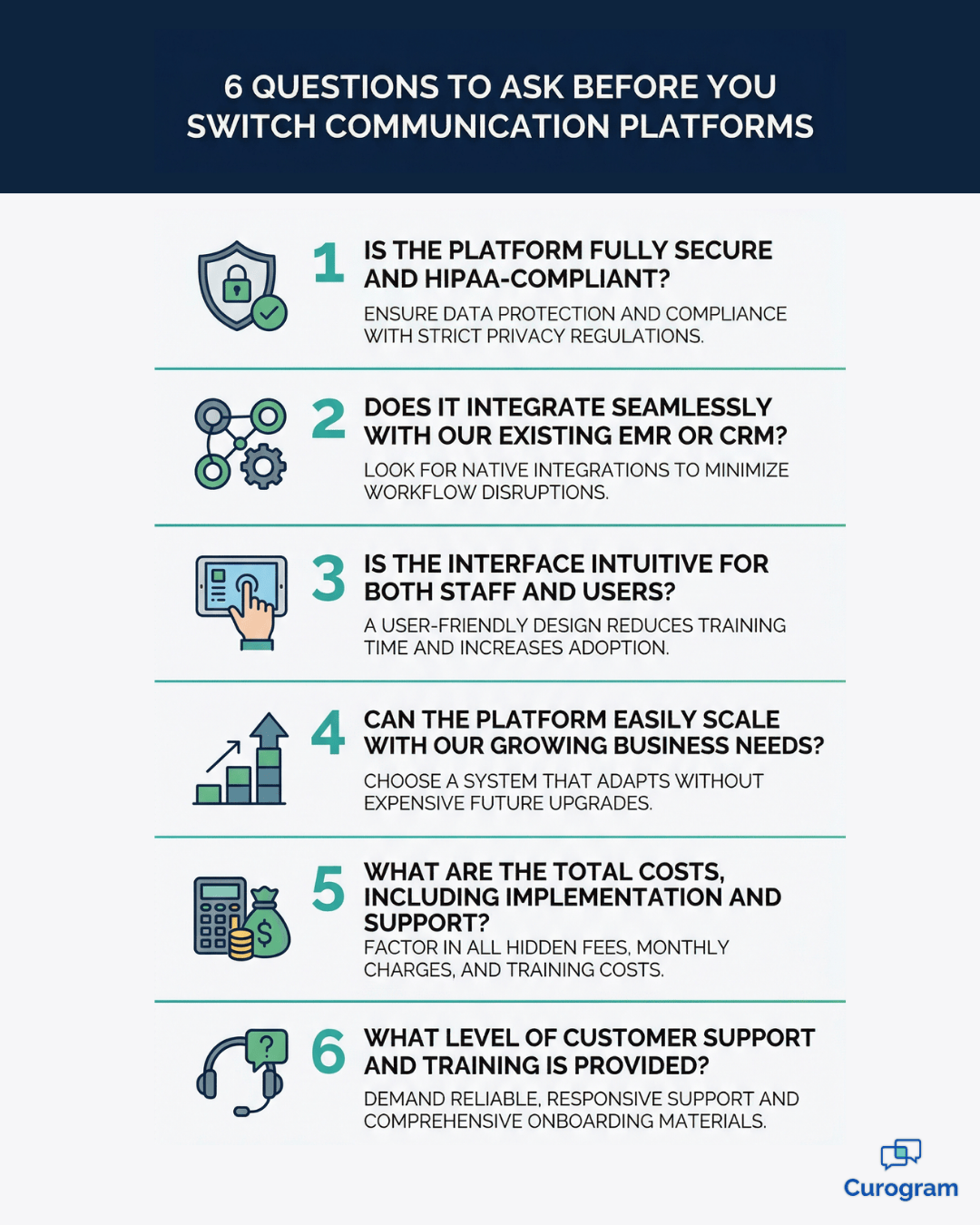
The Right Questions to Ask Before You Commit to Any Alternative

Switching platforms is a real investment of time, money, and team energy. The demo will always look good. What matters is what you ask during it — and whether the answers are specific enough to trust.

Most vendors are skilled at presenting their product in the best possible light.

That's not a criticism;

It's just how sales works.

Your job is to push past the surface and find out how the platform actually performs in a workflow like yours.

The questions below are designed to do exactly that.

Compliance, Pricing, and Integration

These three areas carry the most risk if you skip over the details.

Which EMRs do you integrate with — and how deep does that integration go?

Don't accept "most major EMRs." Ask for a specific list, ask whether data syncs in both directions or only one, and ask what happens when your EMR pushes an update. Integration breaks are a real and common problem that rarely gets mentioned until after you've signed.

Is a BAA included in every plan, or is it an add-on?

Some platforms charge extra for HIPAA compliance documents. Others make you request them. A vendor that doesn't lead with this in a healthcare conversation is worth scrutinizing closely.

Is pricing per user, per message, or per location?

Per-message pricing sounds reasonable until your volume grows. Get the full pricing breakdown — including what triggers overages — before you agree to anything, and ask what the renewal looks like in year two.

Getting clear answers to these three questions upfront will eliminate a lot of the surprises that practices typically discover only after they've already committed and started onboarding.

Support, Onboarding, and the Real-World Demo

Once you're confident on compliance and cost, push on the operational side.

How long does onboarding take, and who manages it?

A 6-week implementation timeline is not acceptable for a front-desk communication tool. Ask who your onboarding contact is and how quickly your staff can realistically begin using the platform day-to-day.

What does customer support look like after onboarding?

Ask for the average response time. Ask whether you'll have a dedicated contact or be routed into a general support queue. For a platform your team relies on every day, this matters more than most features on a spec sheet.

Can I see the platform using a workflow that mirrors my practice?

A demo with generic data is one thing. Ask to walk through a real scenario using your EMR and your patient communication patterns. The difference between a polished demo and a genuine fit becomes obvious quickly.

If a vendor hesitates on any of these questions — or deflects with vague answers — that tells you something important about what your experience will look like post-sale.


Confidence in the product should come through in how clearly and directly a vendor can answer the hard questions.

Why Curogram Is a Strong Weave Alternative for Medical Practices

If you're a medical practice that wants a true healthcare communication platform — not a general business tool with healthcare features added on — Curogram is worth a serious look.

The distinction isn't just about what the platform can do. It's about how it was built, who it was built for, and how that focus translates into daily value for your team and your patients.

One Platform for Everything Your Front Desk Needs

Two-way texting, automated appointment reminders, digital intake forms, secure internal staff messaging, text-to-pay, and Google review automation — all in one place. Many practices using Weave or similar tools are already paying for two or three separate solutions to get this same coverage. Curogram eliminates that patchwork.

Up to 50% fewer phone calls

That's the average reduction Curogram users report, based on our internal data. For a front desk fielding 80–100 calls a day, that's 40–50 calls that become texts instead — handled faster, with less interruption, and without putting patients on hold.

It's a single platform built around the way medical front desks actually operate, with an EMR-agnostic integration that works alongside whatever system you already use — without requiring you to change it. That matters because the biggest adoption barrier for most new software isn't the learning curve.

It's disruption to a workflow that's already under pressure.

When your staff doesn't have to change the tools they rely on — only add to them — the transition is faster, smoother, and far less likely to create the kind of resistance that quietly kills software rollouts.

The Numbers Behind the Results

The outcomes aren't theoretical. Atlas Medical Center cut their no-show rate from 14.20% to 4.91% in just three months — 3x better than the industry average — using Curogram's automated reminder system, based on our internal data.

That kind of improvement doesn't just look good on a report. It directly translates into filled appointment slots, more predictable daily scheduling, and a front-desk team that spends less time chasing down confirmations.

Beyond no-shows, a 35% appointment reconversion rate from SMS patient recalls means that dormant patients — the ones who haven't scheduled a follow-up in months — can be brought back with a single automated text.

Based on our internal data, one multi-location practice saw 1,240 patients return from recall messages alone. Practices that adopt Curogram consistently see a 10–20% revenue increase as recovered appointments fill previously lost slots.

What makes these results repeatable is that they come from automation, not from asking your staff to work harder. The platform handles the follow-ups, the reminders, and the recall messages in the background — so your team can focus on the patients who are actually in the building.

Built for Simplicity, Not Just Power

A platform is only as useful as your team's ability to use it. Curogram is designed so that front-desk staff can learn the system in minutes, not days.

There's no lengthy IT deployment, no complicated onboarding manual, and no need to restructure your existing workflow.

You add it to what you already have, and it starts working.

This simplicity isn't a trade-off for capability. It's the result of building a product specifically for the people who use it — front-desk staff, practice managers, and clinical teams who are busy, often understaffed, and need tools that work without friction.

The interface feels familiar because it's modeled on the communication patterns your team already uses.

For practices that want HIPAA compliant texting for medical practices as a core function — not an afterthought — Curogram is purpose-built for exactly that. If you're also thinking about how this fits into a broader patient engagement strategy, our guide to the best patient engagement software for practices is a helpful next read.

Conclusion

You've done your research. You know what you need. Now it's time to make the switch count.

Switching patient communication software is not just a technology decision — it's an operational one. Get the comparison table in front of your practice manager. Ask the right questions on every demo call.

Don't settle for a platform that checks six out of nine boxes and promises the rest "on the roadmap."

The right healthcare communication platform will make your front desk faster, your patients more engaged, and your revenue more predictable. It will reduce the number of tools your team juggles. And it will keep you HIPAA-compliant without requiring a compliance officer to oversee every text message.

What separates a good switch from a frustrating one is preparation. Practices that take the time to identify their actual pain points — not just the most obvious ones — tend to find a much better fit on the other side.

Be specific about what you need, honest about what isn't working, and direct with vendors about both.

Curogram is built for exactly this. Not for dentists, auto shops, and law firms in the same breath — for medical practices. If you want to understand what a patient communication platform is and what it should actually do for your workflow, start with a clear-eyed look at what's possible.

See How Curogram Compares. Book a Demo today, bring your current platform, your EMR, your workflow frustrations, and your questions. We'll show you exactly how Curogram performs against all of them.


Frequently Asked Questions

Is Weave HIPAA compliant?

Weave does offer HIPAA-compliant features and provides a Business Associate Agreement. However, HIPAA compliance depends on how the platform is configured and used within your practice — not just whether a BAA is available. Always confirm the specifics with your vendor before transmitting any protected health information through their system.

What is the best Weave alternative for a small medical practice?

The best alternative depends on your EMR, your workflow, and your budget. For small practices, the most important factors are ease of use, transparent pricing, and a genuine BAA. Curogram is frequently chosen by small and mid-size practices for its simplicity, EMR-agnostic integration, and comprehensive feature set — all in one platform.

Does Curogram integrate with my EMR?

Curogram integrates with virtually any EMR or practice management system. Unlike platforms with a limited list of supported integrations, Curogram is built to work alongside your existing setup without requiring you to change your workflow. Confirm your specific EMR during a demo.

How long does it take to switch from Weave to Curogram?

Implementation is typically fast. Based on our internal data, most practices are fully set up and their staff trained within days — not weeks. Front-desk staff can usually begin using the platform in as little as 10 minutes.

What's the difference between Weave and a healthcare-specific communication platform?

Weave was designed as a general business communication tool that serves multiple industries. A healthcare-specific patient communication platform is designed exclusively around healthcare workflows — including EMR integration, HIPAA compliance as a foundation, digital intake forms, and clinical communication patterns. For medical practices, this difference shows up in features, support, and how well the product fits your day-to-day operations.