

Skip to the main content.

11 min read

Appointment Reminder Text Messages: Cut No-Shows in Your Practice

Appointment Reminder Text Messages: Cut No-Shows in Your Practice
💡 Appointment reminder text messages help medical practices cut no-shows by reaching patients where they already are: their phones. Text messages have a 98% open rate, far ahead of email and phone calls. A good appointment text reminder service sends messages at the right times, includes clear details, and lets patients confirm or cancel with a simple reply. This reduces missed slots, gives staff more time, and keeps your schedule full.

Practices that use automated text reminders see fewer last-minute gaps and more consistent revenue. This article covers why texts work, what to include, how to time them, ready-to-use templates, and how to measure results.


A patient misses an appointment. Your staff finds out when the slot stays empty. By then, it's too late to fill it.

This happens every day in medical practices across the country. No-shows aren't just a scheduling headache. They drain revenue, block access for other patients, and chip away at your team's morale. And the hard truth is that most of them are preventable.

The fix isn't complicated. It's a simple, timely message sent to the right person before the appointment happens. That's where appointment reminder text messages come in. Patients check their phones constantly. A well-timed text gets read. It gives them a chance to confirm, cancel, or reschedule before the slot is wasted.

Phone calls used to be the standard way to remind patients. But they're slow, they go to voicemail, and they eat up hours of staff time each week. Texts, on the other hand, are fast. They don't require a staff member to sit on hold. And patients actually respond to them.

This guide covers everything your practice needs to know about using text reminders to bring down your no-show rate. You'll learn what to include in a reminder, when to send it, and which templates to use right away. You'll also learn how to choose an appointment text reminder service that connects with your current system.

Whether you run a solo practice or manage a multi-location clinic, the principles here are the same. A small change in how you communicate with patients can make a significant difference in your schedule and your revenue. Let's get into it.


How Much Are No-Shows Costing Your Practice?

Before fixing a problem, it helps to see its full cost. No-shows are one of the most expensive issues a medical practice faces, and many clinics underestimate just how much money walks out the door with every missed slot.

The Revenue Impact of Missed Appointments

Each empty slot means lost time that can't be recovered. A primary care visit might be worth $150 to $300. A specialist appointment can be worth far more. When no-show rates climb into the 10 to 20% range, the monthly revenue loss adds up fast.

Based on our internal research, practices using automated reminders see no-show rates that are 53% lower than the industry average. That gap translates directly into more filled slots and more revenue every single month.

Industry No-Show Rate Benchmarks by Specialty

Here's a look at typical industry no-show rates compared to what Curogram clients see, based on our internal data:

Specialty

Industry Avg No-Show Rate

Curogram Client Avg

Primary Care

19%

14.11%

Pediatrics

30%

14.00%

Psychiatry

23%

11.03%

Radiology

18%

8.00%

Dermatology

25%

9.00%

Pain Medicine

14%

10.00%

Specialty Clinics

23%

10.00%

Source: Based on our internal data. Industry averages are approximate benchmarks.

Hidden Costs Beyond Lost Revenue

No-shows do more than drain revenue. They waste the time your staff spends preparing for visits that never happen. They block slots that other patients could have used. And they push your team into reactive scheduling, trying to fill gaps at the last minute instead of running a smooth, planned day.

Based on our internal research, practices that reduce no-shows see a 10 to 20% increase in revenue, with each recovered appointment adding directly to profitability. That's a return worth taking seriously.


Why Appointment Reminder Text Messages Work Better Than Phone Calls

Not all reminders are equal. Phone calls were once the go-to method, but they come with real limits. Text messages, on the other hand, fit how people actually communicate today.

A Head-to-Head Look: Text vs. Phone Reminders

Here's how the two methods compare across key areas that matter to your practice:

Factor

Phone Call

Text Message

Open/Read Rate

~20% (voicemail)

98%

Patient Response Rate

Low

High (Reply Y/N)

Staff Time Required

High (manual calls)

Near zero (automated)

Patient Preference

Declining

Strongly preferred

Cost per Contact

Higher

Lower


Why Patients Prefer Texts

Most patients don't want to answer unknown numbers. Voicemail pickup rates have dropped sharply over the past decade. A text, by contrast, gets seen. Patients can confirm or cancel with a single reply, on their own schedule, without waiting on hold.

Patient reminder text messages also remove a common friction point: having to call back during office hours. With a two-way text system, patients handle it in seconds. That convenience leads to higher confirmation rates and fewer surprise no-shows.

What This Means for Your Staff

Every minute your front desk spends making reminder calls is a minute they're not helping patients in the office. Automated text reminders free up that time. Based on our internal data, practices using Curogram's two-way texting reduce phone call volume by as much as 50% and increase staff efficiency by more than 30%.

Compliance Is Not an Afterthought

It's worth noting that any system you use to send patient reminder text messages must be HIPAA compliant. That means your texts should not include sensitive health information and should be sent through a secure, covered platform. For a full breakdown of the rules, see our guide on HIPAA Compliant Texting for Medical Practices: The Complete Guide.

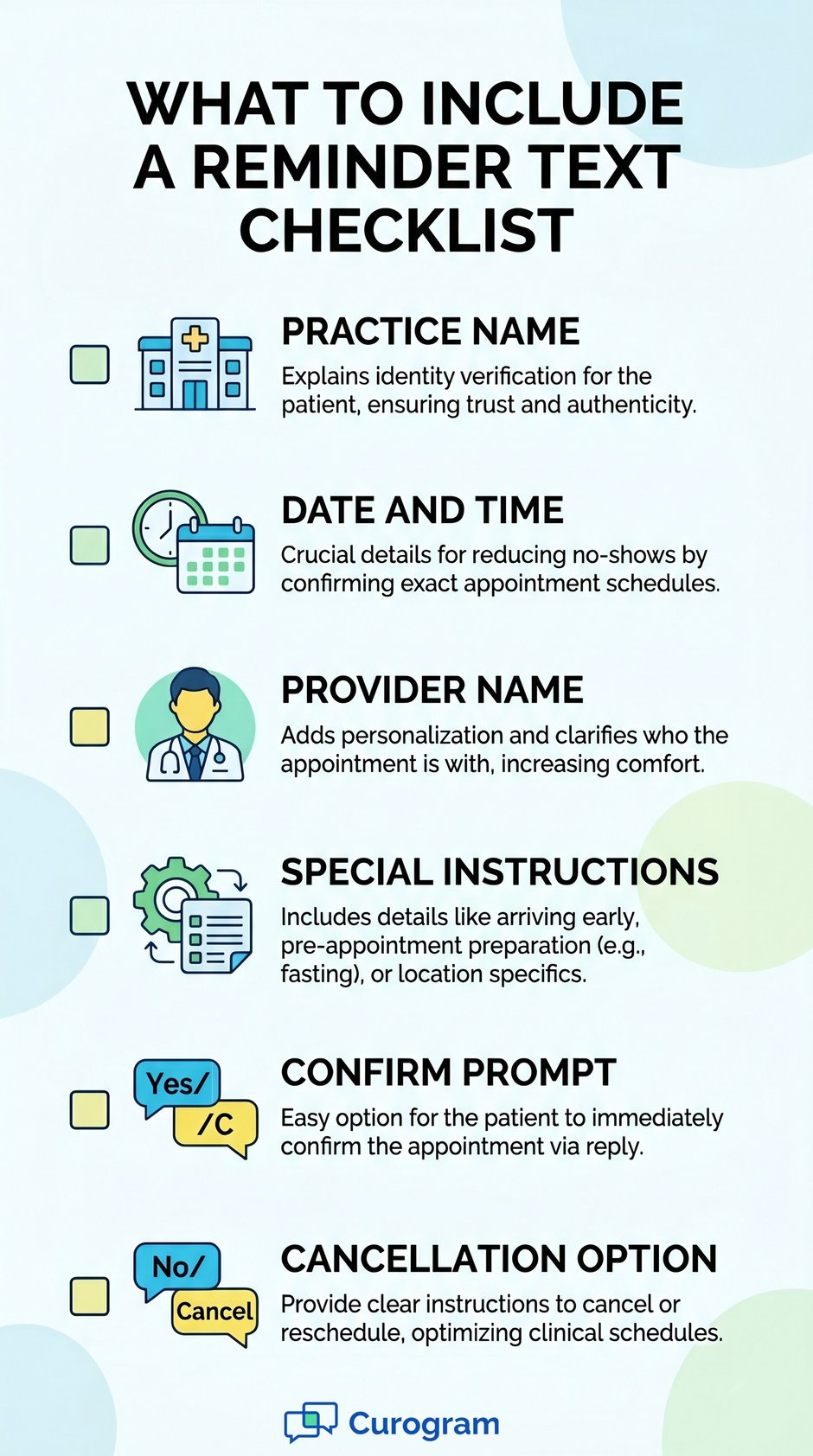
Infographic listing 6 key components of appointment reminder texts for practices


What to Include in an Appointment Reminder Text

A reminder text is only useful if it gives patients the information they need to act on it. Too little info and they're confused. Too much and they don't read it. Here's the right balance.

The Core Elements of a Strong Reminder

Every doctor appointment reminder text should include the following:

  • Practice name: Patients need to know who is texting them.
  • Date and time: Be specific. Include the day of the week to reduce confusion.
  • Provider name: Especially useful at multi-provider practices.
  • Special instructions: Fasting, bringing a photo ID, arriving early, or completing forms online.
  • Confirmation prompt: A simple "Reply Y to confirm" or "Reply C to cancel" keeps it easy.
  • Cancellation path: Always give patients a way to cancel or reschedule without calling.

Keep It Short and Clear

The best reminders are under 160 characters when possible. If you need more space, 2 to 3 short sentences is fine. Avoid clinical jargon and long sentences. Patients should be able to read and respond in under 10 seconds.

Patient text reminders that are easy to read get higher response rates. If a patient has to decode the message, they're less likely to act on it. Plain language wins every time.

What to Leave Out

Do not include diagnoses, lab values, medication names, or any other protected health information (PHI) in a standard reminder text. These belong in a secure portal, not a text message. Keeping reminders simple also protects your practice from HIPAA risk.

For guidance on what counts as PHI and how to handle it in patient messages, check out our article on Patient Text Messaging: Best Practices for Doctors and Front Desk Staff.


How to Time Your Patient Text Reminders

Sending one reminder isn't enough. Sending too many feels like spam. The right timing sequence gives patients enough notice to reschedule without overwhelming their inbox.

The Three-Step Timing Sequence

Most practices get the best results with a three-message sequence. Here's how it works:

Step

When to Send

Purpose

First Reminder

72 hours before appointment

Gives patients time to reschedule if needed

Second Reminder

24 hours before appointment

Prompts confirmation or last-minute cancel

Day-of Confirmation

Morning of appointment

Reduces same-day no-shows


Why 72 Hours Is the Right Starting Point

The 72-hour window gives patients time to check their calendar, arrange childcare, or request time off work. If they need to cancel, this gives your team enough time to fill the slot. A last-minute cancel is far better than a no-show: at least you have a chance to fill the gap.

Text message reminders for medical appointments sent too far in advance (say, a week out) are often forgotten by the time the date arrives. Text sent too close to the visit don't give enough time to act. The 72-24 sequence hits the right balance for most specialties.

Adjusting for Your Practice Type

Long-appointment specialties like psychiatry or physical therapy may benefit from an additional 7-day reminder. Same-day appointment practices, like urgent care, may only need a single same-morning text. Match your timing to how your patients think and plan.

Based on our internal data, practices using a multi-step reminder sequence achieve over 75% average appointment confirmation rates, compared to much lower rates with a single reminder.


Appointment Reminder Text Message Templates You Can Use Today

The fastest way to get started is with ready-to-use templates. These examples are designed to be clear, brief, and HIPAA-safe. Customize the bracketed fields for your practice.

Template Library

Template 1: Standard Appointment Reminder

Hi [First Name], this is [Practice Name]. Your appointment with Dr. [Last Name] is on [Day], [Date] at [Time]. Reply Y to confirm or C to cancel. Questions? Call us at [Phone].

Template 2: Specialist Appointment

Reminder from [Clinic Name]: You have a [Specialty] appt on [Day], [Date] at [Time] with Dr. [Last Name]. Please bring your insurance card and arrive 10 min early. Reply Y to confirm.

Template 3: Follow-Up Appointment

Hi [First Name], your follow-up with [Practice Name] is scheduled for [Day], [Date] at [Time]. Reply Y to confirm or call [Phone] to reschedule. We look forward to seeing you.

Template 4: Annual Check-Up

Hi [First Name], your annual check-up with Dr. [Last Name] at [Practice Name] is on [Day], [Date] at [Time]. Please fast for 8 hours before your visit. Reply Y to confirm.

Template 5: Cancellation Confirmation

Hi [First Name], we've received your cancellation for [Date] at [Time]. To reschedule, call [Phone] or visit [Link]. We hope to see you soon.

These patient reminder text messages are a starting point. Your platform should let you save and customize them. The goal is a consistent, friendly message that gives patients everything they need at a glance.

How to Set Up a Text Appointment Reminder Service

Getting started with a text appointment reminder service is simpler than most practice managers expect. You don't need to overhaul your current systems. The right tool plugs into what you already use.

Step-by-Step Setup Process

Here's a straightforward path from zero to a fully running reminder system:

Step 1: Connect to Your EMR

A good appointment text reminder service integrates with your existing EMR or practice management software. This removes the need for double data entry. Patient names, appointment times, and provider details pull in automatically. Curogram, for instance, integrates with virtually any EMR on the market.

Step 2: Build Your Template Library

Use the templates from the previous section as your starting point. Set up separate templates for different visit types: standard visits, specialist appointments, follow-ups, and annual check-ups. Having the right template for each scenario means your messages always feel relevant.

  1. Connect your EMR and sync patient appointment data
  2. Build and save your template library by appointment type
  3. Set your timing rules (72 hours, 24 hours, day-of)
  4. Run a test with a small group of staff or trusted patients
  5. Go live and monitor confirmation reply rates in week one

What to Look For in a Reminder Platform

When choosing a service, look for two-way messaging (so patients can reply), EMR integration, HIPAA compliance, and easy template management. Avoid platforms that only send one-way blasts with no option to reply. If a patient wants to cancel and can't, you've lost the chance to refill that slot.

Also, look at whether the platform allows you to text patients' appointment reminders automatically based on your schedule data, without manual input each day. Full automation is the goal. It's what frees your staff to focus on patients in front of them, not patients they're trying to reach by phone.


Measuring the Impact of Text Reminders on Your No-Show Rate

Sending reminders is step one. Knowing whether they're working is step two. Tracking the right numbers tells you where to adjust and proves the value of your investment.

The Metrics That Matter

Focus on these key numbers when evaluating your reminder program:

Metric

What It Tells You

Target Range

No-show rate

How many patients miss without canceling

Below 10%

Confirmation reply rate

How many patients respond to your reminders

75%+

Same-day cancellation rate

Patients who cancel with enough notice to refill

Ideally rising

Slot fill rate

How often you fill canceled slots before the visit

As high as possible


Before and After: How to Measure Your Baseline

Before you turn on automated reminders, pull your no-show rate for the past 60 to 90 days. That's your baseline. After 30 days of consistent reminders, compare the numbers. Most practices see a meaningful drop within the first month.

What Good Looks Like

Based on our internal research, one medical center reduced its no-show rate from 14.20% to 4.91% in just three months after using Curogram's automated reminder system. That's 3x better than the industry average. Their confirmation rate also climbed above 75%, meaning most patients actively acknowledged their upcoming visit.

Same-Day Cancellations Are a Win

It might feel like a same-day cancellation is almost as bad as a no-show. It isn't. When a patient cancels with even a few hours' notice, your team has a window to fill that slot from a waitlist or a rescheduled patient. A same-day cancel is an opportunity. A no-show is just a loss.

Track your same-day cancel rate separately from your no-show rate. As your reminder system matures, you should see that rate rise while no-shows fall. That's the system working as designed.

For broader strategies on reaching patients before they disengage, see our article on Patient Outreach Strategies That Work. 


Medical receptionist confirming appointments on clinic desktop scheduling software

Conclusion

No-shows cost your practice money, time, and patient trust. But they are not inevitable. The right message, sent at the right time, changes what happens.

Appointment reminder text messages work because they meet patients where they already are. Texts get read. They get replied to. And when patients have an easy way to confirm or cancel, they use it. That's what keeps your schedule full and your revenue steady.

The practices seeing the best results aren't doing anything complicated. They're sending a 72-hour reminder, a 24-hour follow-up, and a same-morning confirmation. They're using short, clear messages with a simple reply prompt. And they've connected their appointment text reminder service to their EMR, so the whole process runs without manual effort.

The data is clear. Based on our internal research, practices using automated reminder systems see no-show rates 53% lower than the industry average. One medical center cut its rate from over 14% to under 5% in just three months. Those aren't outliers. They're what happens when you give patients timely, easy-to-act-on reminders.

If your practice is still relying on phone calls or inconsistent reminder systems, now is a good time to change that. The templates in this article give you a ready-made starting point. The timing sequence gives you a structure that works. And the right platform handles the rest automatically.

You don't need a major overhaul. You need a reliable system that reaches patients before it's too late.

Start small if you need to. Pick one appointment type, build one template, and set up one reminder. Measure the result. Then expand from there. That's how lasting change starts in a busy practice.

Your patients want to show up. Sometimes they just need a nudge to remember. Give them that nudge, and watch your schedule fill up.

Ready to Start Texting Your Patients? See How Curogram Works — Book a Demo.


Frequently Asked Questions

How do appointment reminder text messages reduce no-show rates?

Texts reach patients directly on their phones, where they are most likely to see and respond to a message. When patients get a clear reminder with an easy way to confirm or cancel, they take action.

This gives your team time to fill canceled slots before they go to waste. Based on our internal data, practices that use automated text reminders see no-show rates 53% lower than the industry average.

Why do text reminders work better than phone calls for medical practices?

Text messages have a 98% open rate, compared to about 20% for voicemail. Patients can read and reply to a text in seconds, without waiting on hold or calling back during office hours.

Texts also cost far less staff time: automated texts go out without anyone having to make a single call. That frees your front desk to focus on the patients who are already in front of them.

How often should a practice send appointment reminders by text?

The most effective sequence is three messages: one 72 hours before the appointment, one 24 hours before, and an optional confirmation on the morning of the visit. The 72-hour reminder gives patients enough time to reschedule if needed. The 24-hour message catches anyone who forgot. For longer or more complex visits, a 7-day reminder can be added as a first step.

What information should be included in a doctor appointment reminder text?

A strong doctor appointment text reminder includes the practice name, the patient's appointment date and time, the provider's name, any special instructions (such as fasting or bringing an ID), and a simple reply option to confirm or cancel.

It should not include any sensitive health details. Keeping the message short and clear gives patients everything they need to take action in one quick read.

How do you measure whether text reminders are actually helping your practice?

Start by recording your no-show rate for the 60 to 90 days before you launch a reminder system. That's your baseline. After 30 days of consistent reminders, compare your new no-show rate to that number.

Also, track your confirmation reply rate and same-day cancellations. A rising cancel rate paired with a falling no-show rate means the system is working: patients are giving you enough notice to fill the slot.