

How to Automate 5-Star Google Reviews for Doctors: Workflow Guide
💡 Medical practices can simplify virtual care by using a telehealth solution that connects directly to their EMR. With SMS-based automated...
16 min read
Aubreigh Lee Daculug
:
February 21, 2026
You have heard the terms tossed around in meetings, vendor demos, and trade shows. EMR, EHR, practice management — they all sound like the same thing. But picking the wrong system can cost your practice thousands of dollars and countless hours of frustration.
Here is the reality. Almost 90% of office-based doctors now use some form of electronic records. Yet many practice owners still struggle to understand the difference between EMR and EHR systems, let alone how practice management software fits into the picture.
The confusion makes sense. These medical practice software types overlap in some areas, and vendors often blur the lines to make their products sound more complete. You end up comparing apples to oranges without even knowing it.
That is where this guide comes in. We wrote it to give you a clear, honest breakdown of each system type. No jargon-filled sales pitch, just practical information you can use when choosing medical software for your clinic.
By the time you finish reading, you will know exactly what each system does, where it falls short, and how to decide which combination works best for your practice. We will walk through real cost ranges, must-have features, and common mistakes to avoid.
Whether you run a solo family practice or manage a multi-location group, the right healthcare software explained in simple terms can save you from a costly mistake. Let us break it all down, starting with the basics.
An Electronic Medical Record (EMR) is more than a digital filing cabinet. It is the clinical command center of your practice. Every diagnosis, medication, allergy, lab result, and treatment plan lives in one secure system built to support daily patient care.
Inside your office, the EMR powers everything. Providers document visits in real time, send prescriptions electronically, order labs with a few clicks, and monitor chronic conditions without flipping through paper charts. It keeps your team aligned, organized, and efficient.
A strong EMR delivers essential clinical tools in one streamlined platform. Clinical documentation templates speed up charting while keeping notes consistent. E-prescribing reduces handwriting errors and flags potential drug interactions before they become problems.
Lab ordering and results integration eliminate back-and-forth phone calls. Built-in reporting tools give you quick visibility into performance, quality measures, and patient trends.
Clinical decision support is another high-impact feature. Automated alerts can highlight medication conflicts, preventive care gaps, and chronic condition benchmarks. These built-in safeguards help reduce risk and improve care quality without adding extra steps for providers.
Moving from paper to an EMR dramatically improves operational accuracy. Charts are never misplaced. Documentation is searchable within seconds. Every action creates a timestamped audit trail, making compliance and reporting far easier to manage.
Research consistently shows that electronic systems reduce medication errors because of automated safety checks and standardized workflows.
However, EMRs are designed primarily for use within a single practice. That is both their strength and their limitation. While they excel at organizing internal clinical data, they typically do not share information seamlessly outside your organization.
Modern healthcare rarely happens in isolation. Patients visit specialists, urgent care centers, imaging facilities, and hospitals. An EMR alone does not automatically connect all those touchpoints. That is where broader interoperability solutions and integrations become essential to ensure continuity of care beyond your four walls.
An EHR, or electronic health record, does everything an EMR does and then some. The key difference between EMR and EHR is that an EHR is built to share information across multiple providers, hospitals, and even patients themselves.
Where an EMR is like a private notebook, an EHR is more like a shared document that follows the patient wherever they go. It connects your practice to labs, pharmacies, hospitals, and other clinics through secure data exchange. EHRs are designed around a concept called interoperability, meaning they can send and receive patient data in a standard format that other systems understand.
Coordinated care is the biggest win. When your cardiologist, primary care doctor, and pharmacist all see the same record, they make better decisions together.
Beyond that, EHRs open the door to several advantages that a basic EMR cannot match:
These benefits add up fast for practices that coordinate care across multiple settings. If your patients regularly see outside specialists or use hospital services, an EHR keeps everyone working from the same playbook.
EHR systems tend to be more complex and more expensive than basic EMRs. The learning curve is steeper, and your staff may need extra training to use all the features well. Some providers complain that EHR documentation takes longer than writing on paper.
Data sharing also comes with privacy concerns. The more systems that access a patient's record, the more important it becomes to maintain strict security controls. HIPAA compliance is not optional — it is a daily responsibility that requires ongoing attention from your entire team.
A practice management system, often called a PMS, is the software that runs the business side of your medical practice. It has nothing to do with clinical notes or patient charts. Instead, it focuses on scheduling, billing, insurance claims, and financial reporting.
If your EMR or EHR is the clinical brain of your practice, your practice management system is the operational backbone. It keeps the lights on by making sure appointments get booked, claims get submitted, and payments get collected.
Understanding practice management system vs EMR starts with knowing what a PMS actually does. At its core, the system handles appointment scheduling, patient registration, insurance verification, and claims processing. It also generates financial reports so you can track revenue and spot trends over time.
Many systems include automated appointment reminders that reduce no-shows. Some connect to patient communication tools like two-way texting, which helps front desk staff manage their workload more effectively. These features keep patients engaged and your schedule full.
Without a solid practice management system, your billing team is stuck with manual data entry, paper claims, and spreadsheets. That leads to slower payments, more denied claims, and higher administrative costs. A good PMS can cut claim denial rates and speed up your entire revenue cycle.
Scheduling features also matter more than most people think. When patients can book online and get automatic reminders, your no-show rate drops. That means more patients seen per day and more revenue flowing into your practice.
A practice management system does not handle clinical documentation. You will not use it to write patient notes, order labs, or prescribe medications. It is purely an administrative tool, which is why most practices pair it with an EMR or EHR to cover both sides of the operation.
Some practice owners make the mistake of thinking a PMS can replace an EMR. It cannot. These are complementary systems that serve different needs, and understanding that distinction will save you headaches down the road.
Now that you understand what each system does on its own, let us put EMR vs EHR vs practice management side by side. The differences are not just technical — they affect how you deliver care and how much you spend.
An EMR stays within your practice. The data lives on your servers or in your cloud account, and only your team can access it. An EHR is designed to share data across organizations using secure health information exchanges.
For a solo practice that rarely sends referrals, an EMR might be enough. But if your patients see specialists, visit hospitals, or use telehealth services, an EHR gives everyone a complete picture of the patient's health.
EHRs follow data-sharing standards like HL7 and FHIR that let different systems talk to each other. EMRs may use some of these standards, but they are not always built for cross-system communication. If seamless data exchange matters to your practice, an EHR is the better choice.
Most modern EHR systems also include patient portals where people can view test results, schedule appointments, and message their providers. Basic EMRs may not offer this level of patient-facing access. Since patients increasingly expect digital tools, this feature gap is worth noting.
EMR systems generally cost less upfront and have lower monthly fees. EHR platforms offer more features but come with higher licensing, implementation, and training costs. The right call depends on whether you need the extra capabilities or can get by with a simpler tool.
| Feature | EMR | EHR |
|---|---|---|
| Scope | Single practice | Multi-organization |
| Data Sharing | Limited | Built-in interoperability |
| Patient Portal | Sometimes | Usually included |
| Cost | Lower | Higher |
| Best For | Solo or small practices | Multi-provider or network practices |
Many vendors use the terms EMR and EHR interchangeably, which adds to the confusion. In everyday conversation, most people say "EHR" even when they mean an EMR. The practical difference between EMR and EHR matters most when you are comparing products and deciding what you actually need.
Another common mix-up is assuming that a more expensive system is automatically better. A small dermatology office does not need the same platform as a 50-provider health system. Match the tool to your size and workflow, not the other way around.
A practice management system vs EMR is not an either-or decision. These are different tools that solve different problems, and most practices need both. Think of it like a restaurant needing both a kitchen and a cash register — one makes the food, the other handles the money.
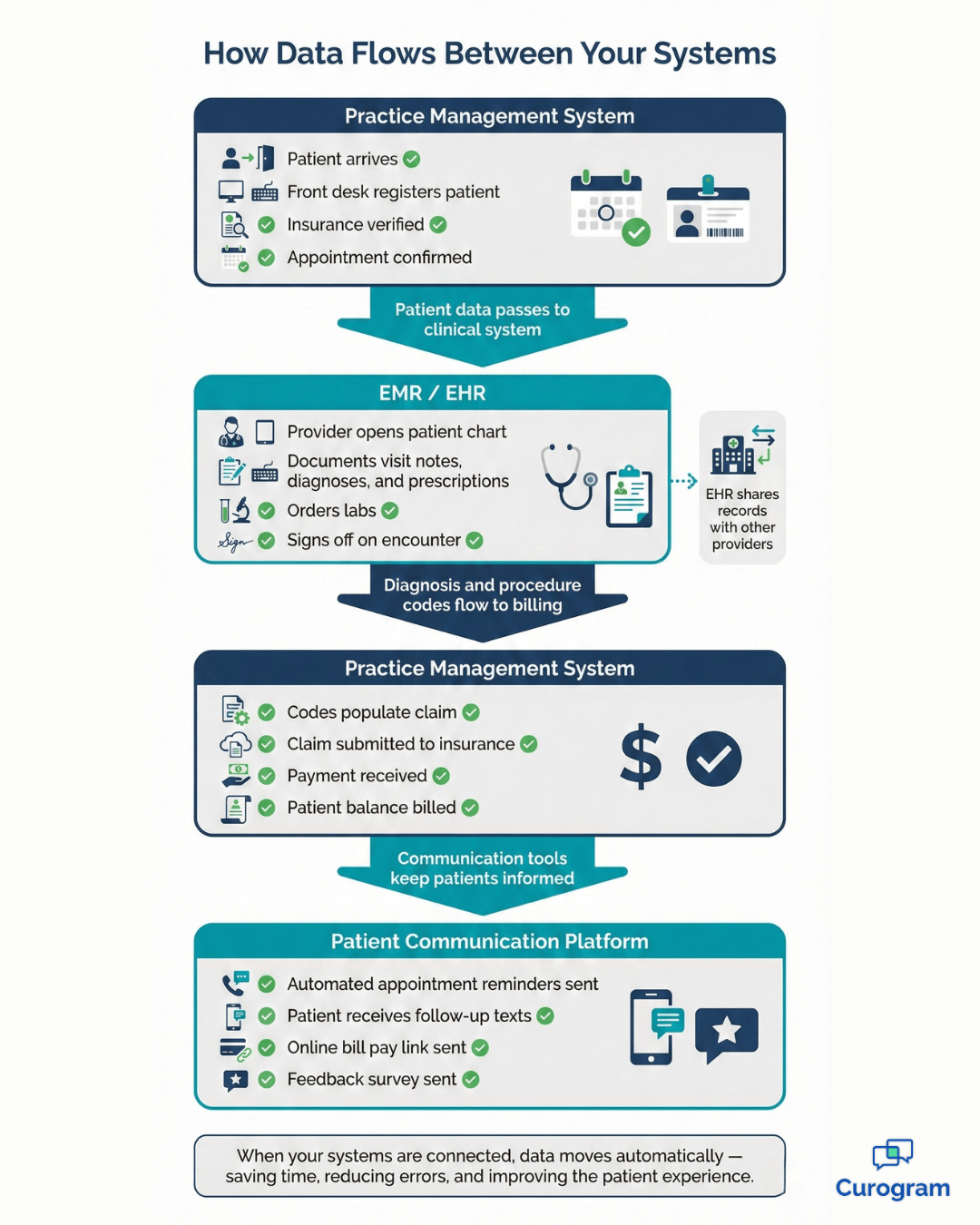
Your EMR or EHR handles the clinical side: patient notes, diagnoses, prescriptions, and lab results. Your practice management system handles the business side: scheduling, billing, claims, and collections. When they work together, data flows smoothly from patient visit to paid claim.
For example, when a provider documents a visit in the EMR, the diagnosis and procedure codes can flow directly into the practice management system for billing. This removes the need for double entry and cuts down on coding errors that slow your revenue cycle.
When your clinical and administrative systems talk to each other, your entire workflow speeds up.
Here is what that looks like in practice:
Good integration also means better decision-making at every level. Practice managers can spot problems early, like a procedure that keeps getting denied by insurance, and fix the root cause instead of chasing individual claims.
Some practices use a standalone practice management system alongside a separate EMR. Others choose an all-in-one platform that bundles everything together. Each approach has trade-offs that depend on your specific situation.
The decision often comes down to how specialized your needs are. If you need a best-in-class billing system and a specialty-specific EMR, separate tools might be the better fit. If you want simplicity and a single login, all-in-one is the way to go.
This is one of the biggest decisions you will make when selecting healthcare software. An all-in-one solution bundles your EMR, practice management, and billing into a single platform. A best-of-breed approach lets you pick the top tool in each category and connect them through integrations.
All-in-one platforms offer simplicity. Your staff learns one system, your data lives in one place, and you deal with one vendor for support. Training is faster, and there are fewer things that can break between systems.
These platforms also tend to have tighter data flow since everything is built on the same foundation. You will not run into issues where your billing system cannot read your EMR's codes. For smaller practices, the convenience often outweighs the trade-offs.
Best-of-breed tools shine when you need deep specialty features. A cardiology practice might need a specific EMR with advanced cardiac imaging support, paired with a powerful billing system that handles complex procedure codes. An all-in-one platform might not offer that level of depth.
You also get more flexibility to swap out one tool without replacing your entire tech stack. If your billing software falls behind, you can switch it out without touching your EMR. That freedom appeals to practices with specific workflow needs.
The deciding factors usually come down to a few key questions:
All-in-one solutions often cost less overall because you are paying one license fee instead of several. But best-of-breed setups can deliver better ROI if the individual tools significantly outperform a bundled alternative. Complexity is the hidden cost of best-of-breed — without dedicated IT support, managing multiple systems can become a real challenge.
All-in-one works best for small to mid-size practices that value simplicity and want to minimize vendor management. Best-of-breed is better for large or specialty practices with unique workflows that a general platform cannot handle well.
There is no universal right answer here. The best choice depends on your practice size, specialty, budget, and tolerance for complexity. Take the time to evaluate both options before you commit.

When you are comparing different medical practice software types, features are where the rubber meets the road. Not every feature matters for every practice, so focus on what will actually improve your daily workflow.
Your EMR should include customizable charting templates, e-prescribing, lab integration, and clinical decision support. Look for a system that fits your specialty without requiring heavy customization. If you spend more time fighting the software than using it, you have the wrong tool.
Mobile access is becoming a must-have, not a nice-to-have. Providers who can review charts and respond to messages from their phone or tablet are more productive and more available to patients.
On top of everything an EMR offers, your EHR should include robust interoperability, a patient portal, and population health tools. Look for systems that support current data-sharing standards so you can exchange records with other providers easily.
Telehealth integration is another essential feature in 2026 — many practices now offer virtual visits, and your EHR should handle scheduling, documentation, and billing for those appointments without a separate platform.
For your practice management system, the essentials include:
Patient communication tools like secure texting are also critical for reducing no-shows and improving the patient experience. Without good reporting, you are flying blind on the business side of your practice.
A behavioral health practice needs different templates and workflows than an orthopedic clinic. When you are choosing medical software, make sure the platform has experience serving your specialty. Ask vendors for references from practices similar to yours.
Scalability also matters. If you plan to add providers or open new locations, choose software that can grow with you. Migrating to a new system later is expensive and disruptive, so plan ahead.
Strong integration capabilities are not a bonus feature in healthcare software — they are the backbone of your entire tech stack. Your EMR should seamlessly connect with your lab, billing system, imaging platform, and patient communication tools. When everything talks to each other automatically, your staff spends less time on data entry and more time on patient care.
A fully integrated EMR and practice management system ensures clinical documentation flows directly into billing without manual handoffs. That means fewer coding errors, faster claims processing, and smoother revenue cycles.
Add integrations with lab systems, PACS radiology platforms, and e-prescribing networks, and your workflows become faster, cleaner, and more reliable.
Modern patient communication tools elevate this even further. Platforms like Curogram plug directly into your existing EMR to enable two-way texting, online scheduling, and automated reminders — without forcing you to replace your core system. The result? A more responsive front desk and a better patient experience from the first message to follow-up.
Behind the scenes, powerful integration is driven by industry standards like HL7 and FHIR. HL7 supports traditional healthcare data exchange, while FHIR uses modern web technology to enable faster, more flexible connections between systems. Together, they make real-time interoperability possible.
API flexibility is another critical feature to look for. Open APIs allow your software to connect with a wide range of third-party tools, giving your practice room to grow and adapt. Limited or closed APIs can lock you into a vendor’s ecosystem, restricting your options as your needs evolve.
No single platform can do everything perfectly, which is why third-party add-ons matter. Solutions like Curogram enhance patient engagement while working alongside your EMR and practice management system. You get expanded functionality without disruption.
The best integrations are not just powerful — they are practical. Fast setup timelines, stable connections during system updates, and minimal maintenance requirements ensure your technology works quietly in the background while your team focuses on care.
Always ask vendors about average integration timeframes and speak to practices that have already implemented the solution. Seamless integration should simplify your operations, not complicate them.

Understanding the true cost of your healthcare software goes beyond the monthly subscription. There are upfront costs, ongoing fees, and hidden expenses that can catch you off guard if you do not plan ahead.
Most EMR and EHR systems charge per provider per month. Practice management systems may be bundled into that price or sold separately. The table below shows typical monthly cost ranges per provider for each system type.
| System Type | Low End (per provider/month) | Mid Range (per provider/month) | High End (per provider/month) |
|---|---|---|---|
| EMR Only | $200 | $350 | $500 |
| EHR (with interoperability) | $300 | $500 | $700 |
| Practice Management System | $100 | $200 | $300 |
| All-in-One (EMR + PM + Billing) | $400 | $600 | $800+ |
Some vendors offer tiered pricing based on the number of features or users. Others charge a flat rate regardless of practice size. Make sure you understand exactly what is included in the base price and what counts as an add-on.
Getting a new system up and running is rarely free. The costs vary widely based on your practice size and the complexity of the setup. Here is what to expect across different practice sizes.
| Cost Category | Solo Practice (1 provider) | Small Practice (2–5 providers) | Mid-Size Practice (6–20 providers) | Large Organization (20+) |
|---|---|---|---|---|
| Implementation | $1,000 – $3,000 | $3,000 – $10,000 | $10,000 – $30,000 | $30,000 – $50,000+ |
| Data Migration | $500 – $1,500 | $1,500 – $5,000 | $5,000 – $15,000 | $15,000 – $40,000 |
| Staff Training | $500 – $1,000 | $1,000 – $3,000 | $3,000 – $8,000 | $8,000 – $20,000 |
| Custom Workflows | $0 – $500 | $500 – $2,000 | $2,000 – $7,000 | $5,000 – $15,000 |
Training is often underestimated. Even the best software is useless if your staff does not know how to use it. Budget for initial training and ongoing education as features get updated or new team members join.
Beyond the sticker price, there are several expenses that vendors do not always mention upfront.
Keep an eye out for these common surprises:
These costs add up fast and can turn a seemingly affordable platform into a budget headache. Always ask vendors for a complete pricing breakdown before you sign anything.
When comparing options, calculate the total cost of ownership over five years. The table below shows an estimated five-year cost comparison for a small practice with three providers. These are approximate ranges based on typical market pricing.
| Expense | EMR + Separate PM | All-in-One Platform | Best-of-Breed Setup |
|---|---|---|---|
| Monthly Software (3 providers x 60 months) | $99,000 | $108,000 | $126,000 |
| Implementation | $6,000 | $8,000 | $12,000 |
| Training (initial + ongoing) | $4,000 | $3,000 | $6,000 |
| Integration / Interface Fees | $5,000 | $0 – $1,000 | $8,000 – $12,000 |
| Support / Maintenance | $6,000 | $5,000 | $9,000 |
| Estimated 5-Year Total | $120,000 – $125,000 | $124,000 – $130,000 | $161,000 – $175,000 |
The numbers above show that a lower monthly rate does not always mean a lower total cost. Best-of-breed setups can run 30% to 40% higher over five years once you factor in integration and support expenses. On the other hand, if those specialized tools help you collect more revenue or reduce claim denials, the ROI may still be worth it.
Getting this number right helps you compare healthcare software explained in terms that matter to your bottom line. Do not let a low sticker price fool you into ignoring the bigger picture.
Picking the right software is a big decision that affects your entire team. Follow this step-by-step framework to make a confident choice without getting overwhelmed by the options.
Start by mapping out your current workflows. Where does your team waste the most time? What tasks create the most errors? Talk to your front desk staff, billing team, and providers to get a full picture of what needs to change. Write down your must-haves versus nice-to-haves, because this list becomes your filter when you start comparing vendors.
Based on your needs assessment, decide whether a bundled platform or a best-of-breed approach makes more sense. If you value simplicity, lean toward all-in-one. If you need specialized features for your specialty, consider separate tools with strong integrations.
Use the feature checklists from the earlier section to narrow your search. Eliminate any vendor that does not meet your must-have requirements. Do not get distracted by flashy features you will never use.
If you are using separate systems, make sure they can integrate smoothly. Ask about API availability, supported data standards, and the vendor's track record with third-party connections. Check whether tools like Curogram integrate with the platforms you are considering.
Never buy software based on a brochure or a sales call alone. Get a live demo with your actual workflows and data. Then ask the vendor for references and talk to practices similar to yours about their real-world experience with the product.
Run the five-year cost analysis we described earlier. Include every line item you can think of, from licensing to lost productivity during training. Compare your top two or three options side by side.
This framework removes emotion from the decision and helps you focus on what actually matters for your practice. Take your time with each step, and do not let a pushy sales rep rush you into signing.
Choosing between EMR vs EHR vs practice management systems does not have to feel overwhelming. Each system serves a different purpose, and the right choice depends on your practice size, specialty, and goals. The key is to understand what you need before you start shopping.
Start by getting clear on your workflows and pain points. From there, decide whether an all-in-one platform or a mix of specialized tools makes more sense. Use the selection framework in this guide to compare options fairly and avoid common pitfalls.
Remember that no software is perfect on its own. The best results come when your clinical and administrative systems work together smoothly. Integration is what turns separate tools into a connected workflow that saves time and reduces errors.
If you are looking for a platform that connects to your existing EMR and adds powerful patient communication features, Curogram can help. Our tools integrate with nearly any EMR to give your practice two-way texting, automated reminders, and online scheduling.
Your patients want to show up and your reminders just need to help them get there. Book a demo today to see how it all works together.
It depends on your practice. All-in-one platforms are simpler to manage and often cost less. Separate systems offer more flexibility and deeper specialty features. Consider your size, specialty, and IT resources when deciding.
Small practices can expect to pay between $200 and $500 per provider per month for an EMR or EHR. Practice management systems may add another $100 to $300 per month. Implementation and training costs are extra.
At a minimum, look for EMR-to-billing integration, lab connectivity, e-prescribing, and patient communication tools. Platforms like Curogram add texting and scheduling features that connect to your existing EMR seamlessly.
💡 Medical practices can simplify virtual care by using a telehealth solution that connects directly to their EMR. With SMS-based automated...
Introduction to Luma Health Pricing Understanding the investment required for a patient engagement platform is crucial for any healthcare practice....
Your medical practice needs practice management tools to help you improve healthcare delivery efficiency, boost patient satisfaction, and increase...