
1 min read
Understanding Your PACS System in Modern Medical Imaging
💡 A PACS system stands for Picture Archiving and Communication System. It is the digital network that stores, finds, shares, and shows medical...
A patient walks into your imaging center for a follow-up MRI. The scan goes off without a hitch, but when the referring doctor tries to open the file at their clinic across town, nothing loads. The software does not recognize the format. Suddenly, everyone is scrambling: the patient is frustrated, the doctor is stalled, and your staff is fielding questions they didn’t sign up for.
Scenes like this used to be all too common. Different machines, different software, and different file formats meant one small glitch could derail an entire patient’s care journey. Then the healthcare industry agreed on a shared language for medical images — and everything changed.
That language is called DICOM, short for Digital Imaging and Communications in Medicine. Thanks to DICOM, imaging devices, storage systems, and viewing software from completely different companies can now talk to each other seamlessly, like a universal translator for medical images.
If you’ve ever found yourself wondering “What is DICOM imaging, and why does my IT team keep mentioning it?”, this guide is for you. We’re going to break down DICOM standards in plain, everyday language — no jargon walls, no engineering degree required.
By the end of this article, you’ll understand why DICOM matters, how it keeps care moving, and what it means for your staff and patients. Whether you’re a practice manager juggling vendor contracts, a front desk coordinator fielding patient calls, or a clinical administrator planning your next tech upgrade, you’ll walk away feeling confident.
Think of this as your DICOM-for-beginners crash course — the kind that actually makes sense and sticks with you.
And here’s the best part: once you grasp DICOM, you’ll start seeing it everywhere — in every PACS system, every imaging workflow, and every cross-clinic transfer — quietly working behind the scenes to make sure patient care never skips a beat.
DICOM stands for Digital Imaging and Communications in Medicine, but don’t let the long name scare you. At its core, it’s a simple idea: a universal rulebook for medical images. It tells every scanner, computer, and display screen how to create, store, and share images so that everyone — from your local clinic to a hospital across town — can understand them.
Think of it as a translator that makes sure every device speaks the same language.
Before DICOM, working with medical images was a bit like trying to fit a square peg in a round hole. Each equipment maker had its own file format. An X-ray from one machine? Often unreadable on another. Doctors either had to print films, mail them, or go without critical images — all of which slowed care and frustrated patients.
Today, things are very different. An MRI captured at Hospital A can appear on a screen at Clinic B in seconds. The patient’s name, scan date, and body part being imaged are all embedded in the file. That’s DICOM at work: tying the picture directly to the person it belongs to and making it usable no matter what software or machine is on the other end.
With seamless EMR integration, these images can appear directly in the patient’s electronic chart, giving providers immediate access without switching systems.
Why does this matter to you?
Because DICOM affects the speed and reliability of your daily workflow:
Even if your practice only occasionally handles imaging, DICOM is quietly working behind the scenes. It keeps your operations moving, ensures providers have what they need to make informed decisions, and helps patients get the care they deserve — without unnecessary delays.
In short, understanding DICOM isn’t just for IT or radiology staff. It’s about seeing the invisible system that makes modern healthcare run smoothly, day in and day out.
To understand why DICOM matters so much, you need to see what life looked like before it existed. And honestly? It was a mess.
Every equipment maker built its own proprietary file format. Buy an X-ray machine from one vendor and a CT scanner from another, and the two systems had zero ability to share images. It was like trying to plug a European charger into an American outlet — the technology simply wasn’t designed to connect.
Then there was the film problem. Physical films had to be chemically developed, stuffed into jackets, and stored in rooms the size of small apartments. Need to send images to a specialist? You put them in an envelope and hoped the mail was fast enough. Films got lost, damaged, or misfiled. Pulling a study from five years ago could eat up half a morning.
Storage costs were another headache. Film breaks down over time, and the space needed to house thousands of jackets became prohibitively expensive. There was no way to search, sort, or digitally back up any of it.
Here’s what made it so challenging before DICOM:
Something had to give. In the late 1980s, healthcare organizations, equipment makers, and standards groups sat down together and built DICOM.
The mission was beautifully simple:
create one standard so any imaging device could send a file to any system — and have it just work.
That decision changed the game forever. It set the stage for picture archiving and communication systems (PACS) that modern practices rely on today.
Allowing providers to:
In short, DICOM turned what used to be chaos into a smooth, reliable system — and modern imaging as we know it wouldn’t exist without it.
If it produces a medical image, there’s a very good chance it uses DICOM. The standard is that widespread.
X-rays are the most familiar example. When a technologist captures a chest X-ray, the machine instantly saves it as a DICOM file, complete with all the patient and study details already attached. No extra data entry, no guesswork — everything is automated and reliable.
CT scans take things further. A single computed tomography study can generate hundreds of image slices, and each one is saved as its own DICOM file. Together, these slices build a detailed 3D picture of what’s happening inside the body.
MRI scans follow the same pattern — multiple images, all stored and transmitted under the same standard, making it easy for doctors to view, compare, and analyze complex anatomy.
Beyond X-rays, CTs, and MRIs, a wide range of imaging types rely on DICOM every day:
Even newer methods, like digital pathology, are beginning to adopt DICOM as the standard for storing and sharing slides.
The bottom line? If your practice captures any kind of medical image, DICOM is almost certainly the format running quietly behind the scenes. It doesn’t just store pictures — it ensures that every scan, every slice, and every detail is accurate, standardized, and ready to be shared whenever a provider needs it.
Here is something that surprises most people. A DICOM file is not just an image. It is more like a smart package — the picture bundled together with a detailed set of information called metadata.
Think of it this way. Metadata is like the shipping label on a box. The box holds the product, and the label tells you who sent it, who it belongs to, and exactly where it needs to go. Without that label, the box is just a mystery sitting on a loading dock.
Patient information sits at the top of the stack. Every DICOM file carries the patient's name, date of birth, and medical record number right inside it. This direct link between image and identity dramatically cuts the risk of mix-ups and makes chart matching almost effortless.
Study information fills the next layer. The file records the exam date, the type of scan, and the body part that was imaged. When a radiologist opens a chest CT, the file itself provides all the context — no hunting through separate records to figure out what they are looking at.
Then comes the technical layer: pixel size, resolution, color depth. These settings guarantee that the image looks identical on every screen and every workstation in every building. All of this data rides along with the image wherever it travels, which is one of the key reasons DICOM explained in healthcare settings always circles back to reliability and accuracy.
| Data Layer | What It Contains | Why It Matters |
|---|---|---|
| Patient Info | Name, date of birth, medical record number | Links each image to the correct patient chart |
| Study Info | Exam date, scan type, body part imaged | Gives providers full context without extra searching |
| Image Data | Pixel data, resolution, color depth | Ensures consistent display on every screen and workstation |
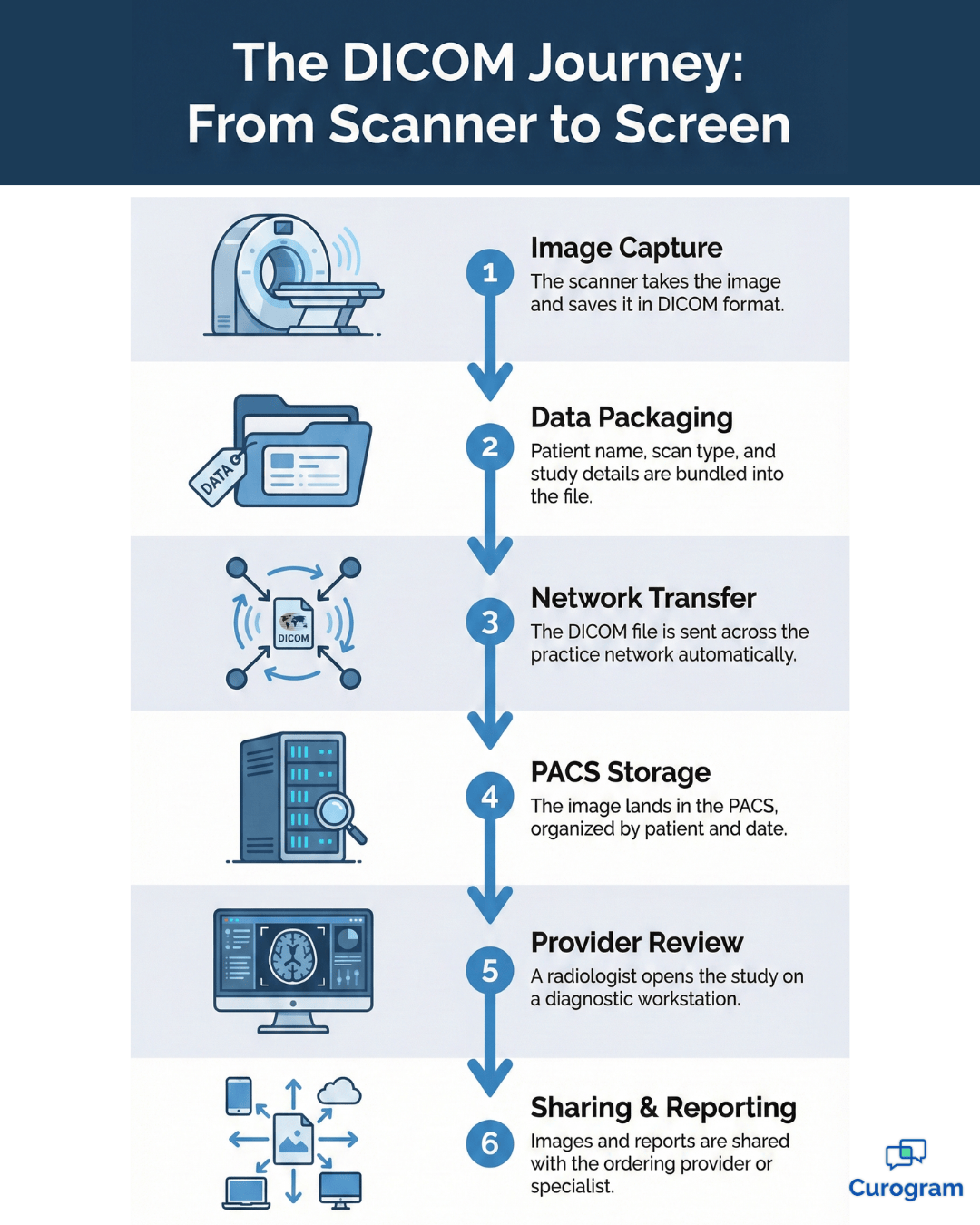
You might never see DICOM in action, but it is working every single minute your imaging department is open. The process begins the moment a scan is ordered. A technologist positions the patient, the machine captures the study, and the images are instantly saved in DICOM format and sent across the network automatically.
Those files land in your practice’s PACS — the picture archiving and communication system. Think of PACS as a massive digital library that organizes every study by patient, date, and scan type. Anyone with the right credentials can access exactly what they need in seconds.
From there, a radiologist opens the study on a diagnostic workstation. They zoom in, adjust brightness and contrast, measure structures, and add annotations. Once the reading is complete, the report is linked directly to the images and sent to the ordering provider.
If the images need to go to a specialist across town, DICOM files travel electronically. No CDs to burn, no films to print, no couriers to schedule. From the moment the scanner fires to the second a provider reads the study, the entire workflow runs smoothly on DICOM, quietly operating in the background.
Understanding this flow is especially valuable for practices focused on streamlining patient communication, reducing delays, and ensuring care moves efficiently at every step.
Curogram’s EMR-integrated platform makes it simple to link imaging results, appointment reminders, and secure messaging directly to patient records, so nothing falls through the cracks.
People often use DICOM and PACS in the same sentence, but they are not the same thing — and knowing the difference gives you a real advantage.
DICOM is the language. PACS is the system that speaks it. A picture archiving communication system stores, organizes, and delivers medical images, and it depends on DICOM to make all of that possible. Without DICOM, your PACS would have no standard way to read the files it receives.
Here is how it plays out in real life. A scanner creates a DICOM file and sends it to the PACS. The PACS catches it, drops it into the right patient folder, and makes it available for retrieval. When a doctor needs that image, the PACS pulls the correct DICOM file and displays it on their screen instantly.
| DICOM | PACS |
|---|---|
| A file format and communication standard | A storage and management system |
| Defines how images are created and shared | Organizes, stores, and retrieves images |
| Works across all vendors and devices | May be vendor-specific or vendor-neutral |
| The language | The library that speaks the language |
This relationship has real consequences for your practice. Pick a PACS that fully supports DICOM and you can add scanners from any vendor knowing the images will flow into your system without friction. Skip that step, and you are signing up for compatibility headaches down the road.
If your team is evaluating PACS options right now, use this knowledge to ask sharper questions during vendor demos. Push for systems that support the latest DICOM versions and integrate easily with your existing equipment. For a deeper dive, check out our guide on what is a PACS radiology system.
The days of walking down the hall to a dark reading room are fading fast. Today, providers have more ways to view DICOM images than ever before — and that flexibility is changing how care gets delivered.
It all starts with a DICOM viewer, which is simply the software that opens and displays these files. Dedicated high-resolution workstations are still the gold standard for radiologists making final diagnostic calls. But they are no longer the only option on the table.
Web-based DICOM viewers have exploded in popularity. Authorized staff can open images from any computer with a browser and an internet connection — no downloads, no installations. For practices with multiple locations or providers who review studies from home, this is a huge upgrade.
| Viewer Type | Best For | Key Benefit |
|---|---|---|
| Dedicated Workstation | Final diagnostic reads by radiologists | Highest resolution and advanced tools |
| Web-Based Viewer | Multi-location access for any staff | No software to install, works from any browser |
| Mobile Viewer | After-hours reviews and quick consults | Access images from a tablet or phone anywhere |
Most viewers pack in a solid set of tools: zoom, pan, brightness and contrast adjustment. The more advanced ones let doctors measure distances, annotate areas of concern, and even build 3D reconstructions from CT or MRI slices. All of that happens without the provider ever leaving their desk.
Mobile DICOM viewing is gaining ground quickly, too. Physicians can pull up images on a tablet or smartphone when they are away from the office. Mobile screens are not ideal for final reads, but they are perfect for quick consultations and urgent after-hours reviews. No matter which screen your team uses — workstation, browser, or phone — the DICOM standard makes sure the image looks consistent everywhere.

Here is something every staff member should know. DICOM files do not just carry images — they carry protected health information. Patient names, dates of birth, medical record numbers. That means every DICOM file in your system falls directly under HIPAA rules, and your practice must treat it accordingly.
De-identification is the first line of defense. Anytime images are shared for research, education, or anything outside direct patient care, every personal detail inside the DICOM metadata needs to be scrubbed clean. Purpose-built software handles this automatically, stripping identifying fields before the file ever leaves your network.
Secure transmission is the other half of the equation. DICOM files should always travel over encrypted connections, especially when headed to outside providers. Pair that with strict access controls and audit trails, and you have a system where only the right people see the right images — and every view is logged.
Keeping DICOM data locked down does not demand a complete system overhaul.
A handful of consistent habits make a real difference:

Privacy protection is not just about avoiding fines. It is about earning patient trust and showing your community that their data is safe with you. Platforms like Curogram help practices maintain HIPAA-compliant communication workflows that fit right alongside your imaging security efforts.
No system is perfect, and DICOM is no exception. The good news? The most common challenges are well understood, and the fixes are straightforward.
File size is the one that hits first. A single CT study can run hundreds of images, each one weighing in at several megabytes. Multiply that across a busy practice, week after week, and storage costs start climbing fast.
Speed comes next. Sending those large studies across a network takes time, and if your internet connection is limited, the wait drags out even longer. Providers sitting idle while images load is not just frustrating — it slows down the entire care cycle.
Then there are the compatibility headaches. Even with a universal standard, older equipment sometimes cannot keep up with newer DICOM features. Some vendors add custom data fields that other systems simply do not recognize. The result? Images that display incorrectly or refuse to transfer at all.
But here is the encouraging part. Lossless compression tools can shrink file sizes without touching image quality. Faster network connections and cloud-based storage dramatically cut transfer times. And working with vendors who follow strict DICOM compliance standards takes most compatibility surprises off the table.
When you manage these issues proactively, your imaging workflow stays fast, smooth, and reliable.
The world of medical imaging is not standing still. If anything, it is accelerating — and the changes coming down the pipeline are going to reshape how every practice handles DICOM data.
Cloud-based DICOM storage is leading the charge. Instead of sinking money into on-site servers that need constant maintenance, practices can store their entire image library securely in the cloud. Costs drop, scaling gets easier, and remote access becomes the default rather than the exception.
Artificial intelligence is right behind it. AI tools are learning to read DICOM images, flag potential abnormalities, and push urgent cases to the top of the queue. They work directly with the DICOM format, combining pixel data and metadata analysis to give radiologists a powerful second opinion in real time.
DICOMweb is opening another door entirely. This newer standard lets providers view and share images through ordinary web browsers — no specialized software, no IT headaches. Vendor-neutral archives are gaining traction, too, freeing practices from being locked into a single PACS provider.
And patient access is expanding fast, with more organizations giving people the ability to view their own imaging studies through secure online portals. As these medical imaging standards evolve, practices that stay current will be best positioned to deliver faster, more connected care.
Pairing these advances with tools like Curogram's patient texting platform keeps patients informed about results, telemedicine follow-ups, and appointment reminders without missing a beat.
DICOM is the quiet engine behind every modern imaging workflow. It is the reason your scanners, storage systems, and viewing software can work together without someone constantly putting out fires. From the first click of the scanner to the moment a provider reads the study on screen, DICOM is there — invisible, reliable, and essential.
By now, you understand what sits inside a DICOM file, how it moves through your practice, and why it matters for both patient care and privacy. You have seen the challenges that existed before a universal standard, and more importantly, you’ve seen that every one of those challenges has a solution.
DICOM is that solution, making sure images are accurate, accessible, and ready when providers need them most.
Here’s what to take away. You don’t need to be a tech expert to make smart imaging decisions. Understanding DICOM in simple terms gives you the confidence to evaluate new systems, ask the right questions, push back on vague vendor pitches, and support your clinical team with real knowledge.
Keep an eye on cloud storage, AI tools, and web-based viewers — the future of imaging is moving fast. Practices that adapt quickly will not only operate more efficiently but also deliver the best possible care to patients.
If you’re ready to see how modern imaging workflows can work seamlessly in your practice, book a demo today and discover the power of DICOM in action.
1 min read
💡 A PACS system stands for Picture Archiving and Communication System. It is the digital network that stores, finds, shares, and shows medical...
1 min read
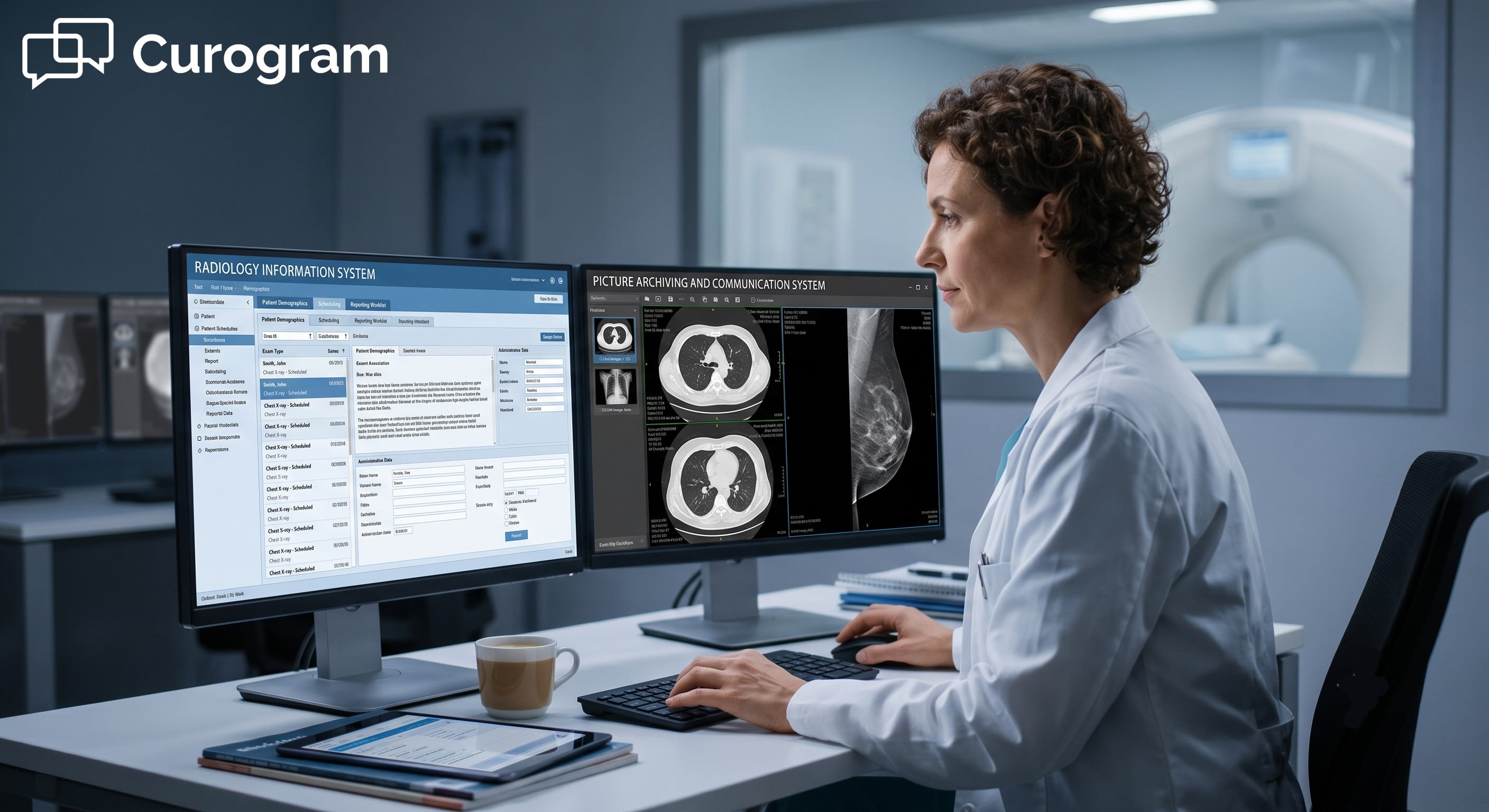
💡RIS vs PACS comes down to one simple split. A Radiology Information System (RIS) runs the paperwork and the schedule. It books exams, tracks...
-1.png)
1 min read
 Aubreigh Lee Daculug : 2/22/26, 1:00 PM
💡 HL7 and FHIR are the two most important healthcare data exchange standards used today. HL7 version 2 has been the backbone of healthcare...