
.jpg?width=30&height=30&name=square-formal-photo%20(1).jpg) Mira Gwehn Revilla
Mira Gwehn Revilla
Pros and Cons of Text and Voicemail Appointment Reminders
 Carylee Gali : 11/23/22, 3:23 PM
Text vs voicemail appointment reminders: what the 2026 evidence shows, the one-a-day cap covering both, and the opt-out rule most practices miss...

At a solo practice, the person who answers the phone also checks patients in, posts copays, and chases prior auths. Nobody on that payroll has "scheduler" in their title. So every reminder tool gets one test: how much work does it take off that desk each day?
That's the lens for this guide to appointment reminder features for solo practices. Most demos are built for groups with a call center and a marketing lead. At one provider, you'll use five features daily. The rest sits in a menu you pay for.
No-shows are the right place to start. In an MGMA Stat poll on 2026 patient access priorities run on December 9, 2025, 27% of 236 medical group leaders named no-shows their top patient access priority for 2026. Online scheduling came next at 24%, then phone access at 22%.
A small office feels each empty slot harder. One provider's day has no second column to absorb the gap, so a 9:30 no-show means lost revenue and an idle exam room. Nobody else's patient can be slid into it.
This guide ranks features. For a side-by-side of named vendors, see the 2026 appointment reminder software comparison.
An appointment reminder is a text, call, or email sent before a visit that asks the patient to confirm, cancel, or move it. Plenty of tools can send one.
What sets the useful ones apart is what happens after the patient answers. The table below sorts features by what each one takes off your desk.
|
Feature |
What it removes |
Priority at one provider |
|
Reply writes to schedule |
Manual confirmation entry |
Essential |
|
Voicemail tag |
Essential |
|
|
Set-once cadence |
Weekly fiddling |
Essential |
|
Opt-out record kept by platform |
Compliance exposure |
Essential |
|
Simple no-show report |
Guesswork |
Essential |
|
Multi-channel orchestration |
Nothing, at one provider |
Skip |
|
Campaign builder |
Nothing, at one provider |
Skip |
A reply that updates the schedule is a confirmation that writes itself back to your EHR. The patient texts "C," and the visit flips to confirmed on your calendar with no one touching it.
Without that write-back, someone reads each reply in a separate inbox and then clicks the same status in the EHR. On an illustrative 25-visit day, that's 25 trips between two screens. Each trip is short. Together they eat the gaps between check-ins.
Based on our internal data, Covina Arthritic Clinic confirms more than 1,100 appointments a month with replies processed in real time.
During a demo, ask the vendor which EHR status field changes when a patient confirms. Then ask them to show it happen live.
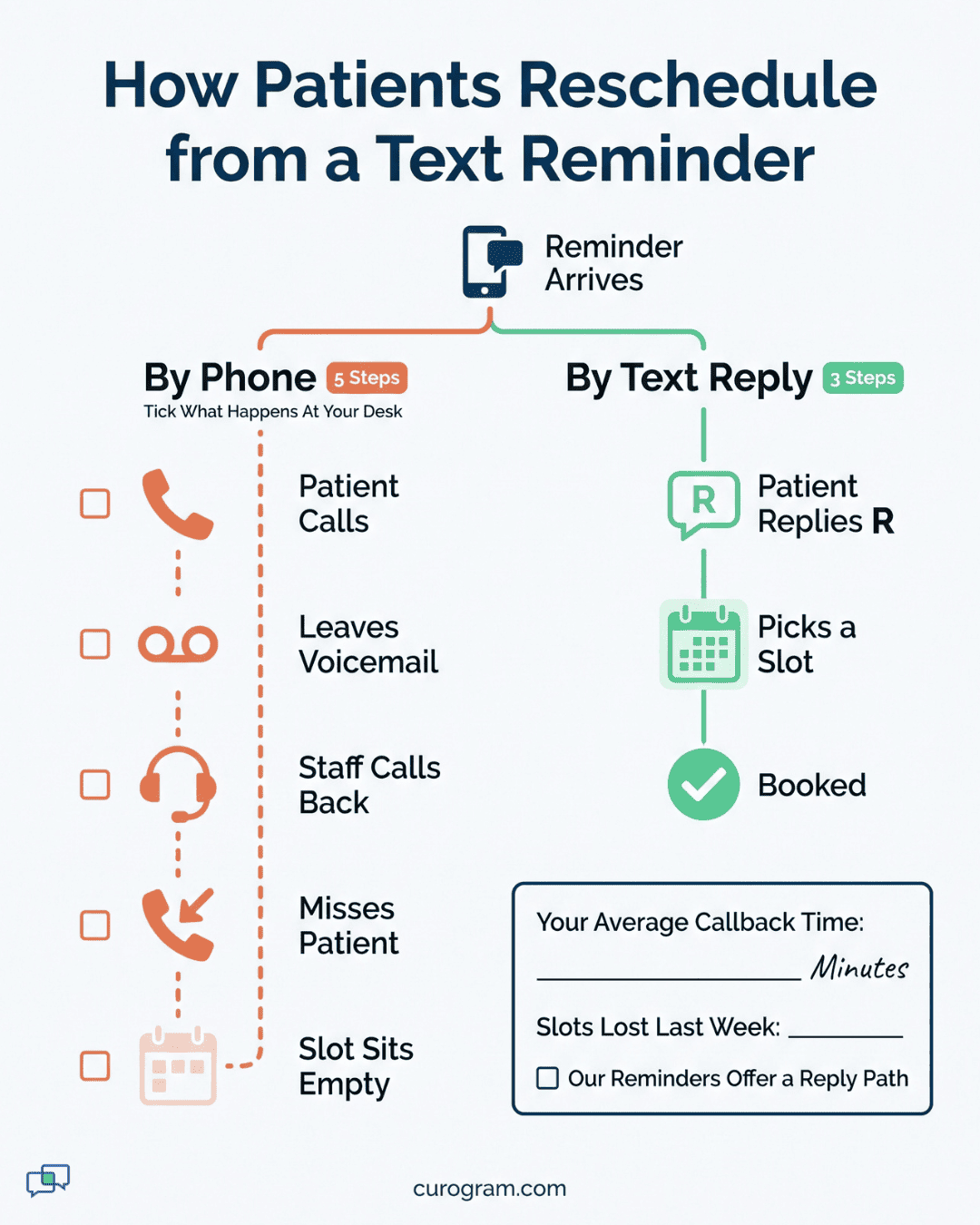
A reschedule path lets the patient move the visit from the reminder itself. It's either a link showing open slots or a reply code like "R" that starts a text thread with your office.
Without one, every change becomes a phone call. The patient reads the reminder after work and sees a conflict. Your office is closed, so they leave a voicemail.
Next morning, your front desk plays it back between check-ins, calls back, and gets voicemail too. That slot sits open until someone finally connects, often too late to refill it.
A reply-based reschedule keeps the whole exchange in one thread. Your staff can answer it in under a minute: "We have Thursday at 10:15 or Friday at 2:00. Which works?" A cancel reply should also free the slot in the schedule right away, so it can be offered to the next caller.
Set-once cadence means you pick the send times one time, and the system runs them for every visit. Automated reminders only save time if nobody has to touch them week to week.
A sensible default is three sends: 3 days before, 1 day before, and 2 hours before. We cover the reasoning in the cadence section below. For now, look for a single rule that covers all visit types. It should also stop asking once a patient confirms.
Resist tuning it monthly. Take an illustrative solo schedule of about 100 visits a week.
One month of data from that volume is too thin to tell a real change from random swings. Change the cadence once a quarter, and only when your weekly report points to a specific problem day.
An opt-out record is the log of every patient who asked to stop getting messages, with the date and channel. Keeping it is the platform's job, and the platform should enforce it on every later send.
The rules behind this come from the TCPA. The FCC's TRACED Act report and order (FCC 20-186) was adopted December 29, 2020. It caps exempted healthcare calls to residential lines at one a day and three a week, and it requires an opt-out mechanism.
When a patient texts STOP, a good system logs it, blocks future sends to that number, and shows the status on the patient profile. A sticky note in the chart only works if someone reads it before every send. At a one-person desk on a busy Monday, nobody will.
A readable no-show report shows one number: last week's no-show rate, split by day of the week. You should be able to read it in under a minute on a Friday afternoon.
Say Mondays run at 12% and other days sit near 5%, as an illustrative example. You now know where to act. Add the same-day text for Monday visits, or book Monday's first slots with patients who confirmed on time last visit.
Skip any report that needs a filter panel or a CSV export to show you this. If the vendor has to build it for you in the demo, you won't open it on your own.

Every feature you pay for and never set up still shows up on the invoice. Top tiers of most medical office reminder software are built for groups.
Those groups have a marketing lead, an IT contact, and several calendars to balance. When you sort appointment reminder features for solo practices, these are the ones to leave off the list.
Multi-channel orchestration is a rules engine that picks the channel for each patient. It chooses among text, email, voice call, and app alert, and sets the order. It assumes someone will build those rules, test them, and fix them when they misfire.
Several features share that assumption of a marketing team behind them:
At one provider, text reaches most patients. One fallback covers the rest, usually an automated voice call to landline numbers.
That pair needs two templates and one rule. The rule reads: if a text fails because the number is a landline, place a voice call with the same date and time.
A five-channel flow needs an owner. At a solo office, the only candidate is already running the front desk.
When a rule misfires, say an email going to a patient who opted for text only, nobody notices until the patient calls to complain. Fewer channels means fewer places for that to happen, and fewer reminder software features to audit when it does.
Why Does a Campaign Builder Sit Unused at One Provider?A campaign builder sends marketing-style messages to many patients at once. Think of a flu shot push or a new service launch. Most solo offices run only a handful of these a year, which doesn't justify a paid tier. Recall is the exception worth keeping, and it doesn't need a full builder. Based on our internal data, 35% of patients who got an SMS recall booked within a month. That added 1,240 visits from recall alone. A list pulled from your EHR and one clear text gets you there. |
Enterprise reporting compares providers, locations, and channels side by side. With one provider and one location, every one of those charts has a single row.
What a solo practice needs fits on one screen:
|
What to see |
How often |
What it tells you |
|
Confirmation rate |
Weekly |
Whether reminders reach patients |
|
No-show rate by day of week |
Weekly |
Which day needs a change |
|
New opt-outs |
Monthly |
Whether message volume is too high |
For a confirmation benchmark, our internal data puts the average across Curogram clients above 75%.
New opt-outs are worth a monthly glance for a different reason. A jump after you add a fourth send usually means patients feel over-texted, and the fix is to remove that send.
A report that adds dozens of views past these three is built for someone who manages managers. You'll pay for it in login time.
A batched review window is a set time when one person clears every reminder reply at once. Most desks run three a day. It's the main tool that lets a one-person desk run reminders while still rooming patients and taking payments.
The system watches most replies, and your staff watches the rest in short windows. Confirmations and STOP replies need no human, since they write back and log on their own. Only reschedules, questions, and odd replies need a person.
Two patterns work at a one-person desk. The first is three fixed review windows a day.
Pattern two adds a phone alert for same-day cancels only. That way an open slot gets offered while it's still useful. Most solo offices do best with both.
Below is an illustrative Tuesday at a solo family practice with 22 visits on the books.
|
Window |
What's waiting |
What the desk does |
Time spent (illustrative) |
|
8:15 am |
14 overnight "C" replies, 2 "R" replies |
Nothing on the 14. Texts each "R" patient two open slots. |
4 minutes |
|
10:40 am alert |
1 same-day cancel for 1:30 pm |
Texts the two patients on the waitlist |
2 minutes |
|
12:30 pm |
1 reply picking Thursday, 1 question about parking |
Books Thursday, sends the parking link |
3 minutes |
|
4:30 pm |
3 replies to tomorrow's 24-hour reminder |
Clears all three, flags one for the provider |
4 minutes |
That's about 13 minutes of reminder work across a full day. The 14 overnight confirmations took zero, because each reply changed the EHR status before anyone arrived.
The fallback is a single after-hours auto-reply. It tells the patient their message arrived, when someone will read it, and what to do in an emergency.
A paste-ready version:
Thanks for your message. Our office is closed and will reply after 8 am on the next business day. If this is a medical emergency, call 911. To confirm your visit, reply C. To reschedule, reply R.
Notice what it leaves out. It doesn't promise a callback tonight, a nurse review, or a refill. A one-person office can't staff those after hours. An auto-reply that implies clinical follow-up creates a duty nobody is there to meet.
Keep health details out of it too. Whoever holds that phone will read the reply, so it should never mention a diagnosis, test result, or visit reason.
Set the auto-reply to fire once per thread per night. A patient who texts three times shouldn't get three copies. Any message that arrives overnight lands at the top of the 8:15 window, oldest first.
Cadence decides how much warning your desk gets. A reminder sent a week out gets forgotten, and one sent the morning of leaves no time to refill the slot.
Three sends cover a solo schedule well. Each one has a separate job, which is why none of them can be dropped without losing something.
|
Send |
Purpose |
What the patient can do |
|
3 days before |
Leaves time to refill a canceled slot |
Confirm, reschedule, or cancel |
|
1 day before |
Last firm confirmation |
Confirm or reschedule |
|
2 hours before |
Same-day nudge with address |
No reply needed |
The 3-day send matters most for healthcare scheduling at one provider. A cancel on Monday for a Thursday visit gives your desk three days to fill it from the waitlist. A cancel two hours out almost never gets filled.
Once a patient confirms, the 1-day send should switch from a question to a short heads-up. Asking twice reads as a system that didn't hear them. If you're weighing whether patients should be able to reply at all, see two-way and one-way patient reminders compared.
Our text appointment reminders can run this three-point pattern from day one. Set it once, then let the weekly report tell you if a day needs more.
Your weekly report decides when to change the cadence. If one weekday runs well above the rest for four straight weeks, adjust that day only.
Try one change at a time.
Say early Monday slots are the problem. Try moving the 1-day send for those visits to Saturday morning, when patients have time to read and answer.
For afternoon gaps, add a second same-day nudge at 4 hours out. Give each change four weeks before you judge it.
Based on our internal data, Atlas Medical Center cut its no-show rate from 14.20% to 4.91% in three months. It got there with automated reminders and confirmations. At one provider, even part of that drop is several filled slots a week.
A sales call is built to show you everything a platform can do. Your job is to check the five things you'll use and get a price for only those.
Copy these into your notes before the demo. Each one tests one of the five core appointment reminder features for solo practices. The vendor should answer each by showing it on screen.
A trial run is the first month after go-live, measured against the month before. It should show two numbers moving: confirmation rate and no-show rate.
Take the baseline first. Before the new tool sends a single text, pull the last four weeks of visits from your EHR. Count the no-shows. If you were confirming by phone, count how many patients you reached.
|
Metric |
Four weeks before go-live |
First four weeks live |
Where to find it |
|
Confirmation rate |
From your call log |
From the reminder report |
Reminder dashboard |
|
No-show rate |
From the EHR |
From the EHR |
EHR appointment report |
|
Staff time on confirmations |
Your estimate |
Your estimate |
Front desk |
Judge against your own baseline, since every panel starts in a different place. Say confirmations land far below the 75% average we see across clients.
Check the phone numbers on file before blaming the tool. Landlines and old numbers are the usual cause.
A solo practice wins on reminders by owning less software and using all of it. Write-back confirmations, a reschedule path, a fixed cadence, platform-kept opt-outs, and a one-number report do the work. Each extra layer adds a screen someone has to check.
A quote shows the monthly price and leaves out staff time. A campaign builder with no one to run it still needs a login, a setup call, and a renewal talk. At one provider, that time comes straight out of the front desk.
Your next step is concrete. Pull four weeks of no-shows from your EHR this week, by day. Bring that number and the four questions above to any vendor call. If a tool can't show all five features live, cross it off and move on.
Want to see the five features running on a real schedule? Request a demo with our team and bring your no-show baseline. We'll show you how replies, reschedules, and opt-outs would flow through your EHR.
 Carylee Gali : 11/23/22, 3:23 PM
Text vs voicemail appointment reminders: what the 2026 evidence shows, the one-a-day cap covering both, and the opt-out rule most practices miss...
%20-%20featured.png)
Reduce no-shows with our guide to appointment reminder texts. Get 50+ templates, best practices, and tips to build an effective reminder system.

 Jo Galvez : 4/19/26, 9:00 AM
Find out how appointment reminder text messages reduce no-shows and what to include in your reminders. Includes templates your practice can use right...