
 Aubreigh Lee Daculug

A patient who cannot reply by text will call the front desk to cancel or move a visit. Two-way reminders cut inbound calls faster, but only when the reply writes back to the schedule. A confirmation stuck in a vendor dashboard still earns a callback.
Curogram sends two-way SMS reminders that update appointment status in the schedule. Based on our internal data, Atlas Medical Center cut no-shows from 14.20% to 4.91% in three months.
Your reminder system is doing its job. Texts go out, patients read them, and no-shows sit lower than they did two years ago. So why is the front desk still stuck on the phone every morning?
The answer usually comes down to two-way vs one-way patient reminders, and most practices have never compared the two directly.
Pull last week's call log and listen to what those calls are actually about. A good share of them are not new business, but patients calling about an appointment they had already been texted about.
The message said Tuesday at 10, and their child has a dentist visit Tuesday at 10. Nothing in that text gave them a way to say so, so they picked up the phone.
That gap rarely gets measured. Reminders get judged on no-show rates, and a plain notice performs respectably by that standard. Call volume is a separate number, and a send-only reminder barely moves it. Some weeks it drives the number higher, because you just told 200 people simultaneously they have a scheduling conflict.
The choice between two-way vs one-way patient reminders gets treated as a feature comparison. It behaves much more like a workflow decision. One model closes the conversation the moment the message lands. The other opens a conversation, then depends on your software to resolve it.
That second half is where practices get stuck. Switching replies on takes an afternoon. Converting those replies into an updated schedule, with nobody retyping anything, is the piece that determines whether your phones actually quiet down.
This guide walks the difference in practical terms: what each model does, where the send-only version leaks calls, and which platform gaps quietly cancel the benefit out.
You will finish with a one-week count that tells you which model your practice genuinely needs.
Key Takeaways
- One-way reminders reduce no-shows. They do not reduce calls.
- Roughly two in three patients want to reply to a clinic text rather than only receive one.
- Atlas Medical Center cut no-shows from 14.20% to 4.91% in three months using automated reminders with replies enabled.
- A reply that does not update the schedule is worse than no reply, because staff stop trusting it.
What Separates the Two Reminder Models
Both models put the same information in front of a patient. What they do with the patient's response is where they split.
What Does a One-Way Reminder Actually Do?
A one-way reminder is a message your practice sends that the patient cannot answer.
It does one job, and does it well: it puts the date, time and place in front of somebody who forgot.
Most clinics operate this model today, usually as an SMS blast the night before or an automated voice drop in the morning.
Its boundary is the reply. The sending line is either a short code that rejects inbound messages, or a number nobody monitors. Every action a patient might want to take next has to happen somewhere else entirely.
Confirming, canceling, moving the visit, asking what to bring:
All of it routes back to your phone line, or to a portal login they will not remember.
What a Reply Adds That a Notice Cannot
A two-way reminder is a message the patient can answer, with that answer landing in a queue your staff can see. Four replies cover most of what people need.
A confirmation ends the callback and tells your schedule the slot is safe. Canceling by text replaces the cancellation call, and frees the slot early enough to refill it.
When a patient needs to move a visit, the reschedule begins without anyone dialing. Questions about parking, paperwork or fasting get resolved in a thread instead of a three-minute call.
Every one of those is a call that never happens. Inbound call reduction works on exactly that mechanism: the reply is the inexpensive version of the call.
One-way and two-way reminders side by side
| Capability | One-way | Two-way |
|---|---|---|
| Tells the patient the appointment exists | Yes | Yes |
| Patient can confirm without calling | No | Yes |
| Patient can cancel or move without calling | No | Yes |
| Schedule updates without staff typing | No | Only with write-back |
| Creates a reply queue for staff | No | Yes |
How a Send-Only Reminder Ends Up on the Phone Queue
Send-only text appointment reminders do not generate phone call volume out of nowhere.
They concentrate it. A batch delivered at a single moment produces its callbacks at a single moment, and every one of those callbacks represents work the original message could have absorbed.
When Rescheduling Leaves Only One Option
When a patient needs to move an appointment and cannot reply by text, the phone becomes the only route left. That single gap produces more calls than any other part of a reminder program. Follow one patient through it.
A reminder lands Monday evening for a Wednesday visit.
She reads it on the couch, opens her calendar, and discovers a work trip she booked after scheduling the appointment.
She needs to move it. Like most people, she replies to the text anyway. Nothing comes back.
So she waits. At 8:05 the next morning, the moment your lines open, she calls. She is now one of nine patients doing the same thing inside the same fifteen minutes, because the reminder that triggered all nine went out together the night before.
Nothing broke in that sequence. Your reminder did precisely what it was built to do, which was put the date in front of her and stop there. The phone absorbed everything after that.
Where Do Replies Go on a No-Reply Number?
They go nowhere, and the patient discovers that too late. A no-reply number is a sending line that accepts no inbound messages. Patients answer it regardless, because people naturally treat a text like a text.
Depending on the carrier configuration, those replies either bounce with an error code or vanish into a system nobody logs into. A patient who receives no bounce reasonably assumes she has canceled. She does not show. You record a no-show, and she records a clinic that ignored her.
Records matter here too. A patient message about care is worth keeping, and a HIPAA-covered practice cannot produce a message it never received.
What Shifts Once Patients Can Text Back
Turning replies on changes two numbers quickly, and adds one new job to somebody's morning.
What Happens to Confirmation Rates and No-Shows
Confirmations climb first, and no-shows follow. Based on our internal data, practices running two-way reminders through Curogram average a confirmation rate above 75%, and Atlas Medical Center cut no-shows from 14.20% to 4.91% within three months of switching on automated reminders with replies enabled.
Sending more notices has not solved this industry-wide.
An MGMA Stat poll on no-show rates and automated reminders, taken 27 August 2024 with 303 applicable responses, found 50% of practices said their no-show rate held steady, 13% saw it improve and 37% watched it get worse.
Half of those practices added automation and saw the number stay exactly where it was.
Patients report wanting the same thing. A Sinch Engage survey of 1,000 US patients aged 18 to 78, fielded 4 to 7 December 2025, found 68% want two-way texting rather than alerts they cannot answer.
How Do You Staff the Morning Reply Spike?
Send in waves, and give the queue one owner. A morning blast to 300 patients tends to draw most of its replies inside the first hour, which is the same window your phones are already busy.
That timing is an illustrative pattern, not measured data.
Three rules keep it workable:
- Split the send. Three batches an hour apart spread identical replies across three hours.
- Move the send out of the rush. An early evening send reaches patients with their calendar open, and most replies arrive before you open the next day.
- Name an owner per shift. A queue watched by everybody is watched by nobody.
For a 300-patient send, plan on one staff member covering the queue for that first hour. Most replies run one word long. Our guide to handling a spike in patient replies covers heavier volumes.
Three Platform Gaps That Keep the Phones Ringing
Practices that switch on replies and see no call reduction almost always hit one of three messaging software challenges. None of them are about the texting.
Each is about what the patient messaging software does after the text arrives, which the complete guide to patient messaging workflows covers in more depth.
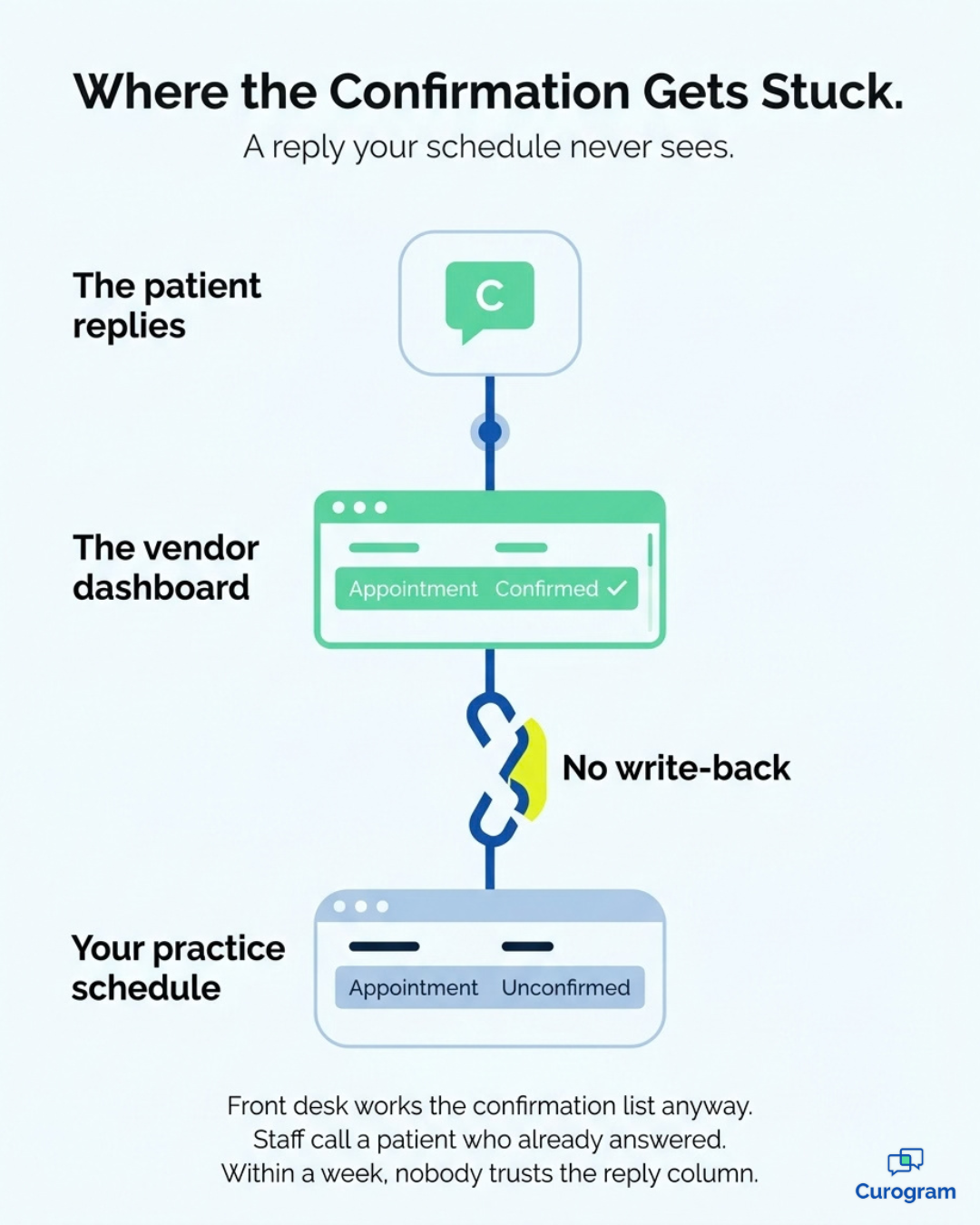
Gap 1: The Confirmation That Never Reaches the Schedule
Write-back is the step where a patient's reply updates the appointment status in your practice management system automatically. Without it, a confirmation stops at the vendor's dashboard and goes no further.
The cost lands on your next confirmation call. Your patient replies C. The vendor screen marks her confirmed. Your schedule still reads unconfirmed, because those two systems never spoke to each other.
So the front desk works its confirmation call list anyway and rings a patient who already answered. Within a week, staff learn that the reply column cannot be trusted, and they stop opening it. You are paying for a feature that saves nobody any time.
Gap 2: The Inbox With No Owner
Replies have to land somewhere a named person opens daily. A shared inbox with no owner fails quietly, since nothing inside it looks urgent until a patient complains.
Replies route to a clinic-wide number, three people hold access, and each one assumes somebody else is watching. A cancellation sits unread for two days. That slot, refillable on Monday, sits empty on Wednesday.
Fixing it costs almost nothing. Assign the queue to a role rather than a group, set a response-time target your team can actually hit during business hours, and post it where staff can see it.
Gap 3: The STOP Request That Gets Ignored
An opt-out has to stop the next send, and federal rules put a clock on it.
Under the FCC's TCPA revocation rules, in force since 11 April 2025, a practice must honor a revocation request within a reasonable time not to exceed 10 business days, and must accept everyday keywords rather than one proprietary word.
A patient texts STOP. If that opt-out lives only inside the messaging tool and never reaches the record your reminder job reads, next month's batch fires at her again.

Your platform has to hold four things:
- The opt-out stored against the patient record, not just a phone-number thread
- Recognition of standard keywords, including stop, end, cancel, quit, unsubscribe, opt out and revoke
- A block the reminder job checks before every single send
- A timestamped log showing when the request arrived and when it took effect
Two-Way vs One-Way Patient Reminders: Making the Call
No universal answer exists here. Volume, staffing and your ability to refill a slot decide it.
When Is One-Way Still Good Enough?
One-way holds up when a reply would have nowhere useful to go. Three situations qualify honestly.
The first is very low appointment volume, where a whole day of reminders runs to a dozen texts and the phone rarely rings twice at once.
Second comes the practice with no capacity to refill a canceled slot, since an early cancellation only pays off when somebody can fill the gap.
Last is a single-provider practice with a dedicated scheduler who answers on the first ring.
Outside those three, a send-only reminder shifts work you already pay for onto a phone line you also pay for.
A One-Week Count That Settles It
Count every inbound call last week about an appointment the patient had already been reminded about. That number is your answer. Front desk staff can tally it on paper in five days.
Then price it. The figures below are an illustrative example, not measured results:
| What you count for one week | Illustrative example |
|---|---|
| Inbound calls about an existing appointment | 120 |
| Share that were confirm, cancel or reschedule | 70% |
| Calls a text reply could have handled | 84 |
| Average minutes per call | 4 |
| Front desk hours returned per week | 5.6 |
| Front desk hours returned per month | 24 |
Read that last row as staff hours, not a percentage. In this illustrative case, a practice pays for roughly 24 hours a month of phone work that a reply would have absorbed. Run your own count before you decide anything.
What the Count Does Not Tell You
The call count misses every patient who never called. Some people who cannot reply stop showing up instead, and a silent no-show leaves no trace whatsoever in your phone log.
That group sits inside your other number. A patient reads the reminder, recognizes the scheduling conflict, and discovers no available way to answer it.
She does not call, does not cancel, and does not arrive. Your phone log stays clean while your no-show rate quietly absorbs the entire cost.
Read both numbers together before you commit to a model. A high call count means a reply queue would take measurable work off the front desk.
Stubborn no-shows alongside quiet phones point to the same gap from the opposite direction, because patients who wanted to reschedule never got the chance
Your Phone Log Already Has the Answer
You do not need a vendor to settle two-way vs one-way patient reminders for your practice. The evidence sits in last week's call log, and it costs one week of tally marks to read.
Count the calls about appointments patients already knew about. If that number is small, and your scheduler answers fast, a send-only reminder is doing its job. Leave it alone. If the number is large, every one of those calls is a reply your software should have caught.
Moving to two-way is not really about texting. Patient communication improves the moment a patient's answer changes something in your schedule without a person retyping it.
Ask any vendor one question before signing: when a patient replies C, what happens in the practice management system? If the honest answer involves a dashboard your staff has to check, you are buying a second inbox rather than fewer phone calls.
Healthcare texting only reduces work when the reply lands where the work lives.
The confirmation writes back to appointment status. The cancellation opens the slot for refill, the reschedule reaches a named owner, and the STOP request holds across every future send.
Miss one of those and the phones keep ringing, however good your message copy is.
Curogram runs two-way SMS reminders built for exactly that. Confirmations and cancellations write straight into your schedule. Opt-outs hold against the patient record, and every reply lands in one HIPAA-compliant inbox your team can staff.
Based on our internal data, Atlas Medical Center brought no-shows from 14.20% to 4.91% in three months. Covina Arthritic Clinic now confirms more than 1,100 appointments a month through that same reply flow.
Bring your one-week call count to the conversation. Schedule a demo and we will map that number against what two-way reminders would absorb for your practice.