Skip to the main content.

8 min read

From Comment to Fix: 3 Major Benefits of Evaluating Patient Feedback

From Comment to Fix: 3 Major Benefits of Evaluating Patient Feedback
 💡 Patient feedback matters because it shows how patients see your practice, from booking to checkout. It points to problems your EHR doesn’t track, like long hold times, repeated intake forms, and unclear aftercare steps. It also shows what patients want, such as fewer reminders or easier online booking.

When your team reads it together each month, it becomes a list of fixes you can measure. Feedback shapes your reputation too. Based on our internal data, 90% of new patient leads check a practice’s Google Business Profile before its website.

To get useful answers, send a short survey by text within a few hours of the visit. Use open questions, and send a review request to every patient.

A survey comes back with a 4 out of 5. At the bottom, in one line, the patient wrote: “Nobody told me my lab results were ready.”

That line is worth more than the score. It names a gap in your callback process, one your EHR has no field for and your staff may never notice.

Patient feedback is the most direct way to find problems like this, and most practices collect far less of it than they could. Some hand out a paper survey at checkout that few patients fill out. Others send an email link that lands in a promotions folder. The comments that do come in often sit in one inbox and never reach the people who could act on them.

The cost shows up in places that are hard to trace. A patient who felt rushed rarely complains. They book with another clinic next time, or they post a review that new patients read first.

Those reviews carry real weight. Based on our internal data, 90% of new patient leads check a practice’s Google Business Profile before they visit its website. What your current patients say is often the first thing a new one sees.

Feedback helps in three concrete ways. It surfaces internal issues that never reach a staff meeting. It shows what patients prefer, down to how many reminders they want. And when your whole team reads it together, it becomes a steady list of small fixes you can measure.

Below, you’ll find each benefit, the four questions worth asking on every survey, and the best time to send them. You’ll also see how 2-way texting gets more patients to answer, and how to ask for reviews within FTC rules and Google’s policy.

Helps You Identify Internal Issues

Your team sees the practice from behind the front desk. Patients see it from the lobby chair, the hold line, and the checkout counter. Patient feedback shows you that second view, and it’s often where retention and revenue problems start.

What Patients Notice That Your Team Doesn’t

Some of these problems never reach a staff meeting. A patient waits 12 minutes on hold, hangs up, and books with the clinic down the street. Nobody logs that call, so on paper it never happened.

A short survey after the visit can catch issues like these:

  • Hold times when patients call to reschedule
  • A check-in form that asks for the same insurance details twice
  • Aftercare steps that patients forget before they reach the car
  • A front desk that feels rushed in the last hour of the day

Your EHR won’t flag any of them. The schedule can look full and claims can go out on time while patients drift to other clinics. Feedback is often the only place these gaps get written down.

How to Spot a Pattern

One complaint about a long wait might be a bad day. Five complaints in a month about the same Tuesday clinic usually point to a staffing gap.

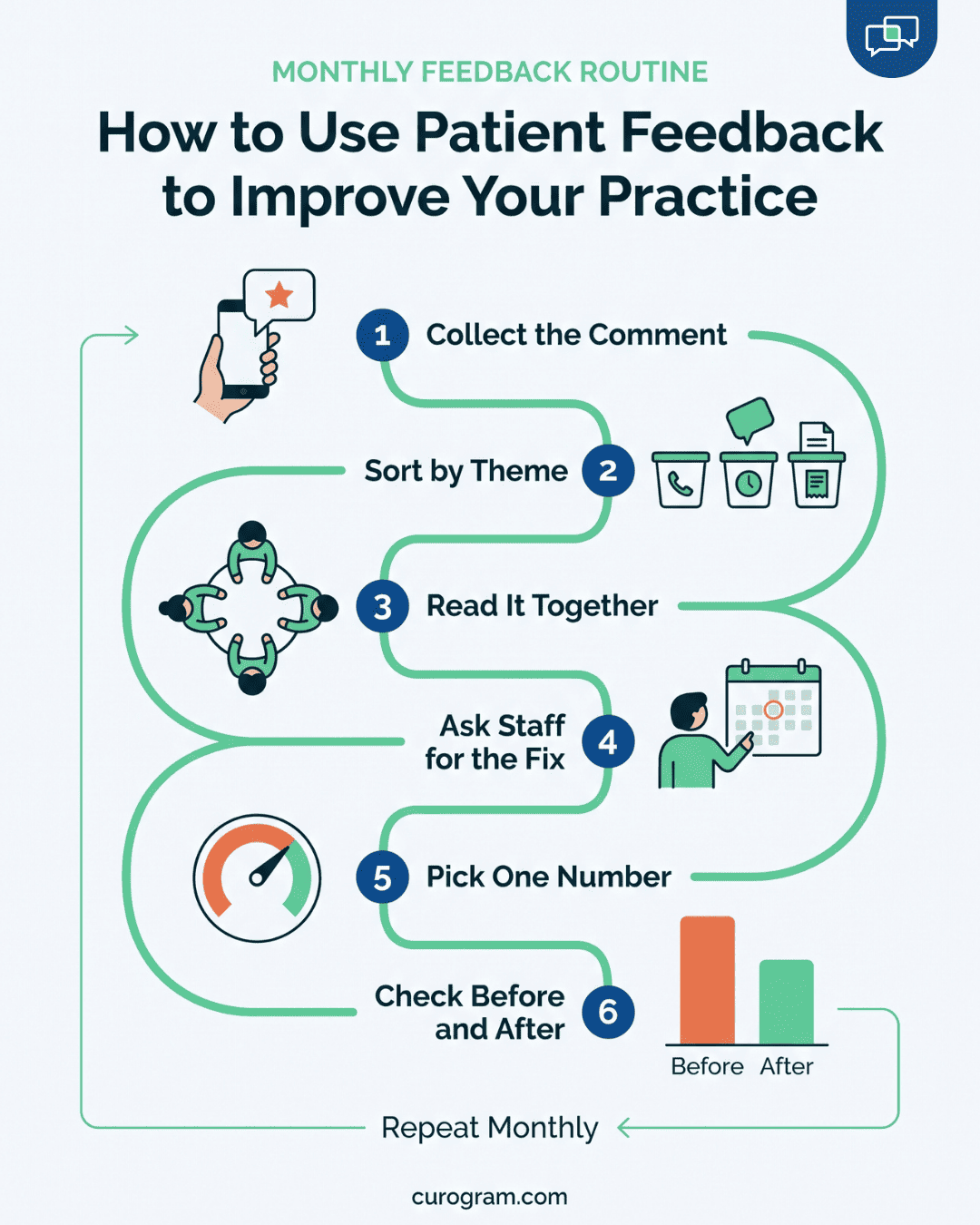
Read feedback in batches. Sort comments by theme, such as phones, wait times, billing, and how clearly the provider explained things. Count each theme every month, and work first on the one that keeps climbing.

Most comments describe a symptom, so trace each one back to its cause. A patient who writes “I could never get through” is telling you about your phone line. That phone line is one of the most common sources.

Why Timing Matters

You only have a short window to reach patients and address their concerns. Ask on the same day, while patients still remember who checked them in and how long they sat in the lobby. Wait two weeks, and most answers shrink to “it was fine.”

Your reply needs the same speed. If a patient flags a billing error, call back within one business day, even if the fix takes longer. That call tells the patient someone read the comment.

Sheds Light on What Your Patients Really Want

Patient feedback tells you how a visit felt from the patient’s side, from booking to the follow-up call. Your team can guess what patients like, but the answers often surprise. Some habits you think help, like an extra reminder, can annoy the people they’re meant for.

Ask About One Step at a Time

“How was your visit?” usually earns a “fine.” Ask about each step on its own, and patients give you something you can act on.

What you ask What a pattern in the answers might mean
How easy was it to book your visit online? Too many steps, or open slots don’t match when patients want to come in
Were two reminders the day before too many? Patients want fewer texts, sent at a better time
How were you treated at check-in? A training or staffing need on certain shifts


Booking is a good place to start. Say patients book through your online scheduling system and then call to confirm anyway. If most patients call your second same-day text too much, drop it and check your no-show numbers a month later.

Find the Blind Spots

Patients catch things your team walks past every day. It could be a parking sign that points the wrong way, or a hold message that lists old hours. A lab result explained too fast is another common one.

These details rarely come up in a staff meeting. They show up in open comments, often as a single line at the end of a survey. Read those lines even when the score above them is high.

Flowchart showing how a medical practice sorts, reviews, and acts on patient feedback each month

How Feedback Reaches New Patients

Patients who felt heard tell family and friends. Many will also leave an online review if you ask.

That matters more than most practices expect. Based on our internal data, 90% of new patient leads check a practice’s Google Business Profile before its website. Your reviews are often the first thing a new patient reads.

An unhappy patient can post a one-star review the same evening. It then sits beside your five-star ones for every new lead to see. Send the review request to every patient after the visit. Asking only the happy ones goes against FTC rules and Google’s review policy.

Creates a Culture of Open Communication and Continuous Improvement

Patient needs shift over time. A practice that added telehealth in 2020 may now hear requests for evening slots, text reminders, and online bill pay. Your team can only keep up if everyone sees the same patient feedback, from the front desk to the providers.

Share the Comments With the Whole Team

In many clinics, survey results land in one inbox. The office manager reads them, and the rest of the staff hears about a comment only when something goes wrong. The people who answer the phones and room the patients are left out.

Set a short, fixed time to go over comments together. A 15-minute huddle on the first Monday of the month works for most small practices. Read three or four comments out loud, including at least one good one that names a staff member.

Rotate who picks the comments. A medical assistant will choose different ones than a biller, so you’ll see different problems.

Keep the Talk on the Process

Staff stop sharing bad news if every complaint turns into a hunt for who’s at fault. Frame the problem by the process, such as “Patients waited 25 minutes at check-in on Thursdays.” That points to the schedule, and nobody feels singled out.

Then ask the people closest to the problem how to fix it. Your front desk usually knows why Thursday check-in backs up before anyone else does.

Sort Requests Into Fixes and New Services

Feedback points to two kinds of change. Some fix how your team works today, and others add something new.

What patients say Type of change One way to respond
“I waited on hold just to confirm.” Workflow fix Send confirmations by text
“I can’t come in before 5 p.m.” New service Add one late clinic night a week
“I never got my lab results.” Workflow fix Set a 48-hour callback rule
“Can I pay my bill online?” New service Add a payment link to statements


Check Whether the Change Worked

Pick one number for each change and check it before and after. Atlas Medical Center, a Curogram client, tracked its no-show rate as it changed how it reminded patients. Based on our internal data, that rate fell from 14.20% to 4.91% in three months.

Put before-and-after numbers like these on your next huddle agenda, next to the comments that started the change.

How to Obtain Patient Feedback

Most patients will tell you how a visit went if you make it easy and ask the right way. The hard part is getting comments you can use. A page of five-star ratings is nice to read, and it rarely tells you what to change.

Yes-or-no questions get yes-or-no answers. Open questions make patients stop and think about the visit. These four cover the main ground:

  1. What went well with your care today? This shows what your team should keep doing.
  2. Did the doctor give you the care you needed? If not, why? The second half is where the useful detail shows up.
  3. What could this office do better? Patients often name one small thing you can fix.
  4. How likely are you to recommend this practice to family and friends? A 0 to 10 scale lets you track the score month to month.

Keep the survey to these four, or fewer. Every extra question means fewer patients finish it.

Send the survey within a few hours of checkout, while the visit is still fresh. Add one line on why you’re asking, such as “Your answers help this office cut wait times.” Patients give better answers when they know someone will read them.

Some patients won’t raise a complaint face to face with their doctor. They’d rather type it later, on their own time, which is one reason online reviews are so popular.

Text messaging gives these patients a private way to answer. Based on our internal data, the confirmation rate for text reminders on our platform is above 75%, so patients do open and answer these messages.

Conclusion: Start Collecting Patient Feedback by Text

Patient feedback only helps if patients actually send it. A secure communication channel like 2-way text messaging makes that easy, for survey answers and review requests alike.

Curogram’s platform lets your team text patients in a HIPAA-compliant way. After each visit, Curogram can send a review request to every patient, which keeps you in line with FTC rules and Google’s review policy. Patients who had a bad visit can reply to the text, so your team hears the complaint and can call them back.

Each reply gives you one more comment for your monthly huddle. Each review gives new patients one more reason to book.

If you’re ready to collect your first online feedback, start with Curogram. Book a demo to see how review requests fit into your post-visit texts.


Frequently Asked Questions

How soon after a visit should you send a patient feedback survey?

Send it within a few hours of checkout. Patients can still name who checked them in and how long they waited in the lobby. After two weeks, most answers shrink to “it was fine,” which gives your team nothing to fix. A text link fits this window well, since patients can answer from the parking lot or at home that evening.

Why should you ask every patient for a review instead of only the happy ones?

Asking only the patients who seemed pleased is called review gating, and it goes against FTC rules and Google’s review policy. Sending the request to every patient after each visit keeps you compliant. It also gives new patients a fair picture of your practice, and the occasional low rating shows you where to look first.

How can your team turn patient comments into changes that stick?

Read comments together in a short monthly huddle, and sort them by theme, such as phones, wait times, or billing. Describe each problem by the process, such as 'Thursday check-in runs 25 minutes late.' Then ask the staff closest to it for a fix. Pick one number to check before and after the change.

What should you do when a patient sends negative feedback by text?

Call the patient back within one business day, even if the fix will take longer. A quick reply tells them someone read the comment. With 2-way texting, the patient’s reply comes straight to your team, so you can follow up before they post the same complaint as a one-star review.

How does patient feedback catch problems your EHR won’t show?

Your EHR tracks visits, codes, and claims. It has no record of the patient who waited 12 minutes on hold, hung up, and booked somewhere else. Patient feedback catches gaps like long hold times, repeated intake forms, and rushed checkouts. When five comments in one month mention the same clinic day, you have a pattern worth fixing.

Why Patient Engagement Matters for Your Healthcare Practice's Future

1 min read

Why Patient Engagement Matters for Your Healthcare Practice's Future

💡 Patient engagement is the working partnership between a practice and its patients. Patients get the information, tools, and access they need to...


Read More
15 Powerful Patient Engagement Strategies: Top Ideas for Patient Care

1 min read

15 Powerful Patient Engagement Strategies: Top Ideas for Patient Care

💡 Patient engagement strategies are the specific workflows that get patients participating in their own care: confirmations, education,...

Read More
5 Reasons Healthcare Providers Should UseText Messaging

1 min read

5 Reasons Healthcare Providers Should UseText Messaging

💡 Text messaging helps healthcare providers reach patients faster than phone calls, email, or portals. Most patients prefer texts, and Curogram...

Read More