
Echo Booking Alternative for Office Ally Practices
 Jo Galvez : Oct 19, 2026, 12:00:00 PM
Office Ally isn't on Echo Booking's EHR list. Score any Echo Booking alternative on five points, from Office Ally sync to security, Curogram included.

An internal medicine office manager found Zingit through its Capterra reviews, which are strong. Then she opened the integration list. ChiroTouch, ChiroFusion, ChiroHD and Jane were named. Her practice runs Office Ally.
Zingit is a good tool for the offices it was built for. Medical practices have better-fit options, and a four-question checklist sorts them out.
Zingit's strengths are real: a two-way inbox, reminders, broadcast and no long-term contract. For the full head-to-head, see our Curogram vs Zingit comparison.
Zingit's named integrations and most of its case studies come from chiropractic practices. It also says it syncs with 150+ EHRs.
A count tells you less than a name. Search each vendor's list for your exact EMR, such as Office Ally or athenahealth.
If your EMR isn't named, ask the vendor in writing how data would sync. We treat a vague answer at this stage as a warning sign. It tends to come back later as a nightly export someone on staff has to run.
Medical teams ask us about three things early: text-to-pay, telehealth links and a SOC 2 Type II report.
None of the three appears on Zingit's pages. That gap weighs more on a primary care office than on a chiropractor. Copays collected by text and video follow-ups are routine in medical work.
Among Zingit competitors, these three features narrow a list faster than anything else. A tool missing two of them drops off before the demo stage.
Four questions do most of the sorting. Ask every vendor the same four, in the same order.
|
Question to ask any vendor |
A strong answer includes |
|---|---|
|
Is our EMR on your published integration list? |
Your EMR named, plus what data syncs |
|
Which messages can staff handle from one inbox? |
Reminders, replies, review requests, payment links, recall, telehealth links |
|
What security documents do you provide? |
A signed BAA and a SOC 2 Type II report |
|
Who sets up the connection and templates? |
A named onboarding contact and a dated plan |
Find your EMR by name on each vendor's published integration list. Then ask what data syncs, and how often.
A working connection pulls appointments in on its own. Reminders build from the schedule, and nobody exports a spreadsheet each night.
For Office Ally practices, Curogram syncs appointment data from Office Ally. See how Curogram connects to Office Ally for the setup steps. Our Office Ally add-ons guide covers the native options.
If a vendor offers a CSV upload in place of a sync, count the staff time. A 10-minute export each workday adds up to about 43 hours a year (illustrative).
Before any demo, tally one week of manual patient contact. Tick marks on a printout by the phone work fine.
Track four kinds: balance calls, review asks, recall calls, and form chases. An illustrative week at a three-provider practice might show 25 balance calls and 8 review asks. It might add 40 recall calls and 15 form chases.
Rank the four. The right tool covers your top three without an add-on. If recall tops your list, ask each vendor to run a recall broadcast live in the demo.
Curogram is our pick for most medical practices weighing a move off Zingit. The reasons are specific.
Curogram puts replies in a free-text inbox and tracks confirmations on a dashboard. From the same place, staff send review requests, text-to-pay links, recall broadcasts, telehealth links and forms.
Security paperwork is covered, too: a signed BAA, SOC 2 Type II, and HIPAA compliance.
Confirmations are where the numbers show. Curogram client data from clinical settings shows a confirmation rate above 75%. On an illustrative 80-visit week, that's 60 or more patients confirmed before anyone picks up a phone.
Some practices want more than two options before they decide. Our roundups cover the wider field of Zingit alternatives for medical teams.
Smaller offices can start with Best HIPAA Texting Tools for Small Practices (2026). Larger groups can use Best Secure Texting Platforms for Physician Groups.
Run the same four-question checklist on every tool in those lists. It keeps the comparison fair.

Leaving a tool that works costs staff time. Two checks make sure the move pays for itself.
Zingit still fits a chiropractic office on ChiroTouch, ChiroFusion, ChiroHD, or Jane. It also fits when staff use the inbox daily, and the plan covers reviews and forms.
If security reviews never mention SOC 2 and nobody needs payment links, switching makes little sense. Keep the tool your staff already trust.
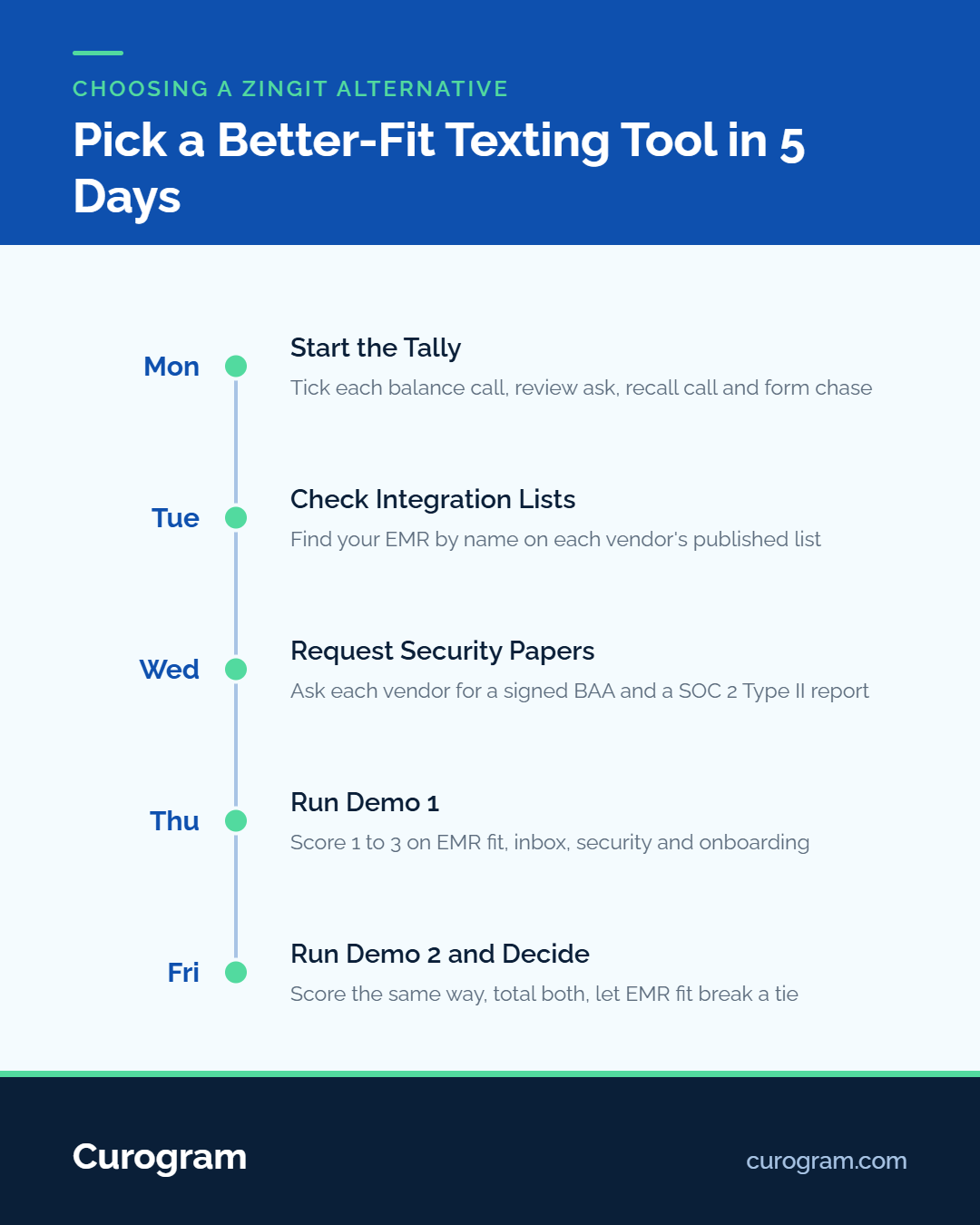
Book two demos in the same week. Bring the checklist table, your tally sheet, and three real patient texts from last week.
Score each vendor from 1 to 3 on each of the four questions. Total the scores the same day, while the details are fresh.
We'd treat a gap of 3 points or more as settled. If it's a tie, let the EMR connection break it.
The internal medicine office manager from our opening started with a strong Capterra rating and an integration list that didn’t name Office Ally. By the end of a week, she had a short list built on her own numbers.
Her tally made the priorities plain. Forty recall calls led the week, with 25 balance calls behind them. That put recall broadcasts and text-to-pay at the top of her checklist, with an Office Ally sync as the one requirement she wouldn’t bend on.
For a primary care or specialty group, a Zingit alternative for medical practices comes down to four questions, one tally sheet, and two demos.
Book a Curogram demo and bring your four-question checklist. We’ll answer each one against your own EMR and message volume.
 Jo Galvez : Oct 19, 2026, 12:00:00 PM
Office Ally isn't on Echo Booking's EHR list. Score any Echo Booking alternative on five points, from Office Ally sync to security, Curogram included.

 Aubreigh Lee Daculug : Oct 17, 2026, 6:00:00 PM
Curogram vs Echo Booking for Office Ally practices: EHR support, patient replies, reviews, payments and telehealth, compared on what each one...
 Aubreigh Lee Daculug : Oct 18, 2026, 6:00:00 PM
Reminder Mate sends Office Ally reminders by text, call or email in 16 languages. See what Curogram adds beside it, and when Reminder Mate alone is...