
7 min read

Best Secure Texting Platforms for Physician Groups

Best Secure Texting Platforms for Physician Groups
 💡 Secure texting platforms for physician groups are HIPAA-compliant texting tools that route each patient message to one provider's team. They also let clinicians discuss the patient on the same thread. Those two jobs, plus role permissions and coverage rules, separate a group tool from a single-clinic tool.

We checked six platforms (Curogram, Klara, TigerConnect, Artera, Luma Health, and Solutionreach) against their public documentation for provider-level routing, internal clinical messaging, and per-provider reporting.

For groups of 10 to 100 providers, routing and roles should carry more weight on the scorecard than general texting features.


In a three-doctor practice, a patient text that says "Dr. Patel wanted my labs rechecked" has one obvious destination. In a 40-provider group with two Dr. Patels on the schedule, the same text lands in a location inbox, and the front desk starts guessing.

The tool has no field that says which Dr. Patel the patient means, so guessing takes real steps. The desk opens the chart, finds recent visits with both physicians, pings a nurse in a separate chat app, and waits. Meanwhile, the patient picks up the phone and calls.

Our view is that secure texting platforms for physician groups should be judged on provider-level routing first. Internal clinical messaging, role permissions, coverage rules, and per-provider reporting come next.

All six platforms here offer two-way patient messaging, so that feature doesn't separate them. A demo that opens with reminder templates is showing a part most vendors already have.

We checked Curogram, Klara, TigerConnect, Artera, Luma Health, and Solutionreach against their public product pages and help centers in September 2026.

Where a vendor doesn't document a capability, the table says so. Treat those cells as questions for the demo. Competitor cells describe capabilities only, and we used no vendor's own performance numbers.

This page is scoped to groups of roughly 10 to 100 credentialed providers. At that size, the hard problems are identity, coverage, and accountability by provider, and a platform built for one front desk starts to strain.

Credentialing, call schedules, and panel rules all shape where a message should go.

What a Group Needs That One Clinic Does Not

Tools built for multi-provider practices start with two capabilities. If your buying question is practice size instead, our comparison of patient texting platforms for large practices covers it.

Provider Routing in Secure Texting Platforms for Physician Groups

Provider-level routing ties each patient message to the rendering provider and that provider's care team. The platform reads the provider from the schedule or chart and sends the thread to the right team.

Each provider's name in the platform should match their credentialing record, so the name patients see is the name on the schedule.

Without routing, a group with two Dr. Patels and shared panels relies on the front desk to guess. A wrong guess sends a medication question to the wrong nurse, who forwards it back.

Clinical and Patient Messaging in One Place

Clinical and patient messaging in one place lets a nurse ask the physician a question inside the patient's thread, with the answer attached. A patient texts that her home blood pressure reads 150/95 on the new dose.

The nurse adds an internal note tagging the physician: "Keep dose or adjust?" The physician answers in the note, and the nurse texts the patient the plan. With separate tools, that clinical communication lives in a chat app nobody can pull up at audit time.

What We Weighed for Group-Scale Messaging

Three criteria go past basic two-way texting, and each maps to a physician group communication problem administrators hit in the first month.

Roles, Permissions and the Audit Log

Role permissions control who can see and answer which threads, and the audit log records who did what. The Security Rule's administrative safeguards at 45 CFR 164.308 call for regular review of system activity, such as audit logs and access reports. They also call for access that fits each staff role.

Its technical safeguards add unique user IDs and audit controls. HHS guidance on the HIPAA Security Rule lays out the administrative, physical, and technical safeguards. In practice, a billing clerk shouldn't read clinical notes, and no two staff should share a login.

How Should Coverage Work On Call and After Hours?

Coverage rules decide who receives a patient thread when its owner is off, whether for lunch, a day off, or the night. An after-hours auto-reply tells the patient when the office reopens and to call 911 or the answering service for urgent needs.

Unassigned threads that arrive at 7 PM queue for the on-call nurse named in that night's rotation. At 7 AM, that nurse hands open threads back to each provider's team. A one-line note says what the patient asked and what was done.

Why Does Per-Provider Reporting Matter?

Per-provider reporting breaks reply time and unanswered threads out by provider or care team, which a practice-level number can't do.

Take an illustrative 10-team group. Nine teams answer within an hour, one team's threads sit for two days, and the group median still looks fine.

Load isn't even either. A JAMIA study of clinician EHR use during the pandemic covered 366 health systems on Epic. Patient messages reached 157% of the pre-pandemic daily average in late 2020, and each extra message added 2.32 minutes of EHR time a day.

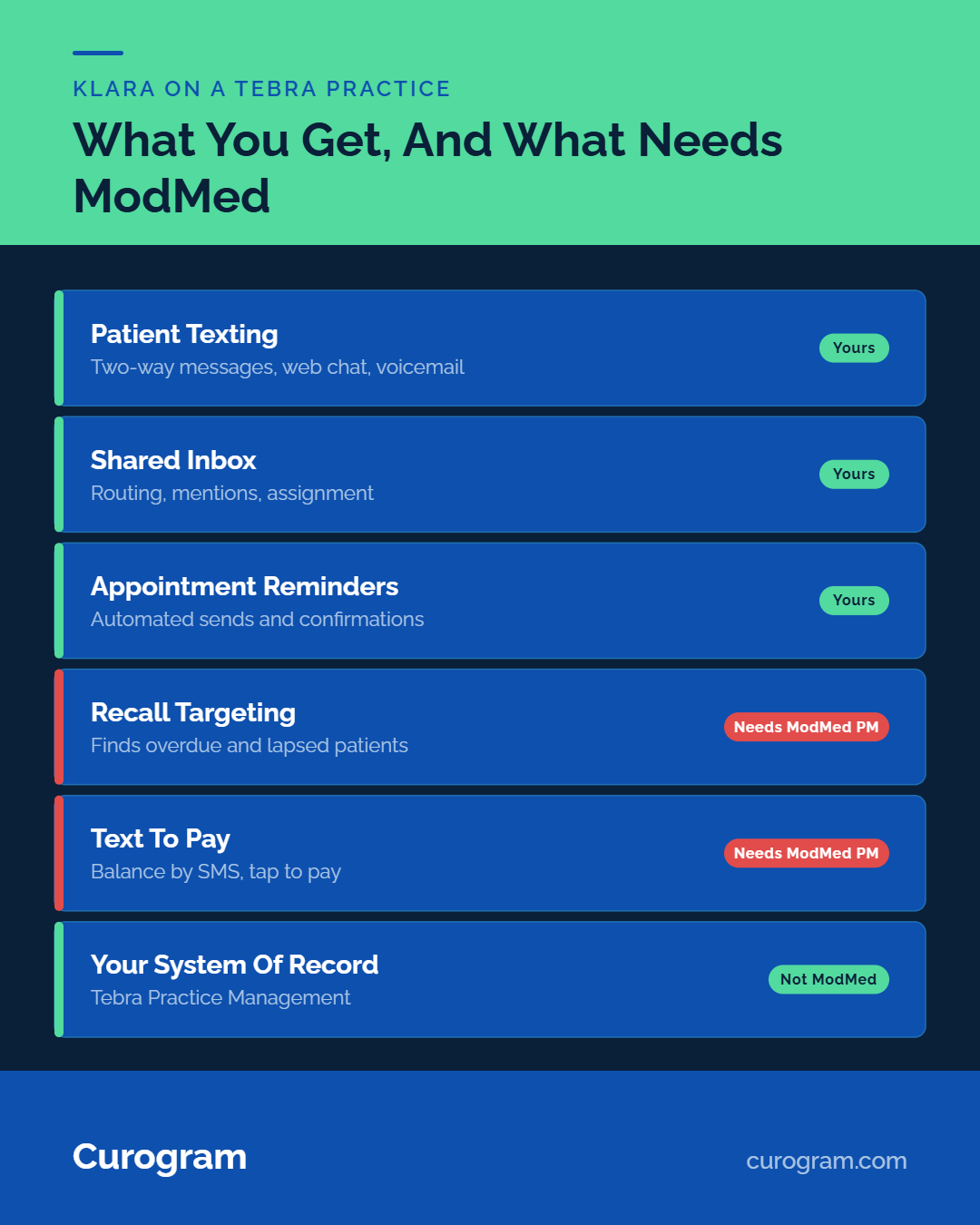
Curogram infographic comparing features for Tebra practices and ModMed integration

How Six Platforms Handle Group Messaging

We compared six HIPAA-compliant secure texting platforms on public product pages and help centers in September 2026.

Where Curogram Lands

Curogram is a HIPAA-compliant, SOC 2 Type II patient communication platform built around routing and roles. Advanced text routing and workflows send each message by provider, topic, location, appointment type, language, or patient group.

Staff can message each other and leave internal notes on a patient thread. Role-based permissions and permanent audit trails cover compliance, and reports track team response times and staff productivity.

Based on our internal data, 35% of patients at one multi-location practice booked within a month of an SMS recall. Those recall texts brought in 1,240 patients.

Group-scale capabilities compared (public documentation, checked September 2026; confirm each cell on a demo)

Platform

Provider-level routing

Internal clinical messaging

Per-provider reporting

Curogram

Yes: by provider, topic, location, appointment type

Yes: staff messaging and internal notes on threads

Partial: team response times and staff productivity

Klara (ModMed)

Partial: by message reason and location; provider-based routing listed as in development

Yes: shared inboxes and @mentions

Not publicly documented

TigerConnect

Partial: staff forward patient threads to care team members

Yes: role-based clinician messaging with on-call scheduling

Partial: message volume by team, department, role

Artera

Yes: phone lines tied to providers; user group mentions

Yes: internal mentions

Partial: user activity reports in Analytics Plus

Luma Health

Partial: assignment queues by user; filters by facility or group

Yes: internal team messages and @mentions

Not publicly documented

Solutionreach

Not publicly documented

Not publicly documented

Partial: reporting by provider; message metrics not documented


The Other Five, One Limitation Each

Each of the five does something well for groups, and each has a documented gap worth raising on a demo.

  • Klara, now part of ModMed, gives staff shared inboxes, thread assignment, and @mentions. Its help center says routing by a patient's next provider is still in the works, and only for some PM systems.
  • TigerConnect has the most fully documented clinician-to-clinician messaging of the six, with on-call schedules and escalation built in. Patient texting is a separate product, and its recent launches target hospitals.
  • Artera documents clear routing rules, user groups, and internal mentions. User-level reports sit in Analytics Plus, which Artera calls its premium analytics tier.
  • Where Luma Health stands out is assignment queues with internal notes and wide EHR coverage. We found no public page on per-user reply reporting.
  • Solutionreach bundles reminders, recall, intake, payments, and reviews. Its public pages don't cover provider routing or staff-to-staff messaging.

Fit by Group Shape

Group shape changes which routing rule does the most work in secure texting platforms for physician groups.

Single-Specialty Groups With Shared Call

Single-specialty groups with shared call need routing that follows the rotation, because any physician may cover any patient after hours. The pattern that works has three rules.

Daytime threads go to the patient's own provider team. After-hours threads go to whoever holds call that night. The morning handoff returns each thread to the home team.

In an illustrative 12-physician cardiology group, the platform should read one shared call calendar, so nobody reassigns threads by hand. Test the handoff on a weekend rotation before go-live.

Multi-Specialty Groups With Separate Panels

Multi-specialty groups with separate panels need routing keyed to the provider, because each patient's panel sits with one specialty team. A dermatology question shouldn't land in the orthopedics queue just because both teams share a building.

Route by the provider on the patient's last or next visit. With no visit on file, fall back to the specialty team. Send anything unmatched to one triage owner. EHR integration matters most here, since the rule depends on current appointment data.

Test the rule with a patient seen by two specialties before go-live.

Getting Providers On It

Rollout order decides whether providers treat secure healthcare messaging as help or as one more inbox.

Which Department Should Go First?

Start with the department that sends the most appointment confirmations. A confirmation is the simplest two-way thread: one reminder, one keyword reply, one schedule update.

High volume builds staff habits fast and gives a clear before-and-after. Front desk staff already know confirmations well, so the new tool is the only thing that changed.

Based on our internal data, Covina Arthritic Clinic confirms more than 1,100 appointments a month. That much daily repetition makes a new routine stick. Add clinical messaging for that department next. Then open HIPAA-compliant texting to the second department.

The First Ninety Days, in Numbers

Three metrics show whether the rollout is working, and each should move in one direction. Median first-reply time by provider team should fall, then flatten. The share of threads with no staff reply by end of shift should trend toward zero.

Confirmation rate by department should rise as patients learn the reply keyword. Our clients average a confirmation rate above 75%, based on our internal data, so record your own starting rate before launch. To price those gains, use the complete guide to HIPAA texting ROI.

Buy for the Provider Roster

A physician group's texting tool earns its budget when every thread reaches the right provider team, and every handoff leaves a record.

When secure texting platforms for physician groups reach the shortlist, routing and roles belong at the top of the scorecard.

Take the capability table into each demo. Ask the vendor to show, live, a message routed to a named provider, an internal note on that thread, and a report split by team.

Book a Curogram demo and bring your provider roster and call schedule. We'll walk through a routing rule for one department.


Frequently Asked Questions

What makes secure texting different for a physician group?

Provider-level routing and internal clinical messaging make the difference. Patient threads go to the rendering provider's care team, and nurses and physicians discuss the patient inside that thread through notes the patient never sees.

How does one platform handle both patient texting and clinical team messaging?

Staff add internal notes to the patient's thread, and only staff can see them. The clinical question, the answer, and the reply to the patient then share one record, which a separate chat app can't give an auditor.

How do on-call rotations work in a secure texting platform?

An assignment rule sends after-hours threads to whoever holds call that night, based on the group's call calendar. An escalation timer, such as 30 minutes, moves an unanswered urgent thread to a backup clinician.

Why should a group roll out secure texting one department at a time?

One department keeps reply volume manageable while staff learn assignment rules and keywords. Starting with the department that sends the most confirmations gives the clearest early read on reply time and confirmation rate.

How should a group test a vendor's routing claims before buying?

Ask for a live demo with your own provider roster. Send a test message for a patient seen by two providers, then watch where it routes, who gets notified, and what the audit log records.