
 Aubreigh Lee Daculug

Curogram works beside it. It adds a shared inbox for free-text replies, a confirmation dashboard, and review, payment and recall texts. Solo practices whose patients mostly confirm or cancel can stay with Reminder Mate alone.
For busier front desks, that extra coverage can show up in attendance. Curogram client Atlas Medical Center cut its no-show rate from 14.20% to 4.91%.
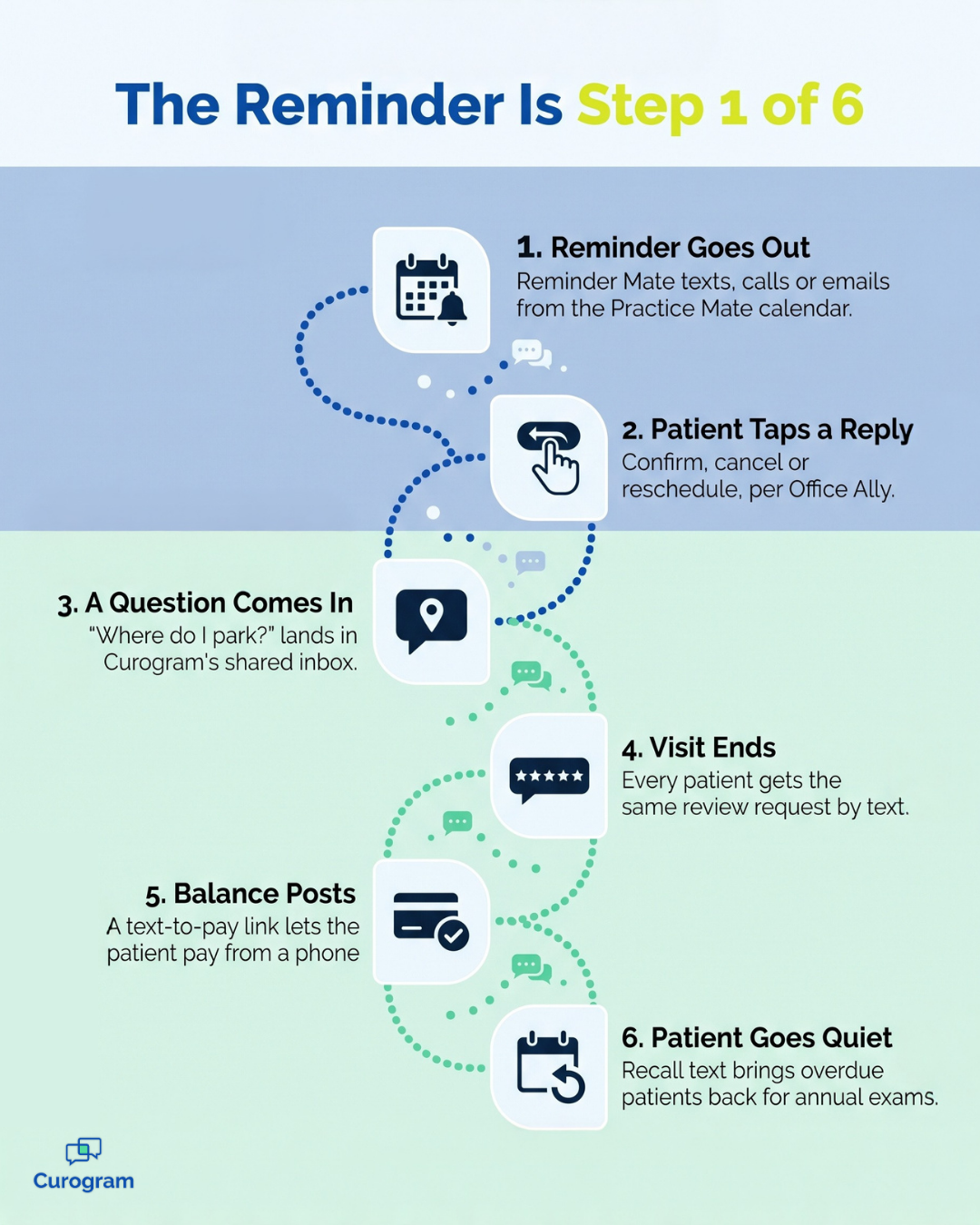
Reminder Mate did its job. Every patient on tomorrow's schedule got a text, a call or an email from Office Ally. Handling the messages that come back is a different job entirely.
One patient asks where to park. Another wants to know if she still owes $40 from her last visit. Yesterday's happy patient never got a review request, because the phones didn't stop ringing.
We think most practices using Office Ally Reminder Mate should keep it, since it sends reminders well.
Curogram covers the patient conversation around those reminders, and Office Ally stays your system of record the whole time.
What Reminder Mate Does Inside Office Ally
Reminder Mate is an Office Ally add-on for Practice Mate and EHR 24/7 users. Office Ally lists it on both product pages, and its job is clear.
Reminders by Text, Call and Email, From the Calendar
Reminder Mate sends reminders automatically from the Practice Mate scheduling calendar. Staff don't build a call list or type each message. Once a visit is booked, the reminder is queued.
It works across three channels: text, phone call and email. That flexibility helps with a mixed patient panel. An older patient who never reads texts can get a call. A college student who ignores calls can get a text instead.
Language support is a real strength. Office Ally says Reminder Mate can send reminders in 16 languages. For a clinic that serves Spanish, Vietnamese and Tagalog speakers, that saves a lot of manual work.
If your main goal is getting reminders out on time, this part is handled.
Confirm, Cancel and Reschedule Replies
Patients can answer a Reminder Mate message, too. Office Ally's own blog says patients can confirm, cancel or reschedule from a reminder.
What happens to those replies depends on how your account is set up.
Before you compare tools, check three things:
- Where do confirm and cancel replies land in Practice Mate?
- Who on staff reviews them, and by what time each morning?
- How fast does a canceled slot get offered to another patient?
If each answer has a name and a time attached, your reminder loop is in good shape. If the honest answer is "we check when we can," the gap sits in the follow-up.
The Patient Messages That Arrive After the Reminder
A reminder opens a conversation, and most of what patients send back doesn't fit a button. Several common after-visit texts also don't appear on Office Ally's product pages.
Questions That Don't Fit a Reply Button
Real replies are messy. One patient answers a reminder with
"Is Dr. Patel in Friday? I'd rather see her."
Another asks which entrance is closest to the lab. A parent sends a photo of a school form that needs a signature.
None of these is a confirm, cancel or reschedule, so they often end up on a callback list. Someone at the front desk writes down names and calls between check-ins. Each call that hits voicemail starts the loop again.
Curogram gives these messages a home. Replies land in a shared, free-text, two-way inbox. Any staff member can pick one up, answer it and mark it complete. The parking question takes one text instead of a phone call and a voicemail.
After-Visit Texts Office Ally's Pages Don't List
Some of the most useful texts go out after the visit. Office Ally's product pages don't list review requests, text-to-pay or recall broadcasts. Because Reminder Mate sends from the calendar, these jobs usually fall to staff, or they slip.
Curogram handles each one:
- Review requests go to every patient after the visit, while the experience is still fresh.
- Text-to-pay sends a secure payment link, so a $40 balance can be settled from a phone.
- Recall broadcasts reach patients who are overdue for an annual exam or follow-up.
Recall is the one we'd set up first. In Curogram client data from a multi-location practice, 35% of recalled patients booked within a month. Altogether, 1,240 patients returned for care from recall messages alone.
Office Ally Reminder Mate Compared With Curogram
For a quick Reminder Mate vs Curogram view, the table below uses only what each company publishes. The two overlap on reminders, then split on most of what follows.
| Feature | Reminder Mate (Office Ally) | Curogram |
|---|---|---|
| Where it lives | Office Ally add-on | Works beside Office Ally; syncs appointment data |
| Reminder channels | Text, call, email; 16 languages | Text, email, phone |
| Patient replies | Confirm, cancel, reschedule | Free-text two-way inbox |
| Confirmation dashboard | Not listed | Yes |
| Review requests | Not listed | Yes |
| Text-to-pay | Not listed | Yes |
| Recall broadcasts | Not listed | Yes |
| Telehealth link by text | Not listed | Yes |
| Security | Not listed | SOC 2 Type II + HIPAA, BAA |
What "Not Listed" Means in This Table
A "Not listed" cell means the feature doesn't appear on that vendor's public product pages. Office Ally may still offer it through support or a custom setup.
Treat the table as a starting point, and ask your Office Ally rep two direct questions.
Can Reminder Mate send review or payment texts?
Where do free-text replies go?
Then ask Curogram the same questions in a demo and write the answers side by side. If both tools cover a task, keep the one already in your account. If only one does, that task decides where it lives.
Running Curogram Beside Patient Ally and Reminder Mate
Office Ally stays in place when you add Curogram. Each tool needs a clear job, so patients get one message per task. Our Office Ally add-ons guide once OA0 is live maps every option side by side.
Where Patient Ally Fits in a Texting Setup
Patient Ally is Office Ally's no-cost patient portal. Patients use it for lab results, clinical notes, secure messages, appointment requests and intake documents.
Keep it. The portal is the right place for records a patient wants to read at home.
Texting covers a different moment. A patient running late won't log in to a portal to say so, but a text reply takes one thumb.
Curogram reaches patients by text with no login, so quick questions and updates go there. Records stay in Patient Ally, and Office Ally remains the record behind both.
One Sender per Message Type
Duplicate reminders confuse patients. The fix is one simple rule: a single tool sends each message type. Two setups work well.
| Message type | Setup A | Setup B |
|---|---|---|
| Appointment reminders | Reminder Mate | Curogram |
| Replies and questions | Curogram | Curogram |
| Review requests | Curogram | Curogram |
| Payment links | Curogram | Curogram |
Setup A keeps what already works. Setup B puts every patient text in one place, through Curogram's appointment reminders for Office Ally.
If you also use Updox Messaging from Office Ally, add it to the same table. Our Curogram vs Updox comparison covers how those two overlap.
When Reminder Mate Alone Is Enough
Some practices don't need anything more. A solo provider with a short daily schedule may get very few free-text replies. If patients mostly tap confirm or cancel, Reminder Mate covers the job.
The same goes for practices with no plans for review requests, text payments or recall campaigns. For them, a second tool means a second login and a second bill for little gain.

We'd tell that practice to stay put. Revisit the question when replies start to pile up, or when a second provider joins.
Signs the Front Desk Needs a Reminder Mate Alternative
Other practices outgrow a reminders-only setup.
Watch for these signs:
- A callback list sits by the phone every morning.
- Google reviews have stalled, even though patients say kind things at checkout.
- Paper statements still go out monthly, and balances age past 60 days.
- Recall lists exist, but nobody has time to call them.
Any one of these means patient messages are landing on people instead of a system. That's when a Reminder Mate alternative earns a look, even if Reminder Mate keeps sending reminders. Curogram's review requests and text-to-pay for Office Ally cover two of those four signs.
Your Next Step With Office Ally
Reminder Mate sends the reminder well, in 16 languages, and lets patients confirm, cancel or reschedule. If that covers your replies, you don't need a second tool.
The texts that follow the reminder need a home too, though. Questions, review requests, balances and recalls are where Curogram fits beside Office Ally. At Atlas Medical Center, no-shows dropped from 14.20% to 4.91% with Curogram.
Book a demo to see Curogram running beside Office Ally, built around your own schedule and message types.
Frequently Asked Questions