
 Jo Galvez

For a one-provider office, the best fit posts two-way replies to the schedule and keeps messages HIPAA-compliant.
We rank Curogram first: it writes confirmations back to EHRs like eClinicalWorks and Tebra, and adds intake and payments. DoctorConnect suits tight timing control, and Tebra fits Tebra offices.
Luma Health and Phreesia suit larger groups. Curogram clients average a confirmation rate above 75%, per Curogram client data from clinical settings.
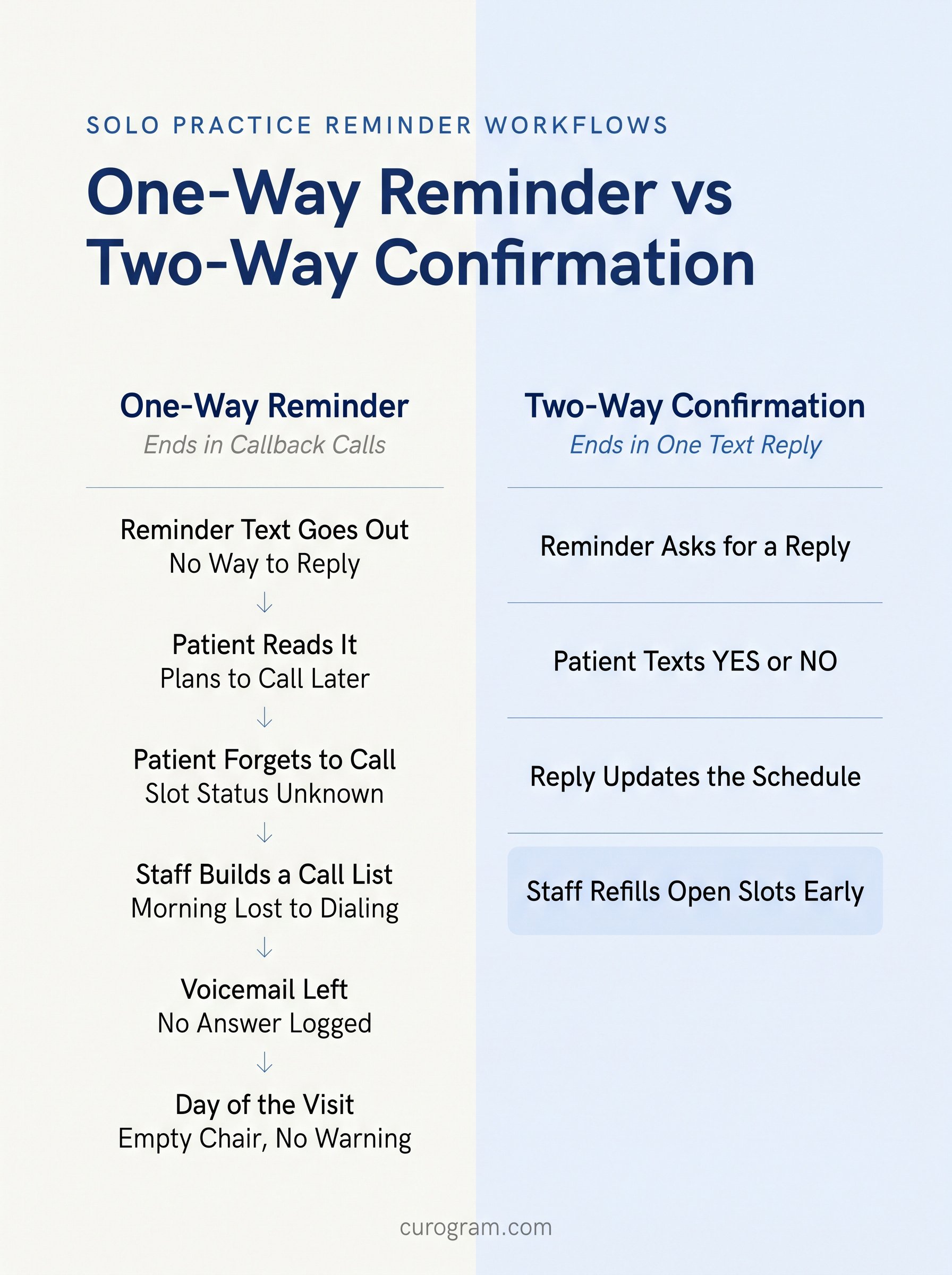
It's 8:10 on a Monday. Your one front desk person has 22 names on the reminder call list. Two lines are ringing, and a patient is waiting. By 9:00, she's reached six people and left voicemails for the rest.
That call list is where solo practices lose visits. One provider means one schedule. A single empty slot is a bigger share of the day than it would be at a 10-provider group.
Our view is simple. In a one-provider office, the right appointment reminder software posts each patient reply to the schedule on its own. A tool that stops at sending a text still leaves your staff holding the call list.
We compared the six tools solo practices ask us about most.
How we chose the best appointment reminder software for solo practices
What a one-provider front desk can't absorb
A solo office usually runs with one or two front desk staff. They check patients in, post payments, and answer the phone.
A tool that adds a daily export gets skipped by Wednesday. So we judged each platform by what it takes off that desk.
The criteria we scored
- Two-way replies: Can patients confirm or cancel by text, and does the answer post without staff help?
- EHR fit: Does it sync with your current system and update the schedule?
- Reminder rules: Can timing and wording change by provider or visit type?
- HIPAA safeguards: Is it HIPAA-compliant texting, and will the vendor sign a business associate agreement (BAA)?
- Go-live time: Can a two-person front desk be running within days?
The 6 best appointment reminder tools for solo medical practices
1. Curogram: Best overall appointment reminder software for solo medical practices
Curogram sends text, email, or voice reminders on a schedule you set for each appointment type. Patients reply YES or NO to your practice's local number. On EHRs with write-back, that reply lands in the appointment as Confirmed or Cancelled.
Curogram has 60+ EHR connections ready to turn on, including eClinicalWorks, athenahealth, DrChrono, Practice Fusion, and Tebra. Most credential-based setups go live in one day.
Atlas Medical Center cut no-shows from 14.20% to 4.91% in three months, per Curogram client data from clinical settings.
Curogram features
- Status write-back: On eClinicalWorks, replies post as Confirmed, Cancel, Reschedule, or No Show.
- Intake to the chart: On Tebra and DrChrono, intake forms and insurance card images post to the chart.
Curogram pros and cons
Pros:
- Reminders, intake forms, text-to-pay, and telemedicine run on one platform
Cons:
- Write-back varies by EHR; some therapy EHRs, like TherapyNotes, sync appointments without it
2. DoctorConnect: Customizable multi-channel reminders with granular scheduling rules
DoctorConnect supports up to three reminder intervals per appointment by text, voice, or email. The vendor lists more than 150 EHR and practice management integrations.
DoctorConnect features
- Three intervals: An email three days out, a text the day before, a call that morning.
DoctorConnect pros and cons
Pros:
- Fine timing control for practices with many visit types
Cons:
- Pricing isn't published, so you'll need a quote
3. Tebra: Built-in reminders bundled with a full practice management suite
Tebra sends automated SMS and email reminders from inside its EHR. Its messaging tools add two-way texting, and intake forms can go out with the reminder. If you run another EHR, it's off the table.
Tebra features
- Automated reminders: SMS and email on a set schedule before each visit.
Tebra pros and cons
Pros:
- No third-party connection to set up for Tebra users
Cons:
- Switching EHRs later means rebuilding your reminder setup

4. Luma Health: AI-powered intent recognition for appointment confirmations
Luma Health reads replies the way a person would. "Sure thing" or a thumbs-up counts as a confirmation. Luma lists more than 70 integrations and reminders in 20+ languages.
Luma Health features
- Natural-language replies: Free text and emojis map to confirm, cancel, or reschedule.
- Smart waitlist: Open slots get offered to waitlisted patients by text.
Luma Health pros and cons
Pros:
- Patients don't have to remember "Reply C to confirm"
Cons:
- Referral and broadcast tools add setup a one-provider office may not need
5. Phreesia: Digital intake and appointment reminders in one pre-visit workflow
Phreesia sends reminders by email, text, and voice in the patient's preferred language. Its bigger draw is intake, with registration and insurance done before the visit. Appointment Accelerator rebooks canceled slots, but Phreesia lists it for six EHRs.
Phreesia features
- Appointment Accelerator: Canceled slots get offered to other patients.
Phreesia pros and cons
Pros:
- Reminders and intake come from one vendor
Cons:
- Setting up intake and reminders together takes longer than a reminder-only tool
6. Emitrr: EHR-triggered reminder sequences with confirmation tracking
Emitrr pulls appointments from your EHR and texts reminders at 48 hours, 24 hours, and same day. It also sells a business phone system. Write-back depends on the EHR; on Practice EHR, replies update the appointment status.
Emitrr features
- Shared inbox: Two-way texts land in one HIPAA-compliant inbox.
Emitrr pros and cons
Pros:
- A good fit if you also want to replace the office phone system
Cons:
- Built for many industries, so healthcare workflows vary by setup
Comparison table: The best appointment reminder software for solo medical practices
Integration counts come from each vendor's own pages. Confirm your exact EHR during the demo.
|
Platform |
Two-Way Replies |
EHR Fit |
Best For |
|---|---|---|---|
|
Curogram |
Yes, YES/NO to a local number |
60+ EHRs ready; status write-back on many |
Reminders, intake, and payments together |
|
DoctorConnect |
Yes |
150+ EHR and PM systems |
Tight control over reminder timing |
|
Tebra |
Yes |
Tebra only |
Offices already on Tebra |
|
Luma Health |
Yes, reads free text |
70+ systems |
Multi-location groups |
|
Phreesia |
Confirm, cancel, or reschedule request |
Wide; slot fill on 6 EHRs |
Practices focused on intake |
|
Emitrr |
Yes |
Varies by EHR |
Offices that also want a phone system |
 What should a solo medical practice look for in reminder software?
Start with what happens after the patient replies
If a reply sits in a separate inbox, someone still opens the EHR to mark the visit confirmed.
Patient no-shows are rising for many groups. An MGMA Stat poll from August 2026 found 32% of medical groups saw higher no-show rates than in 2025. Many of those groups already sent text reminders.
Check the EHR integration before the feature list
Ask which appointment statuses write back to your EHR, by name. The answer differs by system, even inside one vendor. This is what Curogram writes back on EHRs that solo offices often run:
|
EHR |
Statuses Written Back |
Typical Setup |
|---|---|---|
|
eClinicalWorks |
Confirmed, Cancel, Reschedule, No Show |
1 day |
|
DrChrono |
Confirmed, Cancelled, No Show |
1 day |
|
Practice Fusion |
Confirm, Cancelled, No Show |
1 day |
|
Office Ally |
Confirmed, Cancelled, No Show, Reschedule Request |
1 day |
|
Tebra |
Confirmed, Cancel |
1 day |
|
athenahealth |
Confirmed, Cancel |
About 5 days |
athenahealth takes longer because athena has to approve the interface, which runs 2 to 5 days. Some EHRs also charge their own fee. AdvancedMD, for example, bills $500 to set up plus $40 a month per office key.
Then run a live EHR integration test during the demo. Text a test patient, reply, and open the appointment in your EHR.
How does two-way texting reduce no-shows for independent practices?
A cancellation at 6 PM is a slot you can still fill
With a one-way reminder, the patient who can't come has to call you. Many never do. With two-way texting, they reply NO the night before, and staff can text a waitlisted patient.
Covina Arthritic Clinic averages over 1,100 confirmed visits a month, per Curogram client data from clinical settings.
A worked example for one provider
Take a provider who sees 20 patients a day at $100 per visit over 20 working days. These figures are illustrative.
|
No-Show Rate |
Empty Slots a Day |
Lost a Day |
Lost a Month |
|---|---|---|---|
|
10% |
2 |
$200 |
$4,000 |
|
5% |
1 |
$100 |
$2,000 |
Cutting no-shows from 10% to 5% keeps about $2,000 a month.
Curogram Highlight: The Confirmation Loop
Confirmation Loop ties the reminder, the reply, and the EHR together. The patient replies YES or NO, and Curogram writes the status into the appointment on supported EHRs. On athenahealth, the next three days of appointments resync every 15 minutes. A late change still gets its reminder.
Curogram clients average a confirmation rate above 75%, per Curogram client data from clinical settings. Curogram is HIPAA-compliant and SOC 2 Type II certified, and it runs alongside your EHR.
Why Curogram is the best appointment reminder software for solo medical practices
For a one-provider office, we'd pick the reminder tool that removes the most phone calls. Curogram does that by turning each patient reply into a schedule update. Intake forms, text-to-pay, and telemedicine run on the same platform, so there's one vendor to manage.
The other five each fit a specific setup, and the table shows where. Practices using Curogram's automated reminders report revenue gains of 10% to 20%, per Curogram client data from clinical settings.
Before you sign, run one test: text a reminder to a test patient and see where the reply lands.
Book a Curogram demo and watch a test reminder go from your practice number to your EHR schedule.
Frequently Asked Questions