9 min read

Curogram vs Updox: Healthcare-Only vs Portfolio Product

Curogram vs Updox: Healthcare-Only vs Portfolio Product
 💡 A Curogram vs Updox comparison of patient communication comes down to where your work piles up. Updox fits practices whose day is built around documents: inbound faxes, referrals, forms, chart filing.

Curogram fits practices whose day is built around the patient conversation, from reminders and confirmations to reschedules, review requests and balance texts.

Updox sells into healthcare from inside EverCommerce, a portfolio serving more than 745,000 small-business customers across home, health and wellness.

Curogram sells to outpatient medical practices and nothing else. Both are HIPAA-compliant and sign BAAs. Match the tool to whichever side your week actually leans.


Feature requests queue, and the queue is shaped by who else is standing in it. A practice manager asking Updox for per-thread assignment files that request inside EverCommerce, whose other customers run home-service businesses and wellness studios. The same request at Curogram has no other vertical to lose to.

Neither company hides any of this. EverCommerce reports its customer count every quarter, and it belongs to a real business with real engineers. Curogram's founder sent developers to sit beside front desk staff before the first version shipped.

So the renewal question has less to do with feature checklists than vendor pages suggest. Ask where a healthcare request sits in the build queue, and who owns your ticket when texting breaks on a Tuesday. Both show up below

Two Companies With Different Day Jobs

Where each one's revenue comes from

EverCommerce's fourth quarter and full year 2025 results report revenue of $151.2 million for the quarter and more than 745,000 SMB customers worldwide across its EverPro, EverHealth and EverWell brands. Updox sits in EverHealth.

It arrived there in December 2020 through EverCommerce's acquisition of Updox, which at the time served about 560,000 users and connected to more than 100 EHR and pharmacy management systems.

Curogram's customer list is outpatient medical practices, from single-physician offices to multi-location groups with hundreds of providers. No home services division. No wellness division.

We will defend a mild claim here. Roadmap attention follows where the revenue is. At a healthcare-only company, a healthcare request competes with other healthcare requests.

At a three-vertical company, it competes with everything. Practices building the wider Updox alternatives shortlist should start with that question rather than with feature counts.

What that does and does not predict

Portfolio ownership does not make a product worse. Updox's unified inbox pulls faxes, secure texts, portal messages and documents into one place.

Capterra reviewers most often name faxing, patient management, reminders, and ease of use as what works for them. Scale buys real things too: shared security investment, a bigger support team, capital for AI work.

Order is what it predicts. EverCommerce runs three brands: EverPro for home services, EverHealth for healthcare, EverWell for wellness. A healthcare request therefore sits in standing contest with two other industries for the same engineering quarter.

Ask your account manager where patient texting lands on this year's roadmap, and listen for whether the answer names a quarter.

The Same Questions, Put to Both

Owner, focus and feature depth

Most Curogram vs Updox features questions get settled by the same eight rows, so we put both products against them. Two notes before you read the table.

Integration counts do not compare cleanly. Updox's acquisition release cited more than 100 EHR and pharmacy management systems, a total that includes pharmacy software a medical practice will never open.

Curogram publishes outpatient EMR and practice management integrations only. Count the ones you run, not the ones on a logo wall.

A row appearing in both columns can still behave differently. Both products run a shared inbox. Whether a thread inside it can be assigned to one named person and marked closed is a separate question.

It is the one to put to both vendors in a demo. Updox reviews on G2 are worth reading first for how practices describe the daily experience.

Two rows are missing on purpose: price, and the fax audit. Each owns its own page.


Curogram

Updox

Owner

Curogram, Inc.

EverCommerce (Nasdaq: EVCM), since December 2020

Healthcare-only revenue

100%, outpatient medical practices only

One vertical inside a 745,000+ SMB portfolio across home, health and wellness

Named EMR integrations

Outpatient EMR and practice management systems, including eClinicalWorks, Practice Fusion, athenahealth and DrChrono

100+ EHR and pharmacy management systems cited at acquisition; Practice Fusion and Amazing Charts named most by reviewers

2-way texting

Yes, HIPAA-compliant 2-way texting with patients

Yes, secure texting from the unified inbox

Shared team inbox

Yes, with the full patient history inside the thread

Yes, one inbox for faxes, texts, portal messages and documents

Google review automation

Yes, post-visit review requests to the practice's Google profile

Not listed in the published Updox feature set

Text-to-pay

Yes

Payments through the patient portal

Document and fax routing

Picks up after the document lands, at the patient message

Core strength: e-fax, tagging and routing to the chart

Table sources: EverCommerce Q4/FY2025 results and 2020 Updox acquisition release; Updox published feature documentation; Curogram internal product data.

The two rows that matter most

In an Updox comparison, texting behavior decides more weeks than fax behavior does, so start with the shared inbox. Every user can see every thread in both products.

Press hard on what happens when two users open the same thread at the same moment, because a busy morning creates that state constantly and demos almost never show it.

After-hours replies are the second row. A patient texting at 7pm is answering something your system sent: a reminder, a balance notice, a form link.

Where that reply sits overnight decides how much your 8am opener has to rebuild before she can answer. Ask both vendors to walk the 7pm-to-8am path on a live screen, not a slide.

Skip the other six rows for now. The table carries them. One of them, review requests going out after a completed visit, has a full page of its own under healthcare reputation management.

Two Workflows, Traced End to End

The referral that arrives by fax

A cardiology referral lands at 10:40am as an inbound fax. Inside Updox it hits the unified inbox, gets tagged, and routes to the chart. That part works, and it is much of why practices keep Updox.

Then the trail stops. Somebody still has to reach the patient and book the appointment the referral exists for. That step sits outside the document workflow, usually on a sticky note or in one person's memory. The referral stays in the chart, filed and unscheduled, until someone runs a report on Friday.

Curogram's role starts at the next step. The patient gets a text with open slots, replies with a choice, and the thread lands where the front desk is already working. See clinical workflow automation compared for the longer trace.

The patient who replies at 7pm

7:04pm. “Can I move Thursday to next week?” Her appointment is Thursday at 9am. The office closed at five.

Follow that message for the next thirteen hours. Does it land somewhere a person opens before the doors open? Can she be identified by name, with the reminder that prompted her reply sitting above it in the same thread?

Or is it a standalone text with no schedule attached, leaving the 8am opener to look her up, find Thursday, check availability and start over?

Time that rebuild yourself on a Monday, and count the overnight threads while you are at it. Those two numbers belong in front of both vendors, because they are yours rather than ours.

Curogram keeps HIPAA-compliant 2-way texting in one thread with the reminder that prompted the reply, so the opener reads the exchange in place instead of assembling it.

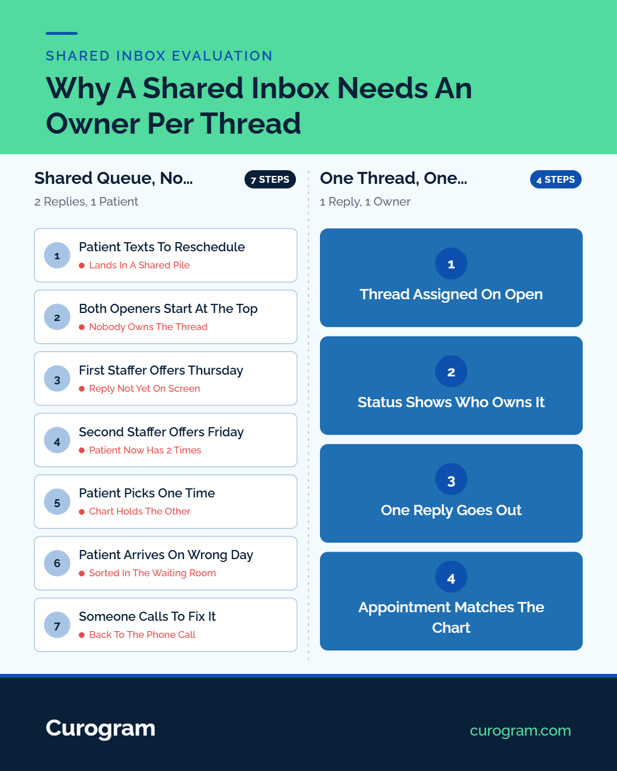
Infographic comparing unassigned shared queue vs single-owner thread workflows

The Front Desk Test

Monday morning, 41 unread

41 unread threads at 8:02 on a Monday. None of them assigned. Two openers start at the top and work down, because that is what people do with a list.

At 8:20, Marisol answers a rescheduling request with Thursday at 2. At 8:24 the second opener answers the same thread with Friday at 10, because the first reply had not refreshed on her screen.

So the patient holds two appointment times. She picks one. The chart holds the other, and on the day of the visit somebody sorts it out in front of a full waiting room.

A shared queue with no ownership state produces that on its busiest mornings. Visibility prevents none of it. Both openers could see everything, including each other's sent replies, a few seconds too late.

What ends it is dull: an assignee field, a status that changes, and a rule that whoever opens a thread owns it until it closes. Ask your vendor to show that field on a real thread. If the answer involves colored flags, you have your answer.

Confirmations that write back

Covina Arthritic Clinic confirms more than 1,100 appointments a month through Curogram, based on our internal data. Across current Curogram clients, the average appointment confirmation rate runs above 75%, also based on our internal data.

Two-Way Confirmation Threads is the mechanic underneath. A reminder goes out on the schedule the practice sets. The patient replies to confirm, or asks to move.

That reply updates the appointment's status inside the same thread, so the front desk works from a status instead of a printed list and a highlighter.

Sync direction deserves a direct question, ours included. Ask whether confirmations write back to the EMR record or stay in the communication platform, and ask to watch it happen on a live appointment during the demo. The answer decides who retypes what, every morning.

One real limit: this runs on the mobile number in the record. Practices carrying three-year-old phone data see the confirmation rate before cleanup, not the one after it.

Support and Compliance

Who picks up the phone

Two questions belong in every renewal conversation, and both should come back in writing.

Is the support queue healthcare-only? Every vendor supports healthcare. Ask instead whether the person picking up a ticket at 2pm handles medical practices all day, or handles whatever arrives from whichever product in the portfolio raised it.

What is the written escalation path? Name, tier, and response window for a texting outage on a Monday. A vendor who needs a week to put that in writing has told you something about week two of an outage.

We will not assert an answer for Updox that we cannot verify. Public reviews on G2 and Capterra carry praise for responsive account management alongside complaints about reaching anyone during outages.

Get your answer from the vendor, dated, and file it with the contract. For how the two price against each other, the full Curogram and Updox cost comparison goes through it line by line.

Where both vendors have to be

Neither vendor clears a bar the other misses here. HIPAA applies to both. Both execute BAAs with covered entities. Both encrypt PHI in transit and at rest.

Curogram publishes its SOC 2 Type II and HIPAA compliance standards, and you can ask us for the current report date. Ask Updox for theirs as well, and ask for the date rather than the badge, because a report covering 2023 covers 2023.

HHS HIPAA guidance for covered entities is worth reading first, because the obligation sits with the practice. A BAA splits duties between you and the vendor. Yours stay yours.

Retention is the question that gets skipped. How long do patient texts live in the platform, who can export them, and what happens to the archive if you leave? Get that answered by both.

Assignment, not just visibility

Two settings get mixed up in every shared-inbox demo. Visibility means everyone can open every thread. Ownership means one named person holds a thread until it closes, and the system shows who.

Real ownership needs three parts: an assignee field, a status that moves, and a house rule about who takes what. Vendors supply the first two. The third belongs to whoever runs the front desk, and it is usually the part that breaks first.

Run this check in any demo. Have the rep assign a thread to themselves, then have a second user open it and try to reply. Whatever happens next, whether a warning, a lock or nothing, is what happens on your busiest Monday.

Where Each One Belongs

Stay with Updox when

Three situations where switching costs more than it returns.

Documents are the job. If the week is faxes, referrals, records requests, and chart filing, that unified inbox is doing real work, and pulling it out to gain texting features swaps a solved problem for an open one.

Your EMR is Practice Fusion or Amazing Charts and the Updox connection is the one your staff already learned. Capterra lists both as the integrations its reviewers cite most. A working connection nobody has to be retrained on outranks a longer feature list.

Video visits already run inside the product the front desk opens every morning. Splitting that across two tools means two logins and two support numbers on the day something goes wrong.

Move to Curogram when

Patient conversations outnumber documents. Count a normal week: if the front desk spends more time confirming, rescheduling, and chasing balances than routing faxes, the center of gravity has moved.

You would rather run review requests, balance texts, and confirmations from the same thread as the reminder, instead of paying a second vendor and training staff on a second login.

And there is the plain version of the argument: you want a vendor whose only customer type is a practice like yours.

Book a side-by-side demo and bring your own Monday queue to it. To run the arithmetic first, the no-show ROI calculator takes about two minutes.

Whose Roadmap You're On

Updox or Curogram for medical practices comes down to a question a practice manager can answer in a minute: does the week run on documents, or on conversations? Buy for that answer, then route the other half to whatever already handles it well.

Curogram sells to outpatient practices and nobody else. That is a limitation, and also why nothing sits ahead of healthcare in our build queue. Book a demo and put a real Monday queue in front of us.

Schedule a demo today. Consultation only, no obligation.


Frequently Asked Questions

How does Curogram fit alongside a practice's existing fax workflow?

Practices keep the fax line or EMR fax module they already run, and Curogram picks up the step after the document lands. That means texting the patient to schedule, to confirm, or to return whatever form the referral asks for. 

How do practices run both platforms during a transition?

Most keep Updox on documents and move patient messaging to Curogram for the first several weeks, then decide what stays. Keep one inbound number per channel so replies do not split. The switch from Updox to Curogram guide covers porting and opt-out transfer.

Why does the answer on EMR integration depth change by system?

Each platform reads and writes different fields on different EMRs. Appointments, statuses, demographics and document routing all behave differently by vendor. How the two integration architectures differ walks through it system by system. 

Why does a shared inbox need thread assignment and not just visibility?

Visibility lets two staff answer one patient separately. An assignee field plus a status that changes makes one person accountable until the thread closes, which is what stops conflicting answers going out on a busy Monday. 

How should a practice compare vendor support at renewal?

Ask both vendors in writing whether the support queue is healthcare-only, then request the escalation path by name, tier and response window for a Monday outage. Keep the dated answer filed with the contract.