8 min read

Curogram vs. Updox: EHR Integration Architecture Compared

Curogram vs. Updox: EHR Integration Architecture Compared
💡 Curogram and Updox take very different paths when it comes to EHR integration architecture. Curogram uses a cloud-native REST API that reads from and writes to your EHR in real time. Data flows in both directions without staff having to step in. Updox relies on a document-centric push/pull sync model. Staff must map, route, and push documents into patient charts by hand.

Curogram writes discrete data into specific EHR fields like allergies, medications, and appointment status. Updox produces flat-file documents that staff must then transcribe into the right fields. Based on our internal data, practices using Curogram's bi-directional API see over 75% automated confirmation rates and no-show drops of up to 65%.

When comparing Curogram Updox EHR integration architecture, the core gap is automation versus manual work at every data exchange point.

Your EHR should work with your tools, not against them. But for many practices, the way their patient platform connects to their EHR creates more work than it removes.

That is the hidden cost of the wrong integration model. A system that looks connected on the surface can still force your staff to copy, paste, and retype data all day. And if your team is stuck routing documents by hand, you are paying for a problem that modern tools should have solved years ago.

This is where the gap between Curogram and Updox becomes hard to ignore. Both platforms connect to EHR systems. But the way each one moves data is very different. Curogram Updox EHR integration architecture is not just a technical detail. It shapes how much manual work your staff does every single day.

Curogram uses a bi-directional API that reads from and writes to your EHR on its own. Patient data, confirmations, intake forms, and schedule updates all sync in real time. No inbox. No document routing. No staff standing between the platform and the chart.

Updox takes a different path. Its roots are in document management. So its integration model centers on pushing and pulling documents through a queue.

Staff must map each item to the right patient. They must pull updates from the EHR. And they must push processed documents back into the chart, often by hand.

In this article, we break down how each platform handles EHR data exchange. You will see how the architecture behind each system affects your staff's workload, your data quality, and your ability to scale. If you are weighing these two platforms, this is the comparison that matters most.

Document Routing vs. Discrete Data Exchange in Healthcare EHR Integration

Healthcare EHR integration has come a long way. It started with faxes. Then came digital document routing, where files moved from one system to another but still needed human hands. Now, modern APIs allow real-time, discrete data exchange between platforms and EHRs.

Each of these stages reflects a very different idea about how patient data should move. And each one comes with a clear trade-off in staff workload, data quality, and speed.

Document routing means the platform sends a file, like a PDF or image, to the EHR. A staff member then opens that file, reads it, and types the data into the right fields. The system moved the document, but a human still had to move the data. This is the model Updox was built on. Its integration reflects its origins as a document-centric vs API-driven healthcare platform.

Discrete data exchange is the opposite. The platform reads structured data from the EHR and writes structured data back. No documents. No manual mapping. Each data point lands in the correct field on its own. This is how a bi-directional API vs manual document mapping approach works, and it is the model Curogram was built around.

Why does this matter in practice? Think about a patient who fills out an intake form. With document routing, the form becomes a flat file.

A staff member must open it, find each data point, and type it into the EHR. With discrete data exchange, the form responses map directly to the EHR fields for allergies, medications, and history. No one needs to retype anything.

The gap between these two models grows with volume. A practice that handles fifty patients a day can manage some manual routing. A practice handling two hundred cannot. At scale, the architecture behind your integration is what decides whether your team keeps up or falls behind.

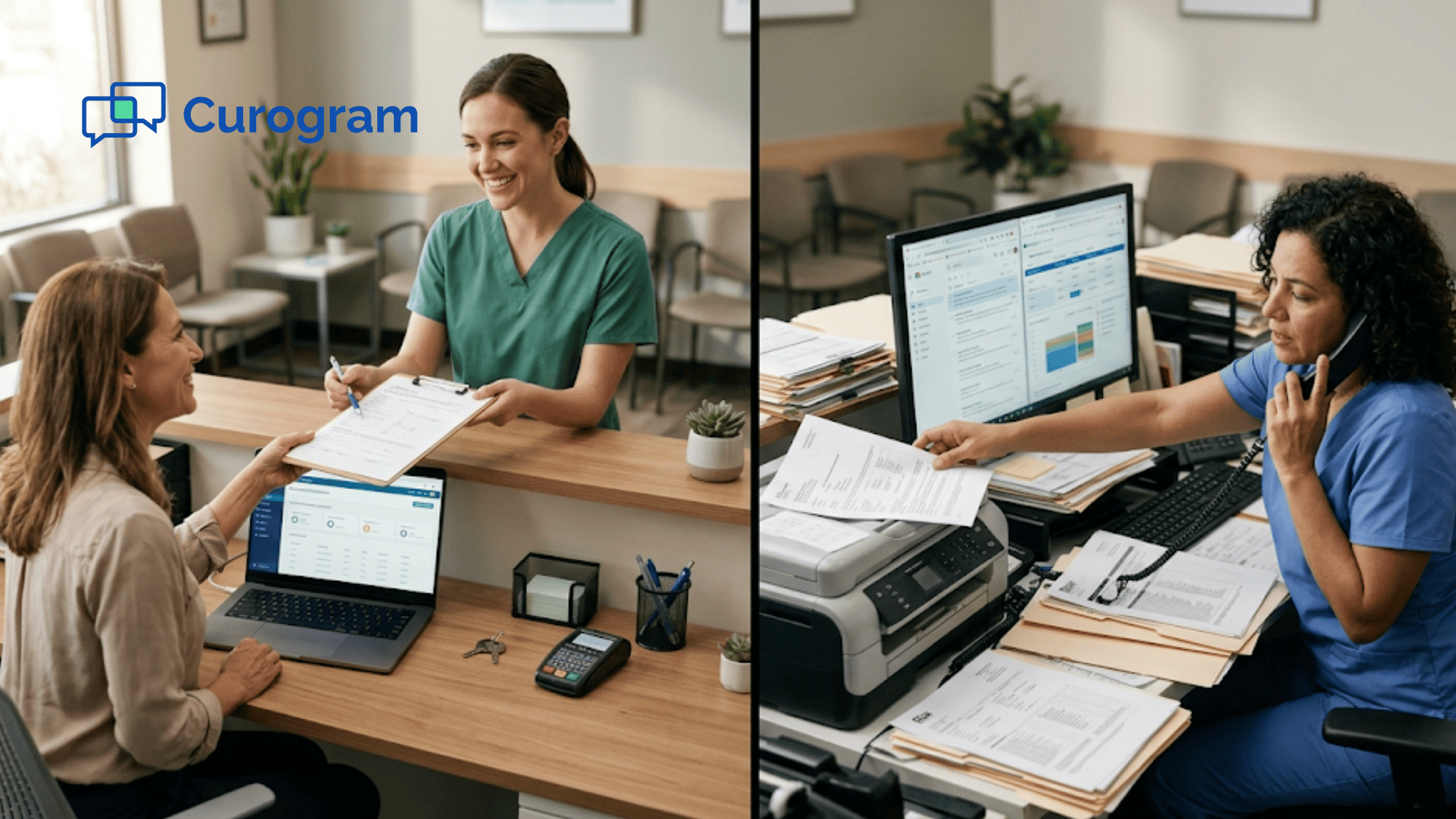
Medical office staff member manually transcribing patient intake form data into EHR system on desktop computer at busy front desk

Bi-Directional API vs. Document-Centric Push/Pull Sync

Curogram's integration runs on modern REST API standards. It connects to your EHR through a continuous, two-way data exchange. The platform reads patient details, schedules, and clinical data from the EHR. It also writes data back, like confirmation status, intake responses, and appointment updates, in real time.

There is no document queue. No inbox for staff to sort through. Data moves in structured form between Curogram and the EHR with no human step in between.

Updox works differently. Because it grew from a document management background, its sync model is built around pushing and pulling files. Based on patterns in verified G2 reviews, users report several friction points.

Staff must manually map incoming messages or forms to the correct patient. They must pull updates from the EHR into Updox. And they must push finished documents back into the chart.

In some EHR setups, the Updox unidirectional integration enterprise EHR limitation makes this even harder. Data only flows one way, from the EHR to Updox. Nothing goes back on its own. This means staff must handle every return trip by hand.

Here is a clear example:

Imagine a patient confirms an appointment through the platform. With Curogram, that response writes directly to the EHR schedule. The status updates in seconds with zero staff input. With Updox's push pull EHR sync limitations, that same response may sit in a queue. A staff member must see it, match it to the right patient, and update the EHR by hand.


The core issue is this: Curogram's API trades structured data on its own, while Updox's model routes flat documents that need a human to process them. When your practice manages hundreds of data exchanges a day, this is the difference between a system that saves time and one that creates busywork.

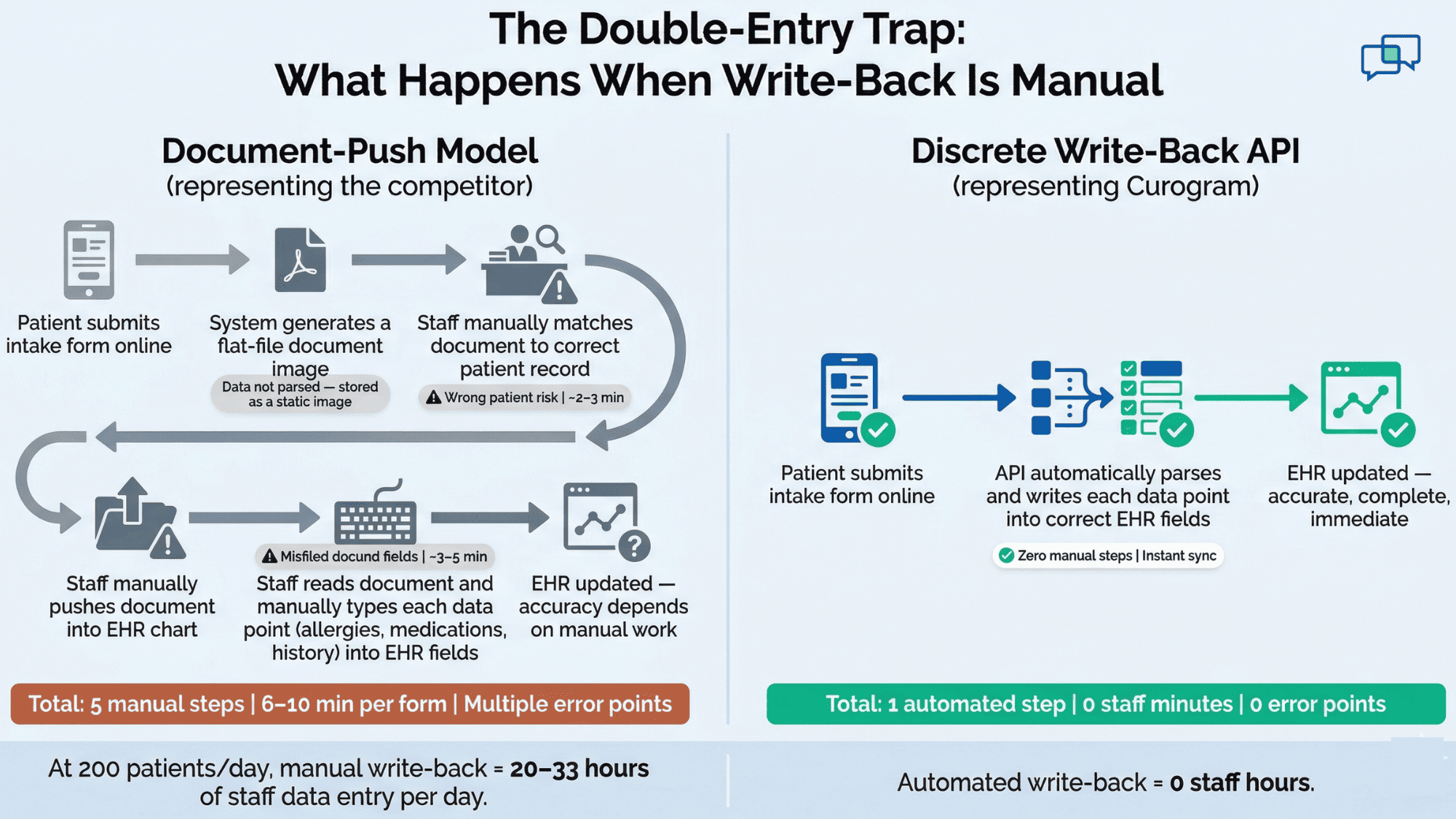
Curogram versus Updox EHR integration architecture infographic comparing five manual steps to one automated step for patient intake data entry

Discrete Write-Back vs. Document Push with Manual Mapping

Write-back is where the real gap between these two platforms shows up. This is the step where data from the platform gets recorded in the EHR. The method each platform uses for this step defines how much manual work your staff must do.

Curogram's bi-directional API writes discrete data into specific EHR fields. When a patient fills out an intake form, the responses map to the right places: allergies go to the allergy field, medications go to the medication list, and history notes land in the history section.

Confirmation replies update the appointment status. Demographic changes sync in real time. The data cycle completes itself without staff touching it.

With Updox, the process is very different. The Updox EHR data write-back comparison reveals a manual, multi-step workflow. When a patient fills out a form through Updox, the system creates a document image.

Staff must then push that document into the EHR chart by hand. But the data inside that document is not parsed into discrete fields. So staff must also open the document, read through it, and type each data point into the matching EHR field. This is the double-entry burden that modern integration should remove.

The impact of discrete write-back shows clearly in real-world results:

Based on our internal data, Atlas Medical Center cut its no-show rate from 14.20% to 4.91% in just three months. That outcome depended on confirmations writing directly to the EHR schedule with no manual step. Covina Arthritic Clinic processes over 1,100 automated confirmations per month, each one syncing straight to the system.


These results are tied to the architecture. A document-push model cannot produce them without adding manual staff processing to every single exchange. When you multiply that manual work across hundreds of daily touches, the cost of document-based write-back becomes clear.

Integration Architecture Comparison

The table below puts both platforms side by side across the key areas that define how an EHR integration works in daily practice.

Dimension

Curogram

Updox

Architecture Model

Cloud-native REST API

Document-centric inbox with push/pull sync

Data Direction

Bi-directional (reads and writes in real time)

One-way or manual push/pull

Sync Method

Real-time, continuous exchange

Manual queue with staff-mediated routing

Write-Back Format

Discrete field-level clinical write-back

Flat-file document image pushed to chart

Data Parsing

Structured data auto-mapped to EHR fields

Documents need manual reading and typing

Manual Work Needed

None; fully automated data cycle

Required for mapping, routing, and entry


Several of these rows deserve a closer look. The data direction row is one of the most telling. Curogram reads from the EHR and writes back to it at all times. Updox, in some EHR setups, only receives data from the EHR. Nothing flows back without a staff member doing it by hand.

The write-back format row is equally important. Curogram places each data point in the correct clinical field. Updox delivers a flat document to the chart. That document then needs a human to read it and type the values into the right places. This is not a small detail. It is the difference between one step and three.

The manual work row sums it all up. With Curogram, data moves through a closed loop. The platform handles the full cycle from patient input to EHR record. With Updox, staff must stand in the middle of every exchange and guide data from one system to the other.

Based on our internal research, practices using Curogram's automated cycle maintain over 75% appointment confirmation rates, all without adding staff hours to manage the process.

Choosing Integration Architecture for Modern Clinical Workflows

In 2026, patient volume alone makes manual document routing a losing battle. Every patient visit, form, text, and confirmation creates data that must reach the EHR. When that data has to pass through a human first, the bottleneck grows with every new patient.

A platform built on document push/pull needs a staff member at every exchange point. Someone must map the document. Someone must route it. Someone must transcribe it. And if the system only syncs in one direction, someone must also push data back. This is not a staffing problem. It is an architecture problem.

Curogram's cloud-native bi-directional API removes that bottleneck. Your integration reads and writes discrete clinical data in real time.

Confirmations show up in the EHR on their own. Intake data maps to the right fields with no retyping. Schedule changes sync both ways. Your staff never has to bridge the gap between what the platform received and what the EHR needs to contain.


Think about what this looks like in a real day:

A practice with 200 patients generates hundreds of data exchanges. Confirmations, form responses, status updates, and demographic changes all need to land in the EHR. With a bi-directional API, all of that happens without staff effort. With a document-push model, each exchange adds a task to someone's plate.


Based on our internal data, Curogram clients see no-show rates 53% lower than the industry average. That result depends on confirmations syncing to the EHR the moment patients reply. It cannot happen if a staff member must read each reply and type the update by hand.

If your practice is growing, the question is simple. Do you want an integration that scales with your volume? Or one that adds staff work with every new patient? The architecture you choose today will shape your operations for years to come.

Conclusion

The difference between Curogram and Updox is not about features on a checklist. It is about how each platform moves data between itself and your EHR. That single choice touches every part of your daily operations.

Updox was built around documents. Its push/pull model reflects that history. Staff must map, route, and transcribe data at every step. In some EHR setups, the sync is one-way only. This means your team fills in the gaps that the integration leaves open. The more patients you see, the more gaps there are.

Curogram was built around a bi-directional API. Data reads from the EHR and writes back to it in real time, in structured form, without staff in the middle. Intake responses go to the right clinical fields. Confirmations update the schedule. Demographic changes sync both ways. The system closes the loop on its own.

The results back this up. Based on our internal data, Atlas Medical Center dropped no-show rates from 14.20% to 4.91% in three months. Covina Arthritic Clinic runs over 1,100 automated confirmations per month. And across Curogram clients, the average appointment confirmation rate sits above 75%, all with zero manual processing.

These outcomes are not about working harder. They are about choosing an architecture that does the work for you.

If your current platform still relies on document routing, manual mapping, or one-way sync, you are asking your staff to do what software should handle. Every manual step is a cost, a delay, and a chance for error.

Curogram's integration architecture was designed to remove those steps entirely. Request a demo to see what that looks like for your practice.

Frequently Asked Questions

How does Updox's document-push model create extra work for front desk staff?

Staff must open each document, match it to the right patient, push it into the EHR chart, and manually type each data point into the correct clinical fields, creating a multi-step process for every exchange.

Why does bi-directional sync matter more than one-way EHR data flow?

One-way sync only sends data from the EHR outward. Nothing flows back on its own. Bi-directional sync lets confirmations, intake data, and updates write directly to the EHR without staff doing it by hand.

How does discrete field-level write-back reduce data entry errors?

Each data point maps to a specific EHR field on its own, so there is no human step where typos, missed fields, or wrong patient matches can happen. This removes the error risk that manual transcription creates.

Why can't a document-centric platform match the no-show reduction of an API-driven one?

Automated no-show reduction depends on confirmations updating the EHR schedule instantly. A document-push model requires staff to manually process each reply before the EHR reflects it, which adds delays and limits scale.

How does integration architecture affect a practice's ability to grow?

Manual routing adds a task per data exchange per patient. As volume rises, staff hours must rise to match. An automated API handles volume growth with no added labor, letting the practice scale without hiring more admin staff.