
9 min read
Curogram vs. Spruce: EHR Integration Architecture Compared
Aubreigh Lee Daculug
:
April 14, 2026
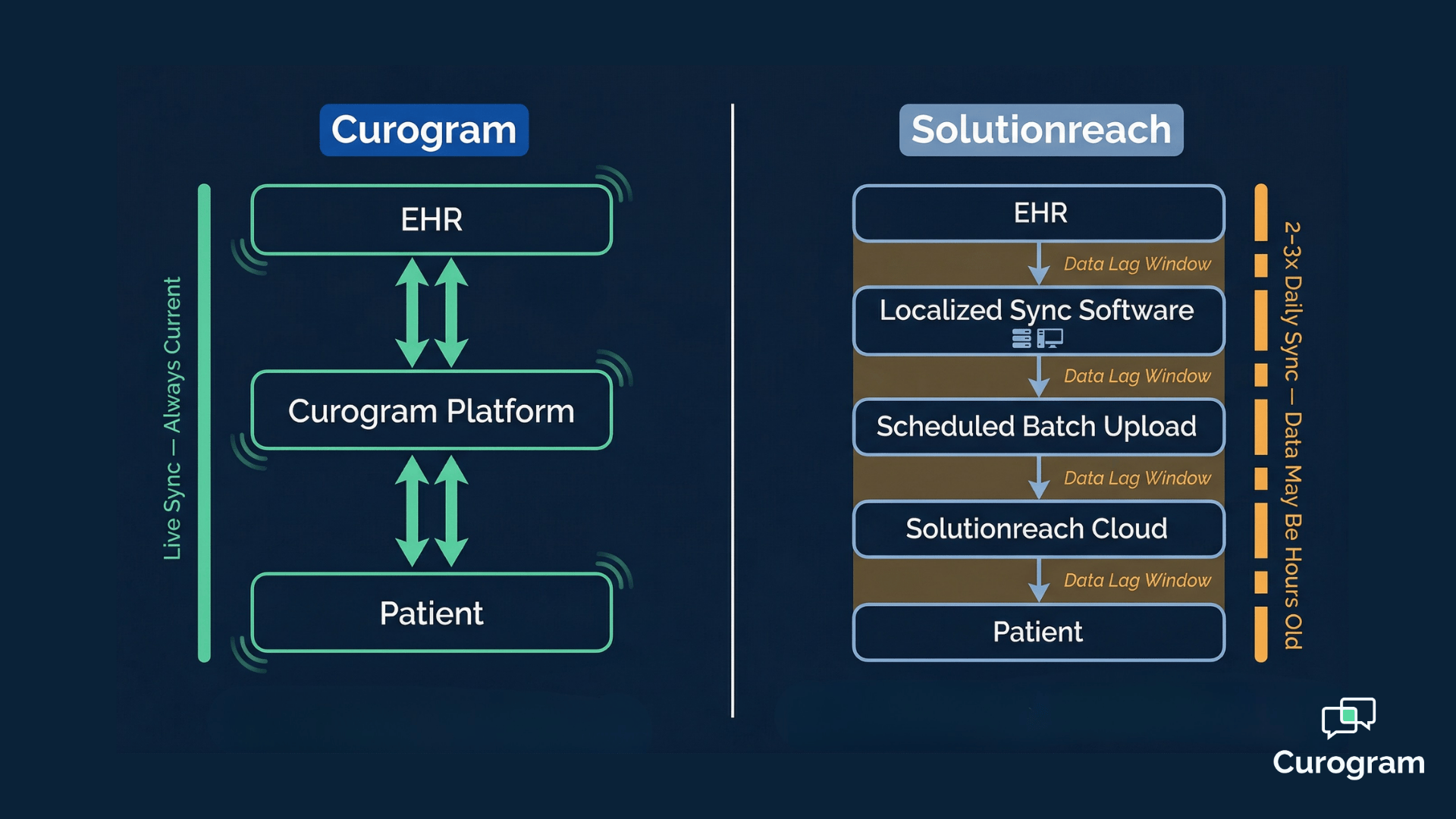
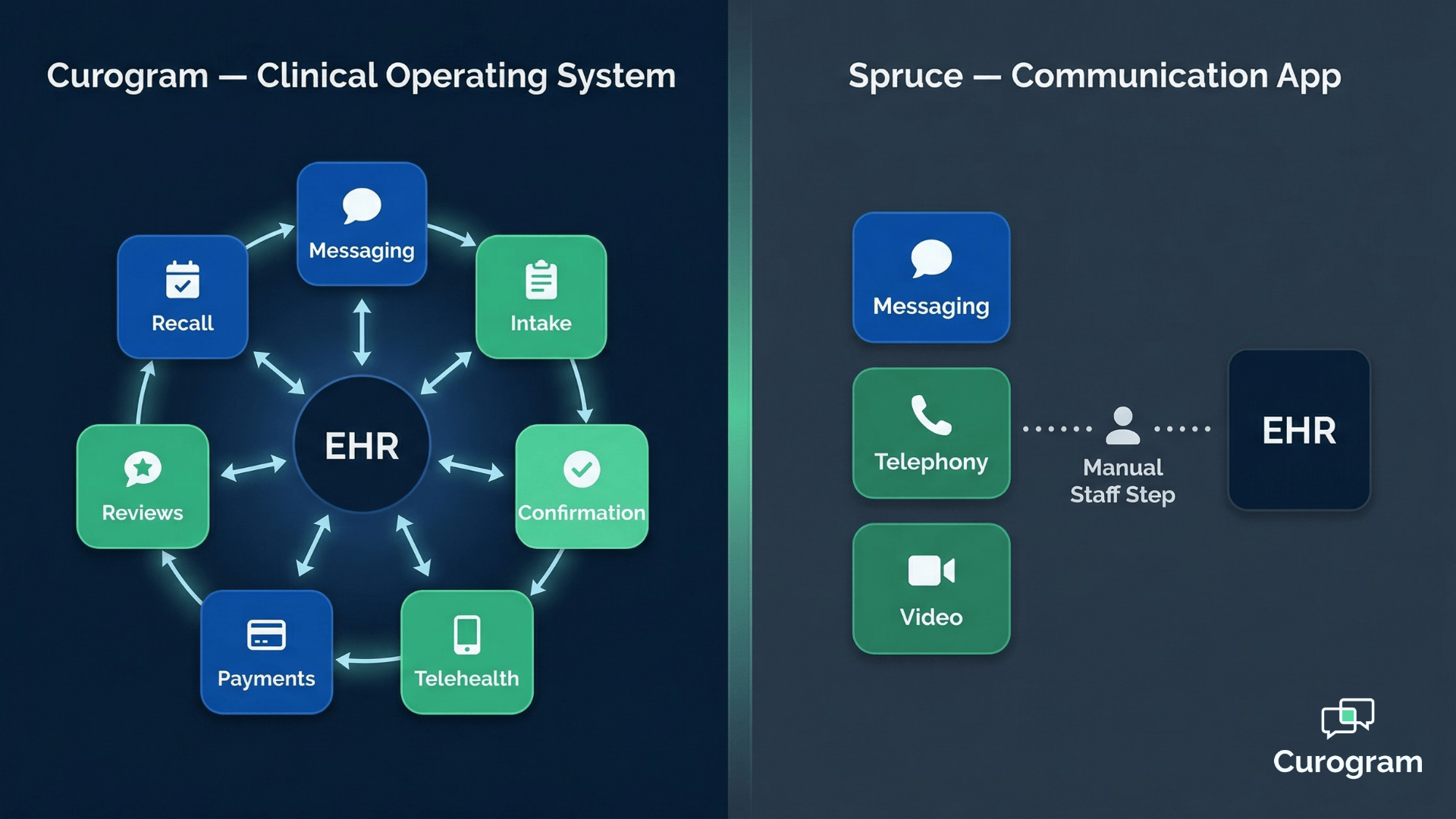
The core difference comes down to data flow. With Curogram, the platform and the EHR operate as one unified system.
With Spruce, clinical data lives in two separate places, and staff must manually bridge the gap for every patient interaction.
For growing medical practices evaluating medical practice EHR integration depth, this architectural distinction directly impacts staff workload, operational scale, and clinical data accuracy.
Think about this.
A patient fills out your digital intake form. They answer every question — allergies, current medications, insurance details, the works. They hit submit.
Your staff gets a notification. And then someone on your team opens that form, opens your EHR, and starts typing. Field by field. Line by line.
This happens for every patient. Every day.
It sounds like a minor inconvenience. It isn't. At scale, it is one of the most expensive administrative habits in your practice — and most practices don't even realize it's optional.
In 2026, choosing a patient communication platform isn't just about how well it sends messages. It's about what happens to the data those messages generate.
Does your platform talk to your EHR?
Or does your staff do the talking for it?
That's the difference at the heart of the Curogram vs. Spruce debate — and it's a difference that goes far deeper than features or price. It comes down to architecture. Specifically, it comes down to what each platform actually does with clinical data once a patient interacts with it.
Spruce is excellent at communication. The secure messaging, the VoIP telephony, the call routing — it's genuinely well-built.
But there's a structural gap between communicating with patients and capturing that clinical data where it needs to live: inside your EHR, in discrete, searchable, usable fields.
Curogram vs. Spruce EHR integration architecture is not a close comparison.
They are built on fundamentally different models, and that gap has real consequences for your staff, your workflows, and your ability to grow without adding headcount.
This article breaks down exactly how each platform handles clinical data, what that means at scale, and why the distinction between a messaging app and a clinical operating system matters more than most practices realize.
When Great Messaging Isn't Enough: The Data Silo Problem
Healthcare practices in 2026 are getting smarter about how they evaluate patient engagement tools. Features matter. Ease of use matters.
But the question that separates a good technology choice from a great one is this:
Where does the data go?
A platform that enables excellent patient conversations but stores those conversations in a separate environment — isolated from your EHR — creates an operational gap your staff has to fill manually. Every single time.
The Hidden Cost of Living in Two Systems
This is the data silo problem, and it's more common than you'd think. Many practices invest in communication tools that improve the patient experience on the surface while quietly adding administrative work on the back end.
In practice, that gap shows up in a few predictable ways:
- Staff manually re-entering intake data into the EHR after every patient submission
- Appointment confirmations sitting in the communication platform while the EHR still shows "unconfirmed"
- No-show follow-up and recall campaigns that depend on someone remembering to update a record first
These aren't edge cases. They're daily routines — and in most practices, they're so normalized that nobody questions them anymore.
The issue isn't that Spruce is a bad product. It isn't. But when clinical data lives in the communication platform and your EHR is a completely separate system — and nothing moves between them automatically — you haven't eliminated double-logging.
You've just moved it around. Spruce EHR integration limitations are a direct reflection of this pattern.
This analysis compares how Curogram and Spruce each handle clinical data flow. It explains why the difference between communication logging and actual clinical data write-back defines the line between a messaging app and a clinical operating system.
And it shows what that distinction means in practical terms for your team, your workflows, and your ability to grow.
Two Completely Different Ways to Handle Your Clinical Data
Curogram: Built Around the EHR, Not Alongside It
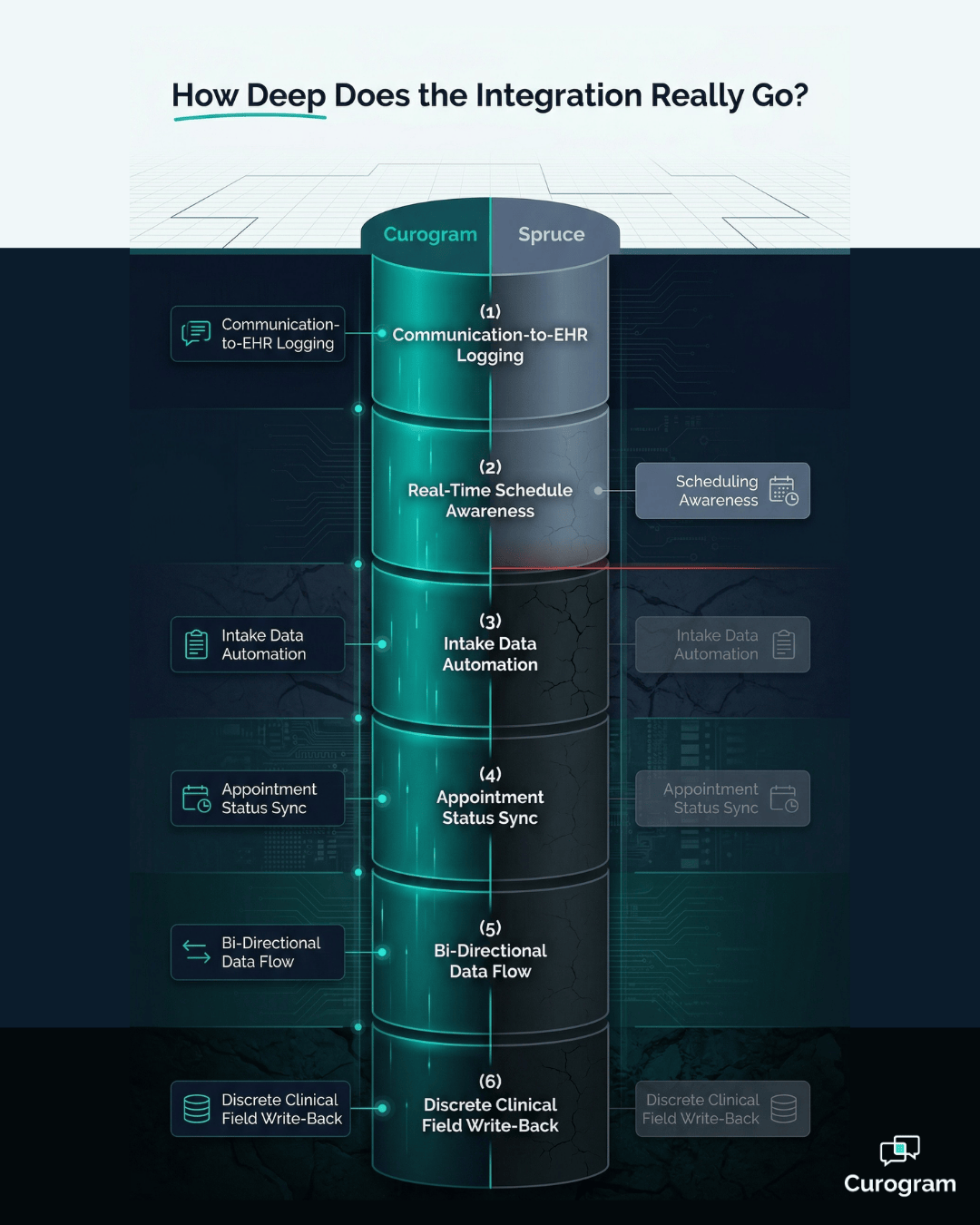
Curogram's architecture is built on direct, bi-directional API connections that perform discrete data write-back into the EHR. This isn't just a technical detail — it's the entire operating philosophy.
When a patient fills out an intake form through Curogram, the responses don't sit in a separate inbox.
The platform parses each answer and writes it directly into structured EHR fields — automatically, without staff involvement.
Here's what that looks like in practice:
- Allergies and medications populate their respective clinical fields in the EHR
- Insurance details write into the patient's billing and coverage record
- Appointment confirmations update the EHR scheduling status in real time
- Clinical communications are linked directly to the patient record
The platform and the EHR operate as one unified data system. Your staff is working in one world, not two.
Spruce: Exceptional Communication, Limited Clinical Data Flow
Spruce is a communication-first platform, and it does that part very well. Secure messaging, VoIP, video calls, and call routing are all polished and functional. Where the architecture diverges significantly is in what happens to the data those communications generate.
Spruce can pull patient contact information from the EHR and log that a communication event occurred. But it typically does not write clinical intake data or appointment confirmations into the EHR's discrete fields.
Patient-submitted forms through Spruce Links stay in the Spruce environment.
A staff member must open the form data, switch to the EHR, and transcribe each field individually.
This is the "two worlds" problem that emerges directly from Spruce's architecture.

Clinical communication lives in Spruce. Clinical data lives in the EHR. The bridge between them is manual staff effort — and that's a bi-directional API vs. standalone messaging app distinction that scales very poorly.
The spruce data silo EHR manual entry pattern isn't a bug in Spruce's design. It's a consequence of it.
Spruce was built to be a communication platform.
Curogram was built to be a clinical data system that communicates.
Why Manual Bridging Breaks Down as You Grow
The Math Gets Ugly Fast
For a solo practice or a small concierge operation — which is much of Spruce's core market — the manual data bridge is manageable.
Patient volume is low. Transcription tasks are limited. The workaround works.
But for growing multi-provider practices, the math changes fast.
Consider a practice handling 500 patient interactions per month — a moderate volume for a two-to-three provider office. If each interaction requiring manual EHR entry takes three minutes of staff time, that's 1,500 minutes per month.
Twenty-five hours. More than half a full-time workday every week, spent on copy-paste transcription that a properly integrated platform would handle automatically.
Add a second provider. Your communication volume doesn't just increase — it multiplies.
Each new clinical workflow adds more data types that need to be manually transferred. Each additional patient adds another transcription cycle.
The staffing cost grows linearly while the actual clinical value of that effort stays flat.

What Automated Data Flow Looks Like at Scale
Curogram's case studies make the scale difference concrete.
Atlas Medical reduced its no-show rate from 14.20% to 4.91% in just three months — an outcome that depends entirely on automatic EHR confirmation updates, not on staff manually processing each patient response and updating the appointment record afterward.
Covina Arthritic Clinic processes over 1,100 automated confirmations per month, with each one writing directly to the EHR. At manual transcription rates, that volume would require dedicated staff time that few practices can afford to absorb.
The downstream results tell the same story:
- 75%+ appointment confirmation rate, achieved without manual staff processing
- 1,064 new five-star reviews generated in three months
- 35% patient recall reconversion rate — 1,240 patients recovered from lapse
These aren't just impressive numbers. They're a direct consequence of a platform architecture where data flows automatically between patient, platform, and EHR — without a human in the middle doing the transcription.
The discrete data write-back clinical automation model produces outcomes at a pace that manual bridging simply cannot replicate.
Side by Side: How the Two Platforms Stack Up
The table below breaks down the key architectural differences between Curogram and Spruce across the dimensions that matter most for a growing medical practice evaluating medical practice EHR integration depth.
| Dimension | Curogram | Spruce |
|---|---|---|
| Integration Model | Bi-directional API with discrete clinical write-back | Surface-level; primarily contact pull and communication logging |
| Data Flow Direction | Bi-directional (EHR ↔ Curogram ↔ Patient) | Primarily one-way pull; manual push from Spruce to EHR required |
| Intake Data Handling | Discrete field-level write-back to EHR automatically | Forms stay in Spruce; staff must manually transcribe into EHR |
| Confirmation Tracking | Real-time EHR appointment status update on patient response | Not written back to EHR; manual update by staff required |
| Data Silo Risk | None; single unified data system | High; clinical data split between Spruce and EHR |
| Scale Characteristics | Linear automation; no additional manual effort per patient | Linear manual effort; each additional patient adds transcription time |
What This Table Is Really Telling You
The pattern across every row is the same. Every touchpoint where clinical data is generated — intake, confirmation, scheduling, communication — Curogram handles it automatically and Spruce hands it back to your staff.
That's not a gap in one feature. It's a gap in the underlying architecture, and it shows up consistently at every stage of the patient interaction cycle.
For practices at low patient volumes, the Spruce column is workable.
For practices with growth ambitions — more providers, more locations, more patient interactions — the Curogram column is the only one that scales without proportional increases in staff time.
The Real Question Your Practice Needs to Answer
Spruce delivers exceptional communication quality. If your primary bottleneck is the quality of the messaging experience, the telephony setup, or the call routing logic, Spruce genuinely addresses those problems well. The product is well-designed for what it is.
But here's the honest question you need to ask your operations team: what is actually costing us the most time right now?
Signs Your Real Bottleneck Is Data Bridging, Not Communication
Before defaulting to a communication-focused solution, it's worth diagnosing where the friction actually lives in your workflows.
These are the patterns worth paying attention to:
- Your front desk spends significant time re-entering form data that patients already submitted
- Appointment confirmation rates are hard to track because the EHR record lags behind actual patient responses
- Staff regularly toggle between your communication platform and the EHR to reconcile the same patient information
- Your no-show rate stays stubbornly high despite sending reminders, because unconfirmed appointments aren't flagged in the EHR in time
If any of these feel familiar, Spruce's communication quality doesn't solve your problem. It might even mask it — the patient experience improves on the front end while the administrative burden behind the scenes stays exactly the same.
Curogram provides both sides of the equation. HIPAA-compliant two-way messaging with an app-less patient experience — no downloads, no logins, just a text — combined with discrete bi-directional EHR integration that eliminates manual data bridging entirely.
When your communication platform and your clinical data system operate as a single unified environment, your staff stops living in two worlds. Intake data goes where it belongs. Confirmations update automatically.
Recalls fire on schedule. And your team spends its time on patients — not on transcription.
That's not a messaging upgrade. That's a clinical operations upgrade.
Conclusion
There's a version of this decision that looks simple from the outside. Pick the platform with the best messaging features. Train your staff. Move on.
But if you've read this far, you already know it's more complicated than that. The spruce EHR integration limitations aren't about Spruce failing at what it does — it's about what it doesn't do.
And for a practice that's growing, that gap compounds every single month.
Curogram was built for practices that need more than a better inbox. It was built for practices that want their communication platform and their clinical data system to be the same system — fully integrated, fully automated, and genuinely scalable.
The practices that moved to Curogram didn't just improve their patient communication.
They cut no-show rates nearly in half. They recovered over 1,200 lost patients through automated recall campaigns. They processed more than 1,100 confirmations per month without adding a single staff minute to the process.
That's what medical practice EHR integration depth actually looks like in practice.
Not a feature checklist. Not a demo slide. Real workflows, running automatically, producing measurable outcomes.
If your current setup has your staff manually transcribing patient data from one system to another — or worse, if it's happening so routinely that nobody even questions it anymore — it's time to see what an integrated architecture actually feels like.
Schedule a demo with Curogram today. See exactly how discrete data write-back works inside your specific EHR, walk through a real intake workflow from patient text to clinical record, and find out what your team's time could be doing instead of double-logging.
Frequently Asked Questions
Spruce's EHR integration is primarily surface-level. It can pull patient contact information and log that a communication event happened, but it typically does not write clinical intake data or appointment confirmations into the EHR's discrete fields. Curogram's bi-directional API writes structured data directly into the appropriate EHR fields — allergies, medications, demographics, appointment status — automatically, without any staff involvement. That distinction eliminates the manual transcription step that Spruce users must perform for every patient interaction that generates clinical data.
No. When patients complete forms through Spruce Links, that data stays in the Spruce environment. A staff member must open the form, switch to the EHR, and manually transcribe each answer into the correct field. Curogram parses intake responses automatically and writes each element — medications, allergies, insurance details, demographics — directly into its corresponding EHR field. This eliminates the double-logging problem entirely, which is one of the most time-consuming administrative inefficiencies in practices that use standalone communication platforms.
Not automatically. When a patient confirms through Spruce messaging, a staff member must manually log into the EHR and update the appointment status. Curogram's confirmation workflow handles this automatically — when a patient responds, the EHR appointment record updates in real time without any staff action required. This is how Curogram-enabled practices achieve 75%+ appointment confirmation rates without dedicating staff time to monitoring and manually processing each response.
For growing practices, Curogram's architecture scales without adding proportional staff time. Each new patient, provider, or clinical workflow adds automated data processing — not manual transcription tasks. Spruce's manual bridging model scales linearly with patient volume, meaning more patients means more staff time spent on data entry. For a boutique or solo practice at low volume, Spruce's approach may be workable. For any practice with growth goals, the staffing math on manual bridging becomes unsustainable quickly.
Yes. Curogram offers HIPAA-compliant two-way texting with an app-less patient experience — patients respond by text, no downloads or logins required. The platform handles automated appointment reminders, confirmations, recalls, intake forms, and broadcast messaging. The key difference is that all of this communication generates clinical data that flows automatically into the EHR, rather than requiring a separate manual entry step. You get communication quality and clinical data automation in one integrated system.