
Curogram vs. Spruce: Total Cost of Ownership and ROI Analysis
 Aubreigh Lee Daculug : May 18, 2026, 8:00:01 AM
Analyze Curogram vs. Spruce costs, including hidden labor, workflow gaps, and revenue recovery from unified clinical automation.
Spruce is a beautifully built communication app. That's exactly why your practice chose it. The messaging feels clean, the team inbox makes sense, and patients respond like they would to a friend.
Then your practice grew.
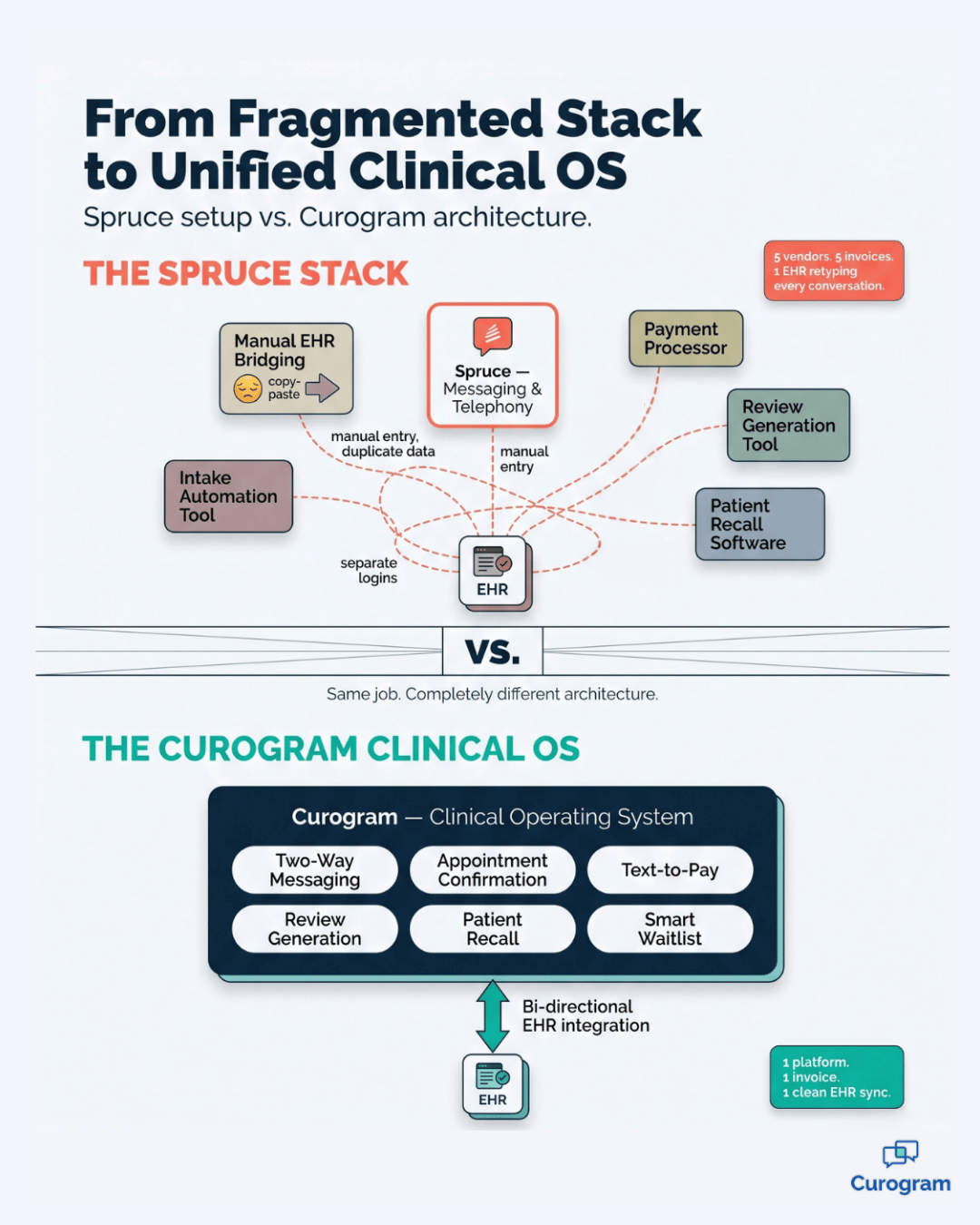
Suddenly your front desk is doing two jobs. They handle a great Spruce conversation with a patient, and then they retype every single detail into your EHR.
Insurance updates. Medication changes. Confirmation status. Intake answers. All of it logged twice, every single day.
That's the double-logging tax. It's quiet, it's invisible on any invoice, and it adds up to dozens of staff hours every month.
Worse, you're still missing the tools your practice needs now: deterministic appointment confirmation, text-to-pay, automated review generation, and patient recall campaigns. Spruce was never designed to do those things, and that's not a flaw — it's a category limit.
This is the moment most growing offices realize they don't need a better communication app. They need to switch from a communication app to a clinical OS that handles messaging, scheduling automation, payments, and EHR data in one place.
If you're reading this, you've probably hit that wall already.
Maybe you've watched a no-show eat into a Tuesday afternoon. Maybe your office manager has hinted that "we need something more." Maybe your spend on add-on tools has crept past what a single platform should cost.
This guide walks you through the switch from Spruce to Curogram migration with zero guesswork.
You'll learn how to audit your current setup, plan a four-week parallel rollout, port your phone number, and turn on capabilities you've never had access to before — without the chaos a platform change usually brings.
Let's get into it.
Most clinics don't leave Spruce because Spruce broke. They leave because the practice outgrew what a communication-only platform was built to do.
Spruce shines for the boutique and concierge model. The interface is friendly, training is fast, and the messaging quality genuinely earns the loyalty practices give it. For a small office where the doctor does everything, that's often enough.
Growth changes the math. Once your patient panel expands and your front desk fills up, your real bottleneck stops being communication.
It becomes data — specifically, the time your team spends transcribing Spruce conversations into the EHR line by line, field by field, hour by hour.
That's the tipping point.
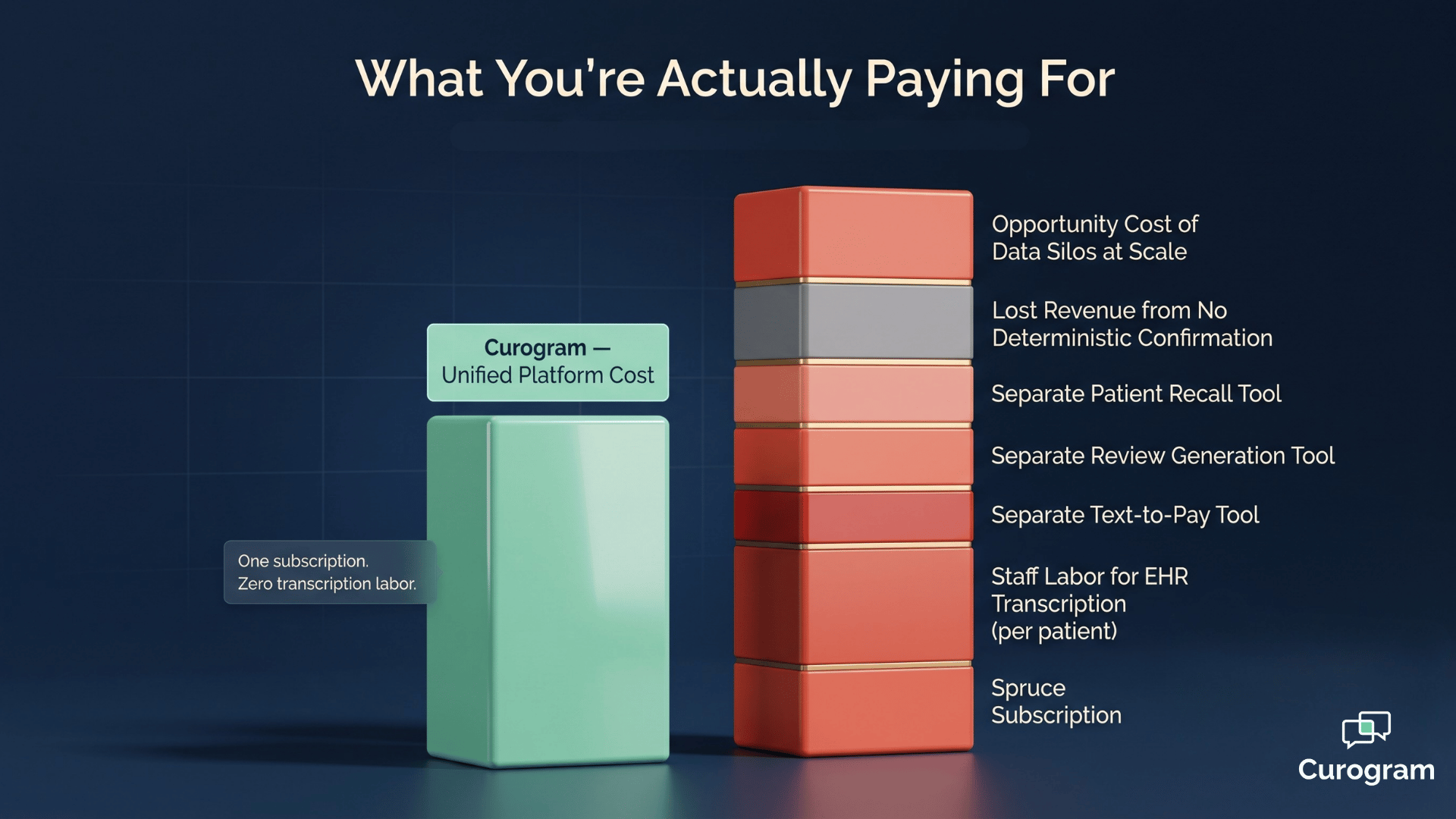
When the labor cost of double-logging exceeds the time Spruce saves on the messaging side, you're paying twice for half a workflow.
And once you start needing tools Spruce doesn't offer — confirmation that writes back to the schedule, text-to-pay, recall campaigns, automated review generation — every additional tool becomes another login, another invoice, another integration headache.
This is why teams looking for a spruce alternative growing medical practice usually aren't shopping for "another texting tool." They're looking for the next layer up.
That next layer is what Curogram calls a Clinical Operating System. It keeps the messaging your team likes about Spruce, then layers in the clinical data automation and revenue workflows that a communication app was never designed to deliver.
The migrate from spruce messaging platform decision, in other words, isn't about replacement. It's about graduation.
The rest of this guide shows you how to do that cleanly.
Every successful migration starts with one honest question: what is your current setup actually costing you?
Most offices have never measured it. Double-logging is invisible because the labor isn't dumped on one person — it's spread across the front desk, the medical assistants, and sometimes the providers themselves.
Five minutes here, fifteen minutes there. By the end of the day, hours are gone and no one logged the loss.
Phase 1 of the migration fixes that. Before you change a single tool, you build a baseline.
Start with your active Spruce footprint. Inventory every messaging template, call routing rule, team inbox configuration, and Spruce Links workflow your practice depends on. This is what you need to recreate or improve in Curogram.
Then quantify the double-logging burden. For one week, have your team log the time they spend transcribing Spruce data into the EHR.
Track intake forms, confirmation updates, medication changes, and insurance updates separately so you can see where the worst leakage is.
Finally, list everything Spruce can't do that your practice already needs or pays for elsewhere.
That usually includes:
Here's a sample calculation for a mid-sized practice:
| Hidden Cost | Time Per Day | Annual Hours | Annual Cost (at $22/hr) |
|---|---|---|---|
| Manual EHR transcription | 2 hours | 520 | $11,440 |
| Manual confirmation calls | 1 hour | 260 | $5,720 |
| Add-on tools (review, recall, payments) | — | — | $4,800 |
| Total invisible spend | ~$21,960/year |
For your team, the takeaway is simple. The cost of staying on Spruce is rarely zero — it's just hiding in payroll and add-on subscriptions.
Once you see the number, the spruce to curogram transition guide stops being a "nice to have" project and becomes a clear financial decision.
The biggest mistake practices make when changing platforms is going cold turkey. Don't.
The smartest version of the switch from Spruce to Curogram migration is a parallel rollout. You keep Spruce running for live patient conversations while you stand up Curogram in the background. This protects continuity, gives your team time to learn, and lets you compare workflows side by side before you commit.
The first thing to activate is Curogram's bi-directional EHR integration. This is the piece that solves the double-logging problem, and it's the moment your team will feel the change.
Once write-back is live, intake answers flow into EHR fields automatically. Confirmation responses update the schedule in real time. Clinical data moves without anyone retyping it. For most front desks, this single change saves more hours per week than anything else on the migration list.
After the data layer is stable, transition your messaging to Curogram's unified inbox. Curogram offers HIPAA-compliant two-way messaging with an app-less patient experience — patients don't need to download anything, they just receive and reply to texts.
The interface looks different from Spruce, but the core workflow is familiar. The new piece is automated task routing, which assigns incoming messages to the right team member based on rules you set, instead of the whole inbox being a shared free-for-all.
Phone number portability matters here too. Patients keep texting and calling the same number they always have. Nothing changes on their end.
Once messaging is stable, switch on the tools Spruce never offered.
Activate them one at a time so your team can adopt each one without overload:
Each of these is net-new capability — automation your practice could not access through a communication-only platform.
This is what makes the curogram onboarding from spruce health journey feel like an upgrade rather than a swap.
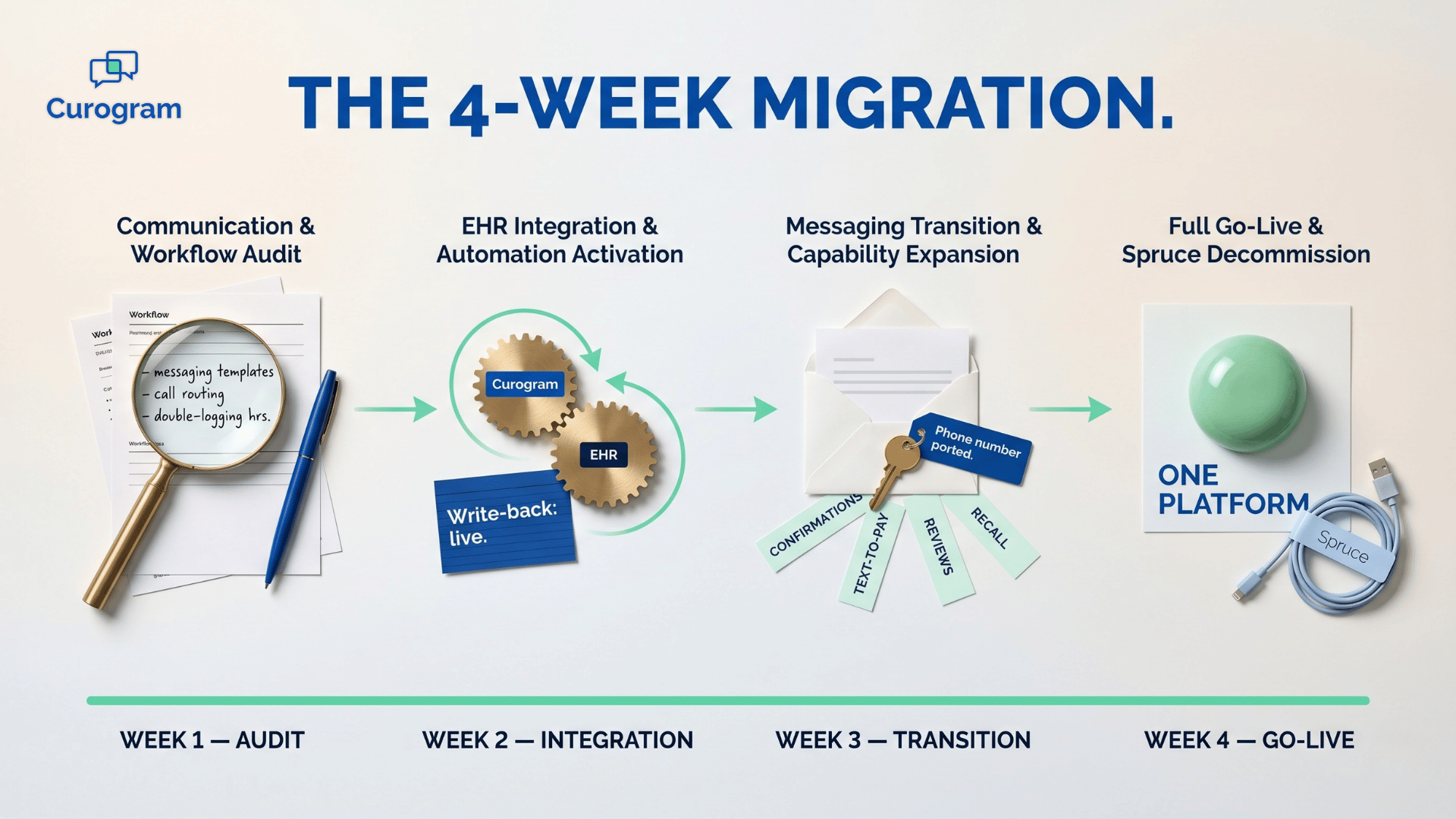
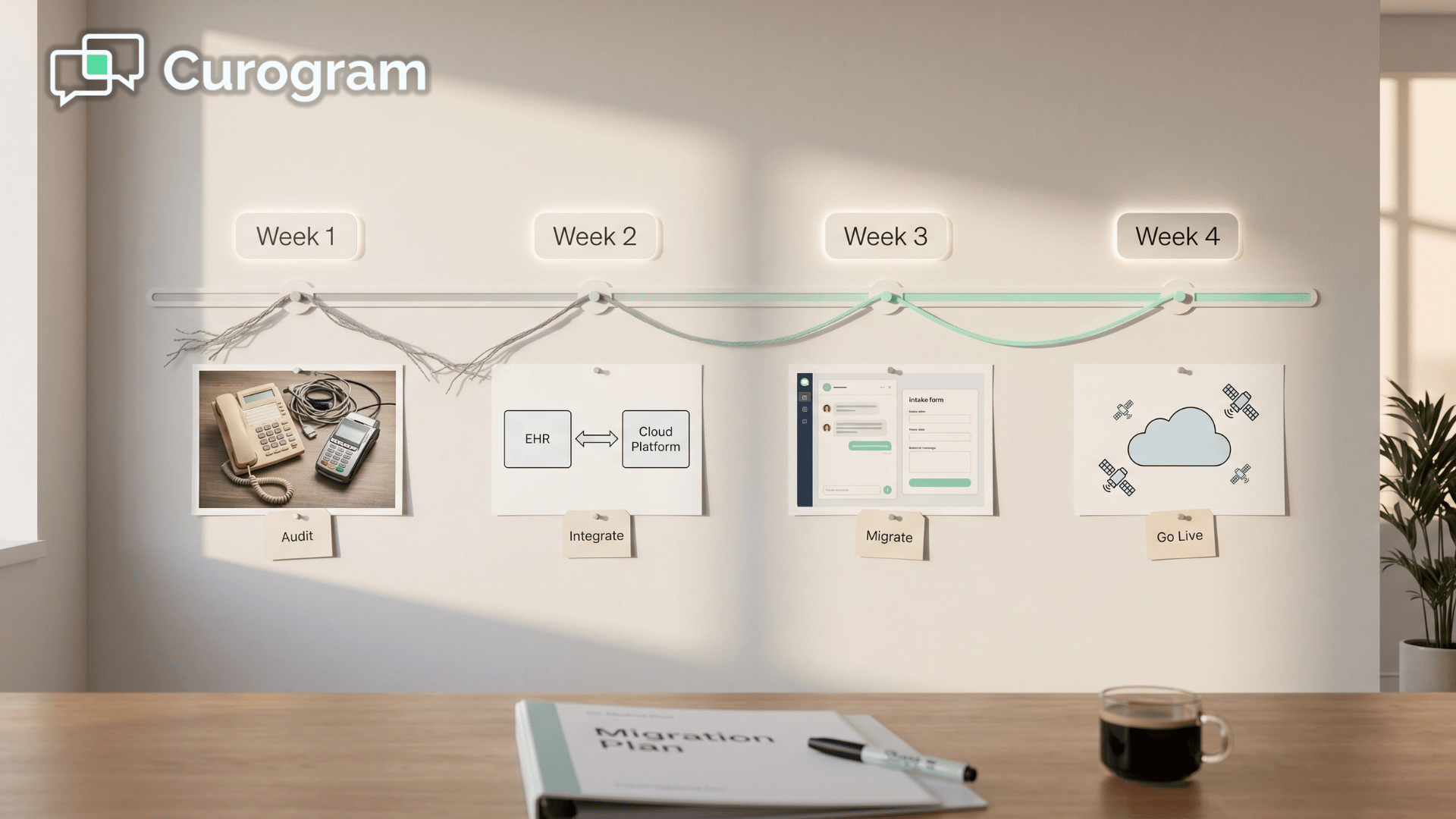
Most practices complete the full transition in four weeks. The cadence below isn't aspirational — it's the standard rollout Curogram's onboarding team has refined across hundreds of migrations.
You document every active Spruce workflow, measure the hours your team is losing to double-logging, and identify the capability gaps your current setup can't close.
By the end of the week, you have a clear cost-of-staying number to anchor every decision that follows.
Curogram's bi-directional write-back goes live and discrete data sync is validated against your EHR. This is the turning point of the migration — once write-back is active, the double-logging problem ends. Most front desks feel the time savings within days.
Your phone number is ported, your messaging templates are migrated, and your staff is trained on Curogram's unified inbox. Patients keep texting and calling the same number they always have, so there's no communication gap.
The new layer here is automated task routing, which directs messages to the right team member instead of the whole inbox catching everything.
You activate the capabilities Spruce never offered — appointment confirmation, text-to-pay, automated review generation, and patient recall — then decommission Spruce. Your practice is now running on a single platform with net-new automation across the board.
By the end of Week 2, the most painful part of your old setup is already gone.
By the end of Week 4, your team is running on one platform instead of three or four.
For your team, this matters because the timeline keeps risk low. You're not betting the practice on a single switchover day. Each week has a clear deliverable, and the previous week's progress is locked in before the next phase starts.
That's the difference between a migration and a gamble.

A migration without measurement is just a software change. The point of the switch is to prove the move paid for itself — and then some.
After go-live, run the same audit you did in Phase 1, this time against your new Curogram baseline. Two categories of impact matter most.
You've removed double-logging labor, the subscription cost of any standalone tools you replaced, and the overhead of managing multiple vendors.
For a practice that previously spent ~$22,000 a year on hidden costs, that's a direct line back to the bottom line.
This is where the new capabilities pay you back.
Real Curogram customers have documented results like these:
In practice, those numbers translate to real dollars.
A no-show drop from 14% to 5% on a practice doing 100 visits a day means roughly 9 fewer empty slots per day.
At an average visit value of $150, that's $1,350 in recovered revenue per day, or roughly $27,000 per month.

This means the migration isn't just a cost story. It's a revenue story too — and it's the part of the equation a communication app can't compete with.
That's the full case for graduating from a messaging tool to a Clinical Operating System.
Your HIPAA-compliant communication workflows are preserved. Your data layer finally works. And the workflows that used to leak revenue start generating it instead.
Every migration conversation we have starts with the same handful of concerns. They're fair questions — and they're also the exact reasons practices delay a move that would have already paid for itself by month two.
Here are the worries that come up most often, and what actually happens.
You won't. The whole point of a parallel deployment is that Spruce keeps running while Curogram is being set up in the background. Nothing goes dark.
By the time you're ready to migrate messaging in Week 3, your phone number ports cleanly and patients text the same number they always have.
Most front desk teams hate the wrong kind of change — the kind that gives them more work without removing any. This migration removes work. Curogram is built to be mastered in around 10 minutes of training, and the first capability your team experiences is the end of double-logging. That's the kind of change staff actually welcomes.
The real cost is staying. A practice losing ~$22,000 a year to hidden double-logging labor and 14% no-show rates isn't avoiding disruption by waiting — it's paying for disruption every single week. The four-week phased migration is built specifically so day-to-day operations keep running while the upgrade happens around them.
Curogram integrates with almost any EMR on the market. The bi-directional write-back layer is the part of the platform Curogram has spent the most time refining, and the onboarding team validates discrete data sync against your specific EHR in Week 2 before anything else moves forward.
For your team, this matters because the friction you're imagining is rarely the friction you'll actually experience. The hard part is making the decision. The migration itself is the easy part.
The hardest part of any platform decision is the moment before you commit.
You already know Spruce isn't holding your practice back because of bad messaging — it's holding you back because the job has gotten bigger than what a communication app can do.
A real migration shouldn't feel risky. With a four-week phased plan, parallel deployment, phone number portability, and a dedicated onboarding team, the switch from Spruce to Curogram migration is one of the lowest-risk operational upgrades a growing practice can make.
The payoff shows up fast. Double-logging ends in Week 2. By Week 4, your team is running confirmations, payments, reviews, and recall from a single platform — the kind of unified clinical automation that quietly transforms your cost structure and your revenue trajectory at the same time.
You don't have to take that on alone. Curogram's team has guided practices of every size through this exact transition, and the guided onboarding is built around your schedule, your EHR, and your existing Spruce workflows.
No cold-turkey switchover. No lost messages. No surprise downtime.
If your front desk is drowning in transcription, your no-show rate is creeping up, or your tool stack has grown into a monthly maze of subscriptions, the next conversation is worth having.
Schedule a Demo with Curogram today. A short walkthrough will show you exactly how the migration would look for your practice, what your baseline costs probably are, and where the biggest revenue lifts would land in the first 90 days. You'll leave with a real migration plan — not a sales pitch.
 Aubreigh Lee Daculug : May 18, 2026, 8:00:01 AM
Analyze Curogram vs. Spruce costs, including hidden labor, workflow gaps, and revenue recovery from unified clinical automation.
 Aubreigh Lee Daculug : Apr 15, 2026, 8:00:00 AM
Step-by-step guide to migrate from Solutionreach batch-sync to Curogram real-time automation, including EHR reconnection and staff onboarding.
 Aubreigh Lee Daculug : May 29, 2026, 8:00:01 AM
Step-by-step guide to moving from Weave to Curogram with EHR integration, hardware removal, and staff onboarding.