How to Switch from Solutionreach to Curogram: Complete Migration Guide
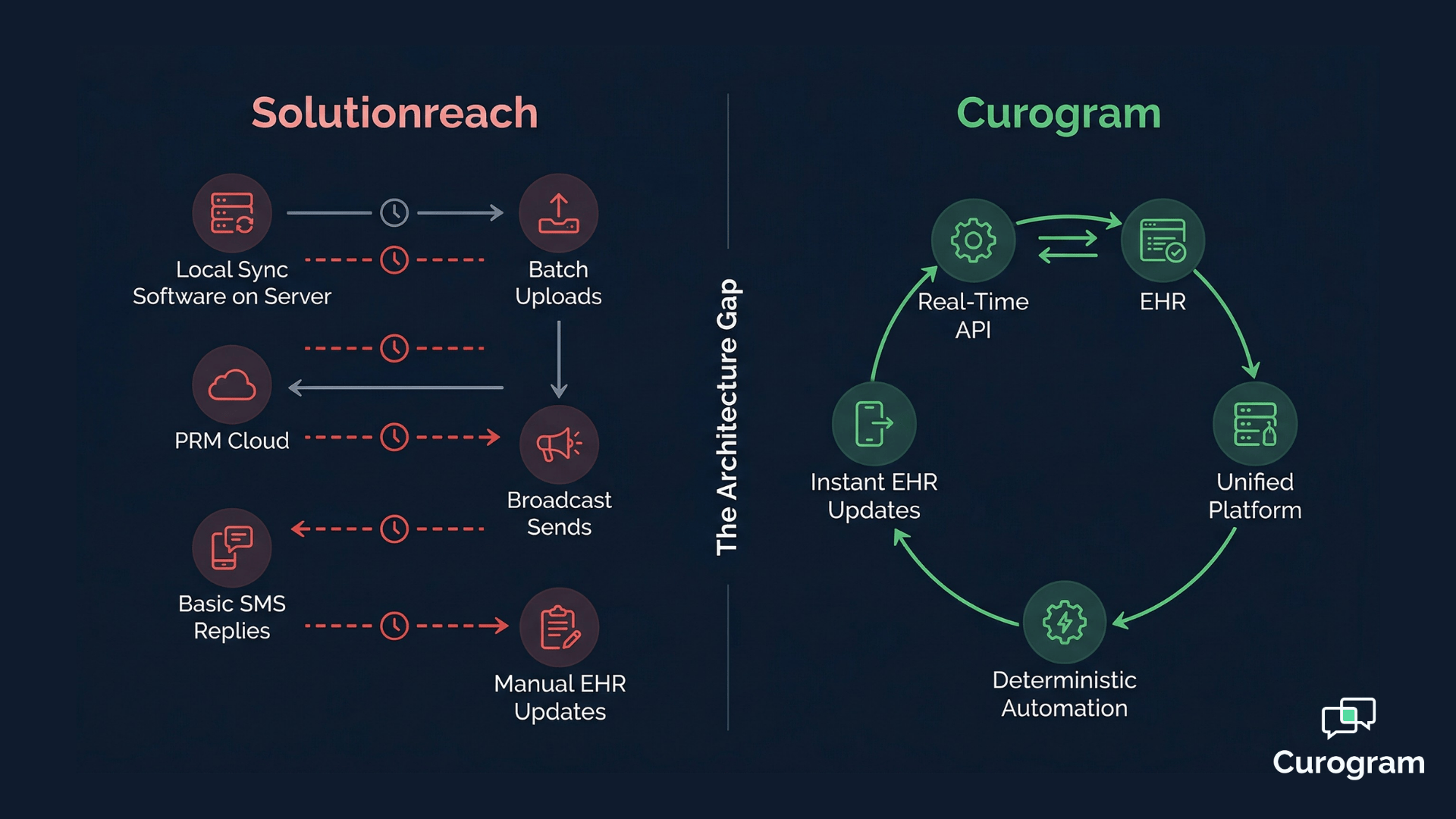
💡 Migrating from Solutionreach to Curogram is a structured, four-week process that moves your practice from a batch-sync PRM to a real-time...
9 min read
Aubreigh Lee Daculug
:
May 29, 2026
Table of Contents
Dropped calls. Frozen phones. A patient on hold while your front desk taps a hardware terminal that won't respond.
For medical practices running VoIP platforms like Weave, these moments aren't rare events — they're the cost of an architecture designed for dental and veterinary SMBs, then stretched to fit medical complexity it was never built for.
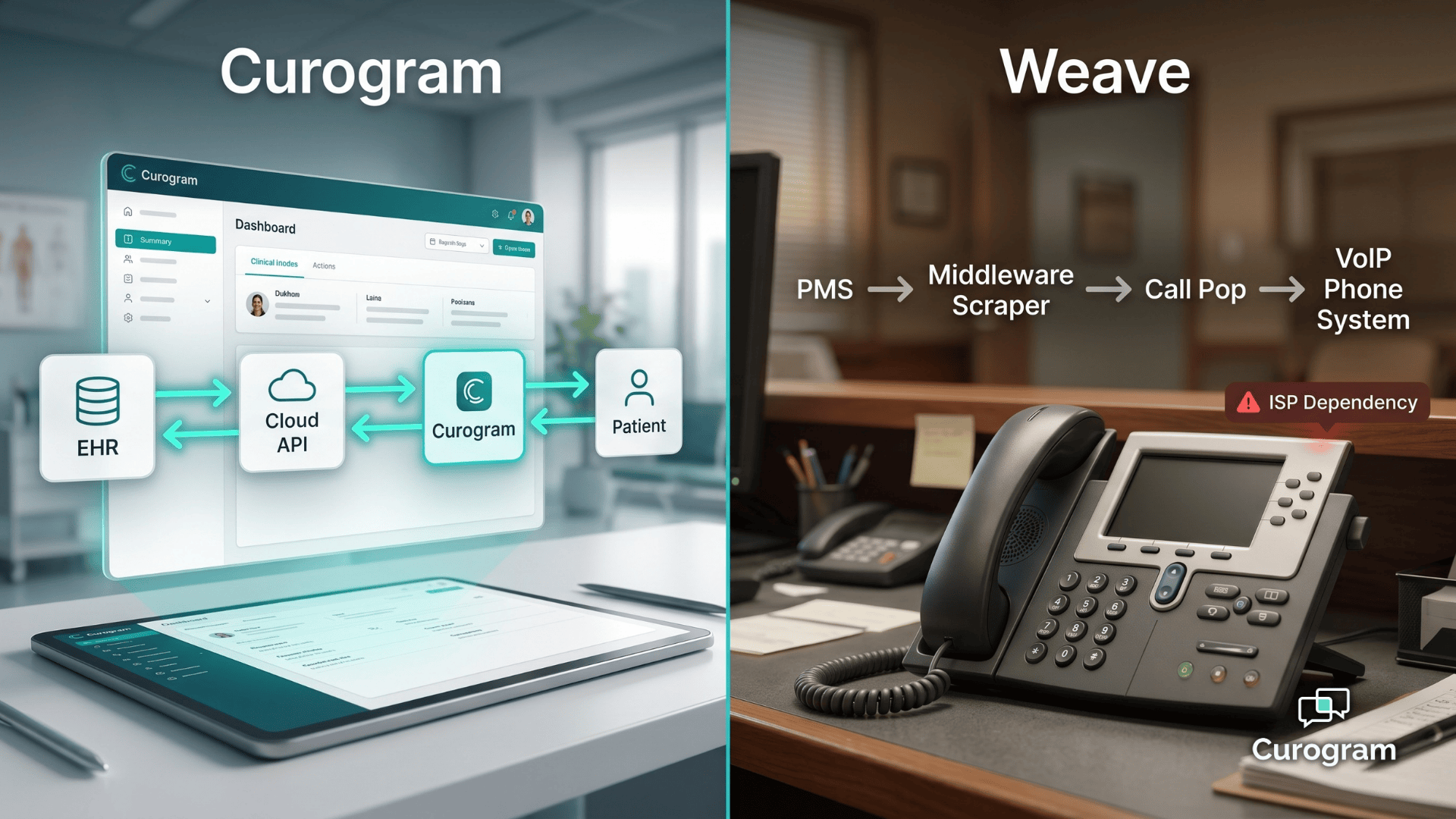
The frustration runs deeper than glitches. Even when the phone behaves, your team is still re-typing the same patient details into the EHR after every call. Call Pop displays the chart. It doesn't update it.
That gap — between a flashy screen pop and clean clinical documentation — is where hours of manual data entry quietly pile up each week.
Then there's the hardware. Desk phones at every workstation. Payment terminals at the front desk. ISP-dependent service that wobbles the moment bandwidth dips. Add separate tools for telehealth, intake, and recall, and you're not running one platform anymore. You're managing five.
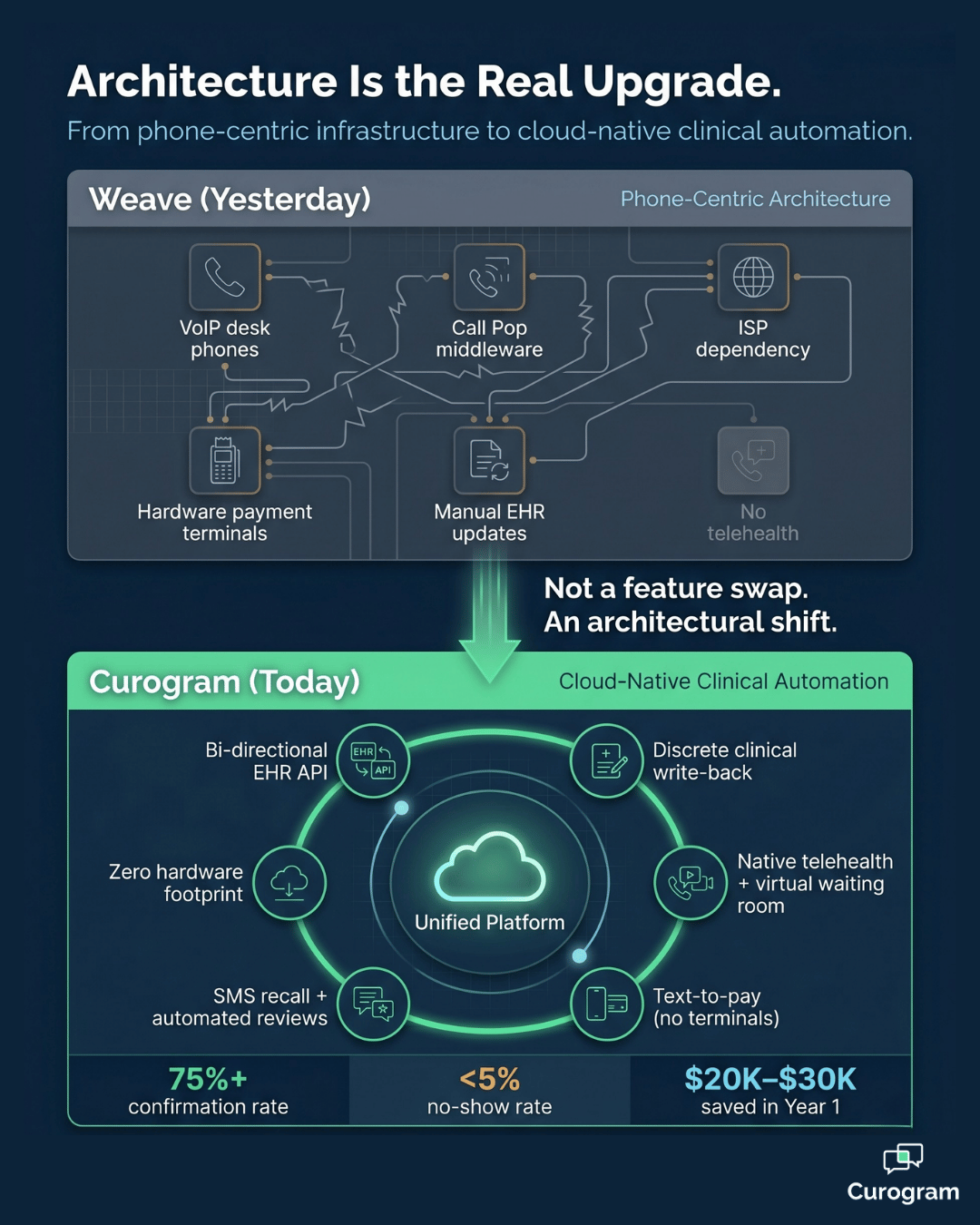
This is why more medical groups are mapping out a switch from Weave to Curogram migration as a structural upgrade, not a feature swap.
Curogram replaces phone-centric infrastructure with cloud-native clinical automation that lives inside your medical EHR.
No desk phones. No middleware scraping. No manual write-back after every patient interaction.
What follows is a practical Weave to Curogram transition guide medical teams can use start to finish.
You'll get the four-week timeline, the milestone-level breakdown, and the post-migration metrics — including how Atlas Medical Center cut no-shows from 14.20% to 4.91% in three months, and how Covina Arthritic Clinic now crosses 1,100 monthly confirmations after the upgrade.
The goal isn't a softer phone bill. It's a different architecture under your front desk — one built for medical workflows from day one, not retrofitted from a dental or SMB blueprint.
Read on for the complete playbook your team can run.
The migration story usually starts with one frustration that snowballs.
A dropped call to an anxious patient.
A frozen Call Pop screen during a busy Monday.
A confirmation that never reached the EHR because the middleware sync skipped a beat.
These aren't edge cases — they're the structural reality of running a VoIP-first platform inside a medical-first practice.
Weave was engineered for dental and veterinary SMB workflows, where phone-centric communication is the dominant operational layer. Medical practices have a different stack. The EHR is the dominant operational layer, and phones are one channel among several.
When the platform's architecture inverts that priority, every patient interaction generates manual work. The system simply wasn't built to write back to a medical EHR with discrete fields.
A switch from VoIP phone system to clinical automation reframes the question. Instead of asking,
"How do we make our phones smarter?" you start asking,
"How does every patient touchpoint flow into the chart automatically?"
That single shift is what separates a communication hub from a clinical platform.
When practices map out the move, three operational pressures usually surface together:
Add hardware leases, ISP redundancy fees, and ancillary tools, and the platform tax adds up fast. For a typical 10-station practice, that's often $5,000–$8,000 a year in hardware costs alone — before you count the labor.
Before you migrate from communication hub to clinical platform, you need a clean read of what you're actually replacing.
The first phase of any switch from Weave to Curogram migration is a structured audit — not a rushed inventory.
Start with what's running today. Map every active Weave configuration: phone lines, call routing rules, Call Pop settings, text templates, and automated reminders.
Most practices uncover three or four legacy templates nobody has used in months. List everything anyway, because each item maps to a Curogram equivalent that needs to be configured.
Next, count the physical equipment. Note desk phones at each workstation, hardware payment terminals, headsets, and any leased gear.
Many practices are surprised by the annual hardware footprint once it's totaled — $4,000 to $6,000 a year is common for a 10-station office.
Don't skip the network layer. VoIP needs reliable, low-latency bandwidth to function, and Weave's call quality is at the mercy of your provider. List your bandwidth allocation, redundancy setup (if any), and the number of call-quality complaints staff have logged in the past six months.
This becomes your baseline for measuring what cloud-native architecture removes from your tech stack.
Finally, time-stamp the labor that's hidden in plain sight. Track how long staff spend each day re-keying patient updates after Weave-driven calls and Call Pop interactions.
If your front desk spends 2 hours a day on this work, that's roughly 500 hours per year, per employee — labor that disappears once Curogram's bi-directional API is active.
For your team, that means every hour of manual entry mapped now is an hour of capacity recovered later.
Curogram's cloud-native architecture allows for a parallel deployment, which is the safest path through the switch. Because Curogram operates entirely independently of VoIP — no desk phones, no ISP dependency, no hardware — it doesn't compete with your existing Weave setup for any infrastructure.
Both systems can run side by side during the transition window without conflict.

The deployment kicks off by connecting Curogram to your medical EHR. This single step replaces Weave's middleware PMS scraping with real-time, continuous HIPAA-compliant discrete data exchange
Confirmations now update appointment status in the EHR automatically. Intake answers parse into discrete fields, not freeform notes. The change is immediate, and your team feels it the moment the first reminder goes out.
As Curogram's clinical workflows prove reliable, you start migrating Weave's phone-based functions to digital channels. Two-way messaging, digital intake, virtual waiting rooms, and missed-call-to-text routing take over the high-volume traffic that used to choke your phone lines.
Most practices see call volume drop by roughly 50% within the first two weeks because patients prefer texting once it's offered.
This is where the platform stops looking like a Weave replacement and starts looking like an upgrade.
Capabilities that come online in this phase include:
Each of these is functionality the practice either never had, or stitched together using separate tools at extra cost.
The numbers from real deployments make the impact concrete.
Atlas Medical Center reduced no-shows from 14.20% to 4.91% within three months — about 3X better than the industry average.
Covina Arthritic Clinic now confirms more than 1,100 appointments per month through Curogram's automation, a volume Weave's middleware-driven sync was never engineered to support.
In practice, that means a multi-provider group can recover the equivalent of an entire patient day each week without adding staff.
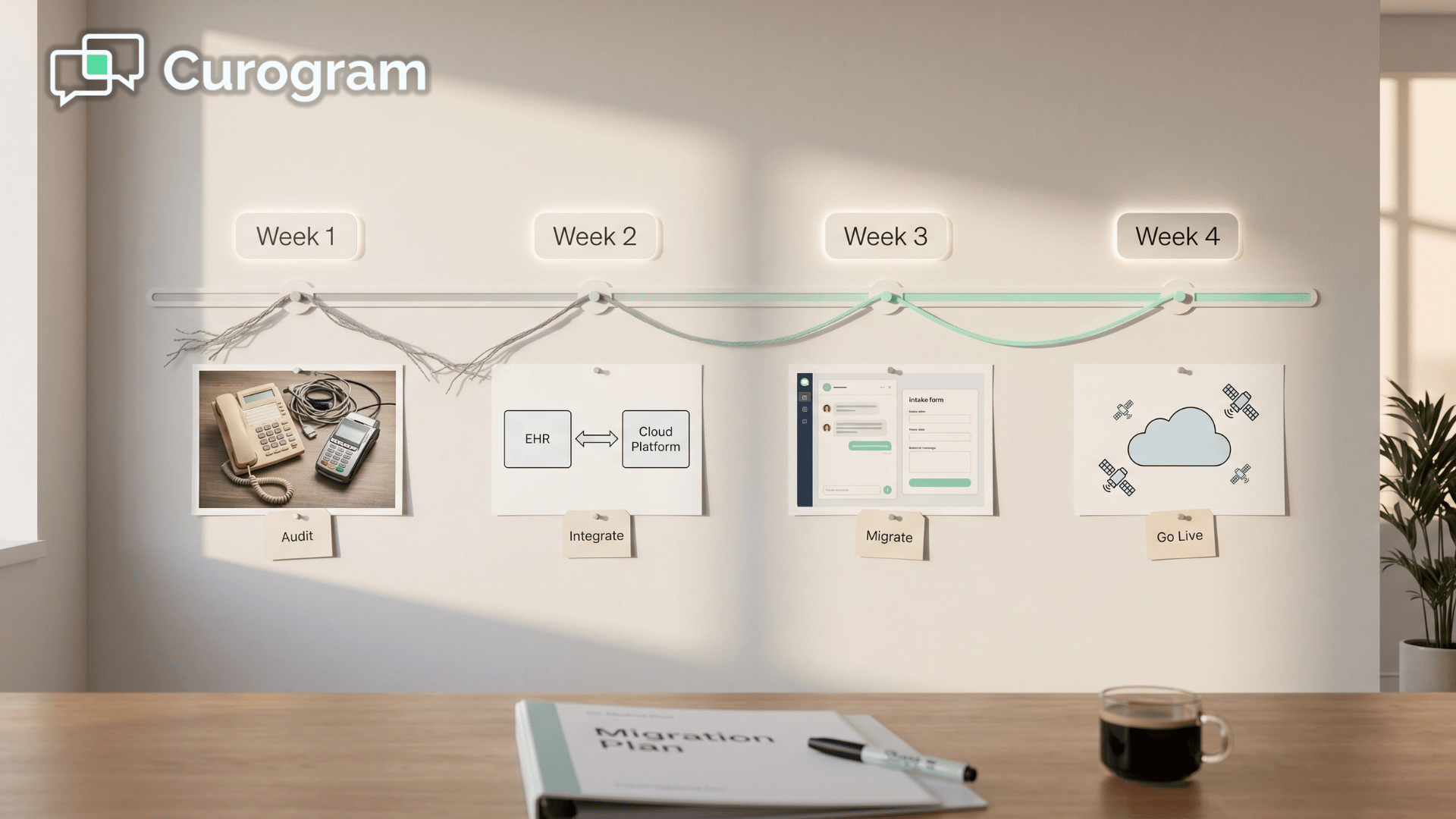
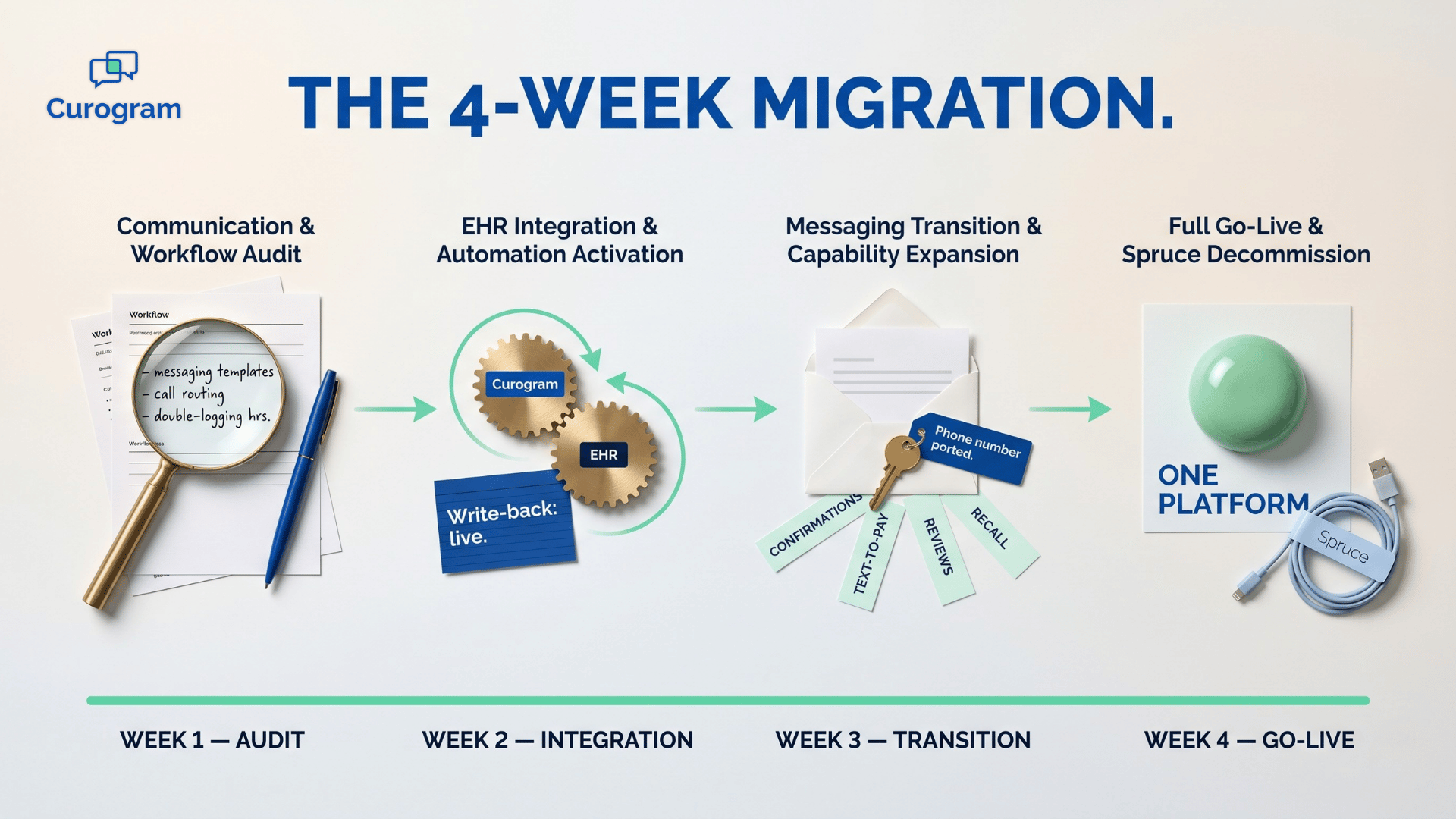
The schedule is structured, predictable, and tight by design. Curogram onboarding from Weave is built around four phases, each with a clear handoff and a measurable success criterion.

Week 1 is dedicated to the audit.
Your team inventories phone hardware, documents call routing rules, catalogs ISP dependencies, and quantifies manual EHR entry hours.
The success metric for this phase is a complete infrastructure map with a hardware cost and manual labor baseline you can compare against later.
Week 2 is where the architecture shift happens.
Curogram's bi-directional API is established, discrete write-back is validated against your medical EHR, and confirmation automation goes live.
By the end of the week, real-time discrete sync is verified, manual EHR entry is eliminated, and confirmations auto-update the EHR without staff touching them.
Week 3 moves patient outreach from Weave to Curogram.
Two-way messaging, digital intake, text-to-pay, and telehealth are activated and tested in live workflows.
The phase wraps when all patient communications are running through the modern platform and the new capabilities are operational across the front desk and clinical teams.
Week 4 closes the migration.
Weave and VoIP hardware are decommissioned, automated review generation and SMS recall campaigns are switched on, and hardware leases are cancelled.
Success looks like a confirmation rate at or above 75%, zero hardware dependency, and a single cloud-native platform running the practice end-to-end.
For your team, the takeaway is timing. Most of the heavy lifting — the API integration, EHR validation, and confirmation automation — is done by Day 14. After that, you're rolling out new capabilities, not fighting fires.
The migration only counts when you can measure what changed. Compare every post-migration metric against your Phase 1 baseline so you can see the architectural upgrade in dollars, hours, and recovered revenue.
Savings are usually visible the first month after Phase 4. Eliminated VoIP hardware leases. No more ISP redundancy fees for call quality. No replacement cycle on aging desk phones. Plus the labor recovered from killing manual EHR entry.
A 10-station practice with $5,000 in annual hardware costs and 500 reclaimed staff hours typically clears $20,000–$30,000 in operational savings in Year 1 alone.
This means the platform pays for itself well before the renewal date.
Cost cuts are only half the story. Automation creates new income streams the previous setup couldn't unlock.
Curogram clients average a 75%+ confirmation rate, which directly translates to 10–20% practice revenue growth from recovered no-shows.
SMS recall reconverts roughly 35% of overdue patients — one Curogram client brought back 1,240 patients from a single recall campaign.
Automated reviews drive new patient acquisition too. One multi-location practice generated 1,064 new 5-star Google reviews in three months, which directly affects how high the practice ranks on Google Maps and Search.
Each metric ties back to one architectural fact: when patient communication and clinical documentation share the same platform, work no longer falls between the cracks. That's the difference between a phone system and a clinical automation engine.
Among every Weave alternative medical practice 2026 buyers evaluate, Curogram leads on EHR-native automation, native telehealth, and zero hardware dependency.
The metrics you collect after Week 4 become your proof — for your team, for your providers, and for whatever board or partner group reviews technology spend.
Migrating off Weave isn't about chasing a new logo. It's about retiring an architecture that was never designed for medical EHR depth, and replacing it with one that was.
The four-week timeline is structured. The numbers behind it — 75%+ confirmations, no-show rates under 5%, six-figure annual hours saved across multi-provider practices — are documented in real client deployments.
What changes after Week 4 isn't only your tech stack. It's your team's day. The front desk stops re-typing chart notes after calls. Providers stop chasing patients who didn't get a confirmation. Billing stops waiting on hardware terminals to settle a payment.
Each of those small wins compounds into hours every week.
That's the operational dividend of a switch from VoIP phone system to clinical automation: less platform overhead, more clinical capacity, and a single source of truth between the front desk and the EHR.
Whether you're a five-provider primary care group or a multi-specialty network, the architecture scales without adding hardware.
If you're weighing a switch from Weave to Curogram migration, the next step is straightforward. See the platform doing what it does — discrete EHR write-back, deterministic confirmation, native telehealth, text-to-pay, automated recall, and the rest — against your real workflow.
Numbers in a deck are useful. Watching your own use case run in a live environment is better.
Schedule a Demo with Curogram team to walk through your EHR setup, your current Weave configuration, and the migration plan tailored to your practice.
A structured switch from Weave to Curogram migration runs on a four-week phased timeline. Week 1 covers the VoIP infrastructure audit and hardware inventory. Week 2 establishes the bi-directional API integration and activates clinical automation. Week 3 handles communication migration and capability expansion. Week 4 closes with full go-live and VoIP hardware decommission. By Day 14, manual EHR data entry is already eliminated and real-time clinical automation is running.
No. The parallel deployment model keeps Weave's phone system live during the transition window. Curogram runs on cloud-native infrastructure that's completely independent of VoIP — no desk phones, no ISP dependency — so both systems run at the same time without conflict. Weave is only decommissioned after Curogram's clinical automation is confirmed operational. If you want to keep your existing phone numbers, you can port them to a separate VoIP or landline provider before the cancellation date.
Curogram adds bi-directional EHR API with discrete field-level clinical write-back (replacing middleware PMS scraping), native telehealth with a virtual waiting room, missed-call-to-text automation, deterministic appointment confirmation with automatic EHR updates, text-to-pay without hardware terminals, automated Google Review generation, SMS patient recall campaigns, and enterprise-grade cloud stability that doesn't depend on ISP quality. These represent medical-grade clinical automation capabilities well beyond Weave's VoIP communication hub model.
Once Curogram is fully live in Week 4, you can decommission desk phones, hardware payment terminals, and any ancillary VoIP equipment. Most practices time the cancellation of their hardware leases to align with the Phase 4 cutover, which removes the recurring cost immediately. Any phone numbers tied to your Weave VoIP service can be ported to a new carrier ahead of the cancellation date so patients still reach you without interruption.
No. Curogram is designed to be mastered in less than 10 minutes per role. Front desk staff usually pick up two-way messaging, digital intake, and confirmation review on day one of go-live. Providers and clinical staff get up to speed on telehealth and recall workflows within the same week. The interface mirrors familiar EHR conventions, which keeps the learning curve flat — even for teams that resisted earlier tech changes.
💡 Migrating from Solutionreach to Curogram is a structured, four-week process that moves your practice from a batch-sync PRM to a real-time...
💡 Curogram uses a cloud-native REST API to write real-time clinical data (allergies, meds, intake) directly into the EHR. Weave relies on VoIP...
💡 Curogram and Weave take different paths to patient engagement. Curogram is built around clinical workflow automation, meaning confirmations,...