
.jpg) Mira Gwehn Revilla
Mira Gwehn Revilla

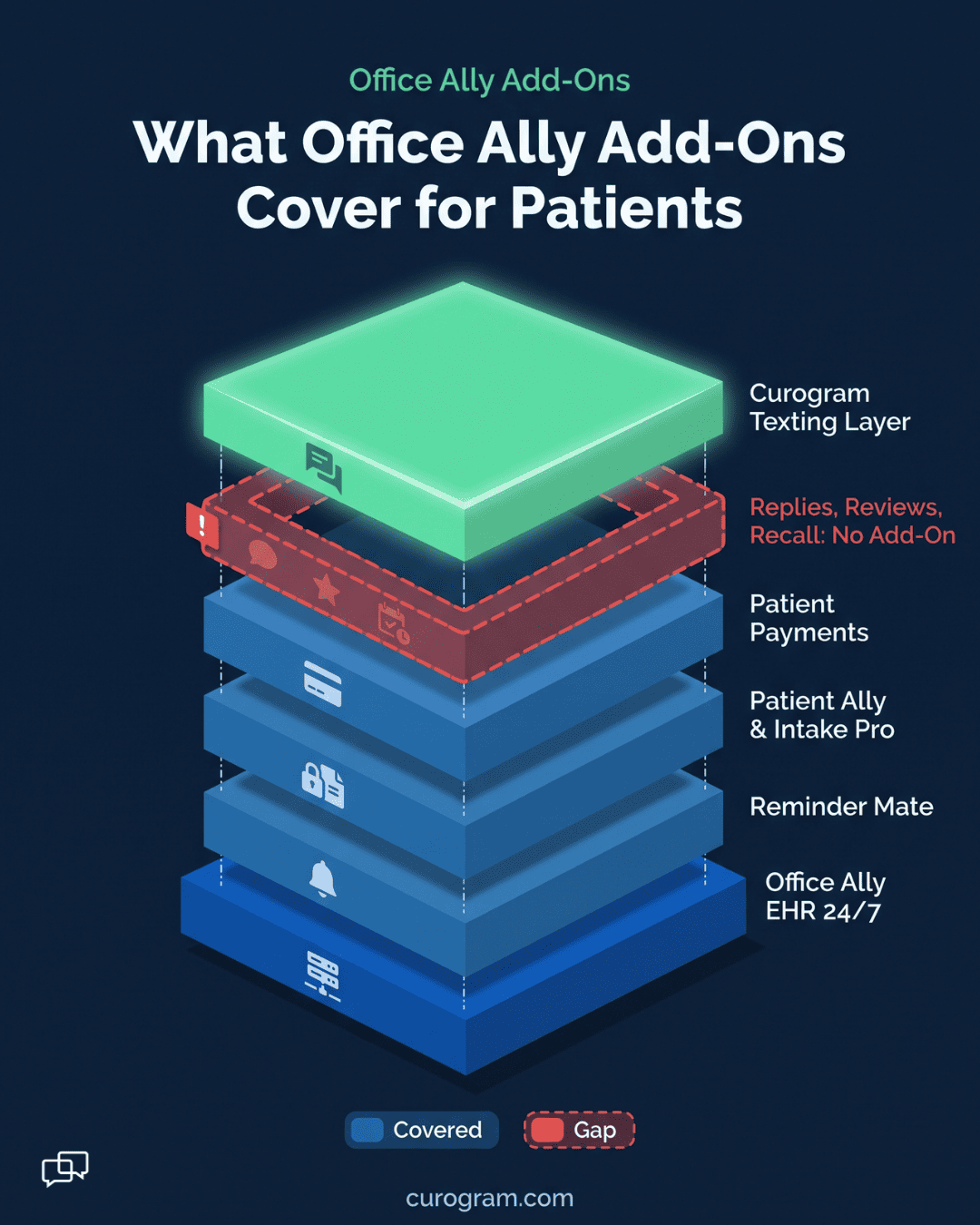
Office Ally's product pages don't list review requests, text-to-pay or recall broadcasts. Curogram fills those gaps beside the add-ons, while Office Ally stays the system of record.
Open Office Ally's products page and scroll to the add-ons. Patient Payments, Intake Pro, OA-Rx, Reminder Mate and Patient Ally share one list.
Only some of them ever reach a patient. OA-Rx goes to the pharmacy. Reminder Mate goes to the person who has to show up at 2:15.
We sorted that list the way a front desk lives it. Office Ally's add-ons cover reminders and the portal, and a texting layer covers the rest of the patient conversation.
Office Ally's Patient-Facing Add-Ons, One by One
Several Practice Mate add-ons reach patients directly. We list them in the order a patient meets them.
Reminder Mate
Reminder Mate is the add-on a patient hears from first. Each visit booked on the Practice Mate calendar triggers a text, call or email. Office Ally says it works in 16 languages.
Patients can reply to confirm, cancel or reschedule. For a practice with a steady schedule and short replies, that loop covers the basics.
Office Ally lists it as a volume-based add-on on its pricing page. We cover what it handles, and where it stops, in our guide to Office Ally Reminder Mate.
Patient Ally and Intake Pro
Office Ally calls Patient Ally its no-cost patient portal. After logging in, patients can see lab results and clinical notes, send secure messages and request visits. They can also fill out intake documents that sync back to Practice Mate and EHR 24/7.
Intake Pro handles forms from another angle. It offers tablet forms in the waiting room and online forms patients finish before the visit.
Both appear among Office Ally's EHR 24/7 add-ons, and both need the patient to take a step. A portal needs a login. A tablet needs the patient in the building.
We'd keep both for records and paperwork. Quick questions need a faster route than either one.
Updox Messaging, Direct Messaging and Patient Payments
Office Ally also lists two messaging add-ons. In Office Ally's words, both send secure, HIPAA-compliant messages to patients. Direct Messaging covers messages with other providers, too.
If your team is weighing Office Ally Updox Messaging, our Curogram vs Updox comparison covers that product in depth.
Patient Payments is the money add-on. It's "powered by Stripe" and takes payments in the office, by phone or on mobile.
Look at what the list leaves out. None of them is described as sending review requests, text-to-pay links or recall messages.
What Office Ally Add-Ons Cover, Mapped by Task
Sorting by task makes the gaps easy to spot. Each row is a job your front desk does every week.
|
Task |
Office Ally add-on listed for it |
Curogram |
|---|---|---|
|
Appointment reminders |
Reminder Mate |
Yes |
|
Confirm, cancel, reschedule |
Reminder Mate |
Yes, plus free-text replies |
|
Patient records access |
Patient Ally |
Not offered |
|
Secure messaging |
Patient Ally; Updox Messaging; Direct Messaging |
Two-way text |
|
Intake forms |
Intake Pro; Patient Ally |
Forms by text |
|
Payments |
Patient Payments (in office, phone, mobile) |
Text-to-pay |
|
Review requests |
Not listed |
Yes |
|
Recall broadcasts |
Not listed |
Yes |
|
Telehealth link by text |
Not listed |
Yes |
A Tuesday's Patient Messages, Sorted by Tool
Take one illustrative Tuesday at a two-provider family practice. The day brings 40 reminders and 6 free-text replies. Two balances are open, 1 review request should go out, and 30 patients are overdue for annual physicals.
That day sorts like this:
- 40 reminders: Reminder Mate sends them.
- 6 free-text replies: no listed add-on, so staff answer by phone.
- 2 balances: Patient Payments takes the card, but someone still has to ask.
- 1 review request: no listed add-on.
- 30 recall patients: no listed add-on.
Three of the five jobs have no listed add-on, so they land on staff. On a short-staffed Tuesday, the review request is the one that slips.
Third-Party Tools Office Ally Practices Weigh
We look at three outside tools here. Each one was built for a different kind of practice.
Curogram Beside Office Ally
Curogram syncs appointment data from Office Ally, so reminders build from the schedule you already keep. Confirmations post to Curogram's dashboard, and free-text replies collect in a single team inbox.
The same tool sends review requests, text-to-pay links, recall broadcasts and telehealth links. For security reviews, Curogram brings a signed BAA plus SOC 2 Type II and HIPAA compliance.
Atlas Medical Center cut no-shows from 14.20% to 4.91% after adding Curogram. Our Office Ally integration overview shows how setup works.
Zingit
Zingit was built for chiropractic offices, and its plan tiers reflect that. Every plan includes a two-way inbox, reminders and broadcast. Reviews and recall start at the Premier tier, and forms sit at the top tier or cost extra.
The integrations it names are chiropractic systems such as ChiroTouch and Jane. Zingit says it syncs with 150+ EHRs, so look for Office Ally by name before a demo.
For a medical practice, our Curogram vs Zingit comparison walks through fit, features and security. A checklist for Zingit alternatives covers the wider field.
Echo Booking
Echo Booking puts an AI receptionist on your phone line, inbox and fax. It works day and night in 70+ languages and books appointments into the EHRs it lists.
Office Ally doesn't appear on that published list today. The company says it scopes custom systems before signing, so ask it directly.
We compare the two tools for Office Ally practices in Curogram vs Echo Booking.

Choosing Your Add-On Mix
Your answer will likely be a mix of Office Ally add-ons and perhaps one outside tool. Three questions settle the shape of it.
Questions to Settle Before You Buy
Who answers patient replies today, and where do they read them? If the answer is a sticky note by the phone, replies need a home.
Which messages does staff send by hand each week? Count them for 5 days. Balance calls, review asks and recall calls tend to top the tally.
Does your security review ask for a SOC 2 Type II report? Curogram holds SOC 2 Type II. For any other vendor, check its site or ask for the report in writing.
If Reminders and a Portal Cover Your Day
Some practices can stop at Office Ally's own add-ons. A solo therapist with 12 visits a day may get almost no free-text replies. A practice that never sends review requests or payment texts has little for a second tool to do.
In those cases, Reminder Mate plus Patient Ally is enough. It keeps everything under one vendor and one login.
We'd revisit the setup when a second provider joins, or when the callback list runs past lunch.
Conclusion: Building Your Office Ally Setup
Office Ally's add-ons handle reminders, records, forms and in-office payments. In our sample Tuesday, three of five jobs had no listed add-on: replies, review requests and recall.
Request a demo and we'll map your own add-on mix task by task against your Office Ally schedule.