11 min read
Best Patient Messaging Platforms for Multi-Site Clinics
Mira Gwehn Revilla
:
October 7, 2026
Texts should land in a per-site inbox that can overflow to a backup queue. Each new thread needs a named owner the moment it opens. When a site has two people out, its queue should move to another team by rule.
Reply time and unanswered threads must show up for each site on its own line. Every local number you text from also needs a registered 10DLC campaign.
Inbox architecture, routing rules and per-location reporting decide whether call volume actually falls, so start your pilot at your busiest site.
A second location doubles more than your patient list. It doubles the number of places a text can sit unread, and most patient messaging platforms for multi-site clinics are sold on features that never touch that problem.
A patient of your Eastside office replies "can I move to Thursday?" The text lands in a queue the Westside desk watches. Nobody there knows the Eastside schedule, so nobody answers, and the patient calls.
That call is the cost. In a March 2026 MGMA Stat poll on phone bottlenecks in medical practices (294 practice leaders), 31% named scheduling as their staff's most time-consuming phone task. Only eligibility and prior authorization ranked higher, at 45%.
Phones are also where leaders plan to spend effort. When MGMA asked 236 leaders in December 2025 about their top patient access focus for 2026, 22% picked phone access, according to the MGMA Stat poll on 2026 patient access priorities.
Texting is supposed to pull those calls off the line. At one site, almost any tool can do it. Across several sites, results depend on plumbing most demos skip.
Our view is simple. Inbox architecture is the decision. AI add-ons and template libraries come second to three questions: where does a text land, who owns it, and which site is falling behind?
Six vendors appear below: Curogram, Klara, Artera, Luma Health, Solutionreach and TigerConnect. Each one texts patients well enough at a single office. They differ on what happens when Site C has two people out on a Tuesday and 40 threads are waiting.
We make Curogram, so weigh our row with that in mind. Every other row comes from each vendor's public documentation, checked in October 2026. Where a vendor doesn't publish how something works, we say so, and you should ask to see it live.
What Several Sites Break in a Messaging Tool
Most texting tools were built around one front desk. A second site adds three problems that one office never has: which number patients text, who covers a site that's short on staff, and who owns a reply once two teams can see it.
One Number, or One per Site?
For most groups, one number per site is the better default. Patients already know their clinic's local number. Reminders arrive from the office they're going to, and replies sort themselves by site before anyone reads them.
One shared number is easier to print on a website. The trade-off shows up at the desk. Every reply lands in one pile, and someone has to open each thread to learn which office it belongs to.
The exception is a central scheduling team that answers every text. If one team owns the queue, a single number fits that single queue.
10DLC is the US carrier system for business texting from standard 10-digit numbers. Each number has to sit under a registered brand and an approved campaign before it can send. More site numbers mean more numbers to set up when a site opens, and more to retire when one closes or moves.
Coverage When a Site is Short-Staffed
A short-staffed site needs its waiting texts moved to another team by rule, with the site details still attached.
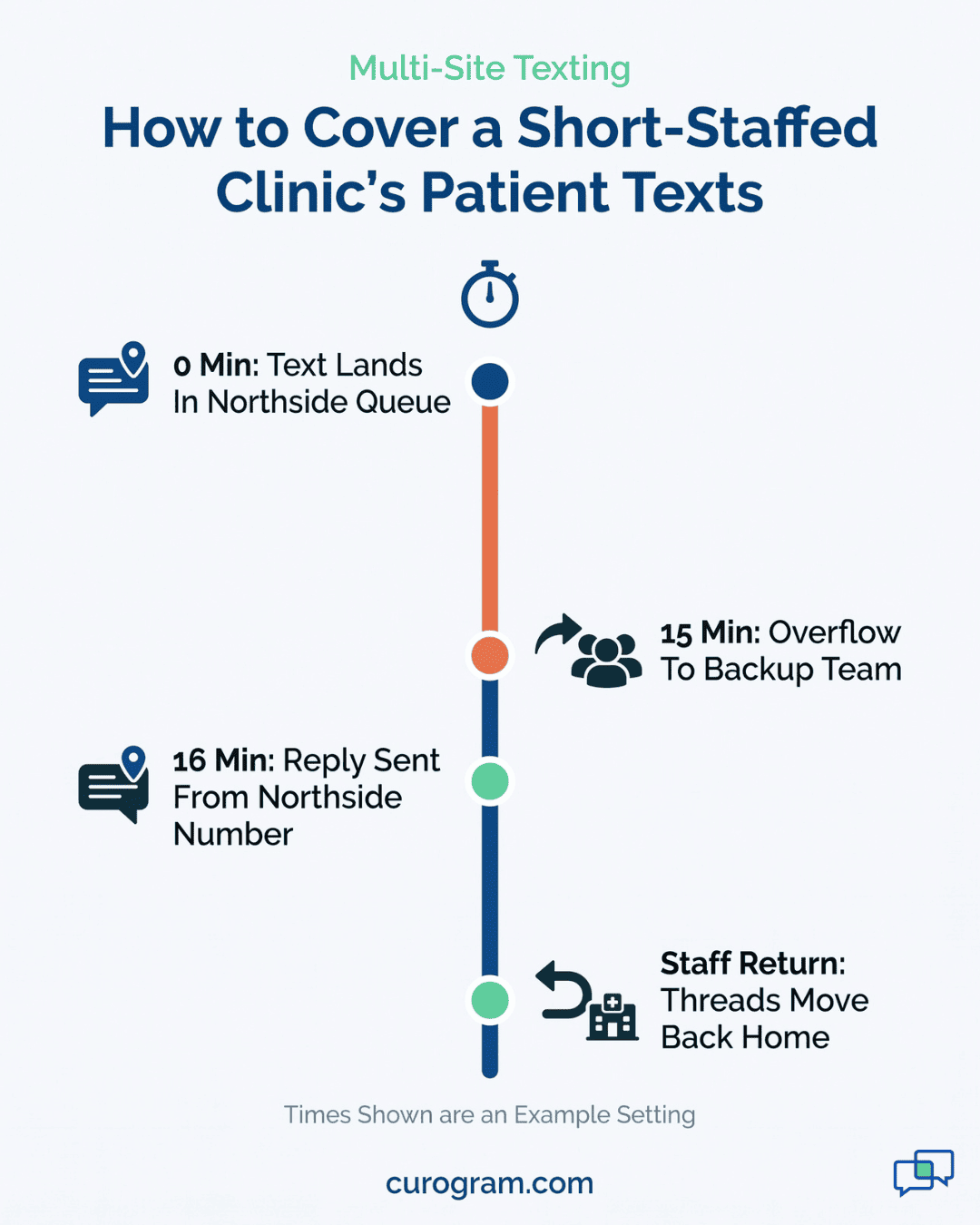
Take a flu-season Tuesday when your Northside clinic has two of its three front desk staff out. By 10 a.m., 30 texts are waiting and the one person left is on the phone.
A good platform handles it in this order:
- Hold new Northside threads in the Northside queue for a set wait, such as 15 minutes (an illustrative setting).
- Move unanswered threads to a named backup queue, like Southside or a central team.
- Keep the Northside tag, so replies still go out from the Northside number.
- Show backup staff the patient's Northside appointment, provider and last message.
- Send threads back to Northside once staff log in again.
If any step needs a manager to drag threads by hand, coverage depends on whoever remembers to do it. Ask each vendor which of these five steps happen on their own and which need a click.

The Multi-Site Yardstick
Score each platform on four tests. Each test is worth 0, 1 or 2 points, for a top score of 8. Run the tests in a live demo with your own scenarios, since a slide can claim anything.
What Inbox Architecture Works Best for Several Sites?
Per-site inboxes with an overflow rule work best for most groups. Inbox architecture is the way a platform sorts incoming patient texts into queues before anyone reads them.
You'll see three models:
- Shared inbox. Every site's texts land in one queue. Staff filter by site tag, if there is one.
- Per-site inbox. Each site sees only its own queue. Clean, until a site runs short.
- Per-site with overflow. Each site has its own queue, and a rule moves waiting threads to a backup after a set time.
Scoring is strict. Give 2 points for per-site queues with an overflow rule your own admin can set. Give 1 point for per-site queues where moving threads is manual. A shared inbox with no site tag scores 0, since staff have to read every message to sort it.
Routing and Assignment Rules
A routing rule is an if-then setting that sends a message to a queue or person based on details like location, provider or topic. Good rules do three jobs: assign on open, allow reassignment, and survive staff turnover.
Assign on open means a thread gets a named owner the second it arrives. Reassignment should carry the full history, so the new owner doesn't text the patient the same question twice.
Turnover is where rules rot. Say the front desk lead at your Lakeview site leaves. If her name still owns 40 open threads a week later, the tool failed this test (the 40 is illustrative).
Ask who edits rules: your admin, or the vendor's support team? If every change needs a ticket, your rules will trail your staff changes by days.
Score 2 if your admin can edit rules and bulk-move threads alone. For rule patterns that work, see the complete guide to patient messaging workflows.
Why Does Per-Location Reporting Matter?
Per-location reporting splits reply time, unanswered threads and call volume out by site. Without it, a single group average hides the site that's struggling.
Take an illustrative group with three sites:
|
Site |
Median text reply time |
|
Site A |
8 minutes |
|
Site B |
9 minutes |
|
Site C |
52 minutes |
|
Group average |
23 minutes |
A 23-minute average looks fine in a monthly review. Site C's patients are waiting close to an hour, and they're the ones calling.
Score 2 if the platform shows all three numbers by site, and lets you pull them yourself. Score 1 if you get site reports only by asking the vendor.
6 Platforms Against the Yardstick
Six patient messaging platforms for multi-site clinics are compared below. Every row comes from the vendor's public product pages or help docs.
|
Platform |
Inbox model |
Cross-site coverage |
Per-location reporting |
|
Curogram |
Per-site queues with overflow, built with Custom Filter Groups |
Yes, by routing rule |
Yes, real-time dashboards by location |
|
Klara |
Shared inboxes staff subscribe to, plus an Unassigned inbox |
Manual, staff subscribe to another team's inbox |
Reports on reminders, forms and reviews; by-site reply time not in public docs |
|
Artera |
One All Messages view, filtered by practice, line, location or provider |
Based on user access; automatic location routing not in public docs |
Not in public docs |
|
Luma Health |
Hub queues for mine, others and unassigned; filter by facility |
Manual assignment from the Unassigned queue |
Not in public docs |
|
Solutionreach |
Central hub with Location Management |
Not in public docs |
Yes, by location, region, provider or brand |
|
TigerConnect |
Patient and provider inboxes, threads started by staff |
Forward a thread to another care team member |
Not in public docs |
Curogram on the Multi-Site Axis
Curogram sorts patient texts by site before anyone reads them.
With Custom Filter Groups, your admin builds teams such as "Northside Front Desk" or "Call Center Team 1," then routes incoming messages by location, provider, topic, appointment type, language or custom patient group.
That setup gives you per-site queues with overflow. Each site works its own queue, and a rule can send waiting threads to a named backup team when a site runs short.
When staff change, your admin edits the group and the rules follow. You don't need to file a support ticket.
Reminders can be tailored by location, appointment type and patient preference, so a parking note for one office never reaches patients of another.
Tasks can be assigned and tracked across locations and departments. Real-time dashboards show results by location, so a slow site stands out.
The results hold up at multi-site groups. Based on our internal data from the Curogram Case Studies:
|
Practice |
Result |
|
Multi-location practice, reviews |
1,064 new 5-star reviews in three months |
|
Multi-location practice, recall |
35% of recalled patients booked within a month; 1,240 visits from recall alone |
|
Atlas Medical Center |
No-shows cut from 14.20% to 4.91% in three months |
|
Covina Arthritic Clinic |
More than 1,100 appointments confirmed each month |
How the Other Five Handle Multiple Sites
Across current clients, the average confirmation rate is above 75%. Curogram also connects with a long list of EHR and PM systems, including eClinicalWorks, athenahealth and AdvancedMD.
Klara
Klara's shared inboxes are easy to staff. Team members can subscribe themselves to an inbox, and an "Unassigned" inbox catches anything without an owner. Reminders can also be switched on for some locations and off for others.
The catch sits in Klara's own release notes, which listed "reason and location routing" as a pilot in January 2021. Confirm it's live on your account before you count on it.
Artera
If your team already thinks in phone lines, Artera will feel familiar. Its All Messages view filters by practice, line, location and provider, and it's built for large health systems.
What its public help docs don't describe is an automatic rule that moves one site's threads to another, or a reply-time report by site. Ask to see both live.
Luma Health
Luma's Collaboration Hub sorts chats into three queues: yours, other staff members', and unassigned. Staff can filter by facility, which helps a central team.
Patient-started chats land in the Unassigned queue, and staff assign them by hand. Luma's docs say custom routing setups may need a Statement of Work.
Solutionreach
Reporting is Solutionreach's strongest multi-site card. It splits results by location, region, provider or brand, and can feed data into Power BI.
Its multi-location page describes "Location Management" and central workflow standards. We didn't find a documented overflow rule for moving a short-staffed site's open threads to another team.
TigerConnect
TigerConnect grew up in hospital staff messaging, and it shows. Staff can forward a patient thread to another care team member in a tap.
But its patient conversations are clinician-controlled, so patients can only text after staff reach out first. That limits the patient-started texts that usually replace phone calls.
Fit by Operating Model
Your org chart picks the inbox model before any vendor does. Groups that schedule from one central team need different features from groups where every site runs its own desk. Many sit in between.
Centralized Scheduling Team
A central team works best with one queue and skill-based routing. Skill-based routing sends each message to the staff group trained for that request, such as billing, refills or new-patient scheduling.
Require these before you sign:
- A site tag on every thread, so agents know which office the patient uses.
- Outbound replies sent from the patient's home site number.
- Language routing, if your patients text in more than one language.
- Reply time by agent and by site in the same report.
Central teams also take the calls that texting doesn't catch. If that's your setup, look at how call center workflows connect missed calls and voicemail to the same queue. A missed call that becomes a text thread is one less callback list for an agent to work through.
Independent Site Teams
Independent sites need per-site inboxes with an overflow rule. Each site's front desk owns its own queue, knows its own providers and answers in its own voice.
Three things matter most here:
-
The overflow rule needs a named receiving queue and a wait time your admin sets, such as 15 minutes during clinic hours (an illustrative setting).
-
Site managers should be able to edit their own templates for hours, parking and lab directions, since those local details drive most day-to-day patient communication.
-
Each manager needs a report for their own site, so they can fix a slow week without waiting for a group review.
Watch for one trap. Some tools let each site run its own inbox but give no way to share a thread. When a patient seen at two sites texts, both teams end up with a partial history.
Turning It on Site by Site
Rollout order shapes what you learn. Roll out to every site at once and you can't tell what worked. Start at one site and you get a clean before-and-after, plus your other sites as a comparison group.
Why Pilot at Your Busiest Site?
Pilot where the queue is longest, because that's the only place the hard features get tested. A quiet site might get 12 texts a day. At that pace, any platform looks fast.
A quiet-site pilot fails to prove three things. Overflow rules never fire, because no one is ever short enough to need them.
Reassignment never gets stress-tested. And reply-time numbers look great, so you roll out with confidence, then watch them fall apart at the site that takes 150 texts a day.
Your busiest site also has the most phone calls to lose. If texting can cut calls anywhere, it'll show there first.
Setup runs in a set order, and skipping ahead usually means rebuilding routing rules later. A typical sequence for one pilot site looks like this (the timing is illustrative):
|
Week |
What gets done |
|
Week 1 |
Site number registered under your 10DLC brand and campaign; reminder templates written |
|
Week 2 |
Routing rules built; every staff member assigned to a group; backup queue named |
|
Week 3 |
Go live with reminders and two-way texting; front desk answers all texts |
|
Week 4 |
First overflow test on a planned short day; first site report pulled |
The Call-Volume Check at Day Ninety
At day 90, compare the pilot site against itself and against a site that hasn't launched yet. Measure four things, each by site:
- Inbound calls per week, from your phone system, against your pre-launch baseline.
- Median text reply time during clinic hours.
- Threads still open at the end of each day.
- Threads closed without a follow-up call from the patient.
A good result has three parts. Calls at the pilot site fall while the comparison site stays flat. Reply time holds steady on short-staffed days. Open threads at close are near zero.
If calls didn't move, check the reply-time line first. A slow queue sends patients back to the phone. Fix the routing, run 30 more days, and measure again before you add the next site.
Conclusion: Choose the Inbox First
A multi-site group buys a messaging tool to take calls off the phones. Whether that happens depends on what the tool does with a text at your slowest site on your shortest day.
We'd build a shortlist of patient messaging platforms for multi-site clinics around architecture. Pick per-site queues with an overflow rule your own admin controls. Insist on a named owner for every thread, and on reply times you can see site by site. Price, templates and AI features are worth comparing once those three are settled.
Then prove it where it's hard. Your busiest site, on a short-staffed week, will show you more in 90 days than a quiet site will in a year.
If your question is about practice size more than site count, our guide to patient texting platforms for large practices covers that angle.
Want to see how Curogram routes texts across your locations? Book a demo and bring your site list. We'll set up the overflow rule for your busiest clinic during the call.
Frequently Asked Questions
Start with one number per location. Patients already know their clinic's local number, reminders come from the office they visit, and replies sort by site on their own. Choose a single shared number only if one central team answers every text. Either way, each number needs a registered 10DLC campaign before it can send.
Set an overflow rule with a named receiving queue. After a set wait, unanswered threads from the short site move to that backup team. The site tag stays on each thread, so replies still go out from the original site's number. When staff return, threads move back, and the record shows who handled what.
Three numbers, each split by site: median text reply time, unanswered threads at the end of the day, and inbound call volume. A group average hides the one site that's falling behind. You should be able to pull these yourself, without asking the vendor, so you can check them weekly during a rollout.
Texts turn into calls when they sit unanswered. At multi-site groups, that usually happens because a message landed in the wrong site's queue, or no one owns it. Patients wait, then dial. Scheduling, intake and refills made up 46% of the most time-consuming phone tasks in MGMA's March 2026 poll, and all three can be handled by text.
Plan on 90 days at one busy site. The first month covers setup and staff habits. Months two and three show whether reply times hold and whether calls fall against your other sites. If the pilot site's calls drop while the others stay flat, you have a result worth rolling out.