10 min read
Best Patient Texting Features for Lower Call Volume
Mira Gwehn Revilla
:
October 12, 2026
A confirmation text with no way to reschedule barely moves that number, because the patient who can't come still calls. Missed-call text-back is the cheapest feature on the list and the one most often missing.
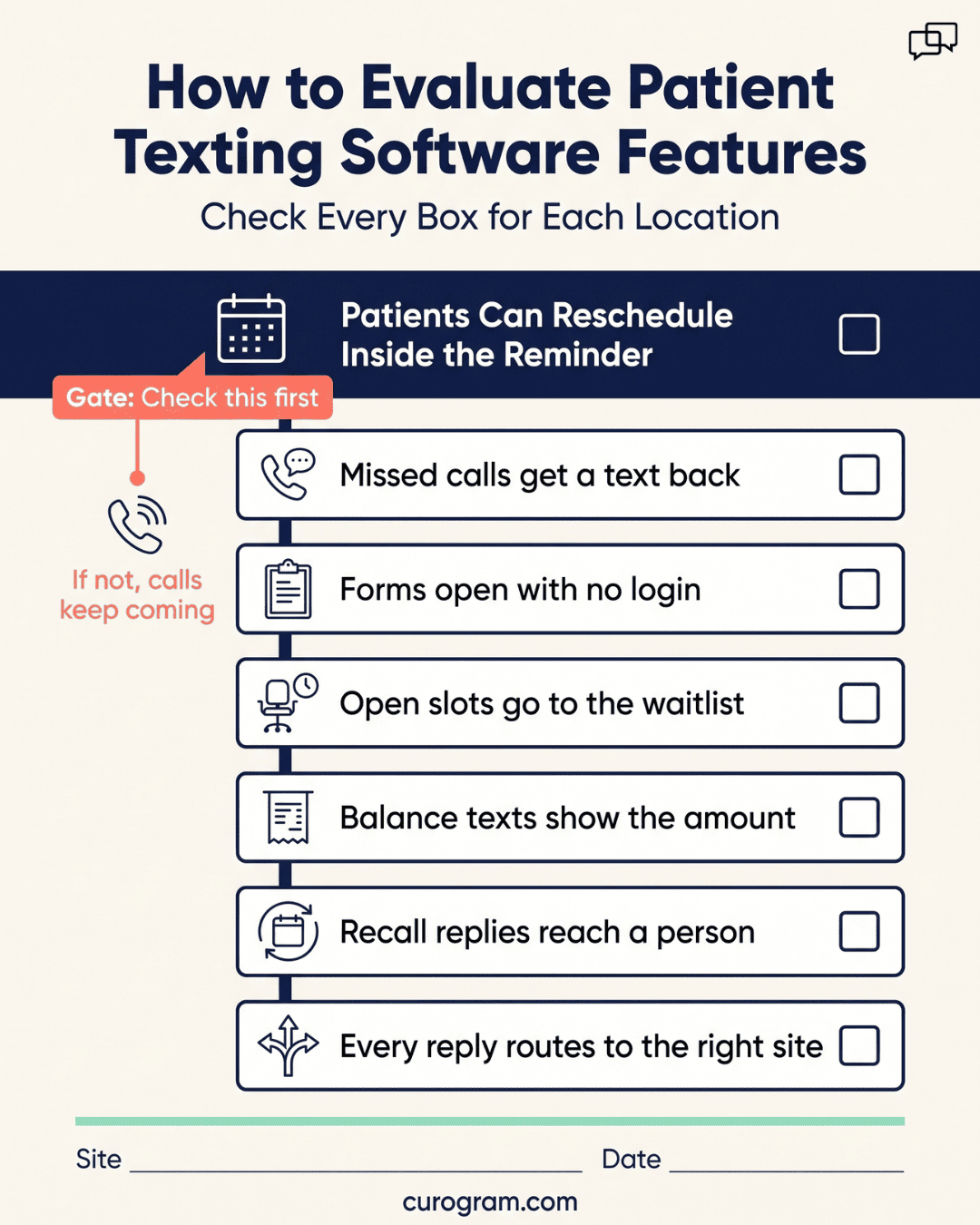
Rank each feature by the calls it removes, and judge each demo by what happens after a patient replies. At more than one site, set each feature up per location, or staff will stop using it.
Most texting demos open on the same screen. A reminder goes out, a green "Confirmed" tag comes back, and the sales rep moves on to the next feature.
The demo skips the patient who can't make Tuesday. Her reminder offers one reply, "C to confirm," so she calls the front desk. She waits on hold behind two other callers, asks for Thursday, and a staff member re-keys the slot in the EHR. The reminder went out on time and still produced a call.
That call shapes how practices should shop for patient texting software. Vendors give every feature equal time in a demo. Some of those features end a call type for good. Others shift the call to later in the week.
Rank texting features by the calls they remove, then buy and roll them out in that order. Two-way confirmation with reschedule leads the list by a wide margin, since scheduling is the largest call type texting can reach. Missed-call text-back comes second, and it's the cheapest feature most practices still lack.
For administrators and IT leads running several locations, every site raises the stakes. A reminder template with the wrong address creates calls that didn't exist before go-live. So does a text-back rule set to another site's time zone.
Depth matters as much as the feature list. One vendor's missed-call text-back stops at "message sent," while another's routes the reply to the right site's inbox. Five plain requests in a 30-minute demo will show which kind you're getting.
Ranking Features by Calls Removed
Two-way confirmation with reschedule ranks highest, followed by missed-call text-back and pre-visit forms. We scored each feature by the call type it removes and how often that call comes in.
Which Patient Texting Features That Reduce Calls Rank Highest?
- Confirmation with reschedule ends appointment-change calls, the largest group texting can reach.
- Missed-call text-back stops patients who hung up from redialing two or three times.
- Pre-visit forms end "What do I bring?" calls, and they fire for every new patient.
- Waitlist backfill offers a canceled slot by text, so staff skip the phone list.
- A balance text with a text-to-pay link heads off "What do I owe?" calls.
- Recall books lapsed patients by text, though it adds replies to answer.
- Shared-inbox routing keeps the other six working, since an unanswered text becomes a call.
|
Feature |
Calls it removes |
Relative impact |
|
Two-way confirmation with reschedule |
Appointment changes |
Highest |
|
Missed-call text-back |
Repeat callers |
High |
|
Pre-visit forms |
Form and prep questions |
High |
|
Waitlist backfill |
Cancellation follow-up |
Moderate |
|
Balance collection by text |
Billing questions |
Moderate |
|
Recall messaging |
Follow-up scheduling |
Moderate |
|
Shared-inbox routing |
Repeat calls after no reply |
Enabling |
Why Does Confirmation With Reschedule Win?
Confirmation with reschedule wins because it ends the most common call that texting can reach. Without a reschedule path, the patient who can't come calls anyway.
In the MGMA Stat poll on phone bottlenecks in medical practices, taken March 10, 2026, with 294 responses, 31% of practice leaders said scheduling takes the most staff phone time. Eligibility and prior auth led at 45%, but those calls mostly run between staff and payers.
With a reschedule path, the patient replies "Can I do Thursday?" and gets two open times in the same thread. Patients want that. In the Sinch Engage survey of 1,000 US patients, aged 18 to 78 and fielded December 4 to 7, 2025, 68% said they want two-way texting.
The 3 Features Most Often Missing
Missed-call text-back is an automatic text sent to a caller whose call went unanswered. It removes repeat calls from patients who hang up on hold and dial again.
What is Missed-Call Text-Back?
A typical message reads: "Sorry we missed your call to Eastside Family Medicine. Reply here and we'll help by text." Staff answer the thread between calls, in order, with no callback list.
It's cheap because it runs off your phone line. There's no EHR field mapping and only one template per site. Most of the setup is carrier paperwork: your number must be text-enabled and registered for 10DLC, the carrier system for business texting from local numbers.
Bundled reminder tools skip it because they read the EHR schedule and never see the phone line. That's why missed call text-back is the gap we find most often.
Reschedule Inside the Confirmation
Many platforms confirm an appointment but can't move one. Any reply other than "C" gets ignored or triggers "Please call our office to reschedule," and the patient does.
Testing it takes two minutes. Book a test appointment in the vendor's demo setup. When the reminder arrives, reply "Can I come Thursday afternoon instead?" Then ask the rep where that reply goes and who sees it.
|
What happens after the reply |
Result |
|
Auto-text asks you to call the office |
Fail: the call still happens |
|
Reply lands in a staffed inbox thread |
Pass: staff offer slots by text |
|
Patient picks from open slots |
Pass: check that the change reaches your EHR |
The staffed thread is enough for most practices. A text can wait 10 minutes while staff check in a patient.
Watch the clock too. A reply that sits unseen for an hour turns into a call. For self-serve booking, ask whether the new time writes back to your EHR schedule or needs re-keying.
Per-Location Configuration
One template set across every site is the clearest sign of a platform built for single offices. Ask to see site two's reminder in the demo. If it's site one's text with a new name merged in, expect new calls.
Three things break first. A patient booked at your satellite clinic gets the main campus address, drives to the wrong building, and calls from the parking lot.
A fasting note written for one site's lab draws reaches patients at a site with no lab. Missed-call text-back set to one site's hours sends "we're closed" texts to a clinic open in another time zone.
Ask for templates, hours, and routing set per location under one login. Each site's number also needs 10DLC registration. Our guide to patient messaging platforms for multi-site clinics covers inbox design by site count.

How Platforms Differ in Delivering Them
Patient texting platforms come from different starting points. Some began as reminder add-ons that read the EHR schedule.
Others started as phone systems and added texting later, or as messaging tools built for the front desk. That starting point shapes which of the seven features run deep and which stay thin.
Depth vs Presence
Depth is how far a feature carries a task before staff have to step in. A checkbox on a spec sheet only shows that the feature exists.
Weave, Solutionreach, Klara, Luma Health, NexHealth, and Curogram all list reminders and two-way texting. The differences show up after a patient replies. Two examples:
|
Feature |
Shallow version |
Deep version |
|
Missed-call text-back |
Same text day or night; patient calls back at 8:00 am |
After-hours note with next open time; patient replies by text |
|
Balance collection |
Link to a portal login; patient calls billing |
Amount in the text and a pay page with no login |
A shallow feature can raise calls. Patients stuck at a portal login phone billing to ask what they owe.
In the Sinch Engage survey of 1,000 US patients from December 2025, 90% said they prefer text, so a shallow feature fails at volume.
So when you compare patient texting features that reduce calls, ask one question for each: what happens after the patient replies? Its answer is your real measure of inbound call reduction.
Where Curogram Sits on the Seven
Curogram covers the seven from one HIPAA-compliant platform, starting from your EHR schedule or your phone line.
Curogram Appointment Reminders go out from the appointments your EHR already holds. When a patient asks for a new time, staff offer open slots in the same thread.
Based on our internal data, practices on Curogram average a confirmation rate above 75%. Covina Arthritic Clinic confirms more than 1,100 appointments a month.
Missed-call text-back runs off your practice number. Forms arrive on mobile with no login, and text-to-pay puts the balance in the message.
Recall has our clearest numbers. Based on our internal data, 35% of patients who got an SMS recall at one multi-location practice booked within a month, with 1,240 visits from recall alone. Staff can text waitlisted patients as a group when a slot opens. Every reply lands in one shared inbox.
Sequencing Them Across Locations
Every feature you switch on adds a new kind of reply for the front desk to learn.
Launch all seven in the same week and staff face booking requests, form questions, and payment replies at once. You also lose any way to tell which feature cut which calls at each site.
Which Two to Turn On First
Turn on confirmation with reschedule first, then missed-call text-back. That order hits the largest call type first, then catches the calls that slip through while staff learn the inbox.
Confirmation goes first because its volume is easy to predict. Each appointment brings about one reply, so a site booking 120 visits a day can plan for roughly 120 short threads. It also reaches the 31% scheduling share from the MGMA poll.
Missed-call text-back follows in week two or three. Phones keep ringing while patients get used to texting, and text-back turns missed calls into threads.
Start 10DLC registration in week one, since carrier approval isn't instant and each texting number needs it. Shared-inbox routing goes live on day one, under both.
What to Hold Back Until Month 3
Hold recall and mass outreach until month three. Both cause a reply spike that a new team can't absorb next to confirmation traffic.
Recall replies come in bursts. Take an illustrative case using our internal recall rate: a site texts 1,000 lapsed patients, and 35% book within a month.
That's 350 extra scheduling threads, plus questions from patients who don't book. If they land in week two, confirmation replies wait, and waiting patients call.
When recall does start, send it in batches of a few hundred per site per day.
|
When |
Turn on |
|
Weeks 1 to 2 |
Shared inbox, confirmation with reschedule |
|
Weeks 2 to 3 |
Missed-call text-back |
|
Month 2 |
Forms, balance collection, waitlist |
|
Month 3 and later |
Recall, mass outreach |
Mass outreach, like a closure notice or a flu shot campaign, behaves the same way. One send can bring hundreds of replies in an hour.
Testing the Claims
Before any demo, pull two weeks of call logs from each site and tag the reason for every call you can. That tally tells you which features to press hardest. Bring a front desk lead to the demo, since they'll spot a broken reply flow faster than IT will.
5 Demo Requests
Every vendor says its platform cuts calls. These five requests test that claim one feature at a time, and each has a pass condition you can judge during the demo.
|
What to say in the demo |
Feature |
It passes if |
|
"Send me a reminder for a test visit. I'll reply asking for Thursday." |
Confirmation with reschedule |
The reply reaches a person or slot list, with no "please call" text |
|
"Call this demo line, let it ring out, and show me the text I get." |
Missed-call text-back |
A text arrives within two minutes, worded for that site |
|
"Show me site two's reminder next to site one's." |
Per-location setup |
Address, hours, and callback number differ under one login |
|
"Text me a test balance. I'll pay without logging in." |
Balance collection |
The amount shows, and payment takes a few taps |
|
"Send a recall to 500 test patients and show me where replies land." |
Recall and inbox routing |
Replies sort by site, and staff see who's been answered |
Ask the rep to run each one live on your phone. Run them in this order. If request one fails, the biggest call type is still coming in, and the other four matter much less.
Use cellular data for every test, since that's how patients will see it. Mark pass or fail before the call ends, so every vendor faces the same five checks.
What a Single-Site Pilot Proves About Seven Features
A single-site pilot proves depth. Thirty days of real patients will show whether replies route well, the reschedule path holds, and forms and text-to-pay work on patients' own phones.
Scale needs its own test. One site has one template set, one number, and one inbox queue. It can't show six sites sharing an inbox, a recall going to five locations at once, or each new number waiting on 10DLC approval.
So plan two stages. Run 30 days at your busiest site, then add a second site with different hours or a different specialty for two more weeks.
Track one number through both: inbound calls per 100 scheduled visits, counted the same way before and after. That figure is your call volume reduction.
Conclusion: Start With the Calls You Get Most
Vendor feature lists make patient texting features that reduce calls look interchangeable. For a practice with several sites, the result depends on order and depth.
Patients will also judge you on it. In the Sinch Engage survey of 1,000 US patients, fielded in December 2025, 30% said they'd consider switching providers if texting weren't offered. Among Gen Z, that rose to 42%.
We'd build the plan around confirmation with reschedule, then missed-call text-back, with shared-inbox routing underneath both from day one.
Add forms, balance collection, and waitlist in month two. Let recall wait until your team has the inbox under control. By then, SMS patient engagement can add visits while replies still go out in minutes.
Then test the depth before you sign. Bring the five demo requests, your own templates, and two of your least alike sites, and judge each vendor's patient communication by what happens after a patient replies.
Book a demo today and bring your call logs, and we'll map which features would end which calls at each site.
Frequently Asked Questions
Of the patient texting features that reduce calls, two-way confirmation with reschedule removes the most. In a March 2026 MGMA Stat poll, 31% of 294 practice leaders named scheduling as their biggest phone time drain. The ranking holds only with a reschedule path. If patients can only reply "C," those who need a new time still call.
Missed-call text-back is an automatic text sent to anyone whose call to your practice went unanswered. It removes repeat calls from patients who hang up on hold and redial. The patient replies by text, and staff answer in order between calls. It needs a 10DLC-registered number but no EHR link.
Each site has its own address, hours, prep notes, and callback number. With one shared template set, satellite patients get the main campus address, wrong prep, or "we're closed" texts during open hours. Each of those errors creates a phone call that didn't exist before texting went live.
Shared-inbox routing sends each patient reply to the staff queue for the right site. Without it, a reschedule request can sit unread in a general inbox, and the patient calls the next morning to ask if anyone saw it. Routing also shows staff which threads are already answered, so two people don't reply to the same patient with different times.
Recall creates reply spikes. As an illustration using our internal 35% recall booking rate, texting 1,000 lapsed patients could add 350 scheduling threads in a month. If that lands while staff are still learning to handle confirmation replies, response times slip, and slow replies turn into phone calls. By month three, inbox habits are set and the team can absorb the surge.