

Skip to the main content.

14 min read

A Simple Guide to HIPAA-Compliant Text Payments for Clinics

A Simple Guide to HIPAA-Compliant Text Payments for Clinics
💡 HIPAA-compliant text payments help clinics collect money from patients while keeping their health data safe. These systems use special links sent by text that protect patient info through coding and safe channels. The key parts include coded payment data, locked access for staff only, and records of every message sent.

Clinics must follow HIPAA rules when sending bills or payment requests through text to avoid big fines and protect patient trust. Good text payment tools make it easy for patients to pay bills on their phones while meeting all federal rules.

The best options blend strong safety steps with a simple design so patients can finish payments fast. When clinics pick the right HIPAA-compliant payment texting system, they can speed up cash flow and cut admin work without risking patient data or breaking laws.


Clinic owners often feel stuck between two bad choices. They can keep using slow paper billing that frustrates patients, or they can try digital tools that might break HIPAA rules. This fear keeps many practices from making the switch to faster payment methods.

The truth is simpler than most people think. HIPAA-compliant text payments exist and work well for clinics of all sizes. These systems let you send secure payment links through text messages that patients can click and pay right away.

You don’t need to become a tech expert or hire costly IT staff. Modern text payment tools handle the hard parts for you. They keep patient data safe, create needed records, and follow all federal rules without extra work on your end.

The real question isn’t whether text payments can be safe. It’s whether your current system wastes time and loses money. Studies show that clinics using text-to-pay collect bills 3 times faster than those using paper statements. Patients also prefer this method since they can pay from their phones in under a minute.

HIPAA rules protect how clinics share patient info during any type of contact. Payment requests count as protected health information when they include patient names, dates, or service details. This means your billing texts need the same safety steps as your medical records system.

But here’s the good news: secure healthcare payments through text don’t require complex setups. The right platform does the heavy lifting while you focus on patient care. Your staff can send payment links with a few clicks, and patients get a smooth, safe way to clear their bills.

This guide breaks down what HIPAA-compliant payment texting means in plain terms. You’ll learn the real risks of unsafe systems, how proper tools protect your practice, and why simple design matters just as much as security. By the end, you’ll know exactly how to start collecting payments safely through text


What Does “HIPAA-Compliant Text Payment” Mean?

The term sounds technical, but the concept is straightforward. HIPAA-compliant text payments use special safety steps to protect patient data when you send billing messages. These protections ensure that private health details don’t fall into the wrong hands during the payment process.

Three Core Safety Requirements

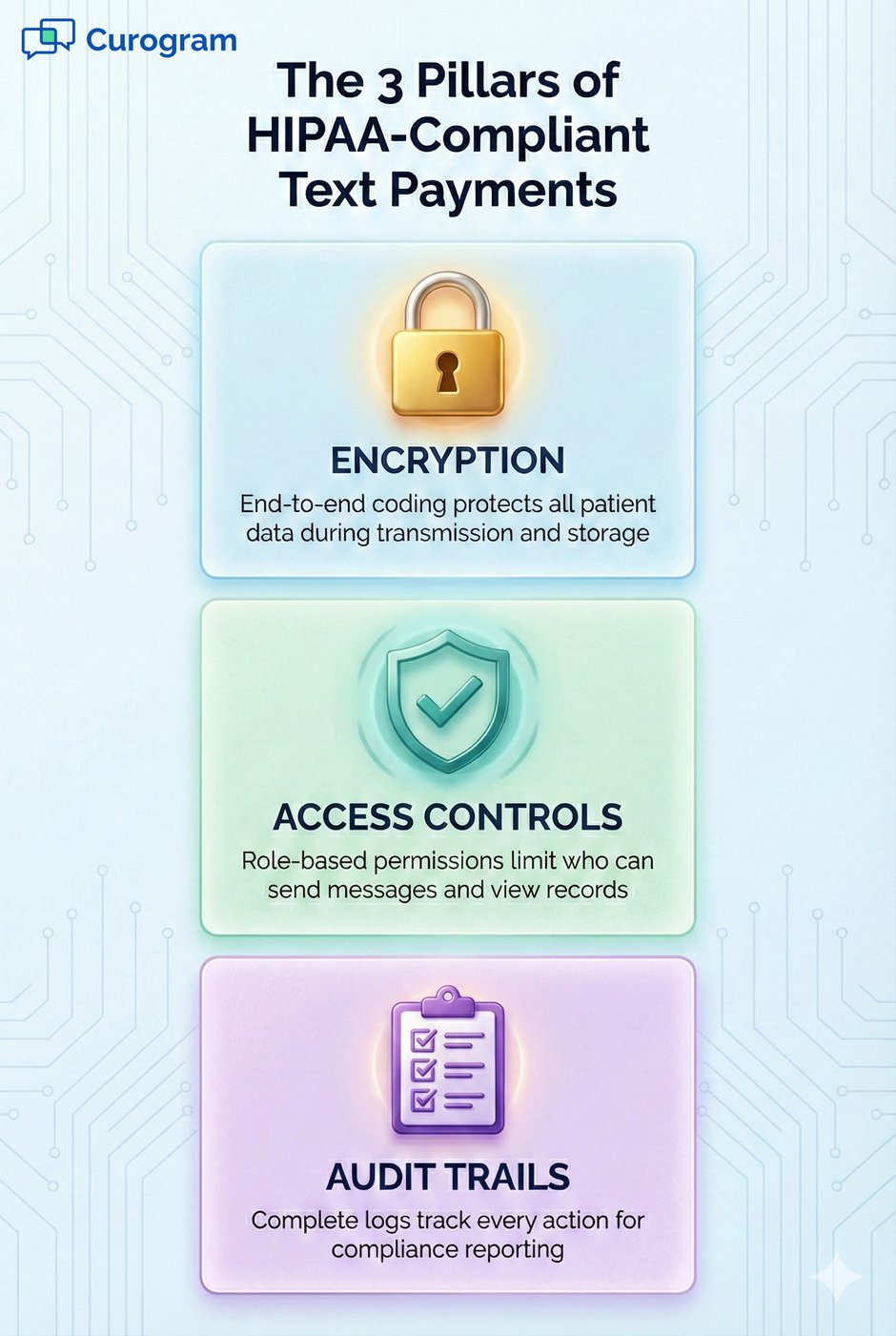
Every HIPAA-compliant payment texting system must include three main parts. First, it needs end-to-end coding that scrambles data so only the right people can read it. Second, it requires access rules that limit which staff members can send payment texts or view records. Third, it must keep detailed logs showing who sent what message and when.

These aren’t optional features you can skip. Federal law requires all three elements when handling protected health information. Clinics that skip any of these steps face serious legal and financial risks.

Why Payment Messages Contain Protected Health Information

Many clinic staff assume payment texts are safe because they don’t mention diagnoses or medical details. This thinking leads to costly mistakes. HIPAA treats payment info as protected when it links to a specific patient and their care.

A text saying “Your balance for the January 15 visit is $150” contains protected details. It shows that the person visited your clinic on a certain date and received services worth a specific amount. Sending this through regular SMS without safety measures breaks HIPAA rules.

How Secure Payment Links Work

The safest text payment systems don’t put any patient details in the actual message. Instead, they send a coded link that patients click to reach a secure payment page. This page lives on protected servers with proper coding and access controls in place.

When patients click the link, they see their bill details on a safe website. The payment form uses the same type of coding that banks use for online transactions. After payment, the system creates a record that gets stored with full audit trails and access limits.

The Role of Tokenization in Payment Safety

Modern HIPAA-compliant payment texting platforms use something called tokenization. This process replaces real credit card numbers with random codes during transmission. Even if someone intercepts the payment data, they only see meaningless tokens instead of actual card details.

Tokenization works alongside coding to create multiple layers of protection. Your clinic never stores raw credit card numbers, which cuts your risk if systems get breached. The payment processor handles sensitive card data in their secure environment instead.

Access Controls That Matter

Having coding isn’t enough if every staff member can access all patient payment records. Proper access controls let you set different permission levels for different roles. Front desk staff might send payment texts, but not view full payment histories. Managers might see reports but not send individual messages.

These controls prevent internal data leaks and help you track who does what in the system. If a question comes up about a specific payment message, you can quickly find which staff member sent it and when. This audit trail proves crucial if you ever face a compliance review or patient complaint.

Understanding What HIPAA Actually Governs

HIPAA doesn’t ban digital billing or text messages. It sets rules for how you share patient data through any channel. The law cares about your methods, not your medium. You can use texts, emails, or phone calls as long as you protect patient info properly.

Many clinics avoid SMS payment security healthcare tools because they think all texts violate HIPAA. This outdated view costs them time and money. The right platform makes text payments just as safe as any other billing method while being much faster and more convenient for patients.


The Risks of Non-Compliant Payment Systems

Using the wrong payment tools can destroy your clinic’s reputation and finances in ways you might not expect. The risks go far beyond just breaking rules. They affect your patients’ trust, your legal standing, and your ability to collect money you’ve earned.

Common Pitfalls That Clinics Fall Into

  1. Sending itemized bills through regular text messages. This practice exposes patient names, visit dates, and service details without any protection. One forwarded text or stolen phone gives strangers access to private health records.
  2. Emailing invoices with patient details in the subject line or body. Email lacks the coding and access controls that HIPAA requires. These messages sit unprotected in inboxes and mail servers that hackers often target.
  3. Using consumer payment apps like Venmo or Cash App for medical bills. These platforms don’t meet HIPAA standards, and their terms of service often ban business use for healthcare payments.
  4. Sharing payment portal links that don’t require patient verification. Anyone with the link can access bill details and personal information. Proper systems use unique tokens that expire after use. Storing payment records in standard spreadsheets or unsecured databases. This creates audit trail gaps and makes it impossible to prove compliance during investigations.

Legal Consequences That Add Up Fast

HIPAA violations carry steep fines that scale based on the severity and number of incidents. Minor violations start at $100 to $50,000 per incident, with annual caps at $1.5 million per violation type. But serious breaches from willful neglect can cost $50,000 per violation with no annual maximum.

These numbers multiply quickly. If you send unprotected payment texts to 100 patients, that’s 100 separate violations. A single month of non-compliant billing could generate fines exceeding your annual revenue. The Office for Civil Rights actively investigates complaints and can audit your entire operation once they find one problem.

Criminal charges apply in the worst cases. Knowingly obtaining or sharing protected health information illegally can result in prison time ranging from 1 to 10 years. Even if you avoid criminal prosecution, civil lawsuits from affected patients create additional legal costs and settlement payments.

The Hidden Cost of Data Breaches

Financial penalties represent just one part of your exposure. Data breaches trigger notification requirements that force you to contact every affected patient by mail. You must also notify media outlets if the breach impacts 500 or more people. These public announcements damage your clinic’s reputation in ways that paid advertising can’t fix.

Patients lose trust when their private health and payment data are exposed. Many choose to switch to competing practices rather than risk future breaches. Your patient retention rate drops while your marketing costs spike as you try to attract replacements.

The average healthcare data breach costs clinics $408 per stolen record, according to recent industry studies. A breach affecting 1,000 patients runs over $400,000 in total costs when you add notification expenses, credit monitoring services, legal fees, and lost business.

Operational Disruptions That Hurt Daily Work

Investigations and remediation consume massive staff time. Your team must gather records, answer questions, and implement corrective action plans instead of focusing on patient care. This internal chaos reduces productivity and increases employee stress.

You might also face business associate agreement violations if your payment processor or text service lacks proper HIPAA compliance. These contract breaches can void your agreements and force you to find new vendors on short notice. The transition disrupts billing operations and can delay payment collection for weeks.

Why Compliance Actually Reduces Stress

Proper HIPAA digital billing tools prevent all these problems before they start. The small monthly cost of compliant text-to-pay platforms is minimal compared to breach remediation expenses. More importantly, you sleep better knowing your payment system protects patients and follows the law.


How Curogram Ensures HIPAA-Compliant Payments

Building a truly secure payment system requires more than just basic coding. Curogram combines multiple layers of protection to keep patient data safe at every step of the billing process. These safeguards work together to meet and exceed HIPAA requirements while staying simple for your staff to use.

End-to-End Encryption That Never Stops

Every payment message and data transfer gets scrambled using bank-level coding from the moment it leaves your system. This protection stays active as information moves across networks and sits in storage. No one can read the data without the proper keys, which only authorized systems hold.

The coding covers more than just credit card numbers. Patient names, account balances, visit dates, and all other details receive the same protection. Curogram’s infrastructure maintains this security even when integrating with your EMR system or payment processor.

Strict Access Controls for Your Team

Not every staff member needs access to all payment functions. Curogram lets you set specific permissions based on job roles within your clinic. Reception staff can send payment links without viewing full payment histories. Billing managers see detailed reports but might not send individual messages. Administrators control who has access to what features.

These controls prevent internal data leaks and limit damage if employee credentials get compromised. The system logs every action so you can track exactly who sent which message or viewed which record. This audit capability proves essential during compliance reviews or when investigating patient concerns.

Complete Audit Trails for Every Transaction

Federal regulations require detailed records of all activities involving protected health information. Curogram automatically creates and stores these logs without any extra work from your staff. Each entry includes the staff member’s name, the action taken, the timestamp, and the affected patient record.

These audit trails stay secure and searchable for years. You can quickly pull reports showing all payment texts sent to a specific patient or all actions taken by a particular employee. This documentation protects you during compliance audits and provides evidence if disputes arise.

SOC 2 Type 1 Certification for Extra Assurance

Beyond HIPAA compliance, Curogram maintains SOC 2 Type 1 certification from independent auditors. This certification confirms that our security controls meet strict industry standards for protecting customer data. The audit process examines our policies, procedures, and technical safeguards to verify they work as designed.

Most small clinics can’t afford this level of security testing on their own. By using Curogram, you benefit from enterprise-grade protection that larger health systems pay millions to build. The certification gets reviewed regularly to ensure our security stays current as threats evolve.

Seamless EMR Integration That Reduces Errors

Manual data entry creates opportunities for mistakes that can expose patient information. Curogram connects directly to your electronic medical records system to pull billing data automatically. This integration eliminates transcription errors while ensuring payment messages always contain accurate information.

The connection works both ways. When patients complete payments, the transaction details flow back into your EMR without manual input. Your records stay current, and your staff avoids repetitive data entry tasks. This automation saves time while reducing the risk of data handling errors.

Smart Link Generation That Prevents Sharing

Each payment link that Curogram creates is unique and tied to a specific patient and billing event. The links expire after use or after a set time period to prevent unauthorized access. Even if someone forwards the message, the link won’t work for anyone except the intended patient.

This tokenization approach keeps sensitive details out of the actual text message. Patients only see a clean link that takes them to a secure payment page. All protected health information stays behind proper authentication and coding rather than sitting in an SMS that could be forwarded or stored insecurely.

3 pillars of HIPAA-compliant text payments: encryption, access controls, audit trails infographic


Why Compliance Alone Isn’t Enough — Simplicity Matters Too

Many clinics make the mistake of choosing payment systems based solely on security features. They pick platforms with every possible safety measure, then watch patients ignore the complicated payment process. High security means nothing if patients don’t actually use your system to pay their bills.

When Secure Platforms Fail in Practice

The healthcare industry is full of HIPAA-compliant tools that satisfy auditors but frustrate users. These platforms require patients to create accounts, remember passwords, answer security questions, and navigate multiple screens before reaching the payment form. Each extra step increases the chance that patients give up and never complete their payment.

Some secure portals take 5 to 10 minutes to access for first-time users. Patients must verify their identity through email links or text codes, then create login credentials they’ll forget by their next visit. The friction makes paying a medical bill harder than buying something online, which makes no sense.

The Psychology of Payment Completion

Patients are most willing to pay immediately after their visit when the care experience is fresh in their minds. This window of motivation closes quickly as days pass and other priorities take over. Complex payment systems waste this critical moment by forcing patients through obstacle courses.

Research shows that every additional click or form field reduces completion rates by 10% to 15%. A payment process requiring 6 steps might lose half your patients before they finish. Those incomplete attempts don’t just delay revenue. They often result in accounts that never get paid because patients lose interest and forget about the bill.

How Text-to-Pay Bridges Security and Ease

HIPAA-compliant text payments solve this problem by hiding security complexity from patients. The protection happens behind the scenes through coding, access controls, and audit trails. Patients only see a simple text with a link they can tap to reach a clean payment form.

The entire process takes under a minute from text receipt to payment confirmation. No account creation, no password requirements, no identity verification steps that feel excessive. Patients enter their payment details once, and they’re done. This smooth experience drives completion rates above 70% compared to 30-40% for traditional patient portals.

Designing for Trust and Speed

Good payment systems earn patient trust through familiar design patterns that people recognize from other online shopping. The payment page should look professional, load quickly, and work perfectly on mobile devices. Curogram’s interface uses clear language and simple buttons that guide patients through each step.

Security indicators like lock icons and HTTPS connections provide visual confirmation that the page is safe. Payment forms accept all major cards and process transactions instantly. Confirmation messages arrive immediately, so patients know their payment went through without delays or uncertainty.

Staff Efficiency Matters Just as Much

Complex platforms burden your team with extra support work. Staff waste time helping confused patients navigate security hurdles or reset forgotten passwords. Every support call about payment system problems pulls employees away from more valuable tasks.

Text-to-pay reduces these support needs dramatically. Your staff sends payment links with simple clicks rather than walking patients through portal access. When patients have questions, the issues usually involve billing amounts rather than system navigation. This shift frees your team to focus on patient care instead of tech support.

Measuring What Actually Matters

Compliance certifications prove your system is legal. Completion rates prove it works in reality. The best platforms excel at both measures. They protect patient data according to all regulations while delivering the user experience that patients expect from modern digital services. Curogram achieves this balance by treating security as a foundation rather than the entire product.


Affordability Without Compromise

Small and mid-sized clinics often assume that enterprise-grade security costs enterprise-level prices. This outdated belief keeps many practices stuck with unsafe billing methods or overly expensive platforms that strain their budgets. The truth is that modern HIPAA-compliant payment texting tools are built to serve clinics of every size.

Enterprise Security at Clinic-Friendly Prices

Curogram brings the same protection standards used by large hospital systems to independent practices and small clinic groups. You get SOC 2 certified infrastructure, full HIPAA compliance, and ongoing security updates without paying hundreds of thousands for custom development. The shared platform model spreads these costs across all users.

This approach makes professional-grade security accessible to clinics with tight budgets. You avoid the massive upfront costs of building your own compliant system while still getting all the features you need. Updates and improvements happen automatically as part of your subscription rather than requiring expensive upgrade projects.

Cost-Effective Pricing That Makes Sense

Recent pricing updates make Curogram even more affordable for smaller practices. The platform charges based on actual usage rather than requiring huge minimum commitments. This structure lets you start small and scale up as you see results without wasting money on unused capacity.

When you calculate the total cost, text-to-pay usually costs less than the staff time you currently spend on manual billing calls and paper statement preparation. The faster payment collection also improves cash flow, which more than covers the monthly platform fee. Many clinics see positive ROI within the first month of use.

Real Feedback from Real Clinics

Practice managers consistently praise the combination of security and affordability. One billing coordinator shared: “Finally, a HIPAA-compliant solution our patients actually use.” This sentiment captures what matters most. Compliance protects your clinic while simplicity ensures patients complete their payments. You shouldn’t have to sacrifice either goal or overspend to achieve both.

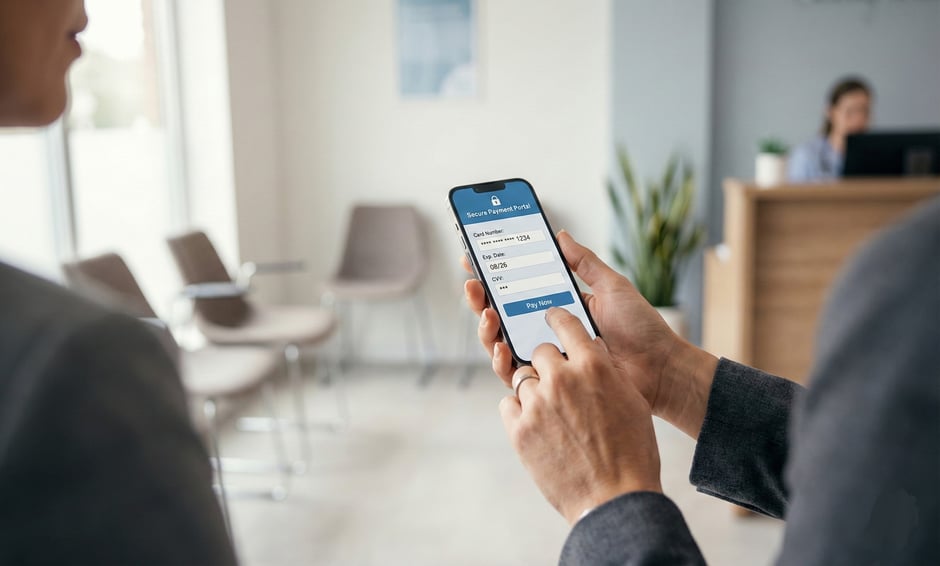
Patient making a secure mobile payment on their phone in a clinic waiting room


How to Get Started Safely

Starting with HIPAA-compliant text payments doesn't require technical skills or lengthy setup processes. Most clinics complete the entire onboarding within just a few days and start collecting payments immediately. The system is designed to work with your existing workflows rather than forcing you to learn complicated new procedures.

Connect Your EMR System in Minutes

The first step involves linking Curogram to your electronic medical records platform. This connection happens through secure API integration that your Curogram team handles for you. You don't need to understand how APIs work or hire IT consultants to make it happen. Simply provide your EMR credentials and approve the connection.

The integration pulls patient contact information and billing data automatically. This eliminates manual data entry while ensuring payment messages always contain accurate details. Most popular EMR systems connect within 15 to 30 minutes, and your existing patient records remain completely unchanged during the process.

Configure Your Payment Settings

Next, you'll set up basic preferences like which staff members can send payment texts and what your payment messages should say. The system includes pre-written message templates that already meet HIPAA requirements. You can use these templates as-is or customize them to match your clinic's communication style.

This configuration step takes about an hour for most practices. You'll also connect your payment processor during this phase, so transactions flow directly into your merchant account. Curogram supports all major payment processors and guides you through each connection with simple instructions.

Test Before Going Live

Before sending real payment requests to patients, you'll run a few test messages to your own phone numbers. These trial runs let your staff practice the workflow and verify that everything works correctly. You can see exactly what patients receive and experience the payment process from their perspective.

Testing reveals any questions your team might have about using the system. Your Curogram support contact answers these questions in real time so you feel confident before launch day. Most clinics complete testing in less than an hour.

Launch and Monitor Results

Once testing confirms everything works properly, you're ready to start sending actual payment requests. Begin with a small batch of recent invoices to see how patients respond. The system dashboard shows completion rates and payment amounts in real time.

Your staff can monitor which patients opened their messages, which ones paid, and which links expired unused. This visibility helps you follow up strategically on unpaid balances. Within the first week, most clinics notice significantly faster payment collection compared to their previous methods.

Book a demo today to see how compliance can be effortless. Our team will walk you through the entire platform and answer your specific questions about integrating with your current systems.


Frequently Asked Questions


How does HIPAA-compliant payment texting differ from regular text billing?

HIPAA-compliant text payments use coded links instead of putting patient details directly in messages. The system protects all data with strong coding during transmission and storage.

Regular text billing sends unprotected information through standard SMS networks that anyone can intercept. Compliant platforms also maintain audit trails and access controls that regular texting lacks entirely.

Why can’t clinics just use popular payment apps for medical bills?

Consumer apps like Venmo and Cash App don’t meet HIPAA security standards for healthcare data. These platforms lack the required coding, access controls, and audit trails that federal law demands.

Their terms of service often prohibit business use for healthcare payments specifically. Using them exposes your clinic to legal penalties and puts patient information at serious risk.

How long does it take to set up HIPAA-compliant text payments?

Most clinics finish setup within one to three business days after signing up. The process involves connecting your EMR system, configuring staff permissions, and testing a few sample messages.

Curogram handles the technical work while your team completes simple setup steps. You don’t need IT expertise or special equipment to get started collecting payments safely.

What happens if a patient forwards their payment link to someone else?

Secure payment systems generate unique links that only work for the intended patient. Each link includes special tokens that verify patient identity before showing any bill details.

The links also expire after use or after a set time period. This design prevents unauthorized access even if messages get forwarded or devices get stolen.

How do compliant text payment systems protect credit card information?

Modern platforms use tokenization to replace real card numbers with random codes during processing. The actual card data gets handled by certified payment processors in secure environments.

Your clinic never stores raw credit card details, which dramatically reduces your liability if systems get breached. Multiple layers of coding protect all financial data from interception during transmission.


Why Patient Payments Are Delayed — and How Text-to-Pay Solves It

Why Patient Payments Are Delayed — and How Text-to-Pay Solves It

💡 Patient payment delays cost clinics time and money. Most practices wait 30 to 90 days to collect payments after service. This creates cash flow...

Read More
Healthcare Text-to-Pay ROI: Smart, Affordable Way to Get Paid Faster

Healthcare Text-to-Pay ROI: Smart, Affordable Way to Get Paid Faster

💡 Text-to-pay ROI healthcare systems help clinics get paid faster while cutting costs. The results are clear and quick. Clinics see payments arrive...

Read More
5 Ways Affordable Text-to-Pay Reduces Billing Costs for Clinics

5 Ways Affordable Text-to-Pay Reduces Billing Costs for Clinics

💡 Billing costs drain clinic budgets through paper, postage, and staff time, but affordable text-to-pay systems cut these costs by 90% while...

Read More