


Skip to the main content.

18 min read

Streamlining Clinical Workflows with Secure Medical Messaging

Streamlining Clinical Workflows with Secure Medical Messaging
💡 Medical practices improve daily workflows most effectively by using HIPAA-compliant 2-way texting to replace manual phone calls, rather than relying on unvetted medical AI chatbots. While AI is often sought for its efficiency, secure automation integrated with your EMR provides a more predictable and compliant workflow that reduces call volumes by 50% and automates patient intake without the data privacy risks associated with large language models.

Healthcare automation needs to work in the real world. Secure patient messaging workflows deliver clear outcomes without black box AI that staff cannot trust. EMR-integrated messaging creates smooth clinical coordination automation while keeping patient data safe inside your system.

Your front desk staff answers the same questions 200 times per week. Patients call to confirm appointments, ask about prep instructions, or check their test results. Your team spends hours on the phone instead of helping patients who are standing right in front of them.

Many clinics hear about AI and wonder if chatbots could solve this problem. The promise sounds great: let AI handle patient questions while staff focus on higher-value work. But most AI tools for healthcare are not ready for real use.

The issue is not about whether AI is smart. The real challenge is control and compliance. Can you verify every answer an AI gives to a patient? Does the tool meet HIPAA rules? Will it work with your EMR? These questions often have unclear answers.

There is a better path forward. HIPAA-compliant 2-way texting paired with smart automation gives you the efficiency gains you want from AI, but with full control. You know exactly what messages go out. You can track every interaction. And you stay compliant with healthcare rules.

This approach works because it automates the right things. Instead of trying to make AI answer open-ended medical questions, you automate the tasks that follow clear patterns. Appointment reminders, intake forms, prep instructions, and follow-up messages all fit this model.

The result is a system staff can trust. Messages are consistent. Workflows are clear. And you cut phone volume in half while giving patients faster, more convenient service. This guide shows you how secure patient messaging workflows deliver these results without the risks that come with unproven medical AI tools.


Why AI-Curious Clinics Experience Workflow Bottlenecks

Clinics looking at AI often face the same core problems. They have too many manual tasks, too much phone volume, and staff who feel stretched thin. AI seems like the answer, but it often creates new issues instead of solving old ones.

Fragmented Communication Creates Daily Chaos

Most practices juggle multiple ways to reach patients. You have a phone system, a patient portal, maybe email, and staff personal phones. Each channel lives in its own world. When a patient calls with a question, that information stays in someone's memory or on a sticky note.

This fragmentation hurts efficiency. Staff waste time asking patients to repeat information. Important details fall through the cracks. And when you need to find a past conversation, good luck tracking it down across five different systems.

The Phone Tag Problem

Phone calls dominate your day. Patients call during work hours, but many are at work themselves. They miss your call back, so they call again. You play phone tag for days, trying to share simple information that could have been a text message.

Data Lives in Silos

Your EMR holds official records. Your phone system has call logs. Staff emails live in Outlook. When information is scattered, you cannot see the full picture of patient communication. This makes it hard to improve your workflows because you do not know what is actually happening.

Complex AI Tools Create Training Challenges

Many AI tools promise to solve your problems. But they come with steep learning curves. Staff need hours of training to understand how to use them. And even after training, they worry about what the AI might say to a patient.

The complexity creates resistance. Front desk staff do not want to learn another complicated system. Doctors question whether AI answers are accurate. Compliance officers worry about liability. So the expensive AI tool sits unused while everyone goes back to the phone.

Black Box Decision Making

Most medical AI chatbots work in ways you cannot fully control. You do not know exactly what the AI will say until it says it. This uncertainty makes healthcare staff nervous. They need to trust that patient communication follows your standards every single time.

Integration Problems

AI tools often work as separate systems. They do not talk to your EMR. So staff end up manually copying information back and forth. This double entry defeats the whole purpose of automation and creates new chances for errors.

Manual Tasks Overwhelm Your Staff

Without good automation, everything requires human attention. Staff manually call to confirm every appointment. They hand-write information from phone calls into your EMR. They print forms and ask patients to fill them out in the waiting room.

These tasks add up fast. Your team spends 60% of their day on repetitive work that could be automated. But they keep doing it manually because they do not have better tools. Or because the AI alternatives feel too risky to trust.

Paperwork Piles Up

New patients arrive with empty clipboards. They fill out the same forms you have used for 20 years. Staff then manually enter that handwritten data into your EMR. This process wastes 15 minutes per patient and creates data entry errors.

No Time for Important Work

When staff spend all day on routine tasks, they have no time for work that actually matters. They cannot help confused patients. They cannot improve your processes. They just try to keep up with the mountain of busy work.


The Cost of Inefficient Communication on Clinical Operations

Poor communication does more than annoy staff. It creates real costs that show up in your bottom line and patient satisfaction scores. These costs compound over time until they threaten your practice's ability to function well.

Staff Burnout Drives Turnover

Your front desk team answers 150 calls per day. Many are the same questions repeated over and over. By 3 PM, they feel exhausted. By Friday, they feel defeated. Within six months, they start looking for other jobs.

High call volume is not just annoying. It leads to burnout. Staff feel like they never accomplish anything meaningful. They spend their energy on repetitive work that could be automated. This drains morale and pushes good employees to quit.

The Anxiety Cycle

When staff feel overwhelmed, they start to dread coming to work. They know the phone will never stop ringing. They know patients will be frustrated about wait times. This anxiety affects job performance and spreads through the whole team.

Replacement Costs Add Up

Replacing a front desk employee costs 50-60% of their annual salary. You spend weeks recruiting, interviewing, and training. Meanwhile, the remaining staff work extra hours to cover the gap. This cycle repeats every time someone burns out and leaves.

Patient Throughput Slows Down

Inefficient communication creates bottlenecks in patient flow. When staff are stuck on the phone, they cannot check in the patients standing at the desk. The waiting room fills up. Appointment times slip. Doctors run behind schedule.

Each delay compounds the next one. A 10-minute delay for one patient means everyone after them waits longer. By the end of the day, you might be running an hour behind. Patients get frustrated and leave negative reviews.

The Waiting Room Bottleneck

Patients arrive and sign in. Then they wait while the staff finish phone calls. They wait while the staff hunt for their chart. They wait to fill out forms that should have been done before arrival. All this waiting adds up to a poor experience.

Revenue Impact

Slower patient flow means seeing fewer patients per day. If your practice could see 10% more patients with better workflows, that is 10% more revenue. Over a year, this adds up to tens of thousands of dollars in lost income.

HIPAA Compliance Risks Increase

When staff feel rushed, they take shortcuts. They might discuss patient info in public areas. They might send information through non-secure channels. They might use unvetted AI tools that do not have proper Business Associate Agreements.

Each shortcut creates compliance risk. HIPAA violations can cost thousands of dollars per incident. More importantly, they damage patient trust. Once patients lose confidence in your data security, they might go elsewhere for care.

Unvetted Communication Channels

Staff might start using personal phones or regular text messages to communicate with patients. These channels are not HIPAA compliant. But when the official systems are too slow or complicated, people find workarounds. Those workarounds expose your practice to serious penalties.

AI Without Proper Safeguards

Some practices experiment with AI chatbots without fully vetting them. They do not check if the tool has a Business Associate Agreement. They do not verify where patient data goes. This creates massive liability if that data gets breached or misused.

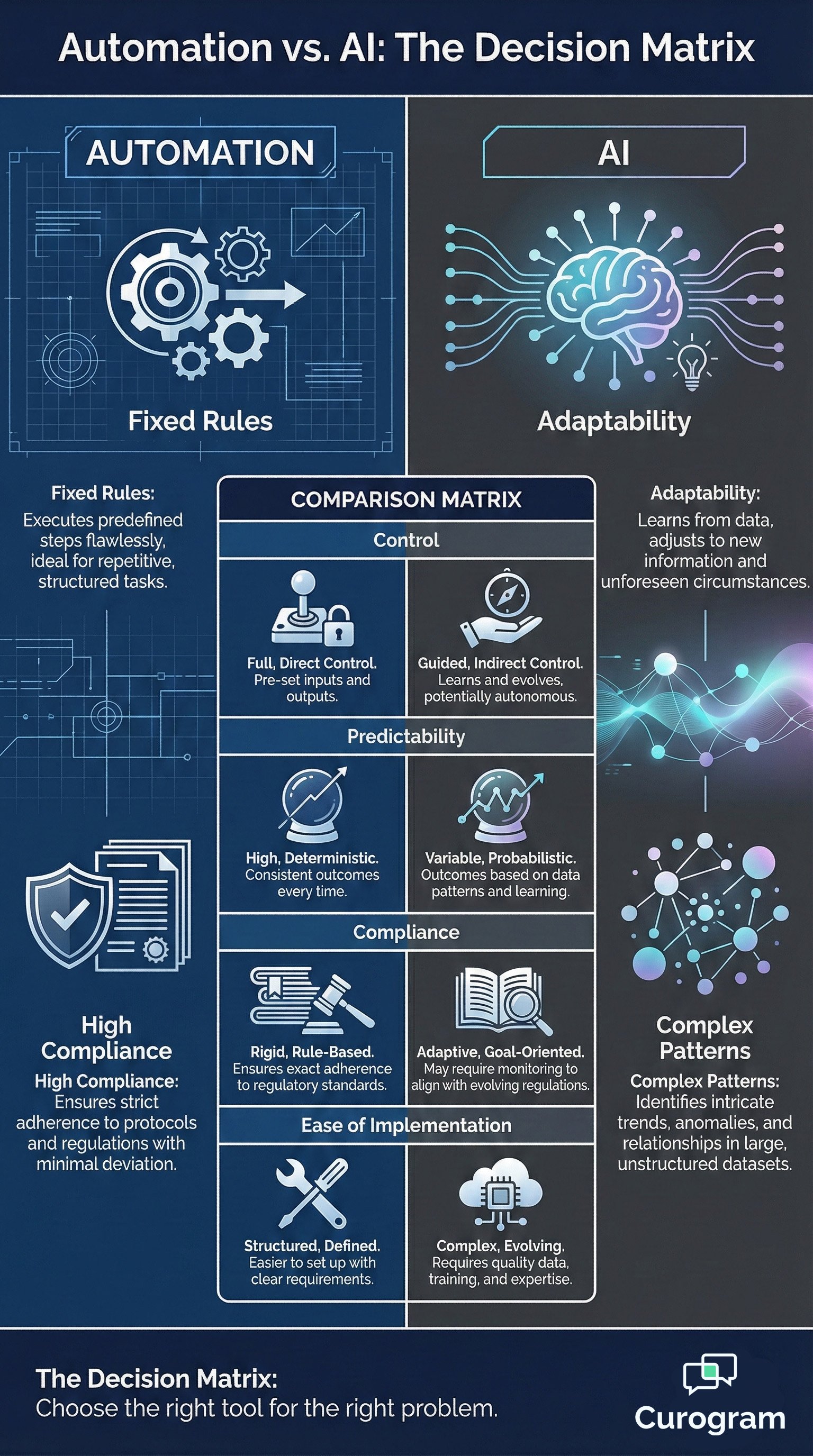
Automation vs AI comparison infographic showing a decision matrix of fixed rules versus adaptability


How HIPAA-Compliant Texting Streamlines Daily Workflows

The right messaging system changes how your practice operates. Instead of chasing patients by phone, you send secure texts that reach them instantly. Instead of scattered conversations, you have one organized system. Clinical coordination automation becomes simple when you build it on the right foundation.

Automated and Consistent Patient Communication

Smart automation sends the right message at the right time without staff intervention. A patient books an appointment on Monday for next Thursday. The system automatically sends a confirmation text. Three days before the appointment, they get a reminder. One day before, they receive prep instructions specific to their procedure.

Every message is consistent. You write it once, and the system uses it every time. No more staff forgetting to mention important details. No more variations in how different people explain the same thing. Patients get reliable information they can trust.

Template-Based Messaging

You create message templates for common scenarios. New patient welcome messages. Appointment reminders. Lab result notifications. Billing reminders. Each template gets reviewed by your team to ensure accuracy. Then the system uses these approved templates automatically.

Trigger-Based Workflows

Messages are sent based on specific triggers in your EMR. When a lab result is ready, the system texts the patient. When an appointment is scheduled, the system starts a reminder sequence. These workflows run 24/7 without anyone thinking about them.

Centralized Message Management

All patient messages flow through one secure platform. Staff see every conversation in context. They can search the message history to find past discussions. Everything is documented and saved in a way that meets HIPAA requirements.

This centralization eliminates the chaos of juggling multiple systems. Staff do not need to check three different places to see if a patient responded. They have one dashboard that shows all active conversations. This makes their work faster and more reliable.

Unified Patient History

When a patient texts with a question, staff see the full conversation history instantly. They know what was already discussed. They can reference previous messages. This context helps them give better, faster answers without making patients repeat themselves.

Team Collaboration Features

Multiple staff members can access the same conversation. If someone goes to lunch, another person can pick up where they left off. Notes and flags help teams coordinate responses. This ensures patients never fall through the cracks during shift changes.

Faster Response Times Improve Patient Care

Text messages get read within minutes. Patients can respond from anywhere without needing to call during business hours. This speed improves their experience and helps your practice run more smoothly.

Think about appointment confirmations. When you call patients, you might need three attempts before reaching them. With texts, 95% of patients confirm within an hour. This lets you identify no-shows early and fill those slots with other patients.

Reduced Cycle Time

The time between patient inquiry and clinical action shrinks dramatically. A patient texts asking about their medication refill. Staff see the message immediately. They check with the doctor and respond within 30 minutes. The whole cycle completes in less than an hour instead of days of phone tag.

Asynchronous Communication Benefits

Patients do not need to call during work hours. They text when it is convenient. Staff respond when they have capacity. This asynchronous flow is better for everyone. Patients feel respected, and staff feel less pressured.


Integrating Curogram Automation With Your EMR Workflow

EMR-integrated messaging works because it connects to your existing system. Data flows automatically between your EMR and messaging platform. This integration creates the efficiency you want from AI, but with complete control and transparency.

Real-Time Patient Data Synchronization

When someone books an appointment in your EMR, that information appears in your messaging system instantly. When a patient updates their phone number via text, it syncs back to your EMR. This two-way flow keeps everything current without manual updates.

No one enters the same information twice. Staff do not copy and paste between systems. The integration handles all data movement automatically. This eliminates errors and saves hours of redundant work every week.

Automatic Schedule Sync

Your appointment schedule lives in the EMR. The messaging system reads that schedule continuously. When an appointment is created, modified, or cancelled, the system knows immediately. This triggers the right messages at the right times without staff needing to remember anything.

Patient Demographics Stay Current

Contact information, insurance details, and medical history all sync from your EMR. When you need to send a message, the system has current data. You never waste time texting an old phone number or using outdated patient information.

Bidirectional Data Flow Ensures Accuracy

Information does not just flow out from your EMR. It also flows back in. When a patient confirms an appointment via text, that confirmation is recorded in your EMR. When they complete intake forms on their phone, that data populates the right fields automatically.

Your EMR remains the single source of truth. Nothing happens in the messaging system that does not get reflected in your official records. This keeps your documentation complete and makes audits straightforward.

Appointment Status Updates

Patient actions in the messaging system update appointment status in real time. A confirmed appointment shows as confirmed in your EMR. A cancellation request triggers your cancellation workflow. Staff see these updates immediately without checking a separate platform.

Form Responses Auto-Populate

Patients fill out intake forms on their phones before appointments. Their responses automatically populate the corresponding fields in your EMR. Staff review the information rather than entering it manually. This saves time and reduces data entry mistakes.

Easy Adoption by Front Desk Teams

Good automation should be simple to use. Your front desk staff learn the core messaging features in under 10 minutes. The interface is clean and obvious. They do not need special training or technical skills.

This fast mastery is crucial. If a system takes weeks to learn, staff resist using it. They stick with the old phone-based workflow because it feels familiar. But when the new system is easier than the old way, adoption happens naturally.

Intuitive Interface Design

The messaging dashboard looks like any modern messaging app. Staff see conversations in a list. They click to open them. They type responses and click send. There is no complicated navigation or hidden features. Everything works the way they expect.

Minimal Training Requirements

A quick orientation covers the basics. Staff learn how to send messages, use templates, and check patient history. Within minutes, they feel comfortable using the system for real patient interactions. This low barrier to entry drives high adoption rates.


Workflow Improvements for Specialized Departments

Different parts of your practice have unique needs. Secure patient messaging workflows adapt to each department while maintaining consistency across your organization. This flexibility helps every team work more efficiently.

Automated Intake and Digital Forms

New patient intake used to mean clipboards and paper forms. Patients arrived early to fill out pages of questions. Staff then spent time entering that handwritten data into your EMR. This process was slow, error-prone, and wasteful.

Mobile-first intake changes everything. When a patient books an appointment, they receive a text with a link to digital forms. They complete these forms on their phone from home. The data flows directly into your EMR without anyone typing it manually.

Reduced Wait Times

Patients who complete intake before arrival move through check-in much faster. They verify their information instead of filling it out from scratch. This cuts wait room time by 10-15 minutes per patient. Your staff can focus on helping people who need extra assistance.

Less Paper Waste

Digital forms eliminate paper waste completely. You do not need to print forms, store completed paperwork, or later scan documents into your system. Everything is digital from the start. This saves money on supplies and reduces your environmental impact.

Clear Procedure Preparation Instructions

Patients often arrive unprepared for procedures. They forget to fast. They take medications they were supposed to skip. They do not arrange transportation home. These mistakes force you to reschedule, wasting appointment slots and frustrating everyone.

Automated prep instructions solve this problem. The system sends detailed, procedure-specific instructions at the right times. Three days before a colonoscopy, patients get dietary restrictions. The day before, they receive medication instructions. Two hours before, they get a final reminder.

Procedure-Specific Templates

You create instruction templates for each type of procedure you perform. The system matches appointments to the right template automatically. This ensures patients get accurate, relevant information every time without staff needing to remember specific requirements.

Timed Message Delivery

Instructions arrive when patients need them. Not too early to be forgotten. Not so late that patients cannot comply. The timing is automatic and consistent. This reduces no-show rates and improves procedure success rates.

Standardized Communication Across Multiple Locations

Multi-location practices struggle with consistency. Each office might communicate differently with patients. This creates confusion when patients visit different locations or when staff transfer between sites.

A centralized messaging system ensures every location uses the same standards. The same message templates. The same workflows. The same timing. Patients get consistent experiences regardless of which office they visit.

Unified Brand Experience

All your locations communicate with the same voice and style. Patients recognize your messages, whether they come from the main office or a satellite clinic. This builds trust and reinforces your professional brand across your entire organization.

Centralized Template Management

Your central team creates and updates message templates. All locations use these approved templates automatically. When you improve a message, every office benefits instantly. This makes quality control simple and effective.


Front Desk Efficiency Gains Through Automated Messaging

Your front desk handles hundreds of interactions daily. Most are routine and predictable. Automated messaging takes over these repetitive tasks, freeing your team to focus on work that requires human judgment and empathy.

Dramatic Call Volume Reduction

Phone calls may drop by 50% or more when you implement secure messaging. Patients text instead of calling for simple questions. They confirm appointments via text. They get lab results through secure messages. The phone still rings, but only for complex issues that truly need voice conversation.

This reduction has an immediate impact. Staff who were constantly on the phone can now help patients at the desk. They can complete insurance verifications. They can prepare charts. They have mental space to do their jobs well instead of just trying to keep up.

Fewer Interruptions

Phone calls demand immediate attention. Staff must stop what they are doing to answer. Text messages let them respond when they finish their current task. This reduces interruptions and helps staff maintain focus on important work.

More Time for Pressing Tasks

With lower call volume, staff have bandwidth for work that adds real value. They can spend time with confused elderly patients who need extra help. They can resolve billing issues thoroughly. They can coordinate care between providers. These pressing tasks improve outcomes more than answering the same routine questions 200 times per week.

Better Staff Allocation and Productivity

When routine work is automated, you need fewer people doing low-value tasks. Your existing team can handle higher patient volumes. Or you can redeploy staff to roles that drive practice growth and improve patient experience.

Productivity gains reach 30% or higher. The same team accomplishes more in less time because they are not bogged down by repetitive manual work. This efficiency shows up in your financial results and in better staff morale.

Optimized Staffing Levels

You might need one fewer front desk person per location. Or you can maintain current staffing and see 20% more patients. Either way, the economics improve. Labor costs per patient visit go down while service quality stays high or gets better.

Simplified Workflows

Staff workflows become more straightforward. Instead of juggling phone calls, paperwork, and patient questions simultaneously, they handle one thing at a time. This reduces errors and makes training new employees much easier.

Replacing Manual Scheduling and Confirmation Work

Appointment confirmation used to consume hours each day. Staff called every patient to confirm appointments scheduled 2-3 days out. They left voicemails. They tried again if patients did not call back. This manual outreach was tedious and often ineffective.

Automated confirmations handle this completely. The system texts patients 48 hours before appointments. Patients confirm with a simple reply. If they do not respond, the system sends a second reminder. Staff only get involved if a patient needs to reschedule.

Higher Confirmation Rates

Text confirmations get 95% response rates compared to 60-70% for phone calls. More patients respond, and they respond faster. This gives you better visibility into your schedule and more time to fill potential gaps.

Reduced No-Show Rates

When patients confirm appointments via text, they remember to show up. No-show rates typically drop by 30-40%. Each prevented no-show preserves revenue and keeps your schedule running smoothly. Over a year, this adds up to a significant financial impact.

How Texting Enhances Post-Visit Coordination

Patient care does not end when they leave your office. Follow-up communication ensures they follow treatment plans, attend follow-up appointments, and get the care they need. Automated messaging makes post-visit coordination reliable and effective.

Automated Follow-Up for Better Adherence

Patients often forget post-visit instructions. They mean to fill prescriptions but get busy. They plan to schedule follow-ups, but never call. This lack of adherence leads to worse health outcomes and more emergency visits down the line.

Automated follow-up messages close this gap. The system texts patients after visits to remind them about prescriptions, exercises, dietary changes, or upcoming tests. These timely reminders help patients stick to treatment plans.

Medication Reminders

Patients receive texts reminding them to pick up prescriptions. They get messages about when to take medications. These simple reminders improve adherence rates significantly. Better adherence means better health outcomes and fewer complications.

Treatment Plan Check-Ins

A week after starting a new medication, patients get a check-in message asking about side effects. Two weeks into physical therapy, they receive encouragement to keep going. These touchpoints show patients you care and help catch problems early.

Streamlined Referral Management

Referrals to specialists often fall through. Patients leave with a referral form but never call to schedule. They forget which specialist to see. Months pass, and their condition worsens.

Automated referral workflows keep patients on track. They receive specialist contact information via text. They get reminders to schedule the appointment. They receive follow-up messages checking if they went to the specialist. This active coordination moves patients through the care continuum faster.

Specialist Information Delivery

Instead of handing patients a phone number on paper, text them complete specialist information. Name, address, phone number, and a direct link to schedule online if available. This convenience makes it more likely they will actually follow through.

Appointment Status Tracking

Follow up a week after the referral to confirm that the patient scheduled their specialist visit. If not, send a gentle reminder. This persistence ensures patients get the care they need rather than falling through the cracks.

Reducing Care Transition Delays

The time between diagnosis and treatment, or between primary care and specialist visits, represents risk. Delays can lead to complications, disease progression, or emergency room visits. Proactive communication reduces these delays.

Messages keep patients engaged during transitions. They remind them of next steps. They provide resources and support. This active communication makes patients feel cared about and helps them navigate the healthcare system successfully.

Faster Time to Treatment

Patients who receive clear, timely communication complete their care plans faster. They schedule follow-ups sooner. They see specialists more quickly. They pick up prescriptions the same day. These faster transitions lead to better health outcomes.

Enhanced Patient Confidence

Regular communication makes patients feel supported. They know what to do next. They have clear instructions. They can reach out with questions. This reduces anxiety and builds trust in your practice. When patients feel cared about, they stay engaged with their health.

A doctor and nurse together analyzing electronic patient records on a hospital computer screen

Workflow Outcomes for Automation-First Practices

Practices that embrace automation see measurable improvements across key metrics. These changes show up in financial performance, patient satisfaction scores, and staff retention. The benefits compound over time as workflows become more efficient.

Faster Clinical Operations

High-volume practices need speed without sacrificing quality. Automation delivers both. Patients move through check-in faster. Staff complete administrative tasks more quickly. Providers have more time with each patient because less time is wasted on logistics.

The entire patient journey accelerates. From scheduling to check-in to check-out to follow-up, every step happens more smoothly. This efficiency lets you serve more patients without hiring more staff or extending hours.

Increased Patient Capacity

Most practices can increase patient volume by 15-20% with better workflows. The same providers, same rooms, and same equipment serve more patients. This growth happens because time previously lost to inefficiency now goes to patient care.

Reduced Overtime Needs

Staff finish their work during regular hours because automation handles time-consuming tasks. You pay less overtime. Staff have a better work-life balance. Everyone wins when operations run efficiently.

Consistent Processes Eliminate Errors

Human error is inevitable when people do repetitive tasks manually. Staff get tired. They get distracted. They forget steps. Automation performs the same tasks the same way every single time.

This consistency reduces mistakes. Patients get the right information. Appointments get confirmed properly. Follow-ups happen on schedule. The quality of your operations improves because variation decreases.

Predictable AI Without Black Box Risks

Unlike AI chatbots that might say unpredictable things, rule-based automation is completely transparent. You write the messages. You set the triggers. You know exactly what happens in every scenario. There is no black box uncertainty that could expose you to liability.

Standardized Communication

Every patient gets consistent information regardless of which staff member they interact with. This standardization builds trust and ensures regulatory compliance. Audits become easier because your processes are documented and repeatable.

Higher Patient Preparedness Rates

Patients who receive clear, timely instructions arrive prepared. They bring the right documents. They complete pre-visit forms. They follow prep instructions correctly. This preparedness makes appointments more productive.

Prepared patients need less staff time. They know why they are there. They have their questions ready. They understand the next steps. This efficiency benefits everyone and leads to better health outcomes.

Fewer Cancelled Procedures

When patients get clear prep instructions at the right times, they show up ready. Procedures go forward as scheduled rather than their appointments getting cancelled. This protects your revenue and ensures patients get timely care.

Better Patient Experience

Patients appreciate clear communication. They like being able to text instead of calling. They value reminders that help them remember appointments. These positive experiences lead to better reviews, more referrals, and stronger patient loyalty. When operations run smoothly, patients notice and appreciate your professionalism.


Get Started with Secure Workflow Automation

You do not need complex AI to transform your workflows. HIPAA-compliant 2-way texting integrated with your EMR delivers proven results. Practices across specialties use this approach to cut call volume, improve patient experience, and free staff to do meaningful work.

The path forward is clear. Start with appointment reminders and confirmations. These high-volume, low-risk communications show immediate results. Your staff sees the call volume dropping. Patients love the convenience. Confirmation rates improve.

Once reminders are working, expand to intake forms and pre-visit instructions. Then add post-visit follow-up and referral coordination. Each step builds on the last. Within a few months, you have comprehensive clinical coordination automation that touches every part of the patient journey.

This gradual approach lets your team adapt. They learn the system in manageable pieces. They see benefits at each stage. By the time you have full automation running, everyone is comfortable with the technology and trusts it to work.

The alternative is continuing with phone-based workflows that frustrate staff and patients alike. Or experimenting with AI tools that might not meet healthcare compliance standards. Neither path gives you the reliable efficiency you need.

Curogram's smart automation platform is built specifically for healthcare workflows. It integrates with your EMR. It meets HIPAA requirements. And it delivers the operational results you expect from AI without the unpredictability and compliance concerns.

Book a Demo to see how Curogram’s Smart Automation outperforms AI hype in your real-world clinical workflow.


Frequently Asked Questions


How does HIPAA-compliant 2-way texting differ from regular texting?

HIPAA-compliant 2-way texting uses encrypted platforms with proper security controls and Business Associate Agreements. Regular text messages through standard SMS are not encrypted and do not meet HIPAA requirements.

Compliant systems also provide audit trails, access controls, and secure data storage that regular texting lacks. This protection ensures patient information stays private while still giving you the convenience of text communication.

Why is automated texting better than medical AI chatbots?

Automated texting gives you complete control over every message while AI chatbots can generate unpredictable responses. With automation, you write and approve all templates before they go to patients. You know exactly what information they receive.

Medical AI often lacks proper healthcare training and might give incorrect medical advice. Automated systems are also easier for staff to trust and use because they work consistently.

How long does it take to integrate messaging with our EMR?

Most EMR integrations take 2-4 weeks to complete depending on your system. The process includes connecting the systems, syncing patient data, setting up automated workflows, and training your team.

Many practices start seeing benefits within the first week of use. The integration is handled by technical teams, so your staff just need to learn the simple messaging interface which takes about 10 minutes.

What kind of call volume reduction can we expect?

Most practices see call volume drop by 40-60% within 3 months of implementing secure messaging. The reduction happens as patients shift to texting for appointment confirmations, simple questions, and routine updates.

Your phone still handles complex issues that need voice conversation. The exact reduction depends on your specialty and current call patterns, but significant decreases are typical across all practice types.

How does messaging improve patient satisfaction?

Patients prefer texting because it fits their lifestyle better than phone calls. They can communicate on their schedule without waiting on hold or leaving voicemails.

Messages provide written records of instructions that they can reference later. Response times are faster than phone tag. These convenience factors lead to higher satisfaction scores and better online reviews for your practice.


Is Texting HIPAA Compliant? Everything You Need to Know

Is Texting HIPAA Compliant? Everything You Need to Know

In today's hyper-connected world, text messaging has become a dominant form of communication – quick, convenient, and almost universally adopted....

Read More
15 Transformative Benefits of Text Messaging in Healthcare

15 Transformative Benefits of Text Messaging in Healthcare

In an era where instant communication is not just a convenience but an expectation, the healthcare industry is rapidly adapting. The simple,...

Read More
Text-to-Pay for Multi-Location Clinics: Simplified Centralized Billing

Text-to-Pay for Multi-Location Clinics: Simplified Centralized Billing

💡 Multi-location healthcare networks face a common challenge: managing payments across different sites with separate systems. This creates billing...

Read More