
Telemedicine Wisconsin: Laws and Policies | Blog
 Michael Hsu : 6/22/20, 11:03 AM
The provider's ultimate guide to telemedicine in Wisconsin. Learn how to streamline your telehealth business and keep ahead of the competition.
7 min read
Most practices judge telehealth by the video visit: how clear the picture is, whether patients can log in, how many visits move online. That test leaves out where most of the workflow time goes.
The heavier load sits at the front desk, in the calls, voicemails, clipboards, and retyping that surround every visit, virtual or in person.
Our position is that telehealth technology improves clinical workflow when it takes hand-done steps off your staff. Video is one of those tools. Booking by text, 2-way reminders, and online intake remove more steps, and they do it on every appointment.
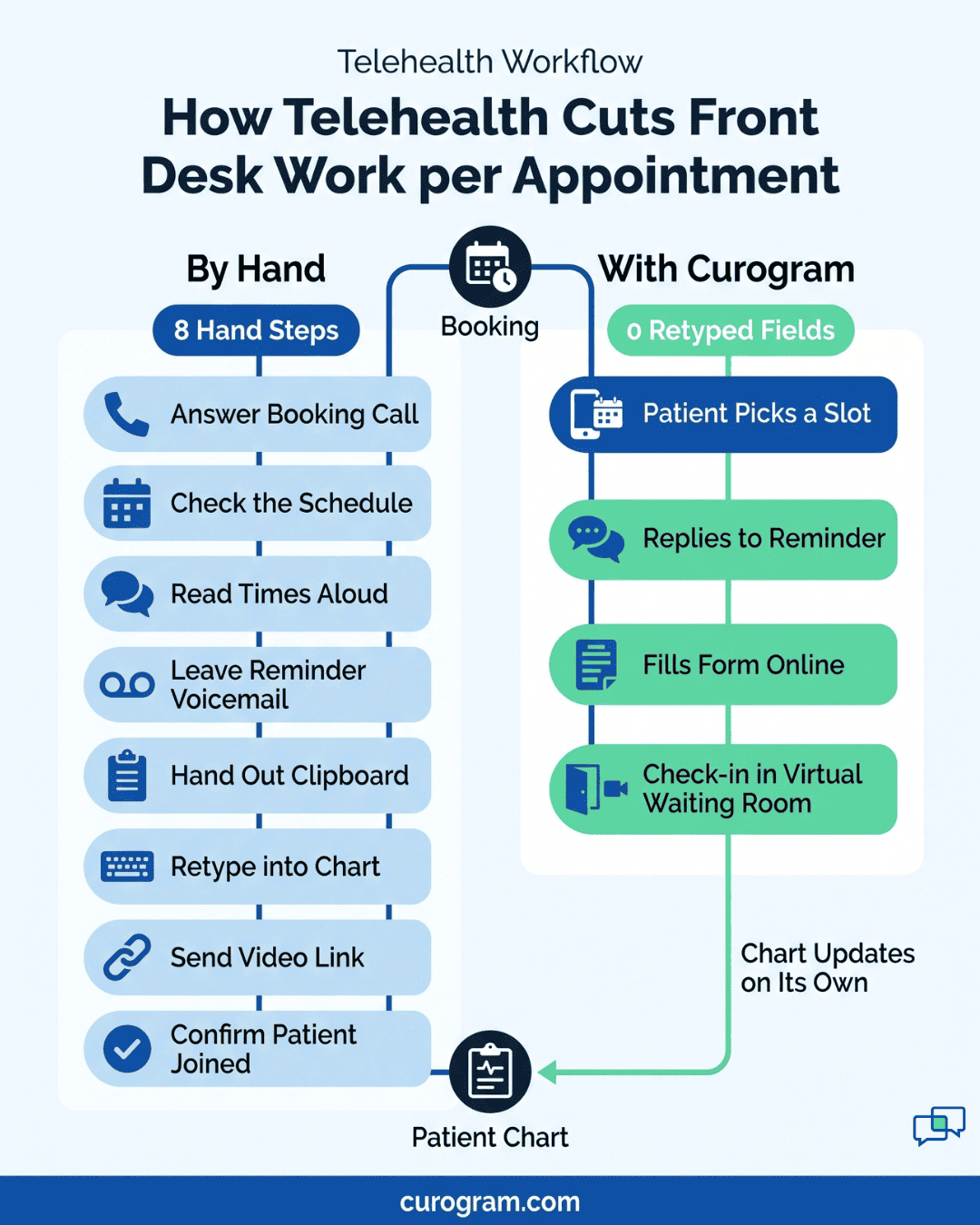
Count how many times one appointment gets handled by hand. Someone takes the booking call and checks the physician's schedule, and someone else calls the day before with a reminder that often lands in voicemail.
At check-in, a staff member hands over a clipboard and then types the answers into the chart. For a virtual visit, someone also sends a link and makes sure the patient reached the right call.
Each step is small. Across a full schedule, they add up to hours of front desk time and a steady trickle of errors, like a double-booked slot or a misread medication name.
Based on our internal data, practices using Curogram's automated texting see about 24% fewer inbound calls. That's time your staff can spend on the patient standing at the desk.
Four tools do most of that work: smart schedule reminders, online intake forms, video visits with virtual waiting rooms, and EHR connections that end double entry.
Telehealth means giving care at a distance. That includes live two-way video, text messages, and simple audio-only phone calls.
Patients can reach you from home, from work, or from a parked car on their lunch break. That gives them more say over when and how they get care. It also means fewer people in your waiting room for visits that never needed a chair.
Your clinical workflow improves most through the tools around the visit, and booking is the easiest place to see it. Curogram lets your team text patients to book appointments instead of handling every request by phone.
Phone booking is slow because every step runs through your front desk. Picture the call on a busy morning.
Your staff pulls up the physician's schedule, reads a few open times aloud, and waits while the patient checks their calendar. Meanwhile, two people stand at the window and line two keeps blinking.
| Step | Booking by phone | Booking by text with Curogram |
|---|---|---|
| 1 | Staff answers the call | Staff sends a text with a secure link |
| 2 | Staff checks the physician's schedule | Patient views open time slots online |
| 3 | Staff reads options back to the patient | Patient picks the time that suits them |
| 4 | Patient decides, and staff books it | Physician's schedule updates automatically |
| Later changes | Another phone call | Patient reschedules or cancels just as quickly |
Every one of those phone steps is a chance for error. If someone accidentally double books the physician, the whole day backs up. Visits start late, the waiting room fills, and patients get irritated.
With Curogram's integrated texting, providers don't have to go back and forth on the phone to set a time. The patient does the choosing, and the schedule stays current without anyone retyping it.

An empty 9:15 slot costs you twice. The provider loses the visit, and your front desk loses the hour it spent the day before calling patients who didn't pick up.
Curogram sends automated 2-way text reminders before each visit. Patients can reply to the message to confirm, ask a question, or flag a problem, and they can keep replying right up until they arrive. Your staff sees those replies in one place, so a "running late" or "can't make it" shows up before the slot is lost.
The results show up in the numbers. Based on our internal data:
| Measure | Result |
|---|---|
| Atlas Medical Center no-show rate | Fell from 14.20% to 4.91% in three months |
| Confirmation rate across our platform | Above 75% |
| Inbound calls after automated texting | Down 24% |
Fewer calls means fewer people holding at the desk to ask the same question. A confirmed schedule also means fewer surprise gaps, so your waiting room runs on time and the day stays on plan.
Paper intake has a familiar rhythm. A patient fills out a clipboard in the lobby, and someone on your staff spends ten minutes guessing whether the medication line says "Zyrtec" or "Zantac." Then they type it all into the chart by hand.
Curogram moves that work out of the lobby and ahead of the visit. You build intake forms that fit your practice, and the process runs in three steps:
Typed answers end the handwriting guesswork and the chart errors it causes. Because nobody re-enters each form, check-in stops stalling while paper gets processed, and there's no stack to scan or file at the end of the day.
Your waiting room gets the biggest change. Patients no longer need to arrive early just to fill out forms, so fewer people sit in the lobby with clipboards.
A bare video link skips your check-in. The patient taps it ten minutes early, and the physician opens the call to find someone whose insurance and history nobody has confirmed yet.
Curogram's video visits run through a virtual waiting room that follows the same order as your front desk. The patient joins and waits, your staff completes the check-in steps, and only then does the patient become visible to the physician. No one lands in a provider's call before they've been checked in.
From the provider's side, the waiting room works like a status board. The physician can see who is ready, step into a video call, finish, and move to the next patient without hunting for links or asking the front desk who's up next.
That quick handoff is what lets your practice see more patients remotely in a day. The patient's details stay in the EHR, so the chart is open and current when the call starts.
Double entry is where small errors start. A patient texts a new phone number, and someone updates the scheduler but not the chart. Or a birth date gets typed wrong once, and your team ends up with two records for the same person.
Your EHR holds the answers to those problems only if everything else feeds into it. Curogram connects with over 700 EHRs, so bookings, reminder replies, intake answers, and video visits sync to the chart instead of being copied in by hand. That cuts down on manual work, duplicate entries, and the errors that come with them.
The payoff shows up across the office. Staff can coordinate from one record, medical details move faster between the front desk and clinical team, and there's less paper to file. When a provider opens a chart, the latest information is already there.
Each of the four tools in this article removes a step your staff does by hand today: phone booking, reminder calls, clipboard intake, or sending video links. Start with whichever step takes the most time at your front desk.
The hardest part of a clinic day usually happens before the provider says hello. Your staff spends it returning booking calls, leaving reminder voicemails, reading clipboards, and retyping the same details into the chart.
Our view is that telehealth pays off at the front desk first. When patients book, confirm, and complete forms by text, your team answers fewer calls and types less, and the chart is right the first time.
Based on our internal data, Atlas Medical Center cut its no-show rate from 14.20% to 4.91% in three months after moving reminders to 2-way text.
Your EHR, your schedule, and your staff's busiest hours shape what that looks like in your own clinic. Book a Curogram demo and we'll show you how booking, reminders, intake, and video check-in work with the system you already use.
 Michael Hsu : 6/22/20, 11:03 AM
The provider's ultimate guide to telemedicine in Wisconsin. Learn how to streamline your telehealth business and keep ahead of the competition.
See how unified data helps healthcare practices give providers the full chart, stop retyping intake forms, and send reminders that match each...
 Joshua Inciso : 5/30/22, 8:45 AM
Discover the 5 best types of content physicians can use to promote their practice and attract more prospective patients.