

7 min read
Shared Inbox Coverage for Tebra Groups | Curogram
Aubreigh Lee Daculug
:
October 12, 2026
That closes "The Coverage Gap." Lunch breaks, sick days, and Tuesday rushes no longer leave one office's patients waiting, including the new inquiries your marketing paid for.
The quiet location backs up the busy one, and replies still come from each clinic's own number. Groups using Curogram keep appointment confirmations above 75%, even on short-staffed days.
Every front desk in your group has a backup plan. For most multi-location practices, it's the same plan: hope that nobody calls in sick, takes a long lunch, or gets buried under a line of check-ins.
That fragile plan holds up right until the particular morning it doesn't. One coordinator wakes up with the flu, and an entire location goes quiet while calls roll to voicemail and patient texts pile up completely unread.
Here's the frustrating part.
Your other offices are open that same morning, and a few of them are having an unusually slow day. Capable, trained people are sitting a few miles away who could answer those messages in seconds, but they have absolutely no visibility into them.
That's how most growing groups are structured. Each office operates its own separate island of phones and inboxes. Five locations don't add up to one strong team. They add up to five fragile ones.
It sounds like a staffing problem. It isn't.
It's a communication design problem. When every patient message is tied to one specific desk, every desk becomes a place where patients quietly slip away. The first ones to slip are often the new patients your marketing budget just paid to attract.
Cross-location front desk coverage for Tebra groups changes that structure entirely. Instead of each office guarding its own inbox, patient texts from every location flow into one shared, location-tagged workspace. Any trained staffer can claim a thread, review the patient's record, and reply from the correct clinic's number.
In this guide, you'll learn where coverage gaps actually come from and what they quietly cost your practice every month.
You'll also see how Curogram works alongside Tebra to turn your group's size into a genuine advantage, so backup becomes a dependable system instead of a personal favor.
When One Empty Chair Silences a Whole Location
Every Desk Runs Without Slack
Most growing groups staff each front desk only one or two people deep. There's no spare employee waiting in the back office, and as the group expands, patient demand usually climbs faster than headcount.
That's the hidden trade-off of lean group staffing. Communication is typically the first thing to crack, because every phone line and every inbox depends entirely on whoever happens to be sitting at that particular desk.
As a result, each office carries its own front desk single point of failure. When that one person steps away, the location's ability to respond to patients steps away with them.
One Sick Call, One Lost Morning
Consider an ordinary Tuesday at the Cedar office. The front desk coordinator calls in sick on the very day the group's new advertising campaign goes live.
Phones ring straight to voicemail all morning. When someone finally checks the inbox at noon, eleven messages are waiting, and three of them are new patients asking to book an appointment.
By then, all three have already scheduled with a competing practice down the street.
Nobody did anything wrong. The system simply had no way to route those messages to someone who was available.
What the Gaps Really Cost
Medical practices already lose an estimated $20,000 to $30,000 every month to missed appointments.
Coverage gaps add to that total in two separate ways:
Some patients never get booked, and some booked patients never get confirmed.
Then there's the marketing money you spent to attract those patients in the first place.
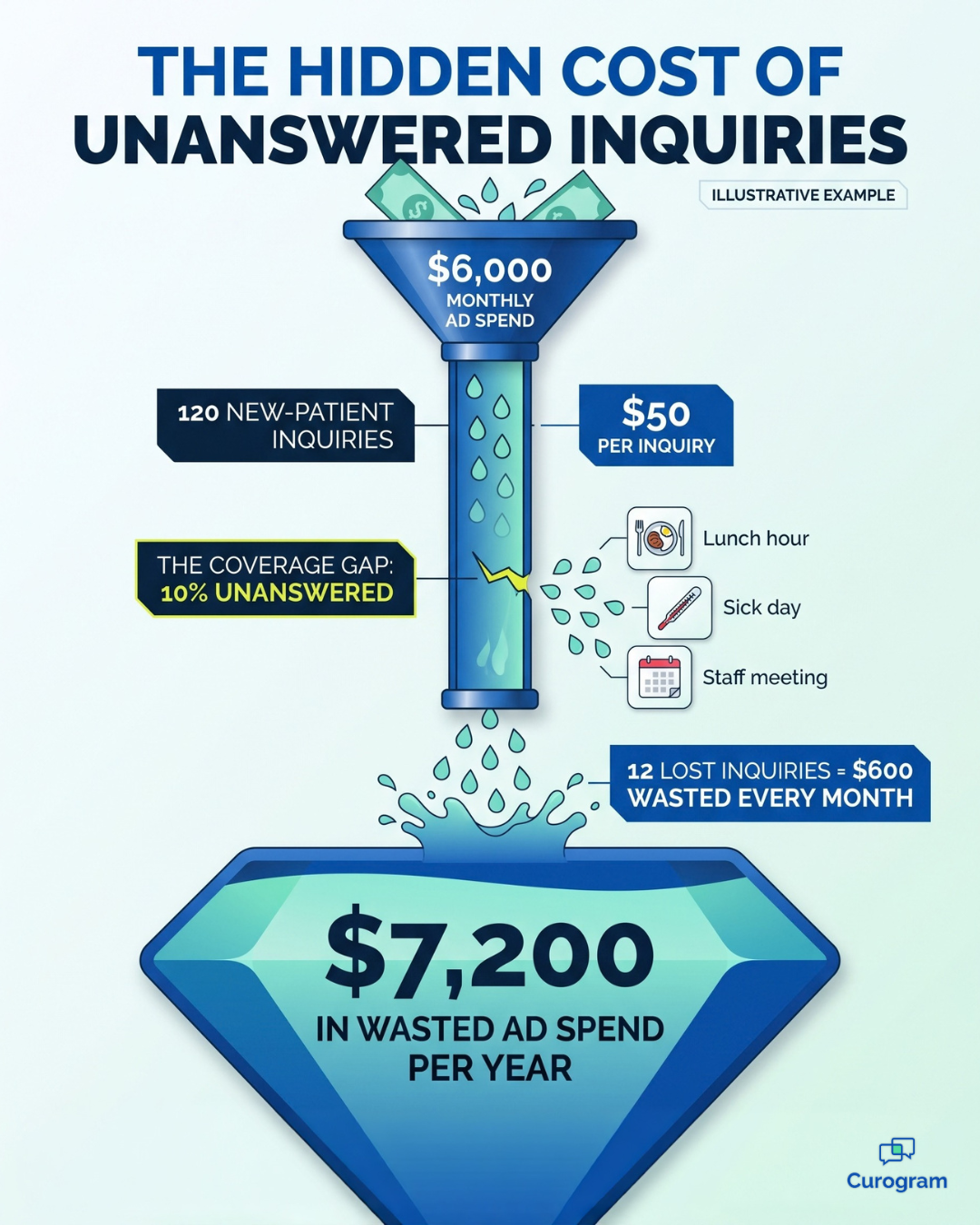
Here's an illustrative example.
Suppose your group invests $6,000 a month in advertising and generates 120 new-patient inquiries, which works out to roughly $50 per inquiry.
If coverage gaps leave just 10% of those inquiries unanswered, you lose 12 potential patients every month.
That's $600 in wasted ad spend monthly, or $7,200 annually, before you even calculate what those patients would have been worth over years of future visits.
The Fixes That Don't Fix Anything
Ask most practice owners how they manage a Tebra staff shortage.
Phone coverage usually comes down to two unappealing options:
Hire additional employees at every location, or personally step in and cover the gaps.
Both approaches eat into the margins that made expansion worthwhile. Extra hires add payroll you still pay for on quiet days, and an owner stuck answering phones isn't actually running the business.
Lunch hour? Sick day?
Message coverage shouldn't depend on luck, goodwill, or the owner's limited free time.

The Switchboard That Connects Every Front Desk
Curogram works like a network switchboard for your whole group. It joins every front desk into one team without moving a single person or changing anyone's schedule.
Here's how a patient message travels through the system:
- A patient texts their clinic. The message arrives in a shared inbox, automatically tagged with its original location, such as Cedar or Birch.
- A trained staffer claims it. With Cross-Location Claiming, authorized team members can claim conversations, any location, whenever the home desk is busy or unavailable.
- The patient's context comes along. Record details travel with the thread, so a Birch staffer can answer a Cedar patient correctly without calling anyone.
- Routine questions get quick answers. Templated replies handle common requests, like office hours, directions, and appointment times. These make up most of a front desk's daily messages.
- The reply comes from the right clinic. Patients get replies from their own location's phone number, so they see their own clinic responding quickly, not a strange office.
Setting up the coverage structure is straightforward. You decide which locations back each other up and during which hours.
For example,
Birch might cover Cedar from noon to 1 p.m. every day, while Elm steps in whenever Cedar has a sick call.
Supervisors can also track response times for each location. If one desk starts falling behind, managers can spot the problem before patients notice it. That visibility is what allows your team to cover front desk across locations without hiring a floater or constantly asking colleagues for favors.
Access stays tightly controlled, too. Staff members only see the conversations their role permits, and every access is logged for compliance, so backup becomes a transparent, balanced system that everyone can trust.
From Five Fragile Desks to One Resilient Front Office
Once your group shares a single inbox, the daily picture changes in clear ways.
Here's what that shift looks like in practice:
| Situation | Every location for itself | The group covers the group |
|---|---|---|
| Front desk calls in sick | Messages wait until someone returns | A backup location claims threads within minutes |
| Lunch hour | Texts sit unanswered for an hour or more | The assigned backup responds |
| New-patient inquiry | Can sit for hours | Answered within minutes |
| Confirmations on short-staffed days | Slip as messages pile up | Stay above 75% |
| The owner's role | Emergency backup | Runs the business |
The clearest gain shows up in confirmations. Groups using Curogram maintain confirmation rates above 75%, even through sick days, because no message depends on one person sitting at one particular desk.
Here's what that can mean, using an illustrative example.
Suppose your group sends 2,000 appointment reminders every month. Holding confirmations at 75% instead of letting them drop to 60% on short-staffed days produces 300 additional confirmed visits monthly, which means 300 fewer empty slots your team has to chase down.
The daily workload becomes more manageable, too.
Curogram clients have reduced phone call volume by 50% and improved front desk productivity by more than 30%. In practice, fewer incoming calls give your staff more time for the patient conversations that genuinely require attention.
The mindset changes, too. Resilience stops being heroic, the kind where one exhausted employee stays late to dig out of a backlog. Instead, it becomes a built-in feature of how the group operates every day.
Patients get answered regardless of which office is short-staffed. New inquiries never sit long enough to go cold, and the owner finally stops serving as the emergency backup plan.
Five Warning Signs Your Locations Need Shared Coverage
Not every multi-location group experiences the coverage gap in the same way.
Sometimes it's obvious, like a voicemail box that's completely full by noon. More often, it hides inside everyday habits your team has gradually accepted as normal.
Here are the warning signs worth watching for:
- Messages wait until someone returns. If texts sit untouched during lunch breaks or staff meetings, patients are learning to expect slow responses from your clinic.
- One location always seems overwhelmed. When the same office consistently falls behind while others stay relatively calm, the real issue is uneven workload distribution, not your team's effort.
- New-patient inquiries go cold. If first-time inquiries regularly get answered hours later, many of those patients have already booked somewhere else.
- Sick days trigger a scramble. A single call-out shouldn't require frantic group texts, borrowed employees, or the owner driving across town.
- Nobody can see response times. If you can't identify which location responds fastest or slowest, you can't fix gaps you're unable to measure.
If two or more of these sound familiar, your group is already paying for the coverage gap, even if it never shows up on a single report.
The encouraging news is that every one of these problems shares the same root cause:
Each desk works alone. Once patient messages flow into one shared, location-tagged inbox, these warning signs begin to fade, because the whole group finally operates as one team.
Your Group's Size Is Your Best Backup Plan
A solo practice has one front desk and nobody to call when it's unexpectedly empty. Your group has something far more valuable: trained people at every location who already understand your patients, your schedule, and your systems.
The real problem has never been a shortage of people, but rather that each desk has been completely isolated. Once those walls come down, your size stops being a staffing headache and starts working in your favor.
That's the true promise of cross-location front desk coverage for Tebra groups. Tebra helps power your growth engine by attracting new patients and keeping daily operations organized.
Curogram gives those patients confidence that someone will always answer whatever that engine produces.
Try a quick, revealing exercise this week: look back at last month and count every coverage gap across all your locations, including sick days, lunch breaks, staff meetings, and mornings when one desk was buried in check-ins.
Each of those gaps was a window when patients reached out and nobody could respond. Some of them called back later, while others never did.
Now imagine every one of those windows covered, not by an additional hire and not by you, but by a teammate at another location who had a few spare minutes.
That isn't a dramatic change to how your group operates. It's a small adjustment to where messages go, and it closes costly gaps you may not even realize exist.
Your patients will never encounter the shared inbox. They'll simply notice that their clinic always gets back to them.
Ready to see how this would work across your locations? Schedule a consultation with Curogram, and in a single session, we'll map your offices, design your coverage rules, and show you exactly who backs up whom, so no patient message is ever left waiting again.
Frequently Asked Questions
No. Replies always come from the location's own phone number, and record context means the staffer answers accurately. Patients simply see their clinic responding quickly, and they never see the org chart behind it.
Coverage rules and per-location dashboards keep the arrangement fair. Supervisors can see each location's message volume and response times, so backup is assigned, visible, and balanced instead of informal.
Only what their role allows. Access is scoped by location and job duty, so coverage can be as broad or as narrow as you need. Every access is also logged for compliance.
No. Tebra remains your system for scheduling, records, and practice growth. Curogram works alongside it to manage patient texting, so your team gains a shared inbox without abandoning the tools they already use.
Most groups can design their coverage rules in a single working session. You decide which locations back each other up, during which hours, and which staff members are trained to cover. After that, the rules run automatically.